
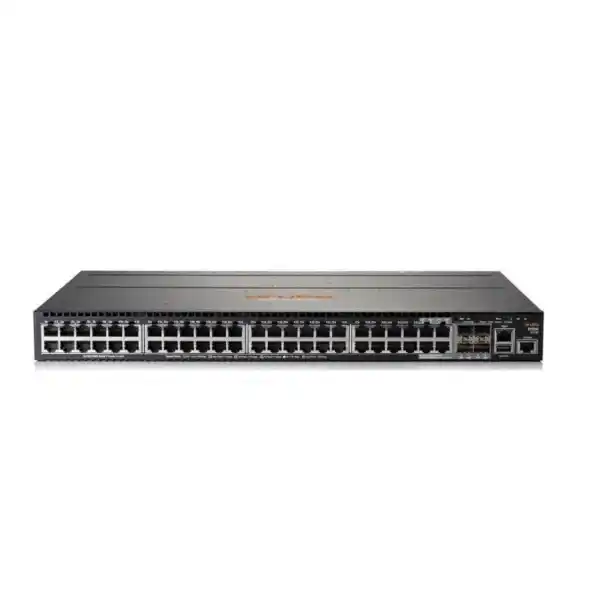
HPE Aruba Networking 2930M Switch Dubai
A flexible Layer 3 access-switch family for organizations that need modular uplinks, resilient power choices, high-performance stacking, PoE options and selected HPE Smart Rate multi-gigabit access ports. The most important buying decision is choosing the exact 2930M member and accessories for the intended edge design rather than treating every 2930M as the same switch.
What is the HPE Aruba Networking 2930M?
A family of stackable Layer 3 access switches designed for enterprise, SMB and branch edge networks.
Connecting users, phones, access points, cameras and other wired edge devices while aggregating traffic toward higher-speed uplinks.
Organizations that value modular uplinks, modular power, backplane stacking and mature Aruba network operations.
The exact model, PoE requirement, power supply, uplink module, stacking hardware, optics and software-management plan must be confirmed together.
FourTeck can help translate port counts, endpoint power demands, uplink capacity, stack size, fibre type and management requirements into a bill of materials suitable for a Dubai or wider UAE deployment.
Why the 2930M family is different
The defining idea behind the 2930M is modularity at the access layer. Instead of forcing every site into one fixed uplink and power configuration, the platform separates several important decisions. Buyers can select 24-port or 48-port Gigabit-focused models, choose PoE or non-PoE variants, evaluate Smart Rate models for multi-gigabit edge devices, and populate a modular uplink slot according to the required aggregation design.
This matters in real projects because the switch name alone does not describe the finished deployment. A 2930M intended for ordinary office desktops has a different bill of materials from a 2930M supporting high-density wireless access points, IP phones and security devices. The chassis, power supply, uplink module, stacking module, stacking cables and transceivers all need to be considered as a system.
Where it typically fits
A 2930M is most naturally evaluated as an access-layer switch for offices, campuses, education facilities, hospitality networks, healthcare environments, branch networks and other sites where many endpoint connections terminate in an IDF or communications room. Its modular stacking approach is useful where multiple access switches must operate as a coordinated stack and where growth may extend across several chassis.
It can also be attractive when an organization already operates Aruba access switching, AirWave, ClearPass or Aruba Central workflows and wants operational consistency. That does not mean the 2930M should be selected automatically: newer AOS-CX platforms may be preferable for projects standardizing on a modern CX architecture, so platform direction should be part of the shortlist.
2930M model choices that change the design
The 2930M name covers multiple hardware configurations. The following family view helps separate the choices that matter during procurement.
JL319A / JL321A
24G and 48G non-PoE variants. These suit endpoints that do not need switch-delivered power or environments where powered devices are served elsewhere. They use the non-PoE power-supply family.
JL320A / JL322A
24G and 48G PoE+ variants for phones, access points, cameras and other IEEE PoE endpoints. The final PoE budget depends on selected power supplies, not only on port count.
JL323A / JL324A
Smart Rate PoE+ variants designed for higher-speed copper edge requirements. They deserve attention when wireless access points or specialist devices need more than 1GbE over supported cabling.
R0M67A / R0M68A
Higher-power PoE Class 6 variants, including Smart Rate capability. These are relevant when endpoint power demand exceeds conventional PoE+ planning and up to 60W per port is required on supported ports.
Core technical characteristics
| Area | 2930M family characteristic | Buyer relevance |
|---|---|---|
| Switching role | Layer 3 enterprise access switching with static, RIP and Access OSPF support | Suitable for routed access requirements that fit the platform feature set; full core-routing requirements should be assessed separately. |
| Stacking | Modular backplane stacking, up to 10 chassis, with 100Gbps stacking performance | Useful for scaling access ports while managing the stack as a coordinated system. Stacking modules and cables are separate design items. |
| Uplinks | Modular options include 10GbE SFP+ and 40GbE QSFP+ choices | The uplink module should match the distribution layer, fibre plant, optic type, redundancy plan and required aggregate bandwidth. |
| Smart Rate | Selected models support multi-gigabit copper rates including 1/2.5/5GbE and, on appropriate models/ports, 10GbE | Important for high-performance APs and devices that outgrow 1GbE without immediately moving to fibre at the edge. |
| PoE | PoE+, with selected Class 6 variants offering higher per-port power | A port count is not a PoE budget. Endpoint wattage, concurrency and power-supply selection must be calculated. |
| Management | CLI, web, SNMP and support for Aruba management platforms including Central and AirWave | Confirm software version, subscription requirements and whether the project is staying with AOS-S or moving toward AOS-CX. |
| Physical format | 1U rack-mount form factor; standard 24G/48G chassis are approximately 44.25cm wide and 32.43cm deep | Rack depth, airflow, PDU capacity and cable-management space should be checked before installation. |
Stacking: plan the stack, not just the switches
The 2930M uses a dedicated stacking approach rather than relying only on ordinary front-panel uplinks. HPE specifies modular backplane stacking for as many as ten switches in the family, which can provide substantial edge-port scale while retaining a coordinated operational model. The stacking performance is specified at 100Gbps, giving the stack a dedicated high-speed interconnect independent of ordinary access links.
A buyer must still include the physical stack components. The JL325A stacking module and compatible 2930M stacking cables are separate items. HPE lists 0.5m, 1m and 3m cable options, which means rack layout matters. A stack spread awkwardly across racks can create avoidable cable-length and serviceability problems.
For resilience, also consider what happens during a power-supply failure, member replacement or maintenance event. A ten-member capability does not automatically mean ten members are the right design. In many sites, smaller stacks distributed by floor or zone may simplify failure domains and cabling.
Uplink selection and fibre planning
The modular uplink slot is one of the strongest reasons to evaluate the 2930M for an existing network. HPE documents modular 10GbE and 40GbE uplink choices, including a four-port SFP+ MACsec module and a one-port QSFP+ 40GbE module. The appropriate choice depends on how the access layer connects to distribution or core switches.
Do not specify an uplink merely as “10G fibre.” A complete design should identify multimode or single-mode fibre, link distance, connector type, optic compatibility, number of physical paths, link aggregation requirements and the available interfaces on the upstream switch. DAC cables may be appropriate for short in-rack connections; optical transceivers are usually needed when the distribution point is farther away.
Where traffic growth is expected, two or more uplinks may be preferable to a single link even if current utilization is modest. The uplink design should account for wireless growth, local server traffic, voice, surveillance, cloud applications and inter-VLAN traffic rather than simply multiplying user port speeds.
Power and PoE require deliberate sizing
Power supply selection is a major 2930M procurement dependency. HPE provides different supply families for non-PoE and PoE-capable switches. The X371 250W supply, part JL085A, is for non-PoE 2930M models. PoE-capable models use X372 supplies such as the JL086A 680W unit or JL087A 1050W unit. These supplies are keyed for their intended chassis class, so they are not generic interchangeable accessories across every model.
For PoE deployments, the useful number is not only the nominal wattage of a supply. What matters is the PoE power available to endpoints after the switch’s own requirements are accounted for, the number of powered endpoints, each endpoint’s negotiated class and the desired redundancy behavior. HPE documentation describes up to 370W of PoE+ power from the JL086A and up to 740W from the JL087A, with dual-supply configurations enabling substantially larger aggregate PoE budgets on supported switches.
That distinction becomes important in wireless-heavy environments. A switch may have enough Ethernet ports for all access points but still have an undersized power budget. Conversely, overbuying two high-capacity supplies for a small set of low-power endpoints can waste budget. The correct exercise is to list every PoE device, its maximum or design wattage, the expected simultaneous load, planned growth and whether the network must maintain full PoE operation after a supply failure.
For higher-power Class 6 models, also verify that endpoints actually need the increased per-port power and that cabling and thermal conditions are appropriate. High-power PoE across a dense copper bundle increases planning importance beyond the switch itself.
Office access layer
For standard desktops, printers and phones, 24G or 48G models can provide a straightforward access layer. The decision turns on port density, PoE demand, stack size and uplink capacity. A non-PoE model can make sense where endpoints are not powered from the switch; a PoE+ model is usually more practical where phones and APs share the same closet.
High-performance WLAN edge
Smart Rate variants are useful when access points can exceed 1GbE or need multi-gigabit copper links. The real requirement should come from AP model, radio capability, cabling category, PoE class and expected traffic. Multi-gigabit switching does not compensate for unsuitable horizontal cabling.
IP surveillance and IoT
PoE models can consolidate network and power delivery for cameras and other edge devices. Buyers should validate total wattage, cable distance, VLAN segmentation, multicast requirements where relevant and retention-server traffic. Camera quantity alone is not enough to size the uplinks.
Campus and branch standardization
Organizations with an established AOS-S operational model may use 2930M switches to maintain consistent tooling and configuration practices. When a project is part of a wider modernization, compare this benefit with the long-term advantages of standardizing on newer AOS-CX platforms.
Management, security and network operations
The 2930M belongs to the AOS-S switching family and supports established enterprise-management methods including command-line administration, browser access, SNMP and out-of-band management. HPE also lists support for AirWave and Aruba Central. For cloud-managed projects, the software version and subscription model should be validated against the current Central support matrix rather than assumed from the hardware name alone.
The platform can participate in Aruba policy and access-control designs. HPE positions the series with ClearPass integration and Dynamic Segmentation capabilities, allowing user or device roles and policy to be applied at the access layer. In a real deployment, this should be designed alongside authentication methods, RADIUS policy, VLAN or role assignment, endpoint profiling and the behavior required when authentication services are unavailable.
For routed access, the 2930M supports static routing, RIP and Access OSPF. That makes it more capable than a basic Layer 2 edge switch, but it should not automatically be treated as a substitute for a dedicated campus core or data-center routing platform. Route scale, convergence expectations, high-availability design and advanced protocol requirements can move the project toward a different switch family.
Operational fit is as important as feature availability. If the network team has automation, templates, monitoring and incident-response processes built around AOS-S, the 2930M can preserve familiarity. If the organization is actively migrating to AOS-CX, then mixing operating systems may add long-term administrative overhead. The procurement decision should reflect the target architecture for the next several years, not only the immediate port requirement.
When the 2930M may be a strong fit
- You need an enterprise access switch with modular rather than fixed uplink choices.
- Backplane stacking across multiple access switches is important to the design.
- The environment needs a mix of ordinary Gigabit access and, on selected models, Smart Rate multi-gigabit copper.
- PoE requirements range from standard PoE+ to higher-power endpoints on appropriate Class 6 models.
- The network already uses Aruba AOS-S operations, Central, AirWave or ClearPass and continuity has value.
- Power-supply redundancy and modular expansion are more important than the simplicity of a fixed-configuration low-cost switch.
When to compare another platform
- Your standard is moving to AOS-CX and operational consistency matters more than matching an older installed base.
- You need higher access density, different uplink architecture or features outside the 2930M’s intended access role.
- A small branch only needs a few ports and does not benefit from modular stacking or redundant power.
- Your routing, EVPN, data-center or core requirements are substantially more advanced than an enterprise access switch is designed to provide.
- Lifecycle, availability or support-policy considerations favor a newer platform for a greenfield deployment.
Accessories that can change the final quotation
A common purchasing mistake is to request only a 2930M chassis and expect it to arrive as a complete production-ready stack. Depending on the model and intended topology, several separately selected components may be necessary.
Choose the correct non-PoE or PoE supply type and quantity. Dual supplies can support redundancy and higher aggregate PoE capacity where the chassis supports it.
The modular uplink slot needs a module that matches the intended 10GbE or 40GbE design and upstream interfaces.
SFP/SFP+/QSFP+ transceivers or supported direct-attach cables depend on link speed, fibre type and distance.
Stacking modules and cables are required when multiple 2930M units are to form a backplane stack. Cable length must suit the rack arrangement.
Confirm rack depth, mounting method, PDU connectors, UAE power requirements and sufficient circuit capacity for the chosen PoE load.
Cloud-management requirements can introduce subscription and software-version dependencies that should be defined before the hardware quote is finalized.
Deployment and migration considerations in Dubai and the UAE
For a replacement project, start with the existing switch inventory and port utilization rather than assuming a one-for-one chassis swap. Record active copper ports, existing fibre uplinks, VLANs, link aggregation groups, voice settings, PoE endpoints, authentication policies, spanning-tree design, routing interfaces, DHCP helper settings, monitoring destinations and any special QoS rules. This creates a migration baseline and helps identify functions that may be hidden in a long-running configuration.
Cabling should be checked at the same time. Gigabit copper is generally straightforward on standards-compliant structured cabling, but Smart Rate targets can be more sensitive to cable category, length and installation quality. Fibre uplinks require verified connector type and optical budget. In older buildings, the limiting factor may be the cable plant rather than the switch.
PoE projects should include thermal and electrical planning in the communications room. A dense access layer supplying hundreds of watts to endpoints places different demands on UPS capacity, cooling and PDU design from a non-PoE switch. If two power supplies are installed for resilience, verify that the intended power feeds and UPS circuits actually deliver the desired fault tolerance rather than connecting both supplies to the same single point of failure.
For new deployments, FourTeck can help align the physical bill of materials with the logical configuration plan so the hardware arriving on site matches the intended topology. That includes switch model selection, uplink and stacking parts, power supplies, optics, rack considerations and the management approach.
A practical 2930M sizing process
Separate current active ports from spare ports and planned growth. Decide whether 24-port or 48-port density is operationally cleaner for each closet.
Identify which endpoints need only 1GbE and which may need 2.5, 5 or 10GbE Smart Rate connectivity. Do not pay for multi-gigabit ports where they provide no benefit.
List every powered device and its design wattage. Add growth and determine whether the switch must preserve full or partial PoE service after a power-supply fault.
Estimate aggregate northbound traffic, resilience and upstream port availability. Choose 10GbE or 40GbE modular uplinks accordingly rather than matching access-port count mechanically.
Decide how many switches belong in each stack, how they are physically arranged and what failure domain is acceptable. Then select stacking modules and cable lengths.
Clarify AOS-S software, Central or AirWave usage, authentication integration and whether the organization is maintaining AOS-S or preparing for an AOS-CX migration.
Frequently asked buyer questions
Is every 2930M a PoE switch?
No. The family includes both non-PoE and PoE-capable models. The exact part number determines whether endpoint power is available and which power-supply family applies.
Does a 2930M include the power supply?
Do not assume so. HPE documentation for multiple 2930M models specifies power-supply selection separately. The final quotation should explicitly list the supply part number and quantity.
Can the 2930M stack?
Yes. The family supports modular backplane stacking up to ten chassis. Stacking modules and appropriate stacking cables must be included in the design.
Does it support 10GbE uplinks?
Yes, through appropriate modular uplink options. HPE also documents a 40GbE QSFP+ uplink option. Optics or DACs must match the selected module and upstream equipment.
What is Smart Rate?
On selected 2930M models, HPE Smart Rate provides multi-gigabit copper speeds above 1GbE on supported ports. It is primarily useful for compatible high-performance access points and other multi-gigabit devices.
Can 2930M be managed in Aruba Central?
The 2930M is listed among supported AOS-S platforms in Aruba Central documentation. Exact software versions and subscription requirements should be checked for the intended Central environment.
Is the 2930M suitable for a core switch?
Its principal positioning is enterprise access switching. Some routed-access requirements are supported, but larger core designs should be evaluated against route scale, resilience, protocol and architecture needs.
Should a greenfield project still compare AOS-CX?
Yes. A buyer may prefer 2930M for installed-base consistency or specific design reasons, while a new standardization project may benefit from comparing current AOS-CX access-switch families before committing.
Decision recap before you request a quote
24G, 48G, Smart Rate, PoE+ or Class 6 must match the actual edge requirement.
Specify the correct supply type, quantity, redundancy policy and PoE budget.
Select the uplink module plus optics or DACs according to speed, distance and upstream ports.
Include stacking modules and cable lengths if more than one switch will form a backplane stack.
Check fibre, optics, structured cabling, upstream switches, endpoint PoE classes and management software.
Balance AOS-S continuity against any broader plan to standardize on AOS-CX.
Inputs for an accurate HPE Aruba 2930M quotation
Build the right 2930M bill of materials for your Dubai network
Share your port count, PoE devices, uplink topology, stack size and management requirements. FourTeck can help identify the correct HPE Aruba Networking 2930M model and the power, uplink, stacking and optical components needed for a complete quotation.

Reviews
There are no reviews yet.