
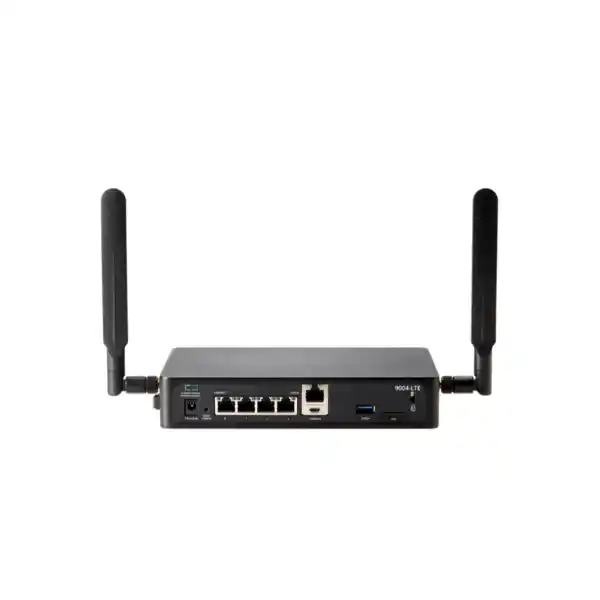
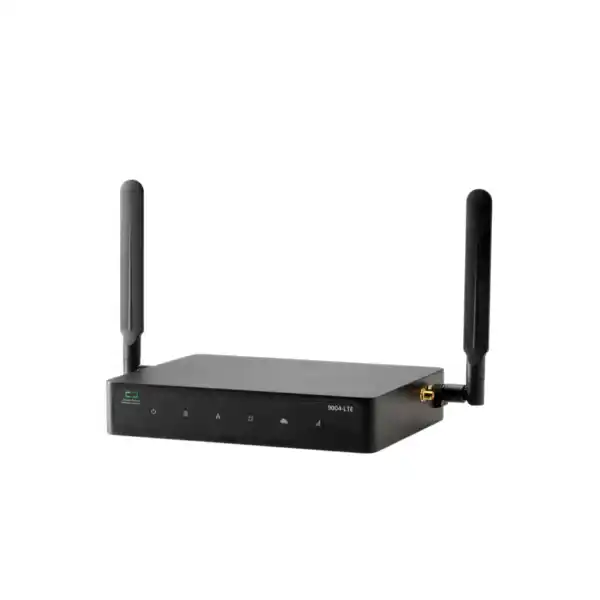
HPE Aruba Networking 9004 Gateway Dubai
A compact four-port gateway for Aruba-based branch networking, SD-WAN and WLAN gateway designs where secure policy enforcement, centralized operations and a small fanless form factor matter more than integrated PoE or high port density.
Direct answer for buyers
Where the 9004 fits in an Aruba branch design
The HPE Aruba Networking 9004 sits at the compact end of the 9000 Series gateway family. Its role is not simply to provide four Ethernet ports. It is designed to participate in a broader Aruba branch architecture in which WAN connectivity, wired and wireless access, policy enforcement and cloud-based operations can be coordinated rather than managed as separate technology islands. That makes the appliance most relevant when the organization values consistent policy and centralized control across many branch locations.
For Dubai companies with multiple offices, retail outlets, clinics, warehouses or customer-facing branches, this architecture can reduce configuration variation between sites. The 9004 can be deployed as an SD-Branch gateway or used for WLAN gateway functions, but the intended operating mode matters. HPE documentation notes that when the 9000 Series is used in mobility-controller style branch or campus operation, it cannot simultaneously perform the SD-WAN role. Buyers should therefore decide the architecture first and treat the hardware purchase as one component of that design rather than as a stand-alone router replacement.
A useful sizing perspective
The current HPE data sheet rates the 9004 at 4 Gbps firewall throughput and 4 Gbps for several encrypted-throughput measurements. Those platform figures are useful upper reference points, but they should not be confused with a guaranteed real-world application throughput for every security policy, WAN mix or traffic pattern.
A practical branch design should consider simultaneous traffic, internet circuit speed, encrypted tunnels, east-west policy, number of active clients, application mix and expected growth. If the branch is approaching the platform ceiling on day one, or if more physical ports and PoE are required, the 9012 deserves comparison before procurement.
HPE Aruba Networking 9004 key specifications
| Specification | 9004 detail | Buyer relevance |
|---|---|---|
| Network interfaces | 4 × 100/1000BASE-T RJ45 | No integrated multi-gigabit or high-density port set; plan switching separately. |
| PoE | Not provided on 9004 | APs, phones and cameras require a suitable PoE switch or injector. |
| Firewall throughput | Up to 4 Gbps | Check against actual WAN, policy and encrypted-traffic requirements. |
| Client scale | Up to 2K client MACs in current platform specifications | Client count is only one sizing dimension; sessions and traffic remain important. |
| AP scale | Current AOS 10 table lists up to 128 devices/APs; legacy AOS 8 WLAN mode lists 32 APs | Software generation and deployment mode must be identified before relying on an AP number. |
| Datapath/firewall sessions | Up to 128K in current AOS 10 specifications | Useful for busy branches with many concurrent flows and cloud applications. |
| IPsec tunnels | Up to 2K concurrent IPsec tunnels | Relevant in highly segmented or multi-site encrypted designs. |
| USB | 1 × USB 3.0 Type-A | Can support configuration transfer via USB storage. |
| Console | RJ45 serial and Micro-USB console | Provides local commissioning and recovery access. |
| Dimensions | 3.82 × 19.85 × 15.31 cm | Compact enough for branch cabinets, shelves or appropriate wall mounting. |
| Weight | 1.143 kg | Lightweight compared with full-size rack gateways. |
| Power / cooling | 12 V DC, 2.5 A adapter; fanless; maximum 25 W with USB | Good for quiet branch environments, but installation clearances still matter. |
Four Gigabit Ethernet ports: what that means in practice
The 9004 provides four 100/1000BASE-T copper Ethernet ports numbered 0 through 3. HPE documents these as Gigabit Ethernet interfaces with support for 100 Mbps and 1 Gbps operation. Later software introduced explicit speed and duplex configuration choices beyond the original Auto/Auto behavior, so organizations inheriting older deployments should make sure software level and peer-device negotiation settings are understood during migration.
Four ports are sufficient for many branch edge designs when the gateway connects to one or two WAN services and an access/distribution switch. They are not intended to replace a branch access switch. The 9004 does not provide PoE, so access points, IP phones, cameras and other powered endpoints must connect through separate PoE infrastructure. This distinction is important in smaller offices where buyers sometimes expect an edge gateway to serve as both router and access switch.
If the site needs a larger number of directly attached Ethernet connections, integrated PoE capacity or more physical separation between WAN and LAN segments without external switching, the 9012 should be evaluated. The 9012 offers twelve Gigabit Ethernet interfaces, six PoE+ ports and higher headline firewall throughput, but it has a larger rack-oriented form factor and different power characteristics. The right choice depends on site architecture rather than simply selecting the higher model number.
Stateful policy enforcement
The 9000 Series includes HPE Aruba Networking’s Layer 4–7 policy enforcement firewall capability. In an Aruba design, this can apply user, device and application-aware policy across WLAN, LAN and WAN. For buyers, the operational value is consistency: access policy can follow roles rather than being recreated separately in every branch switch, SSID and WAN rule set.
Dynamic segmentation
Dynamic Segmentation is designed to reduce dependence on complex static VLAN and ACL designs by applying role-based controls. This is particularly useful where branches have employees, guests, contractors, scanners, printers, cameras and IoT equipment with different access requirements. The policy architecture still needs planning; the gateway does not automatically decide business access rules.
Application visibility
Deep Packet Inspection and application-aware controls can help operations teams understand and prioritize branch traffic. This becomes valuable when internet links carry Microsoft 365, voice, collaboration, cloud ERP, point-of-sale and guest traffic at the same time. Application policy should be designed around business criticality and measured user experience rather than broad assumptions about bandwidth.
Centralized operations
HPE Aruba Networking Central can be used to configure and manage 9000 Series gateways in supported deployments. Centralized visibility is especially useful for UAE organizations with many branches and limited IT presence at each location. It can reduce site-by-site configuration work, but subscription entitlements, tenant design, software compatibility and operational ownership should be agreed before rollout.
Licensing and subscription planning is part of the product decision
The appliance should not be quoted as though hardware alone defines the final capability. HPE positions the 9000 Series for WLAN and SD-WAN deployments with HPE Aruba Networking Central subscription licenses. The exact subscription requirement depends on the intended operating model, feature set, software generation and the organization’s wider Aruba environment. A buyer planning centralized SD-Branch operations may therefore have different licensing needs from a customer using the gateway in a WLAN-focused controller architecture.
This is one of the most important quotation checks because an apparently lower hardware price can become misleading if required software or cloud subscriptions have not been included. The quote should identify hardware, subscription term, support entitlement, implementation work and any related Aruba components separately enough that the customer understands what is perpetual hardware and what is term-based service.
For an existing Aruba customer, FourTeck can work from the current Central tenant, license inventory, AP estate and branch topology to determine the most relevant path. For a new deployment, the design should begin with the target operating model and management platform before selecting subscription SKUs. Licensing names and packaging can change over the commercial life of a platform, so the exact current ordering code should be validated at quotation time rather than copied from an older bill of materials.
AOS 10 and legacy AOS 8 sizing: do not mix the numbers
Current AOS 10 platform table
HPE’s current 9000 Series data sheet lists the 9004 with a cluster size of four, up to 2K client MAC addresses, up to 128 AP devices, 128K datapath/firewall sessions, 2K concurrent IPsec tunnels and 4K Layer 2 VLANs. Those figures describe platform limits in the stated AOS 10 context; they do not mean every branch should be sized to those maxima.
Legacy AOS 8 WLAN mode
The same HPE data sheet separately lists the 9004 at 32 campus or remote APs and 2K concurrent users in AOS 8 specifications. That is why online product titles and older installation material often describe the 9004 as a 32-AP gateway. Procurement teams should not combine an AOS 10 AP figure with an AOS 8 controller design.
The practical lesson is simple: identify the target software train, management architecture and role of the gateway before using a headline device limit. Maximum client or AP scale is not a substitute for throughput, session, redundancy and application sizing. A branch with far fewer users can still need a larger gateway if it has heavy encrypted traffic, multiple high-speed WAN links, complex security services or significant growth expectations.
SD-WAN use at the branch edge
For organizations managing multiple WAN connections, the 9000 Series can participate in HPE Aruba Networking’s SD-WAN architecture. The business objective is normally not simply to create another tunnel. It is to centralize WAN policy, identify applications, steer traffic according to role or application needs, and use alternate uplinks when appropriate. This can be useful for branches that combine fibre, broadband, private WAN or cellular backup connectivity.
The standard 9004 does not have an integrated LTE modem. A site that requires built-in cellular connectivity should compare the 9004-LTE, which adds 4G cellular capability while retaining the four-Gigabit-Ethernet format. In the UAE, a cellular design also requires consideration of carrier service, signal quality, SIM policy, antenna placement and the desired role of LTE as primary or backup connectivity. Hardware selection should follow that connectivity decision.
Where the branch requires more wired ports or local PoE along with SD-WAN, the 9012 may be more appropriate. Conversely, a small site with modest WAN bandwidth, existing PoE switching and no need for integrated LTE may gain little from the larger platform. This balanced comparison helps avoid both under-sizing and paying for capacity the site will never use.
High availability and branch resilience
The 9000 Series supports high-availability designs, including N+1 or NxN redundancy in appropriate architectures, and current AOS 10 platform specifications show a cluster size of four for the 9004. However, buying a second gateway does not by itself create a resilient branch. The surrounding design must consider WAN diversity, switch topology, power feeds, DHCP and routing behavior, management connectivity, state synchronization, change procedures and failure testing.
For a business-critical Dubai branch, the resilience conversation should start with acceptable outage time. A retail point of sale, contact center, healthcare site or logistics facility may justify dual gateways and diverse WAN connectivity. A small administrative office may accept a simpler design. The right redundancy level depends on the cost of downtime rather than a generic best practice.
Clustering also affects procurement because identical or compatible software versions, licenses and physical connectivity need to be planned. If a branch uses two 9004 units side by side, HPE documentation notes an optional rack mounting arrangement that can place two units within 1RU. This can be practical in a structured cabinet, while wall or shelf installation may suit smaller communications rooms.
Physical installation in Dubai and UAE branch environments
The 9004 is compact at approximately 3.82 cm high, 19.85 cm wide and 15.31 cm deep, with a weight of about 1.143 kg. It is fanless and uses conduction cooling, which makes it suitable for quiet office environments. Fanless does not mean ventilation can be ignored. HPE’s installation guidance calls for at least 10 cm of clearance on the left, right, front and rear to support airflow and advises against placing objects on top of the gateway or stacking it on another heat-producing device.
The specified operating temperature is 0°C to 40°C with 10% to 90% relative humidity, non-condensing. This point deserves attention in the UAE. The gateway should be installed in a controlled indoor environment, not in an unconditioned outdoor cabinet or poorly ventilated utility area where ambient temperature can exceed the supported range. The small chassis can make it tempting to place the unit wherever space is available, but the communications location should still provide suitable cooling, clean power, cable access and physical security.
HPE provides integrated wall-mounting slots, and the installation guide also documents a Kensington security slot. Professional installation is recommended. Where a rack is preferred, confirm the correct mounting accessory because the base unit is a compact desktop form factor rather than a full-width rack appliance. An installation quote should therefore state whether wall mounting, shelf placement, rack tray, patching, labeling and power preparation are included.
Power and local connectivity
The 9004 uses a 12 V DC, 2.5 A AC-to-DC power adapter. HPE lists maximum power consumption of 25 W with USB. Because power is external, branch deployment should account for suitable UPS-backed AC power if the gateway forms part of a resilient WAN design. Protecting the gateway while leaving the access switch or modem on unprotected power can still create an avoidable outage.
A USB 3.0 Type-A port can be used with storage for configuration transfer. Local management is available through both Micro-USB and RJ45 serial console interfaces. HPE notes that the Micro-USB console takes precedence when both console connections are present. These interfaces are useful for commissioning and recovery but should be accessible only to authorized personnel.
A console-port warning worth retaining
The RJ45 console connector is a serial RS-232 management interface, not an Ethernet data port. HPE explicitly warns against connecting it to an Ethernet switch or a PoE power source because this may damage the gateway. That distinction is easy to overlook during fast branch installations where many RJ45 cables terminate in the same cabinet.
A professional implementation should label console and network connections clearly, record port assignments and retain an as-built diagram. This small operational step reduces troubleshooting time later, especially in sites supported remotely by a central IT team.
9004 vs 9004-LTE vs 9012: which model should be compared?
9004
Four Gigabit Ethernet ports, no integrated PoE and no integrated cellular modem. Rated at 4 Gbps firewall throughput. Best evaluated for branches that already have suitable access switching and external WAN connectivity.
9004-LTE
Retains the compact four-port branch form factor and adds integrated 4G cellular connectivity. It is relevant when LTE should be a built-in primary or redundant WAN uplink rather than provided by a separate cellular router.
9012
Provides twelve Gigabit Ethernet ports, six PoE+ ports with 120 W PoE capacity and up to 6 Gbps firewall throughput. Compare it where branch switching integration, port density, PoE or extra headroom is more important than the smallest form factor.
Regional SKU and procurement checks for the UAE
HPE has produced multiple regional 9004 part numbers. The product information reference lists R1B21A as the 9004 “RW” four-port GbE RJ45 gateway, while other codes exist for specific regulatory regions and TAA requirements. A Dubai quotation should therefore confirm the current appropriate regional SKU instead of assuming that a US, JP, IL or other regional code is interchangeable. Regulatory region, software entitlement, warranty handling and channel availability can matter even when the hardware name looks identical.
Procurement teams should also distinguish the standard 9004 from 9004-LTE and TAA variants. Product titles from different markets can be very similar, and LTE models add cellular hardware that changes the bill of materials and deployment considerations. The requested SKU should be tied to the exact requirement, not inferred from an image or shortened distributor title.
For project purchasing, provide quantity, target deployment date, intended software architecture, Central subscription term, support preference, rack or wall-mount needs, installation scope and whether the gateway must integrate into an existing Aruba estate. This gives the supplier enough context to quote a usable solution rather than only a chassis.
Typical HPE Aruba Networking 9004 use cases
Retail branch
A store can use the gateway to participate in centralized WAN policy and segmentation while separate PoE switching supports access points, phones, cameras and point-of-sale devices. WAN resilience and application priority may matter more than raw client count.
Professional office
A branch office with cloud applications, voice and guest Wi-Fi can benefit from consistent policy and centralized visibility. The compact fanless chassis is convenient where the communications space is close to users.
Warehouse or logistics site
Handheld devices, scanners, IoT endpoints and operational applications can be segmented by role while WAN traffic is controlled centrally. Environmental temperature still has to remain within the indoor operating specification.
Multi-site enterprise
Standardizing on the same branch gateway family can simplify templates, monitoring and operational processes across a distributed organization. The exact model can still vary by site according to bandwidth, PoE and cellular requirements.
Migration from an existing router, controller or branch gateway
Replacing an existing branch device should be treated as a controlled migration, not only a physical swap. Start by documenting current WAN circuits, VLANs, subnets, DHCP roles, routing, VPN peers, NAT policies, security rules, authentication dependencies, DNS/NTP services, monitoring integrations and any locally hosted applications. This establishes what the current device is actually doing before a new Aruba design is built.
Next, decide which functions should move to the 9004 and which should remain on switches, firewalls, carrier routers or cloud security services. If the organization is moving to Aruba Central-managed SD-Branch, the project may also involve template design, group structure, device onboarding, subscriptions and WAN policy. If the gateway is being used for WLAN functions, AP compatibility, management architecture and software versions must be checked separately.
A cutover plan should define pre-staging, configuration validation, maintenance window, rollback method, success tests and who owns each dependency. At minimum, test internet reachability, VPN connectivity, DNS, DHCP, business applications, voice quality, wireless access, guest services, monitoring and failover behavior. For critical branches, conduct failure testing instead of assuming redundancy works because both links or gateways appear online.
FourTeck can scope supply-only procurement or include configuration, installation and migration services depending on the project. The most accurate quote is produced when the current topology and target outcome are shared before hardware is ordered.
Questions buyers often ask before ordering
Does the 9004 provide PoE for access points?
No. The 9004 has four Gigabit Ethernet ports but does not provide PoE. If access points or other powered devices connect at the site, plan a PoE-capable switch or appropriate injectors. The 9012 is the 9000 Series option with integrated PoE+ ports.
Does the standard 9004 include LTE?
No. Integrated 4G cellular connectivity is a feature of the 9004-LTE model. For the standard 9004, cellular backup would require an external supported connectivity approach.
Is the 9004 a 32-AP or 128-AP gateway?
Both numbers appear in HPE material because they refer to different software contexts. Current AOS 10 specifications list up to 128 AP devices for the 9004, while AOS 8 WLAN gateway specifications list 32 campus or remote APs. Confirm the intended software generation and architecture before sizing.
Can it handle a 4 Gbps internet service?
The platform is rated at up to 4 Gbps firewall throughput, but a production design should not equate a laboratory platform rating directly with a guaranteed 4 Gbps business workload under every security, encryption and application condition. Provide the actual traffic and policy requirements for sizing.
Can two units be used for resilience?
Yes, the 9000 Series supports high-availability and clustering designs in supported architectures. The full branch topology, WAN diversity, switch connectivity, licenses and failure behavior must be designed together.
Is the 9004 suitable for an uncooled cabinet?
Not if the ambient conditions exceed the supported operating range. HPE specifies 0°C to 40°C operation and recommends clear space around the unit for airflow. Dubai installations should use a controlled indoor communications environment.
Decision recap: is the 9004 the right gateway?
What FourTeck needs for an accurate 9004 quotation
A useful quote should reflect the branch design, not just the gateway chassis. Sharing the following inputs allows the bill of materials and services scope to be checked more accurately.
Plan the HPE Aruba Networking 9004 around your branch requirements
FourTeck can help confirm whether the standard 9004 is the correct fit for your Dubai or UAE site, identify the appropriate regional ordering path, review Central and software dependencies, compare the 9004-LTE and 9012 where necessary, and scope supply, configuration, installation or migration services.

Reviews
There are no reviews yet.