

Direct answer for buyers
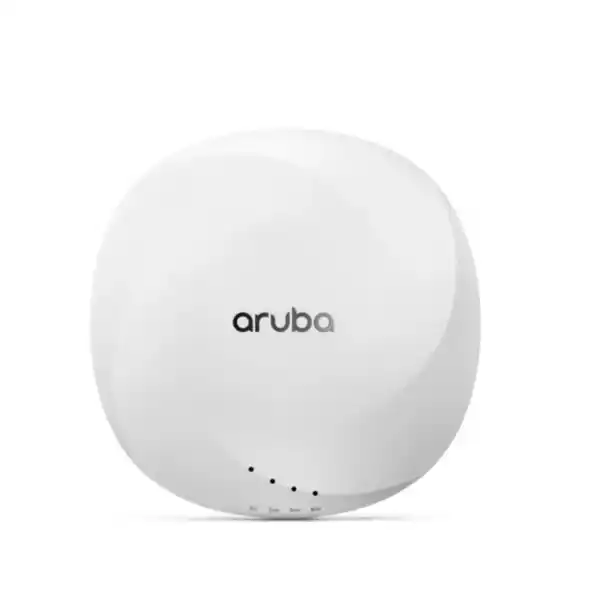
HPE Aruba Networking AP-514 is an indoor, dual-radio Wi-Fi 6 access point in the 510 Series, distinguished from the AP-515 by its external-antenna design. It is mainly used in campus, office, healthcare, education, meeting, training and other managed indoor wireless environments where the RF plan benefits from selecting a specific antenna pattern. Organisations should consider it when they need enterprise wireless features together with 2.5 GbE uplink capability and flexible antenna selection. Before proceeding, confirm the UAE regulatory variant, antenna model and quantity, mounting hardware, PoE or DC power arrangement, switch capability, software version, management model and any subscription or licensing requirements. These dependencies can affect both the bill of materials and the deployment design.
What the AP-514 does
The AP-514 provides concurrent 2.4 GHz and 5 GHz wireless service for managed indoor networks. HPE identifies the platform as a Wi-Fi 6 access point with a 2×2 MIMO radio at 2.4 GHz and a 4×4 MIMO radio at 5 GHz. That radio architecture allows a network designer to allocate client traffic across the two common enterprise Wi-Fi bands while taking advantage of 802.11ax features supported by the deployed software environment.
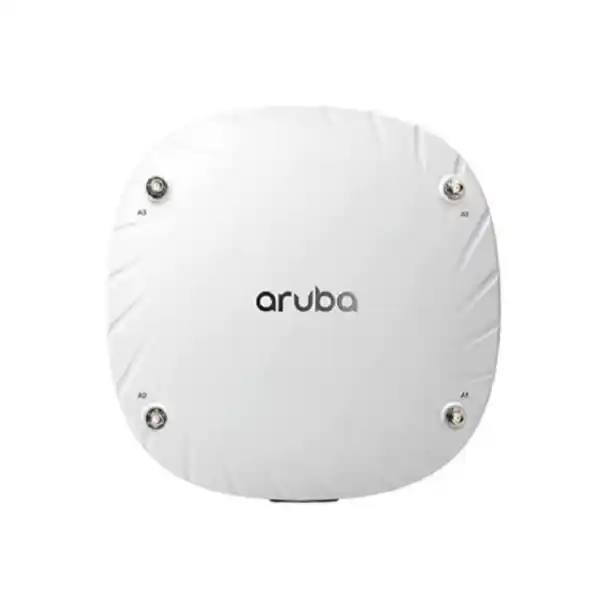
Its most important physical differentiator is the presence of four RP-SMA antenna connectors instead of integrated client-serving antennas. This makes the AP-514 appropriate when the installation calls for a particular indoor antenna pattern, directional coverage or another RF design choice that cannot be achieved simply by placing an internal-antenna access point on the ceiling. The access point also includes multi-gigabit Ethernet, a secondary Gigabit Ethernet interface, USB connectivity, Bluetooth Low Energy and Zigbee radio capability. Each element should be evaluated as part of the network design rather than treated as a guarantee that every optional function is enabled by default.
Who should consider this model
The AP-514 is most relevant to IT teams that already know, or are willing to determine, the antenna characteristics required at the site. A standard office with conventional ceiling coverage may be simpler to serve with an internal-antenna model, while a warehouse-style room, training facility, long corridor, high ceiling, shaped coverage zone or specialised indoor area can justify the extra flexibility of external antennas. Suitability depends on an RF survey or at least a disciplined design process.
It may suit enterprises, government departments, healthcare facilities, educational organisations, hospitality environments, branch networks and multi-site businesses that use HPE Aruba Networking infrastructure. Buyers who only need a small standalone Wi-Fi device and do not want to select antennas, mounts, power, software and management architecture may find the design more complex than necessary. FourTeck can help compare the AP-514 requirement with nearby options and identify whether external antennas are solving a real coverage objective or merely adding avoidable procurement and installation steps.
Business problems the AP-514 can help address
Coverage that needs antenna choice
External antenna connectors allow the RF design to use compatible antennas selected for the room shape, mounting position and coverage objective. The antenna is part of the design and should not be chosen only after the AP is purchased.
High client activity in shared spaces
Wi-Fi 6 is designed to improve efficiency in environments with many active devices. Real results still depend on channel planning, client capabilities, interference, bandwidth needs and software settings.
Uplink bottleneck concerns
The primary SmartRate Ethernet interface can negotiate up to 2.5 Gb/s, helping prevent the wired uplink from being limited to 1 Gb/s when the switch, cabling and configuration support the higher rate.
Consistent enterprise management
The 510 Series can participate in HPE Aruba Networking management architectures. The correct controller, cloud-management or software approach must be confirmed for the organisation’s current network and licensing plan.
Core capabilities in practical terms
Dual-band Wi-Fi 6
Concurrent 802.11ax service across 2.4 GHz and 5 GHz provides a current enterprise Wi-Fi foundation for compatible clients while retaining support for legacy WLAN devices through the platform software.
External RF design
Four external antenna connectors are the reason to choose AP-514 over an internal-antenna alternative. Antenna gain, pattern, cable loss and regulatory limits must be considered together.
Multi-gigabit Ethernet
The E0 HPE SmartRate interface supports up to 2.5 Gb/s. A secondary 10/100/1000BASE-T port is also provided, with LACP support between both network ports documented by HPE.
IoT radio capability
Integrated Bluetooth 5 and Zigbee radio hardware can support compatible location, sensor and IoT use cases. Application availability depends on the wider platform and chosen software services.
AP-514 suitability matrix
| Requirement | Suitable when | Confirm before ordering |
|---|---|---|
| External antenna coverage | The RF plan calls for a selected antenna pattern instead of fixed internal antennas. | Approved antenna model, gain, mounting location, connector/cable needs and regional RF rules. |
| Wi-Fi 6 client environment | The organisation wants 802.11ax capability while continuing to support mixed client generations. | Client mix, channel widths, RF plan, firmware/software version and expected application load. |
| Multi-gigabit access switching | The access switch can provide SmartRate/NBASE-T connectivity and suitable power. | Switch port speed, cabling category, PoE budget, VLAN design and redundancy requirements. |
| Centralised operations | The AP will be integrated into a supported HPE Aruba Networking management environment. | Controller or cloud architecture, software release, entitlement and subscription requirements. |
| IoT/location integration | Bluetooth or Zigbee capability is part of a broader supported application design. | Application compatibility, platform support, device requirements and operational ownership. |
| Straightforward office ceiling Wi-Fi | Only if there is a defined reason to use external antennas. | Whether an internal-antenna model such as the AP-515 would reduce complexity without compromising the RF objective. |
Configuration, licensing and compatibility dependencies
The AP-514 should be treated as one component in a wireless system, not as a complete deployment by itself. The first dependency is the antenna system. Because the client-serving antennas are external, the required RF pattern, gain, orientation and mounting position must be selected before the bill of materials is finalised. Antenna choice can influence coverage shape and compliance with local transmit-power limits, so using an arbitrary RP-SMA antenna is not a substitute for a supported design.
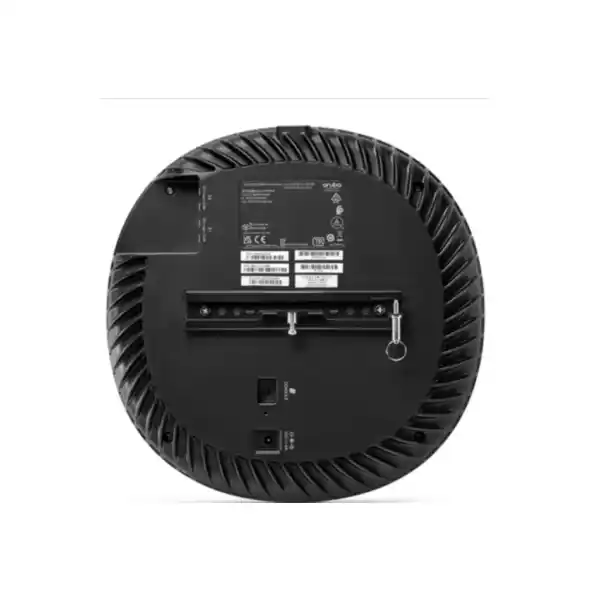
The second dependency is power and switching. The AP can use PoE or DC input, but the project should verify the available PoE class, switch power budget, port speed and cabling. A 2.5 Gb/s SmartRate uplink only delivers its intended benefit when the access switch and copper cabling can negotiate that speed. The secondary Ethernet port and LACP may be useful in designs that require additional resiliency or capacity, but they should be planned rather than assumed.
The third dependency is the software and management architecture. HPE documentation supports controller-based and controllerless approaches for the 510 Series and also identifies HPE Aruba Networking Central as a management option. Exact feature support changes by software release, so organisations upgrading an existing Aruba environment should check the supported operating-system matrix before standardising on a firmware version. Features such as Wi-Fi 6 scheduling, client steering, policy enforcement and IoT integration may depend on software version, license or cloud subscription.
Important: published throughput figures can vary by channel width, radio mode, client capability and HPE document. For procurement, design around the client population, regulatory domain and application requirement rather than choosing the AP solely from a headline data-rate number.
A practical purchase and deployment journey
Define the space
Share floor plans, ceiling height, wall materials, user density, expected applications and any areas that need intentionally shaped wireless coverage.
Validate RF and antenna needs
Determine whether external antennas are necessary, then select supported antenna characteristics and installation positions that match the design objective.
Confirm infrastructure
Check PoE budget, SmartRate capability, cabling, VLANs, DHCP, routing, firewall rules and whether the access layer can support the planned AP count.
Confirm management and software
Match the AP to the existing Aruba software architecture, required feature set, controller or cloud-management plan, entitlement and subscription terms.
Build and quote the BOM
Include the regional AP SKU, antennas, mounting hardware, power accessories if needed, licenses or subscriptions, switching changes and professional services.
External antennas turn RF planning into a design decision
The AP-514 is not simply an AP-515 without antennas. Its external connectors are a procurement signal that the installation expects deliberate RF engineering. A directional antenna can concentrate coverage into a defined area, while an omnidirectional design can support a different spatial objective. Cable runs, connector loss, mounting orientation and local power constraints all influence the result. This is particularly relevant in rooms that are long, tall, segmented, open or difficult to serve with a standard ceiling-mounted internal antenna pattern.
For business buyers, the key question is whether there is a measurable reason to use that flexibility. If the deployment is a conventional open office, an internal-antenna access point may simplify ordering and installation. If the site survey shows a shaped coverage requirement, the AP-514 can provide the physical flexibility needed to meet it. FourTeck can help translate floor plans and coverage expectations into a bill of materials that includes the antenna and mounting components instead of quoting the AP as an isolated line item.
Wired uplink and power planning matter as much as Wi-Fi
The primary Ethernet interface can negotiate up to 2.5 Gb/s, which is useful when wireless traffic would otherwise be constrained by a 1 Gb/s uplink. That does not mean every deployment needs multi-gigabit switching. The decision should consider the expected client count, application mix, channel plan, WAN capacity and aggregation design. If the existing access switches only provide 1 Gb/s, the AP can still be integrated, but the network designer should understand where the wired boundary sits.
Power deserves equal attention. PoE budget is a common source of surprise in AP refresh projects because a switch may have enough physical ports but insufficient available power for the planned access point count. USB peripherals and optional functions can also change the power picture. A quotation should therefore include the existing switch models, free PoE budget and cable information. If a switch upgrade is needed, it is better to identify it during design than after access points and antennas arrive on site.
Management, security and IoT features depend on the wider platform
HPE positions the 510 Series as part of an enterprise WLAN architecture, with support for central management and policy capabilities. The AP hardware includes a trusted platform module, Bluetooth 5 and Zigbee radio support, while current HPE product information also describes WPA3, Enhanced Open and Wi-Fi 6 efficiency features. The practical value of those functions depends on the software release and how the WLAN is designed.
A buyer should decide whether the access points will join an existing controller environment, operate under a controllerless architecture or be managed through HPE Aruba Networking Central. That choice affects onboarding, monitoring, configuration workflow, feature availability, entitlement and support planning. Organisations with existing Aruba networks should share current controller or Central details, software versions and licensing status before ordering. This prevents a hardware purchase from creating an unexpected software migration or subscription requirement.
Ideal business environments and use cases
Meeting and training spaces
Useful where temporary client concentration and room geometry require careful RF planning. External antennas can be considered when ordinary ceiling coverage does not match the seating or room shape.
Healthcare facilities
HPE identifies hospitals among suitable 510 Series environments. Actual design should account for clinical workflows, device compatibility, roaming, RF-sensitive areas and the organisation’s security policies.
Education and campus buildings
Classrooms, lecture spaces and administration areas can create uneven density patterns. The AP-514 may be appropriate when selected antennas help the design manage those spaces more predictably.
Specialised indoor coverage zones
Long corridors, high ceilings, shaped rooms and selected service areas can justify an external-antenna AP where the coverage pattern is part of the engineering requirement.
The AP-514 should not be selected simply because external antennas appear more powerful. Antenna gain changes the pattern and effective radiated power; it does not automatically create better Wi-Fi. A site survey, predictive design or at least a careful floor-plan review should define the outcome first. FourTeck can help buyers decide whether the deployment benefits from AP-514 flexibility or whether another HPE Aruba Networking access point would reduce complexity.
Integration and operational considerations
Wireless access points depend on several upstream services. Before deployment, confirm IP addressing, DHCP, DNS, VLAN assignment, routing, firewall policy, authentication services and any RADIUS or identity platform used for enterprise access. The AP-514 can be an excellent radio platform and still produce a poor user experience if the surrounding network is congested, incorrectly segmented or unable to deliver stable power.
Roaming design also matters when multiple APs serve the same floor. Channel allocation, transmit power, minimum data rates and client behavior influence whether users move cleanly between cells. HPE client optimisation features can assist, but RF fundamentals remain important. A design that simply adds more APs can increase co-channel interference rather than improve service.
For remote branches, zero-touch provisioning can reduce hands-on staging when supported by the chosen architecture. Even then, the branch needs the correct cabling, switch power, internet reachability and mounting position. Organisations planning a phased rollout should define a repeatable configuration template and acceptance test so every location is validated against the same performance and security criteria.
If Bluetooth or Zigbee functions will be used, identify the business application and integration owner early. The presence of an IoT radio does not by itself provide asset tracking, sensor management or location services; the supported application, software platform and device ecosystem must be designed as part of the project.
Buyer questions to resolve before requesting a quote
Define the coverage problem, room shape or mounting constraint that makes AP-514 a better fit than an internal-antenna model.
HPE publishes multiple regional AP-514 ordering codes. Confirm the correct regulatory-domain version before the purchase order is issued.
Specify supported antenna models, quantity, orientation, cable requirements and the mounting kit for the planned ceiling, wall or structural location.
Share switch model, available PoE budget, port speed and copper-cabling details to identify any access-layer changes.
Confirm the existing Aruba controller, controllerless or Central environment, software version and current licensing position.
Decide whether the quotation should cover survey, cabling, mounting, configuration, migration, testing, documentation or user acceptance.
Procurement checklist for AP-514 projects
- Confirm the exact AP-514 regional ordering SKU for the destination.
- Confirm required quantity and deployment locations.
- Confirm antenna model, gain, pattern and quantity per AP.
- Confirm mounting kit and physical installation method.
- Confirm switch model, free ports and PoE budget.
- Confirm whether 2.5 Gb/s SmartRate uplinks are required.
- Confirm cabling suitability for the selected uplink speed.
- Confirm controller, controllerless or Central management architecture.
- Confirm software release compatibility and upgrade needs.
- Confirm license or subscription requirements and terms.
- Confirm survey, installation, configuration and testing scope.
- Confirm desired support coverage and regional warranty terms.
How FourTeck can assist with selection and deployment
FourTeck can help turn the AP-514 model name into a complete project requirement. The starting point is to understand where the APs will be installed, how many users and devices are expected, which applications matter and whether the RF design specifically needs external antennas. From there, the discussion can include regional SKU selection, antenna and mounting components, power, access switching, software architecture and support requirements.
For existing HPE Aruba Networking customers, sharing the current controller or Central environment, software versions and switch models can reduce uncertainty. For new deployments, FourTeck can coordinate a broader review of WLAN architecture, installation and configuration scope. Visit the FourTeck technology services page for service context or browse business networking products when comparing infrastructure options.
A quotation can then distinguish the access points from antennas, mounts, licenses, subscriptions, switches and professional services. That separation makes the bill of materials easier for procurement teams to review and reduces the risk of essential components being left out.
Useful information to send
Quantity and destination
Floor plan or site type
Current Aruba environment
Existing switches and PoE budget
Antenna or coverage objective
Required installation scope
Target project timeline
UAE availability and support guidance
Contact FourTeck to confirm current UAE availability for the HPE Aruba Networking AP-514. Availability may depend on the regional ordering code, requested quantity, antenna and mounting requirements, vendor lead time and any software or support items included in the quotation. A model number alone is not enough to promise supply because AP-514 is sold in multiple regulatory variants and the external-antenna design means the surrounding bill of materials can be just as important as the access point.
For projects in Dubai, Abu Dhabi, Sharjah and Ajman, FourTeck can discuss delivery coordination, installation scope, configuration requirements, switching dependencies and support planning as one combined UAE requirement. If the project covers several sites, provide the site count, AP quantity per site, installation constraints and desired rollout sequence. This makes it easier to separate product lead time from project scheduling and to identify any site-specific antenna, cabling or mounting work before deployment dates are agreed.
GCC Availability
FourTeck can assist organisations planning AP-514 requirements across GCC markets by reviewing the exact destination, regional product variant, antenna requirement, quantity and deployment scope before quotation. Projects in the United Arab Emirates, Saudi Arabia, Kuwait, Qatar, Bahrain or Oman can differ in regulatory-domain requirements, logistics, service coverage and vendor lead time. For multi-country projects, share the destination for each site rather than assuming one ordering code applies everywhere. FourTeck can also help coordinate model and license selection, delivery planning, configuration scope, installation planning and renewal or support considerations where relevant. Product availability, licensing, project visits and delivery schedules can vary by country, quantity and requirement, so the buyer should provide the expected timeline, management architecture and any required services before commercial commitments are made. For Kuwait-specific regional enquiries, the FourTeck Kuwait resource can also provide local project context.
Africa Availability
Organisations planning wireless projects in Africa can work with FourTeck to review the AP-514 model, required antennas, mounting approach, management software, quantity, destination and installation expectations before a quotation is prepared. Fulfilment can depend on the country, regulatory version, shipping route, vendor lead time, power and cabling environment, software entitlement and local project conditions. For East African requirements such as Kenya or Uganda, buyers should share the exact site location, target rollout schedule and whether the request includes only hardware or also configuration and deployment assistance. FourTeck can help structure regional procurement without implying local inventory or guaranteed delivery. The FourTeck Africa technology portal and FourTeck Kenya resource can be used when the project extends beyond the UAE and requires destination-specific discussion.
Related products, services and alternatives to evaluate
HPE Aruba Networking AP-515
The internal-antenna member of the same 510 Series family. It is worth comparing when standard ceiling coverage is suitable and external antenna selection would add unnecessary complexity.
HPE Aruba Networking Central
A management option for supported Aruba networks. Confirm subscription, software compatibility and whether the organisation intends to manage APs, switches and sites through the same platform.
SmartRate PoE switching
Consider access switching that can match the required AP count, PoE budget and 2.5 Gb/s uplink design. Switch selection should be based on the complete access-layer requirement.
Wireless survey and installation
External-antenna deployments benefit from RF planning, mounting review, cabling checks, configuration, validation and documentation. Discuss installation and configuration services.
Why businesses contact FourTeck for AP-514 projects
The value of procurement assistance is usually in the details that sit around the access point. FourTeck can help clarify whether AP-514 is the right form factor, identify the regional model, review antenna and mounting needs, check access-switch dependencies, structure the software or subscription requirement and separate hardware from professional services in the quotation. That is useful for procurement teams because it reduces ambiguity about what is included and what still needs confirmation.
For technical teams, the same process can expose design assumptions before installation begins. Questions about RF coverage, cabling, PoE budget, SmartRate ports, management architecture, existing Aruba software and site rollout can be resolved as part of a structured requirement review. Buyers can learn more about FourTeck or use the contact page to submit a project requirement.
What buyers usually need to know before shortlisting the AP-514
When buyers research the AP-514, the first practical question is often whether it is still the right access point for a new project or primarily an option for extending an existing 510 Series estate. HPE’s current software support matrix dated in 2026 still lists the 510 Series with end-of-sale and end-of-support dates shown as to be determined, while HPE continues to publish current product, QuickSpecs and support information. That does not mean every regional SKU will be immediately available. A UAE buyer should confirm the exact regulatory variant and lead time with the quotation rather than infer availability from a global product page.
Another common question is whether the AP-514 includes antennas. The model is specifically built with four RP-SMA connectors for external dual-band antennas. HPE ordering guidance indicates that antennas and a mount should be added, which means the buyer needs more than just the AP line item. The antenna decision should come from coverage requirements, not convenience. A directional pattern can help focus RF energy into a defined area, while an omnidirectional option distributes coverage differently. Gain, pattern, cable loss, mounting direction and local regulatory limits need to be considered together.
Buyers also compare AP-514 with AP-515. The important distinction is not core Wi-Fi generation; both belong to the same 510 Series. AP-514 is the external-antenna model, while AP-515 uses internal antennas. That makes AP-515 easier for many conventional office ceiling deployments, whereas AP-514 becomes attractive when an RF designer needs control over antenna type or placement. Choosing between them should therefore start with the physical environment and coverage objective rather than a simple feature checklist.
Power and switching questions appear quickly once the radio choice is settled. The AP-514 includes a 2.5 Gb/s-capable SmartRate Ethernet port and a second Gigabit Ethernet port. A network with only 1 Gb/s access switching can still operate the AP, but organisations planning higher aggregate wireless traffic may want to evaluate multi-gigabit switch ports. At the same time, the PoE power budget must be checked across the entire switch. A switch can have enough empty ports but still be unable to power every planned AP at the desired operating level.
Management is another frequent source of confusion. A buyer may see references to Aruba Instant, controller-based deployments and HPE Aruba Networking Central and assume all options are interchangeable. They are different operational approaches and may require different software versions, licenses or subscriptions. Existing Aruba customers should provide their controller or Central details and current software release before ordering. New deployments should define the preferred management architecture first, especially if the organisation expects centralised configuration, policy, monitoring and multi-site operations.
It can be, but external antennas are most valuable when the RF design has a reason for them. For standard ceiling coverage, compare an internal-antenna model before adding complexity.
No. It means the AP can use a faster wired link when the switch and cabling support it. Whether an upgrade is justified depends on traffic, density and the broader access-layer design.
Not for this model. The practical project cost can include antennas, mounts, licenses or subscriptions, switching changes, cabling and services. Compare complete bills of materials.
Quantity, UAE destination, current Aruba environment, antenna or coverage objective, switch models, installation scope and expected timeline are the most useful starting points.
A final area buyers investigate is software feature support. HPE’s product pages describe Wi-Fi 6 functions such as OFDMA, target wake time and modern security capabilities, while older release notes for early 510 Series software documented some features as unavailable at launch. This is a good example of why the intended software release matters. Current deployments should be designed from the current compatibility and support matrix, not from an early release note or a reseller description that may be years old. When upgrading an existing estate, verify the target ArubaOS or other supported platform release against controllers, access points and management services before scheduling migration. FourTeck can help organise that compatibility check as part of sizing and quotation work.
Decision questions that prevent the wrong purchase
Do we need AP-514 specifically, or simply a Wi-Fi 6 AP?
Choose AP-514 because the external-antenna design supports a defined RF requirement, not just because the organisation wants Wi-Fi 6. If the coverage plan is conventional and an internal antenna pattern is suitable, another model may simplify the deployment. FourTeck can compare the requirement before the bill of materials is locked.
Which antenna should be paired with the access point?
The correct answer depends on room geometry, mounting location, frequency bands, desired pattern, gain, cable path and local regulatory limits. A model number cannot be selected responsibly without those inputs. For larger or unusual sites, an RF survey or predictive design is the safer basis for antenna selection.
Will our existing switches provide enough power?
Check both per-port capability and the total PoE budget across the switch. Also consider whether the design expects USB peripherals or higher-power operating modes. If multiple APs are being added, total power draw matters more than the capability of a single port.
Is the 2.5 Gb/s uplink important for our users?
It can be valuable in busy deployments, but not every site will generate enough wireless traffic to justify access-switch upgrades. Compare application demand, number of active clients, internet bandwidth and aggregation capacity before making multi-gigabit switching a mandatory project cost.
Do we need a new license or subscription?
That depends on how the AP will be managed and which HPE Aruba Networking services are already in place. Existing customers should provide current controller or Central entitlement details. New projects should decide management architecture and support expectations before the commercial quote is finalised.
What should be tested after installation?
Validate AP adoption, power state, Ethernet negotiation, SSID and authentication behavior, roaming, expected coverage, client throughput appropriate to the design, monitoring visibility and failover where relevant. Acceptance should be based on agreed design goals rather than one speed test beside the AP.
These questions are particularly important in refresh projects. Replacing an older access point one-for-one can look simple, but the new model may have different power needs, management requirements, mounting arrangements or antenna assumptions. A replacement plan should therefore compare old and new bills of materials, not only old and new AP counts. If the current WLAN includes legacy controllers or software, compatibility should be reviewed before purchase. If the site has changed since the original deployment, a fresh RF review can prevent the new hardware from reproducing old coverage problems.
Frequently asked questions about HPE Aruba Networking AP-514
1. What is the main difference between AP-514 and AP-515?
Both are members of the 510 Series, but AP-514 uses four external RP-SMA antenna connectors while AP-515 uses integrated antennas. AP-514 is therefore better suited to deployments where the RF design calls for a selected external antenna pattern. AP-515 can be simpler for standard ceiling coverage. Confirm the actual site requirement before choosing between them.
2. Are external antennas included with the AP-514?
Do not assume they are included. HPE ordering guidance for AP-514 indicates antennas and a mounting kit should be added. The quotation should therefore identify the selected antenna and mount separately so the buyer can review a complete bill of materials.
3. Does the AP-514 support 2.5 Gigabit Ethernet?
Yes. HPE documents the E0 SmartRate port as auto-sensing up to 2.5 Gb/s, with a second 10/100/1000BASE-T interface also available. The switch and cabling must support the desired negotiated speed, and actual network performance depends on the complete design.
4. Can the AP-514 be powered by PoE?
Yes, PoE power is supported through the Ethernet interface, and a 12 V DC input is also documented. The project should still verify the switch’s per-port capability and total PoE budget because available AP functions can vary with the power arrangement.
5. Can AP-514 be managed with HPE Aruba Networking Central?
HPE identifies Central as a management option for the 510 Series. The exact subscription, software compatibility and onboarding method should be confirmed for the organisation’s current environment. Existing customers should share their current platform and license details before ordering.
6. Does AP-514 support Bluetooth and Zigbee?
Yes. HPE documents integrated Bluetooth 5 and Zigbee radio capability. Using those radios for a business application depends on the supported software, devices and integration design; the hardware alone does not provide a complete IoT or location solution.
7. Which AP-514 SKU should be ordered in the UAE?
AP-514 is offered in several regulatory-domain variants. HPE lists regional ordering codes such as RW, US, JP, IL and EG. The correct UAE SKU should be confirmed at quotation stage rather than inferred from a product page for another country.
8. Is the AP-514 suitable for a new Wi-Fi deployment?
It can be, particularly where external antennas are required or where the organisation already operates compatible HPE Aruba Networking infrastructure. New projects should also compare current alternative models, management architecture, lifecycle plans and total bill of materials before standardising on a 510 Series platform.
9. What information does FourTeck need to prepare a useful quotation?
Provide the quantity, destination, site type, antenna or coverage requirement, current Aruba environment, switch models, required license or subscription approach, installation scope and preferred timeline. This helps FourTeck quote the supporting components and services instead of returning an incomplete AP-only price.
Plan the AP-514 as a complete wireless requirement
Send FourTeck the AP quantity, UAE destination, antenna objective, current switching and Aruba environment, plus any survey, installation or configuration needs. The quotation can then identify the correct regional model, supporting components and project scope.

Reviews
There are no reviews yet.