
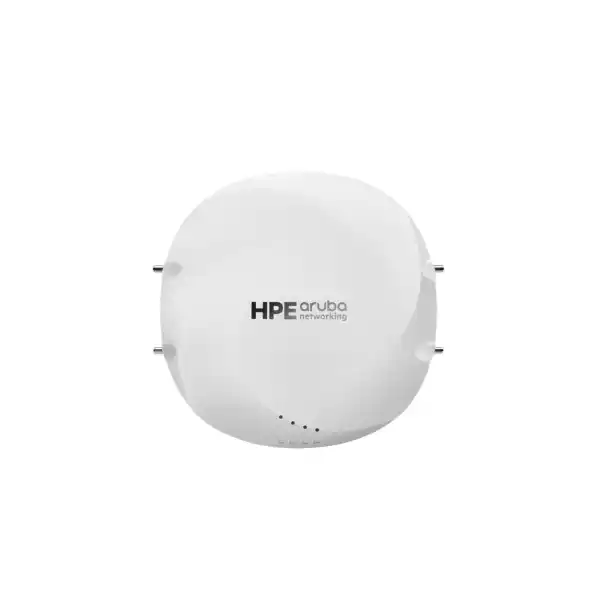
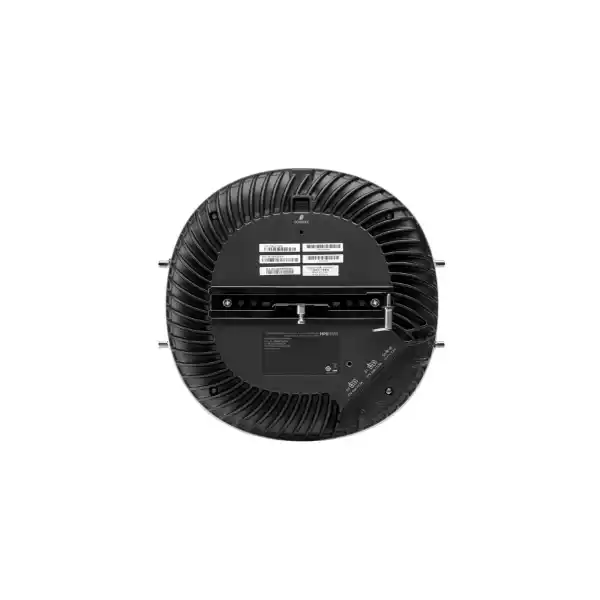
HPE Aruba Networking AP-634A in Dubai, UAE
A Wi-Fi 6E campus access point for enterprises that need controlled antenna design, multi-gigabit wired uplinks and a managed path to higher wireless capacity. The AP-634A belongs to the HPE Aruba Networking 630 Series and uses external antenna connectors, so RF design, approved antenna selection and local 6 GHz rules are central parts of the buying decision.
Confirm the regional product number, external antennas, mount kit, PoE budget, software compatibility and permitted 6 GHz operation before a bill of materials is finalised.
Direct answer for buyers
The HPE Aruba Networking AP-634A is a 630 Series indoor enterprise access point built around the Wi-Fi 6E generation and designed for external antennas. It is mainly used where a wireless designer wants more control over antenna type and RF coverage than an internal-antenna access point provides. Organisations planning corporate offices, campuses, specialised indoor areas or high-density wireless zones may consider it. Before proceeding, confirm the exact regional SKU, antenna models approved for the deployment, mounting hardware, PoE or DC power method, switch port capability, management software version and whether the intended 6 GHz channels are permitted for this model in the UAE. Those checks matter because regulatory and configuration conditions can change how the radio system can operate.
What the AP-634A does
The AP-634A provides managed indoor WLAN connectivity using the 630 Series radio architecture. The platform supports 802.11ax operation and the 630 family is designed around three radio bands: 2.4 GHz for broad client compatibility, 5 GHz for mainstream enterprise Wi-Fi, and 6 GHz for Wi-Fi 6E operation where the country regulatory table and configuration allow it. HPE specifies the 630 Series for a maximum aggregate data rate of up to 3.9 Gbps across the platform; actual client throughput is lower and depends on spectrum, channel width, client capability, RF conditions, uplink design and network policy.
Unlike the internal-antenna AP-635 family design, the AP-634/AP-634A chassis provides two sets of RP-SMA female antenna connectors. One set serves combined 2.4 GHz and 5 GHz operation, while the second set is for 6 GHz. That design is useful where a project requires manufacturer-approved external antennas, but it also makes professional installation and correct antenna gain configuration essential.
Who should consider it
The AP-634A is most relevant to IT teams and wireless integrators that already treat Wi-Fi as part of a designed campus infrastructure rather than a plug-in convenience network. It may suit organisations that need antenna choice for a particular room geometry, ceiling condition, mounting location or coverage pattern, and buyers who want dual multi-gigabit Ethernet connectivity with PoE options.
It is less suitable for a buyer who wants a basic stand-alone access point with no RF design work, or a project where external antennas and professional installation create unnecessary complexity. If an internal-antenna design meets the RF plan, a nearby HPE Aruba Networking model may be simpler. FourTeck can review whether AP-634A is justified for your site before the quotation is built.
Business challenges this model can help address
RF coverage needs more control
External antenna connectors allow a qualified designer to select an approved antenna approach for the intended environment instead of accepting a fixed internal pattern. The gain, orientation, cable path and regulatory limit still have to be engineered correctly.
Wireless demand is outgrowing legacy bands
The 630 Series was designed to extend 802.11ax into the 6 GHz band. Where 6 GHz operation is permitted, this creates additional spectrum choices for capable clients. Legacy client compatibility remains relevant because many devices still rely on 2.4 GHz or 5 GHz.
Uplink resilience matters
Two 2.5 GbE-capable RJ45 ports provide options for resilient wired and power designs. HPE describes dual-port failover capabilities for the 630 Series, but the switch design, cabling, PoE source and deployed configuration must support the intended behaviour.
IoT and location functions are part of the WLAN plan
The access point includes Bluetooth 5.0 Low Energy and 802.15.4 radio capability for supported location, wireless console and IoT gateway use cases. Application value depends on the management platform, software and wider solution architecture.
Verified technical information
The table below separates confirmed platform and installation-guide information from values that still require a regional quotation or project check. This avoids treating a similar 630 Series model as if it were the AP-634A.
| Brand | HPE Aruba Networking |
|---|---|
| Product name | HPE Aruba Networking AP-634A |
| Series | 630 Series Campus Access Points |
| Regulatory model name | APIN0634A |
| Regional product number | S4W55A appears in current market/regulatory trade references for AP-634A (RW); confirm the exact UAE ordering SKU with FourTeck before purchase. |
| Wireless standard | IEEE 802.11ax / Wi-Fi 6E generation; legacy IEEE 802.11a/b/g/n/ac services are supported by the 630 Series platform. |
| Radio bands | 2.4 GHz and 5 GHz; 6 GHz capability is subject to country regulations, regulatory table and deployed configuration. |
| Radio architecture | 630 Series tri-radio 2×2:2 platform. |
| Aggregate data rate | Up to 3.9 Gbps specified for the 630 Series platform; real application throughput is environment and client dependent. |
| External antenna connectors | Two RP-SMA female connectors for combined 2.4/5 GHz (A0/A1) and two RP-SMA female connectors for 6 GHz (B0/B1). |
| Ethernet | E0 and E1: two auto-sensing 100/1000/2500Base-T MDI/MDX RJ45 network ports. |
| PoE | Both Ethernet ports support PoE-in from 802.3at or 802.3bt compliant sources. |
| DC power | 12V DC interface; HPE Aruba Networking AP-AC2-12B adapter is an optional supported power method. |
| USB | USB 2.0 host interface; when active it can provide up to 5W/1A to a supported device. Power restrictions may affect USB availability. |
| IoT radio | Integrated Bluetooth 5.0 Low Energy and 802.15.4 radio for supported location, console and IoT gateway uses. |
| Console | Micro-B console connector; compatible console cable/module options are sold separately. |
| Mounting | Ceiling or wall deployment; suitable mount kit is ordered separately. |
| Operating environment | Indoor use; 0°C to 50°C and 5% to 95% non-condensing humidity. |
| AOS 10 minimum support for AP-634A | HPE documentation lists 10.7.2.0 (SSR) as the minimum AOS 10 release for AP-634A/AP-635A. |
| AOS 8 support | HPE Aruba Networking Wireless Operating System 8.13.0.x documentation includes AP-634A support. |
| Availability | Contact FourTeck to confirm current UAE availability, regional compliance, exact SKU and lead time. |
Regulatory, antenna and software dependencies
The AP-634A should not be bought from the model name alone. HPE’s installation guidance states that AP-634/AP-634A is intended for countries with an existing or clearly defined path for operation of 6 GHz radios with external connectorized antennas, and it tells buyers to confirm country availability. That point is especially important for a UAE project because the exact enabled channels, allowed power mode and regulatory behaviour come from the applicable country rules and HPE downloadable regulatory table. A feature shown for the same hardware family in another country is not automatically legal or enabled in the UAE.
External antennas must be manufacturer-approved and professionally installed. The installer is responsible for ensuring radiated power remains within the host-country limits and for entering antenna gain correctly in the management system. Antenna choice therefore belongs in the bill of materials and design scope; it should not be treated as an afterthought.
Software support is also model specific. HPE lists AP-634A in AOS 10 beginning with 10.7.2.0, and later AOS 8 documentation includes AP-634A in 8.13.0.x. AirWave 8.3.0.5 added AP-634A support. Existing Aruba estates should verify the exact controller, Central, AirWave and firmware path before introducing this model.
From requirement to working access point
Define the wireless outcome
Document user count, device mix, application traffic, coverage boundaries, roaming needs and any specialised antenna requirement.
Validate RF and regulatory fit
Confirm AP placement, approved antenna type, 6 GHz permission for the UAE, channel strategy and physical installation method.
Build the bill of materials
Include APs, antennas, mount kits, power accessories if needed, cabling, switches, licensing and service scope rather than quoting only the access point.
Check software readiness
Verify supported software releases, management architecture, policy model and onboarding sequence before installation day.
Install and validate
Use professional installation, confirm power and uplink state, test RF coverage, validate client behaviour and document the final configuration.
External antennas turn radio design into a procurement decision
The defining characteristic of the AP-634A for many buyers is not simply that it belongs to a Wi-Fi 6E family; it is that the access point exposes external antenna connectors. That gives a competent RF designer more flexibility in shaping coverage for a room, open hall, high ceiling, corridor, controlled work area or other indoor space. The value comes only when the antenna system is selected as part of the design. An antenna that is physically connectable is not automatically approved, appropriate or legal for the target configuration.
The AP-634/AP-634A connector arrangement separates the combined 2.4/5 GHz connections from the 6 GHz connections. That has practical consequences for the bill of materials. Buyers need to know which bands will actually be used, what antenna set is supported, how cables will be routed, how the AP is mounted, and whether the installation surface and nearby metalwork affect the pattern. The installer must also record antenna gain in the system management software so the radio operates within regulatory limits.
FourTeck can help frame those questions before the order is placed. For complex sites, an RF survey or predictive design is often more useful than simply increasing AP quantity. It can also reveal when an internal-antenna AP would be sufficient and remove unnecessary antenna components from the project.
Multi-gigabit uplinks and power planning should be designed together
A high-capacity wireless access point can only deliver useful performance when the wired access layer and power design are appropriate. The AP-634A hardware family provides two auto-sensing 100/1000/2500Base-T RJ45 interfaces. Both ports can accept power from compliant 802.3at or 802.3bt sources, and HPE describes the 630 Series as supporting resilient Ethernet and power operation through its dual-port design. The details of the switch configuration, network topology and failover behaviour still need to be validated for the chosen software architecture.
For a new deployment, specify switch port speed, PoE capability and cable condition at the same time as the AP. Cat5e or better is identified in HPE’s installation checklist, but existing horizontal cabling should be tested rather than assumed to support the intended multi-gigabit service. Power budget matters too. HPE’s Intelligent Power Monitoring can manage restrictions when power availability is constrained, which means a seemingly functional AP may operate with limitations if the power source is below the desired design point.
An optional 12V DC input exists through the supported AP-AC2-12B adapter. If both DC and PoE are connected, HPE documents DC as the preferred source, with PoE able to provide a fallback path. The quotation should state the intended powering method clearly so adapters, injectors and switch upgrades are included only where needed.
Management compatibility matters more than the logo on the chassis
Organisations with an existing Aruba estate should verify software support before standardising on AP-634A. HPE’s current supported-device documentation lists AP-634A/AP-635A support from AOS 10.7.2.0. Separate AOS 8 release information includes AP-634A under 8.13.0.x, and AirWave 8.3.0.5 added support for AP-634A. These version points are useful checks, but they are not a substitute for reviewing the full target architecture, licensing state, controller or Central service, feature requirements and supported upgrade path.
A project that already runs an older long-lived release may require an upgrade before AP-634A can join the network. That upgrade can affect other access points, gateways or operational procedures, so the cost of introducing the model is not always limited to hardware. Conversely, a greenfield environment can choose a current management approach from the outset and build the configuration standards around it.
FourTeck can help review software compatibility as part of product selection. Share the existing platform, controller or cloud-management state, current software release, AP estate and planned change window. That information allows the quotation and implementation scope to reflect the actual environment instead of assuming every Aruba access point is interchangeable.
Where AP-634A can make practical sense
Enterprise offices with designed RF zones
Multi-floor offices may use the external-antenna design where ceiling structure, meeting-room geometry or controlled coverage requires more antenna choice than a standard omnidirectional internal pattern. The RF plan should decide where AP-634A adds value and where a simpler AP is sufficient.
Education and training spaces
Classrooms, labs and collaborative spaces can create concentrated client demand. Wi-Fi 6E-capable devices may benefit from additional spectrum where allowed, but density design, roaming and application behaviour matter more than a peak data-rate number.
Healthcare and specialised interiors
Hospitals and clinics often have difficult building materials, equipment zones and strict change procedures. External antennas may help in selected areas, but placement, interference, security policy and application validation should be part of a structured WLAN design.
Hospitality and conference facilities
Meeting rooms, ballrooms and guest areas can shift quickly between normal and event density. A survey-led AP layout and well-planned wired access layer can be more important than installing identical AP counts in every zone.
Indoor industrial or operational spaces
Where an indoor environment has metal surfaces, racks or non-standard mounting points, an external-antenna AP can offer design flexibility. Confirm that the environment remains within the indoor operating limits and that selected antennas and mounts are approved.
Migration from older enterprise WLANs
AP-634A can be evaluated as part of a phased refresh where the organisation wants Wi-Fi 6E capability without replacing the entire campus at once. Software coexistence, client mix and controller support need to be checked before a phased design is approved.
Integration and operational considerations
Treat the access point as one element of the network rather than an isolated radio. The access switches must provide the intended Ethernet speed and PoE budget. VLANs, authentication, guest access, segmentation and upstream firewall policies need to align with the wireless architecture. If the project uses cloud or controller management, onboarding connectivity, DNS and DHCP services should be prepared before installation. HPE’s installation checklist also identifies discovery, DNS or DHCP-based services used during access-point discovery depending on the deployment.
RF placement is equally important. Concrete, water, brick, metal ducts, racks and reflective surfaces can change coverage significantly. HPE’s installation guidance recommends identifying absorbers, reflectors and interference sources during planning. A drawing-based design should therefore be validated in the real environment, especially when the project relies on directional or specialised external antennas.
Operational teams should decide how the AP will be monitored, how software updates are approved, which configuration standards apply, and what fault data must be retained. If dual Ethernet is used for resiliency, test the failure scenarios rather than assuming that a second cable creates automatic redundancy. If 6 GHz is central to the business case, test with actual 6 GHz-capable client devices and the approved UAE regulatory configuration.
For broader infrastructure planning, FourTeck can combine the AP requirement with network configuration and deployment services and help review adjacent switching or security needs through the FourTeck technology product portfolio.
Questions to resolve before requesting the quotation
Identify the coverage or mounting problem the AP-634A solves. If there is no specific antenna requirement, compare an internal-antenna model before committing.
List Wi-Fi 6E-capable laptops, phones and specialist devices. A 6 GHz strategy gives limited benefit when the client fleet cannot use it.
Confirm permitted bands, channels and power mode for AP-634A under the current HPE regulatory table rather than relying on another country’s documentation.
Check 2.5 GbE support, PoE budget, port count, cabling and redundancy design. Include switch remediation if the current access layer is a bottleneck.
Record AOS, controller, Central and AirWave versions where applicable. AP-634A has newer minimum support points than earlier 630 Series models.
External antennas require professional installation. Define whether FourTeck is supplying hardware only or also coordinating survey, mounting, configuration and testing.
Procurement checklist for AP-634A
✓ Confirm exact AP-634A regional SKU and quantity.
✓ Confirm APIN0634A model identity where compliance documentation is required.
✓ Confirm current UAE 2.4/5/6 GHz regulatory operation.
✓ Select manufacturer-approved external antennas and document gain.
✓ Select the correct mount kit for ceiling or wall construction.
✓ Check E0/E1 switch port speeds and cable quality.
✓ Verify 802.3at/802.3bt PoE capacity at the access switch.
✓ Decide whether optional DC power or injector accessories are required.
✓ Validate AOS/Central/controller/AirWave version compatibility.
✓ Confirm licenses or subscriptions required by the chosen management architecture.
✓ Define RF survey, installation and configuration responsibilities.
✓ State required delivery destination and target project window.
✓ Request current warranty and support options in the formal quotation.
How FourTeck can assist
FourTeck can help translate the model request into an orderable WLAN requirement. That can include reviewing AP quantity, user density, floor plans, antenna needs, switch and PoE readiness, management compatibility, licenses, mounting accessories and deployment services. The objective is to avoid a quotation that contains an access point but misses the components needed to use it correctly.
For replacement or expansion projects, share the existing Aruba model estate, software release and management platform. For greenfield projects, share floor plans, expected device counts and application priorities. FourTeck can then coordinate a more complete bill of materials and identify items that require vendor or regional confirmation.
You can review FourTeck business technology assistance or send the AP-634A requirement for quotation.
UAE availability and support guidance
Contact FourTeck to confirm current UAE availability for the HPE Aruba Networking AP-634A. Availability can depend on the exact regional SKU, quantity, regulatory status, vendor lead time, antenna requirement and the software or support package included in the project. A public listing for a related AP-634 variant should not be used as evidence that AP-634A is immediately available in Dubai.
Delivery and project coordination can be discussed after the bill of materials is confirmed. If installation or configuration is needed, include that scope in the quotation so mounting, antenna work, cabling checks, software onboarding and post-installation validation can be scheduled around the site conditions.
Warranty terms and support coverage should be confirmed on the specific quotation because service options can vary by SKU, region and contract selection.
Dubai, Abu Dhabi, Sharjah and Ajman project coordination
FourTeck can discuss AP-634A requirements for business deployments across Dubai, Abu Dhabi, Sharjah and Ajman as one UAE project scope. The useful starting point is the deployment location, quantity, floor plan, antenna approach, desired management platform and target schedule. Projects that span several Emirates may benefit from a consistent bill of materials and configuration standard, but RF placement should still be assessed for each site rather than copied from one building to another. Delivery, site access, installation responsibility, configuration, testing and handover should be written into the quotation where required. Current product availability and service scheduling remain subject to the confirmed scope and lead time.
GCC Availability
Organisations planning HPE Aruba Networking AP-634A deployments elsewhere in the GCC can ask FourTeck to review the requirement before procurement. A regional project may cover the United Arab Emirates, Saudi Arabia, Kuwait, Qatar, Bahrain or Oman, but wireless regulations and 6 GHz rules are not interchangeable between markets. The AP-634A is specifically sensitive to country approval because it uses external antenna connectors and can participate in 6 GHz operation only under the applicable regulatory framework. FourTeck can help coordinate model and antenna review, quotation preparation, management compatibility, installation scope and delivery planning after the destination is known.
Product availability, license region, delivery schedules, service visits, vendor lead times and permitted radio operation can vary by country, model and quantity. Share the destination country, required quantity, intended management platform, antenna requirement, deployment location and expected timeline. For regional enquiries that include Kuwait, FourTeck can also coordinate through its Kuwait technology presence. No GCC stock level, customs outcome or fixed installation date should be assumed until the project is reviewed.
Africa Availability
FourTeck can also help organisations evaluating the AP-634A for African projects, including multi-site requirements that span different regulatory environments. The practical review should begin with the destination country, exact AP quantity, chosen antenna approach, power and switching design, management software, project schedule and installation expectations. Because the 6 GHz band and external-antenna rules vary by jurisdiction, a configuration that is permitted in one market may require different channels, power limits or a different model selection elsewhere. The country decision should therefore be made before the bill of materials is finalised.
Availability and fulfilment can depend on vendor lead time, licensing region, shipment arrangements, local power and regulatory requirements, and whether on-site services are part of the scope. FourTeck can support requirement review and procurement planning for East Africa and other regions through resources such as FourTeck Africa, including selected project coordination in Kenya and Uganda. Buyers should provide the destination, quantity, preferred deployment window and support requirements so suitable guidance can be prepared without assuming local inventory or guaranteed delivery.
Related options and project components
AP-635A evaluation
Consider the related internal-antenna 630 Series variant when the RF design does not need connectorized external antennas. Confirm regional availability and exact specification before substituting models.
Aruba management review
Validate Central, controller or other supported operating architecture, software release and licensing before the AP is added to an existing estate.
PoE switching assessment
Check whether the access switches can provide multi-gigabit Ethernet and suitable PoE budgets, particularly where dual uplinks or resilience are planned.
Wireless survey and RF design
Use floor plans, user density and application needs to decide AP placement, antenna type and quantity rather than estimating from square metres alone.
Installation and configuration support
Scope mounting, antenna installation, configuration, commissioning and handover separately when the customer does not have an in-house wireless implementation team.
Why businesses contact FourTeck for this requirement
The value of assistance on AP-634A is in getting the dependencies right. FourTeck can help clarify whether the external-antenna model matches the RF objective, identify the information needed for the regional SKU, review switching and power readiness, and include installation or configuration services where requested. That is more useful than treating the access point as a stand-alone box.
A complete request can also reduce quotation revisions. If the buyer shares the existing wireless platform, current software release, floor plan, user density, antenna requirement, site location, quantity and target date at the beginning, FourTeck can structure questions around compatibility and bill-of-material completeness. Where a fact depends on vendor policy or regional regulation, it can be confirmed rather than guessed.
For a wider technology discussion, visit FourTeck UAE or contact the team with your project information.
What buyers are really trying to determine about AP-634A
Most useful AP-634A research is not about whether it is “fast.” Enterprise buyers are trying to determine whether the model is the right physical and operational fit for their building, whether 6 GHz can be used in their country, what must be ordered with it, and whether their existing Aruba environment can manage it. Those are the questions that decide project success.
Choose AP-634A when a designed external-antenna solution is part of the requirement and when your management, switching, power and regulatory environment supports the model. Do not select it simply because it belongs to the Wi-Fi 6E generation. A well-chosen internal-antenna AP can be a better purchase when there is no specific RF reason for external antennas.
AP-634A versus AP-634: what should procurement notice?
The letter suffix should not be ignored. AP-634 and AP-634A are distinct regulatory model identities, and HPE documentation lists APIN0634 and APIN0634A separately. Software support dates also differ: AP-634 appears in AOS 10 earlier, while AP-634A is listed from AOS 10.7.2.0. A quotation should therefore use the exact model and regional product number rather than accepting “AP-634 series” as sufficient identification. This matters in refresh projects because an older controller or software release that manages AP-634 may not automatically support AP-634A without an upgrade.
Does Wi-Fi 6E mean 6 GHz will work automatically in Dubai?
No. Wi-Fi 6E describes the technology generation, but 6 GHz operation is controlled by country regulations and vendor regulatory tables. HPE specifically notes that AP-634/AP-634A is offered where there is a defined path for operating 6 GHz radios with external connectorized antennas. The safe procurement approach is to confirm current UAE support for the exact model and intended antenna configuration before the 6 GHz business case is approved. If the project can deliver its goals on 5 GHz and wants a later 6 GHz path, that should also be stated so expectations are realistic.
What else needs to be bought with an external-antenna AP?
At minimum, review the approved antenna set and a mount kit suitable for the ceiling or wall. Depending on the project, the bill of materials may also need a compatible power adapter, PoE injector, console accessory, switch upgrades, licensing or subscription, and installation services. HPE’s installation checklist calls for one or two Cat5e-or-better network cables and compatible antennas for AP-634/AP-634A, while mount kits are ordered separately. The most expensive mistake is often not the AP price; it is discovering after delivery that the antenna, mount, PoE source or software path was omitted.
How should performance be interpreted?
HPE specifies the 630 Series at up to 3.9 Gbps aggregate data rate across its tri-radio architecture. That is a platform capability figure, not a promise that one user will transfer data at 3.9 Gbps. Real throughput depends on client radio capability, channel width, interference, signal level, protocol overhead, airtime sharing, security policy, upstream capacity and application servers. For a business case, start with the applications and number of concurrent devices, then design channel reuse and AP placement. Peak rates are useful for comparing architecture, but capacity planning should use realistic client behaviour.
Can an existing 1 GbE switch still connect it?
The Ethernet ports auto-sense 100/1000/2500Base-T, so a 1 GbE link is technically part of the supported interface range. The bigger question is whether 1 GbE becomes a capacity limit for the traffic profile and whether the switch can provide the required PoE. An organisation can sometimes phase the upgrade by connecting the AP to existing switching first, but that decision should be based on measured demand and the migration roadmap. If 6 GHz clients, wide channels and high-density use are central to the project, multi-gigabit switching deserves a serious review.
What information produces a useful UAE quote?
Send more than a model name. Include the number of APs, deployment Emirate and building type, current Aruba environment, software version, switch model, available PoE, whether 6 GHz is required, whether the customer already has approved antennas, the mounting surface, installation requirement and target project window. If the project is a new WLAN, provide floor plans and approximate user or device counts. This lets FourTeck distinguish hardware supply from a complete deployment requirement and identify questions that must go back to HPE or a regional channel before pricing is finalised.
A final point buyers often search for is price. Public web pricing is easier to find for adjacent AP-634 variants than for the newer AP-634A regional SKU, and reseller prices vary significantly with country, support and accessories. The dependable UAE price is therefore the project quotation after the exact regional model and bill of materials are confirmed. A low device-only price is not directly comparable with a quote that includes antennas, mount kits, software entitlement, support or installation.
Decision questions that prevent the wrong purchase
“We already use Aruba. Can we add AP-634A without changing anything?”
Not safely assumed. Inventory the current management platform and software release first. AP-634A has a documented minimum AOS 10 support point of 10.7.2.0, and AOS 8 documentation includes it from the 8.13.0.x line. If your estate is older, an upgrade may be required. That upgrade should be checked against the rest of the AP and gateway estate before the new model is approved.
“Can we choose any RP-SMA antenna that fits?”
No. HPE requires manufacturer-approved antennas and professional installation for this external-antenna model. The chosen antenna must also comply with the host-country EIRP limits, and the gain must be recorded in the management system. Ask for the supported antenna list that applies to the exact AP and regulatory domain, then make the antenna part of the approved design.
“Should we use both Ethernet ports?”
Only when the network design has a reason to do so and supports the intended resilient behaviour. Two 2.5 GbE-capable ports create options for data and power resilience, but a second cable alone does not define the switching configuration. Decide whether the project requires redundant access switches, power sources or a particular failover design, then validate that design with the chosen Aruba software and switch topology.
“Is AP-634A the right choice for every high-density room?”
No. Density is a system design problem. External antennas can help when the RF plan needs a particular pattern, but they can also add complexity. In many rooms an internal-antenna model may be easier to deploy. Compare the physical space, client count, channel plan, available bands, mounting constraints and operations capability before selecting the model. The AP should follow the RF design rather than the other way around.
“What should be tested after installation?”
Validate power state, negotiated Ethernet speed, management onboarding, radio state, SSID and policy behaviour, client authentication, roaming, application performance and the RF coverage expected from the selected antennas. Where 6 GHz is part of the design, verify it with approved local configuration and actual compatible clients. Record final AP placement, antenna gain and software version for future support.
“What makes a comparison quote fair?”
Compare like with like: exact regional AP SKU, antenna set, mount kit, power accessories, management entitlement, support term, installation scope, taxes and delivery assumptions. A quote for only the access point can look cheaper than a complete bill of materials but may leave the buyer with missing components. Ask each supplier to state dependencies and exclusions clearly.
Frequently asked questions
Is HPE Aruba Networking AP-634A a Wi-Fi 6E access point?
Yes. It belongs to the HPE Aruba Networking 630 Series, which is based on IEEE 802.11ax and designed for Wi-Fi 6E operation. Actual 6 GHz availability depends on the country regulatory table and configuration.
Does the AP-634A have built-in antennas?
The AP-634A is the external-antenna design. HPE documents two RP-SMA connectors for combined 2.4/5 GHz and two RP-SMA connectors for 6 GHz. Approved antennas are selected separately and require professional installation.
Can AP-634A use 6 GHz in the UAE?
That must be confirmed against the current UAE regulatory support for the exact model. HPE states that AP-634/AP-634A availability and operation depend on countries permitting 6 GHz with external connectorized antennas. FourTeck can help check the current regional position before ordering.
What Ethernet ports are provided?
The 630 Series AP-634A hardware provides two RJ45 ports, E0 and E1, supporting auto-sensing 100/1000/2500Base-T connectivity. Both ports can accept power from supported PoE sources.
What PoE standard should the switch support?
HPE documents 802.3at and 802.3bt compliant PoE sources for the AP. The appropriate switch budget should be checked against the intended feature set because restricted power can affect AP operation.
Which software versions support AP-634A?
HPE lists AP-634A/AP-635A with minimum AOS 10 support at 10.7.2.0. AOS 8 documentation includes AP-634A in the 8.13.0.x line, and AirWave 8.3.0.5 introduced AP-634A support. Verify the exact target architecture before upgrading or ordering.
Is a mount kit included?
HPE’s installation guide states that mount kits are accessories ordered separately. Select a kit that matches the ceiling rail, wall or other approved mounting surface used at the site.
Can it be installed outdoors?
No. HPE identifies the 630 Series campus AP in this installation guide as an indoor device intended for stationary use in protected environments. Use an outdoor-rated product family for outdoor coverage requirements.
What information should I send FourTeck for an AP-634A quote?
Provide quantity, deployment location, current Aruba software or management platform, switch and PoE details, antenna requirement, mounting type, whether 6 GHz is required, installation scope and target project timing.
Is UAE stock or delivery time guaranteed?
No. Current availability and lead time need to be confirmed for the exact regional SKU, quantity and project scope. FourTeck can coordinate the quotation after those details are known.
Build the AP-634A requirement before you buy
Send FourTeck your AP quantity, site, antenna requirement, current Aruba platform, switch and PoE details, and whether 6 GHz is part of the project. We can help turn that information into a quotation and identify the regional, software and installation points that must be confirmed.

Reviews
There are no reviews yet.