
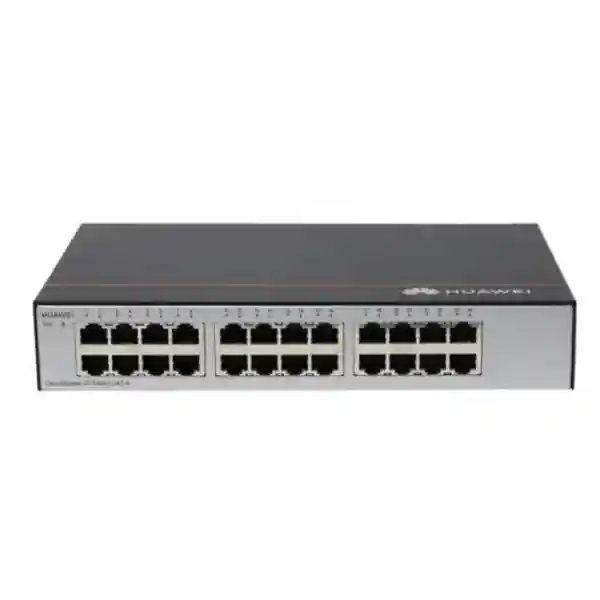
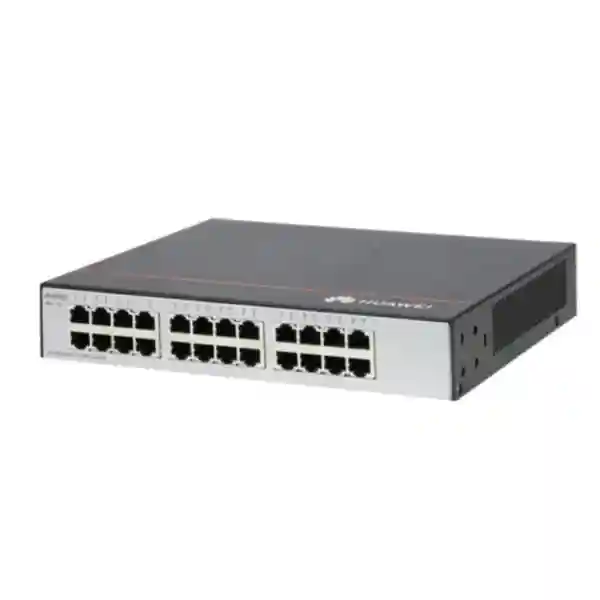
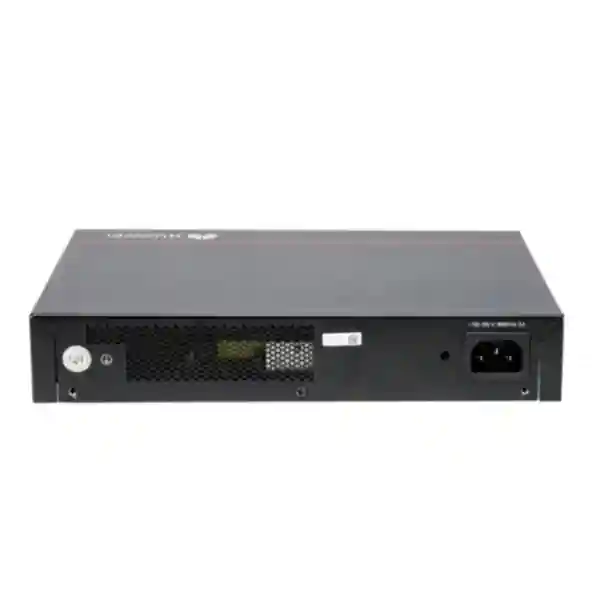
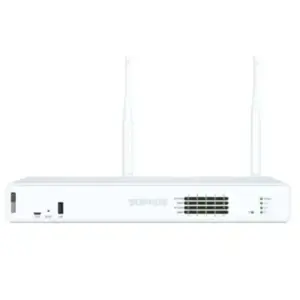
Huawei CloudEngine S1730S-L24T-A in UAE
A straightforward, unmanaged 24-port Gigabit Ethernet switch for offices, branches, workgroups, retail networks and edge connectivity where simple Layer 2 access, predictable throughput and fast deployment matter more than configuration complexity.
The S1730S-L24T-A provides 24 x 10/100/1000BASE-T ports, 48 Gbit/s switching capacity, approximately 36 Mpps forwarding performance and built-in AC power. It belongs to Huawei’s S1730S-L SOHO unmanaged family and is intended for plug-and-play Ethernet access.
What the Huawei CloudEngine S1730S-L24T-A is designed to do
The Huawei CloudEngine S1730S-L24T-A is best understood as a simple Ethernet fan-out device for networks that need many wired Gigabit ports but do not need local switch management. Twenty-four copper ports allow a single switch to aggregate desktops, printers, network-attached devices, point-of-sale terminals, workgroup equipment, uplink routers and other standard Ethernet endpoints. Because it is an unmanaged model, the deployment model is intentionally different from Huawei CloudEngine managed access switches: there is no expectation that an administrator will log in, build VLAN trunks, create access policies or maintain a local configuration database on the switch. The value proposition is simplicity, rapid installation and predictable Layer 2 forwarding.
For UAE businesses, this type of device can be useful in locations where the logical network policy already exists elsewhere. A firewall, router or managed distribution switch may handle routing, security policy, DHCP scopes, segmentation and Internet access, while the S1730S-L24T-A acts as a local access layer for endpoints that are allowed to share the same Layer 2 segment. This makes the switch especially relevant to small branch offices, temporary project offices, labs, classrooms, retail counters, service desks, back-office workgroups and extensions of an existing flat LAN.
FourTeck can position the S1730S-L24T-A as part of a wider UAE network design rather than as an isolated component. Customers that need end-to-end switching, firewall, wireless, server or support planning can also review the broader portfolio on FourTeck UAE and the integration capabilities available through FourTeck IT Services UAE.
Twenty-four 10/100/1000BASE-T Ethernet interfaces for standard RJ45 copper connections.
A capacity figure aligned with full-duplex Gigabit connectivity across 24 access ports.
Published packet forwarding performance suitable for wire-speed class Gigabit access traffic.
Integrated AC power simplifies installation by avoiding an external power brick for this model.
Core specifications at a glance
| Product | Huawei CloudEngine S1730S-L24T-A |
| Series positioning | S1730S-L SOHO unmanaged Gigabit Ethernet switch |
| Ethernet interfaces | 24 x 10/100/1000BASE-T copper Ethernet ports |
| Switching capacity | 48 Gbit/s |
| Packet forwarding rate | Approximately 36 Mpps |
| Power | AC power with built-in AC power module |
| PoE | Not specified as a PoE model; use a dedicated S1730S PoE variant when endpoint power delivery is required |
| Management model | Unmanaged / plug-and-play Layer 2 access |
Project note: Huawei has released multiple S1730S-L revisions over time. When exact chassis dimensions, rack accessories, production revision, environmental limits or country-specific compliance details are critical to a tender, confirm them against the offered part number and shipment revision on the supplier quotation.
Understanding the 48 Gbit/s switching figure
A 24-port Gigabit Ethernet switch has twenty-four interfaces, each capable of negotiating up to 1 Gbit/s. Ethernet ports are normally discussed as full-duplex links, meaning a port can transmit and receive simultaneously. A theoretical aggregate across 24 Gigabit ports therefore reaches 24 Gbit/s in one direction and 24 Gbit/s in the opposite direction, giving 48 Gbit/s when both directions are considered. The published 48 Gbit/s switching capacity of the S1730S-L24T-A is consistent with that access-port geometry.
The packet forwarding rate is a different measure. It represents how many packets per second the switching engine can process, which matters most when traffic consists of many small frames rather than a few large flows. Huawei publishes approximately 36 Mpps for this model. In practical office networks, traffic varies widely: file copies and backups may use large frames, voice signaling and interactive applications use smaller flows, printers generate bursts, and Internet-bound traffic is often constrained by the router or WAN circuit rather than the switch fabric. The switch therefore needs both adequate aggregate bandwidth and enough packet-processing capacity for mixed endpoint behavior.
These headline numbers should not be misread as an Internet speed guarantee. Internet performance depends on the firewall or router, WAN service, application server, DNS path, endpoint capabilities, cable quality, duplex negotiation and congestion outside the LAN. The S1730S-L24T-A provides local Ethernet forwarding capacity; it does not replace a router, firewall, wireless controller or WAN service.
Port architecture and practical cabling behavior
All 24 access interfaces are 10/100/1000BASE-T copper ports. That makes the S1730S-L24T-A compatible with the standard RJ45 cabling model used throughout offices and branches. Modern endpoints generally negotiate the highest common link speed automatically. A Gigabit-capable workstation connected through correctly terminated Cat5e or better horizontal cabling can normally establish a 1000BASE-T link, while older 100 Mbps devices can continue operating at their supported rate. This mixed-speed behavior is one reason a 24-port Gigabit switch remains useful during staged infrastructure refreshes.
For structured cabling deployments in Dubai, Abu Dhabi and other UAE locations, the physical path should be treated as part of the network design rather than as an afterthought. Permanent-link quality, patch-panel termination, patch-cord condition, bend radius, pathway separation from power cabling and labeling standards all affect supportability. When a port unexpectedly negotiates at 100 Mbps instead of 1 Gbit/s, the switch is not always the root cause. A split pair, damaged conductor, marginal keystone, low-quality patch cord or legacy two-pair installation can force a lower rate. A cable certification or at least a qualified wire-map and link test is valuable during commissioning.
The absence of dedicated SFP uplinks on the S1730S-L24T-A is an important architectural point. Any uplink from this switch uses one of the same copper Gigabit ports available to endpoints. That is completely acceptable for a small room or workgroup located close to its upstream switch, router or firewall. It is less ideal when the network requires fiber between floors, buildings, warehouses or electrically noisy areas. In those cases, select a Huawei variant with SFP/SFP+ uplinks or place the S1730S-L24T-A behind a suitable media/uplink device designed for the link distance.
Port-count planning should always reserve some growth. A switch with 24 physical ports does not mean all 24 should automatically be committed on day one. If one port is required for the uplink, 23 remain for local devices. Reserving additional spare ports for moves, additions, testing and emergency changes reduces the chance that an otherwise minor endpoint request forces an unplanned switch replacement.
Where this unmanaged switch fits — and where it does not
Good fit
A flat office LAN, a simple branch, a training room, a small retail back office, a bench network, a printer/desktop workgroup, a temporary project office or another environment where connected devices are intentionally allowed to share the same Layer 2 broadcast domain and where plug-and-play operation is preferred.
Choose managed switching instead
Networks that require local VLAN assignment, 802.1Q trunks, STP tuning, LACP configuration, authenticated access, port security, managed QoS policy, SNMP monitoring, centralized switch management, detailed counters or other administrator-controlled features should use a managed CloudEngine access model rather than an unmanaged S1730S-L switch.
Unmanaged switching: operational simplicity with clear design boundaries
Unmanaged switching is frequently misunderstood. It does not mean the device is inherently inferior; it means the operational objective is different. A managed switch exposes features and configuration interfaces because the network team wants to control forwarding behavior. An unmanaged switch minimizes those controls so the device can be inserted into a compatible topology with little or no configuration. The S1730S-L24T-A therefore works best when the upstream network design is already simple and deliberate.
The advantage is deployment speed. A technician can connect power, attach the uplink and patch endpoint cables without building a switch configuration. There is no local management IP to document, no administrative password lifecycle to maintain, no startup configuration to archive and no firmware configuration matrix created by site-specific feature settings. For organizations with many very small sites and limited local IT resources, that simplicity can reduce operational variation.
The trade-off is visibility and control. If an application experiences poor performance, an unmanaged switch cannot provide the same depth of interface counters, VLAN state, event logs, mirroring configuration or remote diagnostic access expected from managed infrastructure. Troubleshooting therefore relies more heavily on endpoint statistics, upstream managed devices, cable testing and physical inspection. This is acceptable in simple networks but can become limiting in larger or highly regulated environments.
A useful design rule is to place management intelligence where it produces operational value. If a branch has only a handful of homogeneous devices on one trusted LAN, an unmanaged switch can be appropriate. If the same branch carries corporate users, guest access, IP phones, cameras, payment systems and building devices that should be isolated from one another, managed access switching provides a more suitable control point.
UAE branch topology example
Consider a small UAE branch with one Internet firewall/router, twelve user desktops, four printers, two local appliances and several spare desks. If all wired devices are intended to reside on one corporate LAN, the S1730S-L24T-A can provide the copper access layer. One switch port connects to a LAN interface on the firewall or upstream managed switch, while the remaining ports serve endpoints. DHCP is supplied by the firewall, server or another network service. Internet policy is enforced at the firewall, and the S1730S-L24T-A simply forwards local Ethernet frames.
The same topology becomes unsuitable if the branch needs multiple VLANs delivered over a single trunk to the access switch and then separated by port. An unmanaged switch cannot be treated like a configurable access switch where ports 1–8 belong to one VLAN and ports 9–16 to another. If segmentation is a requirement, the correct approach is to choose a managed switch with VLAN support and validate the entire design, including firewall subinterfaces, DHCP scopes, routing, ACL policy and any voice or wireless requirements.
For firewall-led branch designs, FourTeck can help align the switching layer with security architecture through Firewall Dubai. The objective is not simply to sell a 24-port switch, but to ensure the access switch matches the segmentation, monitoring and support expectations of the site.
Sizing the S1730S-L24T-A correctly
Port count is the first sizing dimension, but it should not be the only one. Begin with a device inventory that separates currently active Ethernet drops from anticipated growth. Count desktops, thin clients, printers, access-control controllers, small servers, NAS devices, uplinks and any other wired equipment. Then identify devices that require PoE. Because the S1730S-L24T-A is not the PoE variant, phones, access points or cameras that rely on Ethernet power require either separate injectors, their own power supplies or, more cleanly, a PoE-capable switch.
Next evaluate traffic concentration. A 1 Gbit/s uplink from this switch to a firewall or distribution device may be adequate for normal office use, especially when the WAN circuit is significantly slower. It can become a bottleneck if many endpoints simultaneously access a high-performance local server, storage system or backup target located beyond that uplink. In such cases, a managed switch with faster uplinks, aggregation options or a more capable topology should be considered.
Physical placement also matters. A small unmanaged switch installed close to endpoints can reduce copper run length, but extending Layer 2 indiscriminately through multiple daisy-chained unmanaged switches increases fault domains and complicates troubleshooting. For larger floors and multi-room deployments, a structured access/distribution design is generally preferable. Each wiring zone should have clear uplinks, documented patching and a defined path back to the network core or firewall.
Finally, assess support requirements. If the organization expects centralized monitoring, automated inventory, configuration backups, port-level incident diagnosis or proactive alerting, the operational requirement itself points toward managed switching. Hardware capacity alone does not make a model suitable. A 24-port device can be electrically adequate while still being operationally wrong for the environment.
FourTeck’s broader regional portfolio is available through FourTeck Global for customers coordinating standards across UAE and international offices.
Six deployment scenarios
1. Small office workgroup
Use the switch to connect desktops, printers and a router in an office where all wired users share one trusted LAN. The low-administration model helps organizations without a dedicated on-site network engineer.
2. Retail back office
Connect non-PoE back-office terminals, PCs, printers and local appliances when the security architecture does not require the access switch itself to provide VLAN segmentation or authentication.
3. Classroom or training room
Provide Gigabit connectivity to a group of training PCs where rapid setup is more important than per-port policy. The room can be connected to a controlled upstream network for Internet and server access.
4. Temporary project office
Deploy a simple wired LAN for a site office or short-term project where equipment must be installed quickly and later moved, provided the topology remains intentionally flat and trusted.
5. Lab or bench network
Connect test systems and engineering devices that need local Gigabit communication without a managed control plane. This is useful when configuration simplicity is itself a lab requirement.
6. Edge expansion behind managed infrastructure
Extend a single approved Layer 2 segment from a managed distribution switch into a small group of nearby copper endpoints where no additional segmentation is needed at the edge.
PoE planning: an important model-selection checkpoint
The S1730S-L24T-A should not be selected when the main objective is to power IP phones, wireless access points, CCTV cameras or other IEEE 802.3af/at powered devices directly from the switch. Huawei uses separate PoE-capable S1730S variants for that requirement. A non-PoE switch can still carry Ethernet traffic for a device that has its own power source, but it will not replace the power delivery function expected from a PoE access switch.
This distinction matters because many modern UAE office networks combine data and power on the same structured cabling system. Wireless access points are commonly ceiling-mounted where local power outlets are inconvenient. IP cameras may be installed at doors, corridors and perimeter locations. VoIP handsets are often powered centrally so they can remain online through UPS-backed network power. A switch selected only by port count can therefore create hidden deployment cost if PoE requirements are discovered after procurement.
During quotation, classify every endpoint into one of three categories: data only, data plus PoE, or data with separate local power. Then identify required PoE standards and power budgets. If only a few endpoints need power, injectors may be technically possible, but a purpose-built PoE switch normally produces a cleaner, more supportable installation when the powered-device count is significant.
Security architecture around an unmanaged access switch
Security does not disappear because the access switch is unmanaged; it simply shifts to other layers. The firewall or router remains responsible for Internet security, traffic inspection, NAT, VPN and policy between routed networks. Endpoint security controls protect workstations and servers. Identity services control user access to applications. Physical controls protect network rooms and cabling. The access switch forwards Ethernet traffic within the segment it is given.
This means the S1730S-L24T-A should be used only where a common Layer 2 segment is acceptable. Connecting untrusted visitor devices, corporate endpoints, cameras and sensitive systems to the same flat unmanaged segment can undermine a carefully designed firewall policy because traffic between devices on the same subnet may never traverse the firewall. Segmentation requirements should therefore be identified before switch selection, not after installation.
Physical access is equally important. In a managed enterprise access switch, unused ports can often be administratively disabled or placed into restricted VLANs. An unmanaged switch does not provide the same administrative control model. If the unit is installed in a public or semi-public area, an unused live port can become an easy point of network attachment. Place the switch in a controlled cabinet or room where practical and control access to patching infrastructure.
For branches with compliance obligations, security audits or high-value systems, the design team should document why unmanaged switching is acceptable. If the environment requires NAC, switch-port authentication, per-port visibility or enforcement, choose managed infrastructure instead. Simplicity is valuable only when it is compatible with the risk model.
Power, UPS and environmental planning in the UAE
The S1730S-L24T-A uses AC power with an integrated AC power module, simplifying desk, shelf or cabinet installation. For business deployments, power should still be designed systematically. Connect network equipment to a suitable UPS when short outages or transfer events must not interrupt local communications. If the firewall, Internet termination, access switch and critical servers are distributed across different power sources, a UPS plan should account for the complete service chain rather than protecting only the switch.
Thermal conditions deserve particular attention in the Gulf. Even when a switch is located indoors, communications cabinets can become significantly warmer than the surrounding room if ventilation is poor or if the enclosure contains routers, firewalls, PoE switches and power equipment. Avoid sealing active equipment in an unventilated cupboard. Maintain airflow around chassis vents, keep dust accumulation under control and ensure room cooling remains available during normal operating hours and after-hours periods when network equipment continues running.
Do not size cabinet power only by switch nameplate values. Include the firewall, ISP devices, any media converters, servers, wireless components and future additions. For UPS runtime calculations, use realistic load figures and account for battery aging. A small branch may need only enough runtime to bridge generator start or short utility disturbances, while a remote site may require a longer autonomy window.
Grounding and structured cabling practices also matter. Copper Ethernet links should remain inside environments appropriate for copper cabling; inter-building runs or routes exposed to different earth potentials and lightning risk typically justify fiber or specialized protection. The S1730S-L24T-A has only copper access ports, so projects with inter-building links should plan the optical conversion or select a switch with native fiber uplinks.
Performance planning for real applications
Office traffic is bursty. A workstation may be nearly idle while a user reads email, then suddenly transfer hundreds of megabytes during a file synchronization. Printers generate short bursts. Cloud applications depend heavily on the WAN. Local backup jobs may run at night and consume sustained bandwidth. The goal of access switching is to accommodate these patterns without introducing avoidable local bottlenecks.
A Gigabit access port provides ample capacity for most ordinary desktop workflows, but application performance depends on the full path. A 1 Gbit/s workstation connected to the S1730S-L24T-A can still experience slow transfers if its destination is across a 100 Mbps WAN, behind a heavily loaded firewall, on a slow storage array or reached through a congested 1 Gbit/s uplink shared with many peers. Troubleshooting should therefore follow the end-to-end path and measure each segment.
If multiple users frequently access a local server that sits on the same S1730S-L24T-A, local traffic can remain inside the switch rather than crossing the uplink, depending on the Layer 2 topology. This can be efficient. If the server is on a different VLAN or behind an upstream router, traffic must leave the switch and the uplink can become the aggregation point. That architectural distinction is more important than simply counting ports.
High-throughput storage, virtualization clusters, engineering workstations with multi-gigabit interfaces and dense Wi-Fi 6/6E access points are outside the natural design center of a basic unmanaged Gigabit switch. Those environments should evaluate 2.5GE, 5GE, 10GE or faster access/uplink options and managed features appropriate to the workload.
Installation methodology for a clean deployment
1. Validate the topology before unpacking. Confirm which upstream device provides the LAN, which subnet the endpoints will use, whether all devices are permitted on one broadcast domain, and whether the uplink is copper Gigabit. If the answer reveals VLAN, fiber or PoE requirements, stop and reassess the model before installation.
2. Inventory endpoint ports. Map switch ports to patch-panel outlets and endpoint names. Even though the switch has no local configuration, documentation still matters. A simple spreadsheet showing port number, room, outlet ID and device makes future support substantially faster.
3. Prepare power and ventilation. Install the switch on a stable surface or appropriate mounting arrangement for the supplied chassis revision. Connect it to the planned power source, preferably UPS-backed for business-critical sites. Do not obstruct ventilation openings.
4. Connect the uplink first. Link one Gigabit copper port to the approved upstream firewall, router or switch. Confirm link establishment and basic LAN reachability before populating all endpoint ports. This provides a known-good reference point.
5. Add endpoints in controlled groups. Connect a few endpoints at a time and test DHCP assignment, default gateway reachability, DNS resolution, local applications and Internet access where permitted. Incremental patching makes it easier to identify an unexpected loop, faulty cable or miswired outlet.
6. Verify negotiated speeds. On representative endpoints, check that Gigabit-capable systems negotiate 1.0 Gbit/s. A persistent 100 Mbps negotiation often indicates cabling or endpoint limitations and should be corrected before handover.
7. Label and document. Label the switch, uplink, power source and patching. Record the installed model, serial details, purchase information and support contact. Unmanaged does not mean undocumented.
Troubleshooting guide for field technicians
No link light: Start with the physical layer. Confirm the endpoint is powered, the patch cord is seated, the correct wall outlet is patched at the cabinet and the cable is not damaged. Swap in a known-good patch cord, then test another switch port. If a known-good device and cable work on the same port, the problem lies elsewhere in the original path.
Link established but no IP address: An unmanaged switch does not normally supply DHCP. Check the DHCP server, firewall or router providing addresses. Confirm the endpoint belongs on the same Layer 2 segment and that the upstream device is reachable. If the site design expects tagged VLAN behavior, the unmanaged switch may be the wrong device for the topology.
100 Mbps instead of 1 Gbit/s: Test cabling first. Gigabit Ethernet over copper uses all four pairs, while 100BASE-TX can operate over two pairs. A termination fault can therefore produce a link that works but only at 100 Mbps. Verify the endpoint NIC supports Gigabit and is configured for auto-negotiation unless a documented exception applies.
Slow file transfers: Determine whether the source and destination are on the same switch. Measure endpoint disk performance, CPU utilization, NIC speed and server load. Check whether the traffic crosses the uplink or firewall. A throughput issue should be localized rather than attributed to the access switch based only on symptoms.
Intermittent network outage: Look for accidental loops created by users connecting two switch ports together or bridging multiple unmanaged switches incorrectly. In simple environments, physical topology control is essential. Remove unauthorized links, restore a single clear path and test again.
Only one area affected: Compare a failing port and a working port, then move the device temporarily. This simple A/B method can separate endpoint, cabling and switch-port faults without sophisticated management telemetry.
Migration from an older 10/100 switch
Replacing a legacy Fast Ethernet switch with the S1730S-L24T-A can remove a 100 Mbps access bottleneck for compatible endpoints. The upgrade is most noticeable for local file transfers, backups and any traffic that remains within a Gigabit-capable LAN. However, an access-switch replacement should be planned as a small migration rather than a casual cable swap.
Before the change, label every existing cable and identify the uplink. Legacy installations often contain undocumented daisy chains or small downstream switches hidden under desks. Photograph the old switch and patching. Determine whether any device has a manually forced speed/duplex setting left from older infrastructure; modern Gigabit connections should normally use auto-negotiation.
After moving the uplink and endpoints, verify IP addressing and critical applications. Then inspect negotiated link speeds on a sample of Gigabit endpoints. If users still see 100 Mbps, test the horizontal cable. An upgrade can expose old cabling problems that were invisible when every device ran at Fast Ethernet.
Remember that a Gigabit access switch does not increase the subscribed Internet bandwidth. A branch with a 200 Mbps Internet service will still have a 200 Mbps WAN ceiling, although users can benefit from faster communication with local resources and from reduced contention inside the LAN.
Comparing model-selection paths inside the S1730S family
Huawei has offered multiple S1730S models with different port counts, PoE capabilities and uplink options. The correct comparison starts with function rather than price. The S1730S-L24T-A is the straightforward choice when the requirement is twenty-four copper Gigabit ports with integrated AC power and unmanaged operation. A model with PoE should be chosen when powered endpoints are part of the design. A model with SFP ports is preferable when fiber uplinks are needed. A managed model is required when VLAN and administrative features are part of the specification.
Avoid selecting a switch solely because its port count matches. Two switches with 24 copper ports can serve very different purposes. One may be unmanaged and suited to a flat LAN; another may support VLANs, STP, LACP, ACLs, monitoring and centralized management. Those capabilities can change project cost, but they also change what the network team can operate and troubleshoot.
For tenders and refresh programs, write requirements in functional terms: number and speed of access ports, uplink media, uplink speed, PoE device count and wattage, VLAN count, management protocols, redundancy, mounting, power input, environmental conditions and support expectations. Model selection becomes much easier when these items are explicit.
Procurement considerations for Dubai, Abu Dhabi and the wider UAE
Enterprise procurement involves more than confirming that a model name appears on a quotation. For the S1730S-L24T-A, confirm the exact part number being supplied, hardware revision, included power cable, mounting accessories if required, warranty terms, lead time and whether the unit is intended for the target market. Product generations evolve, and distributors may offer successor revisions with closely related names. The quotation should make the offered revision unambiguous.
If the switch is for a standardization project, ask whether the same revision can be supplied across all required sites. Consistency simplifies spares, documentation and support. If a successor model is proposed, compare not only port count but also management behavior, dimensions, power arrangement, forwarding specifications and uplink options before approving substitution.
For multi-site UAE rollouts, consider holding a small number of spares centrally. Unmanaged switches are generally simple to replace because no site-specific configuration needs to be restored, which can make them attractive in low-complexity branches. A replacement procedure can be reduced to identifying the failed unit, moving labeled patch cables, connecting power and verifying the uplink and endpoint connectivity.
Logistics planning should include site access windows, rack or shelf availability, power outlets, UPS capacity, patch cords and technician travel. The hardware itself may be easy to install, but missing patch leads or unclear cabinet access can delay a deployment more than the switch configuration would.
For broader project coordination, FourTeck UAE can help align switch supply with firewall, server, wireless and structured IT requirements so procurement decisions remain consistent across the site.
Designing around the lack of dedicated uplink ports
A key detail of the S1730S-L24T-A is that all published interfaces are copper access ports; there is no separate fiber uplink listed for this model. One of the 24 Gigabit ports therefore becomes the uplink in a normal branch deployment. This is not a problem when the switch sits within copper reach of its upstream device and 1 Gbit/s aggregation is sufficient.
It does affect capacity planning. If the switch serves many devices that all send traffic through the same upstream link, that single Gigabit connection becomes the shared path. Twenty-three local endpoint ports may theoretically generate far more than 1 Gbit/s in aggregate, but normal office workloads are bursty and rarely saturate every port simultaneously. The design is therefore often acceptable for user access, yet it should be reviewed for media production, local backup, high-volume scanning, large software distribution or storage-heavy workflows.
It also affects distance. Copper Ethernet has practical distance limits based on cabling standards, so a branch requiring a 150-meter or inter-building uplink should not attempt to solve the problem with an extra-long copper run. Fiber provides electrical isolation, longer reach and better suitability for backbone links. Select a switch with native fiber interfaces or use properly designed conversion equipment.
Finally, the lack of a separate uplink does not mean a particular physical port is special. In an unmanaged switch, the network designer simply dedicates one appropriate Gigabit port to the upstream path. Documentation should clearly label that cable so it is not disconnected during desk moves or routine patching.
Why a simple switch can reduce branch operational burden
Configuration is valuable when it enables required policy, but configuration also creates state that must be maintained. Managed switches need administrative credentials, configuration backups, firmware planning, standardized templates and change control. For a small trusted branch that requires none of those features locally, an unmanaged switch removes several operational tasks. A replacement unit can be installed without reproducing a complex configuration.
This can be particularly useful for geographically distributed organizations where remote branches do not have dedicated IT staff. A central service desk can instruct a local technician to identify the labeled unit and replace it, while the firewall and other managed devices remain the primary policy points. The network design becomes easier to explain and the branch has fewer configuration dependencies.
However, simplicity should never be confused with invisibility. A business still needs asset records, purchase details, serial numbers, port documentation and a spare strategy. The upstream managed infrastructure should be monitored so loss of the branch switch can be detected indirectly through endpoint or uplink status. Critical locations may require managed switching precisely because proactive visibility is important.
The correct balance depends on business impact. A training room that can tolerate a quick hardware swap has different operational needs from a payment-processing environment, healthcare location, industrial control network or regulated office. Use the S1730S-L24T-A where its simplicity is an advantage, not where it conceals requirements that should be managed.
Frequently asked technical questions
Is the Huawei CloudEngine S1730S-L24T-A managed?
No. Huawei positions the S1730S-L series as an unmanaged SOHO Gigabit switch family. The S1730S-L24T-A is intended for plug-and-play Layer 2 forwarding rather than administrator-defined configuration.
How many Ethernet ports does it have?
It provides 24 x 10/100/1000BASE-T copper Ethernet ports. In a typical installation, one of those ports is used as the uplink and the remaining ports connect local devices.
Does it have SFP fiber uplinks?
The published S1730S-L24T-A interface specification lists 24 copper 10/100/1000BASE-T ports and does not list dedicated SFP uplink ports. For native fiber uplinks, select a model designed with SFP or SFP+ interfaces.
Does the S1730S-L24T-A provide PoE?
It is not the PoE-designated model. If IP phones, Wi-Fi access points or cameras need power from the Ethernet switch, choose a suitable PoE-capable S1730S variant with the required power budget.
What is the switching capacity?
Huawei publishes 48 Gbit/s switching capacity for the S1730S-L24T-A. This aligns with 24 full-duplex Gigabit access interfaces when transmit and receive directions are considered.
What is the forwarding rate?
The published packet forwarding rate is approximately 36 Mpps. Packet forwarding rate and switching capacity measure different aspects of switch performance.
Can I create VLANs on it?
Not as an administrator-configured feature on an unmanaged access switch. If your topology requires assigning ports to VLANs, carrying 802.1Q trunks or applying segmentation policy, use a managed model.
Can it connect directly to a firewall?
Yes, provided the firewall interface and the attached endpoints are designed to operate on the same intended Layer 2 LAN. One Gigabit copper port can serve as the switch uplink to the firewall or upstream switch.
Will it increase Internet speed?
It can remove a local Fast Ethernet bottleneck when replacing an older 10/100 switch, but Internet speed remains limited by the WAN service, firewall/router performance, application path and endpoint conditions.
Can I use it for CCTV?
It can carry Ethernet data for cameras that have separate power, but it does not provide the PoE function typically used for modern IP cameras. Security networks may also require VLAN isolation or managed monitoring, in which case a managed PoE switch is the better design.
Can I use it with Cat6 cable?
Yes. Standard Gigabit Ethernet over copper can operate over suitable Category 5e or better structured cabling, so Cat6 is appropriate when properly installed and terminated.
Is it suitable for a large enterprise campus?
It may be useful at a very simple edge location, but enterprise campuses typically need managed switching, redundancy, VLANs, monitoring, policy controls and higher-speed uplinks. Those requirements point to more capable CloudEngine access platforms.
Decision recap: when the S1730S-L24T-A is the right fit
Choose it when
You need up to 24 copper Gigabit Ethernet connections, the site uses a simple common LAN, endpoint power is handled separately, a copper Gigabit uplink is sufficient, and plug-and-play operation is more valuable than local switch configuration.
Move to a managed model when
You require VLANs, fiber or multi-gigabit uplinks, PoE, centralized monitoring, per-port policy, authentication, detailed diagnostics, redundancy features or formal enterprise access-layer controls.
The strongest deployment is one where the simplicity is intentional. If the technical requirement is only to extend one trusted Ethernet segment to a moderate number of nearby wired devices, the S1730S-L24T-A is easy to understand, easy to install and easy to replace. If the requirement list grows into segmentation and operational control, selecting a managed switch at the outset avoids redesign later.
Quotation input checklist
To prepare an accurate UAE quotation and avoid model mismatch, provide the following information with your request. These details help confirm whether the S1730S-L24T-A is the correct fit or whether a PoE, fiber-uplink or managed alternative is more suitable.
Number of switches and UAE emirate/site.
Active ports today plus expected growth.
Any phones, access points or cameras needing switch power.
Copper, fiber, required distance and target speed.
Whether multiple VLANs or isolated device groups are required.
Desk, shelf, cabinet or rack expectations.
Required service level, spares and response expectations.
Required delivery date, installation window and rollout phases.
FourTeck UAE consultation for Huawei access switching
A 24-port switch is only one layer of the network. FourTeck can help determine whether the S1730S-L24T-A should connect directly to a firewall, sit behind a managed distribution switch, be replaced by a PoE variant, or be upgraded to a managed access platform based on your actual topology. That review can cover endpoint count, VLAN requirements, uplink design, structured cabling, UPS planning, branch standardization and deployment support.
For a straightforward flat LAN, the S1730S-L24T-A offers a clean combination of 24 Gigabit copper interfaces, 48 Gbit/s switching capacity, approximately 36 Mpps forwarding performance and integrated AC power. Its unmanaged design eliminates local configuration tasks and supports rapid branch or workgroup deployment. For more complex environments, the same requirements exercise makes it clear when a managed Huawei CloudEngine switch is the better long-term choice.
Send your quantity, delivery emirate, endpoint count, uplink type and whether PoE or VLANs are required. FourTeck can then align the exact hardware revision and accessory set with the project rather than relying on model-name assumptions.

Reviews
There are no reviews yet.