
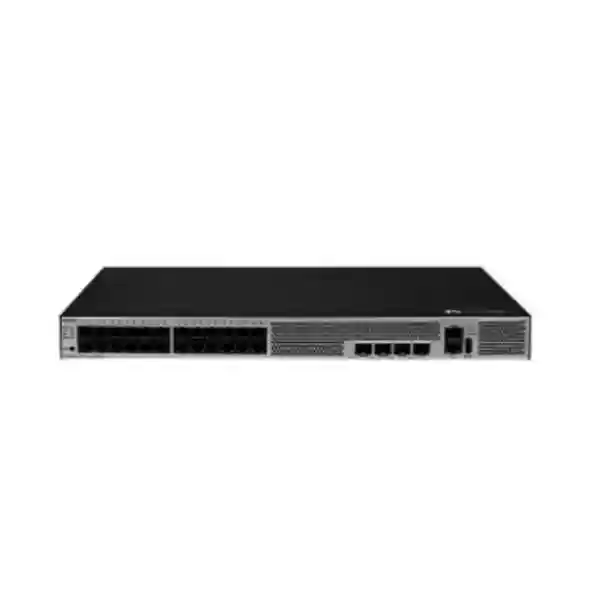
Huawei CloudEngine S5731-S24T4X-D
A compact 24-port Gigabit Ethernet access switch with four 10GE SFP+ uplinks, built-in DC power, high-performance packet forwarding, mature IPv6 support, intelligent operations capabilities, and a feature set designed for enterprise campus access and aggregation roles.
For UAE organizations planning a dependable wired access layer, the S5731-S24T4X-D combines conventional copper endpoint connectivity with high-speed optical uplinks in a shallow 1U chassis. Its architecture makes it suitable for branch communications rooms, building distribution points, industrial facilities with DC power infrastructure, managed service deployments, public-sector networks, education campuses, hospitality environments, and enterprise sites where rack depth, power method, routing capability, and operational consistency matter as much as raw port count.
Direct answer
Choose the Huawei CloudEngine S5731-S24T4X-D when the design requires 24 non-PoE Gigabit copper access ports, four 10GE SFP+ uplinks, DC input, enterprise switching and routing features, and a compact shallow chassis. It is especially relevant where phones, access points, and cameras are powered separately, or where the network rack already uses -48 V DC power distribution.
10/100/1000BASE-T copper connectivity for endpoint and downstream network access.
High-speed optical or DAC uplinks for aggregation, core attachment, or resilient dual-homing.
Designed for wire-speed enterprise access workloads within the platform’s published forwarding profile.
Huawei publishes device and system switching-capacity values for the S5731-S24T4X-D.
Rated for -48 V DC to -60 V DC input, with a broader published operating input range.
43.6 x 442.0 x 220.0 mm basic chassis dimensions support space-conscious installations.
What the S5731-S24T4X-D is designed to do
The Huawei CloudEngine S5731-S24T4X-D sits in the enterprise campus switching category and is built around a straightforward access-layer proposition: provide a substantial set of Gigabit copper ports for users and devices, then move aggregated traffic upstream through multiple 10 Gigabit Ethernet interfaces. That combination remains highly relevant in offices and institutional networks because many endpoints still connect at 1 Gbit/s, while the aggregate traffic generated by dozens of endpoints can easily justify 10GE uplinks. The result is a design that avoids overspending on multigigabit access interfaces when they are not required, while still preserving a strong uplink path toward aggregation or core switching.
The “-D” suffix is important because it identifies the built-in DC power version of this compact 24-port model. That distinguishes it from the similarly named AC version and from the deeper chassis variant that uses modular power supplies. In practical procurement terms, engineers should not treat S5731-S24T4X, S5731-S24T4X-A, and S5731-S24T4X-D as interchangeable line items. Port count and forwarding performance may look similar, but power architecture, chassis depth, and deployment assumptions differ. The S5731-S24T4X-D is the model to specify when the site has a compatible DC plant and when the shallow chassis is desirable.
This switch is also explicitly non-PoE. That makes it a better fit for desktop PCs, printers, servers, controllers, security appliances, building-management gateways, fixed workstations, and other endpoints that have their own power source. It can still carry traffic for IP phones, wireless access points, or cameras if those devices are powered through separate injectors or another PoE layer, but engineers should not plan on the S5731-S24T4X-D supplying endpoint power. When Power over Ethernet is a design requirement, the PoE-capable models in the wider S5731-S family should be evaluated instead.
Hardware architecture and physical design
Compact rack footprint
The basic chassis dimensions are approximately 43.6 mm high, 442.0 mm wide, and 220.0 mm deep, which places the platform in a standard 1U rack-mount class while keeping depth notably lower than many full-depth enterprise switches. The maximum physical depth is greater when protruding rear components are included, so cabinet planning should always reserve clearance for cabling, airflow, grounding, and service access rather than using the nominal chassis depth as the only measurement.
A shallow enclosure can be useful in older communications cabinets, wall-mounted enclosures, branch racks, telecom closets, and industrial control spaces where standard 600 mm or 800 mm deep data-center cabinets are unavailable. It also simplifies cable management when copper patch panels and fiber termination are installed in the same small rack. For UAE projects, where branch facilities can range from purpose-built server rooms to compact retail or logistics sites, the physical form factor can materially affect whether a network refresh is practical without replacing the existing enclosure.
Processor, memory, and local storage
Huawei documentation for the compact S5731-S24T4X-D identifies a 1.4 GHz four-core CPU, 2 GB of RAM, and 1 GB of flash memory. These resources support the VRP software environment, management functions, routing and switching control-plane processes, logging, configuration storage, protocol state, and the operational services needed by a managed enterprise switch. Forwarding itself is handled through dedicated switching hardware rather than relying on the general-purpose CPU for every packet.
The distinction between control-plane resources and forwarding-plane capacity matters when assessing a campus switch. A good access design does not merely ask whether ports can pass traffic; it also considers how the device behaves during topology changes, routing updates, monitoring activity, authentication events, software upgrades, and periods of management-plane demand. The S5731-S architecture is intended to provide enterprise switch behavior rather than function as an unmanaged Layer 2 device with a basic web interface.
Dedicated management interfaces
Operational access is supported through a dedicated RJ45 console interface and an RJ45 Ethernet management interface, while a USB 2.0 port is available for supported maintenance workflows. This separation is useful because network engineers can keep management traffic off the production VLAN fabric, use console access for initial deployment or recovery, and maintain a predictable out-of-band management path. In regulated or security-conscious environments, the management port can be connected to a dedicated administration network protected by access controls, jump hosts, and monitoring policies.
A dedicated management design is especially valuable during disruptive events. If spanning tree, routing, VLAN configuration, or an uplink path fails, administrators can still reach the switch through a separate management segment when the physical and logical design supports it. For remote branches, combining out-of-band management with a console server or secure management gateway can reduce truck rolls and shorten incident resolution times. The switch should therefore be assessed not only as a forwarding device but as an operational component in the wider network-management architecture.
Port map: 24 Gigabit access interfaces and four 10GE uplinks
The fixed access layer consists of 24 10/100/1000BASE-T Ethernet interfaces. These ports negotiate standard Ethernet speeds and are appropriate for conventional wired endpoints, downstream unmanaged or small managed switches, printers, workstations, servers operating at Gigabit speed, network appliances, controllers, and other equipment that does not require power from the switch. Because the ports are copper RJ45 interfaces, they integrate directly with structured Cat5e, Cat6, or better cabling systems according to the required Ethernet distance, installation standard, and environmental conditions.
Four 10GE SFP+ interfaces provide the high-speed path toward the rest of the network. These interfaces can be used for fiber transceivers or compatible direct-attach connectivity depending on the topology and supported module list. A common design is to allocate two 10GE ports to resilient uplinks toward a pair of aggregation switches and reserve the remaining interfaces for stacking, server interconnect, a local distribution device, or future capacity. Another design may use all four uplinks in link aggregation where the upstream architecture supports it. The correct arrangement depends on failure-domain design, physical paths, upstream port availability, and whether the switch participates in an iStack or other resiliency topology.
A 24-port access switch with 40 Gbit/s of total nominal uplink interface bandwidth can provide substantial headroom compared with a single 1GE uplink. That does not mean every edge port can simultaneously transmit at full line rate through one uplink without contention; no practical network should be designed by simply adding port speeds. Instead, engineers should calculate expected concurrency, application mix, east-west versus north-south traffic, backup windows, video usage, virtualization traffic, internet breakout behavior, and oversubscription targets. The four 10GE interfaces give the designer flexibility to distribute that aggregate load across resilient paths.
When optics are used, module type should be selected based on fiber media, connector system, wavelength, supported distance, and the exact Huawei compatibility requirements for the installed software release. Short-range multimode modules, longer-range single-mode modules, and direct-attach copper each solve different cabling problems. Procurement teams should avoid selecting optics only by physical SFP+ form factor; the module must be electrically, optically, and operationally compatible. Link budget, patch-panel loss, connector cleanliness, fiber type, and existing structured cabling must all be considered.
For brownfield projects, the port map also helps with migration sequencing. Existing Gigabit endpoints can often move one patch lead at a time, while new 10GE uplinks are pre-staged toward the aggregation layer. This allows an access-switch replacement to be executed with controlled outage windows. A disciplined migration plan records old and new switchport mappings, VLAN assignments, access-control settings, trunk configuration, link aggregation, spanning-tree role, management IP addressing, and monitoring integration before any production cable is moved.
Switching performance and traffic engineering
96 Mpps forwarding
Huawei publishes forwarding performance of 96 million packets per second for this model. Packet-per-second capability is particularly relevant when traffic consists of small packets, because small frames create more forwarding events for a given amount of bandwidth than large frames. In enterprise environments this can occur with transactional applications, control traffic, voice, certain security flows, and highly distributed client activity. The published forwarding level positions the switch for demanding campus access use rather than low-end unmanaged switching.
128/672 Gbit/s switching capacity
Huawei lists switching capacity as 128/672 Gbit/s, where its product documentation distinguishes device switching capability from system switching capability. Capacity figures are useful for platform comparison, but they should be interpreted together with port layout and forwarding performance. For this switch, the physical interface mix is often the more intuitive design reference: 24 Gigabit access ports plus four 10GE uplinks, with packet forwarding engineered for enterprise campus workloads.
Performance planning should start with applications rather than headline bandwidth. A floor of office users browsing cloud applications may generate modest sustained traffic with short bursts, while a design studio, surveillance environment, backup segment, software-development floor, or branch hosting local virtualized workloads can create higher sustained load. Network architects should profile current interface utilization and growth trends wherever possible. Historical monitoring data from the outgoing switching layer provides a stronger basis for sizing than user count alone.
Quality of Service is also important when multiple traffic classes share the same uplink. Voice, business-critical transactional flows, interactive desktop traffic, backup traffic, software distribution, video, and guest usage may all compete for capacity. The purpose of QoS is not to create bandwidth that does not exist; it is to define predictable treatment when links are congested. Classification, marking, queue selection, scheduling, policing, and trust boundaries must be designed end to end rather than configured on one access switch in isolation.
Buffering and congestion behavior should be considered in architectures that funnel many 1GE interfaces into one or two uplinks. Microbursts can cause packet loss even when average monitoring graphs appear low. For workloads sensitive to packet loss or latency, engineers should examine burst characteristics, aggregation ratios, uplink diversity, and application behavior. Where sustained demand approaches the available uplink capacity, adding additional 10GE paths or moving the workload closer to a higher-capacity aggregation platform is usually preferable to relying on queue tuning alone.
DC power design, consumption, cooling, and environmental limits
The S5731-S24T4X-D uses a built-in DC power architecture. Huawei specifies a rated DC input range of -48 V to -60 V DC and a broader operating input range of approximately -38.4 V to -72 V DC. This makes the model relevant to telecom-style power environments, industrial facilities, network rooms with centralized DC plants, and sites where DC-backed power is preferred for operational reasons. It is not a direct replacement for an AC-powered switch unless the site includes the required DC supply, cabling, protection, grounding, and qualified installation practices.
Power consumption is modest for a 24-port enterprise switch. Published figures identify approximately 42 W minimum consumption, about 57 W at 30 percent traffic load, roughly 61 W at 100 percent traffic load under the test conditions, and 76 W maximum consumption. Real deployments vary based on software activity, interface usage, optics, traffic pattern, environmental temperature, and operating state. These figures are nevertheless useful for DC plant sizing, UPS runtime estimates where conversion is involved, thermal calculations, and branch energy budgeting.
Huawei lists maximum heat dissipation around 259 BTU per hour for the compact DC model. In a single-switch branch rack this is rarely a major thermal burden, but multiple switches, routers, security appliances, servers, and power-conversion equipment can collectively produce substantial heat. Rack-level thermal planning should therefore use the combined heat output of all active equipment rather than evaluating each switch in isolation. The availability of cooling during utility-power failures should also be considered if the network power system has longer backup runtime than the room air-conditioning system.
The platform uses forced-air cooling with intelligent fan-speed control and a front-to-rear airflow direction. That direction must be respected in cabinet layout. Blocking intake or exhaust paths, pressing the switch tightly against unmanaged cabling, or combining equipment with conflicting airflow directions can increase internal temperature and fan speed. Cable-management arms, fiber slack, DC leads, and patch cords should be routed so they do not obstruct ventilation. Dust management is equally important in warehouses, construction environments, and industrial sites.
The published long-term operating range is -5°C to +45°C from sea level through 1800 meters altitude, with an altitude-related reduction in the upper temperature limit above that point. Storage temperature extends from -40°C to +70°C, and supported relative humidity is 5 percent to 95 percent non-condensing. These values describe the equipment capability under defined conditions, not a recommendation to run a communications room continuously at the thermal extreme. For reliability, network rooms should be designed with controlled temperature, clean airflow, proper grounding, and environmental monitoring.
In the UAE, ambient outdoor temperature can significantly exceed indoor equipment limits, so installation location matters. A switch rated for enterprise indoor operation should not be placed in an unconditioned external cabinet simply because the cabinet is physically sheltered from sunlight. Solar loading, dust, humidity changes, and loss of active cooling can create internal conditions outside the design envelope. For remote or industrial deployments, FourTeck engineers can help assess enclosure type, cooling strategy, power conversion, grounding, and environmental monitoring as part of the wider network design through FourTeck IT Services UAE.
Layer 2 switching functions for enterprise access networks
The value of an enterprise access switch comes from control as much as connectivity. In a managed campus environment, endpoint ports are normally assigned to VLANs that separate user groups, voice systems, printers, building-management equipment, servers, guest services, operational technology, and network-management traffic. VLAN design limits broadcast domains, creates administrative boundaries, and provides the logical structure required by security policy. The S5731-S family supports mature Ethernet functionality suited to these segmented networks.
Trunk interfaces carry multiple VLANs between switches or toward routers, firewalls, wireless controllers, virtualization hosts, and other infrastructure. A production trunk should be explicitly defined: permitted VLAN list, native or untagged VLAN behavior, link aggregation membership, spanning-tree expectations, and management controls should all be documented. Allowing every VLAN everywhere may simplify a first installation but expands failure domains, increases the impact of configuration mistakes, and makes troubleshooting harder. A better design carries only the VLANs required across each trunk.
Spanning-tree mechanisms remain relevant because Layer 2 redundancy can otherwise create forwarding loops. In a properly designed campus, redundant physical paths should be intentional and the loop-prevention topology should be predictable. Root bridge placement, edge-port behavior, protection features, and link aggregation must align with the desired traffic path. When engineers migrate from another vendor, protocol interoperability and timer behavior should be validated rather than assuming every default is identical.
Link aggregation allows multiple physical Ethernet links to operate as a logical bundle when both ends support a compatible configuration. This can improve aggregate bandwidth and resiliency without requiring individual flows to split arbitrarily across different Layer 3 paths. The effectiveness of a bundle depends on hashing behavior and traffic diversity, so a four-link bundle does not guarantee that a single flow will use the combined bandwidth of all four links. It does, however, give a busy access switch additional aggregate capacity and link-failure tolerance.
Storm control, loop protection, MAC address management, broadcast suppression, and other edge safeguards are part of a disciplined access-layer policy. These features can reduce the impact of accidental loops, faulty devices, or unexpected broadcast behavior. Their thresholds should be configured with care. An overly aggressive storm-control threshold can interfere with legitimate discovery or failover traffic, while a threshold that is too loose may not protect the network during a real event. Baseline measurements and a staged rollout are preferable.
Enterprise campus switches also participate in operational visibility. Interface counters, errors, discards, duplex state, link transitions, VLAN state, MAC learning, and protocol status should be incorporated into network monitoring. A port that is “up” is not necessarily healthy; CRC errors, packet drops, frequent flaps, or rising utilization can point to cabling faults, transceiver issues, endpoint problems, or oversubscription. Good monitoring turns the switching layer from a passive utility into a measurable service.
Layer 3 routing and mature IPv6 capability
Huawei positions the CloudEngine S5731-S family with enhanced Layer 3 features and mature IPv6 capabilities. This allows the switch to participate in routed campus designs instead of functioning only as a Layer 2 bridge. Depending on software release, licensing, and the precise feature set enabled in the deployment, the switch can support the routing functions needed for access, aggregation, and resilient campus architectures. Engineers should always match the intended protocol set against the software version and commercial feature package being procured.
Inter-VLAN routing is one common requirement. Rather than sending every VLAN to an external router-on-a-stick connection, a Layer 3 campus design can terminate selected VLAN gateways directly on switching infrastructure. This reduces unnecessary traffic hairpinning and can improve fault isolation. The placement of default gateways should nevertheless be an architectural decision. Security-sensitive traffic may still need to cross a firewall even if the switch is technically capable of routing it locally.
Static routing is useful for small branches, isolated segments, management networks, and deterministic paths where a dynamic routing protocol would add complexity without operational benefit. Larger environments may use dynamic routing to exchange reachability information and converge after topology changes. Route summarization, metric design, default-route behavior, failure detection, and redistribution policy should be documented carefully. The campus edge should not become a place where multiple routing protocols are casually redistributed without clear control, because that can create loops or unstable convergence.
IPv6 planning deserves equal attention. Many enterprises have historically treated IPv6 as a future project while endpoints and service providers increasingly enable it by default. A mature campus design should decide whether IPv6 will be disabled, contained, dual-stacked, or fully routed. Simply ignoring IPv6 can create blind spots because clients may generate IPv6 traffic even when the organization thinks it is operating an IPv4-only network. The S5731-S family’s IPv6 capability provides a foundation for structured adoption when the enterprise is ready.
Dual-stack environments require consistent security and operations across both protocol families. Address planning, first-hop behavior, neighbor discovery, access control, monitoring, logging, DNS, DHCPv6 or SLAAC policy, routing, and management access should be reviewed together. A network that is tightly controlled over IPv4 but permissive over IPv6 does not have a consistent security posture. Change procedures and troubleshooting tools also need to support both stacks.
For complex campus designs, the switch can form part of a larger routed access architecture where the boundary between Layer 2 and Layer 3 is moved closer to users. Routed access can reduce spanning-tree domains and improve fault containment, but it requires a clear addressing plan, dynamic routing design, gateway strategy, and automation model. The correct architecture depends on campus size, operational maturity, application requirements, wireless integration, and the capabilities of the upstream core.
Access security, segmentation, and policy enforcement
Access switching is the point where users and devices physically enter the enterprise network, making it a critical policy boundary. A secure design starts with port-level intent: which device types may connect, which VLAN or segment should they use, what authentication is required, what traffic is permitted, and what should happen when the identity of the endpoint is unknown. The S5731-S family provides enterprise security and access-control capabilities that can be integrated into a broader identity and segmentation architecture.
IEEE 802.1X-based access control is often used where organizations need user or device authentication before granting normal network access. In a full solution, the switch acts as the network access device while a RADIUS or policy platform determines authentication and authorization outcomes. The design may assign VLANs, access policies, or other attributes based on identity. Deployment should account for devices that do not support 802.1X, including printers, building controllers, legacy appliances, and certain IoT endpoints, so that exceptions do not become uncontrolled bypasses.
DHCP security mechanisms, source validation, ARP protection, and related controls can help defend against common local-network attacks and accidental misconfiguration. These tools depend on accurate trust boundaries. For example, an uplink toward an authorized DHCP server may be trusted while ordinary endpoint ports remain untrusted. If trust is applied incorrectly, security features can either fail to protect the network or unintentionally block legitimate services. Change control and lab validation are therefore important before enabling anti-spoofing features at scale.
Management-plane security is equally important. Administrative access should use secure protocols, centralized authentication where appropriate, role separation, source-address restrictions, and logging. Default credentials and unnecessary services should be eliminated. SNMP should be configured using secure versions and limited to authorized monitoring systems. Network time must be synchronized so logs from switches, firewalls, servers, and identity systems can be correlated during troubleshooting and incident response.
Segmentation should be based on business and security requirements, not only organizational convenience. Finance users, guest access, CCTV, building management, voice, developer labs, printers, and operational technology often have different trust levels. VLANs provide Layer 2 separation, but true security segmentation generally requires enforcement at routed boundaries or through policy systems. A VLAN alone does not automatically stop traffic if routing permits it elsewhere. Network diagrams should therefore show both logical segmentation and the points where access policy is enforced.
Organizations using dedicated firewalls between security zones can integrate the campus switching layer with those controls so that sensitive traffic is intentionally forwarded through inspection. FourTeck maintains a specialist UAE security practice at FourTeck UAE, which can be used as a starting point for broader network, switching, firewall, and infrastructure planning rather than treating the access switch as an isolated purchase.
iStack, resilient topology design, and failure domains
Huawei lists intelligent stacking, or iStack, among the capabilities of the S5731-S series. Stacking can allow multiple physical switches to be managed and operated with a more unified logical structure, which can simplify uplink design, configuration, and resiliency. It can also support cross-member link aggregation in supported topologies so that downstream or upstream links are distributed across different physical units. This improves resilience against a single member or link failure when the overall design is implemented correctly.
Stacking does not eliminate the need for failure-domain planning. If all stack members share the same rack, power source, upstream fiber route, management path, and environmental system, several independent-looking links may still fail together. A high-availability design asks what failures are being protected against: one cable, one interface, one switch, one power feed, one rack, one room, or an entire building. The answer determines whether a stack is sufficient or whether physically separate switching systems and routed resiliency are required.
Software maintenance is another design consideration. Some stacked architectures can simplify upgrades, while others still require a maintenance window that affects the logical system. Organizations with stringent availability targets should review the exact software-upgrade procedure, compatibility matrix, stateful behavior, and outage expectations for the selected VRP release. It is better to define the maintenance model during procurement than discover later that the expected “non-stop” upgrade behavior does not apply to the installed combination.
Uplink diversity is critical. Two 10GE uplinks connected to different ports on the same upstream chassis protect against a cable or transceiver failure but not against loss of that chassis. Connections split across two aggregation switches provide a broader protection boundary, assuming the aggregation architecture supports the required multi-chassis or routed design. Fiber paths should also be physically diverse when building infrastructure allows it; two logical paths in the same conduit are not truly independent.
For branch networks where a single access switch is acceptable, the four 10GE interfaces still provide useful flexibility. One can serve the primary core path, another can be a standby or secondary routed link, and additional ports can connect a local server, storage appliance, security device, or expansion switch. Designing port roles before installation prevents the common problem of consuming every high-speed interface for convenience and then discovering there is no capacity for redundancy or growth.
Operations, monitoring, automation, and lifecycle management
Huawei positions the CloudEngine S5731-S series for simplified operations and maintenance. In modern campus networks, this means much more than logging into a command line when a user reports a problem. A well-managed switch should be integrated into inventory, configuration backup, performance monitoring, event collection, change control, authentication, software lifecycle, and security operations. The device becomes part of an operational system in which health and configuration drift can be observed rather than discovered only during incidents.
SNMP-based monitoring remains common for interface statistics, device health, environmental information, and alerts. Streaming or more programmable telemetry methods may be used where the broader management platform supports them. The goal is to capture enough information to answer practical questions quickly: Which port is dropping packets? Has an uplink utilization pattern changed? Did a fan or power condition generate an alarm? Which interfaces are flapping? Is a VLAN missing from a trunk? When did the configuration change?
Configuration consistency is especially important across dozens or hundreds of access switches. Standard templates can define management access, time synchronization, DNS, AAA, logging, VLAN naming, uplink policy, spanning-tree protections, QoS, security controls, and monitoring. Site-specific variables are then applied within that structure. This reduces the risk of every switch becoming a unique handcrafted configuration that only one engineer understands.
NETCONF support and programmable management capabilities can be used as part of automation workflows in compatible environments. Automation should be treated as controlled change, not simply faster typing. Templates need validation, version control, rollback plans, peer review, and a method for detecting partial failure. The safest automation systems maintain idempotent intent where possible and confirm post-change operational state rather than assuming that a successful API response means the network behaves as expected.
Software lifecycle planning should include approved release selection, security advisory review, regression testing, maintenance windows, backup of current configuration, and recovery procedures. A switch installed today may remain in service for years. Procurement should therefore consider support entitlement, access to software updates, vendor lifecycle status, compatibility with the chosen optics, and the organization’s ability to test upgrades before production rollout.
Asset data should record serial numbers, model identifiers, management addresses, rack locations, software versions, support status, connected uplinks, and ownership. This is particularly useful in multi-site UAE deployments where equipment may be distributed across emirates, warehouses, retail branches, clinics, schools, or office floors. Accurate inventory reduces replacement time and prevents uncertainty when security teams need to determine which devices are affected by a specific advisory.
Deployment scenarios in the UAE
Office access layer
A corporate office can use the 24 Gigabit ports for workstations, printers, room systems, and wired endpoints while the 10GE SFP+ interfaces connect to a building or campus aggregation layer. Where wireless access points and phones require PoE, those devices can remain on dedicated PoE switches while the S5731-S24T4X-D serves non-PoE users and infrastructure.
Industrial and telecom rooms
Facilities with -48 V DC systems may prefer a DC-powered enterprise switch to avoid local AC conversion. The shallow form factor can fit compact cabinets, while Gigabit access and 10GE uplinks provide adequate capacity for controllers, engineering stations, gateways, and network appliances. Environmental limits still need to be respected; the switch is not automatically an outdoor industrial device.
Education campus
Schools, colleges, and training centers often have distributed communications closets with conventional Gigabit clients and fiber backhaul. The S5731-S24T4X-D can be used where endpoint power is not required from the switch, while multiple 10GE uplinks provide paths toward centralized core infrastructure, server rooms, or high-capacity internet gateways.
Retail and branch networks
A branch may connect point-of-sale back-office systems, staff workstations, printers, local controllers, and security appliances. The compact chassis suits smaller racks, while enterprise routing and management features support standardized remote operations. Separate PoE switching can be used for cameras, phones, and wireless access points when required.
Government and regulated environments
Public-sector and regulated organizations can use managed access controls, segmentation, centralized authentication, monitoring, and separate management networks as part of a documented security architecture. Procurement should validate the exact software features, approved support entitlement, origin requirements, and any organization-specific compliance criteria before purchase.
Service provider managed edge
Managed service providers may deploy standardized access switches at customer sites and monitor them centrally. DC power, predictable hardware, template-based configuration, dedicated management, and fiber uplinks can make the platform suitable for repeatable designs where customer edge networks must be operated consistently across many locations.
How to size the switch correctly
The simplest sizing question is whether 24 non-PoE Gigabit access ports are enough. Count every production endpoint, planned spare, management connection, downstream device, and temporary requirement. A switch with 24 physical ports should not be designed with all 24 permanently occupied on day one unless expansion is impossible or another switch is readily available. Spare ports provide flexibility for moves, new users, troubleshooting, equipment replacement, and temporary devices.
The second question is endpoint power. If a significant number of connected devices require PoE or PoE+, this model may not be the appropriate access switch. Using external injectors for a large number of devices usually adds clutter and operational complexity. A non-PoE switch is best when the majority of endpoints have independent power or when the design intentionally separates powered endpoints onto another switching tier.
The third question is uplink demand. Review historical utilization from the current switch if available. If the existing 1GE uplink already reaches sustained high utilization or experiences bursts and drops, moving to 10GE can remove a major bottleneck. If several application groups generate heavy traffic simultaneously, multiple 10GE uplinks may be justified. Conversely, using four 10GE links simply because they exist can consume valuable aggregation ports without delivering a measurable benefit.
The fourth question is resiliency. Decide whether failure of one access switch is acceptable. If not, dual-switch designs may be required, with endpoints or downstream systems distributed where practical. For servers and critical appliances with dual network interfaces, each interface can connect to a different physical switch if the overall topology and link aggregation method support it. For ordinary desktop users, access-layer switch failure may remain a localized outage that the organization accepts.
The fifth question is power compatibility. A DC model should be selected intentionally. Verify the site’s DC voltage, available current, breaker or fuse arrangement, cable gauge, grounding method, polarity, redundancy expectations, and installation responsibility. Network teams sometimes assume that “DC power” is a simple alternative connector choice, but it is part of the electrical infrastructure and must follow the site’s engineering and safety procedures.
The sixth question is rack and cable geometry. Measure usable rack depth, not only rack external depth. Account for patch panels, rear doors, vertical cable managers, power distribution, fiber bend radius, and connector protrusion. A shallow switch helps, but poor cable planning can still make a compact cabinet difficult to service. Front-to-rear airflow also requires a clear path through the enclosure.
The final question is lifecycle. Confirm the desired software feature set, support coverage, spare strategy, compatible optics, and standardization goals. A network refresh is easier to operate when the organization standardizes on a small number of approved switch templates rather than buying a different model for every site. FourTeck can provide broader regional sourcing and enterprise infrastructure support through FourTeck Global for organizations coordinating projects across multiple countries.
Procurement, optics, licenses, and support considerations
A complete switch quotation should identify more than the base chassis. The bill of materials may need rack-mount hardware, compatible SFP+ transceivers, fiber patch cords, DAC cables, console accessories, DC power cabling or termination components, support entitlement, software licenses where required, and spare optics. If the switch is replacing an existing vendor platform, the project may also require new transceivers because optics that fit physically are not always supported across vendors.
Licensing should be matched to the exact functions that the production design intends to use. Enterprise switching platforms can expose features differently across software editions, releases, and commercial packages. Before procurement, document the required routing protocols, automation methods, advanced security functions, virtualization or fabric features, management platform integration, and any special telemetry. The supplier can then verify the correct entitlement instead of discovering missing capabilities during implementation.
Support coverage is particularly important for infrastructure that will remain in service for several years. A valid vendor or authorized support path helps with software access, bug investigation, replacement procedures, compatibility questions, and escalation. Organizations should align support duration with their planned asset lifecycle and maintenance model. A switch that is inexpensive at purchase but difficult to support can create higher operational cost later.
Optics should be included in the design review because fiber problems are a common source of failed deployments. The correct module must match wavelength, distance, fiber type, connector, and supported platform. Existing patch panels should be inspected for labeling and cleanliness. Long-distance links may require optical power-budget checks. If the network spans multiple buildings, the fiber route and ownership should be confirmed before scheduling the cutover.
For UAE procurement, lead time can vary by distributor inventory, exact part number, support bundle, and optics. Projects with fixed construction or migration dates should lock the bill of materials early enough to allow substitutions to be evaluated properly rather than made under time pressure. A substitution should be checked for power type, depth, port mix, software feature set, transceiver compatibility, and support status, not only for port count.
Organizations operating sites outside the UAE can also coordinate related infrastructure procurement through FourTeck Africa where a regional project needs consistent network standards across African branches. The important objective is to keep hardware selection, support expectations, and configuration standards aligned across locations rather than creating isolated one-off deployments.
Migration and implementation methodology
A reliable migration begins with discovery. Export the existing switch configuration, interface descriptions, VLAN database, spanning-tree status, link-aggregation state, routing table, neighbor information, MAC address table, DHCP relay configuration, access-control lists, authentication settings, management configuration, and monitoring details. Capture interface utilization and error counters over a representative period. This creates both a technical baseline and a rollback reference.
Next, translate the old configuration into the Huawei VRP model rather than copying commands literally. Vendor syntax differs, and some features use different conceptual defaults. The migration document should map each old interface to the new physical port, identify access versus trunk mode, list allowed VLANs, define uplink bundles, record IP addresses, and specify security policy. Where possible, build the new configuration from a standardized template and insert site-specific parameters.
Pre-stage the switch before the maintenance window. Load the approved software version, apply baseline security settings, create VLANs, configure management, define uplinks, set interface descriptions, add routing, configure time and logging, and integrate authentication. If a lab environment is available, connect representative endpoints or traffic generators. At minimum, validate console and management access, uplink negotiation, VLAN reachability, and the intended routing behavior before the device is moved into the production rack.
During cutover, use a structured port migration sheet. Move uplinks and critical services in the planned order, then verify reachability before moving the next block of endpoints. Monitor spanning-tree events, routing neighbors, interface errors, link aggregation, and CPU state. Do not wait for users to report problems. Active validation can include gateway reachability, DNS, DHCP, application access, voice registration where applicable, internet access, monitoring, and remote-management connectivity.
Rollback criteria should be defined before starting. Examples include failure to establish the upstream trunk, inability to restore routing adjacency, widespread authentication failure, unexpected loops, or application-impacting packet loss that cannot be resolved within the maintenance window. Keeping the original switch configuration and cable map available makes rollback faster. Cables should be labeled before migration so that restoration does not depend on memory.
After cutover, compare actual state with the design. Confirm all expected ports, VLANs, routes, uplinks, monitoring, logs, time synchronization, AAA, and management access. Clear temporary migration configuration, back up the final running configuration, update diagrams and asset records, and record the installed software version and serial number. Monitor interface errors and utilization closely during the first production period because cabling faults or overlooked capacity issues often appear soon after a change.
A migration is complete only when documentation is updated and operations staff know how to manage the new platform. Handover material should cover common show commands, configuration backup, password or AAA process, escalation contacts, spare handling, software upgrade procedure, and the topology diagram. This reduces dependency on the project engineer and helps the support team respond consistently after the implementation phase ends.
Frequently asked technical questions
Does the S5731-S24T4X-D support PoE?
No. This is a non-PoE model. Its 24 copper access ports carry Ethernet data but are not intended to power phones, access points, cameras, or other powered devices. If endpoint power is required, select a PoE-capable S5731-S model or design a separate PoE layer. External injectors are practical for a small number of devices but become cumbersome at scale.
What is special about the “-D” version?
The “-D” version is the compact built-in DC power model. That matters for both electrical and mechanical design. It uses a DC input rather than the built-in AC supply of the “-A” variant, and its shallow 220 mm basic chassis depth is useful in compact cabinets. The exact DC infrastructure should be validated before purchase.
How many 10 Gigabit uplinks are available?
Four fixed 10GE SFP+ interfaces are provided. They can be allocated to aggregation uplinks, resilient paths, server connectivity, stacking-related functions, or other supported high-speed roles. The correct use depends on topology, optics, and the supported configuration in the selected software release.
Can this switch perform Layer 3 routing?
Yes, the S5731-S series is positioned with enhanced Layer 3 functionality and mature IPv6 features. The exact protocols and advanced functions available should be checked against the intended VRP software version and licensing. For a production design, list the required routing features before ordering so the commercial package can be verified.
Is 96 Mpps enough for enterprise access?
For the intended 24-port Gigabit access role, 96 Mpps is a strong published forwarding figure. Real design quality still depends on uplink sizing, traffic mix, packet size, QoS, and topology. Performance should be assessed against application behavior rather than relying on one number in isolation.
Can all four SFP+ ports be used at the same time?
They are fixed physical uplink interfaces and can be used according to the switch’s supported configuration. In practical designs, engineers may distribute them across aggregation paths, bundles, or other high-speed connections. Transceiver support, stacking roles, and software limitations should be validated for the specific deployment.
What optics should be ordered?
Optics depend on fiber type and distance. Multimode short-range links, single-mode building links, longer metro-style runs, and direct-attach connections use different modules. Select transceivers from the supported Huawei compatibility list for the software release, then validate connector type and optical budget against the installed fiber plant.
Is the switch suitable for a small server room?
Yes, if the requirements match its port speed, power method, and environmental limits. The shallow 1U chassis is attractive for compact racks. However, servers needing 10GE access may consume the SFP+ ports that would otherwise be used for uplinks, so the overall port role should be planned before choosing it as a server-access device.
Can it be installed in an outdoor UAE cabinet?
Only if the cabinet environment remains within the switch’s operating limits and provides appropriate protection, cooling, airflow, grounding, and cleanliness. The published operating temperature is not the same as uncontrolled outdoor ambient tolerance. Direct solar load, dust, and cooling failure can push an enclosure beyond acceptable conditions even when the air temperature seems close to the equipment limit.
What should be included in a quotation request?
Provide the required quantity, exact model, site power method, desired support term, optic distances and fiber type, rack constraints, software features, required routing protocols, number of uplinks, preferred redundancy design, and deployment location. Include whether installation, configuration, migration, labeling, documentation, and post-cutover support are required. A detailed request reduces the chance of receiving an incomplete bill of materials.
Decision recap: when this model is the right fit
Strong fit
Use the S5731-S24T4X-D when you need 24 non-PoE Gigabit access ports, multiple 10GE uplinks, enterprise switching and routing capabilities, DC input, and a compact shallow chassis. It is particularly sensible in branches, telecom-style power environments, enterprise closets, and mixed campus designs where endpoint power is provided elsewhere.
Reconsider if
Select another model if most endpoints need PoE, if 48 copper access ports are required in one rack unit, if the site has no suitable DC plant, or if the architecture requires higher-speed access interfaces such as 2.5GE, 5GE, 10GE copper, 25GE uplinks, or specialized data-center features.
For organizations comparing Huawei campus switching with other infrastructure options, FourTeck can align the switch choice with routing, wireless, security, server, and site-power requirements so that the final bill of materials reflects the complete topology rather than a single isolated SKU.
Quotation input checklist
Plan the Huawei S5731-S24T4X-D around the complete network, not just the port count
A correct deployment depends on the DC power system, fiber paths, uplink resiliency, VLAN and routing design, authentication model, management architecture, optics, support entitlement, rack depth, and migration method. FourTeck can review those dependencies and prepare a practical UAE bill of materials for a new installation or a controlled replacement of an existing access layer.
Before ordering, share a simple topology diagram or existing switch configuration. That information makes it easier to confirm whether the S5731-S24T4X-D is the correct variant, identify required optics and licenses, and avoid last-minute changes during installation.
Switching, routing, security, servers, structured deployment support, and multi-site infrastructure planning.

Reviews
There are no reviews yet.