
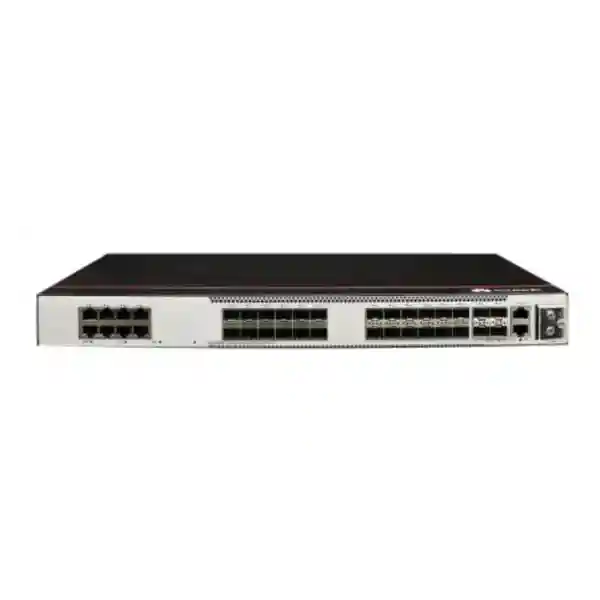
Huawei CloudEngine S5731-S32ST4X-D
A compact DC-powered enterprise switch for optical-heavy campus access, aggregation, metro access, and mixed fiber/copper edge designs. The S5731-S32ST4X-D combines 24 SFP access interfaces capable of 1GE and, with the appropriate software release and configuration, 2.5GE operation, eight 10/100/1000BASE-T Ethernet ports, and four 10GE SFP+ uplinks in a 1U platform.
Direct answer: what the S5731-S32ST4X-D is designed to do
The Huawei CloudEngine S5731-S32ST4X-D is an enterprise fixed-form-factor switch intended for organizations that need a high proportion of fiber-facing access ports, some local copper connectivity, and four 10GE uplinks in one compact unit. Huawei publishes the model with 24 x 1/2.5GE SFP ports, eight x 10/100/1000BASE-T Ethernet ports, four x 10GE SFP+ ports, DC power, 125 Mpps forwarding performance, and 216 Gbit/s device switching capability with a 672 Gbit/s system switching figure. The model is not a PoE access switch, so it should be chosen for optical endpoints, non-PoE copper devices, aggregation roles, or environments where powering phones, cameras, or access points from the switch is not required.
For Dubai and wider UAE deployments, this port mix is useful in buildings where fiber has already been run to floor cabinets, industrial areas, remote IDFs, surveillance aggregation points, transportation facilities, utility networks, government campuses, or multi-building enterprise estates. It can also fit organizations that want to aggregate multiple downstream access switches over optical links while retaining a handful of RJ45 ports for local management systems, appliances, or legacy Ethernet endpoints.
The “-D” suffix is important because this variant uses a built-in DC power design rather than the AC implementation found on the “-A” model. That distinction must be validated during quoting because the upstream power architecture, rack PDU design, DC plant, grounding, protection, and maintenance procedures are different. FourTeck can help align the switch, optics, patching, DC feed, rack layout, and upstream uplink design with the actual site through its UAE network infrastructure practice.
Core hardware specification for the Dubai/UAE build
Access interfaces
Twenty-four SFP access ports support GE operation and, on V200R023C00 and later software, Huawei documents use of the port mode 2.5ge command to set the applicable interfaces to 2.5GE. Eight additional RJ45 interfaces provide 10/100/1000BASE-T Ethernet connectivity for copper-attached devices.
Uplink interfaces
Four 10GE SFP+ ports provide high-speed uplinks toward distribution, core, firewall, router, data-center edge, or resilient aggregation paths. The uplink count supports designs that use dual upstream links plus dedicated stack or service connectivity, subject to the final topology.
Forwarding and switching
Huawei lists forwarding performance at 125 Mpps. The product sheet lists 216 Gbit/s as the device switching capability and 672 Gbit/s as the system switching capability. These figures should be interpreted together with actual packet profiles, uplink oversubscription, service features, and topology.
Power architecture
The S5731-S32ST4X-D uses built-in DC power. Huawei documents a rated DC input range of -48 VDC to -60 VDC and a maximum range of -38.4 VDC to -72 VDC for the DC model. This makes power-feed engineering a deliberate part of deployment planning.
Port-map interpretation: why the mixed optical and copper layout matters
Many access switches are designed primarily around copper edge ports, but the S5731-S32ST4X-D takes a different approach. Its twenty-four SFP access ports make it a practical fit where optical handoff is the normal method of reaching remote endpoints, access switches, industrial nodes, building distribution points, media converters, or long-distance edge devices. Fiber can provide distance, electrical isolation, immunity to electromagnetic interference, and flexible campus reach that copper cannot match. In a Dubai office tower, logistics site, utility installation, manufacturing area, data-center support network, or large hospitality property, these characteristics can simplify the physical design when telecommunications spaces are separated by distances beyond traditional horizontal copper limits.
The eight copper GE ports remain valuable because not every device requires fiber. They can host local monitoring appliances, console servers with Ethernet management, out-of-band components, test tools, nearby servers, environmental controllers, or other non-PoE endpoints. This mixed design can reduce the need for a separate small copper switch in the same cabinet, but engineers should still keep failure-domain and security-zone requirements in mind. A management appliance attached directly to the same switch as production aggregation links still requires VLAN, ACL, authentication, and routing policy appropriate to its risk profile.
The four 10GE SFP+ uplinks provide a straightforward step up from 1GE access density to 10GE aggregation. For a single switch, two 10GE links may be combined through link aggregation where the peer design supports it, while the remaining interfaces can be reserved for additional paths or services. In stacked designs, service ports may also be used for stacking. Huawei documents service-interface-based stacking and a maximum bidirectional stack bandwidth of 80 Gbit/s for the series, so port allocation needs to be settled before optics are ordered.
2.5GE on the optical access side: software version and planning implications
Huawei’s current product information notes that GE 9 through GE 32 are GE ports by default on this model family and that, from V200R023C00 onward, the port mode 2.5ge command can be used to set the applicable ports to 2.5GE. This is not a reason to assume that every installed optic, remote device, patching element, or existing design will automatically operate at 2.5GE. The physical transceiver, peer interface, software release, configuration, and supported interoperability matrix all have to align.
From a capacity-planning perspective, 2.5GE can be useful where a remote aggregation point has outgrown 1GE but does not yet require a 10GE handoff. It can also help organizations extend the economic life of existing fiber pathways while increasing bandwidth incrementally. However, the value depends on the supported optical modules and the remote endpoint. A quotation should therefore identify whether each of the twenty-four SFP ports will run at 1GE or 2.5GE, which optical standard is required, the fiber type, connector type, estimated distance, wavelength, and whether the far end is another Huawei switch or a third-party device.
When interoperability is important, FourTeck recommends treating optics as part of the switch solution rather than as an afterthought. The switch, transceiver, fiber plant, patch cord, splice budget, remote interface, and software support matrix form one system. A low-quality or incorrectly specified optic can create flaps, errors, unstable negotiation, or unexpected limitations that are often misdiagnosed as switch faults.
Performance sizing: what 125 Mpps and 216/672 Gbit/s mean in practice
Forwarding performance and switching capacity are useful engineering indicators, but they should not be treated as the only sizing inputs. Huawei lists 125 Mpps forwarding performance for the S5731-S32ST4X-D. This metric represents packet-processing capability and becomes especially relevant when traffic contains large volumes of small packets, because small packets impose more packet-per-second work than large frames carrying the same aggregate bit rate. Real networks also use ACLs, QoS, routing, multicast, stacking, telemetry, authentication, and control-plane functions that must be accounted for in the design.
Huawei’s documentation presents switching capacity as 216 Gbit/s / 672 Gbit/s, with the first number identified as device switching capability and the second as system switching capability. The distinction matters because published platform architecture figures do not automatically equal usable throughput on every combination of front-panel ports. For capacity planning, engineers should map the expected traffic matrix: how many access ports are active, their normal and peak utilization, how much traffic remains local to the switch, how much traverses the uplinks, and how much must cross a stack or routed boundary.
An optical access switch with twenty-four 1GE or 2.5GE-facing links can theoretically aggregate more edge bandwidth than a small number of 10GE uplinks can carry simultaneously. That is normal in enterprise switching because users and applications rarely drive all access ports at line rate at the same moment. The correct design question is therefore the intended oversubscription ratio and peak concurrency. CCTV backhaul, backup windows, storage synchronization, VDI, large software distribution, and data replication can create very different traffic profiles from ordinary office browsing and voice traffic.
For high-consequence environments, design uplink capacity from measured traffic plus forecast growth rather than from port count alone. Keep at least one growth cycle in reserve, and check whether future 2.5GE use changes the uplink requirement. If two 10GE uplinks are already expected to run near sustained high utilization, the architecture may need additional uplinks, a different aggregation tier, or a higher-capacity platform rather than simply enabling more access bandwidth.
DC power design for telecom, utility, industrial, and resilient UAE sites
Input range
Huawei specifies -48 VDC to -60 VDC as the rated DC input range for the S5731-S32ST4X-D and -38.4 VDC to -72 VDC as the maximum input range. The source, protection, cable size, polarity, connectorization, earthing, and upstream breaker or fuse arrangement should be engineered to local site standards.
Power draw
For the S5731-S32ST4X-A/D hardware table, Huawei lists a 94 W maximum power figure for this compact A/D form factor, with separate load figures for AC and DC variants. Power budgeting should still include upstream conversion losses, DC distribution margin, environmental conditions, optics, and the facility design reserve.
The DC variant is particularly relevant in sites with established -48 VDC telecom power plants, battery-backed DC distribution, utility substations, transport environments, or facilities where operators standardize on DC-powered network equipment for resilience. It is not simply an interchangeable alternative to AC. Procurement teams should confirm that the rack location has the correct DC feed, that polarity and connector requirements are understood, and that installation personnel are authorized and trained for the site’s electrical environment.
Because a DC design often sits inside broader continuity planning, the switch should be considered together with rectifiers, batteries, DC distribution units, grounding, surge protection, and the redundancy model of upstream routers and firewalls. For sites integrating switching with secure perimeter services, FourTeck’s Firewall Dubai engineering team can coordinate segmentation, uplink handoff, and security-zone design alongside the switching layer.
Physical format, airflow, temperature, and rack engineering
The compact S5731-S32ST4X-A/D chassis is published at 43.6 mm high, 442 mm wide, and 220 mm deep, corresponding to a 1U rack height. Huawei lists packaged weight figures of 4.02 kg / 3.87 kg for the A/D variants in the shared hardware table. The shallow depth can be useful in telecommunications cabinets and compact IDFs, but the usable rack depth still has to include cable bend radius, power cabling, front patching, side clearance, service access, and airflow.
Huawei documents built-in dual fans for the A/D form factor and an airflow path that enters from the front and left sides and exhausts toward the right. This is a critical detail in dense cabinets. A switch can meet its own thermal specification yet still overheat if side vents are blocked, if adjacent equipment recirculates hot exhaust into the intake, or if the cabinet has insufficient conditioned airflow. Do not treat the 1U height as the entire cooling requirement.
The published long-term operating range is -5°C to 45°C from 0 to 1800 m altitude, with the maximum operating temperature derated by 1°C for every 220 m increase above 1800 m up to the stated operating altitude. Storage temperature is listed at -40°C to +70°C, with 5% to 95% non-condensing relative humidity. Dubai installations normally operate near sea level, but ambient rack temperature can be much higher than room set point when airflow is poor or heat loads are concentrated.
For UAE sites, the engineering priority is controlled intake temperature, filtered and maintained cabinet airflow, dust management, sensible cable dressing, and a clear hot-air path. Equipment rooms near warehouses, loading areas, rooftops, industrial workshops, or partially conditioned spaces should be assessed more carefully than normal office MDFs. Thermal margin is a reliability resource; operating permanently close to the upper limit leaves less tolerance for HVAC faults, blocked filters, or seasonal heat excursions.
Layer 2 services: VLAN scale, trunks, loop protection, and aggregation
Huawei publishes support for 4094 active VLANs on the CloudEngine S5731-S series, with access, trunk, hybrid, and QinQ modes. The platform also supports VLAN assignment by interface, protocol, IP subnet, MAC address, and combinations of MAC, IP, and interface identifiers. These tools allow the switch to serve a wide range of enterprise access and aggregation designs, from conventional user/device VLANs to more controlled service-provider-like handoff models.
The MAC table scale is listed at 64K entries, with automatic learning and aging, static and dynamic entries, blackhole entries, sticky MAC, learning limits, flapping detection, and spoofing defense. This capacity can be valuable at aggregation points where many downstream endpoints are visible through a smaller number of uplinks. As always, the size of a table is only one design factor; stability of Layer 2 domains, broadcast control, segmentation, and failure containment usually matter more than maximizing how many MAC addresses one switch can learn.
For loop prevention and resiliency, the series supports STP, RSTP, MSTP, VBST, BPDU protection, root protection, loop protection, TC-BPDU attack defense, interface loop detection, Smart Link, Monitor Link, RRPP, and G.8032 ERPS. Selection depends on the network architecture. Campus networks often use MSTP or routed access to limit spanning-tree dependence, while ring-based industrial or metro-style designs may use ERPS where deterministic ring protection is required.
Link aggregation is available through LACP and Eth-Trunk. Aggregating multiple physical links can increase bandwidth and provide path resilience, but only if the peer device, hashing behavior, cabling, optics, and traffic distribution are understood. A single flow generally remains on one member link, so a two-link bundle does not make an individual flow twice as fast. The benefit is parallel capacity across multiple flows and continued operation when one member fails.
Layer 3 routing for campus access and aggregation
The S5731-S series is not limited to Layer 2 switching. Huawei lists static IPv4 routing, VRF, DHCP client/server/relay functions, URPF, routing policies, RIP, OSPF, BGP, MBGP, IS-IS, and policy-based routing. The published IPv4 route scale is 32K. This feature set lets engineers place routing boundaries closer to the access layer when that improves fault isolation, convergence, broadcast-domain control, or operational clarity.
In a traditional campus design, the switch may operate mainly at Layer 2 and uplink to a distribution pair that hosts user gateways. In a routed access design, VLAN interfaces and routing can be moved onto the access or aggregation switch. Both models can be valid. The decision should consider operational skill, policy enforcement, gateway redundancy, multicast requirements, failure domains, troubleshooting workflows, and how the network integrates with firewalls and WAN routers.
VRRP support enables first-hop redundancy where two routing devices present a resilient default gateway. BFD support is listed for static routes, OSPF, IS-IS, BGP, PIM, and VRRP, which can help accelerate failure detection in designs that require faster convergence than ordinary protocol timers. Engineers should tune BFD conservatively: aggressive timers increase control-plane activity and can make unstable physical links produce rapid route churn.
For branch aggregation or metro-style enterprise networks, MPLS and VPN features may also be relevant. The platform lists LDP, MPLS TE, VLL, PWE3, VPLS, MPLS L3VPN, MCE, and GRE capabilities. These are powerful tools, but they should be activated only as part of a documented architecture because they increase the number of protocol layers that operations teams must understand and monitor.
IPv6 readiness and dual-stack migration
Huawei describes the CloudEngine S5731-S platform as supporting IPv4/IPv6 dual stack and a broad set of IPv6 capabilities. Published functions include Neighbor Discovery, ND snooping, DHCPv6 snooping, RIPng, DHCPv6 server and relay, OSPFv3, BGP4+, IS-IS for IPv6, VRRP6, MLDv1/v2, PIM-DM and PIM-SM for IPv6, plus manual IPv6 tunneling. The listed IPv6 route scale is 8K and ND entry scale is 8K.
This matters because IPv6 deployment is rarely a single cutover. Most organizations spend a long period in dual-stack mode while applications, security tools, DNS, IPAM, monitoring, and upstream connectivity are migrated. A switch that can route, secure, and monitor both protocol families gives the network team more freedom to phase the transition rather than forcing a binary replacement event.
Operational policy should be symmetrical. If an access VLAN receives IPv6 service, the organization needs IPv6-aware ACLs, DHCPv6 or SLAAC planning, RA/ND protection, monitoring, logging, and firewall policies. Running IPv6 passively without the same governance applied to IPv4 can create blind spots. The S5731-S supports IPv6 ACLs and IPSG for IPv6 in Huawei’s feature table, but these capabilities still require deliberate configuration and integration with the security architecture.
During procurement, verify the software feature set and licensing mode planned for the deployed release. Huawei documentation distinguishes software modes and notes that certain advanced functions depend on software release and feature mode. Treat software entitlement as part of the bill of materials, not as a post-installation assumption.
Access security: authentication, DHCP snooping, ARP protection, and ACL enforcement
The CloudEngine S5731-S series includes enterprise access-control mechanisms that can reduce common Layer 2 and access-layer risks. Huawei lists MAC authentication, 802.1X authentication, and Portal authentication, together with dynamic policy delivery for VLAN, QoS, and ACL settings. In a managed campus, this can support identity-aware access where users or devices receive policy based on authentication rather than purely on the physical switch port.
DHCP snooping is supported with Option 82 and dynamic rate limiting. The switch can build a binding table from legitimate DHCP exchanges and use trusted and untrusted port concepts to help prevent unauthorized DHCP servers from distributing malicious network settings. This is particularly valuable on shared user access networks where a rogue DHCP server can redirect traffic, disrupt addressing, or create difficult-to-diagnose intermittent problems.
ARP defenses include strict ARP learning, ARP anti-spoofing, Dynamic ARP Inspection, Static ARP Inspection, Egress ARP Inspection, gateway anti-collision, and association with spanning-tree behavior. Huawei also lists IP Source Guard for IPv4 and IPv6. These controls can make local-segment impersonation more difficult, but they must be deployed in the correct sequence because features such as DAI often depend on trusted binding information. A misconfigured trust boundary can block legitimate clients.
The platform supports Layer 2 through Layer 4 ACL filtering, with published basic and advanced IPv4/IPv6 ACL capabilities. ACLs can restrict management access, isolate infrastructure services, contain IoT devices, limit east-west communication, and protect control-plane-facing addresses. Network teams should keep ACL policy readable and change-controlled; a large rule set without documentation can become an operational risk even when the hardware can process it.
For security architecture, switching controls should complement rather than replace next-generation firewall inspection. Use the access switch to enforce local trust boundaries and admission policy, and use perimeter or segmentation firewalls for deeper application, threat, and inter-zone controls. FourTeck’s UAE IT services team can assist with implementation planning, migration windows, VLAN/ACL documentation, and handover procedures.
QoS engineering for voice, video, CCTV, and business applications
Huawei lists traffic classification using ACLs, traffic filtering, CAR policing, priority remarking, VLAN modification, egress shaping, queue shaping, WRED, tail drop, Priority Queuing, WDRR, and combined PQ+WDRR. The platform exposes eight priority queues. These mechanisms allow the network to protect latency-sensitive traffic and prevent one class from consuming all available bandwidth during congestion.
A good QoS design starts with application requirements, not with queues. Voice needs predictable delay, low jitter, and minimal loss. Interactive video can be sensitive to both latency and burst loss. CCTV is often sustained and bandwidth-heavy but may tolerate more delay than voice. Backup and software distribution can consume large amounts of bandwidth yet usually tolerate shaping. Business applications vary widely, and encrypted traffic can make classification harder unless policy is based on trusted markings, VLANs, addresses, or application-aware upstream controls.
At the access edge, the trust boundary matters. If every endpoint is allowed to mark traffic as highest priority, priority loses meaning. Network teams commonly trust markings from managed phones or infrastructure but remark traffic from general user endpoints according to policy. On uplinks, queue bandwidth and scheduling should match the actual congestion point. A QoS policy on a 1GE edge port does little if the real bottleneck is a 10GE WAN or firewall link configured differently.
The S5731-S32ST4X-D is especially interesting for video aggregation because its optical access ports can collect streams from distributed sites and its 10GE uplinks can carry aggregate video toward recorders or data-center services. Engineers should calculate average and peak camera bitrate, codec behavior, frame rate, event-driven bursts, retention architecture, and the concurrency of playback traffic before selecting uplink ratios.
iStack design: virtualizing multiple switches into one logical system
Huawei documents iStack support for the CloudEngine S5731-S series, with up to nine physical switches virtualized as one logical switch. The feature can simplify management, expand port density, and provide member-level redundancy. The published function table identifies service-interface-based stacking and a maximum bidirectional stack bandwidth of 80 Gbit/s. These numbers are useful, but the correct stack size depends on failure domains, maintenance practice, software lifecycle, traffic patterns, and physical layout.
A stack can make a group of switches easier to operate because configuration and management are centralized. It can also support multi-chassis-style link aggregation toward downstream or upstream devices within the stack architecture, improving path resilience. However, a stack is still one logical control domain. A software defect, operator error, or control-plane event may affect multiple members at once. For critical environments, compare stacking with a design using independent switches and routed redundancy.
Physical placement matters. If stack members are in the same rack, dedicated cabling and short paths are straightforward. If members are in different cabinets or rooms, distance, optics, patching, and failure correlation become more important. Never stretch a stack across locations simply because it is technically possible without considering how maintenance teams will troubleshoot it during a partial outage.
During a Dubai deployment, the quotation should identify the number of stack members, which ports are consumed by the stack, the intended stack topology, the uplink design, software version alignment, and spare strategy. A stack with no spare optics or no documented member-replacement procedure can create longer outages than an independent-switch architecture that was designed for straightforward field replacement.
Operations and maintenance: CLI, SNMP, SSH, web management, and zero-touch methods
Huawei lists multiple operational interfaces for the series, including CLI, console access, SSH, SNMP-based network management, web-based configuration, EasyDeploy, SVF, cloud management, OPS, file management, hardware monitoring, logging, alarms, debug output, and local or remote traffic mirroring. This breadth is useful because enterprises rarely manage every switch through one method. Day-to-day operations may use an NMS, while troubleshooting still relies on CLI, logs, counters, and packet mirroring.
Zero-touch and batch deployment features can reduce installation effort when many switches are rolled out. Huawei describes zero-touch deployment, USB-based deployment, batch configuration, remote upgrades, and replacement of failed devices without re-entering every setting manually. To gain the benefit safely, the organization needs standardized templates, version control, change approval, and a known-good configuration repository. Automation without governance can reproduce a configuration error faster than manual work.
SNMPv3 and SSH should normally be preferred over older insecure management protocols wherever the surrounding management platform supports them. Separate the management plane from ordinary user traffic with dedicated management VLANs or VRFs as appropriate. Limit management access through ACLs, use centralized AAA where available, synchronize time through trusted NTP sources, forward logs to a central collector, and monitor configuration changes.
A production handover should include a port map, VLAN and IP plan, routing protocol configuration, ACL list, QoS policy, stack layout, software version, optic inventory, serial numbers, rack location, DC feed information, configuration backup, restore process, and escalation contacts. Those documents are often more valuable during an incident than a long generic runbook that does not match the installed topology.
SVF and centralized campus operations
The CloudEngine S5731-S series supports Huawei Super Virtual Fabric as an SVF client. The concept is to virtualize parts of the campus hierarchy so that core or aggregation devices, access switches, and wireless access points can be operated more like one logical system. Huawei describes plug-and-play behavior for clients and centralized delivery of service configuration templates. The operational goal is reduced per-device configuration effort and more consistent policy deployment.
For a large UAE campus with many access closets, simplified deployment can reduce the number of manual CLI changes during rollouts and replacements. This can be useful for schools, hospitals, hospitality groups, government facilities, warehouses, manufacturing campuses, and multi-building corporate estates. The network team still needs to understand the underlying topology because automation does not eliminate physical faults, uplink congestion, spanning-tree behavior, power loss, or transceiver problems.
Before choosing SVF, confirm compatibility between the intended parent device, client model, software versions, and feature set. Centralization is strongest when the entire lifecycle is managed consistently. Mixing different release trains, manually changing client devices outside the central workflow, or using unsupported combinations can undermine the operational simplicity that SVF is meant to provide.
Organizations that do not plan to use SVF can still operate the switch conventionally through VRP and standard management methods. The presence of an automation feature does not obligate the network to adopt it. Choose the operating model that fits staff skills, existing NMS tooling, change-control processes, and the expected lifetime of the campus architecture.
Multicast for video distribution and IPTV-style services
The S5731-S series supports IGMP snooping and proxy functions, MLD snooping, PIM-DM, PIM-SM, and multicast routing capabilities. Huawei lists 1K IPv4 multicast routes and 1K IPv6 multicast routes. This makes the platform suitable for networks where one-to-many delivery is important, including IPTV, enterprise video distribution, digital signage, market-data style feeds, and some surveillance architectures.
Without correct multicast control, a switch can flood multicast traffic much like broadcast traffic, wasting bandwidth on ports that do not need the stream. IGMP snooping allows the switch to learn which receivers have joined which multicast groups and forward traffic more selectively. When multicast crosses Layer 3 boundaries, PIM and an appropriate rendezvous-point design may be required depending on the mode.
Video engineers should distinguish multicast from ordinary unicast CCTV. Many modern camera systems use unicast to recorders, while IPTV and live distribution more commonly benefit from multicast. Do not enable multicast routing simply because cameras exist. Start with the application architecture, identify senders and receivers, determine whether streams cross subnets, and then choose the smallest feature set that meets the requirement.
For hospitality or education deployments in Dubai, multicast design should also account for wireless networks, where multicast may be converted, rate-limited, or handled differently by the WLAN system. The wired switch can forward multicast correctly while the end-user experience remains poor if wireless treatment is not coordinated.
Where this model fits best in UAE network topologies
Fiber-rich campus access
Use the 24 SFP interfaces to connect remote cabinets or fiber-attached endpoints where optical links are preferred for distance, isolation, or environmental reasons. The 10GE uplinks then carry aggregated traffic toward distribution or core.
Building or floor aggregation
Aggregate multiple downstream 1GE or 2.5GE optical links in a compact rack. The mixed copper ports can serve nearby non-PoE devices without requiring a separate edge switch.
Telecom and utility cabinets
The built-in DC design aligns naturally with -48 VDC environments, provided the feed and protection are engineered correctly. Fiber-heavy access can also suit electrically noisy or geographically dispersed infrastructure.
Metro or enterprise edge
Routing, MPLS, OAM, VLAN, QoS, and resilient ring features allow the platform to participate in more advanced enterprise or metro-style access designs when the software feature mode and architecture require them.
The model is less suitable when the primary requirement is to power large numbers of Wi-Fi access points, IP phones, or cameras directly from Ethernet ports, because PoE+ is not supported on this variant. In those cases, select a PoE-capable member of the appropriate product family or keep the S5731-S32ST4X-D as an optical aggregation device above dedicated PoE access switches.
Recommended topology patterns
Pattern A: dual-uplink access
Deploy one S5731-S32ST4X-D as a fiber access switch and use two 10GE SFP+ ports toward a redundant distribution pair or a supported aggregated upstream design. Reserve the other uplinks for growth, dedicated services, or an alternate topology.
This pattern keeps the switch simple and works well when the access layer does not need a local stack. Routing can remain upstream or be enabled locally depending on the campus design.
Pattern B: stacked aggregation pair
Use two compatible switches in an iStack arrangement, allocate service ports for stacking, and build resilient links toward both downstream and upstream devices. This can simplify operations while protecting against failure of a single member.
Validate stack port consumption and bandwidth before ordering optics, because stacking competes with normal service connectivity for front-panel resources in a service-port-based design.
Pattern C: routed access
Terminate VLAN interfaces and routing on the access switch, advertise routes using OSPF or another supported protocol, and reduce Layer 2 scope. This can improve fault containment and convergence in larger campuses.
The design requires mature IP addressing, route summarization, first-hop policy, monitoring, and troubleshooting skills, but it can scale cleanly when consistently implemented.
Pattern D: DC-powered remote node
Install the switch in a telecom or utility cabinet with -48 VDC power and connect remote sites or field cabinets over fiber. Use ring or redundant uplink features if the physical route supports them.
Environmental validation is essential: cabinet temperature, dust ingress, ventilation, grounding, surge exposure, and maintenance access can be more important than nominal switch capacity.
Optics and fiber planning: the part of the BOM that determines whether links actually work
A switch with twenty-four SFP ports and four SFP+ uplinks requires careful optical planning. The correct transceiver depends on interface speed, fiber type, distance, wavelength, connector standard, peer compatibility, and software support. Multimode links within buildings may use different optics from single-mode links between buildings. Long-reach links can require a more formal optical budget that includes connector loss, splice loss, patch panels, and engineering margin.
Record every optical circuit in the design. For each switch port, document source and destination, interface speed, optic model, wavelength, fiber type, core count, connector type, patch-panel positions, estimated loss, and ownership of the remote endpoint. This turns troubleshooting from guesswork into a repeatable process. It also prevents procurement errors such as ordering a single-mode transceiver for a multimode path or mixing incompatible wavelengths across a link.
At 10GE, link quality and connector cleanliness become especially important. Dirty LC connectors can create intermittent errors that appear only under load or after temperature changes. Commissioning should include optical inspection and cleaning where appropriate, DOM checks when supported, interface error counters, and sustained traffic validation for critical links. Labeling should be readable from the front of the rack without disconnecting cables.
If the switch is being integrated with local compute infrastructure or server networks, the Server Dubai infrastructure team can coordinate NIC speed, transceiver type, rack layout, and switch-to-server handoff so the physical and logical design are aligned.
Migration from an older access or aggregation switch
A hardware replacement project should begin with discovery rather than configuration copying. Export the existing VLAN list, trunk allowed lists, native VLAN settings, LACP groups, spanning-tree roles, routing protocols, static routes, gateway addresses, DHCP relay settings, ACLs, QoS policies, multicast configuration, management addressing, NTP, DNS, SNMP, logging, AAA, and port descriptions. Then compare each function against the target Huawei syntax and supported behavior.
Port mapping is especially important on the S5731-S32ST4X-D because optical and copper interfaces have different physical roles. A migration spreadsheet should map old port, old media type, old speed, remote endpoint, VLAN or routed role, new port, new optic, and validation method. Where 2.5GE is planned, confirm the required software release and configure the port mode explicitly rather than assuming negotiation will select it automatically.
Build a rollback plan before the maintenance window. Keep the old switch configuration and physical cabling map available, label fibers before moving them, pre-stage the new configuration, and verify that management access works before migrating all production links. Migrate in logical batches so faults can be isolated. If the network includes dynamic routing, decide whether adjacency changes will occur during the cutover and whether temporary metrics are needed.
After migration, validate at multiple layers: link state, optical levels, VLAN membership, MAC learning, ARP/ND, routing neighbors, default gateway reachability, DNS, DHCP, application reachability, latency, packet loss, QoS counters, multicast joins, management polling, logs, and redundancy failover. Do not close the change after a simple ping if the switch carries business-critical services.
Capture a post-change configuration backup and update diagrams while the installation is fresh. Documentation delayed until later is often never completed, leaving the next engineer to reconstruct the environment during an outage.
Software release, feature mode, and licensing checks before ordering
Huawei’s documentation indicates that some advanced features and modes depend on the installed VRP software release and software mode. The specific 2.5GE port-mode capability is explicitly tied to V200R023C00 and later in current product documentation. Advanced network automation and certain campus features can also depend on release and licensing. For this reason, the quotation must identify the intended software version and feature requirements, not only the hardware SKU.
Organizations should list the protocols they actually plan to use: OSPF, BGP, IS-IS, MPLS, VXLAN, advanced automation, cloud management, SVF, stacking, IPv6 routing, multicast routing, 802.1X, or advanced OAM. That list allows the supplier and implementation team to verify entitlement and support against the exact release train. Buying hardware first and checking software later creates avoidable project risk.
Software lifecycle is also an operational concern. Standardize release versions across stack members and similar access blocks where practical. Maintain tested backups and an upgrade path. Review release notes for feature changes, resolved defects, upgrade restrictions, and required intermediate versions. In regulated or high-availability environments, upgrades should be rehearsed on a lab or low-risk site when possible.
The same discipline applies to transceiver support. An optic that is physically compatible with an SFP cage is not automatically supported by the target software. Maintain an approved optics list linked to the installed software baseline.
Sizing method for a real Dubai project
Start with endpoints. Count how many are fiber-attached, how many are copper-attached, which require PoE, their normal bandwidth, peak bandwidth, criticality, and physical location. The S5731-S32ST4X-D provides twenty-four SFP access ports and eight copper ports, but raw port count alone is not enough. If fifteen of the remote fiber links each feed a downstream 48-port switch, the effective number of end devices may be several hundred.
Next, map traffic flows. Determine how much traffic remains within each VLAN, how much crosses the switch, and how much must traverse the 10GE uplinks. Identify scheduled peaks such as nightly backups, camera retention transfers, software deployment, storage replication, virtual desktop login storms, or analytics jobs. Include growth for the expected service life rather than sizing only for today.
Then design resilience. Decide whether one switch is acceptable, whether two independent switches are preferable, or whether an iStack design is desired. Determine whether downstream devices use dual links, whether upstream devices are redundant, and how gateways or dynamic routing converge after failure. The network should fail in a predictable way that operations staff can explain before the outage occurs.
Finally, validate environment and power. Confirm rack units, cabinet depth, side airflow clearance, intake temperature, dust control, DC feed, breaker sizing, grounding, patch-panel availability, optical distances, and maintenance access. A correctly sized switch installed in a poorly ventilated or undocumented cabinet is still a poor design.
FourTeck can structure this assessment as a bill-of-materials exercise so the switch, optics, patching, uplink modules, racks, DC requirements, and deployment services are quoted as one coherent solution rather than as disconnected line items.
When not to choose the S5731-S32ST4X-D
Do not choose this model if the project primarily needs high-density PoE access. The product is not a PoE+ switch. If phones, cameras, wireless access points, badge readers, or IoT devices must receive power from the Ethernet switch, select a PoE-capable platform or use dedicated PoE access switches below the S5731-S32ST4X-D.
Do not choose the DC variant for a site that has only standard AC rack power unless the project intentionally includes a compatible DC power architecture. An AC version may be operationally simpler for normal enterprise server rooms. Conversely, do not substitute an AC version where the site standard specifically requires -48 VDC resilience.
Do not assume four 10GE uplinks are sufficient for every aggregation use case. If many downstream links are expected to sustain high utilization concurrently, the uplink layer may become the bottleneck. Use measured or modeled traffic to determine whether a higher-capacity switch with more 10GE, 25GE, 40GE, or 100GE interfaces is more appropriate.
Do not use the switch as a substitute for a firewall when the design requires application inspection, threat prevention, web filtering, remote-access security, or deep segmentation controls. The switch has strong network access and ACL capabilities, but its role is still switching and routing.
Procurement considerations for UAE enterprises
A production quotation should state the exact model suffix because S5731-S32ST4X, S5731-S32ST4X-A, and S5731-S32ST4X-D differ in power implementation. It should also identify quantity, software or feature entitlement, optics, patch cords, mounting accessories, support coverage, installation scope, configuration scope, testing, documentation, and whether spare units or spare transceivers are required.
Lead time can vary by model and optic type, so projects should separate design approval from final delivery assumptions. Large campus rollouts often need more transceivers than switches, and an optic shortage can delay commissioning even when the switch hardware is already onsite. Standardize on a small number of approved optic types where the physical design permits it.
For projects spanning several emirates or multiple regional sites, maintain a consistent labeling and configuration standard. A switch in Dubai, Abu Dhabi, Sharjah, or a remote industrial site should use the same naming convention, management framework, logging policy, backup process, and port documentation format. Operational consistency reduces mean time to repair because engineers do not have to rediscover site-specific conventions during every incident.
For broader supply and integration requirements, customers can also reference FourTeck’s global technology portfolio while keeping the UAE implementation aligned to local site requirements.
Acceptance testing and commissioning checklist
Commissioning should validate the switch as an installed system, not just as powered hardware. Start by checking the chassis, serial number, software version, time settings, management IP, AAA, SSH, SNMP, syslog, configuration backup, and DC input status. Confirm that the rack mounting is secure, side airflow is unobstructed, fiber bend radius is acceptable, and every connection is labeled.
Test every populated interface at its intended speed. For optical links, check transceiver recognition, DOM values where available, error counters, duplex and speed, and remote-end stability. For copper ports, verify auto-negotiation or the required forced settings. If 2.5GE operation is part of the design, confirm both the software release and the configured port mode, then run traffic tests that demonstrate sustained operation at the expected rate.
Validate Layer 2 behavior by checking VLAN membership, trunks, MAC learning, spanning-tree or ring state, LACP members, and loop protections. Validate Layer 3 by checking interface addresses, ARP/ND, static routes, dynamic routing neighbors, route tables, VRRP state, and reachability across all required paths. Validate security through authentication, DHCP snooping bindings, DAI/IPSG operation, ACL hit counters, and management-plane restrictions.
Perform failure tests where the project requires resilience. Disconnect one uplink, shut a stack member, remove one LACP link, restart a routing adjacency, or simulate loss of a path according to the approved method. Measure whether services remain available and whether convergence meets the requirement. A redundant topology that has never been failover-tested is only a diagram.
Finally, hand over as-built diagrams, port maps, software versions, configuration backups, credentials through the approved secure process, support details, warranty records, optic inventory, test results, and a change record. These artifacts should be stored in the organization’s normal documentation system rather than remaining with the installation engineer.
Operational lifecycle: monitoring, backups, upgrades, and spares
After deployment, monitor interface utilization, errors, discards, optic levels, CPU and memory trends, temperature, routing adjacencies, stack health, power status, and log events. Alert thresholds should distinguish between transient events and persistent degradation. For example, one CRC error after a maintenance event is different from an interface accumulating thousands of CRC errors every hour.
Back up configuration after every approved change and keep at least one known-good copy outside the switch. Include the software image and release documentation in the lifecycle record. If the network uses a central NMS or automation platform, verify periodically that the backups are actually restorable rather than simply assuming a successful scheduled job is enough.
Maintain a spare strategy proportional to business impact. A campus with dozens of identical switches may keep one or more cold spares. A smaller site may rely on supplier support and spare optics rather than a full switch. Because transceivers and patch cords fail more frequently than switch chassis in many environments, keeping compatible spare optics can shorten recovery dramatically.
Review software advisories and upgrade plans on a defined cadence. Avoid both extremes: upgrading production immediately for every new release without testing, or leaving devices indefinitely on obsolete software. The correct approach is risk-based, tested, and documented.
Engineering comparison: S5731-S32ST4X-D versus common alternatives in the same family
The S5731-S32ST4X-D should be compared first with the same port-layout models that differ mainly in power architecture. The base S5731-S32ST4X uses pluggable power options and supports 1+1 power backup, while the S5731-S32ST4X-A uses built-in AC power. The -D model uses built-in DC power. All three share the 24 x 1/2.5GE SFP, 8 x GE copper, and 4 x 10GE SFP+ front-panel concept in Huawei’s published product table.
If the project needs more optical density, the S5731-S48S4X family provides a larger count of SFP access interfaces while retaining four 10GE uplinks. If the requirement is mostly copper access, S5731-S24T4X or S5731-S48T4X variants are more natural fits. If PoE is required, the S5731-S24P4X and S5731-S48P4X are the relevant PoE-capable branches of the family rather than the S32ST4X design.
The decision therefore starts with media type and power model before it reaches routing features. Choose S5731-S32ST4X-D when mixed optical/copper access and DC power are both intentional requirements. Choose another variant when either of those assumptions changes. This reduces the risk of paying for a port architecture that does not match the installed cabling plant.
For modernization projects, do not limit the comparison to the S5731-S family if the traffic forecast calls for substantially faster uplinks or newer access speeds. A platform with 25GE or 100GE uplinks may provide a better lifecycle fit even if its initial cost is higher.
Security hardening baseline for production deployment
A secure deployment should begin by disabling or restricting unused management services, preferring SSH and SNMPv3, applying AAA, using strong role-based administrative access, and limiting management source addresses through ACLs. Separate device-management traffic from general user networks and forward security-relevant logs to a protected central collector. Configure NTP from trusted sources so event timestamps are reliable during investigations.
At the access layer, enable DHCP snooping and related inspection functions only after trust boundaries are documented. Protect the spanning-tree root, limit MAC learning where appropriate, apply storm controls, and disable unused ports or place them in a quarantine VLAN. Use descriptive interface names so operations teams can recognize abnormal activity without consulting an external spreadsheet for every event.
Review routing adjacencies and control-plane access. Dynamic routing sessions should be limited to intended interfaces and peers. Where supported and appropriate, use protocol authentication. ACLs should prevent ordinary user networks from reaching switch management interfaces, routing protocol ports, or infrastructure addresses they do not need.
Hardening is not a one-time checklist. Include periodic account review, configuration comparison, log review, software advisory assessment, certificate or key rotation where applicable, and validation that monitoring still covers all switches after topology changes.
Designing for service continuity rather than only hardware redundancy
Resilience is an end-to-end property. A redundant switch pair provides limited value if both units share one DC breaker, one fiber pathway, one upstream firewall, one ISP circuit, or one untested configuration template. When the S5731-S32ST4X-D is used in critical access or aggregation, identify every common-mode dependency from power source to application path.
At the power layer, determine whether two network devices receive feeds from independent DC distribution paths. At the physical layer, determine whether redundant fibers follow genuinely separate routes or simply share the same tray. At the switching layer, determine whether LACP, stacking, spanning tree, ERPS, or routing provides the expected failover. At the IP layer, validate gateway and routing convergence. At the security layer, ensure firewalls and policies are symmetrical enough that traffic remains permitted after path change.
Maintenance procedures are part of resilience as well. Operators should know how to take one member out of service without creating an outage, how to replace a failed unit, how to restore configuration, and how to verify the network after work. Periodic failover exercises are more useful than assuming redundancy works because all links show green status.
When uptime requirements are strict, define recovery time objectives and test against them. The correct architecture may involve stacked switches, independent routed switches, redundant distribution, dual firewalls, and diverse WAN paths. The switch is one element of that chain.
Detailed quotation scope for FourTeck projects
A useful quotation for the Huawei CloudEngine S5731-S32ST4X-D should specify more than a single hardware line. The technical scope should include the exact switch SKU, quantity, software release expectations, support term, SFP and SFP+ transceiver quantities, fiber patch cords, copper patch cords, rack accessories, DC power connection scope, configuration services, migration services, testing, and documentation. If the site requires after-hours work or staged migration, that should be stated as well.
The bill of materials should be derived from a port schedule. Each populated access port should have an intended endpoint and media type. Each 10GE uplink should have a peer, optic, fiber path, and redundancy role. Stack links should be identified separately. Spares should be listed explicitly rather than assumed.
For implementation services, define whether FourTeck is responsible for configuration from a customer-approved low-level design, for creating the design, or only for physical installation. Clarify who owns IP addressing, VLAN allocation, firewall changes, routing changes, and application validation. A clear responsibility matrix prevents delays during change windows.
Support scope should include the expected response process, escalation path, and warranty handling. If the network is business critical, consider keeping local spare optics and at least one spare switch where the fleet size justifies it.
Decision recap: the engineering case for S5731-S32ST4X-D
Choose it for
Fiber-heavy enterprise access or aggregation, mixed optical and copper edge connectivity, 10GE uplinks, DC-powered sites, advanced Layer 2/Layer 3 routing, IPv6, stacking, multicast, QoS, and enterprise access security.
Validate before buying
DC feed compatibility, software release, feature mode, 2.5GE requirements, optics, uplink oversubscription, stack topology, airflow, rack depth, support coverage, and the exact remote-device interoperability needed by the project.
Do not use it for
High-density PoE access where the switch must power endpoints, projects with only AC power and no intentional DC architecture, or aggregation tiers whose forecast bandwidth requires substantially faster uplinks than four 10GE interfaces.
Plan the lifecycle
Standardize software, maintain backups, monitor optics and errors, retain spares, document port maps, test failover, and review growth regularly so the initial design remains supportable through its production life.
Quotation input checklist
Providing the following information allows FourTeck to produce a more accurate technical and commercial proposal and reduces the risk of missing optics, power, or implementation dependencies.
Consult FourTeck for a production-ready Huawei switching BOM
FourTeck can help validate the S5731-S32ST4X-D against your fiber plant, DC power architecture, uplink capacity, routing design, security segmentation, optics, rack environment, migration plan, and UAE support requirements before purchase.
Site count, fiber distances, endpoint quantities, DC feed details, current switch models, required uplink speeds, routing protocols, and your preferred installation window. A simple topology drawing is enough to start.

Reviews
There are no reviews yet.