
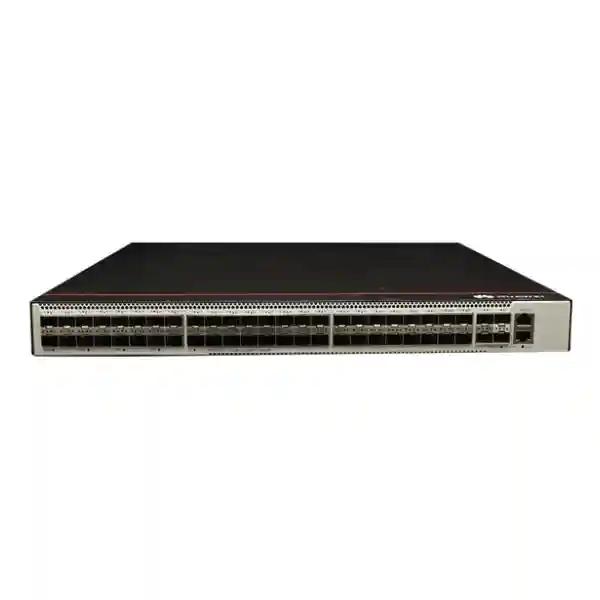
Huawei CloudEngine S5731-S48S4X
A high-density 1U optical campus switch for organizations that need a large number of fiber-facing access interfaces, resilient enterprise switching, and 10GE uplink connectivity without moving to a larger chassis platform. The S5731-S48S4X is particularly relevant where copper reach, electromagnetic exposure, building separation, or long-distance access makes optical Ethernet the preferred edge medium.
High-density optical access with 2.5GE capability subject to supported software release and port configuration.
Dedicated Gigabit optical interfaces complete the 48-port fiber access profile.
Designed for resilient uplinks, link aggregation, stack interconnect planning, or multi-path aggregation designs.
Huawei specifies device switching capability before the slash and system switching capability after the slash.
Direct Answer: What Is the Huawei CloudEngine S5731-S48S4X?
The Huawei CloudEngine S5731-S48S4X is an enterprise-class fixed campus switch with a strong emphasis on optical access. Its front-panel service connectivity consists of 44 SFP interfaces capable of 1GE and, on supported software versions, 2.5GE operation; four additional GE SFP ports; and four 10GE SFP+ ports. Huawei rates the platform at 125 million packets per second forwarding performance and 308 Gbps device switching capability, with a 672 Gbps system switching capability value. The base S5731-S48S4X model supports 1+1 power backup through pluggable power architecture, while the related S5731-S48S4X-A variant uses an AC power design and a shallower chassis.
This port profile makes the switch materially different from a conventional 48-port copper access switch. It is intended for environments where fiber is already the preferred access medium or where the organization is deliberately migrating the access layer to fiber. Typical examples include multi-building enterprise campuses, hospitals, universities, industrial sites, transport facilities, surveillance networks, hotels, government facilities, large villas or compounds with distributed communications rooms, and enterprise networks that want electrical isolation between endpoints and switching infrastructure. Fiber access can also be useful where distances exceed typical copper Ethernet limits or where the cabling route is exposed to electromagnetic interference.
For Dubai and wider UAE deployments, the selection process should not stop at the switch model. A complete design also requires matching optics, fiber type, connector standard, optical budget, cable distance, uplink architecture, power redundancy, rack depth, environmental conditions, software release, and feature licensing. FourTeck approaches the S5731-S48S4X as part of a network solution rather than as an isolated box, which is important because incorrect transceiver selection or an under-designed uplink can erase the benefits of the switch itself.
Why a 48-Port Fiber Switch Matters in Enterprise Networks
Distance and Building Distribution
Copper Ethernet is straightforward inside a floor or room, but fiber becomes increasingly attractive when links cross buildings, extend through large campuses, or run between remote communications rooms. Optical links can support longer distances depending on the transceiver and fiber type selected. The S5731-S48S4X consolidates a large number of these fiber access circuits in a compact 1U device, allowing network teams to centralize switching while maintaining distributed optical connectivity.
Electrical Isolation
Fiber is non-conductive, which can be valuable across buildings with different earth potentials or in locations where lightning exposure, electrical noise, industrial equipment, elevators, or heavy machinery can complicate copper links. The switch does not remove the need for correct electrical design, grounding, surge protection, or compliant installation, but a fiber access strategy can reduce the number of copper pathways that bridge physically separated areas.
Higher-Density Optical Edge
A dense optical access switch can simplify rack planning compared with designs that depend on external media converters. Media-converter-heavy networks create extra power supplies, extra patching points, more fault domains, and more unmanaged devices. By terminating optical access directly on a managed switch, operations teams gain centralized VLAN, authentication, QoS, security, monitoring, and fault-management capabilities at the point where the fiber enters the switching fabric.
Migration to Multigigabit Fiber
The model is notable because 44 of its SFP access interfaces can operate at 1GE or 2.5GE, subject to the appropriate VRP release and configuration. Huawei states that in V200R023C00 and later, the relevant ports are GE by default and can be set to 2.5GE using the applicable port-mode command. That distinction matters during procurement: a buyer planning 2.5GE service should confirm software compatibility, optics, endpoint support, and end-to-end link design before deployment.
Port Architecture and Practical Port Mapping
The S5731-S48S4X presents a front-panel architecture optimized for optical edge and aggregation work. The 48 access-facing SFP interfaces are divided into 44 ports with 1/2.5GE capability and four ports operating at GE. In addition, four 10GE SFP+ ports provide higher-speed connectivity for upstream switching, redundant aggregation, inter-switch links, or other high-bandwidth paths. In an actual deployment, the network engineer should treat the access ports and the 10GE ports as parts of a single bandwidth design rather than independently filling every port.
For example, forty-eight 1GE access circuits can theoretically generate more offered traffic than four 10GE uplinks can carry at the same instant. That is not automatically a problem. Enterprise networks are normally designed around traffic concurrency, oversubscription ratios, application behavior, multicast architecture, local switching, and expected busy-hour utilization. A university classroom building may have dozens of active endpoints but relatively modest simultaneous uplink demand. A video backhaul environment, by contrast, may generate sustained high utilization and should be sized far more conservatively. The correct design therefore starts with traffic characterization rather than a simple port count.
The four 10GE interfaces also create useful redundancy options. They can be divided across two upstream switches, aggregated where supported, reserved for resilient paths, or used as part of a stacking or inter-switch design depending on topology and supported configuration. When designing in Dubai, Abu Dhabi, Sharjah, or other UAE locations, transceiver choice should be tied to actual fiber plant information: multimode versus single-mode, connector type, strand count, patch-panel losses, route length, splice count, and required optical power margin.
Verified Platform Performance
| Specification | S5731-S48S4X | Design Meaning |
|---|---|---|
| Forwarding performance | 125 Mpps | Packet forwarding rating for the platform. |
| Switching capability | 308 Gbps / 672 Gbps | Huawei identifies the first value as device switching capability and the second as system switching capability. |
| Form factor | 1U | Dense rack utilization for enterprise communications rooms. |
| CPU | 1.4 GHz, 4 cores | Control-plane resources for management and protocol processing. |
| Memory | 2 GB RAM, 1 GB flash | Platform storage and operational memory as specified for this model family entry. |
| Power architecture | 1+1 backup on base model | Supports resilient power design using compatible power modules and correct input planning. |
Performance figures should be interpreted in the context of software features, packet sizes, traffic patterns, and actual network design. Capacity planning should also include uplink oversubscription, routing scale, multicast behavior, ACL use, and any operational features that affect the chosen deployment architecture.
2.5GE Operation: Important Software and Optics Considerations
A key reason to consider the S5731-S48S4X is the ability of 44 optical interfaces to operate at 1GE or 2.5GE. That capability should be planned carefully. Huawei documents that these ports are GE by default and that, beginning with V200R023C00, the port mode can be configured for 2.5GE. This means a procurement specification that simply says “44 x 2.5GE” is incomplete. The deployment team must verify the installed VRP release, the exact configuration method, supported transceiver types, and compatibility at the far-end device.
The transceiver is especially important because not every SFP optic is a generic speed-conversion device. Optical Ethernet requires both ends of the link to agree on speed and optical characteristics. A proper bill of materials therefore identifies fiber type, wavelength, connector format, reach, and supported device compatibility. When existing fiber is reused, the design should also confirm whether the physical plant is multimode or single-mode, its approximate length, connector cleanliness, patch-panel condition, and whether historical splices or adapters introduce additional optical loss.
For organizations migrating gradually, it can be practical to run the access layer at 1GE initially and enable 2.5GE selectively for endpoints or downstream devices that require additional bandwidth. This can help protect existing optical cabling investments while allowing targeted upgrades. However, the uplink plan should be revisited as more access ports move above 1GE because the aggregate traffic profile can change significantly.
Layer 2 Design Capabilities
At the access and aggregation layers, predictable Layer 2 behavior is essential. The CloudEngine S5731-S series supports standard Ethernet switching functions such as link aggregation, LLDP, LLDP-MED, interface isolation, traffic suppression, and jumbo frames. It also supports a broad VLAN feature set including access, trunk, hybrid, QinQ, MUX VLAN, voice VLAN, guest VLAN, VLAN mapping, protocol-based assignment, IP-subnet-based assignment, and MAC-based assignment. Huawei specifies support for up to 4094 active VLANs and a 64K MAC address table for the series.
In a UAE enterprise campus, these capabilities can be used to create clean separation between corporate users, guest access, building systems, surveillance, voice, operational technology, servers, and management networks. The right segmentation model depends on security policy and traffic flows. A network should not create VLANs merely for organizational neatness; every boundary should have a reason, and the relationship between Layer 2 segmentation and Layer 3 policy enforcement should be explicit.
Loop protection is another central design concern. The series supports STP, RSTP, MSTP, and additional ring or protection mechanisms such as ERPS depending on design requirements. In networks with multiple fiber paths between floors or buildings, redundant links must be engineered rather than simply connected. Uncontrolled Layer 2 loops can create broadcast storms and MAC instability. A managed topology with defined root placement, edge-port safeguards, link aggregation, and consistent protection settings is essential.
For high-availability campus networks, engineers should also consider whether to keep Layer 2 domains small and route closer to the edge. The S5731-S platform’s Layer 3 capabilities make that possible in many designs. Smaller failure domains can simplify troubleshooting and reduce the impact of broadcast or spanning-tree events, although the final architecture should align with operational maturity, security policy, and application constraints.
Layer 3 Routing and Aggregation Use
The S5731-S series is not limited to basic access switching. Huawei documents support for IPv4 static routing, OSPF, BGP, IS-IS, policy-based routing, VRF-related functions, VRRP, DHCP services, and a mature IPv6 feature set. This gives the platform flexibility to operate as an access switch, a routed access device, or an aggregation switch depending on topology and software package. Huawei also positions the family for enterprise access and aggregation scenarios.
Routed access can be attractive when the goal is to reduce large Layer 2 domains. Instead of stretching user VLANs across many switches, each access block can use local Layer 3 boundaries and advertise routes upstream. Dynamic routing then provides path calculation and convergence. OSPF is common inside enterprise networks, while BGP may be used in larger designs, data-center adjacency scenarios, or networks that need clear policy control. IS-IS is another supported option and can be relevant in service-provider-style or large routed campus environments.
VRRP can provide default-gateway resiliency when two routing devices serve the same network segment. However, the existence of a protocol does not define the architecture. Engineers should decide where first-hop redundancy is needed, how failure is detected, whether the upstream path is redundant, and what happens during maintenance. A resilient design must avoid situations where the gateway remains reachable but the rest of the path has failed.
For customers considering the S5731-S48S4X as an aggregation switch, route scale, multicast scale, policy requirements, and uplink bandwidth should all be evaluated. The platform can be a strong fit for moderate enterprise aggregation, but network sizing should be based on actual table sizes and traffic profiles rather than assuming that every Layer 3 feature is unlimited. FourTeck can help translate topology, endpoint count, VLAN count, routing domains, and growth expectations into a model and software plan.
Multicast for Video, Surveillance, and Collaboration
Multicast support is significant for a fiber aggregation platform because many optical access deployments carry video. Huawei lists IGMP, IGMP snooping, PIM-DM, PIM-SM, PIM-SSM, and MLD-related capabilities across the S5731-S family. These features can support surveillance distribution, IPTV-style services, digital signage, video conferencing, and other one-to-many delivery models when the application itself uses multicast.
Without correct multicast control, a Layer 2 switch can flood multicast traffic more broadly than intended. IGMP snooping helps the switch understand which ports have receivers interested in a multicast group, reducing unnecessary replication. At Layer 3, PIM mode selection influences how multicast trees are constructed and where traffic is forwarded. The network design should match the sender/receiver model, expected group count, source distribution, redundancy goals, and upstream multicast architecture.
For surveillance networks, sustained bandwidth calculations are essential. A camera may transmit continuously, and dozens or hundreds of video streams can create far more predictable load than typical office endpoints. The design should estimate per-stream bitrate, resolution, frame rate, codec, recording behavior, live-view concurrency, uplink paths, recorder placement, and failure scenarios. Four 10GE uplinks provide significant bandwidth, but an engineer should still calculate whether the intended aggregation ratio remains appropriate if multiple downstream sections converge simultaneously.
Security Controls at the Access Layer
Identity and Access Authentication
The series supports 802.1X, MAC address authentication, and Portal authentication. These mechanisms can be used to associate users or devices with network policies, including VLAN, QoS, and ACL behavior. The actual authentication architecture may also involve RADIUS or a campus controller platform, so switch configuration must match the organization’s identity system and fallback requirements.
DHCP and ARP Protection
Huawei includes DHCP snooping and ARP-related protection capabilities in the family. DHCP snooping can distinguish trusted and untrusted ports and build bindings that help reject traffic inconsistent with known assignments. Strict ARP learning and spoofing defenses can reduce common local-segment attacks when deployed with a correctly designed trust model.
ACL and Traffic Policy
Hardware-assisted ACL and QoS processing allows the switch to enforce traffic classification and policy closer to the endpoint. This is useful for restricting management access, separating device classes, prioritizing critical services, or controlling lateral traffic. ACL scale and rule complexity should be checked against the final configuration, particularly in large segmented networks.
DoS and Edge Protection
The series includes mechanisms designed to mitigate traffic patterns such as SYN floods, ICMP floods, bogus DHCP behavior, and IP/MAC spoofing. These controls complement, rather than replace, upstream firewalls and security monitoring. For perimeter and inter-zone protection, FourTeck also supports dedicated security designs through its Firewall Dubai practice.
iStack, Link Resiliency, and Operational Continuity
Huawei’s iStack capability allows multiple compatible switches to operate as a logical system. In a stack design, member devices can provide redundancy while presenting a simplified management model. This can increase port capacity and support inter-device link aggregation, but the stack should be designed with failure domains in mind. Stacking cables or links, member placement, power feeds, uplink distribution, software consistency, and maintenance procedures all affect real-world resilience.
A good high-availability design avoids concentrating all dependencies on one physical component. If two switches are stacked but both receive power from the same PDU, connect through the same upstream switch, and share the same cable route, the logical redundancy does not protect against those common failures. The same principle applies to optical paths. Where business requirements justify it, redundant fibers should follow diverse routes and terminate on independent upstream equipment.
The base S5731-S48S4X model supports 1+1 power backup. Compatible power modules and input source design determine how this redundancy is realized. In the UAE, a typical enterprise rack may already be backed by UPS and generator systems, but switch-level dual power still protects against individual PSU faults, cable faults, or maintenance events. Ideally, redundant power modules are connected to separate protected PDUs where the facility design permits.
Operational continuity also depends on configuration management. Before changing stack topology, upgrading software, or introducing new 2.5GE modes, teams should capture configuration backups, verify software compatibility, review release notes, check dependencies, and define a rollback plan. A resilient network is not only a hardware design; it is also a disciplined operating model.
Power, Chassis, Cooling, and Rack Planning
The S5731-S48S4X base model uses a 1U chassis measuring approximately 43.6 x 442 x 420 mm according to Huawei’s hardware table, while the S5731-S48S4X-A variant is shallower at approximately 43.6 x 442 x 220 mm. The base model’s chassis weight including packaging is listed at approximately 7.51 kg. Rack depth therefore matters, especially in wall-mounted or compact cabinets. Buyers should not assume that any 1U switch will fit every enclosure merely because the height is standardized.
Huawei lists a 1.4 GHz four-core CPU, 2 GB RAM, and 1 GB flash for the model. The platform provides an Ethernet management port, an RJ45 console port, and USB 2.0. These interfaces support initial provisioning, out-of-band management planning, local maintenance, and controlled recovery workflows. Access to console and management interfaces should be protected physically and logically, particularly in shared communications rooms.
Cooling must be considered at the rack level. Huawei’s specifications for the base S5731-S48S4X show built-in triple-fan cooling and airflow entering from the front and left and exhausting from the rear. The documented maximum heat dissipation is about 484.38 BTU/hour for this model. Airflow pathways should remain unobstructed, and front/rear clearance should be maintained. Cabinet doors, blanking panels, cable bundles, and neighboring equipment can all affect thermal behavior.
Huawei specifies a long-term operating temperature of -5°C to 45°C from sea level to 1800 m for the relevant models, with temperature derating at higher altitude, and a storage temperature of -40°C to +70°C. Relative humidity is specified at 5% to 95% non-condensing. These are equipment limits, not a recommendation to run communications rooms at the extremes. In Dubai’s climate, the critical requirement is controlled indoor cooling, clean airflow, and avoidance of condensation, dust accumulation, and direct exposure to unconditioned spaces.
For resilient power, Huawei lists compatible pluggable options for the base model, including 150 W AC and DC choices depending on exact hardware and power module. Selection should be validated against the ordered chassis and regional input requirements. The related S5731-S48S4X-A uses a built-in AC design and does not provide the same removable redundant-power architecture as the base model, so customers should make sure quotations distinguish these two variants clearly.
Optics and Fiber Bill of Materials: Where Many Projects Go Wrong
A fiber switch cannot be specified correctly without the optics. The S5731-S48S4X provides SFP and SFP+ interfaces, but the correct transceiver depends on the link. The project team should identify whether each access circuit is single-mode or multimode, the fiber grade where known, required reach, wavelength, connector type, and whether the remote device presents SFP, SFP+, a media converter, an optical network device, or another switch. Every link must be designed as a pair of compatible endpoints.
For single-mode campus links, the optical budget is especially important when distances are long or the route includes multiple patch panels and splices. Nominal transceiver reach should not be treated as a guarantee. Designers should account for connector loss, splice loss, fiber attenuation, engineering margin, and any known repairs in the path. An optical power meter and inspection/cleaning process are valuable during commissioning because dirty connectors are a common source of unstable links.
For multimode environments, the fiber generation and distance can influence which speeds and optics are practical. Legacy multimode cabling may support 1GE comfortably but impose tighter constraints at higher rates. Before planning 10GE uplinks over existing multimode plant, the cabling should be identified and the channel length confirmed. If records are incomplete, field validation may be more reliable than assumptions based on patch-cord color or labels.
A professional BOM should therefore list the switch, power supplies if applicable, rack accessories, transceivers per link, spare optics, patch cords, fiber adapters, cable-management components, labels, console or management requirements, and any upstream optics. FourTeck’s UAE network solutions team can help build a model-specific quotation that includes these dependencies rather than quoting the chassis alone.
QoS for Voice, Video, Business Applications, and Congested Uplinks
Quality of Service becomes important when multiple traffic classes share limited uplink capacity. The S5731-S family supports classification and QoS mechanisms that can be used to prioritize latency-sensitive traffic, control bandwidth consumption, and apply differentiated forwarding behavior. The exact policy should be based on application requirements rather than on broad assumptions that every voice or video packet deserves the highest priority.
A practical QoS design begins by defining trust boundaries. Traffic arriving from managed phones, wireless access points, cameras, user workstations, or downstream switches may be marked differently. If endpoints are allowed to set their own priority without controls, any device can claim privileged treatment. The switch can be configured to classify or remark traffic according to interface, VLAN, ACL, DSCP, or other supported criteria, depending on the design.
Queueing policy should be conservative. Strict priority for real-time traffic can protect voice during congestion, but excessive strict-priority traffic can starve other classes. Bandwidth guarantees and shaping should reflect measured traffic. For example, video surveillance may be business-critical but bandwidth-heavy; placing every camera stream in the highest priority queue may make congestion worse. It can be more appropriate to reserve predictable bandwidth while maintaining a separate low-latency class for voice or interactive control traffic.
The four 10GE uplinks give the switch significant headroom, yet QoS is still useful because bottlenecks can exist elsewhere: at WAN edges, firewall interfaces, server links, inter-building circuits, or upstream aggregation points. End-to-end QoS requires consistent markings and queue policies across those boundaries. Configuring one switch in isolation will not solve congestion that occurs several hops away.
Operations, Monitoring, and Network Automation
Huawei positions the S5731-S series around simplified operations as well as switching performance. The family supports common management methods including CLI, SSH, SNMP, web-based management functions, logs, traffic statistics, and related monitoring capabilities. It also supports zero-touch and automated deployment approaches in appropriate management architectures. These features can reduce repetitive configuration, especially when a campus includes many access switches with similar policy.
Super Virtual Fabric, or SVF, is designed to simplify management by virtualizing a hierarchy of core or aggregation devices, access switches, and wireless access points into a logical management structure. In supported designs, access devices can operate as clients and receive centralized configuration. This can be useful in large campuses, but it requires a deliberate controller and topology strategy. Organizations should confirm which devices act as parent or client, software compatibility, operational dependencies, and what happens if the management relationship is interrupted.
Huawei’s N1 software model also distinguishes between basic, foundation, and advanced packages for automation-related features. Basic network functions are broadly available, while some advanced automation, VXLAN, mobility, and intelligent O&M functions depend on package level and software release. This is why product descriptions should not present every platform capability as automatically included in every purchase. FourTeck can help map required features to the appropriate software entitlement.
For day-to-day operations, switch telemetry should be integrated into the organization’s monitoring process. At minimum, teams should track interface state, errors, utilization, optical alarms where available, CPU and memory health, environmental status, power-module state, spanning-tree events, routing-neighbor status, and log messages. Thresholds should be tuned to the network so that alerts indicate meaningful risk rather than producing noise.
VXLAN, Campus Fabric, and Advanced Software Features
The CloudEngine S5731-S family includes support for VXLAN-related functionality in appropriate software and licensing contexts, including Layer 2 and Layer 3 gateway roles and BGP EVPN in Huawei’s published feature information. In enterprise campus networks, VXLAN can be used to build an overlay that separates logical segmentation from the physical underlay. This can simplify mobility and segmentation across larger fabrics, but it also increases design and operational complexity.
A campus fabric design normally separates the underlay routing problem from the overlay segmentation problem. The underlay must provide stable IP reachability between fabric nodes. The overlay then carries virtual networks, often with centralized control and policy. BGP EVPN can distribute endpoint and tunnel information. When the design is correctly implemented, users and devices can retain policy-based segmentation while moving across the physical campus.
This architecture is not necessary for every customer. A small business with a few switches may achieve better reliability and lower operating cost with traditional VLANs and Layer 3 routing. Fabric technologies become more valuable when scale, segmentation, mobility, automation, and centralized policy justify the additional components. The decision should consider the capabilities of the network operations team, the lifecycle of controllers, licensing cost, interoperability requirements, and the impact on troubleshooting.
Because advanced automation and VXLAN features can depend on N1 package level and VRP version, a quotation should explicitly state what software package is included and which functions are required. This prevents a common procurement problem where the hardware supports a technology but the delivered software entitlement does not match the intended design.
Deployment Scenario 1: Multi-Building Corporate Campus
Consider a corporate campus in Dubai with a main server room and several nearby buildings. Each building contains office users, cameras, meeting rooms, access-control systems, and local Wi-Fi infrastructure. If the campus already has single-mode fiber between buildings, the S5731-S48S4X can be used to aggregate optical access circuits centrally or within a distribution layer. Each remote block can connect through managed fiber rather than relying on standalone media converters.
A resilient topology could use two upstream aggregation devices and split the S5731-S48S4X uplinks across them. Where supported and appropriate, link aggregation and routing can provide fast path recovery. Critical remote buildings may receive two independent fiber routes. VLANs or routed interfaces can separate user traffic, CCTV, building management, guest services, and network management. Security policy can then be enforced at the switch, firewall, or campus control layer depending on risk.
The uplink design should be sized from measured or estimated traffic. Office user traffic is bursty, while camera traffic is sustained. Wireless AP traffic can spike during events or meetings. If local servers are centralized at the main site, east-west building traffic will traverse the aggregation layer. The four 10GE interfaces offer multiple options, but their assignment should be based on redundancy and peak-load calculations rather than simply connecting all four to the same device.
From an operations perspective, a campus deployment also benefits from standardized templates. Consistent VLAN IDs, routing conventions, management addressing, SNMP settings, NTP, AAA, logging, interface descriptions, and security controls make troubleshooting easier. If a larger Huawei management architecture is used, automation can further reduce manual variation between switches.
Deployment Scenario 2: CCTV and Video Aggregation
Large surveillance systems often distribute cameras across outdoor areas, car parks, warehouses, compounds, or multiple buildings. Fiber is commonly used for long runs, and remote field cabinets may contain compact switches that aggregate several cameras. The S5731-S48S4X can serve as a higher-level optical aggregation point where many remote fiber links converge before traffic continues to recording servers or a core network.
The key sizing input is video bitrate. Suppose a remote cabinet has multiple cameras transmitting continuously. The link from that cabinet to the aggregation switch needs enough capacity for normal operation and for short-term bursts. If the surveillance platform uses multicast for live viewing, IGMP snooping and Layer 3 multicast design can prevent unnecessary flooding. Recording traffic may be unicast, while operator viewing or distribution can introduce additional flows. All of these should be included in the model.
Security segmentation is also important. Cameras and recording infrastructure should generally be separated from ordinary user networks. ACLs, VLANs, routing boundaries, and firewall policy can limit who can access cameras, management interfaces, or recording servers. Device authentication can be considered where the endpoint ecosystem supports it. Management services should use secure protocols and should not be exposed broadly across user segments.
For critical surveillance, failure-mode design matters as much as throughput. If one uplink fails, can the remaining path carry the full camera load? If a power supply fails, is service maintained? If the switch reboots during an upgrade, is there another aggregation path? These questions determine whether a single S5731-S48S4X is sufficient or whether redundant devices and paths are justified.
Deployment Scenario 3: Hospitality, Healthcare, Education, and Government
Hospitality
Hotels and resorts may use fiber to connect distant buildings, villas, service areas, surveillance zones, and communications rooms. A dense optical switch can aggregate these links while keeping guest, staff, voice, CCTV, and building-system networks logically separated. Redundant uplinks and carefully planned multicast can support IPTV or video distribution where those services are used.
Healthcare
Hospitals and clinics require predictable connectivity across clinical, administrative, security, and facility networks. Fiber can help connect distant wings or buildings while providing electrical isolation. Segmentation, authenticated access, monitoring, and change control are critical because network outages can disrupt operational workflows. A full healthcare design should align with application vendor requirements and institutional security policy.
Education
Universities and schools often operate distributed buildings, labs, lecture halls, cameras, Wi-Fi, and administrative systems. The S5731-S48S4X can aggregate optical links at high density while supporting VLAN, routing, authentication, multicast, and automation capabilities. Traffic patterns should account for large student populations and high wireless demand during class changes or events.
Government and Critical Facilities
Government and critical-facility networks may prioritize segmentation, redundancy, controlled management, and documented change processes. Fiber access can be valuable across secure zones or large compounds. Procurement should confirm model, country compliance, software entitlement, approved optics, support requirements, and any internal security standards before deployment.
S5731-S48S4X vs S5731-S48S4X-A: Do Not Confuse the Variants
The model suffix matters. Huawei lists both the CloudEngine S5731-S48S4X and the S5731-S48S4X-A. Both share the same core port arrangement of 44 x 1/2.5GE SFP, 4 x GE SFP, and 4 x 10GE SFP+ interfaces, and both are rated at 125 Mpps forwarding performance with 308/672 Gbps switching figures. However, their chassis and power implementations differ.
The base S5731-S48S4X is the deeper 420 mm chassis and supports 1+1 power backup with compatible pluggable power modules. The S5731-S48S4X-A is approximately 220 mm deep and uses an AC power design. The shallower model can be attractive in compact rack environments, while the base model can be preferable where redundant field-replaceable power is a requirement. The correct choice depends on physical installation and availability objectives.
Quotations, purchase orders, and implementation documents should therefore use the full exact model identifier. Substituting the “-A” version without reviewing power redundancy and rack design can create a mismatch even though the port count appears identical. FourTeck recommends validating chassis depth, power architecture, included power accessories, and intended redundancy before finalizing procurement.
Software, Licensing, and Version Planning
Modern enterprise switches are software platforms as much as hardware platforms. The S5731-S family uses Huawei VRP and supports a broad range of features, but the exact behavior available on a delivered unit depends on software version, software package, and licensing. Huawei’s N1 mode documentation separates basic network functions from foundation-level automation and advanced capabilities such as VXLAN and enhanced campus functions.
Before purchase, the network owner should define mandatory features. If the switch only needs VLANs, LACP, basic routing, standard security, and conventional management, the software requirement may be relatively straightforward. If the design includes controller-based automation, campus fabric, advanced mobility, or VXLAN, the software package should be checked explicitly. The same applies to the 2.5GE access-port mode, which Huawei ties to V200R023C00 and later releases.
Software planning should also include lifecycle management. The organization should identify the approved release, patch policy, upgrade windows, configuration backup process, and rollback method. If the switch participates in a stack or fabric, version compatibility across members becomes especially important. Upgrades should be tested against critical features such as authentication, routing neighbors, multicast, transceiver compatibility, and management integration.
Licensing should be documented in the asset register alongside hardware serial information. This helps future engineers understand which capabilities are entitled and reduces uncertainty during expansion. A precise software bill of materials is especially valuable when a network is handed over from an integrator to an internal IT team.
How to Size the S5731-S48S4X for Your Network
Sizing begins with endpoints and links, not with the switch datasheet. Count how many fiber circuits need termination today, then add realistic growth. Record the speed of each link, the endpoint type, and whether the connection is critical. A project with thirty remote building links and ten planned future links may fit comfortably. A project with forty-seven active links on day one leaves almost no access-port growth and may justify two switches even if one technically has enough ports.
Next, calculate bandwidth. For office access, estimate busy-hour demand rather than assuming every 1GE port transmits at line rate continuously. For cameras, storage replication, industrial systems, or high-definition media, use application-specific sustained rates. Add expected growth and failure scenarios. If two 10GE uplinks normally share traffic, ask whether one surviving 10GE path can carry the load during maintenance or failure.
Then examine routing and policy scale. Count VLANs, routed interfaces, dynamic routing neighbors, access-control rules, multicast groups, authentication sessions, and MAC addresses. Huawei documents 4094 VLANs, a 64K MAC table, 16K ARP entries, and 32K IPv4 routes for the series, but large designs should validate all relevant scale figures against the intended software release. Capacity planning should leave headroom rather than operating at published limits.
Finally, assess operational requirements. Do you need dual power? Stack operation? Centralized management? Zero-touch deployment? Advanced automation? Fabric features? Specific optics? Particular logging or monitoring integrations? The answer to these questions determines the software and accessory BOM. FourTeck can also coordinate broader IT services in the UAE when deployment requires structured implementation, migration planning, or ongoing network support.
A switch is correctly sized when port density, bandwidth, policy scale, resilience, physical installation, software, and operational capability align with the business requirement. Choosing solely on port count is rarely sufficient for an enterprise environment.
UAE Procurement and Deployment Considerations
Enterprise buyers in the UAE should confirm more than availability and price. The exact model code, power supply arrangement, software entitlement, included accessories, transceiver list, and support expectations should all appear in the quotation. For projects with consultant specifications, the delivered product should be checked line by line against the approved technical submittal.
Rack environment is particularly important. The base S5731-S48S4X is approximately 420 mm deep, so compact wall cabinets should be measured before ordering. The rack should provide cable-management space for a high number of fiber patch cords. Bend radius and connector access need to be protected; dense patching directly in front of the switch can create service difficulties if fibers are tightly bundled or unsupported.
Power planning should identify the UPS-backed circuits, PDU capacity, plug type, and whether redundant power modules can be connected to independent sources. Communications rooms should maintain controlled temperature and humidity even during building shutdowns or low-occupancy periods. Network equipment installed in ceiling spaces, outdoor cabinets, warehouses, or unconditioned service rooms may exceed recommended operating conditions unless dedicated environmental controls are provided.
For projects spanning the GCC or Africa, the same engineering principles apply but logistics, support, power standards, and site conditions can differ. FourTeck supports regional projects through its Africa technology practice, while UAE design and coordination remain available through the local team.
Documentation should be treated as a project deliverable. Final handover should ideally include as-built topology, IP addressing, VLAN plan, optics schedule, switch configuration, software versions, license records, rack elevations, cable labels, test results, and support contacts. This makes future troubleshooting and expansion significantly easier.
Installation and Commissioning Methodology
A structured commissioning process reduces the chance of discovering design errors during business cutover. Begin with a bench check: verify the exact model, chassis condition, power modules, accessories, software version, boot status, and management access. Record serial information and compare it with the asset list. If a specific VRP release is required, validate that version before production configuration.
Next, stage the base configuration. Typical tasks include hostname, management IP, AAA, secure remote access, NTP, DNS where required, SNMP or telemetry, syslog, interface descriptions, VLANs, routing, spanning-tree settings, link aggregation, and access security. Unused services should be disabled where appropriate. Management access should be restricted to trusted administrative networks and secure protocols.
Fiber links should be commissioned methodically. Clean and inspect connectors before insertion, verify the optic part numbers, confirm Tx/Rx pairing, and check link state. If diagnostics are supported, review optical power levels and temperature. Unstable links should not immediately be blamed on the switch; common causes include dirty connectors, excessive loss, wrong optic type, damaged patch cords, or incorrect speed configuration.
Redundancy should be tested rather than assumed. Disconnect one uplink and verify expected convergence. Remove one power source if the site procedure permits and confirm continued operation. Validate stack or routing failover. Test authentication fallback, DHCP behavior, multicast delivery, and monitoring alerts. Where the switch carries critical services, these tests should be performed during an approved window with a documented rollback plan.
The final stage is baseline capture. Record interface error counters, CPU and memory utilization, optical readings, routing state, MAC and ARP table sizes, and normal traffic levels. These baselines provide a useful reference when troubleshooting future incidents because engineers can compare current behavior with known-good operation.
Migration from Legacy Copper or Media-Converter Designs
Organizations often consider a high-density fiber switch because the existing network has accumulated many unmanaged media converters. While media converters can solve individual connectivity problems, large deployments create operational complexity. Each converter requires power, occupies space, adds connectors, and may provide limited visibility. A fault can appear as a generic link failure without centralized diagnostics.
Migrating to the S5731-S48S4X can consolidate these optical terminations onto a managed platform. The migration should still be staged carefully. Build an inventory of every existing fiber link, endpoint, optic wavelength, connector, and speed. Identify links that use unusual single-fiber bidirectional optics, legacy multimode, or vendor-specific modules. These may require special treatment rather than a simple transceiver swap.
The VLAN and addressing design is another opportunity for improvement. Legacy converter networks sometimes extend large flat Layer 2 segments across many buildings. During migration, the organization can introduce routing boundaries, segmentation, and security controls closer to the edge. However, changes to topology and IP design should be separated from physical migration where risk is high. A phased approach may move the physical link first, stabilize service, and then introduce logical redesign.
Spare capacity should be reserved for troubleshooting and future moves. Filling every SFP port immediately leaves little flexibility when a new building, temporary link, or replacement circuit is needed. A design that uses two switches at moderate density can be operationally better than one switch filled to its last port, especially when the pair also improves redundancy.
Frequently Asked Technical Questions
Does the S5731-S48S4X have 48 optical access ports?
Yes. The model provides 44 x 1/2.5GE SFP interfaces plus 4 x GE SFP interfaces, for 48 access-facing optical ports, in addition to 4 x 10GE SFP+ ports.
Are all 48 access ports 2.5GE?
No. Huawei specifies 44 ports with 1/2.5GE SFP capability and 4 ports as GE SFP. The 44 multigigabit-capable ports operate as GE by default, and Huawei states that 2.5GE port mode can be configured in V200R023C00 and later versions. Optics and far-end compatibility must also be confirmed.
How many 10GE uplinks are available?
There are four 10GE SFP+ ports. These can be assigned according to the topology for upstream connectivity, link aggregation, redundancy, or other supported inter-switch functions.
Does it support redundant power?
The base S5731-S48S4X is specified with 1+1 power backup and compatible pluggable power modules. The related S5731-S48S4X-A uses a different AC power design, so the exact suffix must be confirmed before ordering.
Can it be used as an aggregation switch?
Yes, Huawei positions the S5731-S family for both access and aggregation use. The model supports dynamic routing and advanced Layer 2/Layer 3 functions. Suitability depends on route scale, traffic, uplink bandwidth, policy requirements, and required software package.
Does it support BGP and OSPF?
The S5731-S series supports OSPF, BGP, IS-IS, static routing, VRRP, and other Layer 3 features. Feature availability should be checked against the software version and package planned for the deployment.
Does it support PoE?
No. The S5731-S48S4X is a fiber access model and is not a PoE access switch. If endpoint power over copper Ethernet is required, a different PoE-capable model should be selected.
Is the switch suitable for outdoor installation?
The switch is an enterprise rack device intended for controlled installation conditions. Outdoor use would require an appropriate environmentally controlled enclosure designed to maintain temperature, humidity, dust protection, power quality, and airflow within equipment limits. Direct exposure is not appropriate.
Designing the Uplink Architecture
The four 10GE SFP+ interfaces are one of the most important design resources on the switch. A simple installation may use two uplinks in an Eth-Trunk toward a single core. A more resilient design may split links across two upstream devices if the chosen architecture supports multi-device aggregation or use Layer 3 routed links to separate failure domains. The correct choice depends on the core platform, convergence objectives, and operational standards.
Link aggregation increases both capacity and resilience, but only if traffic is distributed effectively. Ethernet hashing normally assigns flows based on header fields, which means a single large flow may remain limited to one member link even when the aggregate has multiple members. This is relevant for backups, storage, or video flows that can be individually large. Aggregate bandwidth describes the sum across links, not the speed of one flow.
Routed uplinks avoid some Layer 2 complexity and can provide clear convergence behavior with OSPF or another routing protocol. They also make it easier to contain broadcast domains. However, a routed design may require local gateways, DHCP relay, route summarization, and firewall-policy adjustments. Organizations should choose based on overall architecture rather than on familiarity with one configuration style.
The uplinks should also be physically diverse where uptime is important. Four fibers in the same cable tray and same upstream chassis can all fail from one incident. True resilience considers switch hardware, line cards, power feeds, fiber routes, patch panels, and upstream devices as separate failure domains.
Management Plane Hardening
Switch management should be treated as a privileged security zone. Administrative interfaces can change VLANs, routing, access controls, and authentication behavior, so compromise can affect a large part of the network. A secure deployment uses dedicated management addressing, restricts source networks, enables strong administrator authentication, prefers encrypted protocols such as SSH, and sends logs to centralized monitoring.
SNMP should use the most secure version compatible with the monitoring platform, and write access should be avoided unless there is a specific operational requirement. Default credentials should never remain. Unused local accounts should be disabled, and configuration backups should be protected because they may contain sensitive addresses, community strings, usernames, or policy details.
Out-of-band management can improve recoverability. The S5731-S48S4X provides a management Ethernet port and console access. In larger environments, a separate management network or console server can allow engineers to recover a switch even when the production forwarding path is unavailable. This is particularly valuable for remote sites where physical access is slow or restricted.
Security maintenance also includes software updates. Organizations should monitor vendor advisories, evaluate relevant fixes, and apply supported software in planned windows. A network switch can remain in service for many years, so lifecycle governance should be part of procurement from the beginning.
Common Design Mistakes to Avoid
Buying the Chassis Without Optics Planning
The switch cannot complete a fiber network by itself. Every link needs compatible optics and fiber. A quotation that omits those items may appear less expensive but is incomplete.
Assuming 2.5GE Is Automatically Active
The 44 multigigabit-capable ports are GE by default, and Huawei ties 2.5GE mode to V200R023C00 and later. Software and transceiver compatibility must be validated.
Ignoring Rack Depth
The base model is approximately 420 mm deep. Small wall cabinets may not provide sufficient usable depth once power connectors and fiber bend radius are included.
Treating Redundancy as a Checkbox
Dual PSUs or multiple uplinks only provide useful resilience if they connect to independent power and network paths. Common failure points must be identified explicitly.
Oversizing Layer 2 Domains
Stretching VLANs across many buildings can increase broadcast scope and troubleshooting complexity. Routed access or smaller segmentation zones may be more appropriate.
Skipping Baseline Testing
Without optical readings, traffic baselines, failover tests, and saved configurations, operations teams have fewer reference points when an incident occurs later.
Why Work with FourTeck for Huawei Switching in Dubai
FourTeck can support the S5731-S48S4X as part of a broader enterprise network design. The value is not only in supplying a switch, but in aligning the product with optics, topology, routing, security, power, software, and deployment requirements. This is particularly important for fiber-heavy projects where small specification errors can create link incompatibility or costly site revisits.
For new deployments, the engagement can begin with a port and link schedule. The team can review endpoint counts, building locations, fiber types, expected distances, uplink requirements, redundancy, and software features. From there, a BOM can be built that distinguishes the exact S5731-S48S4X variant and includes appropriate accessories. For existing networks, FourTeck can help plan migration from legacy switches or unmanaged converter-based designs.
Projects that include servers, virtualization, or data-center connectivity can also be coordinated with the broader infrastructure portfolio. Network switching should be sized alongside the systems it serves so that server uplinks, storage paths, firewall capacity, and WAN circuits do not become bottlenecks. This end-to-end approach is available through FourTeck’s enterprise technology services and associated specialist teams.
The goal is a deployment that remains understandable after handover. Clear labeling, configuration standards, as-built diagrams, software records, and tested failover behavior are part of a maintainable network. That operational discipline is as important as the initial hardware selection.
Decision Recap: Is the S5731-S48S4X the Right Fit?
Strong Fit When
You need high-density fiber access in a 1U chassis.
Most access links are 1GE optical today with selective growth toward 2.5GE.
Four 10GE uplinks provide an appropriate aggregation profile.
Layer 2 and Layer 3 enterprise features are required in one platform.
The design benefits from power redundancy, stacking, multicast, security, and centralized operations.
Review Alternatives When
You primarily need copper RJ45 access or PoE for powered endpoints.
You require substantially more than 40 Gbps aggregate uplink capacity.
Your rack cannot accommodate the 420 mm depth of the base model.
Your design needs higher-density 25GE, 40GE, 100GE, or data-center-class fabric capabilities.
The project requires a feature that depends on a different hardware family or licensing model.
The right model is determined by application and topology. FourTeck can compare the S5731-S48S4X with adjacent Huawei CloudEngine models based on your fiber density, uplink target, power strategy, and routing requirements without forcing a one-size-fits-all design.
Quotation Input Checklist
For an accurate Huawei CloudEngine S5731-S48S4X quotation in Dubai or elsewhere in the UAE, provide as much of the following information as possible. This reduces assumptions and helps ensure the switch, optics, software, and accessories match the real installation.
Current fiber links, planned growth, and which ports may need 2.5GE.
Single-mode or multimode, connector type, and approximate route distance.
Number of 10GE links, upstream switch models, and redundancy method.
Single or dual PSU, AC/DC preference, UPS/PDU arrangements, and rack power feeds.
Routing, stack, multicast, 802.1X, VXLAN, automation, or controller requirements.
Rack depth, cooling, deployment emirate, installation window, and support expectations.
Final Consultation Panel
The Huawei CloudEngine S5731-S48S4X is best suited to organizations that deliberately need dense optical access, enterprise switching, advanced Layer 2/Layer 3 control, and resilient uplink design in a compact rack footprint. Its combination of 44 x 1/2.5GE SFP access ports, 4 x GE SFP ports, and 4 x 10GE SFP+ interfaces gives it a distinctive role between conventional copper access switching and larger aggregation platforms.
A successful deployment depends on accurate design around the hardware. The project should verify software release, licensing, optics, fiber plant, link budget, rack depth, cooling, power redundancy, uplink capacity, routing, segmentation, multicast, security controls, and operational monitoring. The S5731-S48S4X can support a sophisticated campus architecture, but those capabilities should be enabled intentionally and documented clearly.
For pricing, availability, optics matching, implementation planning, or a model comparison, contact FourTeck UAE with your port count, fiber type, uplink design, and required features. You can also review the broader enterprise portfolio at FourTeck UAE or engage the specialist infrastructure team for a complete network design.
- Number of fiber links
- Single-mode or multimode
- Required uplink speed and redundancy
- Preferred software and routing features

Reviews
There are no reviews yet.