
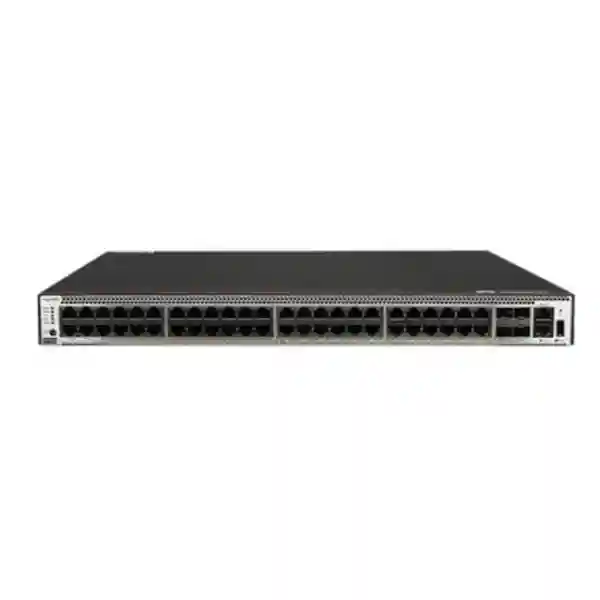
Huawei CloudEngine S5731-S48T4X-A
A compact 1U non-PoE enterprise switch combining 48 Gigabit copper access interfaces with four fixed 10GE SFP+ uplinks, built-in AC power and the broader CloudEngine S5731-S software framework for routed campus access, resilient aggregation, IPv6, automation and virtualized network services.
Direct answer: what is the S5731-S48T4X-A designed to do?
The Huawei CloudEngine S5731-S48T4X-A is best understood as a high-density, fixed-configuration Gigabit Ethernet access switch for enterprises that need forty-eight copper edge connections and several high-speed uplinks in a single rack unit. It is not a PoE model, so its purpose is not to power phones, wireless access points or cameras directly over Ethernet. Instead, it concentrates wired endpoints such as desktops, printers, servers, controllers, industrial devices, security appliances and non-PoE edge equipment, then carries their traffic upstream through four 10 Gigabit SFP+ interfaces.
For UAE networks, that makes the model particularly relevant where equipment rooms need dense port counts but rack depth, power consumption and cooling headroom still matter. The -A variant uses a built-in AC power supply and a compact chassis depth of approximately 220 mm, making it materially shallower than redundant-power chassis variants in the same family. Huawei documentation for the model family lists the exact S5731-S48T4X-A with 48 x 10/100/1000Base-T ports, four 10GE SFP+ ports, 125 Mpps forwarding performance and a switching-capacity figure of 176 Gbit/s at the device level, with 672 Gbit/s shown as the platform/system switching figure in the international datasheet convention.
Beyond the physical port map, the wider S5731-S family is built on Huawei’s Versatile Routing Platform and is positioned for enterprise campus access and aggregation. Features documented at the family level include VLAN services, Layer 3 routing, IPv6, intelligent stacking, multicast, QoS, access control, VXLAN, BGP-EVPN, NETCONF-based configuration, Super Virtual Fabric client functions and security integration. Actual availability can depend on software release, feature license, configuration mode and regional software policy, so production design should always confirm the selected VRP version and entitlement against the required feature set.
Hardware architecture and port map
48 Gigabit copper interfaces
The front-panel access block provides forty-eight 10/100/1000Base-T Ethernet interfaces. This is the classic enterprise access-layer density for a full rack row or a floor distribution cabinet because it maps efficiently to forty-eight-port copper patch panels and preserves a predictable one-switch-per-patch-field operating model. Auto-negotiation allows endpoints running at Fast Ethernet or Gigabit Ethernet speeds to coexist, while structured cabling teams can retain familiar Category 5e, Category 6 or better copper plant according to project standards and channel distance.
Four 10GE SFP+ uplinks
Four fixed 10GE SFP+ ports create several topology choices. They can be used as independent uplinks, bundled as link aggregation groups, assigned as stack links where the selected software and design support iStack, or divided between upstream connectivity and server or security-appliance connections. The optical form factor supports common short-range or long-range fiber designs when matched with supported transceivers, and appropriate direct-attach copper options may be practical inside the same rack. Exact optics compatibility should be validated against Huawei’s hardware compatibility list.
Compact 1U chassis
The documented chassis dimensions for the built-in-power -A design are approximately 43.6 mm high, 442 mm wide and 220 mm deep. The 43.6 mm height places it in a standard 1U rack space. The relatively short depth can be useful in shallow wall cabinets, branch racks and floor telecommunications rooms where full-depth data-center switching hardware would be awkward. Mechanical planning still needs clearance for front patching, rear power entry, airflow and cable bend radius, so the nominal 220 mm chassis depth should not be treated as the complete installed depth.
Built-in AC power
The -A suffix denotes the built-in AC power version in Huawei’s portfolio. Manufacturer portfolio material lists typical power consumption around 76 W for the S5731-S48T4X-A. This is a planning reference rather than a substitute for peak-load electrical design. UAE installations should size PDU capacity, UPS runtime and branch-circuit protection against the official maximum input specifications for the exact hardware revision, while also including connected optics and neighboring rack equipment in the thermal and electrical budget.
Understanding the 125 Mpps and 176/672 Gbit/s figures
Switch specifications are easy to misread if packet-forwarding rate and switching capacity are treated as interchangeable. Huawei lists the S5731-S48T4X-A at 125 million packets per second. Packet forwarding describes how many packets the forwarding engine can process under the test assumptions used for the platform. This matters when traffic consists of many small frames, because small packets create a higher packets-per-second requirement than large frames at the same wire-rate bandwidth.
The international S5731-S documentation shows the S48T4X/S48T4X-A group with 176 Gbit/s / 672 Gbit/s switching capacity. Huawei explicitly explains in its product material that the value before the slash refers to the device switching capability while the value after the slash refers to the system switching capability. For practical sizing, the design question is not simply whether the larger number appears impressive. The more useful exercise is to calculate realistic edge utilization, uplink oversubscription, east-west traffic inside the access layer, routed traffic volumes, multicast behavior, burst patterns and failure scenarios.
Forty-eight 1GE access ports represent 48 Gbit/s of one-direction nominal edge bandwidth, while four 10GE uplinks represent 40 Gbit/s of one-direction uplink bandwidth if all are deployed for upstream traffic. In office networks, every endpoint rarely transmits continuously at line rate, so this can be an efficient access design. In storage-heavy, imaging, engineering or high-volume data acquisition environments, the oversubscription assumptions should be modeled more carefully. The four SFP+ uplinks provide flexibility to increase aggregate bandwidth, distribute traffic across redundant upstream switches, or reserve links for specialized connectivity.
When sizing for resilience, calculate the network in the failed state, not only the normal state. If two 10GE links are split across two upstream devices and one upstream path fails, the surviving path must carry the critical load without unacceptable congestion. Link aggregation, ECMP, spanning-tree design, routed uplinks or multi-chassis architecture upstream all influence how effectively the four uplinks can be used. The S5731-S48T4X-A therefore fits best when capacity planning is tied to application behavior rather than raw port count alone.
Where this switch fits in a campus architecture
A conventional enterprise campus is commonly divided into access, aggregation or distribution, and core layers. The S5731-S48T4X-A is naturally positioned at the access layer, where copper endpoint density is more important than very high-speed modular uplinks. In a smaller office, however, the same device can perform both access and local Layer 3 aggregation functions because the S5731-S software family includes dynamic routing, VRF and extensive policy capabilities. That makes the platform flexible enough for branches, schools, clinics, retail stores and distributed enterprise sites that want fewer device roles.
In a two-tier collapsed-core design, access switches can connect directly to a resilient core pair. Each access device might use two or four 10GE uplinks depending on the redundancy method. In a three-tier design, the switch can uplink to distribution switches that aggregate multiple floors or buildings. Where Layer 3 is extended to the access edge, routed uplinks can reduce spanning-tree dependency and localize failure domains. Where Layer 2 is required for endpoint mobility or legacy application reasons, VLAN trunks can be carried to the distribution layer with loop prevention and link aggregation applied according to the topology.
Huawei’s campus portfolio also emphasizes intelligent operations, automation, SVF and VXLAN-based virtualization. Those capabilities support more modern fabric-style designs, but they should be adopted because they solve a defined operational problem, not because the features exist. A straightforward VLAN-and-routing architecture may be easier for a small UAE branch to operate, while a large multi-building campus may justify centralized orchestration, virtual networks, policy automation and telemetry. The hardware can serve either style when the software release and feature set are selected correctly.
Layer 2 design: VLANs, loops and access segmentation
The S5731-S family supports up to 4094 VLANs and includes standard enterprise segmentation functions such as guest VLAN, voice VLAN, GVRP, MUX VLAN, VLAN assignment based on MAC address, protocol, IP subnet, policy or port, plus 1:1 and N:1 VLAN mapping. In practical projects, the most important design task is to translate business boundaries into a manageable VLAN plan. User workstations, printers, building-management systems, CCTV recorders, access-control systems, voice devices, network management and guest access often require different policy treatment even when they share the same physical switch.
Access ports should normally be assigned explicitly to the intended VLAN, with unused ports administratively disabled or placed in a restricted parking VLAN according to the organization’s security standard. Trunk ports should carry only the VLANs that need to traverse that path. Allowing every VLAN on every trunk may appear convenient during deployment, but it expands broadcast domains, increases accidental exposure and makes troubleshooting more difficult. The S5731-S48T4X-A offers enough local port density that a clean physical and logical mapping can be maintained between patch-panel positions, switch ports and business functions.
Spanning Tree Protocol remains relevant in Layer 2 topologies. Huawei’s S5731-S documentation includes STP, RSTP and MSTP family capabilities, along with protection mechanisms such as BPDU protection, root protection and loop protection. The product family also documents VBST interoperability intended to work with PVST/PVST+/RPVST environments. Mixed-vendor designs need deliberate testing because vendor terminology and default behavior can differ even when protocols are based on standards. Root placement, edge-port behavior, link aggregation and convergence targets should be documented before implementation.
For environments where loops are created accidentally by unmanaged edge equipment, Layer 2 protection is not optional. Office users can connect small switches, patch cables can be moved incorrectly, and building systems may include undocumented bridges. A production configuration should combine loop-prevention features with storm control, MAC learning policy and monitoring. The exact control set should be selected based on the VRP release and security policy rather than copied from a generic template.
Layer 3 routing capabilities for distributed enterprise networks
The S5731-S family is more capable than a basic unmanaged or Layer 2-only access switch. Huawei’s current family datasheet documents VRF, DHCP client, DHCP server, DHCP relay, routing policy, uRPF, policy-based routing and an IPv4 routing table scale of up to 32K entries. It also lists RIPv1, RIPv2, OSPF, BGP, MBGP and IS-IS. These functions allow the platform to participate in routed campus designs, branch routing, segmented enterprise networks and controlled inter-VLAN routing when the software image and licensing support the intended configuration.
For most enterprise access deployments, OSPF is a common choice where dynamic routing is required because it offers structured area design, fast reconvergence with appropriate tuning and broad interoperability. Static routing may be entirely sufficient for a small site with one or two upstream paths. BGP can be relevant in larger segmented networks, multi-tenant environments, EVPN-based fabrics or designs where policy control between routing domains is needed. IS-IS is more common in service-provider or large fabric environments, but the capability illustrates that the platform family is designed for more than simple endpoint switching.
VRF support is especially useful when multiple logical networks must remain isolated while sharing the same physical switching infrastructure. A business can separate corporate users, operational technology, guest services or tenant networks into independent routing instances. VRF alone does not provide a complete security policy; traffic control between routing domains still requires appropriate firewalling, ACLs or service insertion. In UAE enterprise deployments, it is common to integrate campus switching with dedicated next-generation firewalls. FourTeck’s Firewall Dubai practice can be used to align inter-zone policy, north-south inspection and WAN security with the switching design.
Policy-based routing can steer selected traffic according to source, destination, service or policy criteria instead of relying only on the destination routing table. It should be used sparingly because complex policy chains can make path prediction and troubleshooting harder. A good design starts with simple route structure, uses dynamic protocols where they reduce operational risk, and adds policy routing only for clearly defined exceptions such as service chaining, migration stages or special WAN breakout requirements.
IPv6 readiness and dual-stack planning
IPv6 is a first-class capability in the S5731-S feature set rather than an afterthought. Huawei documents the IPv6 protocol stack, Neighbor Discovery, ND snooping, DHCPv6 snooping, RIPng, DHCPv6 server, DHCPv6 relay, OSPFv3, BGP4+ and IS-IS for IPv6. The family datasheet also lists up to 8K IPv6 forwarding entries and up to 8K ND entries, with IPv6 ACL functions and VRRP6 among the broader feature descriptions.
A dual-stack rollout should begin with addressing and security architecture, not with enabling IPv6 everywhere. Enterprises should define prefix allocation, VLAN-to-subnet mapping, router advertisement policy, DHCPv6 behavior, DNS strategy, security inspection and monitoring before activating endpoint connectivity. IPv6 bypass risks arise when security teams focus only on IPv4 ACLs and firewall policy while endpoints automatically obtain IPv6 addresses. Switch-side controls such as ND snooping and DHCPv6-related protections can support a broader IPv6 security framework.
For UAE organizations that interact with global cloud platforms, telecom networks, modern operating systems and internet-facing services, building IPv6 competence now reduces future migration pressure. The S5731-S48T4X-A can participate in that journey while still supporting conventional IPv4. Network teams can start with management-plane readiness, lab validation and selected routed segments before expanding dual-stack operation across the estate.
The operational requirement is consistency. Monitoring systems, TACACS+/RADIUS services, syslog collectors, NTP servers, DNS infrastructure and out-of-band management workflows should all be assessed for IPv6 behavior. A switch that supports IPv6 routing does not automatically make the surrounding operations stack IPv6-ready. Deployment documentation should therefore include both forwarding-plane and management-plane acceptance tests.
VXLAN and BGP-EVPN: when virtualized networking becomes useful
Huawei documents VXLAN Layer 2 and Layer 3 gateway functions for the CloudEngine S5731-S family, including centralized and distributed gateway models, BGP-EVPN and configuration through NETCONF. VXLAN encapsulates Layer 2 segments over a Layer 3 underlay and is frequently used to create scalable virtual networks without extending traditional VLAN mechanisms across an entire infrastructure. BGP-EVPN provides a control plane for distributing endpoint and reachability information in modern fabric designs.
For a single small office, VXLAN may add more complexity than value. Traditional VLANs and routed uplinks are often easier to operate. VXLAN becomes more attractive when an enterprise needs repeatable virtual networks across multiple access blocks, policy-driven segmentation, automated campus fabrics, large-scale multi-tenancy or consistent logical networks across physically separated areas. It can also support phased modernization where the IP underlay remains stable while virtual overlays are created and changed more dynamically.
The S5731-S48T4X-A should not be selected solely because the family datasheet lists VXLAN. A fabric project requires a complete architecture including compatible upstream switches, a control or management platform where applicable, underlay routing, MTU planning, endpoint onboarding, failure-domain design, telemetry and operations procedures. Software release compatibility is critical because EVPN and VXLAN behavior evolves across versions and may require specific feature packages or licenses.
Where an organization is evaluating a broader campus refresh, FourTeck’s IT Services UAE team can be aligned with switching, routing, VLAN migration, documentation, testing and handover requirements so that the hardware purchase is integrated into an operational network plan rather than treated as an isolated device replacement.
Intelligent stacking and resilient access design
Huawei positions iStack as a key S5731-S capability. Stacking allows multiple compatible physical switches to operate as one logical switch from a management and forwarding perspective. The operational benefit is not merely fewer management IP addresses. A well-designed stack can simplify link aggregation across members, centralize configuration, make port expansion predictable and reduce the number of independent devices that administrators must manage.
Stacking design must still account for failure domains. Two switches in a stack are easier to administer than two independent switches, but they also share control-plane relationships and software lifecycle decisions. Stack bandwidth, topology, master-election behavior, upgrade procedures and member compatibility should be reviewed before deployment. Where maximum fault isolation is required, independent access switches with routed uplinks may be preferable. Where operational simplicity and cross-member link aggregation are more valuable, stacking can be an excellent fit.
The four 10GE SFP+ interfaces are strategically important because uplink and stack requirements compete for the same high-speed port resources in many fixed-switch designs. If multiple ports are reserved for stacking, fewer remain for upstream links. If all four are required for upstream bandwidth or redundancy, the stack design may need a different physical plan. This is why bill-of-material planning should specify the exact intended use of every SFP+ interface rather than simply ordering optics after the switch arrives.
For branch sites, resilience may be achieved without stacking by using two independent S5731-S48T4X-A units, splitting endpoints across them, and connecting both to redundant upstream devices. For dense campus floors, stacking can simplify large edge domains. There is no universally correct answer; the right approach depends on acceptable outage scope, maintenance practice, port growth, topology and the capabilities of the upstream network.
Important limitation: this is a non-PoE model
The S5731-S48T4X-A does not provide PoE+. That is a decisive design point, not a minor specification. If the access layer must power IP phones, wireless access points, surveillance cameras, door controllers or IoT devices through the Ethernet cable, a PoE-capable model such as the corresponding S5731-S48P4X family variant may be more appropriate. Alternatively, separate PoE injectors or midspan equipment can be used, but that usually increases cabling, power and support complexity.
Non-PoE can still be the better choice when endpoint power is not needed. The hardware can be simpler, power planning can be more predictable, and there is no requirement to budget hundreds of watts of downstream PoE load. Traditional desktop access, printer networks, server-management ports, building controllers with independent power, industrial endpoints, laboratory equipment and certain branch environments are examples where a non-PoE access switch is entirely appropriate.
Before quotation, classify every connected endpoint by both bandwidth and power requirement. A port-count spreadsheet that only says “48 users” is insufficient if half of those ports are actually phones with PC pass-through, access points or cameras. The S5731-S48T4X-A should be selected when its non-PoE characteristic is intentional.
Security functions and access-layer hardening
Access switches sit close to users and devices, so they are exposed to accidental loops, rogue endpoints, address spoofing, scanning, unauthorized DHCP services and attempts to move laterally across internal networks. Huawei’s S5731-S family includes a broad security and policy framework around ACLs, source validation, DHCP-related controls, MAC functions, IPv6 snooping and integrated security visibility. The value of those functions depends on disciplined configuration.
A hardened deployment begins with management-plane separation. Switch management should be reachable only from authorized administrative networks, preferably through dedicated management VLANs or VRFs. Interactive access should use secure protocols, role-based administrative controls should be applied, and authentication should be centralized where enterprise AAA services are available. Configuration backups, change logging, NTP synchronization and syslog retention make incident response significantly easier.
At the user edge, security policy may include port access controls, static or dynamic MAC restrictions, DHCP snooping, IP/MAC binding, ARP-related protection, IPv6 neighbor-discovery controls, ACLs, storm suppression and segmentation. The exact mechanism should be selected according to endpoint type. A fixed printer port can tolerate stricter binding than a shared meeting-room port. Industrial controllers may require carefully tested controls to avoid disrupting deterministic behavior. Guest or contractor networks usually benefit from strong isolation and firewall enforcement upstream.
Huawei also describes integrated security probe functions within the series that can work with its broader security analytics ecosystem. Organizations already using Huawei security analytics may gain additional visibility from that integration. Others can still use standards-based telemetry, logs and flow visibility to feed existing monitoring platforms. The switch should be treated as one part of a layered security architecture rather than as a replacement for perimeter firewalls, endpoint security, identity systems or network detection tools.
FourTeck’s UAE networking portfolio can be referenced when the switch is being combined with racks, structured cabling, optics, firewalls, wireless infrastructure or managed services so the security and connectivity design is coordinated across components.
QoS for voice, business applications and constrained uplinks
The S5731-S series datasheet documents ingress and egress rate limiting, packet redirection, port-based traffic policing, two-rate three-color CAR, eight queues per port and queue scheduling mechanisms including DRR, strict priority and combined DRR plus strict priority. These are meaningful tools when the access switch serves traffic classes with different latency, loss and bandwidth sensitivity.
QoS design should start with classification. Voice signaling, real-time audio, video meetings, business applications, backups, software distribution and guest internet traffic may all compete for the same uplinks. Markings can be trusted from known managed devices, remarked at the access edge, or classified using policy. The most important rule is to avoid creating more priority traffic than the network can actually prioritize. If everything is placed in a high-priority queue, the queue loses its purpose.
On a 10GE uplink, congestion may be rare in a typical office, but transient bursts can still occur during backup windows, patch distribution, virtual desktop login storms or large file transfers. QoS becomes even more important when upstream paths traverse lower-bandwidth WAN circuits. The access switch can preserve packet markings and enforce local policies, while the WAN edge applies the shaping and queuing model appropriate to the carrier service.
Before deploying a complex QoS policy, measure traffic. Interface utilization, queue drops and application baselines reveal whether the problem is actual congestion, packet loss elsewhere, endpoint limitations or application behavior. QoS is most effective when it is part of an end-to-end policy with consistent DSCP interpretation across access, distribution, firewall and WAN devices.
Multicast for video, IPTV and operational systems
Huawei documents IGMP v1/v2/v3 snooping, fast leave, controllable multicast, multicast forwarding, port-based multicast statistics and routed multicast capabilities including IGMP, PIM-SM, PIM-DM, PIM-SSM and MSDP within the S5731-S family. Multicast matters in environments where one source must efficiently reach many receivers, such as IPTV distribution, market-data feeds, digital signage, surveillance viewing, enterprise video or selected industrial systems.
Without IGMP snooping, Layer 2 switches may flood multicast traffic across ports in a way that resembles broadcast traffic. Snooping allows the switch to learn which ports actually require particular multicast groups. Routed multicast extends distribution across Layer 3 boundaries. The configuration must be coordinated with upstream queriers and rendezvous-point or source-specific multicast design where applicable.
Multicast troubleshooting is frequently more complex than unicast because receiver joins, group state, VLAN boundaries and upstream routing all matter. A rollout should document expected groups, sources, receiver locations, bandwidth per stream and failover behavior. The switch can provide the necessary feature foundation, but successful operation depends on an end-to-end multicast design.
Management, automation and telemetry
The operational cost of a switch is often determined less by purchase price than by how efficiently it can be configured, monitored, upgraded and troubleshot. The CloudEngine S5731-S family is positioned around simplified O&M, telemetry, NETCONF automation and SVF integration in addition to traditional network management. This gives UAE enterprises a path from conventional CLI administration toward more automated operations without requiring every site to adopt a full fabric on day one.
NETCONF is particularly useful for structured automation because it allows configuration and state data to be handled programmatically rather than relying only on screen-scraping CLI sessions. In larger environments, templates can enforce consistent VLAN, routing, ACL, logging and management standards across many access switches. Automation should include validation and rollback logic; a fast method of pushing an incorrect configuration is not an operational improvement.
Telemetry can provide more granular and frequent operational data than traditional polling alone, helping teams observe interface behavior, congestion, resource utilization and faults. The monitoring platform needs to be designed to ingest and retain useful data without generating excessive noise. Baselines are essential. A sudden rise in errors or drops is more meaningful when the normal range for that interface is known.
SVF is designed to simplify campus operations by virtualizing multiple network layers and allowing compatible client devices to be deployed with reduced local configuration. Organizations considering SVF should verify controller or parent-switch compatibility, software releases and operational workflows. The feature is most valuable when it reduces repetitive work across a large number of edge devices.
Traditional management practices still matter even in automated networks. Maintain asset inventory, software versions, serial records, configuration backups, topology diagrams, change tickets and tested recovery procedures. Automation strengthens good operational discipline; it does not replace it.
Four practical deployment topologies
1. Office floor access
One S5731-S48T4X-A serves up to forty-eight wired endpoint drops on a floor. Two 10GE uplinks are aggregated or distributed to resilient upstream switches, while the remaining SFP+ ports are retained for growth or additional resiliency. User, printer, management and infrastructure VLANs are separated logically. This is the most straightforward deployment for corporate offices where phones and wireless APs receive power from separate infrastructure or are connected elsewhere.
2. Branch collapsed access
At a branch, the switch can provide endpoint access and local Layer 3 gateway functions. Static routes or OSPF connect the branch VLANs toward a firewall or WAN router. VRFs may be used if business and operational networks must remain separate. This design reduces device count, but the operational team should confirm that a single switch failure meets the branch availability target or deploy a second access switch where necessary.
3. Non-PoE server and appliance edge
The forty-eight copper ports can aggregate management interfaces, backup appliances, KVM devices, non-production servers, storage management, monitoring probes and other non-PoE equipment. The 10GE SFP+ interfaces connect upstream or to selected high-bandwidth systems. This is not a data-center leaf switch replacement for modern 25/40/100GE fabrics, but it can be very effective for Gigabit management and appliance networks.
4. Industrial or operational access
Where industrial controllers and operational devices use standard Ethernet and have independent power, the switch can provide dense connectivity and VLAN separation. Environmental suitability must be checked carefully: the S5731-S48T4X-A is an enterprise switch, so temperature, dust, vibration, enclosure type and power quality at the installation location must remain within the manufacturer’s limits. Industrial sites often require protected cabinets and conditioned environments.
Sizing methodology: how many switches and uplinks do you actually need?
Start with active endpoint count, not wall-outlet count. A building may have 500 data outlets but only 320 active devices. Conversely, a desk can require more than one logical connection if it contains a PC, phone, docking station and specialized device. Reserve capacity is important because a completely full switch leaves no room for moves, additions and changes. Many enterprise designs target a practical utilization ceiling below 100 percent so that growth and fault recovery remain manageable.
Next classify endpoints by power requirement. Because the S5731-S48T4X-A is non-PoE, every PoE endpoint either needs another switch or an external powering strategy. Separate the bill of materials into PoE and non-PoE access blocks before selecting exact switch counts. Mixing the wrong model can create expensive remedial work after installation.
Then assess bandwidth. Ordinary office desktops may generate modest average utilization, but software distribution, cloud synchronization, large media files and backup tasks create bursts. Estimate total busy-hour traffic rather than multiplying every port by 1 Gbit/s and assuming constant full load. For special environments such as design studios, medical imaging, video production or analytics, obtain measured traffic data where possible.
Uplink sizing follows from the traffic model and resilience target. One 10GE uplink may be enough for a lightly used branch but creates a single path. Two 10GE uplinks can provide redundancy, link aggregation or path diversity. Four uplinks offer additional bandwidth or architectural flexibility, but all four may not be simultaneously usable for upstream traffic if some are allocated to stacking or specialized links.
Finally, size operational capacity: rack units, cabinet depth, PDU outlets, UPS wattage, cooling, fiber cores, transceiver count and patching. A switch purchase is only one line of the implementation bill. Optics, fiber jumpers, cable managers, rack accessories, labeling and installation effort frequently determine whether a deployment proceeds smoothly.
For multi-site or cross-border projects, FourTeck’s global site can be used alongside the UAE operation when procurement and rollout requirements extend beyond a single local office.
Optics, fiber and copper cabling considerations
The four SFP+ uplinks are only useful when the transceiver and fiber plant are selected correctly. Short-reach multimode optics are common inside buildings and data rooms, while single-mode optics are used for longer building-to-building or campus links. The exact supported module list should be checked against Huawei’s compatibility documentation for the switch hardware and VRP version. Unsupported optics may produce alarms, fail to initialize, or operate without vendor support.
Fiber type matters. OM3 or OM4 multimode cabling is commonly used for short 10GE links with appropriate SR optics, while OS2 single-mode cabling is used with LR or other suitable optics for longer distances. Existing UAE buildings sometimes contain mixed fiber generations, undocumented patching or legacy terminations. Do not assume that a connector fits means the link budget is valid. Verify fiber category, connector type, splice count, path length and optical loss.
Direct-attach copper can be attractive for very short 10GE connections within a rack because it reduces transceiver count and can be cost-effective. Compatibility and cable length remain important. Active optical cables can also be practical in some environments. The design should prioritize supported components and maintainable spares rather than lowest initial price.
On the 48 Gigabit access ports, structured cabling quality directly influences link stability. Category 5e is technically suitable for 1GE within standard channel limits, while Category 6 or better is often chosen for new installations to improve headroom and future options. Copper test certification should be included in new cabling projects, especially when intermittent errors could otherwise be blamed on the switch.
Label both ends of every patch connection and maintain a port schedule linking switch interface, patch panel, outlet and endpoint. Good labeling is one of the highest-return investments in day-to-day support because it shortens moves, incident resolution and audit work.
Power, UPS and thermal planning in the UAE
Huawei portfolio material lists typical power consumption around 76 W for the S5731-S48T4X-A. Typical consumption is useful for estimating operational energy, but electrical infrastructure should be designed from official maximum input specifications and real rack composition. Add the consumption of optics, routers, firewalls, servers, patch-panel lighting or management devices if present. UPS sizing should consider both load wattage and the runtime required for orderly shutdown or generator transfer.
The UAE climate makes room-level environmental control especially important. Outdoor ambient temperature is not the same as switch inlet temperature; properly designed telecommunications rooms and data centers maintain controlled conditions. However, cooling failures can cause cabinet temperatures to rise quickly. Ensure front and rear clearances follow the manufacturer’s airflow requirements, avoid blocking ventilation with cable bundles, and do not place heat-producing devices so that one unit exhausts directly into another’s intake.
Compact depth makes the -A model attractive for shallow cabinets, but cabinet selection still requires attention to power-plug clearance, patch-cord bend radius and airflow. A 220 mm deep switch does not mean it belongs in a 250 mm deep enclosure. Allow practical service space so technicians can replace cables without stressing connectors.
Where the site experiences unstable utility supply, a quality UPS can protect against short interruptions and voltage events. Grounding and surge protection should follow local electrical standards and the building’s engineering design. Network equipment should not be used to compensate for inadequate electrical infrastructure.
For larger infrastructure projects involving compute, rack integration or server-room expansion, the Server Dubai resource can be referenced for complementary server and data-room requirements while keeping the switching design aligned with rack and power planning.
Software versions, licensing and feature validation
Enterprise switch capability is defined by hardware and software together. The S5731-S family has evolved through multiple VRP releases, and Huawei support documentation lists several V200 release trains for the platform. Features, command syntax, interoperability behavior, bug fixes and recommended software versions can change across releases. Production procurement should therefore include a software baseline decision rather than treating firmware as an afterthought.
Before deployment, create a feature matrix containing every function the design depends on: stacking, routing protocol, VRF, IPv6, multicast, MPLS if required, VXLAN, BGP-EVPN, NETCONF, authentication, security controls, telemetry and management integration. For each item, confirm whether it is available in the target VRP release and whether a license is required. This prevents the common problem where hardware is ordered because a family brochure lists a capability but the deployed image or license level does not enable it.
Software lifecycle also matters. Check Huawei support status, recommended release guidance and any applicable end-of-sale or end-of-support notices for the exact SKU and target software. A network refresh should avoid standardizing on a release that is approaching the end of maintenance if a supported alternative exists. Where change control is strict, test upgrades in a lab or representative pilot stack before broad rollout.
Configuration templates should be version-controlled. Store both the intended template and device-specific variables such as hostname, management address, VLAN assignments, routing IDs and uplink interfaces. After deployment, archive the actual running configuration and record the software image and patch level. These practices make recovery, auditing and future migration much easier.
Licensing questions should be resolved during quotation. If a feature is essential to business operation, it belongs on the bill of materials and acceptance checklist rather than as an assumption discovered during commissioning.
Migration from an existing access switch
Replacing an access switch is not simply a matter of moving forty-eight patch leads. The old configuration may contain years of accumulated VLANs, static MAC entries, trunk exceptions, voice settings, ACLs, monitoring destinations and undocumented workarounds. A controlled migration begins by exporting the current configuration and comparing it with the desired future state rather than blindly converting every legacy command.
Build a port map showing old interface, new interface, patch-panel position, endpoint type, VLAN, speed, duplex requirement, power requirement and special policy. This immediately identifies any PoE endpoints that cannot move directly to the S5731-S48T4X-A. It also reveals dormant ports that do not need to be reproduced. Clean migrations remove obsolete configuration instead of carrying technical debt forward.
Stage the new switch before the maintenance window. Load the approved software, apply the baseline configuration, verify management reachability, configure VLANs and uplinks, test routing adjacency where applicable, and confirm transceiver status. If the deployment uses stacking, assemble and validate the stack in advance. A pre-staged device reduces the amount of command-line work required during the outage.
During cutover, move uplinks and a small pilot set of access ports first when the change plan allows it. Validate gateway reachability, DHCP, DNS, application access, voice or specialized device behavior, and monitoring visibility. Then migrate the remaining ports in controlled groups. Keep rollback criteria explicit. If a critical dependency fails and cannot be resolved within the approved window, technicians should know exactly when and how to return to the previous switch.
After migration, compare interface counters, error rates, MAC learning, routing neighbors, spanning-tree state, CPU or resource status and monitoring alarms with the expected baseline. Update documentation immediately while the physical changes are fresh. A successful migration is one that leaves both the network and its records in a known state.
Interoperability in mixed-vendor networks
Most enterprise networks are not single-vendor from end to end. The S5731-S48T4X-A may connect to third-party firewalls, routers, wireless controllers, servers and distribution switches. Standards-based Ethernet, LACP, OSPF, BGP, IPv6 and other protocols make interoperability possible, but successful operation depends on matching timers, modes, authentication, MTU, VLAN tagging and feature expectations.
Huawei documents VBST for interoperability with PVST/PVST+/RPVST environments, LNP with functionality similar to DTP, and VCMP with functionality similar to VTP. Similar does not mean identical. Do not assume proprietary negotiation mechanisms behave interchangeably. In mixed environments, explicit trunk configuration is usually safer than relying on vendor-specific dynamic negotiation.
Link aggregation should be configured with compatible LACP parameters and consistent VLAN membership on both ends. Routing adjacencies should use agreed areas, authentication and timers. If jumbo frames are required for overlays or specialized applications, verify the supported MTU across the entire path rather than on the access switch alone. A single lower-MTU hop can cause difficult fragmentation or black-hole problems.
Transceiver policy is another interoperability topic. Even when the far end is a different vendor, each switch must accept its local optic. Optical wavelengths, fiber type and link budget must match end to end. The safest procurement approach is to use supported optics at each endpoint and standards-compatible optical specifications across the link.
Pilot testing is recommended whenever the S5731-S48T4X-A will join a mixed-vendor stack of protocols or automation systems. A small lab can expose differences in spanning-tree behavior, LLDP interpretation, authentication, routing policy and monitoring before the production cutover.
Use cases by sector
Corporate offices
Dense wired access for desktops, docking stations, printers and meeting-room systems that have independent power. VLAN segmentation separates departments, infrastructure and management traffic. Ten-gigabit uplinks provide headroom toward distribution or core switches while the compact chassis fits standard telecommunications rooms.
Education
Computer laboratories, administrative networks and fixed classroom devices can use the forty-eight copper ports. Dynamic routing, VLAN control and IPv6 readiness support larger campus designs. If wireless APs or IP phones require PoE, those endpoints should be placed on PoE-capable switches rather than on this model.
Retail and hospitality back office
POS back-office systems, printers, management terminals, controllers and operational devices can be segmented from guest or public networks. Compact depth can suit distributed site cabinets. Availability planning should consider whether a second switch is required for critical operations.
Healthcare and clinics
Administrative PCs, medical-office equipment, imaging-support interfaces and management systems can be isolated with VLANs and routing policy. Clinical environments require careful change control, security and redundancy assessment; the network architecture should reflect the criticality of connected systems.
Industrial facilities
Standard-Ethernet controllers and operator systems with separate power can connect through the switch when environmental conditions remain within the enterprise hardware specification. Operational technology segmentation should be enforced with VLAN, VRF, ACL and firewall policy appropriate to the risk model.
Branch and remote sites
The platform can combine access switching with local routing in a compact footprint. OSPF, static routing, VRF and IPv6 capabilities give architects options for integrating branches into MPLS, SD-WAN or internet-VPN designs through the appropriate edge router or firewall.
Operational troubleshooting framework
Troubleshooting is faster when engineers follow layers and evidence instead of changing settings at random. For an endpoint connectivity issue, begin with physical state: is the interface up, at what speed and duplex, and are error counters increasing? Confirm the copper cable and patch path. Then check MAC learning, VLAN membership and spanning-tree state. If Layer 2 is correct, verify IP address, gateway, ARP or neighbor discovery and routed reachability.
For uplink issues, verify optic type, receive/transmit levels where available, interface errors, LACP state, allowed VLANs and MTU. In routed designs, inspect OSPF/BGP/IS-IS adjacency and route installation. In an EVPN/VXLAN design, separate underlay reachability from overlay control-plane and VNI state. A structured approach prevents overlay complexity from obscuring a simple physical fault.
Performance complaints require evidence. Check interface utilization, queue drops, packet errors, CPU or resource utilization, routing changes and application paths. A 1GE user port can be the bottleneck even when the 10GE uplink is quiet. Conversely, many low-utilization access ports can collectively congest an uplink during a synchronized event such as backup or patch deployment.
If intermittent issues occur, telemetry and logs become crucial. Preserve timestamps with NTP, send logs to a central collector and keep configuration-change records. Compare the time of the incident with link flaps, spanning-tree transitions, routing neighbor changes, security events or environmental alarms. Troubleshooting becomes much easier when the switch participates in a broader monitoring system.
Finally, maintain known-good spare optics, patch leads and where business criticality justifies it, spare switch hardware. A replace-and-test method is not a substitute for diagnosis, but validated spares can dramatically shorten restoration when a component is genuinely defective.
S5731-S48T4X-A versus nearby family choices
The S5731-S48T4X-A should be compared with related models according to port count, PoE, power architecture and physical depth. The 24-port S5731-S24T4X-A provides a smaller access count while retaining four 10GE uplinks, making it suitable for lower-density branches. The S5731-S48P4X adds PoE capability for powered endpoints but belongs to a different power and chassis planning category. The non-A S5731-S48T4X variant is associated with a chassis designed around replaceable power modules and redundancy rather than the compact built-in AC arrangement of the -A model.
The decision therefore begins with four questions. How many copper access ports are required? Do endpoints need PoE? Is redundant power at the switch chassis required? How much rack depth is available? Once those are answered, uplink needs, software features and total lifecycle cost can be evaluated.
The -A variant is attractive where a single built-in AC supply is acceptable and shallow depth is valuable. It is not the right choice when the switch itself must sustain operation through a power-module failure without external redundancy. An upstream UPS protects against facility power loss but does not create redundant internal power components. Availability architecture must distinguish those failure modes.
Likewise, the non-PoE model may have lower power and simpler thermal planning, but it is the wrong choice if most endpoints require power. Select the hardware that matches the actual edge role rather than attempting to compensate later with adapters and exceptions.
Procurement considerations for UAE projects
A complete quotation should identify the exact switch SKU, quantity, software or license requirements, transceiver types, fiber or DAC cables, power cords, rack accessories, support coverage and any implementation services. If stacking is planned, include every required stack component and reserve the correct SFP+ interfaces. If links terminate on third-party equipment, specify compatible optics for both ends rather than assuming one vendor’s module can be moved between platforms.
Support terms matter as much as purchase price for production infrastructure. Clarify warranty, advanced replacement options, local spares policy, software-download entitlement and escalation path. For multi-year deployments, ask about product lifecycle status so the organization can plan expansion with the same or compatible models.
Lead time should be assessed for the full bill of materials, not just the switch. A project can be delayed by missing optics or rack accessories even when the chassis is in stock. For large rollouts, establish a staging process that records serial numbers, software levels, burn-in results and destination sites before dispatch.
UAE VAT, delivery location, installation access, after-hours work permits and site security procedures may affect commercial and implementation planning. Data-center and free-zone sites can have strict delivery and technician access requirements. These should be handled early rather than during the cutover week.
When requesting pricing, provide the network role and topology as well as quantity. A technically complete quote is more useful than a chassis-only price because it exposes missing optics, licensing and services before purchase approval.
Recommended implementation workflow
- Define the role. Confirm whether the switch is pure Layer 2 access, routed access, branch aggregation, management-network access or part of a fabric.
- Validate endpoint power. Confirm that all devices connected to this model have independent power or an approved external PoE strategy.
- Build the port schedule. Map every copper and SFP+ interface to endpoint, VLAN, speed, uplink or stack purpose.
- Confirm software and licenses. Match required features with a supported VRP release and entitlement.
- Engineer uplinks. Choose optics, fiber, LACP or routed topology, redundancy and failure-state capacity.
- Prepare the configuration. Apply management, AAA, NTP, logging, SNMP or telemetry, VLAN, routing, security and QoS standards in staging.
- Test before shipment. Verify interfaces, optics, stack behavior where used, routing adjacency and management reachability.
- Execute controlled cutover. Use a documented migration sequence, validation plan and rollback trigger.
- Baseline after go-live. Record normal utilization, errors, neighbor state, logs and environmental status.
- Update documentation. Store topology, port map, configuration, software version and support details for future operations.
Frequently asked technical questions
Does the S5731-S48T4X-A support PoE?
No. The S5731-S48T4X-A is the non-PoE 48-port copper model. Use a PoE-capable family model or separate approved powering equipment when endpoints require power over Ethernet.
How many 10GE uplinks are available?
Four fixed 10GE SFP+ ports are provided. Their allocation between upstream links, stack links or specialized connections depends on the chosen topology and software design.
Can it route between VLANs?
The S5731-S family supports extensive Layer 3 functions including static and dynamic routing. Exact functionality should be checked for the chosen VRP release and license before final design.
Can it be used in a stack?
Huawei positions iStack as a family capability. Verify member compatibility, stack topology, software release and the number of SFP+ interfaces required for the stack before ordering.
Is it suitable for shallow cabinets?
Its documented 220 mm chassis depth is compact for a 48-port enterprise switch, but installed depth must include power, airflow and cable bend clearance.
Does it support VXLAN?
VXLAN L2/L3 gateway functions and BGP-EVPN are documented at the S5731-S family level. Confirm the target software and licensing for the exact production requirement.
What is the forwarding performance?
Huawei lists 125 Mpps for the S5731-S48T4X and S5731-S48T4X-A group in its international product specifications.
What is the typical power figure?
Huawei portfolio documentation lists approximately 76 W typical consumption for the S5731-S48T4X-A. Electrical design should still use official maximum ratings for the exact hardware revision.
Bill-of-material planning around the switch
A production-ready switch deployment usually requires more than the chassis. The bill of materials may include SFP+ transceivers, LC-LC fiber patch leads, single-mode or multimode backbone fiber, compatible DAC cables for intra-rack links, rack-mount accessories, horizontal and vertical cable management, IEC power cords, UPS outlets, labels and spare components. If the switch is part of a stack, include all required stack links and verify that the port allocation still leaves the intended uplink capacity.
Transceiver quantity should include operational spares for critical sites. Fiber patch leads should be specified by connector, fiber type and length. Avoid excessive slack inside shallow cabinets because tight coils and crowded patching can obstruct airflow and complicate service. Where multiple uplinks use diverse paths, label them with source and destination information so technicians can identify redundancy at a glance.
For copper access, patch-cord lengths should be selected to keep the front of the rack tidy. Very long cords bundled across the switch face make port identification and airflow worse. In dense forty-eight-port deployments, structured cable managers and consistent color standards can materially improve serviceability.
Operational spares may include one switch for a group of branch sites, spare optics for each deployed type and a small quantity of certified patch leads. The correct spare ratio depends on business criticality, support SLA and delivery time. Remote sites with difficult access generally benefit from more local spare coverage than central offices near a service hub.
Document the full bill of materials in the change package so future expansion uses matching components. A network is easier to support when optics, software versions and cabling standards are consistent across sites.
Acceptance testing checklist after installation
Acceptance testing should prove that the switch performs the intended service, not merely that LEDs are green. Verify serial number and asset record, installed software version, license state, clock and NTP synchronization, management connectivity, administrative authentication, configuration backup and monitoring registration. Confirm that logging reaches the central collector and that alarms are visible to the operations team.
Test access interfaces across the required VLANs and representative endpoint types. Validate DHCP or static addressing, DNS resolution, gateway reachability and application access. Where ACLs or segmentation policies are present, verify both permitted and denied flows. Confirm unused ports are in the expected administrative state.
For uplinks, test LACP member state, VLAN trunks, routed adjacencies, optical levels where supported, interface error counters and redundancy. Simulate a single-link failure during an approved test window and confirm traffic reconverges according to design. If dual upstream switches are used, test the loss of one path or one upstream peer.
If stacking is used, verify member roles, stack topology and behavior under a controlled member or stack-link event according to the design. If VXLAN or EVPN is used, validate underlay reachability, tunnel state, endpoint learning and policy. If multicast is used, test group joins and forwarding to authorized receivers.
Close the installation only after diagrams, port schedules, configuration archives and monitoring dashboards reflect the final state. Acceptance documentation should give future support engineers enough information to understand both normal operation and expected failure behavior.
Why the compact -A variant can be attractive
Many enterprise switches are designed for deep data-center racks or for removable power modules that increase chassis depth. The S5731-S48T4X-A takes a different approach by combining a built-in AC supply with a 220 mm deep chassis. This can simplify installation in telecommunications cabinets, branch racks and locations where physical depth is constrained.
The trade-off is that the compact built-in-power design should not be confused with a chassis providing internal 1+1 removable power redundancy. If the site requires redundant switch power modules, another model configuration may be more suitable. External UPS protection remains valuable, but it protects against a different set of failures.
The compact format can also reduce rack weight and improve service access in small rooms, but the overall installation must still account for patching density. Forty-eight front copper ports plus four SFP+ uplinks create substantial cabling. Good cable management is therefore even more important in shallow enclosures where there is less space to hide excess patch-cord length.
For organizations standardizing branches, the -A variant can provide a consistent balance of port density, Layer 3 capability and physical practicality. Standardization reduces spare variety, simplifies templates and makes technician training easier, provided all target sites share similar power and PoE requirements.
Design notes for high-availability environments
High availability is a system property. A single switch with four uplinks is not automatically highly available if all uplinks terminate on one upstream device, one fiber path or one power circuit. Availability planning should identify independent failure domains from the endpoint through access, uplink, distribution, firewall, WAN and power infrastructure.
At the access layer, critical endpoints can be distributed across two switches where the endpoint architecture permits it. Servers and appliances with multiple NICs can use redundant connections to separate access switches. Ordinary desktops usually have one NIC, so their availability depends on the individual access switch. For business-critical floors, keeping a configured spare switch can reduce mean time to restore service.
Uplink diversity is equally important. Two fibers in the same cable sheath can fail together if the cable is cut. Where the site justifies the cost, use diverse physical paths. If both uplinks terminate on the same upstream switch, that upstream device remains a single point of failure. A resilient core or distribution pair provides better path diversity.
Control-plane convergence should be tested rather than assumed. Whether using spanning tree, link aggregation, OSPF, BGP or EVPN, measure how long real application traffic is disrupted when a link or node fails. Protocol timers can be tuned, but aggressive settings may create instability on poor links. Balance convergence speed with operational reliability.
Power availability should include UPS, PDU and circuit design. The built-in AC architecture means the switch itself has one internal power subsystem, so external power resilience cannot eliminate every hardware failure. If uninterrupted operation through power-module failure is mandatory, specify a platform designed with redundant internal power.
Configuration governance and long-term operations
A switch can run for years, often longer than the team members who originally installed it. Governance ensures the configuration remains understandable. Use standard hostnames, interface descriptions, VLAN naming, IP addressing and routing conventions. Every uplink description should identify the far-end device and interface. Every unusual policy should have a reason recorded in the change system.
Back up configurations automatically and after every approved change. Keep backups in a secure repository with version history. If automation is used, define which source is authoritative: the controller, configuration repository or device running configuration. Configuration drift should be detected rather than allowed to accumulate silently.
Software upgrades should follow a lifecycle plan. Track vendor advisories, bugs relevant to deployed features and support deadlines. Test upgrades on a representative device or lab stack. Document the rollback process and required boot files before the maintenance window. In stacked environments, understand whether the upgrade is disruptive and how member compatibility is handled.
Capacity monitoring should watch access-port consumption, uplink utilization, errors, CPU or memory trends, MAC and routing table growth, and environmental status. Thresholds should be actionable. An alarm that fires continuously without prompting response trains operators to ignore the monitoring system.
Periodic audits should compare physical patching, asset records and configuration with the intended design. Decommission unused VLANs, old trunks and obsolete ACLs. Clean networks are easier to secure, troubleshoot and migrate.
Decision recap for Huawei CloudEngine S5731-S48T4X-A
You need 48 dense Gigabit copper access ports, four 10GE SFP+ uplinks, advanced enterprise Layer 2/Layer 3 capability, a compact 1U chassis and built-in AC power without PoE.
Most endpoints require PoE, internal redundant power modules are mandatory, or the access layer requires higher-speed 2.5GE/5GE/10GE edge ports rather than standard Gigabit copper.
VRP version, required licenses, stacking plan, supported optics, rack depth, power input, uplink topology, support coverage and product lifecycle status.
Treat switching, firewall policy, WAN, wireless, cabling, monitoring and operations as one architecture so the new access switch integrates cleanly into production.
Quotation input checklist
For a technically accurate UAE quotation, provide the following information with the request. These details allow the chassis, optics, support and services to be matched to the actual deployment rather than priced as an isolated part number.
Number of switches, buildings, branches or floor locations.
PCs, printers, servers, controllers, cameras, phones, APs and other devices.
Confirm that endpoints on this model do not require switch-supplied PoE.
Number of 10GE links, fiber type, distance and far-end switch model.
Whether switches will operate independently or in iStack, subject to compatibility.
Static routing, OSPF, BGP, VRF, IPv6, multicast, VXLAN or EVPN requirements.
ACLs, authentication, management access, logging and integration expectations.
Required warranty, replacement SLA, software support and project duration.
Final consultation panel
The Huawei CloudEngine S5731-S48T4X-A is a strong fit for organizations that need a compact, enterprise-class 48-port Gigabit access layer with fixed 10GE uplinks and no PoE requirement. Its value comes from combining dense copper access with the mature routing, IPv6, automation and segmentation capabilities of the S5731-S family.
For a production deployment, confirm the exact software release, license profile, supported optics, stacking design, rack constraints and support coverage before purchase. Build the quote around the complete topology—including uplinks, fiber, firewall integration, UPS and implementation—so the delivered hardware can be commissioned without missing dependencies.
FourTeck can align the switch with UAE campus, branch, security and infrastructure requirements, from supply through configuration planning, migration and support handover.
4 × 10GE SFP+
125 Mpps forwarding
Built-in AC power
1U / approx. 220 mm depth
Non-PoE access switch

Reviews
There are no reviews yet.