
Huawei CloudEngine S5732-H48S6Q
A fiber-dense 1U campus switch for organizations that need large quantities of GE optical access, dedicated 10GE interfaces, six 40GE QSFP+ uplinks, advanced virtualization, intelligent operations, and a migration path toward policy-driven enterprise networking. FourTeck positions the S5732-H48S6Q for UAE deployments where resilient optical distribution, structured uplink design, long-reach connectivity, and centralized operational visibility matter more than simple copper access density.
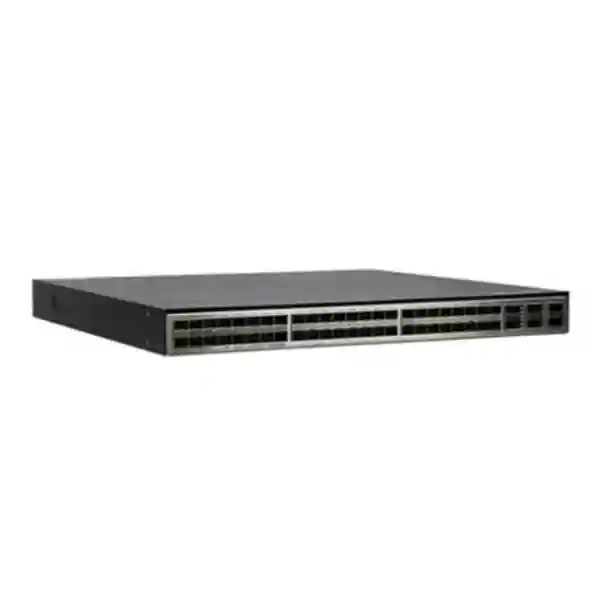
The S5732-H48S6Q provides 44 × GE SFP, 4 × 10GE SFP+, and 6 × 40GE QSFP+ fixed interfaces. Huawei publishes forwarding performance of 486 Mpps and switching capacity of 648 Gbit/s / 2.4 Tbit/s for the model. It is designed for high-density optical campus access or aggregation and supports advanced functions such as iStack, VXLAN, BGP-EVPN-based fabric capabilities, telemetry-driven operations, and wired/wireless convergence depending on software mode and licensing.
What the Huawei CloudEngine S5732-H48S6Q is designed to do
The Huawei CloudEngine S5732-H48S6Q belongs to Huawei’s enhanced all-optical S5732-H campus switching family. Its defining characteristic is not simply port quantity; it is the combination of dense optical GE access and multiple higher-speed uplinks in a compact enterprise platform. For a UAE network architect, this matters because many real projects do not fit the conventional model of forty-eight copper user ports and a small number of uplinks. Headquarters campuses, hospitals, industrial sites, government buildings, logistics facilities, hospitality properties, education campuses, security networks, and multi-building compounds frequently require fiber to intermediate distribution frames, remote buildings, outdoor cabinets, surveillance aggregation points, access-control nodes, server rooms, or long-distance service endpoints. In those environments, an all-optical switch can simplify media design and reduce dependence on external media converters.
The S5732-H48S6Q provides forty-four Gigabit Ethernet SFP interfaces, four 10 Gigabit Ethernet SFP+ interfaces, and six 40 Gigabit Ethernet QSFP+ interfaces. This port map gives designers the ability to separate service tiers. GE SFP ports can terminate access fibers and legacy aggregation links. The four 10GE interfaces can serve applications that need more bandwidth, including server connections, storage-adjacent services, firewall or router handoffs, or intermediate distribution uplinks. The six 40GE ports provide additional headroom for core-facing links, high-bandwidth peer connections, or stack and aggregation architectures. The practical result is a switch that can function as a dense fiber access platform, an aggregation device, or a compact core element depending on topology and software requirements.
Huawei publishes forwarding performance of 486 Mpps for the S5732-H48S6Q and lists switching capacity as 648 Gbit/s / 2.4 Tbit/s, where Huawei’s documentation distinguishes the device switching capability from the system switching capability. Those figures are useful for platform comparison, but FourTeck recommends that project sizing never stop at datasheet bandwidth. Real design validation should also consider oversubscription, expected east-west and north-south traffic, VLAN and VRF scale, multicast behavior, route requirements, telemetry load, number and type of optics, stack architecture, failure-domain objectives, and the throughput of connected firewalls, routers, wireless controllers, servers, and WAN devices.
For UAE organizations standardizing on Huawei campus infrastructure, the value of the S5732-H48S6Q also comes from operational integration. It is built on Huawei’s VRP software platform and participates in the broader CloudCampus architecture. Features available across the S5732-H family include wired and wireless convergence, management of up to 1024 wireless APs in relevant native AC scenarios, iPCA, Super Virtual Fabric functions, VXLAN-based virtualization, telemetry, intelligent operations, security analytics integration, and iStack. Exact feature availability can depend on software version, software package, license mode, and surrounding Huawei platform components, so every quotation should map required functions to the proposed software entitlement rather than assuming that every advanced feature is enabled by default.
Best-fit deployment roles
The platform is particularly strong when the design requires fiber density rather than PoE copper access. It can sit at a building distribution layer, provide optical access for remote cabinets, aggregate GE fiber links from multiple areas, or form part of a compact campus core. Huawei also positions the family for selected data-center access use cases.
It is less appropriate as a direct replacement for a PoE access switch when dozens of phones, cameras, wireless APs, and user devices require copper Ethernet and inline power. In those cases, the S5732-H48S6Q often works better above PoE access switches, providing optical aggregation and resilient uplinks.
Why UAE enterprises choose optical aggregation
Large UAE buildings and compounds can involve distances beyond comfortable copper limits, electrically noisy plant areas, multiple telecom rooms, separate security networks, and building-to-building pathways. Fiber provides distance, electrical isolation, high bandwidth potential, and predictable upgrade paths.
An all-optical platform can also make rack design cleaner where most downstream devices are already fiber-connected. The correct optic type, fiber class, connector standard, attenuation budget, and spare strategy remain critical to reliability.
S5732-H48S6Q hardware architecture and physical specifications
| Specification | Huawei CloudEngine S5732-H48S6Q |
|---|---|
| GE optical access | 44 × GE SFP |
| 10GE interfaces | 4 × 10GE SFP+ |
| 40GE uplinks | 6 × 40GE QSFP+ |
| Forwarding performance | 486 Mpps |
| Switching capacity | 648 Gbit/s / 2.4 Tbit/s as published by Huawei for markets outside the Chinese mainland |
| Chassis dimensions | 442 mm × 420 mm × 43.6 mm |
| Rack height | 1U |
| Published chassis weight | Approximately 9.2 kg including packaging in Huawei’s referenced brochure |
| Power module options | Pluggable 600 W AC or 1000 W DC options according to the referenced S5732-H all-optical brochure |
| Maximum power consumption | 255 W published maximum for the model in the referenced brochure |
| Operating temperature | -5°C to +45°C at 0–1800 m altitude; derating applies at higher altitudes according to Huawei documentation |
| Storage temperature | -40°C to +70°C |
| Relative humidity | 5% to 95%, non-condensing |
Engineering note: production quotations should always be checked against the exact Huawei part number, regional availability, supported software release, selected power modules, fan/airflow requirements, and optical module compatibility. Manufacturer specifications can change between hardware revisions, software trains, and regional publications.
Understanding the 44 × GE SFP access ports
The forty-four GE SFP interfaces are the foundation of the S5732-H48S6Q. In a traditional copper access switch, forty-eight ports usually map to users, phones, cameras, printers, and access points. In this all-optical model, the design logic is different. Each SFP position can be matched to an appropriate supported optical transceiver or compatible connection method based on distance, fiber type, wavelength, connector standard, and operational policy. That makes the switch suitable for an architecture where remote access switches, industrial cabinets, remote buildings, security enclosures, small server rooms, or service-provider handoffs arrive at a centralized fiber distribution point.
For short and medium distances inside a building or campus, multimode fiber may be appropriate where the installed structured cabling supports the required reach. For longer campus runs, single-mode fiber is often preferable because it provides larger distance margins and can simplify future bandwidth upgrades. The switch itself does not remove the need for optical engineering. A reliable design must match transmit and receive characteristics, loss budget, patch-panel count, splice count, connector cleanliness, fiber polarity, and receive sensitivity. Excessive optical power can be just as problematic as insufficient power on some link types, so link budgets should be reviewed instead of assuming that any supported optic will work at any distance.
In UAE projects, fiber pathways may traverse risers, underground ducts, outdoor cabinets, warehouse spaces, plant rooms, or large horizontal distribution areas. Environmental conditions can vary significantly between conditioned data rooms and outdoor or semi-conditioned locations. The S5732-H48S6Q should normally be installed in a controlled rack environment that meets Huawei’s operating specifications, while fiber extends to remote areas. If active downstream equipment sits in non-conditioned cabinets, that equipment requires separate environmental validation. The all-optical switch does not make downstream electronics immune to heat, dust, humidity, or power quality issues.
A further advantage of dense SFP access is operational consistency. When remote links are fiber end to end, teams can standardize patching, label schemes, optical spares, and monitoring practices. FourTeck recommends creating an optic matrix during implementation that records switch port, service role, optic model, wavelength, fiber type, remote endpoint, patch-panel position, expected distance, measured receive power, VLAN or routed role, and redundancy partner. This simple record can materially reduce troubleshooting time after handover.
10GE and 40GE uplink strategy
Four 10GE SFP+ interfaces
The four 10GE SFP+ ports provide a practical middle tier between GE access and 40GE uplinks. They can be used for server connections, firewall or router handoffs, service appliances, building aggregation, or links to devices that do not require 40GE. When planning redundant upstream paths, reserve sufficient ports for both active traffic and failure scenarios rather than allocating every 10GE interface to day-one production.
A common design error is to size each uplink from average utilization. Network links fail during the same periods when traffic must converge onto remaining paths. Capacity planning should therefore calculate the surviving bandwidth after a link, member, optic, or upstream node failure. If one link fails, the remaining path should still carry critical traffic without persistent congestion.
Six 40GE QSFP+ interfaces
Six 40GE ports are a significant resource in a 1U campus switch. They can support high-capacity links toward a core, peer switches, service aggregation, or stack-oriented architectures where supported. The actual use should be decided as part of a port budget because high-speed ports may be needed for several functions simultaneously.
Forty-gigabit design also changes the economics of optics and cabling. Transceiver type, single-mode or multimode choice, patching, breakout requirements where supported, and spare policy can materially affect project cost. A quotation that lists only the switch chassis is therefore incomplete for most production deployments.
iStack for scale, resilience, and simpler operations
Huawei documentation for the S5732-H family describes iStack support with up to nine member switches in a stack. Stacking virtualizes multiple physical switches into a single logical system for simplified management and increased port density. From an engineering perspective, the operational benefit is often as important as the raw scale: a well-designed stack can reduce the number of separately managed logical nodes, provide link aggregation across physical members, and simplify certain access or aggregation topologies.
Stacking should not be treated as a substitute for architecture. A stack can reduce device-level complexity, but it also creates shared control and operational dependencies. Before choosing a stack, the design team should decide what failures the network must survive: one uplink, one optic, one power feed, one switch member, one rack, one telecom room, or an entire distribution location. If the business requirement includes surviving a rack or room failure, splitting the network across separate failure domains may be more appropriate than concentrating everything into one stack.
Physical stack topology matters. Ring-style or otherwise resilient interconnection, supported port selection, cable or optic choice, stack bandwidth, member priority, software consistency, and upgrade process should be documented before installation. The network operations team should also understand how configuration, logs, software upgrades, and failure events behave within the chosen stack topology. FourTeck recommends pre-staging stack member identities and cabling maps before the devices enter the production rack.
For projects with very high availability objectives, compare an iStack design with a dual-device routed or multi-chassis architecture appropriate to the rest of the network. The right choice depends on supported features, operational skill, maintenance windows, connected endpoint capabilities, and the desired blast radius. FourTeck can align the S5732-H48S6Q design with upstream firewalls, routers, core switches, and WAN edge systems so that redundancy remains consistent from access fiber through to applications and Internet/WAN services.
VXLAN, BGP-EVPN, and campus virtualization
One of the strategic reasons enterprises consider the CloudEngine family is support for modern campus virtualization. Huawei lists VXLAN L2 and L3 gateway functions, centralized and distributed gateway models, BGP-EVPN, and NETCONF-based configuration capabilities for the S5732-H family. VXLAN allows logically separated service networks to share a common physical underlay while maintaining segmentation. In large campuses, this can reduce dependence on broad Layer 2 domains and support a more structured method of separating corporate users, contractors, building systems, surveillance, OT devices, laboratories, guest services, and other traffic classes.
VXLAN should be designed as a system, not enabled as an isolated switch feature. A successful fabric needs an IP underlay, addressing plan, routing policy, VTEP placement, gateway model, EVPN control plane, multicast or head-end replication strategy as applicable, security policy, endpoint onboarding process, route and MAC scale validation, and operational tooling. Teams should also decide where firewalls enforce inter-segment policy and which flows can be controlled directly through campus policy mechanisms.
Licensing is important. Huawei’s S5732-H all-optical documentation notes that VXLAN requires the appropriate VXLAN license or N1 advanced software package in relevant software releases. For procurement, this means the switch chassis and base software should not be quoted in isolation when the design specifically requires a fabric. FourTeck maps the bill of materials to the intended feature set so that the project does not discover during commissioning that a required software entitlement was omitted.
BGP-EVPN introduces a standards-based control plane concept for distributing reachability information across the fabric. It can help reduce flooding and improve control-plane scale compared with purely flood-and-learn overlays, depending on implementation. However, it also requires stronger routing and automation skills from the operations team. Organizations moving from traditional VLAN and spanning-tree campus designs should plan for documentation, training, change control, and monitoring rather than treating EVPN as a simple checkbox.
For customers not ready for VXLAN, the S5732-H48S6Q can still provide value as a conventional high-performance campus switch. A phased strategy is often appropriate: deploy robust underlay addressing, structured routing boundaries, consistent templates, telemetry, and resilient fiber architecture first, then introduce virtualization when operational processes and licensing are ready. This avoids forcing architectural change solely because the hardware supports it.
Wired and wireless convergence
Huawei describes native AC capability across the S5732-H series with management of up to 1024 APs in relevant configurations. The broader idea is to converge wired and wireless policy and reduce the operational gap between switch ports and wireless users.
The exact design must consider AP model compatibility, software release, licensing, controller architecture, scale, roaming requirements, and whether the enterprise prefers embedded or dedicated control. For many projects, the feature is valuable even if the S5732-H48S6Q itself is not the device physically powering APs.
Intelligent operations
Telemetry and iPCA capabilities can provide more granular operational data than periodic manual checks. Huawei positions the family for integration with campus analysis tools such as CampusInsight, including detection of performance issues that affect user experience.
To benefit from telemetry, organizations need a collector or management architecture, data retention plan, alert thresholds, naming standards, and staff workflows. Visibility only improves operations when measurements are tied to clear action and escalation procedures.
Security capabilities and segmentation strategy
A campus switch participates in security, but it is not a complete security architecture. Huawei lists functions such as Encrypted Communication Analytics, threat-trap technology, network-wide security collaboration, NetStream-based visibility, and integration with surrounding Huawei security and management platforms across the S5732-H family. These capabilities can help a security operations model identify suspicious traffic characteristics and coordinate responses, but they work best when integrated with identity, endpoint security, firewalls, logging, network access control, and clear segmentation policy.
For a UAE enterprise, the first design question is usually segmentation. Corporate users, privileged administrators, guest access, CCTV, access control, building management, IoT, voice, production systems, payment systems, test labs, and third-party contractor equipment should not automatically share the same trust boundary. The S5732-H48S6Q can contribute Layer 2 and Layer 3 segmentation, fabric virtualization, policy enforcement, and telemetry depending on the architecture. The edge and firewall layers should then apply security policy appropriate to business risk.
Management-plane protection deserves separate attention. Administrative access should use secure protocols, strong authentication, role separation, restricted management source networks, encrypted management channels, centralized logging, time synchronization, configuration backup, and controlled software image management. Default or weak community strings and broad management exposure should be avoided. SNMPv3 is preferable where supported by the monitoring stack, and administrators should restrict legacy protocols unless a documented operational dependency requires them.
Change control is equally important. Network switches often remain in service for years and accumulate configuration exceptions. FourTeck recommends standardized templates for AAA, NTP, syslog, management access, spanning-tree or routing behavior, interface descriptions, unused-port state, storm controls where applicable, DHCP protection functions where relevant, VLAN naming, and monitoring. A known-good template makes incident response faster and reduces the chance that security posture differs unexpectedly between sites.
Optics and fiber planning for S5732-H48S6Q deployments
Optics are part of the system, not accessories added at the end. A switch with fifty-four physical network interfaces across GE, 10GE, and 40GE classes can require a substantial optical bill of materials. The correct design starts with a link inventory. Each link should be categorized by speed, distance, fiber type, connector presentation, path loss, required availability, remote device, and environmental constraints. From that inventory, engineers can select supported transceivers and determine spare quantities.
For multimode fiber, confirm the installed fiber grade and actual path length. Older multimode plant can create limitations when migrating to higher speeds. For single-mode fiber, validate wavelength plan, total attenuation, and any passive elements. Where bidirectional optics are used, transmit and receive wavelengths must be paired correctly at opposite ends. Where CWDM/DWDM systems are involved, channel plans and optical power budgets must be coordinated with the transport design rather than treated as ordinary point-to-point Ethernet optics.
Connector cleanliness is one of the most common practical causes of optical instability. Even a theoretically correct link budget can fail when end faces are contaminated or damaged. Commissioning procedures should include inspection and cleaning, receive/transmit power verification where tools and module diagnostics permit, and documentation of baseline readings. These baseline values become useful when a link degrades months later.
Spare optics should be planned by failure impact, not only by quantity. A spare for a rare 40GE long-reach optic may be more important than several low-cost GE optics if the 40GE link carries an entire building. For multi-site UAE operations, decide whether spares are held centrally in Dubai, at each critical site, or with a support partner. The target replacement time should align with business continuity requirements and site access procedures.
FourTeck can supply the switching platform as part of a broader network bill of materials that includes optics, fiber patch cords, rack accessories, power components, patch panels, labeling, and integration services. For wider infrastructure planning, customers can also review FourTeck UAE for enterprise technology solutions and FourTeck IT Services UAE for implementation and support capabilities.
Power, rack, cooling, and UAE environmental planning
The S5732-H48S6Q is a 1U switch, but rack planning must account for more than rack-unit height. Huawei publishes chassis dimensions of 442 mm × 420 mm × 43.6 mm. Cabinet depth, rail or mounting clearances, rear power cabling, front fiber management, bend radius, and access for module replacement all matter. Dense optical patching can become difficult to maintain when patch cords are routed without horizontal and vertical management. A clean fiber layout reduces accidental disconnections during maintenance.
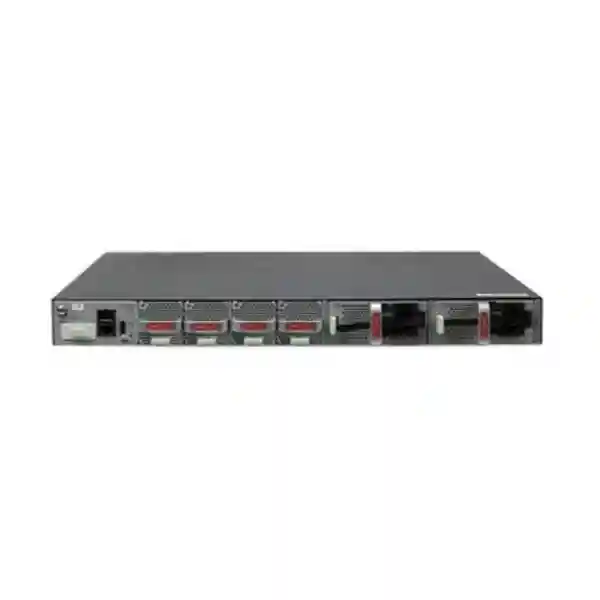
Power planning should use the actual selected power modules and expected configuration. The referenced Huawei all-optical brochure lists pluggable 600 W AC and 1000 W DC power supply types for this model and a maximum power consumption figure of 255 W. The facility team should provide appropriate power feeds, protection, grounding, UPS capacity, and distribution. If the availability design requires redundant feeds, make sure each feed is genuinely independent back to the required point of resilience rather than both terminating on the same upstream PDU or UPS module.
Cooling is particularly important in the Gulf. Huawei’s referenced operating specification is -5°C to +45°C at 0–1800 m, with temperature derating at higher altitude. A Dubai data room should normally operate well below the upper limit and maintain stable airflow. The switch should not be exposed to outdoor heat, direct solar load, dusty unconditioned cabinets, or blocked ventilation. Thermal alarms should be integrated into monitoring, and racks should maintain clear airflow paths.
When the switch aggregates infrastructure distributed across warehouses or industrial facilities, the central switch may sit in a conditioned room while remote access equipment does not. In that case, evaluate every active endpoint separately. Fiber protects the data path from electrical interference but does not address local power quality, heat, dust, or humidity at the remote cabinet. Industrial environments may require hardened downstream switching rather than ordinary enterprise access hardware.
For projects that also require rack servers, storage, virtualization hosts, or data-room expansion, FourTeck’s Server Dubai practice can help coordinate switch uplinks with server NIC speeds, redundancy, rack layouts, and application infrastructure instead of designing the network and compute layers independently.
Deployment topologies for Dubai and UAE enterprises
Building aggregation
Use GE or 10GE fiber from access switches in floor telecom rooms to the S5732-H48S6Q in a building distribution room. Use redundant 40GE or 10GE uplinks toward the campus core. This model fits well when many floor or zone links are already optical.
Campus optical access
Terminate fiber from remote cabinets, small buildings, gatehouses, security posts, or operational zones directly on the 44 GE SFP interfaces, reducing the number of standalone media converters and simplifying central monitoring.
Compact core
For smaller sites, the platform can provide a high-density optical core when routing scale, resiliency, software features, and port speeds match business requirements. Validate high-availability and future-growth targets before consolidating too many services into one chassis or stack.
Security and services aggregation
Use the switch to aggregate fiber-connected firewall zones, surveillance networks, appliance links, service-provider handoffs, or dedicated infrastructure networks while maintaining clear logical segmentation and monitored uplinks.
Data-center access edge
Huawei positions the family for selected data-center access scenarios. The suitability depends on server NIC speeds, oversubscription, storage traffic, latency sensitivity, redundancy model, buffer behavior, and required data-center protocols. It should not be selected for a data center solely because it has many optical ports.
Fabric-ready campus
Deploy it within a Huawei campus fabric using supported VXLAN and EVPN capabilities where licenses and software are aligned. This can support scalable segmentation and policy-driven operations for large enterprise environments.
How to size the S5732-H48S6Q correctly
The first sizing step is a port inventory. Count the number of GE optical links required on day one, then identify planned additions over the expected service life. Reserve ports for maintenance, temporary migrations, and growth. A design that consumes all forty-four GE SFP interfaces at commissioning leaves no operational flexibility. Many enterprises target spare capacity by both quantity and role; for example, spare ports distributed across logical groups rather than all remaining ports belonging to a single service class.
The second step is bandwidth modeling. Record realistic peak traffic for each downstream segment and identify which flows converge on common uplinks. The objective is not to create an unrealistic sum of every endpoint at line rate; it is to understand concurrency and critical workloads. Video surveillance, backups, large file transfers, virtualization, ERP applications, Internet access, voice, guest traffic, and cloud services have different patterns. Where traffic is bursty, short peaks can still cause packet loss if uplinks are heavily oversubscribed.
The third step is failure-state modeling. If two 40GE uplinks normally share load and one fails, can the surviving path carry priority traffic? If a stack member fails, what proportion of ports disappear and how do downstream devices react? If one upstream core is unavailable, is there a second independent path? If power fails in one rack, does the entire building lose connectivity? Availability targets should be translated into explicit failure scenarios before the topology is approved.
The fourth step is feature sizing. A design that uses conventional VLANs and static routing is not equivalent to one using large-scale dynamic routing, VXLAN, EVPN, extensive ACLs, telemetry, NetStream, wireless control, and security analytics. Validate software, table scale, license requirements, and management platform compatibility. Feature interactions can matter, especially on mature campus platforms with multiple software trains.
The fifth step is operational sizing. Consider how many sites the network team supports, how quickly they can replace failed optics, whether configuration is automated, whether logs are centralized, and how upgrades are tested. A technically capable switch can still become an operational burden if every unit is configured differently. FourTeck can standardize templates, port naming, VLAN identifiers, management IP allocation, backup procedures, and commissioning documentation across a UAE rollout.
Software, licensing, and lifecycle considerations
Switch procurement should include the intended software mode and feature licenses. Huawei’s documentation notes N1 software packages and specifically identifies advanced licensing requirements for functions such as VXLAN in relevant releases. The exact entitlement model should be confirmed for the requested part number and software version at quotation time. A network designed around EVPN or fabric segmentation should never assume that base hardware automatically includes every control-plane and management feature.
Software version selection should follow compatibility requirements, not only recency. Review interoperability with existing Huawei switches, wireless infrastructure, iMaster NCE-Campus, CampusInsight, authentication services, monitoring tools, firewalls, third-party routers, and automation platforms. If the switch joins an existing iStack or fabric, version alignment can be mandatory. Test upgrades in a lab or maintenance environment when the network carries critical operations.
Lifecycle planning is equally important. Before standardizing on a platform for a multi-year rollout, confirm current sales status, regional availability, recommended successor platforms if relevant, software maintenance horizon, optic availability, and support options. If a project spans many phases, reserve consistent hardware or validate interoperability with newer revisions. This is especially important when a series evolves into later V2 models with similar naming but different hardware details.
FourTeck treats the exact model name as a control point. The S5732-H48S6Q described here should not be confused with S5732-H Multi-GE copper models or newer V2 all-optical variants. Those platforms may have different port types, switching capacities, expansion slots, power options, and license behavior. Accurate quoting therefore requires the exact model, required optics, software package, power choice, service level, and deployment role.
Operational design: monitoring, telemetry, and troubleshooting
A production switch should be observable from the first day it carries traffic. At minimum, collect device health, CPU and memory where available, interface state, errors, discards, optical diagnostics, link utilization, temperature, fan status, power status, routing adjacency state, stack state, MAC and ARP/ND behavior as appropriate, and system logs. Baseline normal operation before users report problems. If the operations team only begins collecting data during an outage, it loses the ability to compare against healthy behavior.
Huawei’s telemetry and iPCA features can improve visibility into packet loss and performance. Telemetry can stream higher-frequency data to management systems, supporting faster analysis than traditional low-frequency polling in some scenarios. The value is highest when dashboards are designed around services rather than devices. For example, an operations view for a building uplink should correlate optical power, errors, utilization, packet loss, latency indicators, and upstream path state.
NetStream can provide traffic-flow visibility useful for capacity planning and security analytics. Flow data can help identify top talkers, unexpected protocols, asymmetric traffic, and bandwidth spikes. However, flow export itself consumes processing and collector resources, so sampling and export design should be validated. Retention periods should match troubleshooting and compliance requirements without generating unnecessary data volume.
Troubleshooting fiber links should follow a consistent sequence. Check administrative and operational state, negotiated or configured speed, optic recognition, transmit and receive power, error counters, interface flaps, patching, remote-end status, and physical path. If a link is unstable, cleaning and inspecting connectors is often a high-value step. For long or complex fiber paths, use appropriate optical test equipment rather than repeatedly replacing switches.
Configuration backups are essential. Maintain a current baseline after every approved change and document the software image, patch level, licenses, stack membership, management addresses, and physical cabling. When replacement hardware is required, restoration should be a controlled process rather than a reconstruction from memory. FourTeck’s Firewall Dubai practice can coordinate campus switching with perimeter and internal security design, ensuring that VLAN, routed, and fabric segmentation align with firewall policies and logging.
Migration planning from legacy campus switching
Replacing a legacy aggregation switch is rarely a simple port-for-port exercise. Existing networks may contain undocumented VLANs, static routes, spanning-tree dependencies, asymmetric paths, monitoring exceptions, old optics, unsupported transceivers, duplicated IP addresses, dormant but business-critical links, or services that depend on unusual multicast behavior. A migration should therefore begin with discovery and validation rather than direct configuration translation.
Create an authoritative source inventory for every legacy port. Confirm the remote device, speed, optic type, VLAN or routed configuration, link aggregation membership, traffic criticality, maintenance owner, and rollback requirement. Capture current counters and utilization during representative business periods. This identifies ports that are physically connected but unused as well as heavily loaded links that may need a higher-speed target interface.
Where the old network uses spanning tree extensively, a new design may be an opportunity to reduce Layer 2 domains and increase routed boundaries. However, redesign should be separated from risk unless the organization can test it properly. Some migrations are best performed in two phases: first move services onto the new hardware using equivalent behavior, then optimize routing, segmentation, or fabric architecture after stability is confirmed.
Optic compatibility must be checked before the change window. Do not discover during a midnight migration that a remote endpoint uses a wavelength, distance, connector, or vendor optic combination not supported by the target configuration. Pre-stage and label all replacement optics and patch cords. Where possible, test representative link types before the production cutover.
Rollback criteria should be measurable. Define how long a service can remain unavailable, which checks determine success, and which conditions trigger rollback. Maintain the previous configuration and patch map until acceptance is complete. After migration, monitor errors and optical readings rather than relying only on ping tests. A link can pass basic connectivity checks while suffering marginal optical power or packet loss under load.
UAE procurement: what a complete quotation should include
A useful quotation for the Huawei CloudEngine S5732-H48S6Q should identify the exact switch model and not stop at a generic S5732-H series description. It should specify the required quantity, power modules, software or license package, support level, optics, patch cords, stacking components where applicable, rack accessories, implementation scope, documentation, and any management-system integration. If the design uses redundant pairs or stacks, list the complete quantities needed for both normal and failure-state operation.
Optics should be itemized by link class. A project may require a mixture of GE short-reach, GE long-reach, 10GE, and 40GE transceivers. The quote should map each optic to a use case so that procurement teams understand why quantities differ. Spare optics should be separate line items rather than hidden inside implementation services, making future support stock transparent.
Support expectations also matter. Clarify whether the requirement is supply only, installation, configuration, migration, after-hours cutover, health checks, ongoing managed support, or vendor-backed service. For mission-critical sites, identify hardware replacement expectations and escalation routes. If the switch is part of a larger campus project, define responsibility boundaries between structured cabling, optical testing, active network configuration, firewall policy, WAN connectivity, and application validation.
For organizations with multiple UAE locations, standardization can reduce cost and risk. Use a common bill of materials for equivalent site classes, standardized configuration templates, naming rules, spare stock, optic families, firmware baselines, and acceptance test forms. Exceptions should be documented with a technical reason. This creates repeatability across Dubai, Abu Dhabi, Sharjah, Ajman, Ras Al Khaimah, Fujairah, and Umm Al Quwain deployments.
FourTeck can support supply, technical validation, deployment planning, migration, and post-installation services. The objective is to quote the complete operational system rather than a chassis that later requires unplanned optics, licenses, power components, or engineering effort.
Frequently asked technical questions
Is the S5732-H48S6Q a 48-port switch?
It provides 48 primary GE/10GE access-class fixed interfaces in the form of 44 GE SFP plus 4 10GE SFP+, in addition to 6 fixed 40GE QSFP+ uplink interfaces. The exact port map matters because this is not a 48-port copper access switch.
Does it provide PoE?
The S5732-H48S6Q is an all-optical model centered on SFP/SFP+/QSFP+ interfaces, so it is not the platform to choose when user devices require copper PoE access. Pair it with PoE access switches where APs, phones, cameras, or other powered endpoints need inline power.
Can it be used as a core switch?
Huawei positions the family for the core of smaller campus networks as well as aggregation/access roles in larger campuses. Whether it is appropriate for a specific core depends on routing, scale, redundancy, uplink capacity, software features, failure-domain requirements, and growth.
Does it support VXLAN?
The S5732-H family supports VXLAN-related functions including L2/L3 gateways and BGP-EVPN capabilities, subject to software and licensing. Huawei documentation notes licensing requirements for VXLAN in relevant versions, so confirm the proposed package.
How many APs can the family manage?
Huawei lists native AC capability for management of up to 1024 APs across the S5732-H family in relevant configurations. Actual architecture depends on AP model, software, licensing, control design, and scale requirements.
Does it support stacking?
Huawei documentation lists iStack with up to nine member switches for the S5732-H family. The exact stacking ports, cabling, topology, software requirements, and bandwidth should be validated for the production design.
Can I reuse existing SFPs?
Possibly, but compatibility should be checked against Huawei support information and the exact software release. Also validate wavelength, distance, fiber type, connector, and optical budget. Reusing an optic because it physically fits can create support and reliability problems.
Is 40GE sufficient for modern uplinks?
For many campus environments, multiple 40GE links provide substantial capacity, but suitability depends on traffic growth and upstream architecture. Networks planning rapid migration to 100GE should compare newer platforms before standardizing.
Why choose FourTeck for Huawei switching in Dubai
Enterprise switching projects fail most often at the boundaries: optics are omitted, uplinks are undersized, licenses do not match the design, racks lack appropriate power, firewall policies do not match VLAN changes, fiber paths are undocumented, or migration dependencies appear during the change window. FourTeck’s role is to connect those boundaries into a deliverable solution.
For the S5732-H48S6Q, FourTeck can review the required port count and speed, downstream endpoint types, fiber routes, optic classes, high-availability model, power design, software entitlements, stack requirements, management integration, segmentation, and rollout sequence. The resulting bill of materials can therefore include the components needed to place the switch into service rather than only the base chassis.
Our UAE project approach also considers surrounding infrastructure. A new aggregation switch may expose limitations in existing firewalls, WAN routers, server NICs, old access switches, or fiber plant. Identifying those constraints before procurement makes budgeting more accurate and reduces emergency changes during commissioning.
Customers that need broader infrastructure planning can use FourTeck UAE for enterprise solution coordination, IT Services UAE for implementation and managed technical work, Firewall Dubai for security integration, and Server Dubai for compute and rack-side coordination.
Detailed implementation methodology
A well-run S5732-H48S6Q implementation begins with a design workshop. The team identifies business services, locations, criticality, growth assumptions, existing network constraints, maintenance windows, and target operations model. This is translated into a logical diagram showing VLANs or VRFs, routed boundaries, uplinks, redundancy, security zones, and management connectivity. A separate physical diagram shows racks, switch members, power feeds, fiber paths, patch panels, optic types, and remote endpoints.
The bill of materials is then validated against the diagrams. Every physical link should have a corresponding optic or cable on each required side, unless the remote-side component already exists and is confirmed compatible. Power modules and cords should match the site supply. Stack or high-speed interconnect components should be included. Software and feature entitlements should map to the proposed architecture. Any line item described as optional should have a clear reason.
Pre-staging reduces onsite risk. Before delivery to production, load the approved software version, apply baseline configuration, define management addresses, NTP, AAA, logging, SNMP or telemetry, interface descriptions, VLANs, routing, and security settings. For stacks, establish membership and priorities where practical. Record serial numbers and part numbers. Save an initial configuration backup and a golden template.
Physical installation should follow rack and fiber-management standards. Verify grounding, power feed identification, rack unit position, front and rear clearance, airflow, and patch-panel labeling. Install fibers with appropriate bend radius and avoid tension. Label both ends of every patch cord with a consistent scheme that maps to documentation. For dense optical switches, neat patching is not cosmetic; it directly affects maintainability and outage risk.
Commissioning tests should include power redundancy where designed, fan and temperature health, management reachability, software and license validation, stack state, interface state, optic recognition, optical power readings where available, VLAN or routing adjacency verification, link aggregation state, failover behavior, path testing, application reachability, and monitoring integration. If the switch participates in a fabric, validate EVPN/VXLAN control-plane state and endpoint reachability across all required segments.
Load and failure testing should reflect business risk. A standard office may require basic path failover testing, while a hospital, logistics hub, security operation, or payment environment may require structured tests for link, switch, power, and upstream failures. The acceptance plan should define expected convergence behavior and acceptable interruption duration. Tests should be scheduled and documented so that results become part of handover.
After acceptance, deliver updated diagrams, configurations, IP and VLAN tables, optic inventory, firmware details, license records, port maps, test results, and escalation information. Operational documentation should be understandable by an engineer who did not participate in the original project. That is the standard that turns a successful installation into a supportable network.
Performance engineering beyond datasheet numbers
Forwarding rate and switching capacity are essential platform indicators, but they do not automatically predict application experience. Congestion occurs when traffic converges faster than a destination interface can transmit. A switch with high internal capacity can still drop packets on an oversubscribed uplink. Therefore, analyze traffic by egress path. If twenty downstream segments each burst toward the same 10GE server link, that 10GE interface becomes the bottleneck regardless of unused capacity elsewhere in the chassis.
Buffer behavior also affects burst handling. Different applications respond differently to packet loss and jitter. TCP workloads may recover through retransmission but suffer latency and throughput reduction. Real-time voice and video can be sensitive to loss and jitter. Storage or backup traffic can fill links for sustained periods. QoS policy should therefore classify traffic according to business requirements and protect priority services during congestion, while still avoiding a design that relies on QoS to compensate for chronic under-capacity.
Link aggregation can increase bandwidth and resilience, but individual flows may be hashed to a single member based on header fields. A bundle of four 10GE links does not guarantee that one large flow receives 40GE. Traffic diversity determines how evenly load distributes. When a few very large flows dominate, a higher-speed single link may sometimes provide better practical performance than multiple lower-speed links, subject to endpoint support.
Latency is usually less significant in campus switching than in specialized low-latency environments, but topology still matters. Unnecessary Layer 2 hairpins, firewall detours, or centralized gateways can create inefficient paths. VXLAN with distributed gateway models can improve path efficiency in some fabrics, while centralized security inspection may intentionally steer traffic through firewalls. Architecture should balance performance and security instead of optimizing only one dimension.
Monitoring should establish utilization percentiles rather than relying on occasional snapshots. Five-minute averages can hide microbursts, while high-frequency telemetry can expose short congestion events. Capacity plans should use representative busy periods and consider business growth, not only current averages. When repeated peaks exceed defined thresholds, upgrade before users experience persistent degradation.
High-availability design checklist
Decision recap: when the S5732-H48S6Q is a strong fit
Choose the Huawei CloudEngine S5732-H48S6Q when your network needs high-density GE optical access and substantial 40GE uplink capability in a compact campus platform. It is especially relevant when dozens of fiber links converge in one rack, when downstream equipment is distributed across buildings or telecom rooms, or when the architecture needs Huawei CloudCampus features such as telemetry, intelligent operations, wired/wireless convergence, stacking, and optional VXLAN-based virtualization.
Consider a different model when the primary requirement is high-density copper PoE, when most endpoints need Multi-Gigabit copper access, or when the core design is already moving to 100GE and requires greater high-speed port density. Newer S5732-H variants may be more appropriate for those use cases. Selection should follow the topology and service requirements rather than product family familiarity.
For existing S5732-H deployments, the H48S6Q can be an effective way to extend a consistent operational platform while adding fiber density. Confirm lifecycle status, software alignment, optics, licenses, and stack compatibility before ordering for expansion.
Quotation input checklist
To prepare an accurate Dubai or UAE quotation, provide as much of the following information as possible. FourTeck can help complete the design where details are not yet finalized.
Plan your Huawei CloudEngine S5732-H48S6Q deployment with FourTeck
A successful all-optical switching project is defined by the complete path: switch hardware, supported optics, fiber plant, upstream capacity, redundancy, software licensing, security segmentation, monitoring, power, cooling, and operational handover. FourTeck can review these dependencies and produce a UAE-ready bill of materials and implementation plan.
Share your site count, fiber distances, port requirements, uplink speeds, existing core/firewall environment, and preferred support model. We can then align the S5732-H48S6Q with the correct optics, software, power configuration, and migration approach.
• High-availability architecture
• VXLAN / campus fabric readiness
• Firewall and routing integration
• Fiber and rack planning
• Migration and commissioning
• Documentation and support

Reviews
There are no reviews yet.