
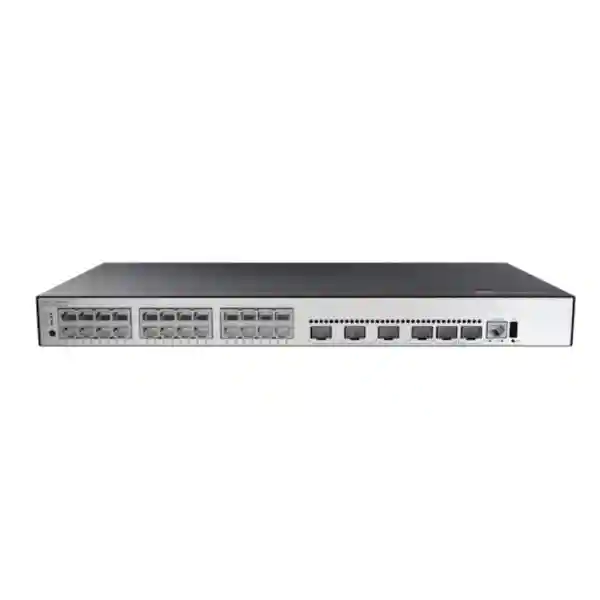
Huawei CloudEngine S5735-S24P4XE-V2
A resilient 24-port Gigabit PoE+ campus switch with four 10GE SFP+ uplinks, dedicated stacking interfaces, enhanced Layer 3 routing and a three-power-module design for dependable enterprise access networks across Dubai and the wider UAE.
Choose the S5735-S24P4XE-V2 when you need 24 powered Gigabit edge ports, 10GE optical uplinks and power redundancy in one 1U access switch. It is particularly appropriate where IP phones, Wi-Fi access points, cameras and user endpoints share the same access layer and where a single power-supply failure should not become a switch outage.
What the S5735-S24P4XE-V2 is designed to do
The Huawei CloudEngine S5735-S24P4XE-V2 sits in the standard Gigabit access class of the CloudEngine S5735-S-V2 family. Its role is straightforward but important: connect a dense set of Ethernet endpoints at the access layer, provide PoE+ power to compatible powered devices, aggregate that edge traffic into higher-speed 10 Gigabit links, and participate in a resilient campus switching design. In practical UAE deployments, that typically means one switch can serve a floor, branch, retail location, clinic wing, hotel zone, classroom cluster or office department while its uplinks connect back to a distribution or core layer.
The model combines 24 copper 10/100/1000Base-T interfaces with four 10GE SFP+ interfaces and two dedicated 12GE stack ports. Huawei rates the model at 132 Mpps forwarding performance and lists a device switching capacity of 176 Gbps, with a higher system switching-capability figure also shown in the product family documentation. The access ports support PoE+, so a correctly sized power configuration can deliver both network connectivity and power over the same Ethernet cable to supported endpoints. This reduces local power-adapter requirements and simplifies centrally backed-up power architectures when switch power is connected to UPS infrastructure.
For organisations comparing access switches, the most important architectural distinction is that this is not simply a 24-port desktop Ethernet switch. It is a rack-mount enterprise platform intended for managed networks, with Layer 2 segmentation, enhanced Layer 3 routing, IPv6 capability, stacking, telemetry and enterprise operations features. That combination makes it appropriate for networks where performance, change control, fault isolation and recoverability matter as much as the physical port count.
Key hardware specification at a glance
Port architecture: 24 Gigabit edge ports and four 10GE uplinks
The front-panel port mix is one of the strongest reasons to specify the S5735-S24P4XE-V2 for a conventional enterprise access layer. Twenty-four copper Gigabit interfaces are enough for many branch offices, small floor zones or functional departments without creating the unused-port overhead of a 48-port switch. At the same time, four SFP+ interfaces provide substantial design flexibility. They can be used as redundant uplinks to a pair of distribution switches, as parallel links where link aggregation is supported by the chosen software design, or as dedicated connections to other infrastructure that benefits from 10 Gigabit Ethernet.
A common mistake in access-layer design is to focus only on edge-port count. Uplink architecture is equally important. If twenty-four user and powered-device ports are active simultaneously, the switch must move aggregated traffic upstream without forcing all traffic through a single low-speed path. Four 10GE SFP+ interfaces provide room for resilient topologies and traffic growth. The correct number of uplinks, transceiver type, fibre class and topology should be selected from the actual traffic profile rather than automatically populating every uplink. For example, a voice-heavy branch may have modest data throughput but strict availability requirements, while an office with Wi-Fi 6 access points, local storage and large file transfers may place greater emphasis on uplink bandwidth.
The SFP+ format also supports separation between copper horizontal cabling and fibre backbone design. Endpoints can remain on standard structured copper cabling while the switch uplinks over multimode or single-mode fibre, depending on distance and optics. Direct-attach cabling may be appropriate for short equipment-room connections where supported. A proper bill of materials therefore includes not only the switch but also the correct Huawei-compatible optical modules or cables, patch leads, fibre panels and redundancy layout. FourTeck can align those components through its broader UAE enterprise networking portfolio so the switch is purchased as part of a workable topology rather than as an isolated chassis.
PoE+ design: calculate the power budget before counting ports
PoE+ is a central capability of the S5735-S24P4XE-V2. In a real network, however, the statement “24 PoE+ ports” does not mean every connected device automatically receives the same power or that every power-supply configuration produces the same available budget. A sound design starts by listing each powered device, its PoE class or expected maximum draw, and whether that device is operationally critical. IP phones, Wi-Fi access points, surveillance cameras, door controllers and other Ethernet-powered equipment can have very different consumption profiles, particularly during startup or when optional radios, heaters, infrared illumination or USB peripherals are enabled.
Huawei documentation for this model shows available PoE power reaching 840 W with a 1000 W AC supply at 220 V, and also 840 W with a 1000 W DC configuration. A 1000 W AC supply at 110 V is documented with a lower available PoE figure. That distinction is useful in the UAE because commercial installations commonly work with supply conditions that make the 220–240 V class relevant, but the exact electrical feed and selected module must still be validated. The objective is not simply to maximise the theoretical wattage. It is to ensure the installed power modules provide enough headroom for the calculated endpoint load while preserving the intended redundancy mode.
For sizing, group endpoints into practical categories. A typical IP phone may draw far less than the maximum PoE+ allowance; an enterprise access point can draw considerably more; a PTZ camera or specialised endpoint may have its own peak requirements. Add the realistic maximums, include a design reserve, and then test what happens when one power module is removed or fails. If the network is described as N+1 resilient but losing one power module forces selected powered devices offline because the remaining budget is insufficient, the electrical design is not truly resilient at the service level.
This is also where UPS sizing matters. A high-capacity PoE switch can shift a substantial electrical load into the rack. If the business expects phones, wireless access and cameras to stay online during short utility interruptions, the UPS must be sized for the switch chassis plus the actual downstream PoE load, not just the switch’s idle consumption. Cooling, PDU rating and cabinet power distribution should be checked at the same time.
Three power modules and N+1 redundancy
The power architecture differentiates the S5735-S24P4XE-V2 from basic access switches that rely on a single fixed supply. Huawei specifies three power supplies with N+1 backup capability for this model. In practical terms, this enables a deployment to be engineered so that the required operational load can continue when one participating power module is unavailable, provided the remaining modules and PoE budget were sized correctly. That matters in networks where the switch powers phones, wireless access points or security devices, because a power subsystem fault could otherwise remove both data connectivity and endpoint power at the same time.
Redundancy should be extended beyond the chassis. If all switch power modules are connected to the same PDU, UPS outlet or upstream circuit, there is still a shared failure domain. Higher-availability designs can distribute power feeds across appropriate independent rack power paths, subject to electrical and manufacturer requirements. The same principle applies to uplinks: redundant power with one upstream cable still leaves a network-path single point of failure. A resilient access design combines chassis power redundancy, diverse uplinks, suitable spanning-tree or routed design, stack planning and upstream redundancy.
For procurement, power modules should be treated as explicit line items. The switch ordering description can be supplied without the final power module arrangement, so the quotation must state module type, quantity and intended redundancy mode. FourTeck’s UAE IT services team can help translate endpoint load, UPS objectives and rack conditions into a complete deployment BOM rather than assuming that the chassis line alone represents the finished power design.
Forwarding performance and switching capacity explained
Huawei publishes a forwarding performance of 132 Mpps for the S5735-S24P4XE-V2. Packet-per-second capability matters because Ethernet networks do not move only large files in long frames. Voice, control traffic, telemetry and many application exchanges can produce large numbers of smaller packets. A switch with adequate packet-forwarding capability is better positioned to process the combined access workload without the forwarding plane becoming the bottleneck under ordinary supported configurations.
The listed switching capacity is 176 Gbps at the device level, while Huawei also presents a 520 Gbps system switching-capability figure. The two numbers should not be casually merged into one marketing claim; Huawei’s product material distinguishes the value before and after the slash. For network architects, the practical takeaway is that the switch is designed for line-rate enterprise access use rather than oversubscribed consumer switching. Real application performance still depends on topology, frame mix, features enabled, uplink design, endpoint capabilities and upstream network capacity.
A useful sizing method is to separate three questions. First, is the access-port speed adequate for each endpoint? Second, is the uplink bandwidth adequate for the aggregate traffic pattern? Third, is the whole path—from access switch through distribution, firewall and WAN or server network—designed for the application? Installing a 10GE uplink does not make a 1 Gbps endpoint faster than its physical interface, and a fast access switch cannot overcome a congested WAN. The S5735-S24P4XE-V2 gives the access layer substantial headroom, but the rest of the network must be engineered accordingly.
Layer 2 segmentation, VLAN design and campus control
Huawei lists support for up to 4094 VLANs, including Voice VLAN, MUX VLAN and VLAN assignment based on parameters such as MAC addresses, protocols, IP subnets, policies and ports. These functions are relevant because modern access networks rarely operate as one flat broadcast domain. A single physical switch may carry corporate users, IP telephony, wireless access, printers, building-management devices, cameras and guest-network infrastructure, each of which may require different addressing, security policy and quality-of-service treatment.
The most maintainable design starts with a clear segmentation policy rather than creating VLANs reactively. Define which endpoint groups need to communicate, which should be isolated, where default gateways reside, how DHCP is provided, and which security devices enforce inter-segment policy. Voice VLAN capability can help separate IP telephony traffic from general user data when the endpoint and deployment design support it. MUX VLAN and more granular assignment options can be useful where a campus needs controlled communication relationships or automated endpoint placement.
Spanning-tree behaviour also matters in switched networks with redundant links. Huawei documents VBST interoperability with PVST/PVST+/RPVST environments, while LNP provides link-type negotiation behaviour comparable in purpose to DTP. These capabilities can be relevant during migration or multivendor integration, but interoperability should always be tested against the exact software versions and intended topology. The safest migration plan documents which side owns root-bridge roles, which ports are trunks or access links, which VLANs are permitted, and what convergence behaviour is expected during a failure.
For UAE organisations replacing older campus access switches, this is an opportunity to simplify legacy VLAN sprawl. Rather than reproducing every historical VLAN automatically, review active segments, remove obsolete networks, standardise naming and ensure the addressing plan aligns with current firewall and wireless policies. The switch provides the capability; operational clarity determines whether that capability translates into a stable network.
Enhanced Layer 3 routing and mature IPv6 support
The S5735-S-V2 family is positioned by Huawei with enhanced Layer 3 functions rather than only Layer 2 switching. For the S5735-S24P4XE-V2, published routing support includes static routes, RIPv1/v2, RIPng, OSPF, OSPFv3, ECMP, IS-IS, IS-ISv6, BGP, BGP4+, VRRP and VRRP6. This protocol set gives architects options for both conventional campus designs and more routed access or aggregation patterns, subject to the software release, feature licensing and scale requirements of the project.
In a simple branch deployment, the switch may remain primarily an access device and use a limited routing role. In a larger campus, dynamic routing can reduce dependence on large Layer 2 domains and improve failure isolation. OSPF or IS-IS may be used inside an enterprise routing domain, while BGP can be relevant in more advanced designs. ECMP allows equal-cost paths to be used where topology and protocol configuration support that architecture. VRRP and VRRP6 help provide default-gateway redundancy when the switch participates in a first-hop redundancy design.
IPv6 should be planned as an operating model, not treated as a checkbox. Mature IPv6 protocol support allows dual-stack or IPv6-oriented designs, but administrators still need an addressing plan, security policy, DHCPv6 or router-advertisement approach, monitoring strategy and troubleshooting procedures. Huawei documentation for the family also lists DHCPv6 client and relay functions. Where an organisation is not yet actively deploying IPv6, it is still wise to define how IPv6 traffic will be handled rather than leaving it unmanaged by default.
Feature availability can depend on the selected software package and release. The quotation and low-level design should therefore specify which routing functions are actually required. This prevents overbuying licences for a simple access deployment or, conversely, discovering during commissioning that an advanced routed design expects a software entitlement that was not included in the original BOM.
Stacking for operational simplicity and resilient access blocks
The switch provides two dedicated 12GE stack interfaces, and Huawei documentation for the S5735-S-V2 family describes iStack operation with support for multiple devices in one logical stack domain. Stacking can simplify management because several physical access switches can be administered as a coordinated system rather than as unrelated standalone devices. It can also support resilient link designs in which downstream or upstream connections are distributed across different stack members, depending on the supported topology and configuration.
A stack should still be engineered carefully. First determine the number of switches in the access block, physical rack or cabinet layout, stack-cable routing, member priorities and software compatibility. Then consider the failure domains: what happens if one member fails, if one stack link is disconnected, or if the master role changes? Cabling should be arranged so a single accidental cable removal does not unnecessarily partition the stack. Maintenance processes must also document how firmware upgrades, member replacement and configuration backups are handled.
For network growth, stacking can be more orderly than deploying isolated switches with separate uplinks and independent configuration. A two-switch access block can begin with forty-eight powered ports and expand further if the design and platform limits allow. However, do not use stacking solely to increase port count if the physical environment would be better served by separate failure domains. A hospital wing, hotel floor or multi-tenant building may benefit from isolation between zones rather than one large logical switch. The correct architecture depends on service boundaries and operational risk.
The dedicated stack interfaces are valuable because they keep the four 10GE SFP+ ports available for uplinks and other high-speed connections instead of consuming those front-panel resources purely for stack connectivity. That port economy can materially improve a 24-port model’s usefulness in compact enterprise designs.
Operations, telemetry and troubleshooting
Enterprise switching is judged over its entire service life, not just on installation day. Huawei documents management and maintenance capabilities for the S5735-S-V2 family including cloud-oriented management through NETCONF/YANG, SNMPv1/v2/v3, RMON, web-based management, HTTPS, LLDP/LLDP-MED, system logs, multi-level alarms, port mirroring, sFlow, NQA and telemetry. The family can also cooperate with Huawei management and campus-insight tools for more centralised operations. These capabilities give network teams several ways to observe switch state, interface behaviour and user-experience indicators.
Telemetry is particularly useful in environments where periodic polling does not provide enough detail. Streaming or more frequent operational data can help an NMS identify changes, congestion patterns or faults closer to the time they occur. That said, collecting more data is not automatically better. The monitoring design should define which counters and events are operationally meaningful, how long data is retained, who receives alarms, and what threshold actually requires action. Otherwise the team may create a large monitoring system that produces noise rather than clarity.
LLDP and LLDP-MED assist with neighbour discovery and can make access-layer documentation easier, particularly for IP telephony and other managed endpoint environments. Port mirroring can support packet analysis during troubleshooting. Virtual Cable Test functions can help investigate suspected copper-cabling problems without immediately dispatching a technician with a separate tester, although certification of structured cabling still requires appropriate test practice and tools.
For UAE sites with outsourced or centralised IT, remote observability is important. Before commissioning, integrate the switch with the organisation’s logging, time, authentication and monitoring systems, then test alert delivery. A switch that is technically manageable but not connected to the operations workflow can remain effectively invisible until users report a fault.
Quality of service for voice, video and business applications
When IP phones, video meetings, wireless access points and ordinary data endpoints share an access switch, traffic priority becomes an operational consideration. The S5735-S-V2 software platform supports enterprise QoS functions, and Huawei configuration documentation for the series includes priority mapping and traffic-policy capabilities. The purpose of QoS is not to create bandwidth that does not exist. It is to manage contention by identifying important traffic classes, preserving required markings where appropriate and applying queueing or policy behaviour consistently through the network.
A successful QoS design is end to end. Marking voice traffic at an access switch is of limited benefit if the distribution layer, firewall, WAN router or service provider ignores those markings. Start with application requirements and trust boundaries. Decide whether endpoint markings can be trusted, whether the switch should remark traffic, and how many classes the organisation can realistically operate. Overly complicated QoS policies often become difficult to troubleshoot and may produce unintended treatment when applications change.
Voice VLAN and LLDP-MED can complement a voice-oriented access design by helping separate IP telephony traffic and communicate endpoint information where supported. Wireless access points may carry multiple SSIDs and VLANs over one physical link, so their switch ports require deliberate trunk and native-VLAN configuration. Surveillance systems may create sustained upstream traffic rather than the bursty client pattern of office PCs. Each use case should be reflected in the port profile and uplink-capacity calculation.
For branches that rely heavily on unified communications, the combination of PoE+, VLAN separation, management visibility and 10GE uplinks makes this switch a practical access-layer candidate. The final QoS template should be based on the organisation’s application catalogue and WAN design rather than copied from a generic configuration.
Access-layer security and segmentation principles
An enterprise switch is part of the security boundary even when a separate firewall enforces internet and inter-zone policy. The access layer determines where devices connect, which VLANs they enter, which local traffic is permitted, and what operational evidence is available when an incident occurs. The S5735-S platform’s managed feature set allows network teams to build controlled access rather than a flat unmanaged LAN. Exact security functions and scale should be checked against the selected software release and licence before the low-level design is frozen.
Start with physical and administrative security. Place the switch in a controlled rack, protect console access, use named administrator accounts or central authentication where appropriate, prefer encrypted management methods, restrict management-plane reachability and send logs to a central system. Disable or logically quarantine unused edge ports. Maintain a configuration backup and record serial numbers, rack position, uplink destinations and power feeds. These operational controls reduce the chance that a simple access-layer change becomes an unmanaged security exposure.
Segmentation should then match business risk. Corporate users, guest services, CCTV, building systems, payment-related devices, voice endpoints and management interfaces often belong in different logical zones. VLANs provide Layer 2 separation, but policy enforcement may occur at a routed boundary or firewall depending on the architecture. For security-sensitive deployments, avoid assuming that a VLAN name alone constitutes adequate isolation. Confirm the path between segments and verify the rules applied at the gateway.
The access switch also generates valuable incident data. MAC learning, interface state, LLDP neighbours, logs and traffic statistics can help identify when a device moved, when a link changed state or which physical port corresponds to a reported endpoint. Integrating this data with the wider security and monitoring process is more effective than treating the switch purely as a connectivity appliance.
Where the S5735-S24P4XE-V2 fits in UAE networks
The model is well suited to enterprise campus access and branch environments where a 24-port density is operationally cleaner than a 48-port chassis. In a Dubai office, one switch may support desks, IP phones and access points for a department while redundant 10GE uplinks connect to the building distribution layer. In a hotel, it can serve a defined floor or service zone with powered access points and phones. In education, it can connect classrooms or administration areas. In healthcare, it can support office and non-clinical network segments while the overall design applies the required availability and security controls for the facility.
Retail and branch environments also benefit from the combination of compact port density and enterprise management. A branch may need PoE for wireless and phones, resilient uplinks, central monitoring and enough Layer 3 capability to participate in a standardised WAN architecture. The four 10GE SFP+ uplinks provide flexibility when the same model is reused in larger offices where more than one upstream path is required.
The switch can also act in aggregation scenarios within the capabilities and scale of the chosen design, but architects should not select it as an aggregation platform solely because dynamic routing is available. Port speed, fibre density, table scale, redundancy model and future traffic growth determine whether a higher-tier aggregation switch is more appropriate. In many campus designs the S5735-S24P4XE-V2 is strongest as a feature-rich access switch feeding a more powerful distribution or core layer.
For customers building security-focused edge networks, FourTeck’s Firewall Dubai practice can align switching segmentation with firewall zones, uplink architecture and secure management. The aim is to make the access switch part of a coherent network design instead of deploying switching and security as independent projects.
Sizing methodology: determine whether 24 ports are really enough
Port count should be calculated from the endpoint plan, not from today’s patch-panel usage alone. Begin by counting active user devices, IP phones, wireless access points, cameras, printers, controllers and any other permanent Ethernet endpoints. Then add reserved ports for likely growth, temporary devices and maintenance. A design that needs twenty-three of twenty-four ports on day one has almost no operational margin. If expected growth is significant, a 48-port model or a two-switch stack may be more sensible even when the initial active count fits inside a single 24-port chassis.
Next separate powered and non-powered ports. Calculate each PoE device’s expected and maximum requirement, then sum those values against the selected power configuration. Do not forget future access points or camera upgrades, which may draw more power than the devices being replaced. If the organisation expects N+1 service continuity, repeat the calculation with one power module unavailable. This is the number that matters during a failure.
Then size uplinks. Estimate average and peak traffic from users, local servers, internet applications, cloud services, surveillance recording and Wi-Fi. Consider whether traffic is mainly north-south toward the internet or data centre, or east-west within the site. Decide whether redundant uplinks are required and whether link aggregation will be used. Four 10GE interfaces provide options, but the design should specify exactly which ports connect where and which optics are required.
Finally, examine operational scale: VLAN count, routing design, stack size, monitoring, software feature requirements and the expected life of the installation. A switch purchased for five to seven years should have enough physical and architectural headroom for planned changes. This structured sizing exercise usually produces a more accurate BOM than selecting a model from port count alone.
Optics, fibre and copper cabling considerations
The four 10GE SFP+ ports create several optical design choices. Multimode fibre is common for shorter in-building links when the installed fibre plant and selected transceivers support the required distance. Single-mode fibre is often preferred for longer building-to-building or campus runs and can also be used inside buildings where the cabling strategy standardises on single mode. The correct optic depends on distance, fibre type, connector path, attenuation budget and the device at the far end.
Do not order transceivers by speed alone. The quotation should name the optical standard, wavelength or reach class, connector requirements and quantity. If redundancy uses two diverse fibre paths, confirm they are truly diverse rather than simply two strands in the same vulnerable cable route. For rack-local connections, supported direct-attach cables may reduce cost and complexity, but only when both endpoints and cable length fit the supported use case.
On the access side, structured copper cabling must be suitable for Gigabit Ethernet and PoE+. Poor terminations, excessive resistance, damaged patch leads or substandard cable can create intermittent problems that resemble switch faults. Higher PoE loads also make cable quality and bundle heating relevant. Use recognised structured cabling practices, preserve bend radius, avoid overfilled pathways and certify installed links where required by the project.
Patch-panel mapping should be captured during deployment. Label each switch port, patch-panel position and outlet in a consistent format, and store that mapping with the network documentation. The operational value becomes obvious months later when a support engineer needs to identify a failing camera or phone quickly without tracing cables manually through a cabinet.
Software, licensing and lifecycle planning
Enterprise switches combine hardware capability with software features, so the procurement process must identify which functions are included in the selected package and which require additional licensing or subscriptions. Huawei documentation for the S5735-S-V2 family describes conventional feature licensing as well as Huawei’s N1 software-packaging approach for certain campus scenarios. Requirements can differ by software version and region, so the final quotation should validate the exact entitlement needed for the intended feature set rather than assuming every documented feature is active in every purchase configuration.
A basic Layer 2 access deployment has different software needs from a routed campus using dynamic protocols, advanced automation and centralised experience analytics. Define required functions in the design document first. Then map those requirements to the switch software and management architecture. This makes licensing a technical decision instead of an afterthought.
Lifecycle planning should include target software release, upgrade process, configuration backup, support coverage and spare strategy. Standardising a small number of access-switch models across branches can simplify spares and configuration templates. For critical sites, consider whether a cold spare should be held locally or centrally and how quickly it can be installed. A replacement switch is only useful if the team has a current configuration, compatible software and the correct optics and power modules available.
Change management is equally important. Before an upgrade, review release notes, known limitations and interoperability requirements. Back up configuration, confirm rollback procedures and schedule an appropriate maintenance window. Where switches are stacked, follow the supported upgrade method and verify stack health before and after the change. Good lifecycle practice extends the value of the hardware and reduces emergency troubleshooting.
Deployment topology examples
Single office floor
One S5735-S24P4XE-V2 serves twenty or fewer active desks, phones and access points, leaving operational spare ports. Two 10GE uplinks connect to separate distribution switches where the upstream design supports redundancy. VLANs separate users, voice, Wi-Fi management and infrastructure. The power configuration is sized so one module can fail without dropping critical PoE endpoints.
Two-switch access stack
Two units form an access block using dedicated stack interfaces. Endpoint connections are distributed across members and uplinks are arranged so the loss of one physical switch does not remove every path. This pattern provides more port capacity and can simplify management, but the exact stack topology, software alignment and uplink method must follow supported design guidance.
Branch with firewall edge
The switch connects users, phones, access points and local devices while VLAN gateways reside on either the switch or a firewall/router depending on policy requirements. The WAN edge handles internet or SD-WAN connectivity, while the switch provides managed segmentation and PoE. Monitoring data is forwarded to a central operations platform.
Hospitality or education zone
A defined physical zone is served by a 24-port switch to keep fault domains and cable runs manageable. Access points and phones receive PoE+, guest or student traffic is segmented from corporate services, and redundant optical uplinks connect back to distribution. Capacity planning includes higher wireless growth and after-hours maintenance constraints.
Why this model can be a better fit than simply choosing more ports
A 48-port switch is not automatically a better purchase than a 24-port switch. Higher density can reduce chassis count, but it can also concentrate more users and PoE load into one failure domain. The S5735-S24P4XE-V2 is attractive when twenty-four access ports align naturally with the physical zone, when rack power and cooling should be distributed, or when operations teams prefer smaller access blocks. It can also be useful where a 48-port patch panel is divided across two independent switches to reduce the impact of a single device failure.
Compared with non-PoE variants, the P model is designed for endpoints that need network-delivered power. If the site connects only PCs, servers or devices with local power supplies, a non-PoE model may reduce cost and power complexity. Conversely, if new access points or other endpoints require higher per-port power than PoE+ provides, a PoE++ model in the same broader family may be more appropriate. The S5735-S24P4XE-V2 should therefore be selected because its port speed and PoE class match the endpoint plan, not merely because it belongs to the same series as another approved switch.
The “XE” uplink profile with four 10GE SFP+ interfaces is a strong fit for standard Gigabit access. Organisations expecting widespread multi-gigabit wired or wireless endpoints should review models with 2.5GE access capability instead. This product is optimised for Gigabit copper access with faster upstream aggregation, which remains appropriate for a large number of enterprise phones, PCs, printers, cameras and conventional wireless deployments.
UAE procurement and bill-of-material planning
A production-ready quotation should list more than the switch model. At minimum, confirm the chassis, power-module quantities and type, required 10GE optics or direct-attach cables, stack cables if stacking is planned, rack mounting requirements, patch leads, support or licence entitlements, and any management-platform components. If redundant power is part of the design, state how many modules are included and what service load they are intended to sustain after one module is lost.
The site survey should confirm rack depth, available rack units, PDU outlets, circuit capacity, UPS runtime objectives, ambient cooling, fibre termination and copper patching. Huawei documentation lists the chassis as 1U and approximately 43.6 mm high by 442 mm wide by 420 mm deep. That depth should be checked against the actual cabinet, allowing space for cables and airflow. Do not assume a wall-mounted or shallow communications cabinet can accommodate enterprise access hardware simply because it is only 1U high.
For projects outside the UAE that reuse the same network standard, regional logistics, plug types, power modules, optics and support arrangements should be reviewed separately. FourTeck’s Africa enterprise technology coverage can support organisations standardising campus switching across multiple countries while keeping the core model and configuration approach consistent.
Lead time should be assessed against the complete BOM rather than the switch chassis alone. A switch available from stock is not deployable if the required power modules, optics or stack accessories are missing. For staged rollouts, standardise the BOM and preserve revision control so later sites receive the same validated combination unless the design team formally approves a change.
Installation and commissioning workflow
Commissioning should begin before the switch is placed into production. Verify the exact model and power supplies received, record serial information, inspect the chassis for shipping damage and confirm that the rack and electrical environment match the design. Install the switch with suitable mounting hardware, maintain the required airflow clearances and route power and data cables so that service work can be performed without disturbing unrelated connections.
Apply the approved software release and baseline configuration. Typical baseline tasks include device naming, management addressing, administrator access, encrypted management services, time synchronisation, logging, SNMP or telemetry integration, VLAN definitions, uplink configuration, spanning-tree or routing parameters, and standard edge-port profiles. Where a stack is used, verify member roles, stack links and software compatibility before attaching production endpoints.
Test PoE deliberately. Connect representative powered devices, confirm negotiated power and verify that the total budget remains within design limits. If N+1 behaviour is required, conduct an approved test that removes one power module or feed and confirms critical endpoints remain powered. Test redundant uplinks in the same way by simulating one path failure and observing convergence. These controlled tests are far more valuable than discovering the behaviour during a real outage.
Finish with documentation and acceptance. Export the final configuration, capture port mappings, record software versions and optics, document power feeds and update the logical diagram. Monitoring should show the device as healthy before handover. The acceptance checklist should also include representative client connectivity, DHCP, DNS, inter-VLAN policy, voice or wireless service and management access from the operations network.
Maintenance and troubleshooting priorities
Most access-layer incidents can be narrowed quickly if the network team follows a consistent fault tree. Start by determining scope: one endpoint, one port, one VLAN, one switch, one stack or an upstream service. Check physical link state, interface errors, negotiated speed, PoE status, MAC learning, VLAN membership and LLDP neighbours. If several endpoints are affected, examine uplinks, stack state, routing adjacencies, spanning-tree events and power alarms.
For PoE problems, compare the endpoint’s requirement with the active budget and per-port state. A device that reboots under load may have cabling or power issues even when basic Ethernet link remains up. For intermittent copper faults, use available cable diagnostics as a first step, then certify the permanent link if needed. For optical uplinks, examine transceiver state, receive and transmit levels where available, connector cleanliness and fibre path continuity.
Logs and telemetry should be retained centrally so events are not lost when a switch reloads or fails. Time synchronisation is essential because troubleshooting across switch, firewall, access point and server logs depends on correlated timestamps. Create alert thresholds for power-module failure, stack changes, uplink transitions and sustained interface errors. Avoid alarming on every ordinary edge-port flap if that produces excessive noise; monitoring should prioritise events with genuine service impact.
Planned maintenance is also easier when the network uses standard templates. Keep a golden configuration for access switches, automate routine checks where practical, and compare running state against the approved design. Before replacing hardware, ensure the spare has compatible software and that the saved configuration is current. This reduces outage duration and configuration drift.
Frequently asked technical questions
Does it support PoE+ on all 24 access ports?
Huawei lists all 24 Gigabit access ports as PoE+ capable. The number of ports that can operate at their maximum PoE draw simultaneously depends on the installed power-module configuration and available PoE budget. Size the power subsystem from endpoint requirements rather than assuming every port consumes the maximum.
How many 10GE uplinks are available?
The switch has four 10GE SFP+ ports. They can support fibre or other compatible SFP+ connectivity according to the selected modules and peer devices. A final BOM should specify reach, fibre type and redundancy topology.
Can it be stacked?
Yes. The model includes two dedicated 12GE stack interfaces and is part of Huawei’s iStack-capable S5735-S-V2 family. Stack size, topology and software requirements should be validated for the target release.
Does it provide Layer 3 routing?
Yes. Huawei lists static routing and dynamic protocols including OSPF, IS-IS and BGP, along with IPv6 counterparts and VRRP/VRRP6. Required features should be mapped to the purchased software package and scale.
Is it suitable for Wi-Fi access points?
It is suitable for PoE+ Wi-Fi access points whose Ethernet and power requirements fit Gigabit access and the switch’s PoE budget. If an AP requires multi-gigabit Ethernet or higher PoE++ power, evaluate a different access model.
Is the switch supplied with all power modules by default?
The final configuration must be confirmed in the quotation. Huawei ordering information identifies configurations where the chassis is listed without the final power-module choice, so the required module quantity and type should be explicit line items.
Technical specification summary
| Model | Huawei CloudEngine S5735-S24P4XE-V2 |
| Access interfaces | 24 x 10/100/1000Base-T, PoE+ |
| Uplink interfaces | 4 x 10GE SFP+ |
| Dedicated stack ports | 2 x 12GE |
| Forwarding performance | 132 Mpps |
| Switching capacity | 176 Gbps device switching capability / 520 Gbps system switching-capability figure in Huawei documentation |
| Power architecture | Three power modules, N+1 redundancy support |
| PoE budget example | Up to 840 W documented with a 1000 W AC supply at 220 V or 1000 W DC configuration; final budget depends on selected power design |
| Chassis | 1U, approximately 43.6 mm x 442 mm x 420 mm |
| VLAN | Up to 4094 VLANs; Voice VLAN, MUX VLAN and multiple VLAN-assignment methods documented |
| Routing | Static, RIP/RIPng, OSPF/OSPFv3, ECMP, IS-IS/IS-ISv6, BGP/BGP4+, VRRP/VRRP6 |
| Management and O&M | NETCONF/YANG, SNMP, RMON, HTTPS, LLDP/LLDP-MED, logs, alarms, port mirroring, sFlow, NQA and telemetry are documented for the family |
Specifications and feature availability can vary with software release, licensing, region and selected power components. Confirm the final approved BOM and software package before deployment.
Decision recap: when this is the right access switch
The Huawei CloudEngine S5735-S24P4XE-V2 is a strong candidate when the design calls for a managed 24-port Gigabit access layer, PoE+ endpoint power, four 10GE uplinks, dedicated stacking and resilient power options. It is particularly useful when the network team wants enterprise Layer 2 and Layer 3 capabilities without moving to a larger 48-port chassis. The platform’s routing, VLAN, IPv6, telemetry and management capabilities also make it suitable for standardised campus architectures rather than isolated unmanaged LANs.
It is not the automatic choice for every access deployment. If endpoints require 2.5GE access, 90 W PoE++, higher physical port density or different aggregation speeds, another model may fit better. Likewise, an installation that does not need PoE may not benefit from paying for a PoE-focused power architecture. The selection should be tied to endpoint speed, power class, uplink design, redundancy objectives and software requirements.
For many UAE offices and campus zones, however, this model hits a practical balance: enough powered ports for a defined access block, enough 10GE uplink capacity for resilient aggregation, and a power design that can be engineered for continuity. That combination supports predictable growth without making the access layer unnecessarily large or complex.
Quotation input checklist
To quote the S5735-S24P4XE-V2 accurately, provide the information below. These inputs allow the switch, power system, optics and software to be sized as one solution rather than as disconnected components.
Plan a production-ready Huawei access-switch deployment
FourTeck can help convert the S5735-S24P4XE-V2 model choice into a complete UAE deployment plan covering PoE load, power-module redundancy, 10GE optics, stacking, VLANs, Layer 3 design, management integration and rollout documentation. The objective is a bill of materials that matches the site and a configuration approach that operations teams can support after handover.
For multi-site projects, the same validated access template can be adapted by location while preserving naming, VLAN policy, monitoring and support standards. This reduces configuration drift and makes future troubleshooting easier across branches.
Confirm endpoint power, fibre type, redundancy targets, rack depth, power feeds, software features and support. Those details determine the correct chassis accessories and deployment BOM.
Regional deployment continuity
Organisations headquartered in the UAE often extend the same switching standards to branches in the GCC, Africa and other regions. A repeatable standard should specify not only the switch model but also approved optics, software baseline, configuration template, naming convention, monitoring method, stack policy and spare strategy. This makes a branch rollout reproducible and reduces the risk that each location becomes a one-off design. FourTeck can coordinate the UAE network baseline with broader regional infrastructure planning while keeping local electrical, logistics and support conditions in view.

Reviews
There are no reviews yet.