
Huawei CloudEngine S5735-S24T4XE-V2
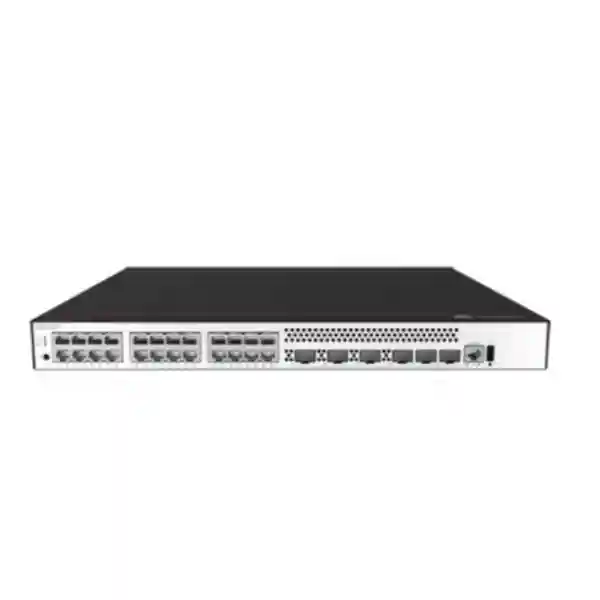
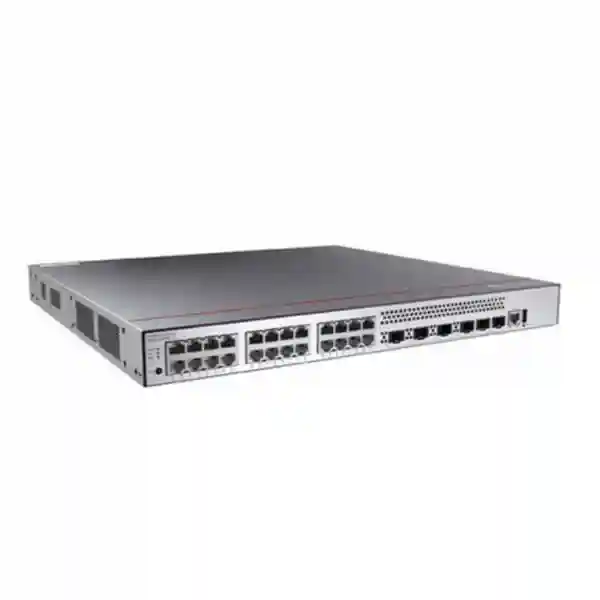
The Huawei CloudEngine S5735-S24T4XE-V2 is a purpose-built enterprise Gigabit Ethernet switch for organizations that need dependable copper access, multi-gigabit uplink headroom, resilient power architecture and sophisticated Layer 2/Layer 3 control without paying for PoE hardware that may not be required. It combines twenty-four 10/100/1000Base-T user or device ports with four 10GE SFP+ uplinks and dedicated stacking interfaces, allowing network architects to build clean access blocks for desktops, printers, controllers, servers, security appliances and other Ethernet endpoints while preserving high-speed northbound connectivity to distribution or core systems.
For UAE deployments, this model is especially relevant where IT teams want a standardized Huawei campus switching platform for office floors, branch locations, education networks, healthcare environments, hotels, warehouses, enterprise campuses and government facilities. The platform supports advanced VLAN design, resilient loop protection, mature IPv4 and IPv6 routing, authentication, access security, centralized operations and telemetry-oriented monitoring. FourTeck can assist with model validation, optic selection, stacking design, power-module planning, installation architecture and migration from legacy access switching.
What the S5735-S24T4XE-V2 is designed to do
This switch sits naturally at the enterprise access layer, where large numbers of ordinary Gigabit Ethernet devices need controlled, secure and resilient access to the wider campus. Its twenty-four copper ports simplify the connection of endpoints that already use standard RJ45 cabling, while the four 10GE SFP+ interfaces provide enough uplink flexibility for dual-homed designs, link aggregation, independent distribution paths or a mix of upstream connectivity and local high-speed services. The dedicated stack interfaces are important because they allow multiple access switches to be operated as a more unified switching system rather than as a collection of isolated boxes. That can simplify configuration, increase port density and provide a cleaner resiliency model for sites where uninterrupted access is important.
Huawei positions the CloudEngine S5735-S-V2 family as a standard Gigabit Ethernet campus switching platform built on a high-performance hardware and unified software architecture. For the S5735-S24T4XE-V2 specifically, the published model specifications identify 132 Mpps forwarding performance and a switching-capacity figure of 176 Gbps at the device level, with 520 Gbps shown as the system switching capability. These figures are more meaningful when interpreted in the context of actual topology. An access switch rarely runs every port at peak utilization all day, but the forwarding headroom helps maintain predictable behavior when multiple users, servers, storage targets, voice systems, surveillance systems or application flows burst concurrently.
The model is deliberately non-PoE. That distinction matters during procurement. If the access layer must directly power Wi-Fi access points, IP phones, cameras, intercoms or other powered devices, a PoE or PoE++ variant in the wider family may be more appropriate. If those endpoints use external power, local injectors, centralized power arrangements or simply do not require Ethernet-delivered power, the S5735-S24T4XE-V2 avoids unnecessary PoE budget and focuses on data switching, uplink capacity, resilient operation and enterprise control. FourTeck can help determine whether this non-PoE design matches the actual endpoint mix before a bill of materials is finalized.
Core hardware specifications
24 × 10/100/1000Base-TStandard RJ45 Gigabit Ethernet connectivity for users, appliances and fixed wired devices.
4 × 10GE SFP+High-speed optical or supported direct-attach uplink options for distribution, core or local high-speed connectivity.
2 dedicated stack portsDesigned for iStack-based multi-switch operation and higher-density access architectures.
132 MppsPacket forwarding performance suitable for enterprise access and compact aggregation roles.
176 / 520 GbpsPublished device/system capacity figures; the first value is the device switching capability and the second is system capability.
1+1 backupSupports redundant power design so a single power-module failure does not have to become a switch outage.
Port architecture and uplink design for real networks
The front-panel architecture is straightforward enough for day-to-day operations yet flexible enough for serious campus design. Twenty-four 10/100/1000Base-T ports fit the common access-layer building block used in executive floors, smaller office zones, classrooms, labs, retail areas, branch locations and equipment rooms. Standard copper access remains operationally attractive because structured cabling is familiar, test equipment is widely available, patching is simple and endpoint replacement does not require optical handling procedures. The switch can therefore be inserted into many existing Cat5e/Cat6/Cat6A access environments without forcing an immediate redesign of the horizontal cabling system.
The four 10GE SFP+ interfaces are where the model gains architectural flexibility. A basic design may use one 10GE uplink and reserve the remaining interfaces for future growth. A more resilient design can use two physical uplinks toward separate aggregation switches, ideally with a topology and protocol design that avoids a single upstream failure domain. Where supported by the broader network architecture, multiple uplinks can also participate in link aggregation to increase logical bandwidth and provide path redundancy. Network architects should size the uplink plan using measured traffic rather than simple port-count multiplication. Twenty-four users do not automatically require 24 Gbps of uplink bandwidth, but modern collaboration tools, cloud storage synchronization, virtual desktop traffic, local backup activity and large software distribution events can create short periods of unusually high utilization.
Transceiver selection is part of that design. The correct SFP+ optic depends on fiber type, wavelength, distance, connector standards and the optics supported by the target Huawei software and hardware release. Short-reach multimode links inside a building have different requirements from single-mode inter-building links. Direct-attach copper may be useful for short rack-level connections where supported. A procurement list should therefore identify not only the number of uplink ports but also each link’s physical medium, distance, connector type, patching environment and spare strategy. FourTeck can align switch quantities, optics, fiber patch leads and rack accessories as a single deployment bill rather than treating the switch as an isolated part number.
Layer 2 segmentation for controlled enterprise access
A modern campus access layer must do far more than bridge packets from an endpoint to an uplink. Segmentation determines how users and devices are grouped, where broadcast domains stop, how policies are applied and how operational boundaries are maintained. The S5735-S-V2 platform supports up to 4094 VLAN identifiers together with a broad set of VLAN functions that can be used to separate departments, device classes, guests, facilities networks, building-management systems, security equipment, voice services and server-facing traffic. The practical number of VLANs used in a deployment should be driven by the design and support model rather than the theoretical maximum.
Voice VLAN support is useful where IP telephony must coexist with general endpoint traffic while preserving a distinct logical domain. MUX VLAN, sub-VLAN and super-VLAN capabilities can support more specialized segmentation strategies. QinQ and selective QinQ are valuable in environments that need VLAN stacking, such as managed campus services, multi-tenant designs or service-provider-style handoffs. VLAN mapping can help translate tagging schemes across network boundaries. These capabilities give architects multiple ways to reconcile legacy addressing, service separation and migration constraints without rebuilding every connected system at once.
The strongest design is usually the simplest design that satisfies security and operational goals. Excessive VLAN proliferation can create troubleshooting overhead, while under-segmentation can increase lateral movement risk and make policy enforcement difficult. Before deployment, FourTeck recommends documenting endpoint types, trust zones, address pools, routing boundaries, DHCP sources, authentication methods and any firewall inspection points. That produces a VLAN plan that is understandable to future administrators and can be consistently reproduced across multiple UAE branches or campus buildings.
Loop prevention, link protection and resilient Ethernet
Redundancy improves availability only when loops are controlled. The CloudEngine S5735-S-V2 software feature set includes standard spanning-tree options such as STP, RSTP and MSTP, giving network teams familiar mechanisms for preventing Layer 2 loops across redundant links. MSTP is particularly useful in networks with multiple VLAN groups because it can map VLANs to spanning-tree instances rather than requiring an independent topology calculation for every VLAN. This helps balance resilience, convergence and administrative complexity.
The platform also supports Huawei-oriented and carrier-style protection features such as Smart Link and ERPS. Smart Link can be used to create rapid protection behavior in suitable topologies, while Ethernet Ring Protection Switching based on G.8032 is relevant to ring architectures that need deterministic failover behavior. These functions are not interchangeable with every campus redundancy model, so topology selection matters. A pair of access switches under a core may be better served by one design, while an industrial or geographically distributed ring may be better served by another. The correct approach depends on fault domains, cable routes, upstream architecture, operational skills and application sensitivity to short interruptions.
Physical resilience should also be considered. Two uplink fibers routed through the same tray can fail together when the tray is cut. Dual upstream switches on the same power strip can fail together during a local electrical event. Redundant power modules do not help if both modules feed from the same failed circuit. UAE deployments should therefore examine logical redundancy and physical diversity together. Where uptime matters, use separate power feeds where practical, diversify uplink paths, keep spare optics, label patching clearly and document the intended failover behavior so maintenance teams know what should happen during an outage.
Layer 3 routing: more than a basic access switch
The S5735-S-V2 family provides a mature routing feature set, allowing this model to participate in network designs that go beyond simple Layer 2 access. Published capabilities include static routing, RIP and RIPng, OSPF and OSPFv3, ECMP, IS-IS and IS-ISv6, BGP and BGP4+, together with VRRP and VRRP6 in the relevant software feature profile. This breadth gives architects choices for routed access, local inter-VLAN routing, branch aggregation and resilient gateway designs. It does not mean every protocol should be enabled. The best operational model is to use only the routing protocols that match the organization’s architecture and staff experience.
Static routes are appropriate in simple networks with predictable paths and limited topology changes. OSPF is often preferred in enterprise campuses because it provides dynamic path calculation and scalable area design. ECMP can distribute traffic across equal-cost routes when the topology is built to support it. BGP is relevant where policy-driven routing, larger routing domains or integration with more complex enterprise edge designs is required. IS-IS can be attractive in large, highly engineered environments. IPv6 variants enable organizations to move toward dual-stack or IPv6-oriented designs without replacing the access platform solely because the addressing strategy changes.
Routed access can reduce Layer 2 failure domains and improve convergence, but it changes how services such as DHCP, multicast, firewall inspection and first-hop redundancy are designed. Before enabling Layer 3 at the access edge, architects should decide where user default gateways will live, how routing adjacencies will be secured, which prefixes will be advertised, how summarization will work and where policy enforcement will take place. FourTeck’s UAE IT services practice can support design validation, configuration planning and migration sequencing when an organization is moving from a flat access network toward routed campus architecture.
Access security, authentication and endpoint control
Switch security is most effective when it establishes identity and limits what untrusted edge devices can do. The S5735-S-V2 platform includes 802.1X authentication, Portal authentication, AAA integration, RADIUS and HWTACACS support, port security, sticky MAC, port isolation, blackhole MAC handling and controls that bind important endpoint attributes such as IP address, MAC address, interface and VLAN. These capabilities can form the enforcement layer for an enterprise network access policy, particularly when combined with a centralized identity or NAC platform.
802.1X is useful where organizations want users or managed devices to authenticate before receiving normal access. It can support dynamic policy decisions when integrated with a compatible authentication system. MAC-oriented methods may be needed for devices that do not support an interactive supplicant, although MAC identity alone is not equivalent to strong user authentication. Portal workflows can be useful for guest or transitional environments. The switch also supports DHCP snooping and related DHCP client, server and relay functions, enabling administrators to control how addresses are learned and distributed at the access edge.
Security must be designed around operations. An aggressive access policy without an exception process can create avoidable outages for printers, scanners, building controllers, legacy devices and specialized medical or industrial equipment. A more sustainable rollout begins by inventorying endpoint types, defining authentication categories, building appropriate VLAN and ACL outcomes, testing critical devices and then moving groups of ports into enforcement. Administrative access to the switch should use secure methods such as SSH and HTTPS, with legacy or insecure management protocols disabled wherever operationally possible.
For organizations using dedicated perimeter or segmentation firewalls, switching security should complement rather than replace stateful inspection and threat prevention. FourTeck’s Firewall Dubai solutions team can help align VLAN boundaries, routing handoffs and firewall policy zones so the switching and security layers enforce a coherent architecture instead of operating as separate technology silos.
iStack design and operational consolidation
Stacking is one of the most practical reasons to choose an enterprise access switch rather than a collection of standalone unmanaged or lightly managed devices. Huawei’s iStack capability allows multiple supported switches to operate in a coordinated system, presenting a more unified operational model to administrators. The S5735-S24T4XE-V2 includes two dedicated stack ports, and Huawei’s published series data identifies stack bandwidth capability for the platform. A properly engineered stack can increase port density while simplifying configuration, uplink design and device management.
In a stacked access block, administrators can distribute physical uplinks across different stack members. That can reduce the impact of a single member failure and make better use of upstream redundancy. Endpoints still attach to individual physical units, so stack topology, master election behavior, software compatibility and cable routing must be planned carefully. All members should be kept on a supported and compatible software baseline. Stack links should be clearly labelled and protected from accidental removal. Where maintenance windows are tightly controlled, the upgrade method and expected service impact should be tested before a production change.
Stacking is not a substitute for site redundancy. If every stack member shares the same rack, same electrical panel and same uplink route, a rack-level event can still take down the entire access block. For critical facilities, architects may distribute access across separate physical zones or use independent systems with redundant upstream paths. Stacking is best understood as an operational and resiliency tool within a broader availability strategy rather than as an all-purpose high-availability answer.
During quotation, specify expected stack size, physical rack positions and cable lengths. These details determine how stack cabling should be arranged and whether the proposed topology can be maintained cleanly. FourTeck can map the rack elevation and uplink plan before shipment so installation teams receive a clearer implementation package.
Power architecture, redundancy and UAE installation planning
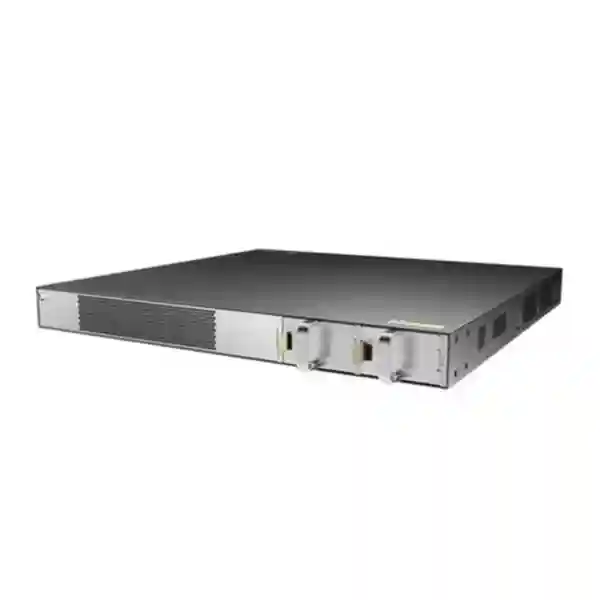
The S5735-S24T4XE-V2 supports a 1+1 power-backup design. In practice, that means a deployment can use redundant power modules so the switch does not have to fail merely because one module stops operating. Huawei documentation for the family lists supported AC and DC power options for applicable models, including hot-swappable modules. Exact power-module selection should be validated against the hardware revision, regional supply, software support and the electrical design of the target site before purchase.
Redundant modules are most valuable when connected to independent upstream power sources. Plugging both modules into the same PDU and the same single UPS circuit provides module redundancy but not full power-path diversity. A higher-availability design uses separate protected feeds where the facility supports them. One feed might originate from UPS A and the other from UPS B, or from independent PDUs fed by separate circuits. In smaller branches, true electrical diversity may not be available; in that case, the design should at least document the remaining single points of failure.
Environmental planning matters in the UAE because telecom rooms can experience elevated ambient temperature if cooling is undersized, doors are left open, filters become blocked or airflow is obstructed by dense cabling. Huawei’s series documentation specifies enterprise operating and storage environmental limits, but a good deployment should not treat maximum temperature ratings as a target. Maintain stable cooling, front-to-back airflow appropriate to the installed equipment, clean cable management and adequate rack clearance. Avoid placing bundles directly against exhaust paths. Monitor room temperature and UPS health so the switch is not expected to compensate for facility problems.
The switch is a standard rack-oriented enterprise unit, which makes it suitable for common 19-inch network cabinets when installed with the correct hardware. Rack depth, power-cable clearance, fiber bend radius and front patch-cord management should all be considered. A switch that technically fits the rack can still be difficult to service if rear clearances are too tight or patching is unmanaged. FourTeck can coordinate the switching hardware with racks, structured cabling and related infrastructure through FourTeck UAE for a more complete site-ready design.
Management, telemetry and troubleshooting workflows
Enterprise switching should reduce troubleshooting time, not simply move packets. The CloudEngine S5735-S-V2 family supports management and monitoring functions including SNMP, RMON, HTTPS, SSH, web-based management, Huawei management platforms and NETCONF/YANG-oriented cloud management capabilities. The platform also supports telemetry functions that can feed more granular operational data into compatible analytics and management systems. These capabilities make the switch suitable for organizations moving from device-by-device CLI administration toward centralized network operations.
SNMP remains common for inventory, interface utilization, error counters, environmental status and alerting. In established operations centers, SNMPv3 is preferable to older versions because it supports stronger authentication and privacy features. Telemetry can complement traditional polling by streaming operational data at useful intervals and helping analytics platforms identify trends that may be difficult to see from periodic snapshots. NETCONF/YANG can support structured automation, configuration workflows and integration with orchestration tools. The right combination depends on the organization’s monitoring platform, licensing model and automation maturity.
Virtual Cable Test capability can assist troubleshooting of copper problems by helping technicians identify likely cable faults without immediately replacing every component in the path. Interface counters can reveal duplex issues, errors, discards or congestion. Logs and alarms help correlate device behavior with upstream events. LLDP can improve visibility into connected infrastructure and neighboring network devices. When these functions are integrated into a documented support process, first-line engineers can resolve common access problems faster and escalate only the issues that genuinely require deeper protocol analysis.
Operational security should remain part of management design. Use dedicated management VLANs or out-of-band access where appropriate, restrict which subnets can reach administrative services, synchronize time consistently, forward logs to a central system and use named administrator accounts rather than shared credentials. Backup configurations after approved changes. Maintain a record of software versions, optics and stack membership. These simple practices often deliver more reliability than adding features without process discipline.
IPv6 readiness and dual-stack campus migration
Many enterprises still operate predominantly IPv4 networks, but access infrastructure is typically purchased for a lifecycle that extends across several application and addressing changes. The S5735-S-V2 family includes mature IPv6 functionality, including IPv6-aware routing protocols such as OSPFv3, RIPng, IS-ISv6 and BGP4+ together with IPv6 first-hop redundancy capabilities in the supported software profile. This allows organizations to introduce dual-stack services without replacing the access switch simply to gain protocol support.
A successful IPv6 migration is not only a routing project. Security policy, address planning, DNS behavior, endpoint operating systems, monitoring platforms and firewall rules all need attention. Dual-stack environments can accidentally leave IPv6 less controlled than IPv4 if teams focus only on the older protocol. Switch configurations should therefore include IPv6-aware access policy, management restrictions and monitoring from the beginning. Routing adjacencies should be authenticated or otherwise protected where supported by the selected protocol and architecture.
The practical benefit of an IPv6-capable access switch is architectural freedom. A UAE organization can continue using IPv4 today, pilot dual-stack on selected VLANs tomorrow and expand IPv6 gradually as applications and security controls mature. The switch does not force the migration schedule, but it avoids creating an access-layer hardware barrier when the business decides to proceed.
Quality of service and traffic engineering at the access edge
Access switches sit where many traffic classes enter the enterprise network, so quality-of-service policy begins at the edge. Although application behavior and end-to-end design determine the ultimate user experience, the switching layer can classify, mark, queue and schedule traffic so critical flows are less vulnerable to congestion. Voice, interactive video, transaction traffic, storage replication, backups, software updates and general internet browsing should not automatically receive identical treatment when links become busy.
A useful QoS design starts with trust boundaries. If every endpoint is allowed to mark its own traffic as highest priority, the queueing model quickly loses meaning. Many enterprises trust markings only from known devices or reclassify traffic at the access port. Voice VLANs can help create consistent treatment for telephony. Uplink policies can then preserve priority across aggregation and core links. The number of traffic classes should remain manageable; a small set of well-documented classes is usually easier to operate than a highly granular policy that no one can troubleshoot during an incident.
Capacity planning remains the first defense against congestion. QoS cannot create bandwidth that does not exist. If uplinks are persistently saturated, increase capacity or reduce unnecessary traffic before relying on queue tuning. The four 10GE SFP+ uplinks on the S5735-S24T4XE-V2 provide useful headroom for most 24-port access designs, but the correct uplink quantity should still be validated against actual traffic patterns, redundancy requirements and expected growth.
Where this switch fits in UAE deployments
Corporate office floors
Ideal for groups of wired users, meeting-room systems, printers, docking stations and non-PoE endpoint clusters. 10GE uplinks help consolidate each floor into distribution switches without turning every access block into an oversized platform.
Education environments
Suitable for classrooms, labs, administration areas and fixed computer rooms where endpoints use wired Gigabit Ethernet and PoE is either not required or delivered by another access tier.
Healthcare and clinics
Supports segmented wired connectivity for workstations, terminals and specialized systems, with access authentication and routing features that can help maintain separation between administrative and clinical device zones.
Hospitality back-office networks
Useful for property-management terminals, finance users, engineering networks and other fixed devices that do not need PoE from the switch but still require strong VLAN and uplink design.
Branch and retail infrastructure
A practical platform for larger branches that need more policy, routing and resiliency than a basic small-business switch can provide, while retaining simple 1GE access connectivity.
Compact aggregation
Can serve selected aggregation roles where Gigabit copper density, 10GE upstream connectivity, routing and stacking align with the traffic requirement. Final sizing should account for oversubscription, fault domains and future growth.
Sizing methodology: how many switches and uplinks do you actually need?
Start with the real endpoint count, not the number of wall outlets. Structured cabling designs often install spare outlets, while active switch ports may be required only for a subset. Count currently active wired endpoints, then add known projects and an operational reserve. A 24-port switch should not necessarily be planned to run permanently at 24 occupied ports if the organization expects frequent desk moves or equipment changes. Leaving some spare capacity reduces the need for emergency hardware additions and makes patching easier.
Next separate PoE and non-PoE devices. The S5735-S24T4XE-V2 does not provide PoE on its access ports. If an area contains many IP phones, wireless access points, cameras or access-control devices that expect Ethernet power, use a PoE-capable access model for those ports or intentionally provide another power method. Mixing a non-PoE model into a PoE-dependent design is one of the simplest procurement mistakes to avoid. Conversely, buying PoE everywhere can be unnecessary when the connected estate is almost entirely desktops and externally powered equipment.
Then calculate uplink requirements. Consider peak northbound traffic, not just average daily use. Large file transfers, endpoint backups, VDI, software distribution, centralized storage and east-west traffic between access blocks can create short peaks. A single 10GE uplink often provides substantial capacity for a 24-port access switch, but dual uplinks may be required for resilience or aggregation. If two uplinks form one logical bundle, remember that a single flow may still be limited by the hashing behavior of the bundle even when aggregate capacity is high.
Finally, model failure scenarios. If one uplink fails, can the remaining path carry the expected traffic? If one stack member fails, which users are affected? If one power feed fails, does the switch remain powered? If the distribution pair is split across rooms, are the fiber routes also diverse? Capacity and resilience should be evaluated together because a topology that works perfectly under normal conditions may become overloaded during a single failure.
For multi-site projects, standardization can reduce both spares inventory and operational complexity. Using a consistent switch model for similarly sized access areas makes configuration templates, monitoring, documentation and technician training easier. Larger floors can use higher-port-count models while retaining the same software family and policy approach.
Migration from an existing access switch
Replacing an access switch is not simply a matter of copying VLAN numbers. A disciplined migration starts with discovery. Export the current configuration, interface descriptions, VLAN membership, uplink trunks, port-security settings, spanning-tree parameters, IP helpers, routing configuration, management addressing, AAA settings and monitoring destinations. Compare the discovered state with the intended design because old configurations often contain years of exceptions that should not automatically be reproduced.
Build the Huawei configuration from a validated template, then adapt only the variables that differ by site. Pre-stage management addresses, administrator access, VLANs, trunks, routing, authentication and monitoring before the maintenance window. Validate optics and fiber paths. Label every patch lead. If the old switch uses proprietary VLAN behavior or spanning-tree extensions, verify interoperability before moving production links. Huawei documents VBST interoperability behavior for environments that must coexist with PVST-style networks, but mixed-vendor designs still require careful testing.
During cutover, move uplinks and a controlled set of access ports first. Confirm gateway reachability, DHCP, DNS, authentication, application access and monitoring before migrating the remaining users. Maintain a rollback plan that is physically and logically realistic. A rollback is not useful if the old switch has already been unracked, factory-reset or had all patching removed without labels. For high-impact sites, take configuration and topology screenshots before the change and have remote or on-site stakeholders ready to test key applications.
After migration, verify more than ping. Check interface speed and duplex, error counters, MAC learning, VLAN membership, routing neighbors, spanning-tree state, CPU and memory status, logs, NTP, SNMP or telemetry visibility and redundancy behavior. Confirm that the backup power module is healthy and that uplink failover behaves as designed. Update documentation immediately while the change details are still fresh.
Interoperability with firewalls, servers, Wi-Fi and unified communications
Access switching rarely operates in isolation. The S5735-S24T4XE-V2 may uplink to Huawei or third-party distribution switches, route toward a firewall, connect local servers, serve wired users or provide network paths for controllers and appliances. Standards-based Ethernet, VLAN tagging, link aggregation and routing make multi-vendor designs practical, but the details still matter. Matching transceiver standards, VLAN tagging conventions, MTU assumptions, spanning-tree behavior, routing timers and authentication methods prevents many avoidable integration problems.
When a firewall is used as the inter-VLAN gateway, the switch typically carries tagged VLANs toward the firewall or aggregation layer. This design centralizes policy enforcement but may increase firewall interface load. When Layer 3 interfaces are hosted on the switch, traffic can route locally at campus speed and selected networks can be forwarded toward the firewall for security inspection. Neither architecture is universally superior. The correct choice depends on security policy, traffic volume, firewall capacity, troubleshooting preferences and where the organization wants trust boundaries to sit.
Wi-Fi infrastructure requires special attention because access points often need PoE. The S5735-S24T4XE-V2 does not provide PoE, so it is better suited to non-PoE wired users or to environments where AP power is delivered by another method. If the switch carries AP backhaul but not power, verify the AP Ethernet speed requirement. Modern high-performance APs can exceed 1 Gbps of practical aggregate traffic, and a standard 1GE access port may not be the best match for high-density wireless designs. Select the switch based on the endpoint requirement rather than simply reusing a familiar model.
Unified communications endpoints can use voice VLAN mechanisms where appropriate, while IP PBX and call-control traffic can be segmented and prioritized end to end. FourTeck’s broader enterprise technology portfolio can help organizations align switching, security, compute and communications components within one documented network architecture.
Procurement considerations for Dubai and the wider UAE
A correct switch quotation should be more than a model number and a quantity. Confirm whether the requirement is exactly S5735-S24T4XE-V2 rather than a visually similar PoE, extended-slot, all-optical or later platform variant. Huawei product families may contain multiple models with similar naming. Port count, PoE capability, stack architecture, power supply type and expansion options can differ. The bill of materials should therefore state the full model, required power modules, optics, cables, licenses if any are applicable to the selected software feature set, rack accessories and support requirements.
For UAE projects, lead time can be influenced by model availability, regional distribution stock and project quantity. A procurement team planning a campus refresh should avoid treating every switch as a spot purchase. Aggregate the expected quantities by phase, identify critical delivery dates and hold a small spare pool for operational continuity. For standardized multi-branch rollouts, one spare unit or a defined percentage of spares can reduce recovery time when hardware replacement is needed.
Software and support entitlement should also be planned. Verify the desired feature set against the intended software release and local support arrangement. Enterprise networks benefit from controlled software baselines rather than arbitrary upgrades. New releases may add features or fixes, but production changes should follow a tested change process. Record serial numbers, hardware revisions, installed power modules and optic types in the asset register so support teams can respond quickly during an incident.
Finally, make sure the switch matches the actual operating environment. Branch closets, warehouses, hotels, clinics and office towers have different rack space, cooling, dust, power and cabling conditions. A technically correct switch still needs a suitable cabinet, stable power, proper grounding, patch management and ventilation. FourTeck can quote the switch as part of a broader infrastructure package rather than leaving installation dependencies unresolved.
Technical feature summary for architects and procurement teams
Why choose the non-PoE S5735-S24T4XE-V2 instead of a PoE model?
The decision should be driven by endpoint power requirements. A PoE switch includes power-delivery hardware and a power budget because it must provide electrical power over Ethernet cabling. That is essential for many access points, cameras and IP phones. It is unnecessary for ordinary desktops, many servers, printers, controllers and appliances that already use local power. In a network zone dominated by those non-PoE endpoints, the S5735-S24T4XE-V2 can be a cleaner fit because procurement is focused on switching features rather than unused PoE capacity.
Non-PoE and PoE switches can coexist in the same campus. One common design is to dedicate PoE-capable switches to wireless, voice and surveillance zones while using non-PoE switches for desktop or server-facing zones. This can make power planning clearer and allows each access block to be optimized for its actual load. The operational disadvantage is that technicians need to know which ports can provide power, so rack labeling and inventory become more important.
If future requirements are uncertain, estimate the expected percentage of powered endpoints over the switch’s lifecycle. It may be more economical to buy a PoE model now if many ports are likely to need power later. If powered devices will remain a small minority, external injectors or a smaller dedicated PoE block may be appropriate. FourTeck can compare model options against the endpoint schedule before procurement so the chosen hardware reflects the actual three-to-five-year use case rather than today’s port count alone.
Deployment example: resilient 48-port office access block
Consider an office floor that needs roughly forty active non-PoE wired ports today with expected growth to forty-six. Two S5735-S24T4XE-V2 switches provide forty-eight copper access ports and can be arranged as a stack if the selected deployment standard uses iStack. Each physical unit retains its own access ports while the stack can be managed more cohesively. Uplinks can be distributed across the two units so a single member or uplink failure does not automatically isolate the entire floor.
The floor may use separate VLANs for corporate users, finance, printers, facilities systems and management. 802.1X can authenticate managed endpoints while selected legacy devices use an exception method. DHCP snooping and port-security controls can reduce common access-layer risks. The distribution pair can run OSPF with the access stack if routed access is desired, or the uplinks can remain Layer 2 trunks if gateways are centralized upstream. The choice depends on the organization’s campus architecture.
For resilience, each switch receives dual power modules connected to separate protected power feeds where the building supports them. One 10GE uplink from each stack member runs toward different distribution switches over physically diverse fiber paths. A second 10GE link per member can be reserved for additional bandwidth, future redesign or separate local services. Monitoring collects interface statistics, environmental state, logs and stack health. Configuration backups are taken automatically after approved changes.
This example illustrates why switch selection should be connected to topology. The hardware becomes significantly more valuable when its stacking, routing, uplink and security capabilities are used deliberately. Buying the same switch and connecting it with one unprotected uplink and one power module would still work, but it would not deliver the same operational resilience.
Deployment example: branch office with local routing and central security
A larger branch office may need twenty to thirty wired users, printers, local application devices and one or two servers. The S5735-S24T4XE-V2 can provide the primary wired access block while a second unit adds port capacity or resilience. User VLANs can be routed locally on the switch if the architecture requires low-latency east-west communication, while a default or summarized route sends internet and inter-site traffic toward the branch firewall or SD-WAN edge.
Dynamic routing can simplify failover if the branch has multiple WAN or security paths, although simple branches may remain easier to operate with static routes. Central AAA can authenticate network administrators, while user access can use 802.1X integrated with the organization’s identity environment. Monitoring can report utilization and alarms back to a central NOC, allowing a small branch to be operated using the same standards as a major UAE office.
The key design question is whether the branch needs PoE. If phones and access points depend on the switch for power, use a suitable PoE model for those ports. The S5735-S24T4XE-V2 remains an excellent candidate for the branch’s non-PoE device block, server-facing access or a mixed design in which a separate PoE switch handles powered endpoints.
Operational standards that make the platform easier to support
Technology alone does not create a maintainable campus. Establish naming conventions for devices, interfaces, VLANs and descriptions. A port labeled merely “User” provides little value during troubleshooting; a description that identifies room, patch-panel port and service type is far more useful. Standardize management IP addressing, NTP, logging, SNMP, AAA, banner text and configuration-backup procedures. Use templates for common interface roles so every access switch follows the same baseline.
Maintain a software lifecycle. Record the approved release, test upgrades on representative hardware and avoid mixing versions within stacks unless the upgrade procedure explicitly requires it. Read release notes for feature changes and defects that affect the deployed configuration. Keep a copy of the running configuration and a known-good startup configuration. Archive configuration changes in a system that records who changed what and why.
Monitor leading indicators rather than waiting for outages. Rising interface errors can reveal cabling problems before users lose connectivity. Consistently high uplink utilization can indicate capacity pressure. Repeated spanning-tree changes can indicate unstable cabling or misconfiguration. Authentication failures may reveal user problems or attempted unauthorized access. Environmental alarms can highlight cooling issues. A well-instrumented access layer allows engineers to investigate patterns before they become widespread incidents.
Finally, keep physical documentation aligned with logical documentation. Rack elevations, patch-panel maps, stack diagrams, uplink fiber routes and power-feed information all matter during a fault. When a technician can see exactly how the switch is supposed to be connected, mean time to repair can be dramatically lower.
Frequently asked technical questions
Does the S5735-S24T4XE-V2 provide PoE?
No. This exact T model is the non-PoE 24-port Gigabit copper variant. If endpoints must receive electrical power from the switch, choose a suitable PoE-capable model in the family or provide an intentional external power method.
How many 10 Gigabit uplinks does it have?
It provides four 10GE SFP+ uplink interfaces. The final optic or cable type depends on distance, fiber media, connector standard and compatibility requirements.
Can it be used for Layer 3 routing?
Yes. The S5735-S-V2 family supports a broad Layer 3 feature set including static routing and dynamic protocols such as OSPF, OSPFv3, IS-IS, BGP and their relevant IPv6 counterparts, subject to the applicable software feature profile.
Can multiple switches be stacked?
Yes. The model includes two dedicated stack ports and supports Huawei iStack functionality. Stack size, cable selection and software compatibility should be planned before deployment.
Is it suitable for mixed-vendor networks?
Yes, when standards-based protocols and compatible optics or interfaces are used. Mixed-vendor spanning tree, link aggregation, VLAN and routing behavior should be tested against the exact upstream devices and software versions.
What should be included in a quotation?
At minimum, include switch quantity, power-module requirement, optics or DACs, stack accessories, rack requirements, software or support entitlement where applicable, implementation services and spare strategy. The exact bill of materials should match the proposed topology rather than listing the switch alone.
Decision recap: when this is the right Huawei access switch
Strong fit
Choose the S5735-S24T4XE-V2 when you need twenty-four standard Gigabit copper access ports, four 10GE uplinks, enterprise Layer 2/Layer 3 features, stack capability and redundant power options without access-port PoE. It is especially well suited to non-PoE office, branch, education, healthcare, hospitality and enterprise campus zones.
Consider another model
Choose a different variant if you need PoE/PoE++ power, more than twenty-four access ports in a single chassis, multi-gigabit copper access, all-optical downlinks or a different expansion architecture. Matching the exact model to endpoint requirements avoids unnecessary compromises later.
Quotation input checklist
FourTeck consultation for Huawei switching in the UAE
A production-ready switching project should connect model selection to topology, optics, power, security and support. FourTeck can review your current network, confirm whether the S5735-S24T4XE-V2 is the correct non-PoE access model, build the bill of materials, plan stacking and uplinks, validate VLAN and routing architecture, align firewall handoffs, and prepare the deployment sequence for Dubai or other UAE locations.
For larger modernization programs, FourTeck can also coordinate related enterprise infrastructure so switching decisions are not made in isolation. This is useful when a project includes firewall refresh, server connectivity, structured cabling, branch standardization, monitoring or migration services. The result is a clearer technical scope and fewer compatibility surprises during implementation.
• Number of switch ports
• PoE requirement
• Fiber distances
• Stack quantity
• Redundancy target

Reviews
There are no reviews yet.