
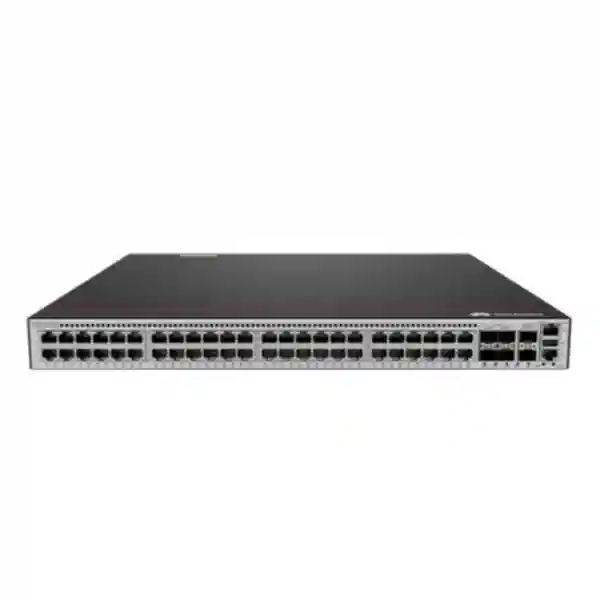
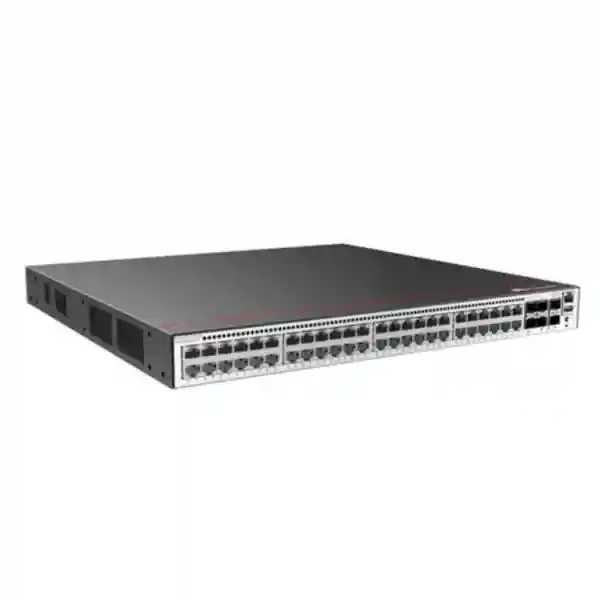
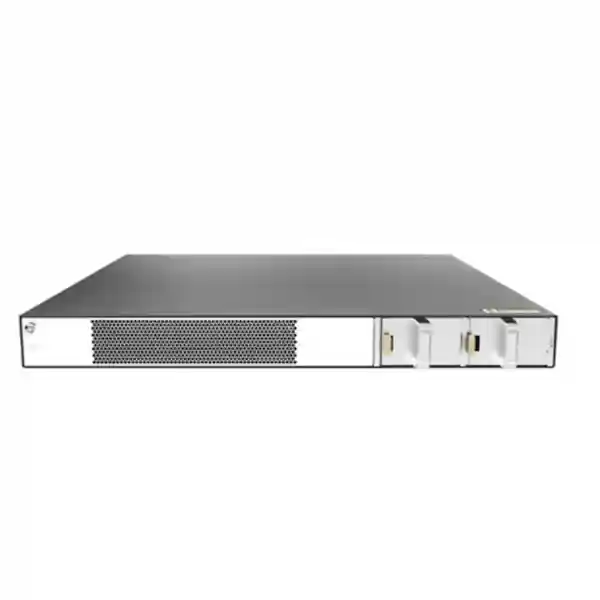
Huawei CloudEngine S5735-S48T4XE-XA-V2
A dense 48-port Gigabit Ethernet enterprise switch with four 10GE SFP+ uplinks, dedicated 12GE stacking interfaces, dual built-in AC power supplies, strong Layer 2/Layer 3 functionality, mature IPv6 support, and modern telemetry-driven operations for campus, branch, commercial, education, hospitality, healthcare, retail, and multi-site networks across the United Arab Emirates.
Choose this model when you need forty-eight non-PoE copper access ports, resilient 10GE fiber uplinks, dedicated stack bandwidth, dual AC power redundancy, and an enterprise feature set without paying for a PoE budget that the site does not require.
At-a-glance hardware specification
10/100/1000BASE-T for workstations, printers, servers, appliances, controllers and other Ethernet endpoints.
High-speed optical or DAC connectivity toward distribution, core, firewall, server, storage or aggregation infrastructure.
Dedicated stacking ports preserve the four 10GE SFP+ interfaces for production uplinks and service connectivity.
Packet forwarding performance sized for dense enterprise access and aggregation duties across the fixed interface set.
Huawei identifies the first value as device switching capability and the second as system switching capability.
Two built-in AC power modules provide redundant power input for higher access-layer availability.
What the S5735-S48T4XE-XA-V2 is designed to do
The Huawei CloudEngine S5735-S48T4XE-XA-V2 sits in the part of the campus switching portfolio where port density, reliable uplinks, routing depth and operational consistency matter more than endpoint power delivery. Its forty-eight copper Gigabit Ethernet ports make it suitable for a full access-layer wiring block, while four 10GE SFP+ interfaces provide enough uplink flexibility to separate production paths, build link aggregation groups, connect redundant distribution switches, attach security appliances or create high-speed links to local compute resources. The two dedicated 12GE stack ports are especially useful in access closets because they allow multiple switches to operate as a coordinated system without consuming the SFP+ uplinks that are better reserved for traffic leaving the stack.
For UAE organizations, that combination can simplify the design of floor-level telecommunications rooms, branch racks and medium-density server or appliance zones. A business can use the switch as a conventional Layer 2 access device with VLAN segmentation and redundant uplinks, or activate its broader Layer 3 capabilities where local routing, routed aggregation, first-hop redundancy and dynamic routing are required. The platform supports IPv4 and IPv6 service features, allowing networks to remain practical during long migration periods in which both protocol families must coexist.
This exact XA model is the non-PoE choice. That distinction matters during procurement. If connected endpoints obtain power independently, such as desktop computers, servers, printers, storage appliances, industrial gateways with local power, or non-PoE edge devices, the S5735-S48T4XE-XA-V2 avoids the cost, heat and electrical planning associated with a large PoE budget. If a project must directly power IP phones, wireless access points or cameras from the switch, a PoE-capable sibling should instead be evaluated against the endpoint wattage, redundancy and future growth requirement.
Port architecture: how to use all 48 GE access ports effectively
Forty-eight 10/100/1000BASE-T interfaces allow the switch to terminate a complete high-density horizontal cabling block. In a typical office floor, each access port can be assigned to a user, printer, meeting-room appliance, building control endpoint, small server, security controller or other Ethernet device. Because Gigabit Ethernet remains sufficient for a large percentage of user and operational technology endpoints, this density provides a practical balance between cabling utilization, rack space and switch count. The one-rack-unit chassis means a pair of switches can provide ninety-six copper ports while consuming only two rack units before allowance for patch panels and cable-management hardware.
Port density should not be confused with simultaneous traffic demand. A correct design considers the behavior of attached endpoints rather than simply multiplying forty-eight ports by one gigabit per second and assuming every link will sustain line-rate traffic at the same instant. Office clients are bursty. Printers are low duty-cycle. Point-of-sale and building-management devices are usually light. Backup systems, imaging workstations, video endpoints and local server transfers can be much heavier. The four 10GE uplinks give the designer room to choose between a simple single-link uplink, dual redundant links, aggregated uplinks or separated service paths based on actual traffic and availability requirements.
For segmentation, the platform supports up to 4094 VLANs and a broad set of VLAN mechanisms, including voice VLAN, MUX VLAN, VLAN assignment using attributes such as MAC, protocol, IP subnet, policy or port, and enterprise functions such as QinQ and VLAN mapping within the wider S5735-S-V2 feature set. In a UAE head office, that allows one physical switch to support multiple logical zones: corporate users, guest or contractor access, finance, operations, printers, building systems, management networks and isolated service segments. The exact segmentation policy should be aligned with firewall rules, identity controls and organizational security requirements instead of treating VLANs as a security boundary by themselves.
Access-port planning should also reserve operational capacity. Using every physical interface on day one leaves no simple place to connect a temporary test device, replacement endpoint, out-of-band appliance or expansion user. A common engineering practice is to keep some spare copper ports per closet and monitor utilization over time. When a site is expected to grow quickly, the dedicated stack interfaces make it easier to add another compatible switch without redesigning the uplink architecture.
10GE SFP+ uplinks: bandwidth, resilience and fiber design
Distribution uplinks
Use two or more 10GE ports toward a redundant distribution or core pair when the campus design requires path diversity, link aggregation or separate physical failure domains.
Local high-speed devices
Spare SFP+ ports can connect compatible servers, appliances or aggregation devices at 10GE where a local high-throughput path is justified.
Optical reach selection
Transceiver selection must match fiber type, distance, connector plan, optical budget and the supported Huawei compatibility matrix for the software and hardware release in use.
DAC/AOC scenarios
Short rack-to-rack or same-rack links may use supported direct-attach or active optical cabling when appropriate, reducing transceiver count and simplifying short-distance interconnects.
The value of four 10GE ports is architectural flexibility. A single access switch might use only two for redundant uplinks, leaving two free for future growth. A stacked pair may distribute uplinks across members so that the loss of one switch does not remove every path to the upstream layer. Where traffic engineering calls for it, multiple 10GE interfaces can participate in link aggregation, subject to the broader topology and configuration. This is particularly relevant for floors with dense user populations, backup windows, imaging traffic, centralized file access, surveillance backhaul or application flows that periodically exceed what one gigabit uplinks can comfortably handle.
Optics should be part of the bill of materials rather than an afterthought. The switch provides SFP+ cages, but the deployment still needs the right transceivers or cables, fiber patch leads, patch-panel interfaces, labeling, cleaning tools and spare optics strategy. In Dubai and other UAE facilities, fiber pathways may traverse multiple risers, intermediate distribution frames or long campus routes. Distances must therefore be measured from end to end, including patching, not guessed from floor plans.
Dedicated 12GE stacking: preserving valuable uplink ports
The S5735-S48T4XE-XA-V2 includes two dedicated 12GE stack interfaces. Their practical advantage is separation: stacking does not have to consume the four production 10GE SFP+ ports. In access-layer environments, that means the designer can use dedicated interfaces for the switch-to-switch stack relationship while keeping all SFP+ ports available for northbound connectivity and special high-speed services. This is useful when a wiring closet needs both redundancy and enough uplink capacity to serve a growing floor.
A stack can simplify operations by presenting multiple physical switches in a coordinated logical system. The operational objective is not merely to make configuration shorter; it is to reduce the number of independent control points, simplify consistent VLAN and policy deployment, and support resilient uplink distribution. In a well-designed stack, links can be spread across members so that physical component failures do not unnecessarily isolate the entire closet. Stacking does not eliminate the need for careful power, cabling and upstream redundancy. A stack in one rack can still share environmental or electrical failure domains unless the broader design deliberately separates them.
When expanding an existing Huawei environment, check the exact supported software release, compatible stack cables or modules, stack topology, member limits and upgrade procedure before ordering. Software compatibility is especially important in brownfield networks where existing S5735-series switches may run a different release train. The safest migration plan stages version alignment, backs up configuration, validates feature dependencies, confirms transceiver support and defines a rollback process before production changes are made.
Forwarding and switching performance in practical terms
Huawei specifies forwarding performance of 168 Mpps for this model and switching capacity of 224 Gbps at the device level, with a 520 Gbps system capability figure in the published model table. For network planners, these values describe the hardware’s packet and switching envelope; they are not a promise that every application will receive a particular throughput. Real network experience also depends on packet size, protocol mix, forwarding behavior, congestion, uplink design, QoS policy, security processing, endpoint limitations and the utilization of other infrastructure in the path.
At the access layer, a stronger design question is whether the uplinks and topology match the expected concentration ratio. Forty-eight user-facing gigabit ports do not usually drive forty-eight gigabits continuously. If most endpoints are general office clients, two resilient 10GE uplinks may offer substantial headroom. If the switch serves workloads with sustained east-west traffic, large file movement, high-definition video aggregation or backup transfers, it may be appropriate to aggregate additional 10GE links or move unusually heavy systems onto higher-capacity switching tiers.
Capacity should be validated with measurements where possible. Existing switch interface counters, flow information, application telemetry and peak-period monitoring provide better sizing data than user counts alone. For new greenfield sites, estimate by endpoint category and growth scenario. Reserve headroom for software distribution, cloud synchronization, operating-system updates, video meetings, disaster-recovery traffic and seasonal peaks. This turns a port-count purchase into an engineered access design.
Layer 2 services for segmented enterprise access
The CloudEngine S5735-S-V2 platform supports the Layer 2 mechanisms expected in managed enterprise campus switching. MAC address learning and aging, static and blackhole MAC entries, source-MAC filtering and interface-level learning controls help administrators govern how endpoints are represented at the switching layer. Up to 4094 VLANs provide the basic segmentation framework, while voice VLAN, MUX VLAN, QinQ-related capabilities, VLAN stacking and mapping give designers options for more specialized campus or service-provider-style segmentation.
Loop protection is equally important in an access network, because a simple cabling mistake can create broadcast amplification and destabilize an entire VLAN. The S5735-S-V2 feature set includes STP, RSTP and MSTP as well as protections such as BPDU protection, root protection and loop protection. Huawei also documents ERPS and Smart Link mechanisms within the series. Which technology belongs in a given design depends on the topology. A conventional office access layer may use MSTP or a routed access approach, whereas rings or specialized industrial-style networks may call for different protection mechanisms.
LLDP and LLDP-MED support can improve topology visibility and endpoint interoperability. In mixed-vendor environments, LLDP is useful for discovering neighboring infrastructure and validating physical connectivity. During migrations, it can help engineering teams map old and new equipment, identify unexpected patching, and verify that uplinks lead where documentation says they lead. Accurate neighbor data becomes particularly valuable in large UAE campuses with multiple buildings, risers and telecommunications rooms.
Layer 2 design should be intentionally bounded. Extending large VLANs across many closets can simplify addressing in the short term but increase failure domains and troubleshooting complexity. Where the organization’s operational model supports it, routing closer to the access layer can contain broadcasts, improve convergence boundaries and reduce dependency on spanning tree. The S5735-S48T4XE-XA-V2 provides the Layer 3 toolset needed to participate in those designs.
Layer 3 routing and first-hop resilience
Huawei lists static routing, RIP/RIPng, OSPF/OSPFv3, IS-IS/IS-ISv6, BGP/BGP4+, ECMP, VRRP and VRRP6 for this model family. That is a broad routing set for a switch positioned primarily around enterprise campus access and aggregation. It enables the platform to do more than bridge VLANs: it can act as a routed access node, support dynamic route exchange toward the distribution layer, provide resilient default gateway functions, or participate in aggregation designs where policy and topology requirements justify local Layer 3 intelligence.
OSPF is often relevant in enterprise campus routing because it allows multiple routed links and prefixes to converge dynamically without maintaining large static route sets. IS-IS or BGP may be used in more advanced enterprise architectures where operational standards already rely on those protocols. VRRP supports first-hop redundancy scenarios in which gateway availability must continue if one device fails. ECMP can provide equal-cost path utilization where the topology and upstream design allow parallel routed links.
The presence of these protocols does not mean every access closet should run all of them. Simplicity is a design asset. A branch with a single upstream firewall may only need static routing. A campus with redundant distribution may use OSPF. A sophisticated multi-building network might have different requirements. Routing policy should be driven by failure behavior, convergence targets, operational skills, visibility tooling and the security architecture.
For greenfield projects, define the Layer 3 boundary early. Decide where user VLAN gateways reside, how default routes are originated, how route summarization is handled, and what happens when one uplink or upstream switch fails. This prevents later configuration from becoming a patchwork of temporary decisions.
IPv6 readiness for dual-stack UAE enterprise networks
IPv6 adoption is rarely a single cutover event. Most enterprises run a period of coexistence in which IPv4 remains important while IPv6 is introduced for selected services, internet connectivity, cloud architectures, laboratories, public-facing systems or internal modernization. The S5735-S-V2 family includes mature IPv6 functionality, with routing support such as OSPFv3, IS-ISv6, BGP4+, RIPng and VRRP6 alongside IPv6 operational tools and neighbor discovery capabilities.
That makes the S5735-S48T4XE-XA-V2 appropriate for organizations that want the access layer to remain useful through a multi-year protocol transition. VLANs can be dual-stack, routing can evolve incrementally, and operations teams can develop IPv6 monitoring and security practices without replacing the access hardware merely because addressing strategy changes. The important work is in design and governance: address planning, route filtering, first-hop security, DNS behavior, logging, firewall policy and monitoring all need an IPv6 equivalent rather than assuming IPv4 controls automatically cover the new protocol family.
When quoting the switch for a network modernization project, document whether IPv6 is required at launch, planned later, or explicitly out of scope. That decision affects configuration templates, management addressing, authentication systems, logging targets and testing. Even when IPv6 is not immediately enabled, choosing hardware with mature support protects the project from an unnecessary replacement cycle.
Enterprise access security controls
Identity-based access
The series supports IEEE 802.1X, MAC-based and portal-oriented authentication workflows as well as AAA integration using RADIUS and HWTACACS mechanisms.
Layer 2 protections
Port security, port isolation, sticky MAC, blackhole MAC entries and limits on learned addresses can reduce common access-layer misuse and accidental exposure.
DHCP safeguards
DHCP snooping and related binding mechanisms help distinguish trusted infrastructure from unauthorized DHCP behavior when configured as part of a coherent access policy.
Management security
SSH v2, HTTPS, hierarchical user management and AAA integration support more defensible administrative access than legacy clear-text management methods.
Huawei also documents defenses against DoS, ARP and ICMP attacks, IP/MAC/interface/VLAN binding capabilities, CPU protection, and blacklists or whitelists within the series feature set. These functions are useful controls, but switch security should be treated as one layer in a broader architecture. A secure UAE enterprise network also needs firewalls, identity systems, endpoint security, logging, patch management, physical controls, privileged-access discipline and tested incident response.
802.1X is particularly valuable where organizations need per-user or per-device authorization at the network edge. Successful deployment depends on a complete ecosystem: supplicant behavior, RADIUS availability, certificate or credential strategy, fallback policy for non-802.1X devices, guest handling and failure-mode design. Printers, building systems and specialized appliances often require MAC-authentication bypass or dedicated policy classes. The switching hardware provides the mechanisms; the project still needs a carefully documented identity model.
For management-plane hardening, avoid using production user VLANs as unrestricted administrative paths. Place switch management interfaces in controlled network segments, restrict source addresses, use centralized AAA where feasible, synchronize time, export logs, maintain configuration backups and disable unused management services. These steps reduce the operational risk of an otherwise capable switch.
ACL and QoS capabilities for policy enforcement
The S5735-S-V2 feature set includes hardware ACL resources and filtering based on Layer 2 through Layer 4 attributes. Policies can match fields such as MAC addresses, IP addresses, transport ports, protocol types and VLAN identifiers. This allows the switch to enforce access policy close to the edge, restrict specific management paths, protect infrastructure services, separate classes of devices or mark traffic before it reaches upstream security and routing layers.
Quality-of-service functions include interface rate limiting, traffic policing, queue scheduling and priority remarking. Huawei documents eight queues per interface with scheduling options such as strict priority and deficit round robin combinations, along with 802.1p and DSCP remarking. In practice, QoS is valuable when a network carries traffic with different sensitivity to delay, jitter and loss. Real-time voice, interactive video and critical control traffic can be classified differently from bulk backup, software distribution or general internet browsing.
QoS policy should remain simple enough to operate. Too many classes and exceptions make troubleshooting difficult. Start with clearly defined business requirements: which applications need priority, which traffic can be shaped, where congestion is expected, and how markings are trusted or rewritten at the access edge. Then keep the same classification model across access, distribution, WAN and firewall layers wherever possible.
ACL scale should also be planned. Feature tables show substantial rule capacity, but complex policy sets consume hardware resources and can interact with other functions. Before a large deployment, validate the target software version, template size and intended combination of security/QoS features in a staging environment.
Telemetry, monitoring and operational visibility
Huawei positions telemetry-based operations as a key capability of the CloudEngine S5735-S-V2 family. Telemetry can stream device data to supported monitoring and analytics platforms, providing more timely operational visibility than a management model based only on occasional polling. Huawei also documents integration with iMaster NCE-CampusInsight for network fault identification and user-experience analysis in appropriate solution designs.
The wider management feature set includes SNMP, RMON, system logs, hierarchical alarms, port mirroring, NQA, sFlow and related diagnostic mechanisms depending on software release and configuration. These tools let operations teams build a layered observability model. SNMP remains useful for inventory and conventional counters. Syslog records events. Flow or sample data helps explain who is generating traffic. Port mirroring supports packet-level troubleshooting. NQA can test service paths. Telemetry can provide richer near-real-time data for analytics platforms.
Monitoring design should be specified during procurement, not after installation. Decide where logs are sent, how long they are retained, which alarms create tickets, which interfaces need utilization thresholds, and who owns escalation. A switch can expose excellent data while still being operationally invisible if nobody collects it. For UAE organizations with multiple branches, central monitoring is particularly valuable because a local fault can be identified before an on-site visit is arranged.
Time synchronization is another foundational requirement. Reliable NTP design makes logs, authentication events, performance records and security alerts correlate correctly across switches, firewalls, servers and identity systems. Accurate timestamps turn monitoring data into evidence that can actually support troubleshooting and incident response.
Power redundancy and why the XA variant is operationally attractive
The S5735-S48T4XE-XA-V2 uses two built-in AC power modules in a 1+1 redundancy arrangement. That is a practical characteristic for access environments where the organization wants power-supply resilience without separately selecting pluggable power units. One supply can support operation while the redundant architecture protects against a single power-supply failure, subject to the installation being designed correctly.
To gain the full benefit of redundant supplies, connect them to independent protected power paths where possible. Plugging both into the same basic power strip creates component redundancy but leaves a common electrical failure point. A stronger rack design may use separate PDUs connected to separate UPS outputs or appropriately engineered circuits, depending on site standards. The exact electrical architecture should be reviewed with facilities teams and comply with local requirements.
Huawei documents a typical power consumption of about 39.1 W for this model, static consumption around 18.45 W and maximum device consumption around 55.12 W in the referenced specifications. Actual consumption varies with operation and environment. Because this is a non-PoE switch, there is no large endpoint power budget to size. That reduces rack-level power and cooling requirements compared with a PoE access switch serving dozens of powered devices.
For multi-rack projects, calculate total IT load rather than looking at one switch. Include switches, firewalls, routers, wireless controllers, servers, storage, console devices and spare capacity. UPS runtime targets, PDU ratings and cooling should be sized against the complete rack load plus growth, not just the network switch nameplate.
Thermal design, airflow and UAE equipment-room conditions
Published hardware specifications identify air-cooled heat dissipation with intelligent fan-speed adjustment, two fan modules, and an airflow pattern that draws air from the left, front and right and exhausts it toward the rear. That airflow path should remain unobstructed in the rack. Dense side cabling, blanking choices, neighboring equipment and poorly routed patch cords can interfere with intake or exhaust paths even when the room temperature itself is acceptable.
Huawei specifies a long-term operating temperature from -5°C to +50°C at altitudes from 0 to 1800 meters, with derating above that altitude, storage from -40°C to +70°C and relative humidity from 5% to 95% non-condensing. These ranges are useful engineering limits, not target room setpoints. UAE installations should still keep network rooms controlled, clean and stable. High ambient heat, dust ingress, blocked filters in neighboring systems, poor rack ventilation and repeated thermal cycling shorten the margin available to all electronics.
A switch installed in an air-conditioned Dubai office telecommunications room experiences very different conditions from one placed in a warehouse mezzanine, temporary project cabin or utility space. Before deployment, confirm room cooling continuity during off-hours, backup power for cooling where required, rack depth, front/rear clearance and environmental monitoring. Small closets often fail not because the switch specification is inadequate but because heat from multiple devices accumulates in an enclosed room after central air conditioning is reduced.
The chassis measures approximately 43.6 mm high, 442 mm wide and 420 mm deep, fitting a standard 1U rack position. Rack-depth planning must include rear cable bend radius, power connectors and maintenance access, not only chassis depth. Provide cable management that keeps copper bundles and fiber jumpers clear of airflow and allows a switch to be replaced without dismantling unrelated patching.
Deployment patterns across UAE organizations
Corporate office floor
Use forty-eight copper ports for desktops, docks, printers, meeting-room systems and local appliances. Connect redundant 10GE fibers to the distribution layer and segment departments or device classes with VLANs. This model is especially suitable when phones and wireless APs are powered by separate PoE switches or injectors rather than this unit.
Education campus
Terminate computer-lab devices, classroom PCs, printers and administrative endpoints while keeping student, staff, laboratory and operational networks logically separated. Dedicated stacking enables straightforward closet expansion as enrollment or device counts grow.
Hospitality back-office network
Support property-management workstations, back-office systems, administration terminals and locally powered devices while using uplinks to connect the property distribution layer. Guest networks and operational systems should remain segmented and controlled by the wider security design.
Retail and branch aggregation
Provide a dense managed switch for POS back-office equipment, local servers, printers and edge appliances. Dynamic routing or VRRP can be used where branch architecture requires more than a simple Layer 2 handoff.
Warehouse and logistics
Connect locally powered terminals, industrial gateways, controllers and fixed workstations. Environmental suitability should be reviewed carefully where racks are outside conditioned office areas, and fiber uplinks can help bridge longer building distances.
Secure server or appliance zone
Use selected copper ports for 1GE appliances or management interfaces and SFP+ ports for high-speed paths. This does not replace a data-center-class switch where higher port speed, deep buffers or specialized fabric features are required, but it can suit compact mixed-speed infrastructure zones.
How to size the switch for a real project
Start with physical port demand. Count every wired endpoint expected at go-live, then add realistic growth and operational spare capacity. Separate endpoints that need PoE from those that do not. The S5735-S48T4XE-XA-V2 is optimized for non-PoE copper access, so a project with forty IP phones and twenty wireless APs should not select it merely because forty-eight ports sounds sufficient. Conversely, a workstation-heavy floor with independent device power may waste budget and electrical capacity on a high-power PoE switch that is not required.
Next, estimate uplink demand. Review present traffic data if available. Identify backups, file transfers, VDI, imaging, CCTV backhaul, video collaboration, cloud synchronization and any application that creates sustained bursts. Decide whether one 10GE path is enough, whether two links should be aggregated, and whether redundant upstream devices are required. Build for failure cases: if one uplink disappears, can the remaining link carry the critical traffic without severe congestion?
Then define the Layer 2 and Layer 3 architecture. Count VLANs, routed interfaces, expected route scale, multicast needs, ACL complexity, authentication policy and monitoring integrations. Most enterprise access deployments will be far below hardware limits, but documenting these quantities prevents unpleasant surprises in unusually segmented environments or complex aggregation roles.
Finally, size the operational ecosystem. Confirm compatible optics, stack components, rack depth, PDUs, UPS capacity, fiber patching, copper patch leads, console access, spare units, software support and management platform requirements. The switch is only one line item in a deployable network. A complete quote should contain everything needed to install, integrate, test and support the device.
For complex UAE deployments, FourTeck can align switch selection with wider network and security requirements through the FourTeck UAE portfolio, including structured integration planning around firewalls, switching, routing, wireless, servers and operational services.
Non-PoE design: when it is the better engineering choice
PoE is valuable, but it is not automatically desirable on every switch. The XA variant has no PoE delivery on its forty-eight copper access ports. That makes it a strong fit when endpoints already have local power or when the network separates powered-device access from general data access. In a large office, for example, wireless access points and IP phones may live on dedicated PoE switches while workstation and server connections are placed on non-PoE switches. This separation can simplify power budgeting and reduce the impact of a single high-power switch failure.
A non-PoE switch also reduces the rack’s maximum electrical load because it does not have to feed tens of powered endpoints. That can be meaningful in retrofit locations with limited UPS capacity. It may also reduce heat generation compared with a fully loaded high-power PoE chassis. The correct comparison, however, is total system design: if eliminating PoE from the switch forces the project to add many external injectors, local adapters and extra power strips, the supposed simplicity may disappear.
During procurement, classify every endpoint by power source. Mark each as local AC/DC powered, PoE required, PoE preferred or unknown. Resolve the unknown category before finalizing the BOM. This single exercise prevents one of the most common access-switch mistakes: buying the correct number of Ethernet ports with the wrong power characteristics.
Management interfaces and day-one deployment workflow
The hardware specification includes an RJ45 console port and USB 2.0 support. Console access remains important for staging and recovery because it does not depend on the production network being correctly configured. A disciplined day-one workflow should begin with asset verification, chassis inspection, rack installation, power-path testing and console access before the device is connected to user-facing networks.
Apply the approved software version, baseline security settings, management addressing, administrative authentication, NTP, logging, SNMP or telemetry configuration, interface descriptions, VLANs and uplink settings in a controlled staging process. Save a golden baseline and record serial or asset information according to organizational policy. Only then move to production patching and endpoint migration.
For repeat deployments across branches, use standardized templates. Templates should parameterize device hostname, management IP, site identifiers, uplink interfaces and VLAN-specific values rather than copying complete configurations manually from another branch. Automation through supported management and NETCONF/YANG capabilities can further reduce variation in large fleets, but change control and validation remain essential.
A post-installation checklist should confirm spanning-tree or routing adjacency, uplink redundancy, expected VLAN membership, DHCP behavior, AAA reachability, monitoring visibility, syslog delivery, time synchronization, interface errors and failover. A switch is not fully deployed merely because link lights are green.
Interoperability and mixed-vendor environments
Huawei documents VBST interoperability with PVST/PVST+/RPVST-style environments and LNP functionality similar in purpose to DTP. Standard protocols such as LLDP, LACP, OSPF, BGP, RADIUS and SNMP also help the switch participate in multi-vendor enterprise networks. This is important in UAE organizations where access, distribution, firewall and wireless platforms may come from different manufacturers due to phased refresh cycles or acquisitions.
Interoperability still requires testing. Similar protocol names do not guarantee identical defaults, timer behavior, feature extensions or management workflows. When replacing an existing access switch, document native VLAN behavior, tagged and untagged VLAN expectations, LAG mode, spanning-tree root priorities, authentication attributes, RADIUS vendor-specific settings and transceiver compatibility. A controlled lab or pilot closet can reveal assumptions before they affect a whole building.
For firewall-facing uplinks, define whether the link is routed or trunked, which VLANs cross it, who owns gateway functions and where security policy is enforced. FourTeck’s dedicated Firewall Dubai practice can be used when the switch project must be coordinated with perimeter or internal-segmentation firewall design rather than treated as a standalone Layer 2 purchase.
Migration from an existing access switch
A switch replacement is primarily a dependency-management exercise. Before touching production, export or document the current interface configuration, VLAN database, trunk settings, spanning-tree state, LAG membership, routed interfaces, helper addresses, ACLs, QoS, authentication, monitoring destinations and interface descriptions. Identify which ports are actually active and which endpoints are sensitive to link interruption.
Map the old interfaces to new ports rather than repatching arbitrarily. Maintain a clear worksheet that lists old switch/port, new switch/port, patch-panel position, endpoint or area, VLAN, speed/duplex expectation and special policy. This reduces troubleshooting during the maintenance window and gives operations teams useful documentation afterward.
If moving from a different vendor, translate intent rather than blindly translating syntax. A trunk allowed-VLAN list, for example, represents a connectivity policy; implement that policy correctly in Huawei configuration rather than relying on superficial command similarity. The same principle applies to spanning tree, link aggregation, DHCP snooping and 802.1X.
Stage the Huawei switch beforehand. Test management access, software version, uplink optics, VLAN behavior and AAA. During cutover, migrate uplinks first only when the plan explicitly supports it, then move endpoint groups in a controlled sequence. After each group, validate DHCP, DNS, default gateway, application reachability and monitoring. Keep the old switch available for rollback until acceptance criteria are met.
For organizations that want engineering assistance beyond product supply, FourTeck IT Services UAE can support structured rollout, migration planning and network operations activities associated with a switching refresh.
UAE procurement planning: what should be in the quotation
A production-ready quote should begin with the exact model string: Huawei CloudEngine S5735-S48T4XE-XA-V2. Similar model names can differ in PoE, power architecture, expansion capability or interface type, so abbreviated descriptions are risky. The quotation should also state required quantity, intended software/support entitlement where applicable, optics, stacking accessories, rack-mount hardware, power cords, patching and any installation or configuration services.
For uplinks, specify each optical link independently. Record required speed, fiber type, approximate route length, connector type and remote device model. This avoids receiving transceivers that are physically compatible with the cage but unsuitable for the fiber plant or unsupported on the other endpoint. Include spares for critical locations according to the organization’s support strategy.
For stacking, define the intended number of members and rack arrangement. Cable length matters. A stack that spans cabinets may need a different physical design from two adjacent switches in the same rack. Verify the supported components against the hardware and software version before ordering rather than assuming any similarly labeled cable will work.
For support, align service levels with business impact. A switch serving a small training room does not necessarily need the same spare strategy as a switch supporting a hotel front office or a headquarters finance floor. Critical sites may keep an on-site spare or use a support agreement with defined replacement procedures. Multi-site organizations should standardize spare models where possible to reduce inventory complexity.
FourTeck’s broader global technology portfolio can help organizations coordinate standardized procurement across projects that extend beyond one UAE site while retaining a consistent model and documentation strategy.
Hardware and environmental reference table
| Parameter | Huawei CloudEngine S5735-S48T4XE-XA-V2 |
|---|---|
| GE access interfaces | 48 x 10/100/1000BASE-T |
| 10GE uplinks | 4 x SFP+ |
| Dedicated stack | 2 x 12GE stack ports |
| PoE | No |
| Forwarding performance | 168 Mpps |
| Switching capacity | 224 Gbps device capability / 520 Gbps system capability |
| Power supply | Built-in dual AC, 1+1 redundancy |
| Rated AC input | 100 V AC to 240 V AC, 50/60 Hz |
| Maximum AC voltage range | 90 V AC to 264 V AC, 47 Hz to 63 Hz |
| Typical power consumption | Approx. 39.1 W |
| Static power consumption | Approx. 18.45 W |
| Maximum device power | Approx. 55.12 W |
| Dimensions | 43.6 x 442 x 420 mm |
| Rack height | 1U |
| Packaged chassis weight | Approx. 6.82 kg |
| Cooling | Air-cooled with intelligent fan-speed adjustment; two fan modules |
| Airflow | Intake from left, front and right; exhaust toward rear |
| Long-term operating temperature | -5°C to +50°C at 0–1800 m; derating applies above 1800 m |
| Storage temperature | -40°C to +70°C |
| Relative humidity | 5% to 95% non-condensing |
| Management interfaces | RJ45 console and USB 2.0 |
Specifications should be reconfirmed against the Huawei release, regional ordering information and support matrix used for the final project, particularly when software versions, optics, stacking accessories or licensing packages are part of the design.
Feature depth: routing, multicast, reliability and service assurance
Beyond standard unicast routing, Huawei documents multicast functions including PIM DM, PIM SM, PIM SSM, IGMP versions 1 through 3, IGMP snooping and MLD snooping in the S5735-S-V2 family. These capabilities can support environments carrying IPTV-style distribution, enterprise video, multicast application feeds or controlled one-to-many traffic. Multicast design is often overlooked until a high-bandwidth application is deployed; selecting a switch with appropriate multicast control provides room to implement it correctly rather than flooding traffic across access VLANs.
Reliability functions include LACP, VRRP, BFD and various Layer 2 protection mechanisms. LACP helps combine multiple physical links into a logical bundle. VRRP supports redundant gateway roles. BFD can provide rapid failure detection for supported routing relationships. Used appropriately, these tools reduce the duration or impact of individual link and device failures. They work best when the topology has genuine path diversity; enabling fast detection on two links that share the same conduit or upstream power source does not create independent resilience.
Service assurance should consider both failure and degradation. A link can remain physically up while dropping packets, accumulating errors or suffering congestion. Interface counters, telemetry, NQA, logs and flow visibility help detect these soft failures. Operations teams should define thresholds for CRC errors, discards, utilization and flaps, then integrate alerts with their ticketing process.
This operational depth is one reason the S5735-S48T4XE-XA-V2 fits enterprise environments better than an unmanaged forty-eight-port switch. The value lies not only in moving Ethernet frames but in controlling, monitoring, segmenting and recovering the network in a predictable way.
When this switch is not the right fit
Do not choose the S5735-S48T4XE-XA-V2 when the access layer must directly power a large number of IP phones, wireless access points, cameras or other PoE devices. A PoE-capable S5735-S-V2 model should then be sized around per-port standards, total power budget, redundancy and the highest likely endpoint load. The right model may have the same copper-port count but a very different power architecture.
It is also not intended to replace a high-end data-center leaf switch when servers need 25GE, 40GE, 100GE or specialized low-latency fabric features. Four 10GE uplinks provide strong campus flexibility but may be insufficient for dense modern server virtualization clusters or storage fabrics. Likewise, if users need 2.5GE or higher at the edge for next-generation wireless access points or high-performance workstations, a multi-gigabit access model should be evaluated.
Projects requiring modular expansion should note that this XA model does not provide the expansion slot associated with some sibling variants. If future interface expansion is a core requirement, compare the exact feature differences within the S5735-S-V2 family instead of assuming every model has identical rear-panel options.
Finally, do not use a feature-rich switch to compensate for an undefined architecture. If the organization has no VLAN plan, no routing design, no identity policy and no monitoring process, purchasing a capable switch will not automatically create a manageable network. The design work is part of the solution.
XA versus nearby S5735-S-V2 variants
| Design question | S5735-S48T4XE-XA-V2 | S5735-S48T4XEZ-V2 | S5735-S48P4XE-V2 |
|---|---|---|---|
| Copper access | 48 x GE | 48 x GE | 48 x GE PoE+ |
| 10GE uplinks | 4 | 4 | 4 |
| Dedicated stack ports | 2 x 12GE | 2 x 12GE | 2 x 12GE |
| Power approach | Built-in dual AC, 1+1 | Pluggable power options, 1+1 | PoE power modules with redundancy |
| Expansion slot | No | One | No |
| Best fit | Dense non-PoE access with simple dual AC redundancy | Non-PoE access needing pluggable power/expansion flexibility | Powered-device access such as phones, APs and cameras |
Variant selection should be based on endpoint power, expansion, supply architecture and lifecycle requirements rather than model-name similarity. Confirm final regional part numbers and supported accessories before purchase.
Designing high availability beyond the switch itself
The built-in 1+1 AC supply architecture protects against a power-supply component failure, and stacking plus multiple uplinks can protect against link or switch failures. End-to-end availability, however, depends on the entire path. A resilient access design should review power circuits, UPS systems, stack member placement, uplink fibers, patch panels, distribution switches, routing adjacency, firewall paths, DHCP/DNS availability and management systems.
Physical diversity matters. Two fibers in the same bundle can fail together if that bundle is damaged. Two uplinks terminating on the same distribution line card may share a hardware failure domain. Two power supplies fed by one unprotected PDU may fail simultaneously when the PDU trips. Document these dependencies explicitly so that the word “redundant” describes real independence rather than duplicated components sharing one point of failure.
Operational resilience also requires recoverability. Maintain configuration backups, version records, spare optics and a tested replacement procedure. Keep rack labels accurate. Record which patch-panel ports map to switch interfaces. When a failed switch must be replaced under pressure, documentation often saves more downtime than any individual protocol feature.
For critical environments, conduct failover tests after deployment. Disconnect one uplink at a time, verify routing or LAG behavior, test power-feed loss under controlled conditions, and confirm monitoring generates the expected alarms. High availability should be demonstrated, not assumed.
Structured cabling and rack integration
Forty-eight front-facing copper ports concentrate a significant number of patch cords in 1U. Plan adjacent horizontal cable managers and patch-panel positions so that ports remain readable and serviceable. Short, correctly sized patch leads reduce congestion compared with long cables looped inside the rack. Maintain bend radius and avoid compressing fiber jumpers underneath copper bundles.
Label both ends of every cable using a consistent scheme. Good labels connect the physical network to documentation: building, floor, telecom room, rack, patch panel, outlet and switch port. For large deployments, barcode or asset-management integration can improve accuracy. Without disciplined labeling, even a well-configured switch becomes difficult to support after personnel changes.
Check rack depth against the 420 mm chassis, power connector clearance and rear service space. The switch itself is not unusually deep, but some wall-mounted cabinets have limited usable depth once front doors, patch cords and rear power connectors are included. Verify before shipment to remote sites.
Copper cabling quality still matters at 1GE. Certification results, patch-panel termination and cable length affect error rates and stability. If a newly connected endpoint negotiates unexpectedly or shows CRC errors, investigate the physical channel before treating the switch as the cause. Virtual cable testing capabilities in the broader platform can assist troubleshooting, but proper cabling certification remains the foundation.
Lifecycle operations: software, configuration and change control
A network switch has a long service life relative to many endpoint devices. Lifecycle management therefore matters as much as initial installation. Maintain an inventory of model, serial number, software release, management address, site, rack position, support status and configuration backup location. Associate each device with a documented owner or operational group.
Software upgrades should be planned around release notes, known issues, feature dependencies and rollback procedures. Avoid upgrading production simply because a newer image exists; upgrade because the target release resolves a relevant defect, addresses a security advisory, adds a needed feature or aligns the fleet on a supportable baseline. Conversely, leaving switches indefinitely on old code can create security and support risk.
Configuration changes need the same discipline. Use peer review for significant routing, authentication, ACL and spanning-tree modifications. Capture pre-change state, define expected outcomes and rollback commands, and verify after implementation. Automated configuration management can reduce manual error, but automation should include validation and exception handling.
Periodically review unused ports, dormant VLANs, stale ACL entries, local accounts and monitoring destinations. Networks accumulate historical configuration. Removing obsolete elements lowers complexity and attack surface. A clean configuration is easier to understand during an incident.
Frequently asked technical questions
Does the S5735-S48T4XE-XA-V2 support PoE?
No. This XA model provides forty-eight GE copper data ports but does not deliver PoE. Choose a PoE-capable variant if endpoints must receive power through Ethernet.
How many 10GE uplinks are available?
Four SFP+ 10GE uplink ports are available. Their use can include redundant uplinks, LAGs, high-speed local links or combinations depending on topology.
Does stacking consume the SFP+ ports?
The model includes two dedicated 12GE stack ports, allowing stacking without consuming the four 10GE SFP+ uplink interfaces.
Can the switch route between VLANs?
Yes. The platform supports Layer 3 functions including static routes and dynamic routing protocols such as OSPF, IS-IS and BGP, plus VRRP and ECMP capabilities.
Is IPv6 supported?
Yes. The platform includes mature IPv6 functionality and routing options including OSPFv3, IS-ISv6, BGP4+, RIPng and VRRP6.
What is the switching capacity?
Huawei lists 224 Gbps device switching capability and 520 Gbps system switching capability for this exact model, with 168 Mpps forwarding performance.
Does it have redundant power?
Yes. The XA model has two built-in AC power modules operating as a 1+1 redundant supply system.
Is it suitable for a standard 19-inch rack?
The chassis is 1U high and about 442 mm wide, with a depth of about 420 mm. Confirm the specific cabinet’s usable depth and mounting arrangement before installation.
Can it integrate with RADIUS?
Yes. The broader S5735-S-V2 security feature set includes AAA and RADIUS integration, supporting enterprise network access-control designs.
Can it be used in a mixed-vendor network?
Yes, standard protocols support mixed environments, but interoperability details, spanning-tree behavior, optics and management integration should be validated before production rollout.
What optics should I order?
The correct optics depend on fiber type, distance, connector plan, remote device and Huawei’s support matrix for the software release. Specify each link rather than ordering generic SFP+ modules.
Is 48-port density enough for a growing floor?
It can be, but sizing should reserve spare ports and consider future headcount, printers, appliances and room systems. Dedicated stack ports make later expansion easier when compatible models are planned.
Engineering checklist before approving the BOM
Endpoint profile
Confirm the number of wired endpoints, which need PoE, expected port speeds, future headcount, special appliances and whether any device requires multigigabit access.
Uplink design
Document fiber paths, remote equipment, optics, link aggregation, redundant upstream devices, oversubscription targets and failure-mode capacity.
Network services
List VLANs, gateways, routing protocols, multicast needs, ACLs, QoS, 802.1X, RADIUS, DHCP snooping and management-plane restrictions.
Operations
Define monitoring, syslog, NTP, SNMP or telemetry, backup procedures, software baseline, spare policy, support ownership and remote-access method.
Rack and power
Validate 1U rack space, usable depth, airflow, dual power feeds, UPS load, PDU capacity, cooling continuity and cable-management space.
Lifecycle
Confirm regional availability, compatible accessories, software support, documentation, change process, acceptance testing and replacement strategy.
Why precise model selection matters in the S5735-S-V2 family
Huawei’s S5735-S-V2 family contains several models that look similar in a short product list but solve different design problems. Some offer PoE, some use pluggable power, some include expansion slots, and some alter downlink technology. The exact S5735-S48T4XE-XA-V2 identity therefore matters. The “48T” portion points toward forty-eight copper data interfaces, the “4XE” portion toward four 10GE SFP+ uplinks in this product context, while the XA variant corresponds to a particular fixed hardware and dual built-in AC power implementation.
Procurement teams should keep the exact model visible on purchase orders, distributor quotes and receiving documentation. Engineers should verify delivered labels before installation. This sounds procedural, but it prevents costly site visits caused by receiving a nearby variant with different power or PoE characteristics.
When alternatives are offered due to availability, ask for an explicit difference statement covering port type, PoE, uplinks, stacking, power supplies, expansion, dimensions, software features and support. “Equivalent” should mean equivalent for the project’s requirements, not merely from the same product family.
Performance planning examples
Example 1 — office access: forty workstations, four printers and four meeting-room devices are connected at 1GE. Normal traffic is light, but cloud sync and software updates produce bursts. Two 10GE uplinks are configured toward redundant distribution switches, leaving two SFP+ ports spare. This gives substantial uplink headroom and a clear failure path if one distribution device or fiber link is lost.
Example 2 — branch with local servers: thirty user endpoints and several locally powered appliances use copper access. Two SFP+ ports provide redundant uplinks; a third may connect a local 10GE-capable server if the design and transceiver support fit. Layer 3 routing can be used locally where the branch architecture benefits from routed segmentation instead of carrying every VLAN to another device.
Example 3 — stacked floor pair: two switches provide up to ninety-six copper access ports. Dedicated stack links tie the members together while SFP+ uplinks are distributed across both chassis toward a redundant distribution pair. The design avoids consuming production 10GE interfaces for stacking and improves physical switch failure tolerance.
These examples are architectural patterns rather than universal prescriptions. Traffic, security and failure requirements differ by organization. The best use of the four uplinks may be two, three or four active interfaces depending on measured demand and the upstream network.
Operational troubleshooting approach
When a user reports “the network is slow,” start with evidence. Check the access port for speed, duplex, errors, discards, flaps and utilization. Confirm VLAN assignment and authentication state. If the port is healthy, inspect uplink utilization and errors, then trace the path to the application. Separating local access problems from upstream congestion prevents unnecessary configuration changes.
For intermittent connectivity, correlate switch logs, interface state changes and endpoint timestamps. LLDP neighbor changes may reveal cabling movement. DHCP snooping state can help identify addressing issues. RADIUS logs can distinguish authentication failures from packet-forwarding failures. Telemetry and flow visibility can reveal bursts that short periodic polling misses.
For uplink problems, inspect optics and physical-layer statistics before changing routing. A dirty fiber connector, marginal optical budget or unsupported transceiver can cause errors while the interface remains up. Validate both ends and clean/inspect fiber according to approved procedures. For LAGs, confirm member consistency and hashing expectations.
For routing incidents, verify adjacency state, route tables, next hops and policy. Do not assume a dynamic routing protocol is at fault simply because reachability failed. The real cause may be VLAN loss, ACL changes, upstream firewall policy or a failed physical path. A layered troubleshooting method reduces mean time to repair.
S5735-S48T4XE-XA-V2 decision guide
Strong fit when
You need forty-eight 1GE copper ports, endpoints do not require switch-delivered PoE, 10GE fiber uplinks are appropriate, dual AC redundancy is valuable, and enterprise Layer 2/Layer 3, security and monitoring functions are required.
Re-check the model when
You need PoE/PoE++, 2.5GE access, more than four 10GE uplinks, modular expansion, data-center fabric features, or very high-speed server connectivity. A different Huawei model may align better.
The key decision is not whether the switch has many features. It is whether the physical interfaces, power architecture and operational capabilities match the project’s endpoints, topology and support model for the next several years.
Final design recap for UAE buyers
The Huawei CloudEngine S5735-S48T4XE-XA-V2 is best understood as a resilient, non-PoE, forty-eight-port enterprise access switch with strong uplink and routing capability. Its four 10GE SFP+ interfaces provide practical bandwidth for modern campus uplinks. Its two dedicated 12GE stack ports preserve those uplinks for production traffic. Dual built-in AC power supplies reduce component-level power risk without requiring separate power-module selection. The 1U form factor supports dense rack deployment, while the wider S5735-S-V2 software feature set gives network teams the VLAN, routing, security, QoS, multicast, telemetry and management capabilities expected in a managed enterprise network.
For the right site, this model is a clean choice: workstations and appliances need reliable Gigabit access, the distribution layer uses 10GE, PoE is not required on these ports, and operations teams want a switch that can remain useful as routing, IPv6 and monitoring requirements mature. For the wrong site, especially one dominated by powered APs, phones or cameras, a PoE variant is the correct direction. The model decision should therefore be anchored in endpoint and power analysis before price comparison.
Quotation input checklist
For an accurate Huawei S5735-S48T4XE-XA-V2 quotation and implementation plan, provide the following project inputs. Supplying these details early reduces BOM revisions and helps ensure optics, stacking, power and support components are aligned with the actual network.
Emirate, site type, number of racks, required switch quantity, spare policy and target deployment date.
Current and future wired users, printers, appliances, servers, controllers and any devices needing PoE.
Remote switch/firewall models, fiber type, distance, connector, number of links and desired redundancy.
Standalone or stacked deployment, number of members, rack positions and required stack cable lengths.
VLAN count, Layer 3 requirements, routing protocol, 802.1X, RADIUS, QoS, multicast and monitoring expectations.
Supply only, staging, installation, migration, configuration, testing, documentation, training or managed support.
Plan the switch, optics, stacking and migration as one solution
Share your port count, PoE requirements, uplink fiber details, topology and support expectations. FourTeck can structure the quotation around the exact Huawei CloudEngine S5735-S48T4XE-XA-V2 requirement and identify where a neighboring model would better match the project before the order is finalized.
Always quote the full model string and verify optics, stack accessories, software support and regional ordering details against the final design.

Reviews
There are no reviews yet.