
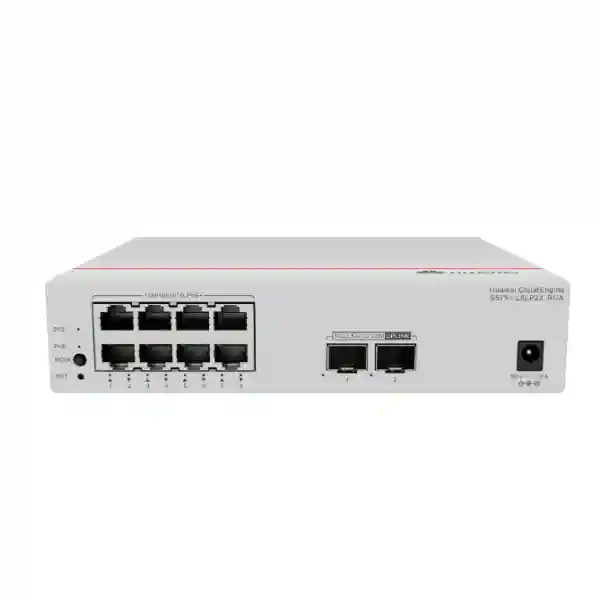
Huawei CloudEngine S5751-L8LP2X-RUA
A compact, fanless Huawei campus remote unit combining eight Gigabit Ethernet PoE+ access ports with two multi-rate SFP+ uplinks that can operate up to 10GE. It is designed for simplified access architectures in which a compatible Huawei central switch provides centralized control, policy, visibility, and lifecycle operations.
2 × up to 10GE SFP+
42 Mpps
98 Gbps
Fanless
Direct answer for UAE buyers
Choose the S5751-L8LP2X-RUA when a site needs a small number of powered Gigabit edge ports, fast optical uplinks, silent operation, and centralized Huawei campus management without installing a conventional full-featured standalone access switch at every remote location.
It is especially relevant for distributed floor zones, hotel areas, classrooms, branch offices, reception spaces, meeting areas, clinics, security-camera clusters, IP telephony zones, and other locations where eight PoE+ copper ports are sufficient and the uplink path benefits from fiber and 10GE capability.
What the S5751-L8LP2X-RUA is designed to do
The Huawei CloudEngine S5751-L8LP2X-RUA belongs to Huawei’s S5751-L remote-unit family. The architectural idea is different from deploying a traditional autonomous access switch everywhere. In a simplified campus design, selected Huawei central switches provide the controlling and aggregation role while the remote unit acts primarily as a distributed port-expansion point. That distinction matters during design, procurement, staging, and support. A buyer should not evaluate this product only by counting ports; the correct question is whether the intended network is being built around Huawei’s compatible central-switch and remote-unit operating model.
For a Dubai office, school, hospitality property, medical facility, retail environment, warehouse office zone, or multi-floor commercial building, the remote-unit model can reduce the amount of access-layer configuration that engineers must maintain at the edge. The remote unit connects upstream over optical links, presents powered copper ports close to users and endpoint devices, and is managed in relation to the central switch. Huawei describes this as a simplified two-layer approach that can replace parts of a conventional access, aggregation, and core hierarchy with an access-plus-core model in suitable campus designs.
That does not mean every UAE network should be converted to a remote-unit architecture. Traditional access switching remains appropriate where a remote location needs independent control-plane behavior, substantial local Layer 3 functions, larger PoE budgets, dense port counts, local stacking, extensive standalone troubleshooting, or non-Huawei upstream integration. The S5751-L8LP2X-RUA is strongest when the design goal is centralized campus operation, modest edge density, quiet installation, and a clean fiber-fed distribution model.
Verified hardware and performance snapshot
Port architecture: eight powered Gigabit access ports plus dual 10GE-capable uplinks
The front-end value proposition is easy to understand: eight copper access ports serve endpoint devices, while two SFP+ ports provide flexible upstream connectivity. Each downlink is 10/100/1000BASE-T and supports PoE+. This makes the unit suitable for common edge devices such as SIP phones, entry-level or moderate-power wireless access points, surveillance cameras, door-control appliances, thin clients, building-management gateways, and office endpoints. The eight-port density is intentionally compact. It works well when the physical endpoint cluster is small enough that deploying a 24-port or 48-port switch would waste capacity, rack space, energy, and installation effort.
The two uplink ports are a major reason to consider the X variant rather than models whose uplinks stop at 2.5GE. Huawei specifies the SFP+ interfaces for 100M, 1GE, 2.5GE, and 10GE operation, giving the designer flexibility to match existing optics, migration plans, fiber plant, and central-switch interface availability. In a new UAE deployment, 10GE fiber is generally the most future-oriented choice where optical budget, transceiver compatibility, and central-switch ports allow it. A site migrating from lower-speed infrastructure can use appropriate supported transceivers and speeds while planning a later step to 10GE.
Dual uplinks also matter for design resilience and bandwidth planning. Huawei lists uplink link aggregation among supported functions in the remote-unit feature set. Whether aggregation is used in a particular topology depends on the exact central switch, software release, optical design, and Huawei configuration guide. Engineers should therefore treat two physical uplinks as design flexibility rather than automatically assuming that every deployment will operate them as an active-active pair. The correct implementation is decided during the logical and physical design phase.
For structured cabling teams, the uplink design should be considered together with fiber type, distance, patch-panel loss, splice count, transceiver wavelength, connector type, central-switch optics, and the future maintenance model. The switch’s multi-rate SFP+ capability does not remove the need for an end-to-end optical budget. In Dubai towers and campuses, floor-to-MDF or building-to-building distances can vary significantly, so optic selection should be based on measured path length and fiber characteristics rather than simply ordering the cheapest SFP+ modules.
PoE+: useful, but the power budget must be engineered
All eight copper access ports are PoE+ capable, but PoE capability on every port does not mean every port can simultaneously supply the maximum IEEE PoE+ wattage. Huawei’s ordering information describes this L8LP2X variant as a 35 W PoE model, while the detailed hardware table in the current brochure reports a full-PoE-load value of 55.82 W total device consumption with “PoE: 32 W.” For procurement and final design, FourTeck recommends treating this as a low-PoE-budget model and validating the exact adapter, regional bundle, software release, and Huawei ordering documentation supplied with the quotation.
This distinction is important. Eight IP phones drawing 3–6 W each may fit comfortably, while eight higher-power access points or motorized cameras may not. A precise PoE budget should be calculated from real endpoint consumption, startup behavior, cable length, environmental derating, redundancy requirements, and growth margin.
Practical PoE sizing method
List every powered device and record its expected steady-state wattage and maximum demand. Add the values for devices that may operate simultaneously. Then add a planning reserve rather than sizing to the last watt. For example, four phones at 5 W each plus two cameras at 6 W each create a 32 W nominal endpoint load before margin. That already approaches the detailed full-load PoE figure published for this variant.
If the endpoint plan is close to or above the available budget, move to a higher-PoE S5751-L variant, reduce powered-device count, use local power for selected endpoints, or redesign the edge zone. The S5751-L8P2X-RUA, for example, is positioned in Huawei ordering information as a substantially higher-PoE-budget sibling.
Why the remote-unit architecture can simplify a campus
In a conventional campus, every access switch is configured and operated as an independent network device, even if automation tools are used. There are management IP addresses, software versions, configuration baselines, uplink policies, authentication settings, monitoring objects, backup files, and replacement procedures to maintain across many closets. Huawei’s remote-unit approach attempts to reduce that operational surface by moving more intelligence and management responsibility toward the central switch. The remote unit is treated as a port-extension element associated with the central device.
Huawei’s current brochure says compatible central switches can include CloudEngine S16700, S12700E, S8700, S6700, and S5700 families when upgraded to R24C00 or later, subject to the detailed support matrix. This should not be interpreted as universal support for every model and every board in those families. Before ordering, the central-switch product code, line cards, software train, license state, and intended remote-unit scale should be checked against the current Huawei compatibility documentation.
The operational benefits can be substantial in the right environment. A replacement remote unit can be introduced without repeating the same degree of standalone switch configuration. Centralized management can provide consolidated visibility. Huawei describes intelligent upgrade behavior in which the central switch can obtain and coordinate appropriate remote-unit software versions. Centralized telemetry can also feed campus assurance tooling for monitoring and fault localization. These features are valuable where an IT team manages many small edge zones with limited on-site engineering resources.
There is also a cabling benefit. Instead of forcing every endpoint cable to run all the way to one large telecommunications room, a remote unit can be placed closer to endpoint clusters, depending on the building’s cabling standards and authority requirements. Fiber can provide the long uplink path, while shorter copper runs fan out locally. This design can reduce copper concentration in selected environments, but it must still follow local fire, pathway, containment, grounding, accessibility, and structured-cabling practices.
Forwarding plane and performance without speculative silicon claims
For enterprise buyers, chipset names can be less useful than verified forwarding behavior. Huawei’s international materials specify 42 Mpps forwarding performance and 98 Gbps switching capacity for the S5751-L8LP2X-RUA. Those figures are the appropriate reference for a Dubai/UAE product page. Huawei’s mainland-China materials may show different capacity and forwarding values for products with similar model names, so regional documentation should not be mixed when sizing a UAE deployment.
Huawei does not need to expose a named merchant-silicon or proprietary ASIC identifier in the public product overview for engineers to make a sound access-layer decision. What matters is whether the platform can forward the expected traffic profile without becoming the bottleneck and whether its interfaces match the physical network. Eight 1GE downlinks produce a theoretical aggregate access rate below the combined nominal capability of two 10GE uplinks, which provides ample upstream interface headroom for ordinary office and campus edge use. Real traffic is bidirectional, bursty, oversubscribed at different points, and shaped by endpoint behavior, so a proper design looks beyond simple port-rate arithmetic.
The remote-unit concept also means that policy and network behavior are coupled to the central-switch architecture. Therefore, performance validation should include not only the remote unit but the central device, uplink topology, VLAN design, security policy, traffic mix, and application path. For video-heavy surveillance, wireless aggregation, high-rate backup endpoints, or latency-sensitive media, engineers should model peak concurrency rather than average utilization alone.
Layer 2 functions, VLAN control, and edge segmentation
Huawei’s S5751-L remote-unit feature table includes support for up to 128 VLANs, port up/down detection, port auto-negotiation, port-rate setting, uplink link aggregation, port-based VLAN assignment, automatic MAC-address learning, and automatic MAC-address aging. The table also lists factory reset support. This set of functions aligns with the product’s purpose as a centrally managed edge port-expansion device rather than a replacement for a feature-rich standalone core or distribution switch.
In a practical UAE office, VLANs can separate employee devices, voice endpoints, CCTV cameras, building-management devices, guest-facing systems, and operational technology where policy requires isolation. The exact VLAN mapping, authentication flow, DHCP behavior, gateway placement, and firewall policy reside in the broader network design. A remote unit can provide the physical attachment point, while the central campus switching and security layers determine how those endpoint groups communicate.
Port isolation is particularly useful for access security. Huawei highlights flexible isolation of remote-unit downlink ports so that user traffic can be forwarded in accordance with centrally defined access policy. This helps reduce unnecessary peer-to-peer exposure at the edge. However, port isolation should be considered one control among several. Secure campus designs may also require 802.1X or other authentication at the central solution level, DHCP snooping and source validation where supported, firewall segmentation, NAC integration, endpoint posture checks, application policy, logging, and monitoring.
Because the unit is part of a centralized design, the engineering team should document endpoint-to-port intent before installation. A port schedule describing room, outlet, endpoint class, VLAN, PoE requirement, expected rate, and security profile makes staging and acceptance more predictable. That documentation is especially valuable in hotels, schools, hospitals, and multi-tenant sites where many similar endpoint types are repeated across floors.
MACsec and Ethernet link protection
Huawei states that MACsec is supported on S5751-L series remote-unit ports. MACsec protects Ethernet frames by providing mechanisms for authentication, confidentiality, integrity checking, and replay protection. In environments where physical cabling traverses shared risers, third-party pathways, campus ducts, or spaces with elevated tamper concerns, link-layer encryption can be part of a layered defense model.
MACsec should not be presented as a universal replacement for IPsec, TLS, firewalling, or application security. It protects Ethernet links at Layer 2, while other controls protect different parts of the communication path. Whether MACsec is enabled on a particular port depends on peer capability, central-switch support, software version, key-management method, performance considerations, and organizational security policy. A pre-deployment design should identify exactly which links require encryption and how keys will be provisioned and rotated.
For a UAE enterprise handling regulated, sensitive, or operational data, the security design should be documented independently of the product purchase. The switch provides capabilities, but secure outcomes depend on configuration, monitoring, access control, software maintenance, and incident processes. FourTeck can integrate the switching layer with broader firewall and segmentation requirements through the Firewall Dubai solution practice when the project includes perimeter, inter-VLAN, or branch security architecture.
Fanless design for quiet and distributed installation zones
The S5751-L8LP2X-RUA uses natural heat dissipation without a fan. This is more than a comfort feature. In small wall cabinets, office areas, meeting rooms, hotel service zones, reception areas, classrooms, and clinical environments, fan noise can be undesirable. Fanless hardware also removes a moving component that can accumulate dust or fail mechanically. The tradeoff is that passive cooling depends heavily on correct placement and ambient conditions.
Huawei lists an operating temperature range of -5°C to +45°C and a storage range of -40°C to +70°C, with 5% to 95% non-condensing relative humidity. UAE projects must distinguish between outdoor weather and the controlled temperature inside the actual installation enclosure. A device rated to +45°C should not be placed in an unventilated rooftop box, ceiling void, exterior cabinet, or sun-exposed service area that can exceed that temperature. Air-conditioning failure scenarios should also be included in risk planning for critical networks.
The physical size—approximately 43.6 mm high, 195 mm wide, and 160 mm deep—makes it easier to fit in constrained areas than a full-width rack switch. Huawei specifies desktop and wall mounting. The installation team should still preserve cable bend radius, avoid loading the ports with unsupported cable weight, provide strain relief, keep ventilation surfaces clear, and plan access for replacement. Compact equipment can become difficult to maintain if it is hidden above ceilings or placed behind fixed furniture without a service path.
When the network project also includes racks, servers, virtualization hosts, storage, or data-room modernization, the switching plan can be coordinated with FourTeck’s Server Dubai resources so that access, core, compute, UPS, rack, and cabling choices are designed as one infrastructure system rather than purchased as isolated components.
Power consumption, heat, and UPS planning
Huawei’s detailed hardware table for this model lists static power consumption around 7.15 W and typical power consumption around 13.14 W. It also shows approximately 13.60 W device consumption without PoE, 15.59 W for device plus adapter without PoE, and a full-load figure of 55.82 W with a 32 W PoE component. These values are useful for UPS and thermal planning, but the actual site load varies with transceivers, powered endpoints, traffic, environmental conditions, and supplied power hardware.
For an installation with many remote units, small per-device differences become meaningful. Ten devices at 15 W base consumption represent roughly 150 W before endpoint PoE demand. Once cameras, phones, or access points draw power, UPS runtime can change substantially. Engineers should therefore calculate both network-device load and endpoint PoE load. UPS sizing should include inverter efficiency, battery age, desired runtime, temperature, expansion allowance, and any other equipment on the same circuit.
Power quality also matters in distributed locations. Huawei publishes a ±4 kV differential and common-mode surge specification for the power port in the brochure table, but this does not remove the need for proper electrical installation, earthing, surge-protection design, UPS protection, and adherence to building electrical standards. In mixed IT and ELV environments, the network equipment should not be treated as a substitute for correctly engineered upstream protection.
For branch and multi-site customers, FourTeck’s IT Services UAE team can align network rollout, rack preparation, endpoint migration, labeling, testing, documentation, and post-deployment support under a consistent operating procedure.
Central-switch compatibility must be confirmed before purchase
A remote unit is only as useful as the central platform that supports it. Huawei notes that S16700, S12700E, S8700, S6700, and S5700 series switches can participate in simplified networking with remote units when on R24C00 or later, but a family-level statement is not a complete bill of materials. The exact central chassis, control unit, interface board, fixed-switch model, software version, license, optical module, and supported remote-unit quantity must be checked against the current Huawei support matrix.
This is especially important during refresh projects. A customer may already own an S5700-series switch, but the installed generation, hardware revision, and software branch might not provide the required remote-unit function. Conversely, a compatible central switch may need an upgrade before the new remote unit is connected. Upgrades should be planned with configuration backups, release-note review, maintenance windows, rollback procedures, and validation of all existing features—not only remote-unit support.
Optics are another compatibility layer. The remote unit supports multi-rate SFP+ uplinks, but the transceiver must be supported by both ends and appropriate for the fiber path. Multimode versus single-mode fiber, wavelength, reach, connector type, and optical budget are all design inputs. For longer inter-building links, the network team should consider lightning and ground-potential risks associated with copper and prefer fiber where appropriate.
A FourTeck quotation should therefore be based on the complete topology rather than only the remote-unit part number. Providing the existing central-switch model, software version, uplink medium, endpoint count, PoE loads, and cable distances allows a more accurate proposal and reduces the chance of ordering incompatible optics or under-sizing the PoE design. General UAE networking procurement and project coordination are available through FourTeck UAE.
Typical deployment topology 1: floor or zone access extension
Consider a commercial building with a main distribution frame hosting the Huawei central switch. A fiber pair runs from the MDF to a remote floor zone. Instead of installing a 24-port rack switch for six or seven devices, an S5751-L8LP2X-RUA can provide a compact local attachment point. The downlinks serve phones, cameras, meeting-room endpoints, or wireless devices; the uplink carries traffic back to the central switch. Centralized policy can simplify operations because engineers do not manage the remote unit exactly like a conventional independent access switch.
This topology is attractive where copper home runs to the MDF would be long, congest pathways, or force additional patching. By taking fiber closer to the user zone, the design can shorten horizontal copper distances. The installer must still ensure that the remote unit is located in an approved accessible enclosure with adequate cooling, power, labeling, and cable management. The compact chassis is not permission to hide equipment in inaccessible voids.
For resilience, decide whether one uplink is sufficient, whether both uplinks will be used, and how central-switch redundancy is handled. The availability requirement of a hotel front desk, medical treatment area, or security-camera zone may be very different from a small meeting room. Document acceptable outage duration before choosing the topology.
Typical deployment topology 2: IP telephony and collaboration edge
The low-PoE-budget profile can be a good match for clusters of IP phones, especially where each handset has modest power consumption. A remote unit can connect the phones while carrying voice VLAN traffic upstream to the centrally managed campus. If PCs are daisy-chained through phone switch ports, the overall data design should account for endpoint count, phone port capability, voice and data VLAN behavior, authentication, and QoS policy in the central architecture.
Power arithmetic remains essential. For example, six phones drawing about 4 W each create roughly 24 W of endpoint demand, leaving more room within the low-power budget than a mix of power-hungry wireless APs. But model-specific phone consumption must be checked rather than estimated. Expansion planning is equally important: a six-phone zone today can become eight phones plus two cameras tomorrow, which may exceed the available PoE headroom even though the port count appears adequate.
Voice networks also depend on DHCP options, call-server reachability, QoS, survivability, firewall rules, DNS, NTP, and WAN design. The switch is one layer in that service chain. For large UC deployments, inventory and acceptance testing should include phone registration, emergency calling policy where applicable, VLAN assignment, call quality under load, failover, and power restoration behavior.
Typical deployment topology 3: surveillance and building systems
Eight PoE+ ports make the S5751-L8LP2X-RUA interesting for small CCTV clusters, but surveillance is one of the use cases where both power and traffic should be calculated carefully. Fixed cameras with modest power draw may fit, while PTZ cameras, heaters, infrared illuminators, or specialty devices may require more power than the low-budget model can provide across the desired port count. Always use camera maximum-power figures and consider startup behavior.
Bandwidth is usually easier to accommodate. Even multiple cameras at several megabits per second each represent a small fraction of a 10GE uplink. However, camera traffic is often continuous rather than bursty, and retention systems can create sustained flows to recorders or storage. Multicast, analytics, firmware updates, and high-resolution streams can add peaks. A network assessment should model codec, frame rate, resolution, scene complexity, and recording architecture.
Security segmentation is particularly important for cameras and building-management devices. These endpoints should generally not share unrestricted access with employee workstations. VLAN separation, firewall policy, management restrictions, credential hygiene, firmware maintenance, and monitoring are part of the solution. Port isolation on the remote unit can contribute to the edge-security model, but it is not the sole control.
Typical deployment topology 4: hospitality, education, and healthcare
Huawei explicitly positions the S5751-L remote-unit family for enterprise offices, education, hotels, and healthcare. These environments often contain many small endpoint clusters separated by rooms, corridors, wings, floors, or functional zones. A centralized design can reduce the number of individually managed access switches while still placing ports closer to users and devices.
In a hotel, a remote unit might support a service area with phones, access-control devices, small APs, or cameras. In a school, it may serve a classroom cluster, staff area, or surveillance zone. In healthcare, quiet fanless operation can be useful near occupied spaces, though medical environments may impose additional requirements for electrical safety, redundancy, physical access, device certification, infection-control practices, and cybersecurity. The network design must follow the rules of the facility rather than assuming that general office practices are sufficient.
The common benefit across these sectors is operational consistency. When many remote units are managed through a central architecture, changes can be executed with clearer standardization. The common risk is underestimating dependency on the central system. If a central-switch problem affects multiple remote units, the failure domain can be larger. High-availability design, redundant uplinks, resilient central switches, backup power, and documented recovery procedures should be aligned with the business impact of an outage.
Sizing methodology: decide by endpoints, watts, uplinks, distance, and failure domain
The most reliable way to select this model is to size the site across five dimensions. First, count physical endpoints and include realistic growth. If a zone needs seven ports today and is expected to add several devices soon, an eight-port remote unit may leave too little spare capacity. Second, calculate PoE draw using actual endpoint specifications. Port count alone is not enough. Third, estimate uplink traffic using peak concurrency rather than simple averages. Fourth, document fiber type and distance. Fifth, identify the acceptable failure domain and decide whether one remote unit should support critical devices that ought to be split across separate power or uplink paths.
A simple port-capacity rule is to keep operational spare capacity wherever practical. For example, if eight ports are available, a design using six active ports leaves two for troubleshooting, expansion, or temporary migration. A design using all eight on day one has no local growth capacity. The exact reserve depends on cost and space constraints, but zero spare capacity usually creates future truck rolls.
For PoE, use maximum device draw for conservative design unless field measurements and vendor guidance justify another value. Sum the load, then add margin. If the total approaches the available switch budget, choose a higher-budget model. Do not assume that because every port is labeled PoE+ the chassis can provide 30 W on every port simultaneously. The aggregate budget remains the governing constraint.
For uplinks, add estimated traffic classes: user data, voice, camera streams, AP backhaul, management, software updates, and bursts. Then check the central-switch uplink port and optic. Two 10GE-capable SFP+ interfaces provide substantial headroom for an eight-port Gigabit edge unit, but the design can still fail if the selected transceiver, fiber path, or central switch does not support the intended speed.
Finally, consider lifecycle scale. Ten remote units across one campus are different from hundreds across a distributed estate. Inventory, naming, serial tracking, software policy, change control, spares, labeling, and monitoring become increasingly important as count grows. Centralized architecture reduces some configuration burden, but operational discipline is still necessary.
How this model compares with nearby S5751-L variants
| Model family position | Access ports | Uplink class | Best-fit distinction |
|---|---|---|---|
| S5751-L8LP2J-RUA | 8 × GE PoE+ | 2 × up to 2.5GE SFP | Low-PoE compact edge where 10GE uplink capability is not required. |
| S5751-L8LP2X-RUA | 8 × GE PoE+ | 2 × up to 10GE SFP+ | Low-PoE compact edge requiring faster optical uplinks and fanless operation. |
| S5751-L8P2X-RUA | 8 × GE PoE+ | 2 × up to 10GE SFP+ | Similar port pattern with substantially higher PoE capacity for heavier powered endpoints. |
| S5751-L8T2X-RUA | 8 × GE, non-PoE | 2 × up to 10GE SFP+ | For endpoint zones that do not require switch-delivered PoE. |
The “LP” model is therefore not merely a cheaper version of the higher-power P model; it targets a different PoE envelope. A buyer should select based on endpoint wattage and growth. If wireless APs, PTZ cameras, or other high-draw devices dominate the plan, the higher-PoE sibling may be more appropriate even when both models have the same eight access ports and dual 10GE-capable uplinks.
Optics and fiber selection for Dubai projects
The switch’s SFP+ ports support multiple Ethernet rates, but the correct optic depends on the installed fiber plant. Multimode fiber is common for shorter in-building runs; single-mode fiber is widely used for longer building-to-building, riser, campus, and future-ready links. The engineering team should identify the actual fiber type, strand count, connector, patch-panel path, and measured loss before selecting transceivers.
Do not order optics solely by reach printed on a catalog page. An optical link budget includes transmitter output, receiver sensitivity, fiber attenuation, connector loss, splice loss, patch-cord loss, and engineering margin. Dirty connectors are a frequent real-world cause of link instability. Cleaning and inspection should be part of commissioning, and optical power measurements should be recorded for critical links.
The multi-rate capability can help during migrations. A site may initially use 1GE or 2.5GE optics and later move to 10GE when the central switch or fiber design is upgraded. That flexibility can protect the remote-unit investment, but only if the selected optics and both endpoint interfaces support the desired rate. Vendor-qualified transceivers are generally preferable where supportability is important.
For dual-uplink designs, document whether the paths share the same tray, riser, patch panel, and central switch. Two logical uplinks do not create true physical resilience if both fibers travel through one vulnerable pathway. Critical installations may require route diversity as well as device diversity.
Intelligent O&M and centralized lifecycle operations
Huawei describes centralized telemetry from the central switch and connected remote units for intelligent operations and maintenance. In supported designs, status data can be sent to Huawei campus assurance tooling for analysis, fault demarcation, and user-experience visibility. This type of telemetry is valuable because access problems are often not caused by a complete switch failure. Duplex mismatches, optical degradation, endpoint issues, cable faults, DHCP delays, authentication problems, or intermittent PoE behavior can create user complaints while the basic port remains “up.”
The remote-unit model can also streamline software lifecycle. Huawei describes an intelligent upgrade process coordinated through the central switch, including version matching and pre-loading capabilities intended to reduce service interruption. Exact behavior depends on platform and software release, so change procedures should follow the current Huawei documentation. Production upgrades should still include impact assessment, backups, maintenance approval, post-change validation, and a rollback path.
Cloud management may be used in compatible Huawei architectures to visualize and manage the central and remote components. Whether cloud management is appropriate depends on organizational policy, licensing, data-sovereignty requirements, operational model, Internet reachability, and cybersecurity controls. Some enterprises prefer on-premises management; others prioritize centralized cloud operations across many branches. The switch selection should support the chosen operating model rather than dictate it.
Operational readiness also includes spares. Because the S5751-L8LP2X-RUA is compact, maintaining one or more pre-approved spare units can be economical for sites with many identical edge zones. The spare procedure should document how a replacement is connected, how the central switch recognizes it, what validation is required, and how the failed unit is tracked for warranty or repair.
UAE installation engineering: heat, dust, access, and serviceability
Dubai projects often involve excellent air-conditioned commercial environments, but network edge equipment is frequently installed in less ideal spaces: riser cupboards, security rooms, service corridors, retail backrooms, false-ceiling enclosures, parking control rooms, warehouses, and temporary fit-out cabinets. The environmental specification must be applied to the actual device location. A fanless switch can run quietly, yet it still releases heat and requires free convection.
Dust is another consideration. Fanless hardware does not actively pull air through the chassis, which can reduce internal dust ingestion, but connectors and exposed surfaces still require clean installation. Fiber end faces are particularly sensitive. During construction phases, switches and optics should not be installed in open dusty areas before ceiling, drilling, and finishing work is complete unless adequate protection is provided.
Service access should be planned deliberately. A wall-mounted device may save cabinet space, but engineers still need to see port LEDs, remove patch cords, replace optics, disconnect power, read labels, and remove the unit. The installation should not require dismantling furniture or ceiling systems for routine support. In hospitality and healthcare, maintenance windows may be constrained by occupancy and service continuity, making accessible placement even more important.
Finally, every remote unit should have a consistent label linked to documentation. Recommended records include site, floor, room, rack or wall location, central switch, central port, fiber pair, optic type, remote-unit serial number, management relationship, connected endpoint ports, PoE loads, and installation date. Good documentation lowers mean time to repair more effectively than relying on memory or ad-hoc labels.
Procurement guidance: what to include in the quotation
A complete quotation should go beyond the switch itself. At minimum, identify the S5751-L8LP2X-RUA quantity, supplied power adapter or power arrangement, required SFP/SFP+ transceivers, fiber patch cords, mounting accessories, copper patch cords, central-switch compatibility, software prerequisites, and any licensing or management components needed for the intended architecture. If the project is a new deployment, add racks or wall enclosures, UPS capacity, patch panels, labeling, testing, and installation services as required.
The buyer should also provide endpoint information. “Eight PoE devices” is not sufficient. List endpoint brand and model where possible, required standard, maximum power, expected network rate, VLAN, physical location, and whether the device must remain powered through switch software reboot. This information helps validate whether the LP model’s power budget is appropriate.
For existing Huawei customers, provide the central switch model and current VRP/software version. If the central device is modular, include relevant board information. If the current switch is not compatible, the project may need a central-switch upgrade or a different access architecture. Discovering this before purchase prevents delays after hardware arrives.
For multi-site rollouts, define standard BOMs by site type. A small branch may use one remote unit and one optic pair; a larger branch may require several units, redundant uplinks, more PoE budget, and local spares. Standardization improves procurement speed and makes support easier, while exceptions should be documented rather than handled informally.
Implementation workflow for enterprise deployments
Security hardening considerations
The switch should be deployed as part of a hardened campus design rather than connected with default assumptions. Start with the central switch and management plane: restrict administrative access, use secure management protocols, enforce role-based permissions, integrate logging, synchronize time, back up configurations, and keep software within supported release policy. Management interfaces should be separated from ordinary user access wherever practical.
At the edge, disable or isolate unused ports according to the central solution’s operating model. Assign ports only to the VLANs and endpoint classes they require. Use port isolation where appropriate. If MACsec is enabled, document peers and key management. Monitor repeated link flaps, unauthorized device changes, unexpected MAC movement, excessive broadcasts, and unusual PoE events.
Physical security matters because compact remote units may be installed outside a locked data room. Enclosures should prevent unauthorized cable changes and device removal. Patch cords should be labeled without exposing sensitive network information to casual users. In public areas, consider locked cabinets and tamper-evident practices.
Security policy should also cover replacement. A failed unit taken off site may still contain configuration or operational information depending on the architecture. Follow asset-disposal and return procedures. Serial numbers, RMA details, and chain of custody should be tracked for regulated customers.
When the S5751-L8LP2X-RUA is not the right choice
Do not select this model solely because eight PoE+ ports match the endpoint count. It may be unsuitable if the site requires a large aggregate PoE budget, many high-power devices, more than eight access ports, multigigabit copper downlinks, standalone switching without a compatible Huawei central architecture, high local feature autonomy, or installation in environmental conditions beyond the stated limits.
It may also be the wrong choice if the installed central switch cannot support Huawei remote units on the required software release. In that case, replacing or upgrading the central platform might cost more than deploying a conventional access switch. The comparison should consider total project cost, operations, licensing, optics, migration effort, and lifecycle support—not only the price of one edge device.
For high-power wireless, the 35 W-class ordering description and the detailed 32 W full-load PoE figure indicate that this LP model needs careful budgeting. A single high-end Wi-Fi 7 access point can consume a meaningful portion of that envelope depending on model and enabled radios. For such environments, a higher-PoE S5751-L variant or a different access switch may be more appropriate.
Likewise, if the requirement includes 2.5GBASE-T or faster copper to endpoints, this particular model’s eight access ports are Gigabit Ethernet. Huawei offers other S5751-L variants with multigigabit copper ports. Select the model based on the endpoint interface requirement rather than assuming every S5751-L provides the same downlink speeds.
Frequently asked technical questions
Is the S5751-L8LP2X-RUA a normal standalone access switch?
It is positioned as a Huawei CloudEngine remote unit for simplified campus architecture. Its value is realized with a compatible Huawei central switch. Validate the intended central platform and software release before purchase.
How many copper ports does it have?
Eight 10/100/1000BASE-T downlink ports. All eight are PoE+ capable, subject to the aggregate PoE budget.
Are the uplinks 10GE?
The two SFP+ uplink ports support multiple rates up to 10GE: 100M, 1G, 2.5G, and 10GE, depending on supported transceiver and peer configuration.
What is the published forwarding performance?
Huawei’s current international product materials list 42 Mpps forwarding performance and 98 Gbps switching capacity for this model.
Is it fanless?
Yes. Huawei lists natural heat dissipation without fans, which suits quiet edge locations as long as ambient conditions and airflow remain within specification.
Can it be wall mounted?
Huawei specifies desk or wall mounting. Mounting should preserve service access, cable support, and passive cooling.
Can it power eight PoE+ devices at full 30 W each?
No. The aggregate power budget is far lower than 240 W. Huawei ordering information identifies the variant as 35 W PoE, while the detailed hardware table shows a 32 W full-PoE-load component. Size by aggregate endpoint wattage.
Does it support MACsec?
Huawei’s S5751-L feature documentation lists MACsec on remote-unit ports. Deployment depends on peer compatibility, software, design, and policy.
How many VLANs are supported?
The current S5751-L remote-unit feature table lists up to 128 VLANs. Confirm behavior with the selected central-switch release and intended configuration.
What are the dimensions?
Approximately 43.6 mm high, 195 mm wide, and 160 mm deep without packaging. Weight is approximately 1.16 kg.
What central switches can support remote-unit architecture?
Huawei documentation references S16700, S12700E, S8700, S6700, and S5700 series devices on R24C00 or later for simplified networking, but exact model, board, and release compatibility must be checked.
Is it suitable for Dubai?
Yes for indoor or appropriately controlled environments within its stated operating limits. Do not equate Dubai outdoor temperature with acceptable switch enclosure temperature; installation conditions must remain within specification.
Detailed pre-sales design notes for network engineers
When preparing a low-level design, start by drawing the physical chain from central switch to remote unit to endpoint. Record the exact central port, optic part number, fiber path, patch-panel positions, remote uplink port, remote downlink port, endpoint device, VLAN, PoE class, and business service. This single chain allows engineering, installation, and support teams to communicate using the same reference.
Next, model the failure points. A single central switch feeding many remote units can simplify management but create concentration risk. If the central switch is redundant, determine whether remote-unit uplinks are distributed across redundant hardware in a supported topology. If not, document the outage scope. If both uplinks share one optic tray or fiber route, recognize that physical resilience remains limited.
Then model the power chain. Identify circuit, socket, adapter, UPS, distribution unit, and endpoint PoE load. If the remote unit is in a wall enclosure, check that the power adapter can be safely mounted and serviced without blocking ventilation. Do not leave power bricks unsupported or hanging by DC cables. Cable management should prevent accidental disconnection during maintenance.
For security, map trust boundaries. Employee laptops, cameras, access-control systems, phones, and IoT devices should not automatically share one logical segment simply because they connect to one remote unit. The central architecture should apply the required VLAN and policy separation. MACsec may protect selected links, while firewall rules and identity systems protect traffic at higher layers.
For operations, define alarms and thresholds. A port-down event on an unused spare port is not urgent; a port-down event on a critical camera or access-control device may be. Monitoring should reflect business context. Track optical errors, link flaps, PoE faults, endpoint changes, and remote-unit reachability. Establish escalation paths so that service desk, network team, cabling contractor, and site facilities team know their responsibilities.
Finally, document acceptance evidence. Capture software versions, central recognition, serial numbers, port status, endpoint connectivity, VLAN tests, PoE status, optical readings where required, label photographs, and updated topology diagrams. A well-documented handover reduces repeated troubleshooting and gives the customer a baseline for future changes.
Lifecycle planning and replacement strategy
Enterprise network value is determined over years, not only at purchase. The S5751-L8LP2X-RUA should be introduced with a lifecycle plan covering firmware policy, compatibility monitoring, spares, warranty, documentation, and eventual refresh. Centralized remote-unit management can simplify some lifecycle tasks, but it also means that changes to the central switch may affect many edge units. Release planning should therefore consider the whole remote-unit estate.
Keep a hardware inventory that records model, serial number, site, installation date, central switch, software relationship, and support status. When a unit is replaced, update the inventory immediately. For larger deployments, holding a small percentage of common spares can reduce downtime. Spare optics and patch cords are often equally important because many “switch failures” ultimately turn out to be optic, fiber, or connector issues.
Review software advisories and hardware support notices periodically. Avoid leaving the central platform on an obsolete release solely because remote units currently work. At the same time, avoid upgrading without testing. A staging environment or pilot site can validate remote-unit compatibility, endpoint behavior, telemetry, and PoE before broad rollout.
At refresh time, reassess rather than blindly replacing like-for-like. Endpoint bandwidth may have shifted toward multigigabit Wi-Fi, PoE demand may have increased, or the campus may have moved to a different architecture. The eight-port GE profile that fits today may not fit a future edge zone. Lifecycle governance turns the remote unit from a one-time purchase into a managed part of the network platform.
Bill-of-materials thinking: the switch is only one line item
A practical BOM may include the remote unit, the supplied power adapter, one or two supported SFP+ transceivers, matching transceivers at the central switch, fiber patch cords, patch-panel couplers, copper patch cords, wall-mount or enclosure hardware, UPS capacity, cable labels, and installation accessories. For greenfield projects it may also include fiber backbone installation, testing, certification, racks, grounding, and pathway works.
Services can be equally important: discovery, design, staging, software upgrade of the central switch, configuration, site installation, optical testing, endpoint migration, acceptance testing, documentation, and support. Buying only hardware may appear cheaper but can move integration risk to the customer. A complete quotation should make assumptions visible so that responsibilities are clear.
For regulated or critical environments, add change-control documentation, maintenance-window planning, rollback procedures, and post-change monitoring. For multi-branch rollouts, add logistics, serial tracking, standard labeling, packaging return, site readiness checks, and remote support. The same switch can be easy to deploy at one site and complex at one hundred sites; the implementation model must scale with the estate.
If the project includes network security, IT services, servers, and campus switching together, a consolidated design can reduce interface gaps between contractors. FourTeck can coordinate these infrastructure domains while preserving clear product-level BOM and acceptance criteria.
Technical interpretation of the published PoE figures
Huawei’s current S5751-L brochure presents two related but slightly different PoE numbers for the S5751-L8LP2X-RUA. The ordering section describes the model as “35 W PoE,” while the detailed hardware table lists full-PoE-load total consumption of 55.82 W with “PoE: 32 W.” Rather than treating one number as an error, procurement should understand that marketing ordering descriptions and measured hardware-table values can use different conventions or test conditions.
The safe engineering response is to avoid designing a site where success depends on using every last watt. If a proposed endpoint set needs around 30 W in normal operation, startup peaks or future additions may leave insufficient headroom. Move to a higher-budget model or power selected endpoints locally. For example, a higher-power S5751-L8P2X-RUA is described by Huawei with a 128 W PoE figure, making it a more natural fit for dense AP or camera loads.
Power budgets should also be revisited when endpoint models change. Replacing low-power Wi-Fi access points with higher-radio-count units can materially increase demand without changing the number of switch ports. The same applies to cameras that add heaters, IR illuminators, analytics processors, or pan-tilt-zoom motors. Asset change control should therefore include network PoE impact.
A FourTeck proposal can state the assumed endpoint wattages and design margin directly in the quotation. That makes the PoE decision auditable and helps the customer understand why a particular remote-unit model was selected.
Performance planning examples
Office pod: six PCs and phones connected through desk-phone pass-through ports may generate modest average traffic but short bursts during cloud synchronization and video meetings. A 10GE-capable uplink provides ample interface headroom, while voice traffic should receive appropriate QoS in the broader campus design. The main constraint may be PoE for the phones rather than bandwidth.
CCTV cluster: six cameras averaging 8 Mbps each create about 48 Mbps of steady stream traffic before overhead—well below a 1GE link, let alone 10GE. Yet PoE may be the limiting factor if cameras draw 6–10 W each. In this case, switch selection is driven more by power than switching capacity.
Wireless edge: four access points can easily fit the port count, but the correct model depends on their Ethernet interface speed and power demand. If APs require 2.5GBASE-T downlinks, this model’s GE copper ports are not sufficient even though the uplinks support 10GE. If APs require high PoE power, the aggregate LP budget may also be insufficient.
Mixed hospitality zone: three phones, two cameras, one controller, and one AP use seven ports. This is a good density match, but the PoE calculation must add all powered devices. One spare port remains for maintenance or growth. If the AP is high-power, consider local power or a higher-budget switch.
Building-management zone: low-bandwidth controllers may use little data, making bandwidth trivial. Security and availability become more important: isolate device VLANs, restrict management access, document endpoints, and ensure the remote unit is on protected power if building operations depend on it.
Why 10GE-capable uplinks still matter on an eight-port GE edge device
At first glance, eight Gigabit downlinks may seem to make a 10GE uplink unnecessary. In practice, the higher uplink speed offers useful design flexibility. A single 10GE link can carry the aggregate of all access ports without the uplink itself becoming the first obvious bottleneck. It also aligns with modern campus cores where 10GE interfaces are common and where standardizing on SFP+ optics simplifies inventory.
The multi-rate behavior is equally valuable. Not every existing central switch has spare 10GE ports, and not every old fiber run is initially commissioned at 10GE. Supporting 100M, 1G, 2.5G, and 10GE on the uplink interfaces provides migration options. A customer can preserve the remote unit while upgrading the upstream network later, subject to optic and platform support.
Higher uplink speed can also help with burst aggregation. Even if average traffic is low, several endpoints can transmit simultaneously. Cloud backup, software deployment, CCTV retrieval, large file transfer, and video collaboration can overlap. A faster uplink reduces the chance that the edge-to-core path becomes congested during those bursts.
However, interface speed is not a substitute for architecture. If the central switch, WAN, firewall, server, or application path is slower, a 10GE remote uplink cannot increase end-to-end throughput beyond those bottlenecks. Capacity planning should identify the complete service path.
Commissioning checklist
Supportability and documentation discipline
The operational simplicity promised by a remote-unit architecture only appears when the deployment is documented and standardized. If each site uses different optics, random labeling, inconsistent firmware, and undocumented port usage, central management cannot compensate for weak operational practice. A standard template should define device naming, central-port numbering, fiber labels, endpoint categories, VLAN codes, PoE expectations, monitoring thresholds, and acceptance evidence.
Support teams should have a troubleshooting decision tree. Start by identifying whether the fault is endpoint, copper patching, PoE, remote unit, optic, fiber, central port, central switch, upstream network, or application. Remote telemetry can narrow the problem, but technicians still need basic physical-layer tools. Spare patch cords, a known-good optic, fiber cleaning materials, and a laptop with approved diagnostic access can reduce resolution time.
For sites without local IT staff, design the installation so that a remote engineer can guide basic checks. Labels should be readable. Port mapping should match documentation. Photographs of the installation can help support teams verify cable positions. Critical changes should not rely on untrained staff moving unlabeled fibers.
Warranty and support entitlement should be recorded with the asset. A replacement process should state who opens the case, who approves RMA, where the spare is stored, who performs the swap, and how returned equipment is handled. These details are often ignored during purchase but determine real-world outage duration.
Energy and sustainability considerations
Huawei positions the S5751-L family as energy-conscious remote units and states that the family uses energy-saving chips, with selected fanless models achieving very low port power compared with traditional switches. The S5751-L8LP2X-RUA’s compact hardware, fanless design, and moderate base power can reduce energy use where it replaces an oversized 24-port or 48-port access switch deployed only for a handful of endpoints.
Energy savings should be evaluated at system level. A centralized architecture may reduce edge-device power, but the project still includes central switches, optics, UPS losses, cooling, and powered endpoints. The most efficient design is usually the one that right-sizes all components. Installing a high-power PoE switch where only a few low-power phones are required can waste capital and sometimes energy; installing an under-sized switch that requires extra injectors and workarounds can do the opposite.
Fanless operation can also reduce maintenance associated with fan replacement and dust intake. However, passive cooling relies on ambient air, so good cabinet design remains essential. Sustainability and reliability are aligned when equipment is right-sized, kept within temperature limits, and operated for a planned lifecycle rather than replaced prematurely due to poor environmental conditions.
For multi-site organizations, measure actual power after deployment. Real consumption data can improve future BOMs, UPS sizing, and sustainability reporting. A standardized remote-unit design makes it easier to compare energy across similar branch or floor templates.
Decision recap: who should shortlist this Huawei model?
Strong fit
Eight or fewer Gigabit edge endpoints, modest aggregate PoE demand, need for fiber uplinks up to 10GE, fanless operation, compatible Huawei central switching, and a preference for centralized campus management.
Validate carefully
Wireless APs, cameras, or mixed endpoints whose combined PoE demand approaches the low-budget limit; existing central switches on older software; dual-uplink designs; or deployments in warm service spaces.
Choose another model if
You need high aggregate PoE, more than eight access ports, multigigabit copper downlinks, standalone access-switch autonomy, or an upstream platform that cannot support Huawei remote units.
Procurement priority
Verify central-switch model and release, endpoint PoE table, optic type, fiber distance, mounting environment, redundancy requirement, and complete accessories before finalizing the order.
Quotation input checklist for Huawei CloudEngine S5751-L8LP2X-RUA Dubai
For an accurate FourTeck quotation, provide as many of the following items as possible. These inputs help validate compatibility and avoid unnecessary changes after purchase.
FourTeck consultation for Huawei campus remote-unit deployments
The S5751-L8LP2X-RUA is a precise tool for a precise problem: compact PoE+ edge connectivity with 10GE-capable fiber uplinks inside a compatible Huawei centralized campus architecture. Its strengths are small form factor, silent fanless operation, strong uplink flexibility, centralized operations, and a port count that fits distributed endpoint clusters without overbuilding the access layer.
The main design questions are not difficult, but they must be answered before ordering: Is the central switch compatible? Is the PoE budget sufficient? Are Gigabit downlinks enough? Which optics and fiber are required? What redundancy is expected? Where will the device be mounted, powered, and serviced? FourTeck can convert those answers into a validated BOM, deployment plan, and quotation for Dubai and UAE projects.
Project-ready information
Send the central-switch model, software version, endpoint list, PoE wattages, fiber distance, and required quantity. For brownfield sites, add photos or port schedules from the existing cabinet. For new sites, provide the network diagram or floor-zone plan.
FourTeck can help with switching, structured network integration, firewall segmentation, server-room coordination, optics, staging, implementation, and support—keeping the design aligned from the campus core to the final powered endpoint.

Reviews
There are no reviews yet.