
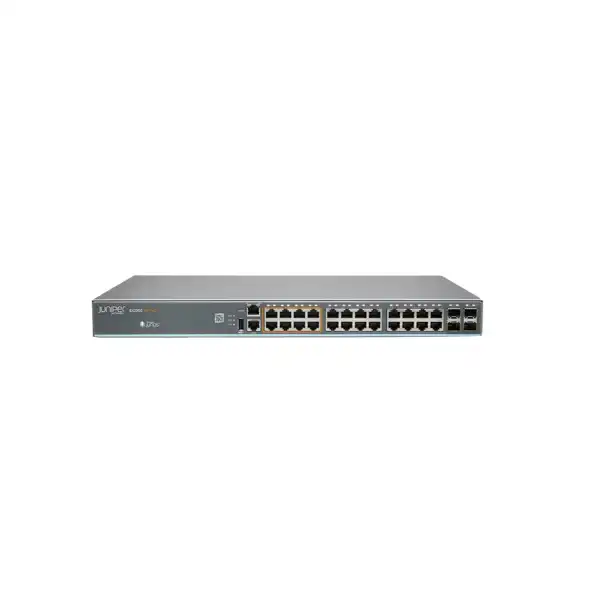
Juniper EX2300M Multigigabit Ethernet Switch Dubai
A compact Junos-based access switching platform for businesses that need selected 2.5GbE copper ports, PoE+ for powered edge devices, 10GbE-capable SFP+ uplinks and a clear path to Juniper Mist cloud operations without moving immediately to a larger campus-switch platform.
Direct answer for buyers evaluating the EX2300M
The Juniper EX2300M Multigigabit Ethernet Switch is the multigigabit branch and compact-campus member of the EX2300 family. It is mainly used at the access layer, where desktops, IP phones, cameras, printers, wireless access points and other Ethernet devices connect to the network. Its important distinction from ordinary 1GbE access switches is that selected copper ports can negotiate up to 2.5GbE while all access ports on the multigigabit models support PoE/PoE+ within the available power budget.
It should be considered by organisations that want to upgrade Wi-Fi access points or other higher-bandwidth edge devices without replacing every copper access port with a more expensive multigigabit interface. The family includes the EX2300-24MP, with 24 RJ-45 access ports including eight 100M/1G/2.5GbE ports and four SFP/SFP+ uplinks, and the EX2300-48MP, with 48 RJ-45 access ports including sixteen 100M/1G/2.5GbE ports and six SFP/SFP+ uplinks.
The most important factor to confirm is not simply the port count. Buyers should map actual 2.5GbE endpoints, PoE wattage, uplink bandwidth, optics, cabling, rack conditions, resilience expectations and management method. FourTeck can use those inputs to determine whether EX2300-24MP, EX2300-48MP or a different Juniper access platform is the more appropriate fit for a Dubai deployment.
Where the EX2300M sits in a business network
The EX2300M is best understood as a fixed-configuration access switch rather than a distribution or core switch. Its design suits wiring closets, branch communications rooms and smaller campus access locations that need a compact 1U chassis and a mixture of conventional Gigabit Ethernet and multigigabit access. That matters because many organisations do not need 2.5GbE on every user port. A typical office may have dozens of laptops, phones, printers and IoT devices that remain perfectly matched to 1GbE, while a smaller number of modern wireless access points can generate enough aggregate traffic to benefit from a 2.5GbE wired connection. The EX2300M lets the buyer put the higher-speed capability where it is useful instead of paying for it across every edge port.
Both EX2300M models run Junos OS and use Juniper’s established switching architecture. They support Layer 2 switching and basic Layer 3 functions, which is typically enough for an access-layer role where VLANs, routing adjacencies, access policies and upstream redundancy are planned as part of a broader campus design. The switches can also participate in a Virtual Chassis of up to four EX2300 units, allowing multiple physical switches to be operated as a single logical device. This can simplify configuration and software maintenance in modest-size installations, although it should not be confused with the higher resilience architecture of modular chassis systems or fixed switches with redundant field-replaceable power supplies.
For a Dubai buyer, the practical question is whether the EX2300M delivers the right balance of port density, multigigabit coverage, PoE budget and operational simplicity for the intended life of the site. If the network is expected to grow rapidly, needs higher multigigabit speeds than 2.5GbE, requires redundant internal power, or must support a larger campus fabric, another EX Series family may deserve comparison. If the requirement is a disciplined access refresh with selected 2.5GbE ports and familiar Junos operations, the EX2300M remains a very specific and useful design choice.
EX2300-24MP vs EX2300-48MP: choose by edge demand, not just rack space
| Buyer factor | EX2300-24MP | EX2300-48MP |
|---|---|---|
| RJ-45 access ports | 24 | 48 |
| 100M/1G/2.5GbE ports | 8 | 16 |
| 1GbE-only access ports | 16 | 32 |
| SFP/SFP+ uplinks | 4 | 6 |
| Maximum listed PoE budget | 380 W | 740 W |
| PoE standard | 802.3af / 802.3at, up to 30 W per port | 802.3af / 802.3at, up to 30 W per port |
| Chassis depth | About 10 in / 25.4 cm | About 14.5 in / 36.8 cm |
| Virtual Chassis | Up to 4 switches | Up to 4 switches |
The 24-port model is not merely a smaller version of the 48-port model. Its shallower depth can be valuable in compact cabinets, while the 48-port model provides twice the number of user-facing copper interfaces and two additional SFP+ uplink positions. The larger PoE budget of the EX2300-48MP also changes what can be powered concurrently. An office with many phones but only a handful of wireless access points may be comfortable on the 24-port model, while a hotel floor, school wing or denser workplace may need the 48-port model for both port density and power headroom.
Port mapping should be completed before ordering. On the EX2300-24MP, only eight access ports are multigigabit; on the EX2300-48MP, sixteen are multigigabit. If a design assumes every port can operate at 2.5GbE, the EX2300M is the wrong fit. This selective multigigabit architecture is one of the product family’s main strengths when requirements are accurately defined, but it is also the most common reason to compare a higher-end multigigabit platform when more high-speed copper endpoints are expected.
Why 2.5GbE matters at the access layer
The move from 1GbE to 2.5GbE at selected edge ports is usually driven by aggregated endpoints rather than ordinary single-user PCs. A modern wireless access point can serve many users at once, and the combined wireless traffic can exceed the practical throughput available through a 1GbE wired uplink. A 2.5GbE copper connection gives the access point additional wired headroom without automatically requiring a new fibre run to every ceiling location. This is particularly useful during Wi-Fi refresh projects where the existing horizontal copper plant is still serviceable and the network team wants to increase access-point uplink capacity with controlled changes in the communications room.
The EX2300M addresses that requirement with ports that support 100 Mbps, 1 Gbps and 2.5 Gbps operation. The speed negotiated in a real installation still depends on the connected endpoint, cable quality, cable length, patching, termination and the configuration on both sides. A multigigabit-capable switch does not guarantee that an older cable run will deliver the desired rate under all conditions. Before a large rollout, it is sensible to identify the cable category, inspect patch-panel and patch-cord quality, and test representative runs—especially in sites where cabling records are incomplete.
For buyers, this creates a practical economic advantage. Instead of replacing a complete access layer solely to improve connectivity for a limited number of higher-performance devices, the EX2300M can allocate 2.5GbE to the endpoints that need it and retain conventional Gigabit Ethernet for the rest. The design should still be forward-looking. If the organisation expects dozens of new high-end access points, workstations requiring 5GbE or 10GbE, or edge devices with higher power requirements than PoE+ can deliver, the right conclusion may be to move beyond EX2300M rather than overextend it.
PoE+ planning: calculate the power draw before counting ports
Every RJ-45 access port on the EX2300M variants can provide standards-based Power over Ethernet within the switch’s available power budget. The platform supports IEEE 802.3af PoE and IEEE 802.3at PoE+, with up to 30 watts per port. That is appropriate for many enterprise wireless access points, IP phones, surveillance cameras and other powered devices. It is not the same as newer higher-power PoE standards, so endpoints that require more than PoE+ can deliver should be identified before the switch is selected.
The model-level power budget matters just as much as the per-port ceiling. Juniper lists a maximum PoE budget of 380 W for the EX2300-24MP and 740 W for the EX2300-48MP. In practice, a design should not be based on the simplistic assumption that every connected device will always draw its nameplate maximum. The correct method is to inventory the powered-device classes, expected negotiated power, startup behaviour and future additions, then keep sensible headroom. This is especially important in mixed environments where access points, cameras and phones have very different power profiles.
Count device classes
List every powered endpoint and record its normal and maximum draw where available. Do not plan only from the number of RJ-45 ports.
Reserve growth headroom
Leave capacity for access-point upgrades, additional cameras, expansion phones and temporary devices so a later change does not force an early switch replacement.
Check power resilience
EX2300M uses an integrated fixed power supply. If uninterrupted edge power is business critical, the wider rack, UPS and switch-resilience design deserves explicit review.
The fixed power supply is a meaningful design consideration. A resilient power feed from a UPS protects against upstream utility interruptions, but it does not create internal power-supply redundancy. Sites with strict availability targets may therefore need a different switch architecture, redundant access designs, or distribution of critical endpoints across separate switches. This is one of the reasons a careful quotation should include availability expectations rather than just a switch model and quantity.
SFP/SFP+ uplinks and the upstream design
Access switches are only as useful as the path that carries their traffic upstream. The EX2300-24MP provides four SFP/SFP+ uplink ports, while the EX2300-48MP provides six. These positions can support 1GbE SFP or 10GbE SFP+ connectivity depending on the chosen optic, supported interface and configuration. For a multigigabit access layer, 10GbE uplinks are often the natural choice because they provide greater aggregate capacity than a single 1GbE uplink, particularly when several wireless access points and high-traffic devices share the switch.
Optics are a separate engineering decision. The correct transceiver depends on fibre type, distance, connectorisation, patch-panel arrangement and the upstream switch. A buyer should not order generic “10G fibre modules” without confirming both ends of the link. Multimode fibre over shorter building distances may require a different optical standard from longer single-mode links. Copper direct-attach or other supported media may be possible in some rack-local situations, but compatibility should be checked against Juniper’s current hardware compatibility information before procurement.
The uplink plan also affects redundancy and Virtual Chassis design. Ports used as Virtual Chassis ports are not available simultaneously for normal uplink traffic, so a small switch with four uplink positions can run out of physical uplink options more quickly than expected if the topology is not designed in advance. Link aggregation can improve bandwidth and resilience when the upstream architecture supports it, but it consumes additional ports and must be configured consistently at both ends.
For a Dubai office refresh, FourTeck typically needs to know where the EX2300M will connect: an existing Juniper aggregation switch, another vendor’s distribution layer, a firewall, a collapsed core, or a small branch router. That single detail influences transceiver choice, LAG design, VLAN trunking, spanning-tree behaviour, routing placement and the number of uplink ports that remain available for future expansion.
Virtual Chassis for simpler operations in smaller deployments
Juniper Virtual Chassis technology allows up to four EX2300 switches to be interconnected and managed as one logical device. In practical terms, this can reduce the number of independent configurations an administrator must maintain. A Virtual Chassis uses a unified configuration and coordinated software management, which is particularly useful when a communications room requires more access ports than a single fixed switch provides but the organisation still wants a compact operational model.
This feature is valuable, but it should be designed rather than assumed. The interconnect requires suitable SFP+ ports and supported transceivers or cables, and the physical topology must leave enough uplink capacity for the rest of the network. The 24-port and 48-port multigigabit models have different Virtual Chassis interconnect capacities listed by Juniper—80 Gbps for the EX2300-24MP and 120 Gbps for the EX2300-48MP. Those figures describe the platform’s Virtual Chassis interconnect capability, not an automatic guarantee of application performance. Actual user experience still depends on traffic patterns, uplinks, endpoint speed and upstream congestion.
A Virtual Chassis also does not eliminate every single point of failure. EX2300M switches use fixed integrated power supplies and fixed fans. If the project requires field-replaceable redundant PSUs, more sophisticated high-availability control-plane design, or higher-density multigigabit connectivity, a larger EX Series platform may be more appropriate. The correct comparison is therefore between operational simplicity and the availability requirements of the site.
For small campuses, education branches, distributed offices and retail environments, a well-designed Virtual Chassis can still be an efficient approach. It can centralise day-to-day management while keeping the access layer physically close to users and powered devices. During planning, document which ports will form the chassis links, which ports will be uplinks, whether uplinks are aggregated, and what happens if an individual switch or link fails. That turns a product feature into an actual resilience and operations plan.
Switching scale and access-layer performance
The EX2300M is designed to provide line-rate-style access switching within the limits of its fixed platform. Juniper lists a data rate of 208 Gbps for the EX2300-24MP and 264 Gbps for the EX2300-48MP on its current multigigabit specification page. The platform supports 16,000 MAC addresses, 4,093 VLANs, jumbo frames up to 9,216 bytes and eight hardware QoS queues per port. These capabilities are meaningful for segmentation-heavy business networks because they allow the switch to handle many endpoint identities, multiple VLANs and differentiated traffic classes without treating the device as a basic unmanaged edge switch.
The Layer 3 capabilities are intentionally more modest than those of distribution-focused platforms. Juniper positions the EX2300 line as a compact access solution with Layer 2 and basic Layer 3 switching. That makes it suitable where default gateways and advanced routing policy may live upstream, while the access switch handles local VLANs, endpoint connectivity, selected routing functions and control protocols. Buyers should resist the temptation to judge the platform only by a headline switching-capacity number; the right question is whether the forwarding scale, route scale, multicast requirements, ACL requirements and operational model are appropriate for the intended access design.
Quality of service becomes especially important in converged access networks carrying voice, interactive applications, cameras and wireless user traffic at the same time. Eight QoS queues per port give administrators room to create traffic classes, but the classification and queuing policy must match the wider network. A local switch cannot protect voice quality if markings are ignored upstream or if the WAN is the true bottleneck.
For most branch and compact-campus access deployments, the useful performance discussion is therefore end-to-end: endpoint link speed, access-switch capacity, uplink design, aggregation capacity, firewall throughput, WAN bandwidth and application path. EX2300M can remove a 1GbE edge bottleneck for selected devices, but it should be part of a complete path assessment rather than treated as an isolated performance upgrade.
Junos OS and Juniper Mist Wired Assurance
EX2300M runs Junos OS, giving organisations that already use Juniper switching a consistent configuration and operations environment. Junos provides the familiar hierarchy, commit model and feature structure used across many Juniper platforms. For teams with established Juniper standards, this can reduce retraining and help keep configuration practices consistent between branch and campus locations. It is also useful when the organisation wants local control and command-line depth while still adopting cloud-based operational tooling.
The EX2300 Multigigabit family is supported with Juniper Mist Wired Assurance. In a Mist-managed design, the switch can be onboarded, provisioned and monitored through the cloud service, providing centralised visibility into wired user and device experience. Juniper describes the platform as cloud-ready and zero-touch-provisioning capable, with telemetry used to support health insights, anomaly detection and service-level monitoring. This is attractive for distributed organisations that want fewer manual branch changes and a common operational view across wired and wireless infrastructure.
Cloud management should nevertheless be treated as a licensed service decision, not as a free attribute of the hardware. The organisation should confirm the required Wired Assurance subscription, entitlement term, Mist organisation design, administrator roles and software release before rollout. Juniper’s current guidance also recommends using a supported Junos release rather than relying on older minimum versions that have reached end of support. A deployment plan should therefore include software lifecycle as part of the switch purchase.
For buyers that do not want cloud management, Junos remains relevant for conventional network operations. The choice between traditional local management and Mist-led operations should be made intentionally. A small IT team with many remote sites may value cloud onboarding and central visibility; a tightly controlled environment may prefer a different management workflow. FourTeck can scope the hardware separately from any subscription or management service so the quotation reflects the operational model the buyer actually intends to use.
Segmentation, policy and traffic visibility
An access switch is a control point between users, devices and the rest of the network. The EX2300M supports VLAN-based segmentation, access control mechanisms, spanning-tree options, link aggregation, traffic monitoring with sFlow and the QoS functions expected in an enterprise edge. These features help separate corporate users, voice, guest access, cameras, printers, building systems and other device groups instead of placing every endpoint in one large broadcast domain.
The design value comes from policy consistency. A VLAN assigned on the switch must exist across the upstream path where required, firewall rules must permit the intended traffic, DHCP and DNS services must be reachable, and wireless SSIDs mapped to wired VLANs need consistent tagging. If an EX2300M is introduced during a Wi-Fi upgrade, the switching migration should therefore be coordinated with the WLAN, firewall and addressing design. A 2.5GbE access port can improve bandwidth, but it cannot fix a poorly structured segmentation model.
sFlow can provide sampled traffic visibility that is useful for capacity analysis and incident investigation when paired with an appropriate collector. This can help answer practical questions such as which clients are consuming uplink bandwidth, whether a camera network is creating unexpected traffic, or whether a server transfer is dominating a branch uplink. The switch’s counters and telemetry also become more useful when integrated into a consistent monitoring process rather than checked only after a user reports a problem.
For new deployments, define the intended VLANs, access policies, voice treatment, guest handling, IoT segmentation and management network before installation. For migrations, export the existing port map and identify special cases such as trunks, phones with downstream PCs, static addressing, cameras on fixed VLANs and devices with nonstandard speed/duplex settings. This preparation usually has a greater impact on migration quality than the physical act of mounting the switch.
Physical installation in Dubai: rack, cooling and power considerations
1U fixed chassis
Both EX2300M variants occupy one rack unit. The EX2300-24MP is about 10 inches deep, while the EX2300-48MP is roughly 14.5 inches deep, so cabinet depth should be checked rather than assumed from the shared 1U height.
Side-to-side airflow
Juniper specifies side-to-side airflow with fixed fans. Ensure adjacent equipment, cabinet walls and cable bundles do not obstruct ventilation, particularly in compact wall-mounted communications cabinets.
Environmental range
The published operating-temperature range is 0°C to 45°C. In UAE installations, the room or cabinet environment should be assessed for cooling continuity, dust management and realistic peak temperature rather than outside ambient conditions alone.
Dubai deployments can range from well-conditioned data rooms to small branch cabinets in back offices, retail stock rooms, hospitality service areas and warehouses. The switch specification assumes appropriate installation conditions. A cabinet that is technically indoors can still experience high internal temperatures if ventilation is poor, the door is sealed, multiple PoE switches are densely stacked or the air-conditioning is shut down outside business hours. Because PoE switches can dissipate more heat than low-power access equipment, thermal planning should include the actual connected-device load and neighbouring equipment.
Power quality and continuity are equally important. A UPS can keep the switch and its powered endpoints online during short utility interruptions, but the UPS must be sized for the complete load: the switch, PoE devices, upstream equipment and any other devices sharing the circuit. Runtime expectations should be documented. A ten-minute ride-through requirement and a two-hour branch-continuity requirement lead to very different battery sizing.
Finally, rack mounting and cable management should preserve serviceability. Leave clear access to uplink optics, the console interface and patch cords. Label the multigigabit ports so ceiling access points or other priority devices are not accidentally patched into 1GbE-only ports. That simple physical discipline protects the design intent long after installation and makes troubleshooting much faster for future support teams.
Cabling and transceiver checks before ordering
One reason multigigabit Ethernet is attractive is the possibility of increasing bandwidth over existing copper cabling, but existing cabling must still be fit for purpose. Cable category, installed length, patch-panel quality, patch cords, termination workmanship and electromagnetic environment can all affect link stability. A legacy cable run that works at 1GbE should not automatically be assumed to work reliably at 2.5GbE under sustained traffic. For important wireless access-point locations, a small validation test can prevent a large commissioning problem.
The same principle applies to fibre uplinks. The switch provides SFP/SFP+ positions, but the correct module is determined by the existing fibre plant and upstream device. Confirm whether the path is multimode or single-mode, the connector type at each patch panel, approximate distance, wavelength requirement and whether the far-end switch supports the selected optic. If the organisation has a policy requiring first-party optics, include those exact transceivers in the quotation. If qualified alternatives are permitted, compatibility and support policy should be considered before deployment.
These checks are especially useful when the EX2300M is part of a staged network refresh. A buyer may want to install the switch first and upgrade wireless access points later, or replace access points first while retaining the existing core. Documenting the cable and optic dependencies makes staged work predictable and prevents the switch purchase from being delayed by missing transceivers, unsuitable patch cords or unknown fibre types during installation.
Typical EX2300M deployment scenarios
Wi-Fi access-layer refresh
A business replacing older wireless access points may discover that new APs can use more than 1Gbps of wired capacity. EX2300M provides selected 2.5GbE ports and PoE+ while preserving ordinary 1GbE access for lower-bandwidth devices. This is often the strongest use case when the existing copper plant is retained. The design should confirm AP power draw, cable quality, number of multigigabit ports required and whether the upstream link can absorb the additional wireless traffic.
Branch office consolidation
A branch may need one access platform for workstations, phones, printers, cameras and several modern access points. The 24-port model can suit compact branches where space and depth matter; the 48-port model can serve denser floors. Junos consistency and optional Mist Wired Assurance can help a central IT team operate many sites with repeatable configuration and monitoring standards.
Education and training facilities
Classrooms and training centres often combine dense Wi-Fi, AV endpoints, instructor PCs, phones and cameras. Selected multigigabit ports can be allocated to access points while the remaining ports serve ordinary devices. VLAN segmentation can separate staff, students, guests and building systems. For campuses with many closets or high availability expectations, the EX2300M should be compared with larger EX Series platforms before standardisation.
Hospitality, retail and distributed sites
Hotels, retail locations and service branches need reliable connectivity for guest or staff Wi-Fi, POS or business systems, cameras, phones and operational devices. EX2300M can provide a converged wired edge where PoE+ and multigigabit access are useful. Physical cabinet conditions and remote-management strategy are particularly important because these sites may have limited local IT support.
Professional offices with mixed endpoint speeds
Consulting, finance, legal and engineering offices commonly have a majority of 1GbE endpoints plus a small set of high-traffic access points or specialised devices. The EX2300M architecture is efficient when the requirement is selective rather than universal multigigabit Ethernet. If high-performance desktop workflows will also need multigigabit access, count those ports explicitly before choosing the model.
A disciplined migration path from an older access switch
Replacing an access switch is not simply a hardware swap. The configuration usually contains years of accumulated operational decisions: VLAN assignments, trunks, voice settings, PoE behaviour, spanning-tree roles, LAGs, uplink tagging, management addressing, monitoring destinations and exceptions for unusual endpoints. The safest migration starts by extracting those dependencies and deciding which ones should be preserved, simplified or retired.
The most common migration risk is an unrecorded dependency. A printer may use a static IP, a phone may expect a voice VLAN through LLDP, a camera recorder may have an ACL exception, or an old access point may be connected through a trunk rather than a simple access port. Treating the migration as a discovery process reduces surprises and gives the new switch a cleaner starting configuration.
For larger sites, move in controlled batches rather than transferring every endpoint at once. That makes it easier to isolate problems and preserves a known-good fallback path. If the EX2300M is being installed specifically to support new Wi-Fi access points, validate one representative AP end to end—power, 2.5GbE negotiation, VLANs, controller or cloud reachability and client traffic—before repeating the change across the site.
Compatibility and procurement details that affect quotation accuracy
A switch quotation is only complete when the surrounding parts and service assumptions are clear. The EX2300M hardware itself does not answer which optics are required, how many patch cords are needed, whether existing rack rails or mounting hardware are suitable, whether the switch must be integrated with Mist, or whether installation and migration are included. These details can change the total project cost more than small differences in the base switch price.
For optics, provide the upstream switch model and the fibre type. For copper endpoints, provide the number of devices expected to run at 2.5GbE and any known cable-category information. For PoE, identify the number and type of powered devices. For management, state whether the switch will be locally managed through Junos, onboarded to an existing Juniper Mist organisation, or deployed into a new cloud-management environment. If the buyer already has Juniper subscriptions, entitlement details may help determine what is reusable and what must be added.
Support requirements should also be explicit. Hardware availability and product lifecycle can change, and a business should align the purchase with current Juniper support status, recommended Junos releases and the desired service level. If the EX2300M is being used as a standard platform across many locations, spare strategy becomes important. Keeping one configured spare switch can reduce recovery time, but the spare must match the intended port density and PoE needs or have a documented substitution plan.
Finally, clarify whether the quotation is for supply only or a complete deployment. A supply-only price assumes the customer will handle mounting, power, optics, configuration, testing and cutover. A managed implementation may include design validation, staging, configuration, migration, endpoint testing, documentation and post-cutover support. Separating those scopes keeps the proposal transparent and makes it easier to compare alternatives fairly.
When EX2300M is a strong fit—and when to compare another Juniper switch
EX2300M is compelling when
The site needs a fixed 1U access switch with 24 or 48 copper ports, but only a subset of those ports must operate at 2.5GbE. PoE+ is sufficient for the powered endpoints, 10GbE SFP+ uplinks meet the upstream requirement, and the organisation values Junos consistency or Mist Wired Assurance.
It is also attractive when cabinet depth, branch simplicity and cost discipline are important, and where a Virtual Chassis of up to four switches is enough for operational consolidation.
Compare a higher platform when
The design requires multigigabit service on most or all access ports, speeds above 2.5GbE, higher PoE power per port, redundant or field-replaceable internal power supplies, larger fabric scale, more advanced routing, greater uplink density or a longer growth runway.
In those cases, newer EX Series families such as EX4100 or EX4400 variants may deserve comparison depending on the exact requirement, available models and support policy.
The standard non-multigigabit EX2300 family may also be sufficient when every endpoint is 1GbE and there is no planned need for 2.5GbE access. Buying multigigabit capability that will never be used adds complexity without creating business value. Conversely, selecting EX2300M because it is familiar can become a false economy if a Wi-Fi roadmap will soon require more multigigabit ports than the eight or sixteen provided.
This balanced comparison is important for lifecycle planning. Access switches often stay in service for years. The right model should satisfy today’s endpoints while preserving enough headroom for the next realistic refresh cycle. A good decision is therefore based on an endpoint forecast, PoE growth, uplink capacity and support horizon—not on the current patch-panel count alone.
Sizing the EX2300M for a real site
Start with the number of active endpoints, then classify them. Separate ordinary 1GbE devices from endpoints that can benefit from 2.5GbE. Count powered devices separately and record their expected PoE draw. Identify any ports that must be reserved for temporary users, meeting-room equipment, future cameras or expansion. A switch should rarely be purchased with every access port already committed on day one unless replacement or expansion is intentionally planned.
Next, size the uplinks. If several 2.5GbE access points will be heavily used, a single 1GbE uplink would immediately reintroduce a bottleneck. A 10GbE SFP+ uplink, or an appropriate link aggregation design, is usually more aligned with the reason for choosing a multigigabit access switch. Confirm the upstream switch has compatible interfaces and sufficient capacity, then include the required optics or cables in the bill of materials.
Then calculate PoE. A 24-port switch with a 380 W budget may be appropriate for a mix of phones and a modest number of access points, but the exact answer depends on the power requested by the actual models. A 48-port switch with a 740 W budget offers more aggregate headroom, yet the same per-port PoE+ ceiling applies. Devices that require higher-power standards should be identified early because adding injectors later can complicate support and rack design.
Finally, apply growth and availability criteria. If the site needs 22 ports today and expects six new endpoints next year, a single 24-port switch is already too tight. If the site needs only 18 ports but has a strict resilience requirement, two smaller switches with carefully distributed critical endpoints may be more appropriate than one large switch—although upstream design and management must support the intended failover. Sizing is therefore a combination of capacity, topology and business risk.
FourTeck can turn a simple device inventory into a proposed port map, PoE estimate, uplink bill of materials and model recommendation. That is more useful than quoting a switch from port count alone because it exposes incompatibilities before hardware arrives on site.
Software, subscriptions, support and lifecycle planning
EX2300M hardware operates with Junos OS, but software maintenance should be treated as part of the operational lifecycle. A new unit should be staged on a Juniper-supported Junos release appropriate for the platform and the features in use. Upgrading simply to the numerically newest release is not always the right approach; organisations should follow Juniper’s current recommended or suggested release guidance, validate required features and schedule upgrades with rollback procedures.
Juniper Mist Wired Assurance introduces a separate subscription consideration. The switch is supported by Mist, but cloud management capabilities depend on the relevant service entitlement. Buyers should confirm whether a subscription is already available in the organisation, whether a new term is required, and how long the hardware is expected to remain under cloud management. A three-year infrastructure plan and a one-year subscription purchase can create an avoidable renewal event if commercial terms are not aligned.
Support coverage influences risk. A branch switch serving only noncritical users may tolerate a spare-based replacement strategy, while a hotel, school or operational site may need defined vendor support and a faster hardware-replacement path. The support choice should reflect business impact, not just procurement policy. When switches power wireless access points, phones or cameras, one hardware fault can remove multiple services at once, increasing the value of a clear replacement plan.
Lifecycle status matters as well. Product families evolve, and organisations standardising equipment should periodically confirm current sales status, end-of-life notices, last-order dates and support milestones. If a project will continue across several years, this review can determine whether EX2300M is the right standard for the entire rollout or whether a newer access platform should be introduced for future sites.
A clean procurement record should therefore capture the switch model, serial and support information, Junos version, Mist organisation and subscription term if used, installed optics, rack location, management address and configuration backup. Those details reduce future support time and make refresh planning much more predictable.
Buyer questions about the Juniper EX2300M
Is every EX2300M port multigigabit?
No. The EX2300-24MP has eight 100M/1G/2.5GbE access ports and sixteen 1GbE access ports. The EX2300-48MP has sixteen 100M/1G/2.5GbE access ports and thirty-two 1GbE access ports. This selective design is central to the product’s value, so the multigigabit endpoints should be mapped before installation.
Does EX2300M provide PoE++?
No. The EX2300M family is specified for IEEE 802.3af PoE and 802.3at PoE+, with up to 30 W per access port. If an endpoint requires a higher-power PoE standard, compare another switch platform or redesign the endpoint power method rather than assuming the EX2300M can supply it.
Can I use EX2300M with Wi-Fi 6 access points?
Potentially, yes. Juniper positions the multigigabit EX2300 as suitable for wired access where wireless access points benefit from 2.5GbE and PoE+. Compatibility still depends on the exact access-point Ethernet speed, power requirement, cabling and VLAN design. Some newer access points may require more than PoE+ or more than 2.5GbE, so check the AP specification rather than relying on the Wi-Fi generation name alone.
Can the switch be managed through Juniper Mist?
Yes. EX2300 Multigigabit is supported with Juniper Mist Wired Assurance. Cloud management requires the appropriate account, service entitlement and supported Junos release. Existing Juniper customers should confirm whether their current Mist organisation and subscription structure can absorb the new switches or whether additional licensing is needed.
Does EX2300M have redundant power supplies?
No. Juniper lists one fixed power supply in each EX2300M model. A UPS can protect the device from loss of upstream power, but it does not provide internal PSU redundancy. If a project has strict hardware availability requirements, this is a key reason to compare a different access-switch family or use an architecture that distributes critical devices across multiple switches.
How many switches can form a Virtual Chassis?
Up to four EX2300 switches can be interconnected in a Virtual Chassis. This can simplify management by presenting multiple physical switches as one logical device. The interconnect consumes suitable SFP+ resources, so the final topology must reserve enough ports for both chassis links and normal upstream connectivity.
Will existing Cat 5e cabling support 2.5GbE?
Multigigabit Ethernet was designed in part to increase access speed over existing installed copper, and Juniper specifically positions the EX2300M for that type of use. However, cable condition, length, patching and installation quality matter. Existing cable should be validated, particularly at critical access-point locations, rather than assumed to be suitable simply because it currently carries 1GbE.
Are SFP or SFP+ optics included?
The uplink ports accept supported pluggable optics, but a project quotation should specify the required transceivers separately according to distance, fibre type and upstream compatibility. Do not assume that the base switch includes the exact fibre modules needed for the site.
Which EX2300M model should a 30-user office choose?
User count alone is not enough. Count physical Ethernet devices, phones, printers, access points, cameras and growth ports. A 30-user office might still fit the 24-port model if most users are wireless, or it might require 48 ports because phones and desktops each consume connections. Multigigabit-port demand and PoE draw can also drive the choice independently of headcount.
Can EX2300M be used as a core switch?
It is better treated as an access-layer platform. While it supports basic Layer 3 functions, its fixed power, port mix and platform scale are aimed at branch and compact-campus access. A core or distribution role should be sized around routing scale, resiliency, uplink density, convergence requirements and future growth, which may point to a different EX Series model.
What a complete EX2300M bill of materials may include
The base switch is the starting point, not always the complete solution. Depending on the deployment, the bill of materials may include one or more EX2300-24MP or EX2300-48MP units, compatible SFP or SFP+ optics, fibre patch cords, copper patch leads, rack-mounting hardware, suitable power cords, UPS capacity, Mist Wired Assurance subscriptions, vendor support and professional services. Virtual Chassis designs may also require dedicated interconnect optics or cables and should account for the SFP+ ports consumed by those links.
A supply-only project should still identify dependencies so the customer is not left with hardware that cannot be connected. At minimum, the quotation should show the exact switch model and quantity, required uplink media, management/subscription assumptions, support term and any excluded installation work. For a turnkey project, add staging, configuration, rack installation, cable patching, migration, testing, documentation and agreed post-cutover support.
The bill of materials should also reflect spares policy. For a single small branch, keeping a spare on the shelf may not be cost-effective if vendor replacement service is adequate. For a multi-site rollout, one or more pre-staged spare units can materially reduce recovery time. If the organisation uses both 24-port and 48-port variants, define whether a larger spare may temporarily replace a smaller model and whether configuration templates accommodate that substitution.
Avoid generic line items such as “fibre accessories” when the site design is known. Precise optics, cable lengths, support terms and subscription periods make the quotation easier to approve, compare and implement. They also reduce last-minute purchasing during the deployment window, which is one of the most common causes of avoidable network-project delay.
Decision recap for Dubai buyers
What FourTeck needs for an accurate EX2300M quotation
A useful quotation can be produced quickly when the technical inputs are clear. The following information lets the model, accessories, subscription and implementation scope be matched to the real site rather than estimated from a generic port count.
EX2300-24MP, EX2300-48MP, or request a model recommendation.
Number of switches and whether they are for one Dubai location or multiple UAE branches.
Total wired devices, number requiring 2.5GbE, phones, access points, cameras and other PoE loads.
Existing upstream switch model, fibre type, link distance and required uplink speed.
Existing Mist organisation, new Wired Assurance requirement, or conventional Junos management.
Supply only, staging, rack installation, configuration, migration, testing, documentation and support.
Plan the EX2300M around your actual edge devices
The Juniper EX2300M is most effective when its selective 2.5GbE ports, PoE+ budget, uplink capacity and management model are matched to a documented port plan. Share your device count, access-point models, cabling, upstream switch and installation scope so FourTeck can prepare a Dubai quotation that includes the right EX2300M variant and the accessories needed to deploy it cleanly.


Reviews
There are no reviews yet.