
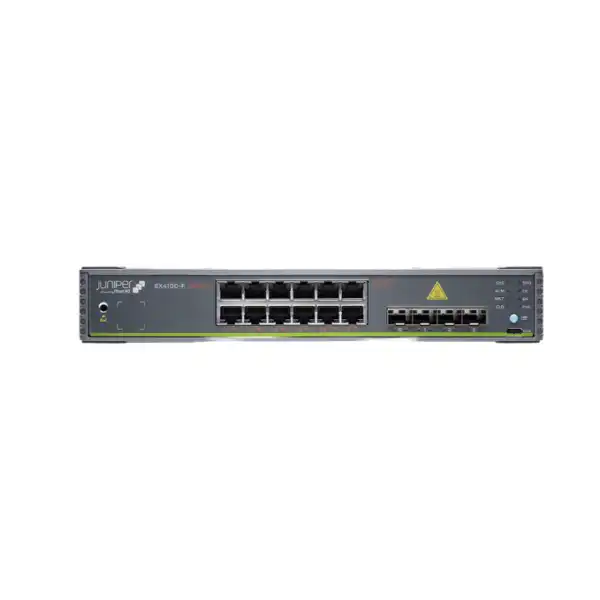
Juniper EX4100-F Ethernet Switch
A fixed-form, cloud-ready access-switch family for branch, remote-office and campus networks, with 12-, 24- and 48-port models, PoE+ and non-PoE choices, 10GbE-class uplink options, Virtual Chassis, EVPN-VXLAN capability and Junos OS operations.
Direct answer: what is the EX4100-F and who is it for?
The Juniper EX4100-F Ethernet Switch is a family of fixed-form-factor enterprise Ethernet switches designed primarily for wired access in branch offices, remote sites and campus networks. The family is not one single port configuration. It includes compact 12-port versions as well as 24-port and 48-port versions, with both powered and non-powered access choices. That distinction matters because a quotation for “EX4100-F” alone is incomplete until the required port count, PoE requirement, uplink design and software-management approach are known.
The family is mainly used to connect end devices such as business PCs, IP phones, printers, security appliances, IoT endpoints and wireless access points to an enterprise LAN. PoE models can deliver standards-based PoE+ to connected devices, while non-PoE models are intended for environments where endpoints are locally powered or where power injection is handled elsewhere. The switches run Junos OS and can be managed on premises. They can also be onboarded into Juniper Mist Wired Assurance when the appropriate subscription is present.
Organizations should consider EX4100-F when they need 1GbE access switching, 10GbE-class uplink or stacking connectivity, enterprise Layer 2 and Layer 3 functions, Virtual Chassis scaling and an option to operate through Juniper’s cloud-management ecosystem. The family is particularly relevant where predictable fixed hardware and lower access-layer complexity are more important than modular power supplies or the higher-speed stacking architecture available on some larger EX platforms.
The most important factor to confirm is the exact model. A 12-port fanless EX4100-F-12T serves a very different physical and power scenario from a 48-port EX4100-F-48P with a large PoE budget. FourTeck can help determine the appropriate port count, PoE budget, uplink media, optics, Junos feature tier, Mist subscription requirement, rack or installation accessories and support scope for a Dubai or UAE deployment.
EX4100-F family models: choose the hardware before choosing the quantity
The EX4100-F family contains six core access-switch variants. Their names encode two buyer decisions: port count and whether the switch supplies PoE+. The “T” models are non-PoE access switches; the “P” models provide PoE+ on access ports. For accurate purchasing, the model should be selected by endpoint requirement rather than simply by choosing the largest port count.
EX4100-F-12T
A compact fanless model with 12 × 1GbE non-PoE access ports. It suits smaller offices, quiet work areas, kiosks, compact communications spaces and low-density branches that do not need the access switch to power phones, cameras or access points. Because it is fanless and uses an external power arrangement, it has a different installation profile from the 24- and 48-port chassis.
EX4100-F-12P
A compact fanless 12-port PoE+ model for small sites that need to power endpoints directly. Juniper specifies 180 W of PoE budget with the external AC adapter, with a higher total possible when the switch also receives appropriate power through its uplink powered-device design. This unusual power architecture makes power-source planning especially important before ordering.
EX4100-F-24T
A 24-port 1GbE non-PoE model for standard rack-based access deployments. It is useful where device power is not needed from the switch, such as desk-heavy office networks with locally powered endpoints, selected laboratory environments, or branches where PoE is provided by another design. It uses built-in cooling and an integrated power supply rather than the fanless 12-port construction.
EX4100-F-24P
A 24-port PoE+ access model with an overall published PoE budget of 370 W. It is often a practical middle point for floor cabinets and branch sites where a mix of access points, IP phones, cameras and conventional Ethernet endpoints must share one switching platform. The final PoE calculation should use the actual powered-device draw, not only the maximum per-port rating.
EX4100-F-48T
A 48-port non-PoE model for high-density copper access where power delivery is unnecessary. It can reduce the number of access switches required in a rack compared with 24-port designs, but higher port concentration also raises the importance of uplink sizing, fault-domain planning, patch-panel organization and deciding whether a 48-port failure domain is acceptable for the site.
EX4100-F-48P
A 48-port PoE+ model with a published 740 W PoE budget. It is intended for denser powered access where many phones, cameras, access points or other IEEE PoE endpoints must be served from one switch. Buyers should still validate per-device power, cable standard, redundancy expectations and the total downstream power profile instead of assuming that all 48 endpoints can simultaneously consume their theoretical maximum.
Core hardware and performance characteristics
Across the family, Juniper positions EX4100-F as fixed 1U access switching. The exact performance changes with port count, so architecture reviews should use the selected model rather than a family-level headline alone.
| Specification area | EX4100-F-12P/T | EX4100-F-24P/T | EX4100-F-48P/T |
|---|---|---|---|
| Access ports | 12 × 1GbE | 24 × 1GbE | 48 × 1GbE |
| Published switching data rate | 72 Gbps unidirectional / 144 Gbps bidirectional | 104 / 208 Gbps | 128 / 256 Gbps |
| Layer 2/3 throughput | Up to 107 Mpps | Up to 154 Mpps | Up to 190 Mpps |
| Virtual Chassis interconnect | 80 Gbps backplane; up to 10 members in a Virtual Chassis design. | ||
| Memory / storage | 4 GB ECC DRAM and 8 GB storage across the family. | ||
| MAC addresses | Up to 64,000 MAC addresses. | ||
| Jumbo frames | Up to 9,216 bytes. | ||
These figures help determine whether the family has enough forwarding headroom for the intended access role, but they do not replace traffic engineering. A 48-port switch with many active users, cameras or wireless APs may require more aggregate uplink bandwidth than a 12-port branch switch, even if both belong to the same product family. Uplink utilization, oversubscription, application profile and redundancy design therefore remain part of sizing.
Uplinks, SFP+ ports and Virtual Chassis design
Uplink planning is one of the strongest reasons to specify the exact EX4100-F model in a bill of materials. The 24-port and 48-port models provide four fixed 1/10GbE SFP/SFP+ uplink interfaces. They also provide four additional 10GbE SFP+ interfaces that can be used for Virtual Chassis or reconfigured as Ethernet uplinks. This gives designers flexibility, but every optical or DAC connection must still be matched to the intended distance, fiber type and neighboring equipment.
The 12-port models are different. They include two copper multigigabit uplink ports supporting rates up to 10GbE, plus four 10GbE SFP+ Virtual Chassis/uplink ports. That arrangement can be useful in compact branches because it provides copper uplink flexibility without consuming the normal 1GbE access ports. It also means that an installation copied directly from a 24-port bill of materials may contain the wrong optics or cable assumptions for a 12-port unit.
Virtual Chassis allows as many as ten EX4100-F switches to be interconnected and operated as a single logical device. This can simplify configuration and operational handling across a switch stack. However, Virtual Chassis should not be confused with full physical redundancy inside each chassis. The 24- and 48-port EX4100-F models use integrated power supplies and fans, while the 12-port units are fanless with external power arrangements. If a project needs redundant, hot-swappable power supplies inside each access switch, a different EX platform may deserve comparison.
For fiber uplinks, transceiver choice must be treated as a compatibility item rather than an afterthought. The bill of materials should state the required speed, fiber type, connector, approximate distance, whether single-mode or multimode fiber is already installed, and the remote switch interface. This prevents a common procurement error: buying the correct access switch but the wrong optic.
Uplink questions to settle
- Is each uplink copper, multimode fiber, single-mode fiber or direct-attach?
- Is 1GbE enough, or does the site require 10GbE from day one?
- Will the four 10GbE SFP+ ports be reserved for Virtual Chassis or used as normal Ethernet uplinks?
- Is link aggregation required toward distribution or core switches?
- Which optics are supported on the selected Junos release and hardware model?
- Does the remote side use matching speed, wavelength, media and connector type?
PoE planning: power budget matters more than the number of PoE ports
EX4100-F PoE models support standards-based 802.3af/at power delivery and can provide up to 30 W per access port. That per-port maximum is useful, but it is not the number that should drive a full deployment plan. The more important figure is the total power budget available to the specific switch and how much power the connected devices actually negotiate and consume.
EX4100-F-12P
Juniper publishes a 180 W PoE budget when the switch uses its external AC adapter. The platform also has powered-device functionality through its high-speed copper uplinks. With the external adapter and two suitable 90 W upstream PSE connections, the published maximum PoE budget can reach 300 W. This architecture can be valuable in specialized branch designs, but it should be engineered deliberately rather than assumed.
EX4100-F-24P
The 24-port PoE model has a published total PoE budget of 370 W. That is enough for many conventional office combinations, but a high concentration of power-hungry wireless access points, pan-tilt-zoom cameras or other demanding endpoints can still exceed the available budget. Add each endpoint’s realistic requirement and leave operational headroom.
EX4100-F-48P
The 48-port PoE model has a published 740 W total PoE budget. This supports dense powered access, but port count and wattage still need to be examined together. A switch can have free Ethernet ports while having insufficient remaining PoE budget, or sufficient PoE budget while having too few physical ports. Both dimensions belong in the sizing sheet.
For a new Dubai office, a practical PoE worksheet should list each wireless access point, IP phone, camera, door controller, sensor or other powered device, its expected PoE class or maximum consumption, and the switch port to which it is assigned. Add growth allowance for devices likely to be installed later. This is especially important when a site expects additional Wi-Fi coverage, surveillance expansion or desk growth after the original network purchase.
Cabling also matters. Power delivery and data performance depend on compliant structured cabling. The switch cannot compensate for damaged copper, excessive channel length, poor terminations or unsuitable cable category. Where existing cabling is being reused, certification testing may be a better risk-control measure than assuming every outlet is ready for PoE+.
Junos OS, Mist Wired Assurance and licensing choices
EX4100-F can be operated in more than one management model. Organizations that already standardize on Junos can configure and manage the switches using traditional Junos workflows. Juniper also makes the family cloud-ready for Juniper Mist management. That flexibility is useful because a branch refresh does not have to adopt cloud operations simply to use the hardware, while organizations seeking cloud-based visibility can add the appropriate service.
For Mist cloud management, Juniper documents Wired Assurance as the relevant subscription. If a switch does not have an active Mist Wired Assurance license, it can still be configured using the Junos CLI. This distinction should be written into the purchase specification because the hardware and the cloud-management entitlement are separate commercial decisions. A quotation that lists only switch chassis can therefore be technically valid but incomplete for an organization expecting Mist onboarding, cloud configuration and assurance workflows.
Juniper Flex licensing for EX Series is organized into Standard, Advanced and Premium tiers. Standard-tier functions are available with the Junos OS image shipped with the switch, while additional software functions can require Advanced or Premium entitlement. EX4100-F supports both subscription and perpetual Flex licensing. Juniper also classes the platform by access-port count for licensing: 12-port models fall into one class, 24-port models into another, and 48-port models into a higher class. As a result, a software SKU copied from one EX4100-F port density should not be assumed to fit another.
Subscription licensing can bundle Junos feature rights with Mist Wired Assurance and related capabilities, depending on the exact SKU and tier. Optional services such as Marvis for Wired and Premium Analytics may also be relevant to organizations building a broader Mist operating model. The correct choice depends on whether the network team wants only switching functions, cloud visibility, advanced routing features, AI-assisted operations or analytics.
The safest procurement method is to define the operational outcome first. State whether the switches will be managed locally or through Mist, identify any advanced routing or telemetry features required, define the desired subscription term, and match that requirement against the current Juniper licensing matrix for the exact hardware class. This avoids both under-licensing and paying for software tiers that the site will not use.
Network capabilities that make EX4100-F more than a basic access switch
The EX4100-F family is positioned for enterprise access rather than unmanaged or lightly managed edge connectivity. Several features shape where it belongs in a network architecture and how much operational value it can provide.
EVPN-VXLAN support
Juniper supports EVPN-VXLAN on the EX4100-F, allowing the family to participate in modern campus fabric designs rather than being limited to conventional VLAN-only access. Whether this capability is appropriate depends on the surrounding architecture, feature licensing, operational skills and the design of the distribution or core layer.
Virtual Chassis
Up to ten EX4100-F switches can be interconnected in a Virtual Chassis. This can simplify management by presenting multiple physical switches as a logical system. Stack topology, cable path, member roles and failure scenarios should still be designed before installation instead of treating stacking as a purely cosmetic configuration choice.
Flow and traffic visibility
The platform supports monitoring technologies including sFlow, IPFIX and flow-based telemetry. These capabilities can improve troubleshooting and capacity analysis, but useful telemetry requires collectors, dashboards or management services capable of receiving and interpreting the data. The design should identify where telemetry will terminate.
Access security controls
EX4100-F includes enterprise access controls such as DHCP snooping, dynamic ARP inspection, IP source guard and MAC limiting. These features can help contain common Layer 2 threats when configured correctly. They should be introduced with an understanding of trusted interfaces, DHCP topology and endpoint behavior to avoid blocking legitimate traffic.
Quality of service
The family provides multiple QoS queues per port, supporting more deliberate treatment of voice, video and business-critical traffic than a basic switch. QoS outcomes still depend on end-to-end marking and policy consistency; configuring queues on the access switch alone cannot guarantee application quality across the entire network path.
Layer 2 and Layer 3 deployment
Juniper documents the family as supporting Layer 2 and Layer 3 technologies. This creates flexibility for routed access, conventional VLAN access and broader campus designs. Exact protocol requirements should be checked against the intended Junos release and software license tier before the architecture is finalized.
Where EX4100-F fits in a campus or branch design
In most projects, EX4100-F is easiest to understand as an access-layer platform. The access layer is where user devices, phones, access points, cameras and other Ethernet endpoints attach. That role makes port density, PoE budget and uplink capacity the three dominant hardware decisions. The same switch family can appear in a 12-user branch and a much denser campus cabinet, but the correct model and uplink design will differ substantially.
For a small branch, the 12-port models are attractive when space, acoustics and low port count matter. Their fanless construction can be useful where a full network room is not available. The non-PoE model is appropriate if the site has no powered endpoints. The 12P is more suitable where the switch must power devices, but its external power arrangement and PoE budget should be included in the physical design.
For a standard office floor, the 24-port models can align well with moderate endpoint density and easier fault-domain separation. Two 24-port switches may provide operational advantages over one 48-port switch if the network design values smaller failure domains, maintenance flexibility or distribution of PoE load. Conversely, a 48-port model can be more space-efficient and may reduce device count when a cabinet serves many outlets.
For larger campus deployments, Virtual Chassis can simplify the management of multiple EX4100-F members. Designers should still decide whether every access cabinet needs a stack, whether standalone switches are sufficient, how uplinks are distributed, and how much of the network remains operational after the loss of a member or upstream path. Logical simplification does not eliminate physical dependency.
The family can also participate in EVPN-VXLAN-based campus designs. That can be valuable where segmentation, scalable fabrics or policy consistency are priorities. It also adds architecture and licensing considerations that are not present in a basic Layer 2 branch. Organizations without staff familiarity in EVPN-VXLAN should include design and operational readiness in the project scope rather than selecting the feature solely because the switch supports it.
Typical fit by site type
Compact branch: 12T or 12P when the port count fits and fanless operation is desirable.
Office cabinet: 24T or 24P where 24-port density matches patching and PoE requirements.
Dense access layer: 48T or 48P when rack efficiency and higher port concentration are preferred.
Mist-managed network: Any suitable model with the required Wired Assurance entitlement and compatible design.
Higher-resilience access: Compare EX4100-F with platforms offering redundant field-replaceable power and higher-speed stack/uplink options if those characteristics are mandatory.
EX4100-F versus EX4100: why the “F” family should not be treated as identical
A buyer comparing Juniper access switches may encounter both EX4100-F and EX4100. Their names are similar, but their hardware positioning is not identical. EX4100-F emphasizes a fixed, economical access design. The standard EX4100 family offers stronger internal resiliency characteristics and higher-speed Virtual Chassis connectivity on 24- and 48-port models. This difference can affect both purchase price and architecture.
Juniper publishes an 80 Gbps Virtual Chassis backplane figure for EX4100-F, while the EX4100 family is specified with a 200 Gbps Virtual Chassis interconnect. Standard EX4100 models also provide 10/25GbE stacking/uplink ports and redundant, hot-swappable power supplies with field-replaceable fans on the applicable 24- and 48-port models. By contrast, EX4100-F 24- and 48-port models use integrated power supplies and fans, while the 12-port EX4100-F units are fanless with external power arrangements.
This does not make one family universally better. A branch or conventional access cabinet may not need 25GbE stacking or redundant internal power supplies, making EX4100-F a reasonable match. A high-availability campus cabinet with strict maintenance requirements may justify the more resilient EX4100 architecture. The choice should follow service-level and uplink requirements rather than product naming.
If the planned network includes multigigabit access ports, high-power PoE++ endpoints, faster stacking or additional redundancy expectations, compare the exact EX4100 and other EX Series variants before standardizing on EX4100-F. A family comparison at design stage is usually less expensive than changing switch architecture after cabling, optics and subscriptions have already been ordered.
Physical installation and environmental planning for Dubai and UAE sites
The EX4100-F family is designed for enterprise indoor networking, and environmental limits should be treated as engineering requirements. Juniper specifies an operating range of 0°C to 40°C for the 12-port models and 0°C to 45°C for the 24- and 48-port models, subject to the vendor’s environmental notes and the selected optics. Dubai’s outdoor climate can exceed those limits, so a switch intended for a warehouse, guard room, outdoor cabinet or weakly conditioned space should not be assumed suitable simply because it is physically small.
For UAE deployments, the correct location is normally a controlled communications environment with adequate air conditioning, dust control and unobstructed airflow. The 24- and 48-port models use front-to-back airflow and built-in fans. Rack design should therefore preserve the intended airflow path rather than placing the switch behind solid panels or against heat-producing equipment with no clearance. The fanless 12-port units rely on natural convection, so they also need free air around the chassis even though they do not contain active cooling fans.
Power planning should include more than the switch’s maximum draw. Consider UPS sizing, rack power distribution, circuit capacity and PoE load. A PoE switch delivering substantial downstream power can place a much larger demand on the UPS than a non-PoE switch. If the business expects phones, wireless access points and cameras to remain powered during a utility interruption, the UPS runtime calculation must include both switch consumption and PoE load.
Rack depth and mounting also differ by model. The 12-port models are compact, while 24- and 48-port models use a standard rack-width chassis. The PoE models are deeper than their comparable non-PoE versions. Confirm the actual cabinet’s usable depth, cable bend radius, front and rear clearance, and the space required for power connectors before installation day.
Finally, do not overlook grounding and structured cabling. A professional installation should follow the site’s electrical, rack-bonding and cabling standards. If the project reuses old patching, test it before migration. Network outages caused by marginal copper are frequently mistaken for switch faults, especially when PoE and high traffic are introduced at the same time.
A practical sizing method for EX4100-F deployments
Switch sizing becomes more reliable when the buyer works through a small set of measurable inputs. Port count alone is not enough, and adding a percentage to the current user count can still miss requirements created by phones, cameras, access points, printers and infrastructure devices.
List users, printers, access points, cameras, phones, meeting-room systems, controllers, IoT devices and infrastructure connections. Count switch-to-switch links separately because they consume uplink interfaces rather than ordinary access ports in many designs.
Identify which endpoints require PoE and their expected wattage. This determines whether a P model is required and whether its total PoE budget is sufficient. A non-PoE port used for a phone later may require an injector or a switch replacement.
Keep capacity for near-term expansion, but choose a realistic allowance. A rapidly growing office may justify 48 ports; a stable 10-user branch may be better served by a 12-port platform than by paying for many unused ports indefinitely.
Estimate aggregate traffic from local users, wireless APs, cameras and servers toward the core, WAN or internet edge. Use 10GbE uplinks where 1GbE would create an avoidable bottleneck, especially on denser access switches.
A single 48-port switch is compact, but its outage affects more endpoints than one 24-port switch. Consider whether maintenance windows, spare strategy and business criticality favor fewer dense switches or more smaller members.
Confirm Junos-only or Mist management, feature tier, subscription term and support expectations before issuing the purchase order. Software requirements can materially change the total solution cost.
Migration from an existing access switch
Replacing an existing switch with EX4100-F is usually straightforward only when the current network is fully documented. In real environments, access switches often contain years of accumulated VLAN assignments, voice settings, trunk definitions, port security, spanning-tree preferences, storm control, link aggregation and exceptions for individual devices. A successful migration therefore starts with configuration discovery, not with physical replacement.
Create a port map that records the current device on each interface, VLAN membership, tagged or untagged behavior, PoE requirement, speed or duplex exceptions, authentication settings and any special policies. If the old switch uses a different vendor’s terminology, translate the intent rather than copying syntax line by line. Junos configuration structure is different from many other network operating systems.
Uplink migration deserves a separate test plan. Confirm that the new SFP or SFP+ optics are supported, the remote device accepts the selected speed, VLAN trunks are consistent, aggregated links use matching parameters, and spanning-tree or routing behavior will not create a loop. Where the EX4100-F will join a Virtual Chassis, establish member identity and cabling topology before moving production endpoint cables.
PoE migrations should be staged with power visibility in mind. If a new PoE model replaces several smaller switches or injectors, the initial boot can cause many endpoints to request power at once. Verify the total budget and prioritize critical ports where policy allows. Wireless access points and IP phones should be tested for successful boot, VLAN reachability and expected negotiation after the move.
If the organization is adopting Mist at the same time, separate the hardware migration from the management transformation conceptually. The switch must first have working connectivity, DNS and reachability required for the chosen cloud onboarding method. The team should know which configuration is authoritative, how templates are assigned, and what happens if a site loses WAN access temporarily.
A rollback plan should identify how to restore the old switch or configuration if critical services fail. Keep configuration backups, a cable map, console access, spare optics and the previous equipment available until the validation checklist is complete. The objective is not only to make links turn green; it is to restore every required business service with known performance and security behavior.
Procurement checklist: what belongs in a complete EX4100-F quote
A useful quote should describe the whole deployment requirement, not merely one chassis line item. Exact hardware, quantity and software entitlements are the starting point. The following items often determine whether the delivered switch can be installed immediately or whether the project is delayed by missing parts.
- Exact switch model: 12T, 12P, 24T, 24P, 48T or 48P.
- Quantity and spares: production count plus any onsite spare policy.
- Power requirement: PoE or non-PoE, expected wattage, UPS runtime and power-cord requirements.
- Uplink media: copper, fiber or DAC; speed; distance; connector and remote platform.
- Optics and cables: supported SFP/SFP+ transceivers and any Virtual Chassis cabling.
- Management: Junos-only or Juniper Mist Wired Assurance.
- Feature licensing: Standard, Advanced or Premium requirements where applicable.
- Subscription term: if cloud or term licensing is selected.
- Support: desired vendor support level and business replacement expectations.
- Installation: rack mounting, configuration, migration, testing and documentation scope.
- Software baseline: approved Junos release and change-management constraints.
Avoid these common ordering mistakes
Ordering “EX4100-F” without a suffix leaves port count and PoE undefined.
Ordering PoE by port count alone can miss the total power-budget requirement.
Assuming every SFP+ optic works can create compatibility or distance problems.
Expecting Mist management without a suitable subscription can leave the operational model incomplete.
Treating EX4100-F and EX4100 as interchangeable can overlook important power-resiliency and stacking-speed differences.
Use cases in business networks
The following examples show how requirements translate into model selection. They are planning illustrations rather than universal prescriptions; the actual choice depends on endpoint counts, power, uplinks, licensing and resilience requirements.
Small professional office
A ten-user branch with a few printers and no powered endpoints may fit an EX4100-F-12T. If the site also has two or three Wi-Fi access points and VoIP phones that need switch power, the 12P becomes a more logical starting point. The decision then shifts to the 12P power budget and whether the branch requires spare ports for growth.
Office floor with IP telephony
A floor with twenty desk phones, several access points and a few infrastructure devices is likely to need a PoE model. A 24P may fit if port headroom and total wattage are adequate. If the outlet count is expected to rise beyond 24, a 48P or a pair of 24P switches can be compared based on fault domain and rack strategy.
CCTV and building systems
A camera-heavy access layer can consume significant PoE and uplink bandwidth. The 48P offers a high total PoE budget, but camera bit rates, retention architecture and the number of simultaneous streams must inform uplink sizing. Critical surveillance designs may also need redundancy beyond what a single fixed-power access switch provides.
Mist-managed branch estate
Organizations with many branches may value centralized Juniper Mist operations, templates and assurance workflows. EX4100-F can fit that model when each switch has the appropriate Wired Assurance entitlement. Standardizing configuration can reduce local touch, but WAN reachability, subscription management and branch rollout processes still need governance.
Campus fabric access
Where EVPN-VXLAN is part of the campus design, EX4100-F can provide access-layer participation in the fabric. This is not a plug-and-play reason to select the family; the upstream architecture, feature tier, underlay and overlay design, routing model and operational tooling must be aligned first.
Quiet or compact workspace
The fanless 12-port variants can be attractive where acoustic output and compact placement matter. The trade-off is lower port density and a different power arrangement. They should still be installed in an environment within the specified temperature range with enough open space for natural convection.
Operations after deployment: monitoring, configuration and lifecycle discipline
A business switch is not complete when it is mounted and forwarding traffic. The operating model determines whether the network remains understandable six months later. Define where configurations are stored, who approves changes, how software is upgraded, how logs are collected and what telemetry is retained. Whether the environment uses Junos directly or Mist, consistent naming and configuration standards reduce troubleshooting time.
For Junos-managed environments, maintain configuration backups and document the software release baseline. Before upgrades, review release notes for feature changes and supported upgrade paths. Test critical functions such as Virtual Chassis, routing, authentication and PoE behavior where possible. A switch firmware change should be treated as a controlled infrastructure change rather than a routine desktop update.
For Mist-managed sites, maintain subscription visibility and organization/site ownership. The cloud platform can simplify onboarding and provide experience-oriented telemetry, but operational teams still need procedures for expiring subscriptions, administrator access, template governance and escalation. Optional Marvis or analytics services should be justified by the operational outcomes the team expects to use.
Monitor uplink utilization and error counters after go-live. A design that was adequate at opening may become congested after more users, cameras or access points are added. Flow telemetry, sFlow, IPFIX and traditional interface statistics can help identify growth before user complaints become the first capacity signal.
Lifecycle planning should also include spare strategy and replacement expectations. The EX4100-F family includes a vendor warranty framework, but businesses with strict recovery objectives may still require onsite spares or a higher support arrangement. Warranty entitlement and business continuity are related but not identical; the recovery plan should state how quickly a failed access switch must be replaced at each site.
Frequently asked buyer questions about Juniper EX4100-F
Is EX4100-F one switch model?
No. EX4100-F is a family containing 12-, 24- and 48-port switches in PoE and non-PoE variants. A valid bill of materials should identify the exact suffix, such as EX4100-F-24P, rather than using only the family name.
Which EX4100-F models are fanless?
The 12-port EX4100-F-12T and EX4100-F-12P are fanless and use natural convection cooling. The 24-port and 48-port models use built-in fans. Fanless does not mean the switch can be enclosed without ventilation; the specified operating environment still applies.
Does every EX4100-F provide PoE?
No. Only the P variants provide PoE+ on their access ports. The T variants are non-PoE. If the site needs to power access points, phones, cameras or other powered devices from the switch, select a P model and verify its total PoE budget.
How much PoE power is available?
Juniper publishes 370 W for EX4100-F-24P and 740 W for EX4100-F-48P. EX4100-F-12P provides 180 W with its external AC adapter and can reach a higher total under Juniper’s supported powered-device arrangement using suitable upstream PSE connections. Always size against the actual endpoint power plan.
Can EX4100-F be managed from Juniper Mist?
Yes. EX4100-F is cloud-ready and can be onboarded and managed through Juniper Mist Wired Assurance when the appropriate subscription is active. Without that Mist subscription, the switch can still be configured using Junos CLI.
Is a Mist subscription always mandatory?
It is required for the Mist Wired Assurance cloud-management service, but it is not required merely to operate the switch through Junos. Buyers should decide whether cloud management is part of the desired operating model and quote the subscription accordingly.
Can EX4100-F switches be stacked?
Yes. Juniper Virtual Chassis technology supports up to ten EX4100-F members operating as one logical device. The family provides dedicated 10GbE SFP+ interfaces that can serve Virtual Chassis connectivity or be reconfigured for Ethernet uplinks.
Does EX4100-F support 10GbE uplinks?
Yes. The 24- and 48-port models include 1/10GbE SFP/SFP+ uplink ports and additional 10GbE SFP+ Virtual Chassis/uplink ports. The 12-port models use two multigigabit copper uplinks up to 10GbE plus four 10GbE SFP+ Virtual Chassis/uplink ports.
Are SFP or SFP+ transceivers automatically included?
A switch order should not assume the required optics are present unless the quotation explicitly lists them. Select compatible transceivers or cables according to link speed, fiber type, distance and the remote device. Compatibility should be checked for the exact model and software release.
Does EX4100-F support EVPN-VXLAN?
Yes, Juniper lists EVPN-VXLAN support for the EX4100-F family. Whether the feature should be used depends on the surrounding campus architecture, Junos feature availability, licensing and the organization’s ability to operate a fabric design.
What is the difference between EX4100-F-24T and EX4100-F-24P?
Both provide 24 × 1GbE access ports, but the 24P provides PoE+ and a published 370 W total PoE budget. The 24T does not provide PoE on access ports. The right choice depends on whether downstream devices need power from the switch.
What is the difference between EX4100-F and standard EX4100?
The standard EX4100 family provides higher-speed 10/25GbE stacking/uplink connectivity and stronger hardware resiliency features such as redundant hot-swappable power supplies on applicable models. EX4100-F uses a more economical fixed design. Compare them when resilience or higher-speed stacking is a primary requirement.
Can I use a 48-port model simply to get more spare ports?
You can, but port headroom should be balanced against fault domain, power consumption, PoE budget, rack design and cost. In some networks two 24-port switches offer better operational separation; in others one 48-port chassis is more efficient. Growth forecast and availability requirements should decide.
Is EX4100-F suitable for an unconditioned Dubai warehouse?
Do not assume so. Juniper’s operating limits are 0–40°C for the 12-port models and 0–45°C for the 24- and 48-port models, subject to stated conditions. Many unconditioned UAE spaces can exceed those limits. Use a controlled enclosure or evaluate equipment specifically designed for harsher environments.
What should I provide for a fast quotation?
Provide the preferred model or required port count, quantity, PoE device count and wattage, uplink speed and media, optics distance, Mist or Junos management choice, software tier if known, subscription term, support requirement, deployment location and whether installation or migration services are needed.
Buyer decision recap
What FourTeck needs from you for an accurate EX4100-F quotation
The fastest way to build an accurate Dubai or UAE quote is to send the network requirement in practical terms. You do not need to know every Juniper part number before contacting us.
12, 24 or 48 access ports.
Number and type of powered devices.
Production units and desired spares.
1GbE or 10GbE, copper or fiber, link distance.
Junos CLI/on-premises or Juniper Mist.
Perpetual or subscription where applicable.
Office, branch, data room or other controlled environment.
Supply only, configuration, migration, installation or support.
Specify the right Juniper EX4100-F before you place the order
FourTeck can help translate your port count, PoE load, uplink design, licensing preference and UAE installation requirements into a complete EX4100-F bill of materials. The goal is to quote the correct switch variant and the supporting items the deployment actually needs, while identifying cases where another Juniper EX model would be a better technical fit.

Reviews
There are no reviews yet.