
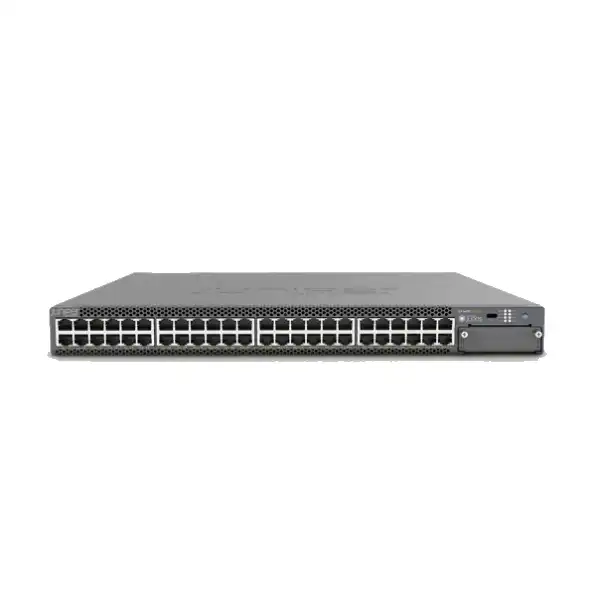
Juniper EX4400M Multigigabit Ethernet Switch Dubai
The Juniper EX4400 multigigabit platform is a high-performance access switching family for organizations that need 2.5GbE, 5GbE and 10GbE edge speeds, high-power PoE++, resilient Virtual Chassis operation, cloud-ready management and a clear migration path beyond conventional 1GbE access switching. It is well suited to modern campus, hospitality, education, healthcare, government and enterprise networks where wireless access points and connected devices are increasingly capable of using more than one gigabit per second.
Direct answer: what is the Juniper EX4400M?
It is Juniper’s EX4400 multigigabit enterprise access switching platform, represented most directly by models such as the EX4400-24MP and EX4400-48MP. These switches bring multi-gigabit copper access, high-power PoE, high-speed uplink choices, resilient hardware and Junos networking capabilities into a fixed 1RU campus switch.
Its primary role is high-capacity wired access for Wi-Fi access points, endpoints and networked devices that can benefit from 2.5GbE, 5GbE or 10GbE connections while also requiring centralized PoE power, VLAN segmentation, policy control, telemetry and reliable upstream connectivity.
Organizations refreshing access closets for modern wireless, dense collaboration, IP surveillance, high-performance workstations, digital learning, healthcare systems, smart-building devices or other environments where a standard 1GbE switch could become a bottleneck.
Confirm the exact EX4400 model and the real per-port speed and PoE requirements. The 24-port and 48-port multigigabit models do not present the same access-port mix, and PoE budget depends on model, installed power supplies and the number of powered devices.
FourTeck can help map user and device density to the correct model, calculate PoE demand, plan uplinks and optics, clarify Junos and Mist subscription requirements, review rack and power constraints, and prepare a Dubai/UAE quotation around the full deployment rather than only the chassis.
Why multigigabit access matters in a modern campus
The practical reason to evaluate the EX4400 multigigabit family is not simply that higher port speeds exist. The important change is occurring at the edge of the network. Modern wireless access points, video systems, engineering workstations, high-resolution media endpoints and other performance-sensitive devices can generate sustained or burst traffic that exceeds the comfortable limits of a single 1GbE access link. A network refresh that keeps every edge connection at 1GbE may therefore replace aging hardware without removing the performance constraint that prompted the refresh.
Multigigabit Ethernet allows organizations to reuse suitable copper cabling while stepping selected links above 1GbE. On the EX4400-24MP, all 24 access ports are designed for 100M/1/2.5/5/10GbE operation. The EX4400-48MP uses a different port mix: 12 ports support 100M/1/2.5/5/10GbE and 36 ports support up to 2.5GbE. This distinction directly affects switch selection. A 48-port closet with only a small number of 5GbE or 10GbE devices may fit the 48MP well, while a 24-port environment where every edge connection may need 5GbE or 10GbE has a different requirement profile.
The value of higher access speeds must also be evaluated end to end. A 10GbE-capable switch port does not guarantee 10GbE application throughput when the endpoint NIC, cable category, server path, wireless radio, uplink, firewall, WAN connection or application architecture provides a lower ceiling. For that reason, a sensible EX4400 design starts with the device population and traffic pattern, then checks the copper plant and upstream network before allocating premium multigigabit ports.
EX4400 multigigabit model position
The product name “EX4400M” is commonly used by buyers as a shorthand for the multigigabit EX4400 variants. Juniper’s current model references identify the multigigabit access choices by their full hardware model numbers. For quotation accuracy, the final order should therefore name the exact chassis, not only the family label.
EX4400-24MP
This 1RU model provides 24 copper multigigabit access ports supporting 100M, 1GbE, 2.5GbE, 5GbE and 10GbE. It is the more uniform choice when many or all attached devices may require speeds above 2.5GbE. Juniper lists a maximum bidirectional switching rate of 1080 Gbps and throughput of 803 Mpps for the 24MP.
It supports PoE++ and can deliver up to 90 W per supported port, but the total usable PoE budget is constrained by the power-supply configuration. The base power-supply combination and an optional higher-capacity dual-supply arrangement have different total budgets, so high-power deployments need an explicit wattage calculation.
EX4400-48MP
This 1RU model provides 48 copper multigigabit access ports with two capability groups: 12 ports support 100M/1/2.5/5/10GbE, while 36 ports support up to 2.5GbE. Juniper lists a maximum bidirectional switching rate of 1020 Gbps and throughput of 758 Mpps for the 48MP.
The mixed-speed layout often fits dense access closets where most endpoints need 1GbE or 2.5GbE and a smaller set of devices needs 5GbE or 10GbE. Its PoE++ design can support up to 90 W per port, while total PoE capacity depends on installed power supplies and must be sized against the full powered-device inventory.
Key technical specifications buyers should understand
| Specification | EX4400-24MP | EX4400-48MP |
|---|---|---|
| Form factor | Fixed 1RU access switch | Fixed 1RU access switch |
| Access ports | 24 x 100M/1/2.5/5/10GbE | 12 x 100M/1/2.5/5/10GbE plus 36 x 100M/1/2.5GbE |
| PoE standard | 802.3af/at/bt, up to 90 W per supported port | 802.3af/at/bt, up to 90 W per supported port |
| Bidirectional switching capacity | Up to 1080 Gbps | Up to 1020 Gbps |
| Layer 2/3 throughput | Up to 803 Mpps | Up to 758 Mpps |
| Virtual Chassis interconnect | 400 Gbps aggregate Virtual Chassis interconnect capability | 400 Gbps aggregate Virtual Chassis interconnect capability |
| MAC address scale | 112,000 | 112,000 |
| Jumbo frames | 9216 bytes | 9216 bytes |
| VLAN scale | 4093 VLAN IDs | 4093 VLAN IDs |
| QoS queues per port | 12 total: 8 unicast and 4 multicast | 12 total: 8 unicast and 4 multicast |
Published maximums are useful for platform comparison, but practical performance depends on traffic mix, software features, topology, packet size, oversubscription, uplink design and the behavior of attached systems. A quotation should therefore not be based on a single headline switching-capacity figure.
PoE++ planning: calculate watts, not only port count
One of the strongest reasons to deploy the EX4400 multigigabit models is their ability to combine higher data rates with high-power PoE. This is particularly relevant to Wi-Fi access points with multiple radios, pan-tilt-zoom cameras, advanced video endpoints, building systems and other powered devices that may request more than the 15.4 W associated with original PoE or the 30 W commonly associated with PoE+. Juniper supports standards-based 802.3af, 802.3at and 802.3bt on the PoE-enabled EX4400 models, with up to 90 W available on an individual supported port.
The 90 W figure should never be multiplied by the number of switch ports and treated as automatically available. Total switch PoE budget is governed by the installed power supplies. Juniper’s published information shows that the EX4400-24MP and EX4400-48MP can be configured with different power-supply combinations, and the resulting total power available to endpoints changes accordingly. The EX4400-24MP can reach a higher total PoE budget with optional larger power supplies, while the EX4400-48MP’s dual-supply configuration is designed for a larger aggregate endpoint load than a single supply. Exact budget figures should be checked against the orderable power-supply SKU in the current quote.
A correct PoE worksheet records the maximum or engineered power requirement for every connected device, not only its nominal average. For wireless access points, consider radio configuration, USB peripherals and any mode that is disabled when insufficient power is negotiated. For cameras, include heater, infrared illumination or motor loads where relevant. For conferencing devices, include displays or accessory modules if they draw from the network. The design should also preserve enough headroom for device replacement and future additions.
Resilient power design requires another decision: whether the switch must retain the planned endpoint load after one power supply fails. A dual-supply chassis can provide hardware redundancy, but the remaining supply still needs sufficient capacity for the essential PoE load if uninterrupted endpoint operation is a requirement. High-availability planning should therefore compare normal-state and single-supply-state budgets rather than treating dual power supplies as an automatic guarantee that every powered device remains energized at full demand.
High-speed uplinks, stacking and extension-module choices
The access edge is only useful when the upstream path is sized to carry the new traffic. EX4400 switches include high-speed connectivity options designed for both Virtual Chassis and uplink use. Juniper documents two dedicated 100GbE-capable ports on the platform for Virtual Chassis connectivity, with the ability to reconfigure them for Ethernet uplinks. These ports can also support 40GbE optics, and the 100GbE connections can be channelized for lower-speed Ethernet links where the supported design and transceiver configuration call for it.
The family also supports optional uplink or extension modules. Current Juniper material identifies choices that include four 1/10GbE SFP+ ports, four 1/10/25GbE SFP28 ports, and a one-port 100GbE QSFP28 option. Some module choices include MACsec capabilities while others do not, so a requirement for encrypted high-speed links must be tied to the exact module rather than assumed from the chassis family name. The correct module is usually determined by the aggregation switch, optic type, cable distance, redundancy target and expected growth.
10GbE uplinks
A practical fit for smaller access closets or environments where the aggregate edge load remains comfortably below 10GbE per uplink. Redundant links can improve availability, but their effective forwarding design still depends on LAG, spanning-tree or fabric architecture.
25GbE uplinks
Useful where multigigabit access density, modern WLAN traffic and server-bound workloads can create an aggregate load that makes 10GbE uplinks too restrictive. The aggregation layer must have matching 25GbE interfaces and supported optics or DACs.
100GbE connectivity
Relevant to high-capacity uplink designs, Virtual Chassis interconnects and environments that want substantial headroom. Do not specify 100GbE solely because the port exists; confirm the aggregation platform, optic type, fiber plant, distance and topology.
Virtual Chassis for operational simplicity and resilience
Juniper Virtual Chassis allows multiple compatible EX switches to operate as one logical system. For EX4400, Juniper documents support for up to ten interconnected switches in a Virtual Chassis. This can simplify administration because a group of physical switches can be managed as a single logical device rather than as unrelated standalone boxes. In a building with several access switches, this can reduce configuration repetition and create cleaner operational workflows for software management, interface provisioning and troubleshooting.
Virtual Chassis is not the same as simply connecting switches with ordinary uplinks. The interconnect topology, member roles, software compatibility and cable or optic selection need to be designed deliberately. The dedicated high-speed ports give EX4400 a strong physical foundation for stacking, but the cabling path should avoid creating a single physical point of failure. In a resilient design, interconnects are normally arranged so the logical system can continue to pass traffic when one link or member fails, subject to the exact topology and remaining capacity.
A ten-member maximum should not be interpreted as a recommendation to build every access layer as a ten-switch stack. Larger logical systems can be convenient, but they also expand the operational blast radius of software upgrades, configuration changes and certain failure scenarios. Many enterprise designs intentionally keep fault domains smaller. The right member count depends on rack layout, building distribution, maintenance policy, change windows and the availability requirements of the connected users.
When EX4400 is being introduced into an existing Juniper environment, software release compatibility and Virtual Chassis rules should be validated before mixing hardware or reusing existing stacking assumptions. When it is being deployed into a multivendor network, the upstream handoff remains standard Ethernet, but operational procedures for LACP, spanning tree, routing or EVPN should be agreed between the access and core teams so that the logical-switch behavior matches the wider campus architecture.
EVPN-VXLAN and campus fabric relevance
The EX4400 family supports EVPN-VXLAN, which gives organizations an alternative to traditional access designs built only around VLANs and spanning tree. In a campus fabric, EVPN provides the control-plane mechanisms used to distribute endpoint and reachability information, while VXLAN provides an overlay method for carrying network segments across the underlying IP infrastructure. This can improve segmentation flexibility and reduce the dependence on extending Layer 2 domains everywhere.
A fabric-capable switch is not automatically the right reason to deploy a campus fabric. EVPN-VXLAN delivers its greatest value when the organization has requirements that justify the additional architecture: scalable segmentation, consistent policy, larger multi-building networks, simplified mobility, standardized provisioning or integration with a broader Juniper campus design. A smaller office with straightforward VLAN requirements may achieve a simpler operational result using conventional Layer 2/Layer 3 access configuration.
For buyers considering a new EX4400 project as the first step toward a campus fabric, the procurement conversation should include the aggregation or core platforms, routing design, addressing plan, authentication strategy, monitoring model and operations team’s Junos skill level. Buying fabric-capable access switches preserves options, but the value appears only when the rest of the architecture and operational process are designed to use those capabilities.
Juniper Mist Wired Assurance and cloud-ready operations
EX4400 can be managed through Juniper Mist with Wired Assurance, giving network teams a cloud-based operational model for onboarding, provisioning, monitoring and troubleshooting supported EX switches. This is particularly relevant when the same organization already uses Mist-managed wireless, because wired and wireless experience information can be brought into a more unified operational view. The objective is not merely remote configuration; it is to improve visibility into whether users and connected devices are receiving the network service expected from the access layer.
Cloud management should be treated as an architectural and subscription decision, not assumed to be bundled indefinitely with every hardware purchase. Juniper’s current subscription model distinguishes the hardware’s Standard feature level from optional cloud and higher-tier software capabilities. Wired Assurance subscriptions are offered by switch class and term. The 24-port EX4400 models fall into the 24-port subscription class, while 48-port models use the corresponding 48-port class. Terms can be ordered for multiple years, and support-service choices can be combined with subscription SKUs.
Optional capabilities can add another subscription layer. Juniper documents Marvis for Wired as an associated option that operates with an active Wired Assurance subscription, and Premium Analytics can also be relevant to organizations that need additional long-term analytics. Flex-term bundles can combine Wired Assurance, Marvis and higher Junos feature tiers. The correct licensing route depends on whether the switch will be managed primarily through Mist, whether advanced routing features are required, and whether the organization prefers subscription or perpetual software models where applicable.
For procurement, ask for the hardware and software lines to be shown separately in the quotation. This makes it easier to see what expires, what is perpetual, what support service is included and what must be renewed later. It also avoids a common mistake in which a buyer compares two chassis prices while one quote includes cloud operations or advanced software entitlements and the other does not.
Licensing and feature-tier checkpoint
Juniper’s current EX software licensing framework separates feature tiers. Standard supports basic Layer 2 and Layer 3 functions and is included with the switch hardware. Advanced enables additional capabilities such as IGMP, OSPF and VRF, while Premium adds advanced Layer 3 protocols such as BGP and IS-IS. Because the exact software entitlement can affect what the switch is allowed to do in production, the required feature set should be decided before the purchase order is issued.
This matters most when EX4400 is being used for more than straightforward access switching. A branch or campus design that expects the switch to participate in dynamic routing, advanced segmentation or fabric functions can require a different entitlement from a design that simply needs VLANs, LACP, access security and static Layer 3 interfaces. The network design document should therefore list the actual protocols and features, not only a vague requirement for “Layer 3.”
Licensing models evolve over product lifecycles, and software support can vary by Junos release. The final quote should be checked against the current Juniper licensing documentation, chosen management method and target software release. This page is intended to support product selection; the orderable software SKU in a live quotation remains the authoritative commercial reference for a specific project.
Flow-based telemetry, sFlow and IPFIX
Visibility becomes more important as access-layer speeds increase because performance complaints can move beyond simple link-up/link-down diagnosis. The EX4400 supports sFlow, IPFIX and flow-based telemetry. Flow information can help operations teams understand who is talking to whom, which applications or endpoints are producing unusual traffic and whether a particular access segment is experiencing behavior that warrants investigation.
Juniper describes flow-based telemetry as a mechanism capable of monitoring large numbers of flows without placing the same burden on the switch CPU that a less specialized collection method might create. This has practical security and troubleshooting value. For example, a sudden change in flow behavior can be exported to an external collector for analysis, helping identify infected devices, abnormal scans, unexpected east-west traffic or bandwidth-consuming applications. The switch itself is not a replacement for a SIEM, NDR platform or firewall, but better edge telemetry gives those systems more useful evidence.
Before enabling telemetry at scale, confirm where the data will go and how much collection capacity exists. Exporting flow records without an analytics or retention plan creates operational noise rather than useful observability. The monitoring design should specify collector addresses, sampling or export settings, retention periods, alert thresholds and ownership for responding to findings. If Mist is part of the deployment, decide which operational questions will be answered in Mist and which require external tools.
Access-layer security controls
An enterprise access switch is an enforcement point, not only a packet-forwarding device. The EX4400 family includes security capabilities that can help restrict unauthorized endpoint behavior and protect the local network from common Layer 2 attacks. Juniper lists controls including MAC limiting, DHCP snooping, dynamic ARP inspection, IP source guard, persistent MAC configuration and control-plane protection. Used together with an appropriate authentication and segmentation policy, these features can significantly reduce the trust placed on an arbitrary device that plugs into an access port.
These protections need a design. DHCP snooping, for example, requires the network to distinguish trusted DHCP-server-facing paths from untrusted edge ports. Dynamic ARP inspection relies on valid binding information and must be tested carefully around static-address devices. IP source guard similarly depends on accurate source information. Enabling controls without documenting exceptions can create outages for printers, cameras, industrial devices or appliances that use unusual addressing behavior.
Where access authentication is required, confirm the intended use of 802.1X, MAC-based fallback, guest access, voice endpoints and network access control. If Juniper Mist Access Assurance or another NAC platform is part of the architecture, software release compatibility and policy workflow should be included in the deployment plan. Network teams should also define how failed authentication is handled: deny access, move the endpoint to a restricted segment, or provide remediation connectivity.
Security features have operational consequences. Logs need to reach a centralized platform, switch clocks should be synchronized, administrator access should use secure protocols, and changes should be backed by role-based control and configuration review. A secure access switch is the result of correctly configured controls and disciplined operations, not a default characteristic of the hardware alone.
Six practical deployment use cases
Wi-Fi 6E and Wi-Fi 7 access
Modern APs can exceed 1GbE aggregate traffic and may require higher PoE classes. Multigigabit copper lets the wired edge keep pace without forcing a fiber run to every access point. Port speed and wattage should be matched to the exact AP model and radio configuration.
High-density office floors
A mixed population of standard endpoints and high-performance devices can make the EX4400-48MP attractive because most users can sit on 1/2.5GbE-capable ports while selected power users or APs use the 5/10GbE-capable group.
Education campuses
Lecture halls, labs, classrooms and collaboration areas can combine heavy wireless traffic, PoE endpoints and changing segmentation requirements. Virtual Chassis and Mist-based operations can reduce the administrative burden when many access closets follow a standardized design.
Hospitality and large venues
Hotels, conference centers and event spaces often combine dense WLAN coverage with cameras, phones, building systems and guest-facing infrastructure. PoE capacity, redundant power and serviceability can matter as much as the headline switching speed.
Healthcare networks
Clinical and administrative environments can have demanding uptime, segmentation and monitoring requirements. The switch can provide the edge capacity, but the design must account for medical-device behavior, power requirements, maintenance windows and policy controls.
Media, engineering and creative teams
Workstations handling large datasets, design files or media can benefit from 5GbE or 10GbE access when servers and storage are equally capable. End-to-end storage and uplink performance should be validated so faster switch ports translate into a real workflow improvement.
Copper cabling and physical-layer considerations
Multigigabit Ethernet is attractive partly because it can extend the useful life of installed twisted-pair cabling, but cable condition still matters. The achievable rate depends on cable category, channel length, connector quality, patching, interference environment and the capabilities of the endpoint. A switch port supporting 10GbE does not mean every existing horizontal run will reliably support 10GbE at the required distance.
Before a large refresh, sample-test the actual cabling plant rather than relying only on labels printed on old patch panels. Certification records may be outdated after years of moves, additions and changes. Poor terminations, damaged pairs or excessive patching can become visible only when link rates increase. Juniper’s EX4400 hardware supports time-domain reflectometry on the copper access models, which can help identify certain cable faults such as breaks or shorts, but formal cable certification remains valuable when the project depends on guaranteed high-speed channels.
Patch leads deserve attention as well. A channel may have high-grade permanent cabling but fail at higher speeds because low-quality or damaged patch cords were reused. In a PoE++ deployment, cable bundling and thermal behavior can also matter because higher current creates more heat. Structured-cabling standards, bundle size, ambient temperature and local installation practice should be reviewed with the cabling contractor for high-power deployments.
A practical migration technique is to classify ports by required speed. Not every desk needs 10GbE. Reserve the highest-capability ports for devices that can use them, then allow 1GbE or 2.5GbE endpoints to operate at their appropriate negotiated rate. This makes the port mix of the EX4400-48MP more useful and can reduce unnecessary cabling remediation.
Optics, DACs and transceiver compatibility
High-speed uplink planning requires more than selecting a port speed. The transceiver must be supported by the exact switch, module and software release, and it must match the medium and reach of the opposite endpoint. A 25GbE uplink may use an optical transceiver, direct-attach cable or another supported interconnect depending on distance and equipment placement. A 100GbE connection introduces similar choices at a higher data rate.
For fiber, confirm multimode versus single-mode cabling, connector type, wavelength, link budget and distance. If existing fiber is being reused, check its type and loss characteristics before assuming a new optic will work. For short in-rack or adjacent-rack connections, supported DACs can be cost-effective and operationally simple. For connections across floors or buildings, optics and structured fiber are more appropriate.
Virtual Chassis cabling may be ordered separately from the chassis, so it should appear explicitly in the bill of materials. The same is true for optional uplink modules and optics. A low chassis price can become misleading if the quote omits the items required to connect the switch to the actual network. FourTeck can structure a quotation with chassis, power supplies, uplink module, optics or DACs, licenses and support lines separated so the buyer can see what is included.
Resilient hardware and field-replaceable components
EX4400 is designed with enterprise serviceability in mind. Juniper documents redundant internal load-sharing power supplies and redundant variable-speed fans, and the hardware guide identifies power supplies, fan modules, extension modules and transceivers as field-replaceable units. This matters in environments where the cost of downtime is greater than the cost of maintaining replacement capability.
Redundancy must be interpreted at system level. Two switch power supplies are useful only if they are fed from appropriately resilient electrical sources. Connecting both supplies to the same single PDU and same upstream circuit protects against a power-supply module failure but not against that PDU or circuit failing. Critical installations can use separate power feeds, separate UPS paths or appropriately engineered A/B distribution where the facility supports it.
Fan airflow direction also matters in mixed data-center or telecom environments. The broader EX4400 family includes airflow variants for some models, and rack layouts should preserve the intended front-to-back or back-to-front cooling path. The multigigabit access deployment should be checked against the actual orderable SKU and rack environment rather than relying on assumptions from a different EX4400 variant.
Spares policy should follow business impact. An office with several redundant access closets may accept next-business-day replacement, while a hotel, healthcare environment or operations center could justify onsite spares. Support service level, replacement logistics in the UAE and maintenance-window requirements should be considered with the hardware purchase instead of after the first fault.
Junos OS, change control and software lifecycle planning
The EX4400 runs Junos OS, giving the platform the operational model used across a large part of Juniper’s networking portfolio. For teams already managing Juniper switches and routers, this consistency can reduce retraining and simplify standards for configuration, automation, logging and software upgrades. For teams moving from another vendor, Junos is straightforward to learn but should still be introduced with lab validation and documented operating procedures.
A new switch should not automatically be deployed with whichever software image happens to be installed at shipment. The target Junos release should be selected based on Juniper support guidance, required feature support, Mist compatibility if used, known issue review and consistency with the rest of the network. Staging is the right time to upgrade software, apply the organization’s baseline configuration and confirm that uplink modules, optics and connected devices behave as expected.
Software lifecycle management is especially important for Virtual Chassis because member compatibility and upgrade behavior affect the logical system. Change plans should define upgrade order, backup, rollback, maintenance window, expected traffic impact and post-change validation. Mist-managed environments can automate parts of the operational process, but the organization still needs governance around when software is changed and how business services are verified.
Configuration backups should be stored outside the switch and tied to an asset record. The record should include serial number, rack location, software version, support entitlement, subscription expiry where relevant, optic inventory and power-supply configuration. This information becomes valuable during troubleshooting, renewal planning and hardware replacement.
EX4400-24MP vs EX4400-48MP: a practical fit matrix
Choose EX4400-24MP when…
- You need 24 access ports and want every one to be capable of 5GbE or 10GbE.
- The closet serves a concentrated set of high-performance APs, workstations or other multigigabit endpoints.
- A smaller port count is desirable for fault-domain or rack-density reasons.
- You want a consistent access-port capability rather than managing two speed groups.
- The PoE design has been validated against the selected power-supply combination and required failover behavior.
Choose EX4400-48MP when…
- You need 48 copper access ports in one 1RU switch.
- Most endpoints fit within 1GbE or 2.5GbE but a smaller group needs 5GbE or 10GbE.
- Port density is more important than giving all 48 ports 10GbE capability.
- The access closet serves a mixed device population such as desks, phones, APs, cameras and building systems.
- The planned distribution of high-speed devices fits the 12-port 5/10GbE-capable group without creating an operational constraint.
If neither profile fits, another EX4400 variant or a different Juniper switch family may be more appropriate. For example, a fiber-heavy access requirement, a primarily 1GbE environment, or a deployment needing a different density and feature balance should be compared against the wider EX portfolio rather than forcing the multigigabit model into every access closet.
When the EX4400 multigigabit platform may be more than you need
A technically strong switch can still be the wrong commercial choice. If every attached endpoint is 1GbE, the access points are older models, the uplinks are modest and there is no near-term plan for higher-performance devices, paying for multigigabit access across the closet may not create meaningful value. In that situation, a lower-cost 1GbE EX model could satisfy the requirement while preserving budget for wireless, security, servers or redundancy elsewhere.
The same applies to PoE. An organization with mostly non-PoE endpoints should not treat a very large PoE budget as a benefit simply because it is available. The switch’s power architecture, heat output, PDU capacity and purchase cost all need to match actual endpoint needs. A non-PoE or lower-power model may be more efficient for server rooms or desktop-only environments.
Conversely, there are cases where EX4400 multigigabit access is not enough. A network with many 25GbE or higher-speed edge devices, unusually large data-center workloads, or a requirement for a modular chassis may need a different platform class. The EX4400 is fundamentally an enterprise campus access family, even though some variants can serve distribution roles. Treating it as a universal answer can create capacity or architecture limitations later.
The best purchase is the smallest design that satisfies current requirements with sensible growth headroom and no hidden operational compromises. FourTeck can compare the EX4400M requirement against nearby Juniper alternatives when port type, density, uplink speed, PoE or licensing suggests a different fit.
Migration from existing 1GbE access switching
A switch refresh is easiest when it is treated as a controlled migration rather than a hardware swap. Start by exporting the existing port configuration and mapping every active connection to a device category. Identify access points, phones, cameras, printers, building systems, user desks, trunks and special devices. Record VLAN, PoE requirement, authentication method, speed, duplex, voice settings and any nonstandard configuration. This inventory prevents unusual edge cases from being discovered during the change window.
Next, classify which ports actually need multigigabit capability. If the target is EX4400-48MP, assign devices that may need 5GbE or 10GbE to the 12 high-speed-capable ports and place ordinary 1/2.5GbE devices on the remaining ports. This port map should be created before installation so patching can follow a documented layout. In a Wi-Fi refresh, coordinate access-point replacement with switch installation so the expected data rate and PoE class are validated together.
Uplinks should be migrated with equal care. Confirm LACP configuration, VLAN tagging, native VLAN behavior, spanning-tree settings, routing adjacency, MTU and optic compatibility. If the old switch used 10GbE uplinks and the new design moves to 25GbE or 100GbE, the aggregation-side configuration and optics need to be ready before the access-layer maintenance window begins.
Operational validation should include more than ping tests. Check DHCP, DNS, authentication, voice registration, wireless AP status, camera streams, building systems, critical applications and monitoring. Measure PoE draw and verify that the expected devices negotiated the intended link rate. If Mist is used, confirm that the switch is claimed, connected to the cloud and reporting useful telemetry.
Keep a rollback plan. The existing switch configuration, patching record and old uplink details should remain available until the new access layer has passed business validation. For larger UAE sites, migrating one closet first creates a repeatable pattern and reveals cabling, licensing or endpoint issues before they affect every floor.
Rack, power and environmental preparation
EX4400 multigigabit switches are fixed 1RU platforms, which simplifies rack planning, but the installation still needs sufficient depth, front and rear service clearance, cable management and airflow. Juniper publishes dimensions around 17.4 inches wide, 1.7 inches high and 15.7 inches deep for the multigigabit models, with additional depth when field-replaceable components and cabling are considered. Rack drawings should therefore use the full installed depth rather than the bare chassis dimension.
Power planning is particularly important for PoE-heavy deployments. A switch that can supply substantial wattage to endpoints also draws substantial input power. Confirm available circuit capacity, PDU connector type, UPS runtime and whether redundant supplies can be placed on separate power paths. UAE facilities may use different outlet and PDU arrangements across offices, data rooms and telecom closets, so the required power cords should be included in the bill of materials rather than assumed.
Cooling capacity should be reviewed at closet level. Access rooms that were designed for low-power 1GbE switches may experience higher thermal load after a multigigabit and high-PoE upgrade. The heat comes not only from the switch electronics but also from the power converted and delivered to attached devices. Ensure that room air conditioning, ventilation and rack airflow remain within the equipment’s environmental limits.
Cable management must allow field-replaceable components to be serviced without disconnecting unrelated links. Keep uplink fibers protected from tight bends, label power feeds and optics clearly, and leave enough slack for switch replacement. These details reduce outage duration when maintenance is eventually required.
Quality of service for voice, video and wireless traffic
Juniper lists 12 hardware queues per port on the EX4400, with eight unicast and four multicast queues. This gives the switch a strong foundation for traffic classification and scheduling, but effective QoS depends on a consistent policy across the full path. Marking traffic at the access edge is useful only when upstream switches, routers, firewalls and WAN services understand and preserve the intended classes.
Voice and interactive video are common reasons to implement QoS. The objective is not to make those applications “faster” under normal conditions; it is to protect delay-sensitive traffic when links become congested. Wireless traffic may carry several application types inside the AP uplink, so the wired design should align with the WLAN’s QoS mappings. A multigigabit AP uplink reduces the chance of local bottlenecks but does not remove congestion elsewhere in the network.
Avoid overcomplicated classification at the first deployment. Define a small number of business-relevant classes, trust markings only from appropriate devices, and police or remark traffic where trust is not justified. Document the expected DSCP or CoS behavior and validate it using packet captures or telemetry. Large campus networks should coordinate access and WAN QoS policies so a critical application does not lose priority when it crosses a different network domain.
QoS can also expose sizing issues. If queues regularly absorb sustained congestion, the network may need more uplink capacity rather than more sophisticated scheduling. EX4400’s 25GbE and 100GbE connectivity options provide room to scale where monitoring shows that a 10GbE access uplink has become the real bottleneck.
Procurement details that affect the final EX4400 price
A useful quotation for the Juniper EX4400M is a complete bill of materials, not a single chassis line. The same hardware model can produce significantly different project cost depending on the power, uplink, optics, licenses and support selected. Buyers comparing quotes should normalize those components before concluding that one supplier is cheaper.
Dubai and UAE deployment considerations
For UAE organizations, network hardware selection is usually only one part of the project. Delivery schedule, import availability, warranty channel, installation access, change-window coordination and onsite support can determine whether the deployment proceeds smoothly. A procurement team should identify whether the requirement is for immediate replacement stock, a planned project shipment or a standardized model that will be purchased repeatedly across several sites.
Dubai projects often include headquarters, branches, warehouses, hospitality locations or mixed office-and-data-room environments. Each can have different rack, cooling and electrical conditions. A standardized EX4400 design should therefore define an approved base configuration and then allow controlled variations for port count, PoE budget and uplink medium. This is better than ordering identical switches everywhere when some sites require very different power or connectivity.
Lead time can vary by chassis, power supply, uplink module and optic. If the project has a fixed cutover date, ask for component-level availability rather than a generic “switch available” statement. A chassis sitting in stock is not useful if the required 25GbE module or optics are delayed. For phased projects, reserve compatible spares and document the hardware revision and software baseline used at the first site.
FourTeck can prepare a UAE-focused bill of materials, confirm which accessories should be included in the same shipment, and separate optional items so procurement can approve a baseline and growth options. Installation and configuration scope can also be discussed where the project requires staging, migration or onsite change support.
Common ordering mistakes to avoid
Assuming every 48MP port supports 10GbE
The EX4400-48MP has 12 access ports capable of up to 10GbE and 36 that top out at 2.5GbE. Map high-speed devices before ordering so the 12-port group is sufficient.
Treating 90 W per port as the total PoE design
Per-port capability and total switch budget are different. Calculate the simultaneous device load and decide what must remain powered if one supply fails.
Omitting uplink modules or optics
The final network connection may require optional hardware and separate transceivers or DACs. List each interconnect explicitly in the bill of materials.
Ignoring software entitlement
Basic switching and advanced routing are not the same licensing requirement. Decide whether Mist management, OSPF, VRF, BGP, IS-IS or optional analytics are part of the deployment.
Skipping cable validation
Existing copper may negotiate below the intended rate if channel quality is inadequate. Test representative runs before promising 5GbE or 10GbE to users.
Sizing the switch around wireless access points
Wi-Fi modernization is one of the most common triggers for multigigabit switching. The correct wired design begins with the AP’s Ethernet interfaces and maximum PoE requirement. Some APs have a single multigigabit port; others include dual interfaces, support link aggregation, or change radio behavior depending on available power. The switch port must support the desired link rate, but the cable must also support it and the PoE class must be sufficient for the chosen AP operating mode.
Do not size the wired edge from the wireless standard name alone. A Wi-Fi 7 AP can have a high theoretical radio rate, but its real wired throughput depends on channel width, radio count, client population, spectrum conditions and the AP’s own Ethernet interface. For many APs, 2.5GbE or 5GbE may be a practical access rate; some designs justify 10GbE. The AP datasheet and site capacity plan should decide the port assignment.
The aggregate WLAN load then drives uplink capacity. Twenty-four APs connected at multigigabit speed do not necessarily produce twenty-four simultaneous full-rate flows, so multiplying every access rate by port count can oversize the network dramatically. At the same time, assuming a single 10GbE uplink will always be enough may underbuild a high-density venue. Use expected client counts, traffic profiles and measured utilization from the current network where available.
The EX4400-24MP is compelling when every AP may need 5GbE or 10GbE. The 48MP can be more efficient when many APs and endpoints fit within 2.5GbE and only selected devices need the highest speed tier. This is a device-mapping decision, not simply a port-count decision.
Monitoring, logging and troubleshooting workflow
A well-designed EX4400 deployment should make faults easier to isolate. Start with consistent interface descriptions so every port identifies the attached device, location or patch-panel reference. Centralize syslog, synchronize time with reliable NTP sources and monitor interface errors, discards, PoE events, temperature, fan status and power-supply state. These basics remain valuable whether the switch is managed locally or through Mist.
For multigigabit links, troubleshoot the negotiated speed as part of every performance case. A device expected at 5GbE may have fallen back because of cabling, endpoint-driver or power issues. Check physical-layer counters, flaps, CRC errors and TDR results where appropriate. If the problem is intermittent, correlate switch events with AP, endpoint and authentication logs rather than treating the switch as the only source of truth.
Flow telemetry adds another layer when the link itself is healthy but users report poor application performance. Exported data can show whether the port is dominated by backups, video, software updates or unexpected traffic. On a campus with Mist, experience-oriented operational data can help distinguish access-switch symptoms from WLAN or endpoint issues.
Document escalation paths before an outage. Operations staff should know when to replace an optic, when to move a device to another port, when to fail over a power supply, when to collect Junos diagnostics and when to engage support. A runbook reduces mean time to repair far more reliably than relying on individual memory.
Implementation journey for a controlled EX4400 rollout
Frequently asked buyer questions
Is EX4400M a single model?
The multigigabit EX4400 requirement should be translated into an exact hardware model for ordering. EX4400-24MP and EX4400-48MP are the primary multigigabit access variants most buyers mean when using the EX4400M label, and their port layouts differ.
Does every port provide 10GbE?
All 24 access ports on the 24MP support up to 10GbE. On the 48MP, 12 ports support up to 10GbE and the other 36 support up to 2.5GbE. This is one of the most important differences to check during sizing.
Can the EX4400 power Wi-Fi access points?
Yes. The PoE-enabled multigigabit models support 802.3af/at/bt and up to 90 W on supported ports. The total simultaneous power available depends on the switch model and installed power-supply configuration.
Does it support 100GbE?
The platform includes 100GbE-capable connectivity used for Virtual Chassis and configurable uplink functions, and optional extension modules add other high-speed uplink choices. The exact role and optic depend on the deployment.
Is Mist management mandatory?
No. EX Series switches can be managed in standalone Junos mode or through the Juniper Mist cloud. Mist Wired Assurance requires the appropriate subscription, and optional Marvis or analytics capabilities can add further subscription requirements.
Which routing licenses are required?
That depends on the protocols. Juniper’s Standard tier covers basic Layer 2/3 functions, Advanced adds features such as OSPF and VRF, and Premium adds advanced protocols such as BGP and IS-IS. Confirm the design before choosing software.
Can existing copper cabling be reused?
Often yes, but the achievable multigigabit speed depends on cable category, channel length, quality and endpoint support. Representative runs should be tested before promising 5GbE or 10GbE across an existing cabling plant.
Does Virtual Chassis remove the need for redundancy planning?
No. Virtual Chassis simplifies logical management and supports resilient designs, but link topology, member count, power feeds, uplinks and upstream architecture still determine the actual fault tolerance.
What should be supplied for a Dubai quotation?
Provide quantity, preferred model if known, device count, required port speeds, PoE device list, uplink speed and media, redundancy requirement, Mist or routing feature needs, support term, delivery location and any installation scope.
Should I choose 24MP or 48MP for future growth?
Growth should be measured by both port count and speed mix. Forty-eight ports provide density, but only 12 on the 48MP reach 5/10GbE. If most future devices may require the highest multigigabit rates, multiple 24MP units can be a cleaner fit.
Decision recap: what matters most before purchase
What FourTeck needs for an accurate EX4400 quotation
A few specific inputs allow the quotation to move from a generic chassis price to a project-ready bill of materials. If some details are unknown, FourTeck can help determine them from the intended deployment.
Plan the right Juniper EX4400 multigigabit configuration for your UAE network
The best EX4400 purchase is not simply the chassis with the most ports. It is the configuration whose access speeds, PoE budget, uplink design, software entitlement, optics and support model match the real environment. FourTeck can help translate a device list or network refresh requirement into an EX4400-24MP or EX4400-48MP bill of materials that is ready for technical review and procurement.

Reviews
There are no reviews yet.