
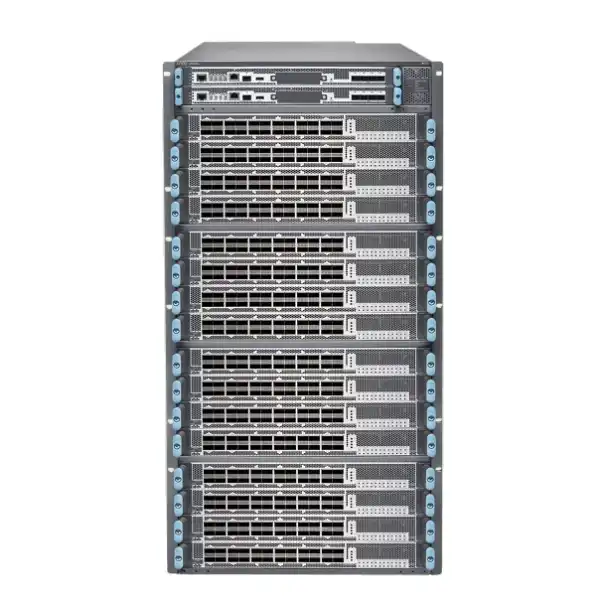
Juniper MX10016 Universal Routing Platform
A high-capacity 21-RU, 16-slot modular routing chassis built for demanding service-provider, cloud and enterprise edge roles. The important purchasing question today is not simply whether the MX10016 can carry large routing workloads; it is whether the exact chassis, control boards, switch-fabric generation, line cards, optics, software release, power system and support position form a coherent lifecycle-safe solution for the network you are operating or inheriting.
Direct answer: what the MX10016 is and what must be confirmed
The Juniper MX10016 Universal Routing Platform is a modular edge-routing chassis in the MX10000 family. Juniper’s hardware documentation describes a 21-rack-unit system with 16 horizontal line-card slots and up to 38.4 Tbps of chassis throughput. Its documented deployment roles include Layer 3 peering, data-center gateway, VPLS aggregation, Layer 3 aggregation and video distribution. That makes it relevant to operators that need large routing scale, high interface density and a service-rich Junos-based edge rather than a small fixed router.
The main factor to confirm is configuration compatibility across the whole system. An MX10016 order should not be reduced to a chassis code. The useful unit of procurement is a validated combination of chassis revision, switch-fabric boards, routing and control boards, supported line cards, optics or cables, power supplies, fan system, software train, licenses, rack environment and support strategy. A component that belongs to the wider MX10000 family is not automatically interchangeable with every MX10016 hardware generation.
FourTeck can help determine whether an MX10016 is appropriate for an existing UAE deployment, a capacity expansion, a spare strategy or a migration project, and can help structure the bill of materials around the actual port speeds, route scale, services, redundancy, power feeds and lifecycle requirements rather than quoting an incomplete chassis.
MX10016 product identity and where it fits
The MX10016 was designed as a high-capacity member of Juniper’s universal-chassis strategy for routing. Its value comes from combining a large modular slot count with the service depth associated with the MX routing family. In practical architecture terms, it sits closer to a carrier or cloud edge platform than to a conventional branch, campus-distribution or small enterprise WAN router. The chassis is intended to aggregate many high-speed links and maintain a substantial control and forwarding footprint while allowing field-replaceable line cards and system components to be serviced without treating the entire router as a disposable appliance.
Juniper documentation describes the chassis as providing 38.4 Tbps of throughput, with 76.8 Tbps stated in half-duplex terms. Earlier capacity positioning also described possible breakout densities reaching 1,536 10GbE, 384 40GbE or 384 100GbE interfaces when populated with the relevant supported hardware. Those headline figures are useful for understanding the original design scale, but they should not be used as a purchase list. Real port density is determined by the exact line cards and transceivers installed, and supported combinations vary by hardware and software generation.
The platform’s 16 line-card slots are a significant architectural distinction. Large slot count can reduce the number of separate routing chassis needed for some edge designs, but it also concentrates capacity, power draw, optics inventory and maintenance impact into a larger failure domain. Network architects should therefore assess redundancy at the system level, not simply component redundancy inside one chassis. If the MX10016 is being used in a peering or aggregation role, dual-chassis design, diverse upstreams, separate power sources and planned maintenance behavior can matter more to service continuity than the raw forwarding number.
There is also an important lifecycle consideration. Juniper’s current documentation labels the MX10016 as end-of-life. That does not automatically mean an installed MX10016 must be removed immediately or that every deployed chassis has no useful operational life. It does mean buyers should treat new procurement, expansion, spares and support planning differently from a current-generation greenfield purchase. A responsible evaluation asks whether the objective is to sustain an installed base, extend capacity within a known environment, obtain compatible spares, complete a temporary migration stage, or build a new long-term edge. Those are different procurement problems and may lead to different answers.
Key chassis specifications for planning
| Planning item | MX10016 guidance |
|---|---|
| Form factor | 21 RU modular chassis. Rack elevation and service clearance should be planned before delivery. |
| Line-card capacity | 16 horizontal line-card slots, numbered 0 through 15 in Juniper documentation. |
| Documented chassis throughput | Up to 38.4 Tbps throughput, with 76.8 Tbps expressed half-duplex in the platform documentation. |
| Dimensions | Approximately 17.4 x 36.65 x 35 inches (44.2 x 93.09 x 88.90 cm), with deeper clearance when the EMI door is installed. |
| Chassis weight | Published product material lists approximately 604 lb (274 kg) excluding line cards. Final installed weight rises with cards, optics, power and ancillary hardware. |
| Mounting | 4-post rack mounting. Rack load rating, anchoring, rail procedure and data-center handling must be considered. |
| Airflow | Front-to-back airflow. Juniper requires unrestricted airflow and meaningful front/rear maintenance clearance. |
| Power families | AC and DC configurations exist. Exact power-supply models, feed capacity and redundancy design must match the installed chassis and card generation. |
| Operating environment | Published MX10000 specifications cite 0°C to 46°C at sea level, 5% to 90% non-condensing humidity and altitude up to 6,000 ft; installation design should use the exact hardware guide for the chassis revision. |
| Lifecycle | Juniper documentation currently identifies MX10016 as EOL. Support entitlement, software availability and component sourcing should be checked for the specific serialised system. |
These figures frame the engineering problem, but they are not substitutes for a configuration review. A platform of this size can fail a deployment plan for reasons that have nothing to do with nominal throughput: wrong power feed, insufficient rack depth, mismatched control-board and fabric generations, unsupported optics, a software requirement that conflicts with the installed network standard, or a support position that makes an otherwise functional chassis inappropriate for a critical service.
The most important MX10016 sizing decisions
1. Traffic profile, not just aggregate bandwidth
Peak throughput is only one variable. Edge routing may also be constrained by route scale, BGP convergence expectations, subscriber or service scale, encapsulation mix, queueing policy, filtering, telemetry, MACsec, MPLS and the forwarding behavior of the selected line-card generation. A design carrying a simple IP transit profile can have very different resource requirements from one supporting rich MPLS services or complex edge policies at the same number of gigabits.
2. Exact port-speed mix
A requirement written as “100G router capacity” is too vague. Count the actual 10GbE, 40GbE, 100GbE, 200GbE or 400GbE circuits, expected breakout ratios, optic reaches, fibre types, protection links, spare ports and growth reserve. Port mix determines the realistic line-card selection and may expose whether maintaining an MX10016 is sensible compared with migrating to a newer platform.
3. Software and control-plane fit
Software must be evaluated as part of hardware selection. Different line-card generations can have different minimum Junos or Junos OS Evolved requirements. The desired routing features, security functions, telemetry tooling and automation stack should be checked against the release family that the actual chassis and cards can run and that the organisation is prepared to operate.
4. Failure-domain and maintenance design
Sixteen slots provide density, but putting many services into one large chassis can amplify operational impact if maintenance is poorly planned. Determine which links and services must survive a line-card failure, routing-engine event, fabric maintenance, power-source loss, whole-chassis outage or software upgrade. High availability is an architecture, not a checkbox on a component list.
5. Lifecycle horizon
For an EOL platform, the time horizon changes the answer. A spare chassis for an installed estate, a two-year bridge to a new backbone and a ten-year greenfield core are not equivalent requirements. Hardware availability, repairability, entitlement, software maintenance and engineer familiarity should be weighed against the cost and risk of accelerating migration.
6. Facility readiness
The MX10016 is physically and electrically significant. Verify floor and rack loading, four-post mounting, front and rear access, A/B power distribution, breaker capacity, grounding, cooling, airflow direction and cable-management space. A technically correct router configuration still fails as a project if the room cannot safely house and service it.
Line cards, interfaces and compatibility: why the BOM must be exact
The line card is where the abstract idea of “MX10016 capacity” becomes a real interface plan. Juniper documentation for the platform identifies the MX10K-LC2101 as one of the supported cards. That card provides up to 2.4 Tbps and was designed around high-density 100GbE and 40GbE operation, with support for channelized 10GbE use. Juniper also documents the MX10K-LC480 as a lower-speed 48-port SFP/SFP+ line card with up to 480 Gbps of throughput, useful when a chassis needs 1GbE or 10GbE connectivity rather than making every slot a high-rate coherent block.
Compatibility becomes more nuanced with later MX10000 hardware. Juniper’s Hardware Compatibility Tool currently lists the JNP10K-LC9600 as supported on MX10016 in an EOL context and associates that support with Junos OS Evolved 22.2R1. The LC9600 itself is a 24-port 9.6-Tbps card whose QSFP ports can operate at rates including 400, 200, 100, 50, 40, 25 and 10 Gbps through supported configuration and breakout methods. However, current component documentation for LC9600 focuses on MX10004 and MX10008, while the compatibility tool preserves the historical MX10016 support relationship. That difference is exactly why an EOL platform should be validated by specific chassis revision, software path and support evidence rather than assuming that a modern MX10000 line card can be inserted safely into any older chassis.
The correct approach is to start from interfaces. For each planned circuit, list speed, media, optic form factor, fibre type, nominal reach, connector type, redundancy requirement and whether channelization is expected. Then map those requirements onto a supported line-card layout. This avoids common procurement mistakes such as buying the right number of physical ports but the wrong port-speed combinations, overlooking breakout limitations, or discovering that the chosen optic requires a line card, software release or FEC behavior that differs from the existing network standard.
Optics must be treated as first-class components. A line card with QSFP-class ports does not imply that every QSFP optic is valid. The exact Juniper hardware compatibility information should be checked for transceiver type, supported speed, wavelength, reach, breakout mode and software release. When third-party optics are part of an established operational policy, the buyer should explicitly decide whether support, telemetry and troubleshooting expectations remain acceptable. For a critical edge platform, an optic mismatch can cause more operational pain than an under-specified chassis because the symptom appears as intermittent physical-layer behavior rather than an obvious ordering error.
Breakout planning also affects port counting. A 400GbE-capable port may support multiple lower-rate lanes only in supported breakout configurations, and the cabling, lane mapping and remote-end compatibility must align. Counting a 400G physical port as four or eight arbitrary lower-speed links without checking the card’s supported modes is unsafe. If the project includes migration from 10G or 100G aggregation to higher-speed uplinks, document which ports will remain native, which will be broken out, and when the remote devices are expected to move to new optics.
Finally, reserve capacity deliberately. Spare ports are useful, but empty slots, power headroom and fabric compatibility can be more valuable than simply leaving a percentage of ports unused. For an EOL chassis, future line-card availability is uncertain compared with a current platform, so the expansion strategy should be linked to realistic sourcing. A buyer who needs two additional 100G ports next year has a different risk profile from a buyer expecting to add multiple 400G line cards over five years.
Lifecycle notice: MX10016 is an EOL platform
Juniper’s current MX10016 documentation page is explicitly labelled EOL. For procurement, that status should be visible rather than buried at the end of a product description. End of life affects the context in which the platform should be considered, even when the hardware is technically capable and familiar to the operations team.
For an existing MX10016 estate, continued use may be rational when the equipment is stable, the installed capacity is appropriate, spares are controlled, software and security requirements are understood, and the business has a defined migration horizon. In that situation, additional compatible components or a spare unit may reduce operational risk during the transition period. The purchasing question is then continuity: can the organisation obtain the exact supported components and maintain them within its governance and support obligations?
For a new greenfield network, the decision is different. A project that expects long vendor support, new interface generations, continuing software feature development and multi-year expansion should compare current MX platforms or alternative Juniper architectures before committing to an EOL chassis. The cost of an attractively priced legacy chassis can be overwhelmed by constrained spares, software limitations, support gaps, engineer time and an earlier-than-planned migration.
For secondary-market hardware, request more than a model name. Useful information includes serial number, chassis hardware revision, installed routing and control boards, switch-fabric boards, power-supply models, fan assemblies, line cards, storage condition, current software, boot history, alarm state, physical damage history and entitlement position. A listing that says only “MX10016 chassis” is not enough to judge value. Even if the base chassis is genuine, missing or mismatched FRUs can turn an apparently inexpensive purchase into a complex integration exercise.
Support policy should also be separated from simple hardware availability. A part may exist in the market after vendor lifecycle milestones, but availability does not automatically provide vendor software rights, technical support or replacement assurances. Critical infrastructure owners should document what happens when a failure occurs, who owns the spare, who can diagnose the fault, whether replacement components are prevalidated, and whether the chosen software is frozen or still governed by an approved maintenance process.
Routing and service roles the MX10016 was designed to support
Internet peering edge
Juniper identifies Layer 3 peering as a deployment role for MX10016. In a peering design, evaluate full-table or partial-table requirements, BGP policy complexity, convergence targets, route-reflector architecture, DDoS response workflows, telemetry, interface protection and upstream diversity. Port count alone does not determine whether the router is a good fit; control-plane scale and operational policy matter just as much.
Data-center gateway
As a data-center gateway, the platform can sit between a large internal fabric and WAN, DCI or external networks. Buyers should document whether the requirement is pure Layer 3 handoff, MPLS services, Internet edge, DCI, security-enforced interconnect or a mixture. The line-card and optic plan must match the fabric-facing and WAN-facing speeds, and the migration plan must account for routing adjacencies on both sides.
Layer 3 aggregation
Large aggregation environments benefit from modular density when many downstream routers, sites or services converge into a smaller number of backbone interfaces. Assess traffic oversubscription, QoS, failure-domain boundaries, link aggregation, ECMP behavior, routing protocol design and planned growth. A chassis should be sized around the traffic matrix and protection model, not simply the sum of access-link speeds.
VPLS and MPLS service aggregation
The MX family is often chosen for service-rich edge roles. Where VPLS, MPLS VPNs or other provider services are in scope, specify the actual service model, scale, encapsulations, QoS requirements, OAM expectations and interworking dependencies. Verify those features against the chosen software and line cards instead of assuming that every feature supported somewhere in the MX family is identical across all generations.
Video or high-volume distribution
Juniper lists video distribution among MX10016 deployment roles. High-volume distribution networks may care about multicast scale, replication behavior, interface density, sustained throughput and failure recovery. When the traffic pattern is highly asymmetric or bursty, analyse the real forwarding profile rather than assuming that a headline chassis figure directly predicts service experience.
Migration or spare platform
Because the platform is EOL, one of the most realistic present-day use cases is sustaining an installed environment. A compatible spare chassis or line card can be operationally valuable when it protects a planned migration window. The key is to validate the spare against the production hardware revision and software image before an outage, not after a failure occurs.
Junos software, feature validation and licensing
MX Series value is strongly linked to Junos, but software should not be treated as a generic entitlement that floats independently of hardware. An MX10016 project should identify the exact operating-system family and release required by the installed control boards and line cards, then verify that the desired routing and services features are supported in that release. Hardware support and feature support are related but not identical questions.
A useful validation process starts with the current production configuration. Record the Junos or Junos OS Evolved release, routing-engine type, line-card inventory and critical protocols. Then classify features into three groups: mandatory for service continuity, desirable for operational improvement, and optional. Mandatory items might include BGP, IS-IS or OSPF, MPLS, L3VPN, VPLS, EVPN, multicast, BFD, QoS, filters, telemetry, synchronisation or MACsec depending on the network. Each should be verified for the exact hardware path.
Licensing deserves special attention because MX licensing has evolved. Current Juniper licensing documentation describes software feature tiers and hardware-specific bandwidth or feature licenses for parts of the MX portfolio. It also lists MACsec bandwidth license variants that include MX10016 among supported hardware models. That does not mean every MX10016 deployment needs MACsec or the same licensing model. It means a quotation must identify which licensed features are actually required and whether existing entitlements can legally and technically cover the planned use.
MACsec is a good example of why licensing should follow requirements. If encrypted Ethernet links are not part of the design, adding MACsec licensing simply because it is available provides no buyer value. If MACsec is required, confirm line-card support, aggregate encrypted bandwidth, software compatibility, peer interoperability and the license quantities that correspond to configured bandwidth. Treat security features as engineered services rather than decorative checkboxes.
Automation and management integration also need software alignment. Many large MX deployments are managed through configuration automation, telemetry platforms, NETCONF, APIs or controller systems. A legacy chassis can remain operationally useful when it integrates cleanly with the organisation’s tooling, but maintaining a release only because the router requires it can create an operations burden elsewhere. Before deciding to extend the MX10016 lifecycle, check whether existing templates, monitoring systems, security scanners, backups and change-control processes still support the chosen software train.
For migration, software sequencing may be as important as physical replacement. If a new line card requires a different OS family or release from the installed system, the change can affect the entire chassis. That means the maintenance window must account for routing-engine upgrade, control-plane convergence, configuration validation and rollback. Buying a card without planning the software transition can turn a simple capacity expansion into an unplanned platform migration.
Power, cooling and data-center engineering in Dubai
A 21-RU modular router belongs in the facility design, not just the network diagram. Juniper documents front-to-back airflow for MX10016 and instructs installers to keep airflow unrestricted. It also calls for service clearance in front of and behind the chassis. That matters in dense data centers where a theoretically available rack position may not provide enough depth, rear access or cable-management room for safe maintenance.
The chassis dimensions are approximately 17.4 inches wide, 36.65 inches high and 35 inches deep, with additional depth when the EMI door is used. Juniper’s hardware guide shows the need for roughly 24 inches of maintenance clearance at both front and rear, with additional guidance for NEBS-oriented installations. Those clearances should be translated into actual aisle conditions before equipment is delivered. A rack can be physically wide enough yet still be unsuitable because adjacent equipment, doors, PDUs, cable baskets or rear obstructions prevent component removal.
Weight is another practical constraint. Published material lists the MX10016 at roughly 604 lb or 274 kg excluding line cards. Once line cards, power supplies and other FRUs are installed, the working system is heavier. The rack must have adequate static load rating and be installed on flooring that supports the concentrated load. Delivery path, lift equipment and safe handling procedure should be prepared; this is not a chassis that two technicians should casually manoeuvre into a rack.
Power supply options differ by hardware generation. Juniper documentation covers AC and DC models and later high-capacity power supplies, including hot-removable FRUs. Documentation for the MX10000 power system notes that an MX10016 base configuration can be supplied with multiple power supplies and that some later power-supply modules provide several kilowatts each depending on feed configuration. The design implication is simple: do not derive circuit sizing from a generic online specification. Build the power budget from the exact FRU list, line-card load and redundancy mode.
A/B source diversity should be genuine. Feeding two power inputs from the same upstream breaker or UPS path does not create the intended resilience. For UAE data centers, confirm PDU receptacles, breaker ratings, source diversity, grounding and cable standards with the facility team. Where DC power is used, involve qualified electrical engineering personnel for lugging, polarity, feed protection and grounding. Juniper documentation specifically treats the platform as restricted-access equipment requiring proper protective earthing.
Cooling should be measured in the context of the full rack. A high-density chassis can be placed inside an otherwise acceptable room and still experience poor inlet conditions if neighboring equipment exhausts toward its intake or if blanking and aisle containment are wrong. Confirm inlet temperature, airflow direction, rack perforation, cable blockage and spare cooling capacity. In Dubai’s climate, outdoor temperature is not the data-center inlet temperature, but high ambient conditions can increase stress on facility cooling infrastructure, making power and thermal planning especially important for large legacy hardware.
Finally, maintenance access should be designed around FRU replacement. Fan trays, power supplies, control components and line cards need clear removal paths. Cabling must not cross the service area in a way that prevents replacement. High-density optics should be labelled so technicians can identify ports without disturbing adjacent fibres. The goal is not merely to install the chassis once; it is to make every predictable maintenance event safer and faster over the remaining operational life of the system.
High availability and resilience planning
Modular routers usually provide component-level redundancy options, but a resilient service requires several independent layers. Start by separating chassis-level resilience from network-level resilience. Redundant control boards, fabrics, fans and power supplies can reduce the impact of individual FRU failures. They cannot protect against every chassis-wide event such as severe software fault, human error, rack power loss, flooding, fire suppression event or a maintenance action that affects the full system.
For critical peering, gateway or aggregation services, a dual-router topology is often the more meaningful protection boundary. Determine how traffic redistributes if one MX10016 is removed entirely. That includes BGP or IGP convergence, ECMP behavior, LAG or MC-LAG dependencies, downstream device behavior, stateful service interactions and capacity on the surviving path. A failover plan that works logically but leaves the surviving router at 120% of practical throughput is not resilient.
Routing-engine redundancy should be tested rather than assumed. Document normal mastership, graceful routing behavior, non-stop mechanisms where used, planned switchover process and monitoring. Similarly, fabric redundancy must be understood for the installed generation. Some high-capacity line cards require specific fabric versions, so a fabric upgrade can be both a performance project and an availability event.
Power redundancy needs a complete chain from utility or UPS source to router inlet. Verify how many power-supply failures are tolerable at the actual load, which feeds each PSU uses, whether A and B sources are electrically independent, and what alarms indicate degraded redundancy. The useful question is not “does the router have redundant power supplies?” but “with the current cards and traffic load, what exact failure combinations can occur without service loss?”
Spares strategy becomes more important for EOL hardware. A spare line card stored locally can dramatically reduce restoration time, but only if it is the correct hardware revision, is tested, is stored properly and can boot with the production software. The same applies to routing and control boards, fabric modules, fan assemblies and power supplies. Spares should be part of an inventory and maintenance process, not anonymous equipment on a shelf.
Operational resilience also depends on documentation. Keep current rack elevations, cabling maps, FRU serials, software images, configuration backups, recovery procedures and escalation contacts. When an older chassis fails at 02:00, the team should not be discovering for the first time which spare is compatible or which engineer remembers the boot procedure. The best use of legacy hardware is controlled, documented and intentionally bounded.
Installation planning for an MX10016 chassis
Validate the asset
Confirm the exact chassis identity, hardware revision, installed FRUs, serial numbers and lifecycle/support position. For used or transferred equipment, inspect for damage, missing blanks, contaminated connectors and unknown component substitutions before it enters the production rack.
Prepare rack and facility
Check four-post rack compatibility, load rating, depth, anchoring, RU allocation, maintenance clearance, airflow direction, grounding and lifting procedure. Reserve PDU capacity and identify independent power sources before cabling work begins.
Stage hardware and software
Verify routing/control boards, fabrics, power supplies, fan components and line cards as one compatible set. Confirm the intended Junos release, licenses, configuration baseline and recovery media. Do not wait until the maintenance window to discover a version dependency.
Install and power safely
Use the manufacturer installation procedure and appropriate lifting resources. Connect protective earth and power feeds according to the selected power system. Confirm source diversity and PSU status before introducing production traffic.
Validate optics and links
Install supported optics or breakout cables, verify transmit/receive levels where relevant, inspect fibre cleanliness, confirm FEC and speed settings, and label both local and remote ends. Bring up links in a controlled sequence so anomalies can be isolated quickly.
Prove service and rollback
Test routing adjacencies, forwarding, convergence, management, alarms, telemetry, redundancy and traffic paths against an acceptance plan. Keep a defined rollback point until production stability is confirmed.
A large modular chassis rewards preparation. Most avoidable installation incidents come from dependencies that could have been discovered in staging: unsupported optics, wrong software, missing power cables, mismatched FRUs, inaccessible rack space or incomplete rollback instructions. An MX10016 maintenance event should therefore be treated as a coordinated network-and-facility change rather than as a simple appliance swap.
Migration from or into an MX10016 environment
Migration planning should begin with services rather than devices. Create an inventory of routing adjacencies, VRFs, MPLS services, VLANs, IRB interfaces, LAGs, multicast state, QoS classes, filters, policy statements, route limits, management access, telemetry, authentication and out-of-band dependencies. The objective is to understand what the current MX10016 is doing, not merely what ports are connected.
Next, build a traffic and route baseline. Record normal and peak utilization, route counts, CPU behavior, memory headroom, interface errors, optics telemetry, packet drops, queue occupancy where available and convergence behavior. This data helps determine whether the replacement must simply reproduce existing scale or provide material headroom. It can also show whether some legacy services should be redesigned rather than copied forward.
Physical migration should be mapped circuit by circuit. For every link, know the remote device, port, speed, optic, fibre path, LAG membership, VLAN or routed-interface role and rollback method. If the new platform uses different optics or breakout geometry, pre-stage patching and spare cables. For data-center gateways, coordinate with the fabric team; for Internet edge, coordinate with peers and transit providers if addressing, optics or maintenance timing changes.
Control-plane migration can be gradual. Depending on topology, new and old routers may run in parallel while BGP preference, IGP metrics or LAG membership is adjusted. The safest method depends on the network and should be labbed or modelled where possible. Avoid designing a cutover that requires many unrelated changes at the same instant. Separating physical installation, software validation, routing adjacency establishment and traffic migration creates clearer fault boundaries.
Configuration conversion deserves human review. Even within Juniper ecosystems, feature syntax, platform defaults, supported knobs and scale behavior can differ across generations. A line-by-line copy of an old configuration can carry obsolete statements, hidden workarounds and policies that no longer match the intended design. Treat migration as an opportunity to identify which configuration is functionally required and which is historical residue.
Operational tools must migrate too. Update monitoring, syslog, SNMP or telemetry targets, automation inventory, backup systems, TACACS or RADIUS policies, NTP, DNS, certificates, asset management, interface descriptions and alert thresholds. A router is not fully migrated when packets pass; it is migrated when the operations team can manage, observe, secure and recover it with the same or better confidence than before.
After traffic moves, define the decommission period. Keeping the old MX10016 powered indefinitely “just in case” can preserve hidden dependencies and consume substantial rack and power resources. If it becomes a spare, document that role and test its storage and recovery plan. If it is retired, follow the organisation’s asset-disposal, data sanitisation and inventory processes.
Procurement guidance for Dubai and UAE buyers
The MX10016 should be quoted as a system. A useful request for quotation identifies whether the buyer needs a bare chassis, an operational chassis, specific replacement FRUs, additional line cards, optics, licenses, support services or a migration package. Without that distinction, two quotations can look similar while representing very different levels of completeness.
For a working chassis, ask for the exact installed routing/control boards, switch-fabric boards, power-supply models, fan assemblies and line cards. Confirm whether blanking panels, cable-management parts, rack hardware, grounding accessories and power cables are included. For every interface card, request the model code and quantity. For optics, list manufacturer part number, speed and reach instead of accepting a generic statement such as “100G modules included.”
Condition is particularly important for EOL equipment. Determine whether hardware is new old stock, vendor-remanufactured, third-party refurbished, used tested or simply pulled from a working environment. Those categories are not equivalent. Ask what testing was performed, whether diagnostic logs are available, what warranty applies, how DOA replacement is handled and whether serial numbers are provided before shipment.
Software and entitlement should be addressed explicitly. Hardware possession does not automatically answer software-license or support questions. If the deployment relies on access to specific Junos images, vendor support or licensed features, validate the legal and operational path before purchase. Inherited hardware from another organisation may have entitlement conditions that do not transfer in the way a buyer expects.
Shipping and handling also deserve planning because the chassis is large and heavy. Confirm packing quality, shock protection, palletisation, insurance, lift requirements, loading-bay access and internal transport to the data hall. For imported used equipment, factor customs documentation, lead time and the possibility that a damaged chassis may be difficult to replace quickly.
For UAE projects, a local spares plan can materially improve resilience when overseas lead times are uncertain. Decide whether the organisation needs same-site spares, a Dubai-area spare pool or supplier-backed replacement. The correct strategy depends on service criticality and how many compatible MX10016 systems remain in operation. A single noncritical lab chassis does not justify the same inventory as multiple production edge routers.
Price should therefore be evaluated against completeness and risk. A low chassis price is not a bargain if it requires expensive missing fabrics, unsupported cards, rare power supplies or an unavailable software path. Conversely, an apparently higher quote that includes a validated FRU set, correct optics, tested configuration and local replacement commitment may have lower total deployment risk.
When the MX10016 may still make sense
Installed-base expansion with known compatibility
If an organisation already operates MX10016 and has validated software, spares, engineers and line cards, a carefully selected expansion may be lower risk than introducing a new architecture immediately. This is strongest when the expansion is bounded and tied to a defined migration plan.
Strategic spare for a critical legacy network
A tested spare chassis or FRU set can reduce outage duration where a production estate cannot yet be retired. The spare should mirror the live hardware sufficiently to avoid compatibility surprises and should be periodically checked rather than left unverified for years.
Temporary migration bridge
Some projects need capacity or replacement hardware for a limited period while circuits, data centers or service contracts move. An MX10016 may be reasonable when its role is explicitly temporary and the cost of maintaining it is lower than accelerating the whole migration.
When another platform should be evaluated
For new long-lived deployments, large future 400G growth, evolving software requirements, strict vendor-lifecycle policy or environments that cannot tolerate uncertain spares, compare current Juniper MX platforms or other contemporary architectures. The MX10016’s original performance strengths do not remove its lifecycle constraints.
Comparison questions to ask before choosing an alternative
The right replacement is not necessarily “the newest larger MX.” Start with the reason the MX10016 was selected or retained. If the essential requirement is 16 slots of modular density, a smaller current platform may require more chassis but could still improve power efficiency, lifecycle and failure-domain distribution. If the requirement is service richness rather than slot count, a current fixed or smaller modular router may be enough.
Compare usable capacity under the real interface plan. A new chassis with fewer slots but higher per-slot bandwidth may outperform the legacy architecture for 400G-heavy networks. Conversely, an environment with many low-rate legacy interfaces may care more about practical breakout and optic support than about maximum terabits. Migration cost can also be dominated by optics and cabling rather than the router itself.
Compare operational architecture. Does the replacement use the same Junos operational model? Are automation templates portable? Does it require Junos OS Evolved? How will routing-engine behavior, upgrade procedures and telemetry change? A platform that is technically superior but operationally unfamiliar may require training and staging that should be included in the project cost.
Compare facility impact. Newer silicon can improve bandwidth density and power efficiency, potentially reducing rack count and cooling load. However, power connectors, voltage requirements and airflow may change. A migration that frees 10 RU but requires PDU redesign can still be worthwhile, but the facility work must be known before approval.
Compare support horizon and commercial terms. A new platform may carry a higher acquisition cost but provide a clearer software and hardware support window. For critical routing infrastructure, the ability to receive fixes, obtain replacement components and align upgrades with vendor recommendations can be more valuable than the initial chassis discount.
Finally, compare the migration path itself. If the existing MX10016 supports a gradual link-by-link transition, the business may be able to spread risk over several windows. If the topology forces a large cutover, choose a replacement and project plan that minimize simultaneous dependencies. The best alternative is the one that improves the long-term architecture without creating an unnecessary short-term outage risk.
Detailed buyer checklist for an MX10016 quotation
A precise quotation starts with precise inputs. The following checklist is intentionally technical because missing one of these items can change the hardware, software, optics, support or installation scope.
New deployment, replacement, spare, capacity expansion, lab use or migration bridge.
Chassis revision, routing/control boards, fabric boards, line cards, power supplies and fan assemblies.
Quantity by speed, fibre or copper type, breakout needs, LAG design and projected growth.
Exact reach, wavelength, connector, remote-end optic type and whether Juniper-branded optics are required.
Current release, target release, Junos or Junos OS Evolved requirement and change-control constraints.
BGP, IGP, MPLS, EVPN, VPLS, multicast, QoS, filters, telemetry, timing or security features that must be preserved.
Peak traffic, route counts, VRFs, service instances, multicast scale and expected growth window.
AC or DC, available source voltage, breaker size, A/B feeds, PDU connectors and redundancy policy.
Rack depth, free RU, loading limit, airflow orientation, aisle clearance, grounding and lifting access.
Vendor entitlement expectations, supplier warranty, local replacement SLA, spare strategy and lifecycle horizon.
Configuration conversion, staging, cutover windows, remote-end coordination, rollback and post-change monitoring.
Dubai or other UAE site, data-center rules, delivery access and any local logistics constraints.
Operational acceptance tests after installation
A router should not be declared ready because all line cards show green. Acceptance should test the system against the services it must carry. Begin with hardware health: confirm chassis alarms, temperature, fans, power supplies, fabric status, routing/control boards, line-card state, optics diagnostics and interface counters. Establish a clean baseline before traffic moves.
Next, verify management. Console access, out-of-band management, SSH, AAA, NTP, DNS, syslog, telemetry, configuration backup and monitoring must work before the device becomes critical. A router that forwards packets but cannot be reliably observed or administered is not production-ready.
Routing validation should check adjacency state, received and advertised route counts, policy behavior, next-hop resolution, ECMP distribution and graceful failover. If the MX10016 participates in Internet peering, compare route counts and key prefixes with the old system. If it participates in MPLS or VPN services, validate representative customer or service paths rather than only checking the global routing table.
Interface testing should include speed, FEC where relevant, optical power levels, errors, drops, MTU, LAG member state and redundancy. Breakout ports deserve careful mapping because a logical lane can be connected correctly from a physical standpoint yet mapped to the wrong remote port. Document the final patching and update interface descriptions as part of acceptance.
Failure tests should be selected according to risk. Examples include routing-engine switchover, loss of one power source, loss of a LAG member, withdrawal of a routing peer or controlled shutdown of a redundant path. The purpose is not to create drama but to prove that the designed redundancy behaves as expected while engineers are present and the change window is open.
Finally, preserve evidence. Save the accepted configuration, hardware inventory, software version, key show-command outputs, optic levels, baseline performance data and updated diagrams. For legacy platforms, good records are especially valuable because future replacement engineers may have less direct experience with the chassis than the team installing it today.
Frequently asked buyer questions
Is the Juniper MX10016 still a current product?
Juniper’s current documentation labels the MX10016 as EOL. Buyers should therefore treat it as a lifecycle-managed platform. It may still be relevant for installed-base expansion, spares, migration or specialised legacy requirements, but a long-term greenfield deployment should be compared with current alternatives.
What throughput does MX10016 provide?
Juniper’s MX10016 hardware documentation specifies up to 38.4 Tbps of chassis throughput and also expresses 76.8 Tbps in half-duplex terms. Actual usable deployment capacity depends on supported line cards, port configuration, features, traffic profile and redundancy design.
How many line-card slots are available?
The chassis has 16 horizontal line-card slots. The card mix should be selected from validated MX10016 compatibility information for the intended software and hardware generation.
Can I install a JNP10K-LC9600 in an MX10016?
Juniper’s Hardware Compatibility Tool records MX10016 support for the JNP10K-LC9600 in an EOL context and associates it with Junos OS Evolved 22.2R1. Because current LC9600 component documentation focuses on MX10004 and MX10008, an MX10016 LC9600 project should be validated carefully against the exact chassis, control/fabric hardware, software and lifecycle information before purchase.
Does the chassis include line cards and optics?
Do not assume so. MX10016 is modular, and commercial listings can describe anything from an empty chassis to a populated system. A quotation should state exactly which routing/control boards, fabric boards, power supplies, fans, line cards, optics, cables, rack hardware and licenses are included.
Can MX10016 be used for 400GbE?
Later MX10000 line-card technology includes 400GbE-capable cards, and Juniper’s compatibility data records legacy MX10016 support for LC9600. The exact implementation is software- and hardware-dependent. Do not base a 400G design on the chassis model alone; validate the line card, fabric, control hardware, power, fan components, optics and operating system as a complete configuration.
What rack space is required?
The MX10016 occupies 21 RU. The rack also needs adequate depth, loading capacity, airflow and front/rear service clearance. Juniper’s installation guidance calls for substantial maintenance clearance, so free RU alone does not prove that a rack is suitable.
How should power be sized?
Use the exact installed FRU list and Juniper power documentation. AC and DC power-supply variants exist, and later power supplies have different capacities and feed behavior. Include redundancy mode, line-card load, breaker ratings, A/B source diversity and facility PDU design in the calculation.
Is used MX10016 hardware suitable for production?
It can be suitable only when condition, compatibility, software, support and spares are acceptable to the organisation. For critical production use, request serialised inventory, test evidence, warranty terms and a replacement strategy. An unverified secondary-market chassis is not equivalent to a lifecycle-managed production asset.
What information should I send for a quote?
Provide intended use, quantity, existing hardware inventory, required port speeds and counts, optics, current and target software, routing/services features, power type, rack location, support requirement and whether installation or migration assistance is needed. This produces a far more accurate quotation than a chassis name alone.
Decision recap: what determines a good MX10016 outcome
Model fit
Use MX10016 when the actual requirement aligns with its large modular edge role and the lifecycle position is acceptable. Do not select it only because a legacy chassis is available at an attractive price.
Capacity
Validate throughput, route scale, service scale and realistic port density for the chosen cards. Headline chassis figures are architectural indicators, not a substitute for workload sizing.
Compatibility
Confirm control boards, fabrics, line cards, optics, power, fans and software as one supported configuration. EOL status makes disciplined compatibility validation especially important.
Licensing and software
Identify required features and their entitlement before purchase. Hardware availability alone does not guarantee the software, support or license path needed for production.
Facility readiness
A 21-RU chassis of this weight requires verified rack, power, grounding, airflow, cooling and maintenance access. Include facility engineering in the approval process.
Lifecycle plan
Decide how long the platform must remain in service, what spares are needed and when migration begins. Legacy infrastructure is safer when its exit plan is known.
What FourTeck needs from you for an accurate MX10016 quotation
Send the information you already have; it does not need to be perfect. The most useful starting inputs are the purpose of the system, quantity, whether an MX10016 is already installed, current hardware inventory, required interface speeds and counts, optic reaches, expected traffic, key routing or service features, software version, AC or DC power requirement, rack location, support expectation and migration timeline.
Photos or command output showing chassis and FRU inventory are useful for compatibility review.
List speed, quantity, media, reach and whether links must be broken out or aggregated.
Identify the protocols and functions that cannot be lost during expansion or migration.
Provide site, rack, power-feed and maintenance-window information when installation is part of the scope.
Tell us whether the goal is long-term operation, spares coverage, temporary expansion or replacement planning.
Plan the MX10016 around your real network, not a chassis headline
The Juniper MX10016 remains a substantial routing platform, but its EOL status makes accuracy more important than enthusiasm. A sound decision considers exact hardware compatibility, software, licensed functions, interface media, facility engineering, spares and the migration horizon together. FourTeck can help build a Dubai/UAE quotation that reflects the system you actually need and can also help identify when a current platform is the safer long-term direction.


Reviews
There are no reviews yet.