
Universal CPE for large branch and managed-service deployments
Juniper NFX350 Network Services Platform
The Juniper NFX350 brings compute, high-speed WAN connectivity, Junos networking, hardware resilience and virtual network functions into a single 1U platform. It is aimed at organisations and service providers that need more than a conventional branch router: secure SD-WAN, service chaining, virtual firewalling, managed routing and edge applications can be consolidated on one customer-premises platform when the design is sized correctly.
Direct answer: what is the Juniper NFX350?
The Juniper NFX350 is a secure, software-driven universal customer premises equipment platform in the NFX Series. It combines a server-class Intel processor, memory, SSD storage, Junos OS networking, Ethernet interfaces, redundant power and the ability to host multiple virtualized network functions on one appliance. In practical terms, it lets an enterprise or managed-service provider place routing, SD-WAN, security and selected virtual services at a branch or customer site without installing a separate physical appliance for every network function.
Its main use is large or extra-large branch and edge deployments where the design needs high WAN capacity, multiple service functions, resilient hardware and room for virtualized services. Buyers should consider it when a normal router or firewall does not provide enough compute flexibility, when several network functions need to be chained together, or when a service provider wants a common uCPE platform across customer locations.
The most important factor to confirm is not simply the model name; it is the exact NFX350 tier and bill of materials. S1, S2 and S3 variants have different processors, DRAM, maximum VNF counts and performance levels, while AC and DC power versions address different facility requirements. Interface modules, optics, LTE components, software releases, licenses, VNF images and orchestration choices can also change the finished solution.
FourTeck can help determine which NFX350 variant is appropriate for the required encrypted throughput, managed security load, number and size of VNFs, WAN media, redundancy target, rack environment and support model in Dubai or elsewhere in the UAE.
Where the NFX350 fits in an enterprise edge architecture
The NFX350 is best understood as an edge platform rather than a single-purpose box. Traditional branch designs often contain a router, a firewall, an SD-WAN appliance, a WAN optimiser, an LTE gateway and perhaps another server for specialised functions. That architecture can work, but every device adds rack space, power, cabling, maintenance contracts, software lifecycles and operational touch points. Universal CPE changes the design by providing compute resources and networking in one appliance so functions can be delivered as software where supported.
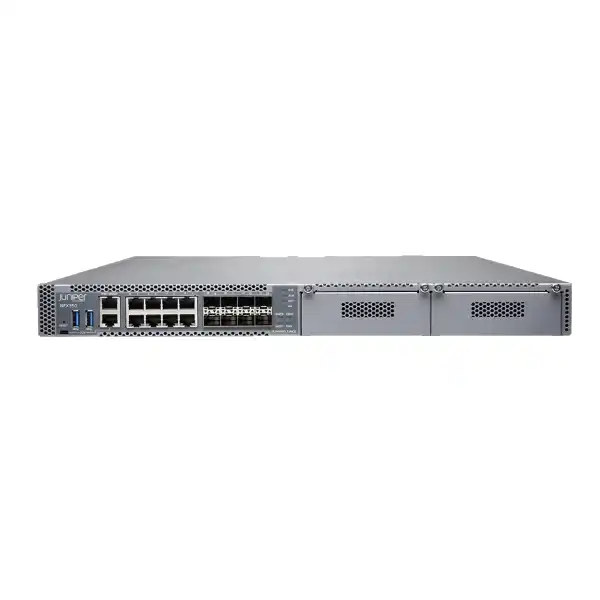
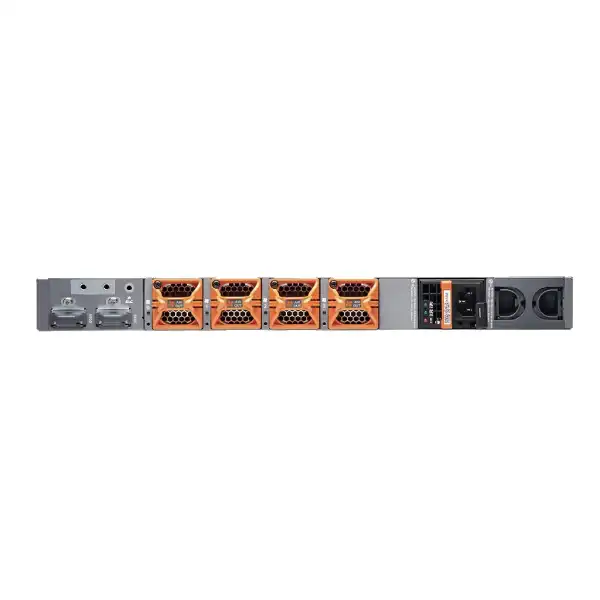
Juniper positions the NFX350 for large and extra-large deployments. This matters because the platform is intentionally more substantial than compact branch equipment. The chassis is 1U rack mount, uses redundant power supplies, has four hot-removable fan modules, provides two expansion slots and includes a mix of copper LAN connectivity and high-speed SFP+ interfaces. Its Intel Skylake-D processors and memory tiers are sized for workloads that may include more than routing alone.
For a Dubai headquarters, regional branch, service-provider handoff location, managed customer site or private-cloud edge, the NFX350 can act as the physical foundation for several logical services. The business reason for choosing it should be clear before purchase. If the requirement is only basic Internet routing with modest firewall capacity, a simpler platform may be easier to operate and more economical. If the requirement includes several virtual functions, higher encrypted WAN performance, service chaining, resilient power and 10GbE uplinks, the NFX350 becomes more relevant.
The platform also supports distributed and hybrid cloud-CPE concepts. That gives service providers flexibility in deciding which functions run locally at the customer premises and which functions are delivered elsewhere. The architectural benefit is not that every function must run on the NFX350; it is that the platform provides a programmable edge where networking and virtual services can be placed according to performance, security, latency, compliance and operational requirements.
NFX350 S1, S2 and S3: choose the compute tier deliberately
NFX350-S1
8-core Intel Skylake D-2146NT, 32 GB DRAM, up to 8 VNFs.
Juniper lists 2.5 Gbps IPsec performance and 12 Gbps for managed secure router and managed security use cases. S1 is the entry point in the NFX350 family and suits designs that need the NFX350 chassis and interface flexibility without the compute scale of S2 or S3.
NFX350-S2
12-core Intel Skylake D-2166NT, 64 GB DRAM, up to 10 VNFs.
Juniper lists 5 Gbps IPsec performance and 20 Gbps managed secure router or managed security performance. S2 is often the comparison point when S1 has insufficient VNF headroom but S3 would provide more capacity than the current service chain needs.
NFX350-S3
16-core Intel Skylake D-2187NT, 128 GB DRAM, up to 12 VNFs.
Juniper lists 7.5 Gbps IPsec and 30 Gbps managed secure router and managed security performance. S3 is the high-end NFX350 choice for heavier service chains, greater encrypted throughput and larger memory allocation requirements.
Each tier is offered in AC and DC power variants. Selecting S3 only because it is the largest model can be wasteful if the site will run a small number of lightweight functions, while selecting S1 around present-day traffic with no growth margin can create a premature upgrade. Sizing should start with the workload: anticipated WAN throughput, encrypted traffic ratio, number of VNFs, vCPU and memory reservations for each VNF, expected peak utilisation, storage needs, high-availability design and whether additional virtual applications are planned during the useful life of the appliance.
Verified hardware and platform specifications
| Specification | S1 | S2 | S3 |
|---|---|---|---|
| CPU | 8-core Intel Skylake D-2146NT | 12-core Intel Skylake D-2166NT | 16-core Intel Skylake D-2187NT |
| DRAM | 32 GB | 64 GB | 128 GB |
| Maximum VNF count | 8 | 10 | 12 |
| IPsec performance | 2.5 Gbps | 5 Gbps | 7.5 Gbps |
| Managed secure router | 12 Gbps | 20 Gbps | 30 Gbps |
| Managed security | 12 Gbps | 20 Gbps | 30 Gbps |
| Built-in network ports | 8 RJ-45 network ports and 8 SFP+ network ports; separate management and console connectivity is also provided. | ||
| Storage | Juniper Hardware Explorer currently lists 100 GB internal SSD plus 1600 GB external SSD capacity shown as 800 + 800 GB. Commercial configuration and included drives should be verified on the quotation. | ||
| Power supplies | Two hot-removable/hot-insertable PSUs; AC and DC model variants are available. | ||
| Maximum listed power consumption | 205 W | 220 W | 230 W |
| Form factor | 1U fixed chassis, approximately 44.09 cm wide and 53.01 cm deep excluding FRUs. | ||
| Operating temperature | 0°C to 50°C. | ||
Performance figures are platform values published by Juniper, not a promise that every real configuration will achieve the headline number. Packet size, enabled features, encryption choice, VNF mix, software release, traffic pattern, service chaining and resource reservations can all affect usable performance. For procurement, the safer approach is to treat the published figures as a sizing reference and validate the intended production feature set against the exact model and software combination.
Virtual network functions and service chaining
The defining capability of the NFX350 is its ability to host multiple virtual network functions, or VNFs. A VNF is a software implementation of a network function that would traditionally run on a dedicated appliance. Depending on the approved software ecosystem and design, that can include firewalling, routing, WAN optimisation, monitoring or other service functions. Juniper highlights support for both Juniper and third-party VNFs, giving service providers and enterprises flexibility in building a service chain around a common hardware platform.
The maximum VNF count—8 on S1, 10 on S2 and 12 on S3—is only one dimension of capacity. Eight lightweight functions are not equivalent to eight resource-intensive functions. Each VNF has its own vCPU, memory, disk, interface and throughput requirements. A design that technically fits within the maximum count may still be unsuitable if the combined memory reservations, compute demand or sustained packet-processing load exceed the comfortable operating envelope.
Service chaining also needs to be designed rather than assumed. The order in which traffic encounters routing, security, optimisation and inspection functions affects both policy and performance. A branch may require Internet traffic to pass through a firewall VNF but allow selected private WAN traffic to follow a different chain. Another deployment may use the NFX350 primarily as a secure router with one or two additional functions. The platform enables these patterns, but the production outcome depends on orchestration, configuration and software compatibility.
For managed services, the value is operational consistency. Instead of shipping a new physical appliance whenever a customer adds a service, an operator may be able to instantiate or change a VNF on existing uCPE capacity. That can shorten service activation and simplify spares strategy. The trade-off is that the uCPE becomes a shared failure domain. Hardware resilience, configuration backup, software governance, tested upgrade procedures and capacity monitoring therefore become more important than in a collection of unrelated standalone devices.
Before committing to a VNF design, identify the exact function vendor and version, supported hypervisor or platform requirements, license model, expected throughput, session or tunnel scale where relevant, vCPU and RAM requirement, disk footprint, interface mapping and any dependency on central orchestration. This information is needed to choose between S1, S2 and S3 with defensible headroom.
Network interfaces: copper access, high-speed WAN and management
Juniper lists eight RJ-45 network ports and eight SFP+ network ports on the NFX350 family. The hardware documentation also identifies a dedicated 10/100/1000BASE-T management port, RJ-45 console, mini-USB console and two USB 3.0 ports. The front-panel arrangement gives the platform enough physical connectivity to support local LAN attachment, multiple WAN circuits, fibre uplinks and out-of-band administration without immediately requiring a separate interface appliance.
The eight copper ports are useful for direct connection to access switches, provider handoffs or local devices that use standard 1GbE electrical interfaces. The SFP+ ports provide 1/10GbE flexibility according to supported optics and interface configuration. Buyers should not treat an SFP+ cage as meaning that every optic or DAC cable is automatically compatible. Transceiver support, fibre type, wavelength, connector, distance and the far-end device must be matched. The optics line items should therefore be specified in the bill of materials rather than left as an installation-day assumption.
A dedicated management path can be particularly valuable in managed-service and data-centre-style deployments. If the production WAN configuration is unavailable, an out-of-band network can provide an alternative path for administration, troubleshooting and recovery. That benefit depends on the management network itself being engineered independently enough to remain reachable during a production outage.
Port planning should document the expected role of every interface before installation: LAN, WAN, HA or service interconnect, management, temporary migration connection, monitoring or spare. This simple step prevents last-minute surprises such as discovering that a required provider handoff is fibre while the ordered optics are for a different standard, or that a migration needs an additional temporary port that was not reserved.
Secure SD-WAN, IPsec and routing performance
The NFX350 is positioned for secure SD-WAN and secure router deployments. Juniper publishes IPsec performance of 2.5 Gbps for S1, 5 Gbps for S2 and 7.5 Gbps for S3. The platform uses Intel Skylake-D processors and integrated Intel QuickAssist Technology, which Juniper identifies as an accelerator for cryptographic operations such as IPsec. For organisations moving large volumes of traffic between UAE sites, cloud gateways or regional hubs, encrypted throughput can be one of the decisive reasons to select a particular tier.
The encrypted bandwidth requirement should be calculated from traffic that actually traverses IPsec, not from the nominal speed of every attached circuit added together. A site with two 5Gbps Internet links might not encrypt 10Gbps continuously, while a lower-speed site with heavy east-west or cloud traffic could run close to its encrypted capacity for long periods. Growth, failover behaviour and burst traffic also matter. If one circuit fails and all traffic shifts to the surviving path, the appliance still needs enough capacity to maintain the required service level.
Managed secure router and managed security figures are higher than the IPsec values, reaching 12/20/30 Gbps across S1/S2/S3. These numbers should not be mixed casually. A security design with deep inspection, application control, logging and multiple VNFs is different from a routing benchmark. The intended feature set should be written down first; then the correct vendor performance reference can be used for sizing.
SD-WAN also depends on more than appliance throughput. Transport diversity, circuit quality, latency, loss, jitter, path steering policy, tunnel topology, route exchange, DNS behaviour, local Internet breakout and cloud access patterns all influence user experience. The NFX350 can provide the edge platform, but WAN design still determines whether applications follow the appropriate path and whether failover is graceful.
For a Dubai deployment connecting to branches across the UAE or to international resources, it is useful to distinguish domestic traffic, Internet SaaS, public-cloud regions, private data-centre traffic and voice/video flows. That traffic map makes it easier to choose link types, security policy, tunnel scale and performance headroom instead of sizing from a single average bandwidth figure.
Hardware resiliency and availability planning
Redundant power
The NFX350 has two power supply units and Juniper lists them as hot-removable and hot-insertable. Redundant PSUs are most valuable when they connect to genuinely independent power sources or UPS/PDU paths; plugging both into the same single point of failure limits the resilience benefit.
Serviceable cooling
Four fan modules provide front-to-back airflow and are listed as hot-removable/hot-insertable. Rack airflow direction, hot/cold aisle design and clearance should be checked so that a resilient appliance is not undermined by poor thermal conditions.
Platform versus service HA
Redundant components reduce some hardware risks but do not make the entire service automatically highly available. A complete HA design may require a second appliance, diverse WAN links, resilient upstream switches, state or configuration synchronisation and tested failover procedures.
The correct availability design depends on the business impact of an edge outage. A branch that can operate temporarily on a backup LTE link has different requirements from a revenue-critical location carrying many services. Define the target recovery behaviour first: what must continue during a PSU failure, a WAN failure, a software fault, a VNF crash, a complete chassis failure and a site power event? The answer determines whether component-level redundancy is enough or whether the architecture needs device-level redundancy and geographically separate paths.
LTE expansion for backup or alternate WAN access
The NFX350 supports optional LTE expansion modules. Juniper documents NFX-LTE-AE and NFX-LTE-AA module families, with the AA variant intended for Asia, Australia and New Zealand and the AE variant covering North America and European Union frequency sets. Because cellular spectrum support, carrier certification and modem firmware requirements can change by country and operator, UAE compatibility should be checked against the exact module part number and the selected mobile network rather than inferred from a generic “LTE supported” statement.
LTE can be configured as a primary interface, a backup for the primary WAN or dial-on-demand. Backup use is common because it gives a branch an independent transport medium when a fixed circuit fails. The actual continuity delivered will depend on signal strength, indoor antenna placement, carrier coverage, SIM plan, NAT behaviour, available bandwidth and whether the applications tolerate the different latency and addressing conditions.
The LTE module is a separate procurement item, and the SIM is normally obtained from the service provider. A quotation should therefore state whether cellular hardware, antennas, SIM/service contract, external antenna accessories and installation testing are included. For sites in equipment rooms with weak indoor signal, antenna planning can be as important as the module itself.
Sizing the NFX350 from workload, not from model prestige
A sound NFX350 selection begins with a workload inventory. List every network function expected to run on the platform on day one, then add likely functions that may be introduced during the planning horizon. For each function, capture recommended and minimum vCPU, RAM and disk resources, expected packet rate or throughput, interface count, license limits and any vendor-specific performance notes. The combined resource requirement can then be compared with the S1, S2 and S3 hardware tiers.
Do not allocate every byte of memory on paper. The platform and host services need resources, VNFs can have transient peaks, and software upgrades may temporarily increase resource requirements. Operational headroom makes troubleshooting easier and reduces the risk that a new service forces an immediate hardware replacement. The same principle applies to CPU: average utilisation can look comfortable while short bursts or inspection-heavy traffic create latency.
Bandwidth should be separated into categories. Record total WAN capacity, expected normal traffic, peak traffic, encrypted traffic, inspected traffic and failover traffic. If one WAN path fails, the NFX350 may need to process a traffic mix that differs from the normal steady state. For SD-WAN, calculate whether tunnels, overlays and encryption change the performance requirement. For managed security, identify which inspection services are enabled rather than assuming a generic firewall figure.
The VNF count limit is also a planning boundary. An S1 may support up to eight VNFs, but a design with seven VNFs leaves little room for future service additions even before CPU and memory are considered. Conversely, a customer running two moderate VNFs might gain no business benefit from buying the S3 merely because it supports twelve.
Storage deserves explicit review. Juniper’s current Hardware Explorer lists 100 GB internal SSD and 1600 GB external SSD capacity represented as 800 + 800 GB across the family. Historical product literature may present storage differently, and a commercial bundle can vary by part number. If VNFs keep local logs, images, caches or application data, confirm which drives are included and how much usable capacity remains after platform requirements.
The outcome of sizing should be a documented reason for the selected tier: for example, S2 because the service chain needs more than 32 GB RAM, expected encrypted throughput is above the comfortable S1 range and ten-VNF capacity provides planned expansion. That rationale is more useful than choosing by headline specifications alone.
Licensing, software and orchestration dependencies
The NFX350 hardware is only one part of a deployable solution. Junos OS is the supported operating system on the platform, but the software release must be compatible with the intended hardware, interface modules, VNFs and operational features. A production bill of materials should identify the software train and support entitlement rather than assuming that any available image is appropriate.
VNF licensing is separate from physical compute. A third-party firewall, optimisation or monitoring VNF may require its own subscription, throughput tier or feature license. Juniper services can have their own entitlement models as well. When comparing uCPE against separate appliances, include these recurring software costs; consolidation reduces physical boxes but does not automatically eliminate software licensing.
Central orchestration is another design decision. Juniper documentation describes the NFX Series as part of Cloud CPE and Contrail-based service orchestration architectures. Some organisations may operate the platform with a broader orchestration system, while others may use a more focused local configuration model. The correct approach depends on fleet size, service-provider automation, desired zero-touch provisioning, lifecycle processes and existing management platforms.
Before ordering, create a license matrix with one row for each required function. Record the vendor, product edition, term, capacity metric, support level, management dependency and renewal owner. This is particularly important for managed services because the hardware can outlive a subscription term. A technically correct appliance with an expired or undersized VNF entitlement may not deliver the service that the business purchased.
FourTeck can incorporate hardware, required accessories and known software/license requirements into the quotation, but the buyer should provide the intended architecture and preferred support term so that assumptions are visible. Where an exact VNF release is critical, compatibility should be validated before purchase.
Deployment planning for Dubai and UAE sites
A successful deployment starts before the appliance arrives. Confirm rack space, power type, PDU socket availability, grounding, cooling direction, cable routes, fibre handoffs and management connectivity. The NFX350 is a 1U device approximately 53 cm deep before field-replaceable components; Juniper lists a greater depth with FRUs installed. The rack therefore needs adequate physical depth and front/rear service access. Juniper also specifies front-to-back airflow and a 0°C to 50°C operating range.
For Dubai equipment rooms, ambient room temperature alone does not tell the whole thermal story. Hot spots can occur when exhaust air recirculates, blanking panels are missing or high-density devices share a poorly ventilated rack. Power planning should also consider the selected S1/S2/S3 maximum consumption, two-PSU resilience and the capacity of each UPS/PDU path. If both power supplies must carry the appliance during a failure, each path should be able to support the required load independently.
WAN readiness should be documented with provider demarcation details, interface media, VLAN IDs, addressing, routing protocol, MTU, expected bandwidth and test contacts. If the provider presents fibre, specify the transceiver type and fibre patch lead. If the handoff is copper, verify speed and duplex expectations. For dual providers, record how traffic should fail over and whether public IP addressing, NAT or VPN peers change during the event.
Management access should be planned separately from user traffic. Decide whether the dedicated management port connects to an out-of-band network, a management VLAN or a secure local access segment. Define administrator authentication, SSH/HTTPS policy, logging destination, NTP, DNS and configuration backup. Factory-default access is suitable for initial setup, not as a long-term security posture; credentials and management exposure should be hardened before the site goes live.
If VNFs will be deployed, prepare the images, licenses and resource assignments before the change window. Verify that each image is approved for the intended platform/software release. Document interface mappings between the physical ports and the virtual functions. A service chain that looks simple on a network diagram can fail during commissioning if a VNF expects a different interface order or management network than the implementation team assumed.
Finally, define acceptance tests. These can include basic connectivity, route convergence, failover between WAN links, IPsec throughput at an agreed load, firewall policy validation, application reachability, management access, VNF health, logging, PSU failure behaviour and LTE backup if installed. A written acceptance plan turns the handover from “device is powered on” into evidence that the intended service actually works.
Migration from a traditional branch stack
Replacing several physical appliances with an NFX350 can simplify the steady-state architecture, but the migration itself needs careful sequencing. Start by mapping the current traffic paths. Identify which device performs routing, NAT, VPN termination, firewalling, DHCP, WAN optimisation, monitoring and any provider-specific function. Document dependencies such as static routes, dynamic routing neighbours, IPsec peers, public IP addresses, policy objects and logging destinations.
Next decide which functions will move to the NFX350 and which will remain external. Consolidation does not need to be all-or-nothing. Some organisations keep a specialised security platform while using the NFX350 for SD-WAN and other virtual services. Others move most branch functions into the uCPE. The design should reflect operational skills, feature needs and support boundaries rather than a goal of minimising box count at any cost.
A phased cutover can reduce risk. The NFX350 can be preconfigured and connected to management before production traffic is moved. VNFs can be instantiated and validated in advance. Temporary parallel links or spare ports can help compare the old and new paths. During the change window, move services in a defined order and verify each dependency before removing the legacy appliance.
Rollback should be designed at the same time as the migration. Preserve the previous configurations, record cable positions, keep old equipment powered and available where practical, and define a clear decision point for reverting. If public IP addresses or provider circuits must be changed, confirm how quickly those changes can be reversed.
After cutover, monitor performance and resource utilisation rather than assuming that successful connectivity proves correct sizing. Check CPU, memory, VNF health, tunnel stability, interface errors, latency, packet loss and logs during representative business periods. The first days of production traffic can reveal patterns that were not visible during a short acceptance test.
Operations, monitoring and lifecycle management
Capacity visibility
Track CPU, memory, storage and per-VNF utilisation over time. A uCPE can be healthy at the chassis level while one virtual function approaches its licensed or allocated resource limit.
Configuration governance
Back up host and service configurations, control administrator access and record changes. Service chains make dependencies important; an undocumented interface or policy change can affect several functions at once.
Upgrade testing
Software upgrades should be checked against the platform, VNFs, modules and orchestration system. A lab or staged deployment is especially valuable where multiple third-party functions share the same appliance.
Support ownership
Define who supports the physical appliance, Junos OS, each VNF, WAN circuits and orchestration layer. Clear responsibility shortens incident resolution when symptoms cross product boundaries.
Lifecycle planning should include both hardware and software. Hardware can remain physically serviceable while a software release, VNF version or subscription approaches end of support. Maintain an inventory of serial numbers, installed variants, software versions, licenses, support dates and spare strategy. For a multi-site rollout, standardising on a small number of approved configurations reduces operational complexity and makes replacement faster.
Physical, power and environmental considerations
The NFX350 is a fixed 1U chassis. Juniper lists a chassis height of about 4.37 cm, width of about 44.09 cm and depth of about 53.01 cm, increasing to about 56.85 cm with FRUs. Fully configured weight is listed at approximately 8.4 kg depending on model. These values make the device straightforward for a standard rack, but depth and rear service clearance should still be checked against compact wall cabinets or shallow communications racks.
Power consumption varies with compute tier. Juniper Hardware Explorer lists maximum consumption of 205 W for S1, 220 W for S2 and 230 W for S3 for both corresponding AC and DC versions. Facilities planning should account for two power supplies and the desired redundancy arrangement. For AC deployments, the selected power cords must match the UAE site’s PDU or socket standard. For DC installations, voltage, cabling, polarity and grounding should be handled by personnel familiar with the facility’s DC plant.
The cooling system uses four fan modules with front-to-back airflow. Airflow orientation should match the rest of the rack. Juniper lists an operating temperature of 0°C to 50°C and noncondensing relative humidity of 5% to 90%. The published maximum acoustic level is 61 dB, which reinforces that this is rack equipment intended for a communications or server environment rather than an occupied office desk.
For installation planning, allow sufficient front and rear clearance for cabling, fan or PSU service and SSD access. Avoid placing tight cable bundles where they obstruct exhaust. Label both power feeds and every WAN/LAN connection so a technician can replace a component or trace a circuit without disturbing unrelated services.
Common NFX350 use cases
Large secure SD-WAN branch
A high-capacity branch can use multiple WAN circuits, IPsec overlays and central policy while the NFX350 provides the resilient edge platform. Sizing depends on encrypted throughput, failover traffic and the number of additional services sharing the appliance.
Managed customer premises equipment
A service provider can standardise on NFX350 hardware and activate several virtual services for enterprise customers. The business value is faster service delivery and fewer physical appliance types, provided orchestration and support processes are mature.
Secure router with virtual services
The platform can operate as a high-performance secure router while hosting selected VNFs. This suits organisations that want a Junos-based edge and enough compute capacity to add services without deploying a new appliance each time.
Temporary or backup cellular WAN
With the appropriate LTE module, the NFX350 can use cellular connectivity for primary, backup or dial-on-demand service. Carrier and frequency compatibility must be verified for the UAE operator and site.
Edge application platform
Juniper describes the NFX Series as capable of evolving beyond virtual network services toward application services such as edge computing and IoT-gateway functions. That does not mean every application is automatically supported. An edge workload should be evaluated for platform compatibility, CPU and memory demand, storage behaviour, security boundary, lifecycle support and the effect it could have on mission-critical network functions. The most valuable use is a workload that genuinely benefits from being placed at the branch while remaining supportable within the uCPE architecture.
When the NFX350 may be too much—or not enough
A balanced procurement decision includes reasons not to buy the supplied model. The NFX350 can be excessive for a small branch that only needs modest routing and firewall performance, a few copper ports and no virtual service chain. In that case, a smaller integrated branch platform can reduce cost, power, rack requirements and operational complexity. Buying uCPE capacity that will never host additional functions provides little return.
At the other end, even the S3 should not be assumed to fit every large site. A deployment that needs more than 7.5 Gbps of published IPsec performance, more than 12 VNFs, substantially higher compute density, specialised acceleration, greater interface scale or a different redundancy architecture should be compared with larger or newer platforms. Similarly, a security design with very demanding inspection features may require a dedicated security appliance rather than relying on generic managed-security throughput figures.
The NFX350 is strongest when consolidation, programmability and a consistent universal-CPE architecture are part of the requirement. If the buyer’s priority is only a single network function, compare the operational simplicity of a purpose-built appliance against the flexibility of uCPE. FourTeck can help frame that comparison before the bill of materials is finalised.
Procurement checklist for a correct NFX350 quotation
An accurate quotation needs more detail than “one Juniper NFX350.” The family includes S1, S2 and S3 compute levels and AC or DC variants, and optional modules or optics can materially change the delivered system. A good procurement request therefore describes the intended service, not only the hardware name.
S1, S2 or S3 based on CPU, memory, VNF scale and performance.
AC or DC, plus the correct power cords or DC installation requirements.
Copper or fibre handoffs, speed, optic type, distance and provider details.
Names, versions, vCPU/RAM/disk needs, expected throughput and license terms.
Whether cellular backup is required and which UAE carrier will be used.
Required support duration, installation, migration, testing and post-cutover assistance.
Also confirm quantity, delivery location, target implementation date and whether the order must match an existing standard build. If the NFX350 will join an installed fleet, provide the current Junos release and existing NFX350 part numbers where possible. Matching software and hardware conventions can be more important than simply ordering the latest available variant.
Buying the Juniper NFX350 in Dubai
For UAE buyers, availability should be treated as quotation-based because enterprise network platforms are often supplied against specific part numbers, support entitlements and project requirements rather than as a generic retail item. The requested NFX350 tier, AC/DC configuration, optics, LTE module, storage configuration, software entitlement and support term can affect both lead time and price.
FourTeck can prepare a bill of materials around the intended deployment and help identify missing dependencies before purchase. That is useful when a project includes provider fibre, a specific VNF, an LTE backup path or a migration from existing branch hardware. The objective is to avoid receiving a chassis that is technically an NFX350 but lacks a required optic, module, entitlement or integration service.
For delivery and implementation, provide the Dubai or UAE site address, rack environment, desired power standard, target go-live date and any security procedures that affect engineer access. If installation is included, share the circuit details and proposed network diagram early enough for configuration and acceptance testing to be planned.
Enterprise buyers should also clarify warranty and support expectations. The relevant support package can depend on required response time, software access and operational criticality. A branch that carries revenue-sensitive traffic may justify a different service level from a lab or noncritical edge site. The quotation should make that support scope visible so hardware price is not compared without the associated service commitment.
Buyer questions about the Juniper NFX350
Is the NFX350 a router or a server?
It is a universal CPE network services platform. It contains server-class compute and storage resources so it can host VNFs, while Junos OS and the physical interfaces provide network-platform functions. It is therefore more flexible than a conventional branch router and more network-specific than a general-purpose server.
Which NFX350 model has 128 GB RAM?
The NFX350-S3 variants are listed with 128 GB DRAM and a 16-core Intel Skylake D-2187NT processor. S2 has 64 GB and S1 has 32 GB. Choose by total workload and performance headroom, not memory alone.
How many VNFs can it run?
Juniper lists maximum counts of 8 for S1, 10 for S2 and 12 for S3. Real suitability also depends on the CPU, memory, disk and throughput needs of those VNFs. The maximum count should not be used as the only sizing criterion.
What is the maximum IPsec throughput?
Juniper publishes 2.5 Gbps for S1, 5 Gbps for S2 and 7.5 Gbps for S3. Actual production performance can vary with packet sizes, encryption, enabled services, VNF mix and software configuration, so the intended feature set should be reviewed during sizing.
Does the NFX350 have redundant power?
Yes. The platform has two hot-removable/hot-insertable power supply units. Redundancy is most effective when each PSU is connected to a separate power path. AC and DC model versions are available, so the correct part number must match the facility.
Can it use LTE in the UAE?
The NFX350 supports optional LTE modules, but UAE deployment should be validated against the exact module frequency bands, modem firmware and selected carrier. LTE hardware is separate and the SIM/service plan is normally sourced from the mobile operator.
Are SFP or SFP+ optics included?
Do not assume they are included. The NFX350 provides SFP+ cages, while the required transceivers depend on link speed, fibre type, wavelength, distance and far-end equipment. Optics should be specified as separate bill-of-material items unless the quotation explicitly includes them.
Is the NFX350 suitable for a small office?
Usually only when the small office has unusually demanding edge-service requirements. The NFX350 is positioned for large and extra-large deployments. A compact site that needs only basic routing and security may be better served by a smaller platform with lower cost and simpler operations.
Can the NFX350 host third-party VNFs?
Juniper positions the platform as an open uCPE framework with third-party VNF support. Compatibility is still version-specific. Confirm the exact VNF image, release, resource requirement and support status with the intended NFX350 software stack before purchasing licenses or committing to a migration.
What should I provide for a FourTeck quote?
Provide desired tier if known, quantity, WAN speeds, encrypted throughput, number and type of VNFs, copper/fibre interfaces, optic distances, AC or DC power, LTE requirement, licenses, support term, delivery location and whether installation or migration is needed. If those details are not yet known, provide the intended use case and current network so sizing can start from the business requirement.
Technical selection notes that reduce purchasing risk
First, treat the NFX350 family as several hardware configurations rather than one interchangeable SKU. The S1/S2/S3 differences are large enough to change design capacity. If a tender simply states “NFX350,” bidders may quote different tiers and create an invalid price comparison. State the target part number or define the required CPU, memory, VNF and throughput level so bids can be normalised.
Second, separate hardware capacity from software entitlement. The appliance can have enough CPU and RAM but still be unable to deliver a function because a VNF license, subscription, orchestration component or compatible image is missing. The bill of materials should show both the physical platform and the recurring software elements that make the service operational.
Third, validate interfaces end to end. A provider may say “10 Gigabit fibre,” but that still leaves questions about single-mode versus multimode fibre, wavelength, connector, reach and provider demarcation. An SFP+ port is only the socket. The transceiver and fibre plant determine whether the circuit actually connects.
Fourth, build for failure conditions. If the site has two WAN circuits, ask what traffic looks like when one fails. If the design relies on redundant PSUs, confirm they use independent power paths. If LTE is the backup, test that applications and VPNs recover when addressing and latency change. High availability is a system property, not a specification line on one device.
Fifth, reserve operational headroom. Virtualization makes it tempting to fill every available resource because the platform can technically host another function. The better approach is to leave enough CPU, memory and storage margin for traffic peaks, troubleshooting and upgrades. This becomes more important when the appliance carries several business-critical functions that share the same physical hardware.
Finally, document the intended lifecycle. Record who owns software upgrades, how VNF compatibility will be tested, which support contracts apply, what spare strategy is used and what event would trigger a move to another platform. A well-managed NFX350 can simplify the branch architecture, but that simplification is sustained through disciplined operations rather than hardware alone.
Decision recap
S1 provides 32 GB RAM and up to 8 VNFs; S2 provides 64 GB and up to 10; S3 provides 128 GB and up to 12. Size from actual workload and growth.
Published IPsec performance scales from 2.5 to 7.5 Gbps. Validate enabled features and failover traffic rather than relying on a single headline number.
Confirm optics, LTE module, Junos release, VNF versions, licenses and orchestration. Physical port presence does not guarantee every accessory is supported.
Two PSUs and serviceable fans improve platform resilience, but full service HA may still require dual appliances, dual WANs and independent power paths.
The final quote should distinguish the chassis, power variant, storage, optics, LTE option, software, VNF licenses, support and implementation services. This prevents a low initial hardware price from hiding missing dependencies needed for production.
What FourTeck needs from the buyer
To prepare a technically meaningful NFX350 proposal, send as many of the following inputs as are available. Missing items can be worked through during consultation, but early detail improves sizing and avoids quotation revisions.
If the requirement is still at concept stage, a current network diagram and a short description of the business objective are enough to begin. From there, the discussion can identify whether NFX350 is the right family and which tier deserves a formal quote.
Specify the right Juniper NFX350 configuration for your Dubai deployment
The NFX350 can consolidate routing, secure SD-WAN and virtual network services into a resilient 1U edge platform, but the value depends on selecting the correct S1, S2 or S3 tier and supplying it with the right optics, power, licenses, VNFs and implementation plan. Share your traffic profile, service-chain requirements and site details with FourTeck for a configuration-focused quotation rather than a generic chassis price.


Reviews
There are no reviews yet.