
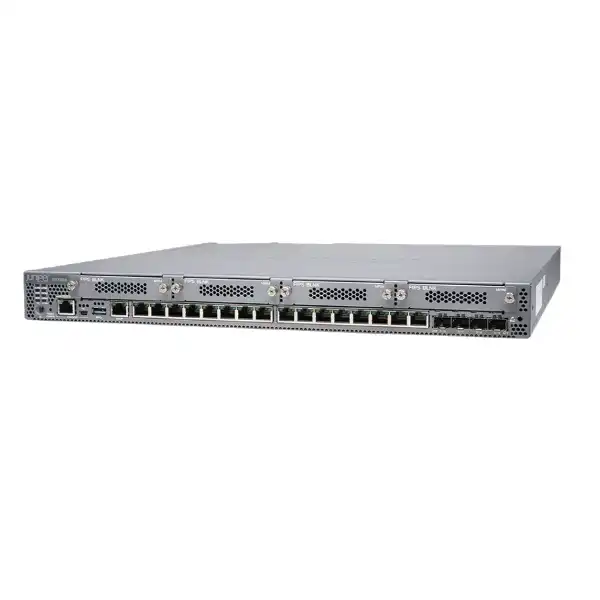
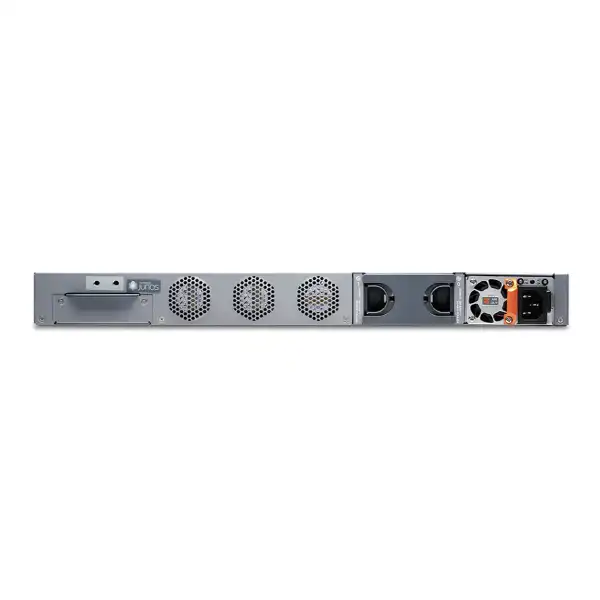
Juniper SRX380 Firewall
A high-performance 1U branch security and SD-WAN platform for organisations that need dense onboard Ethernet, PoE+, 10GbE uplinks, strong VPN capacity, Junos OS routing, and subscription-based advanced threat protection in one appliance.
Direct answer: what is the Juniper SRX380?
The Juniper SRX380 is a fixed 1U firewall and secure WAN gateway in the SRX300 branch family. It combines stateful firewalling, IPsec VPN, NAT, routing, switching and optional advanced security services with 16 onboard 1GbE PoE+ RJ-45 ports, four 10GbE SFP+ ports, a 100GB SSD and four Mini-PIM slots. It is mainly used at larger enterprise branches, small campuses, regional offices, managed WAN customer premises and distributed SD-WAN sites where a smaller branch firewall may not provide enough interface density or security throughput.
Organisations should consider the SRX380 when they need a branch platform with 10GbE uplinks, substantial IPsec capacity, integrated PoE+ access ports, advanced Junos routing functions, multiple WAN-media options, or room for higher session and policy scale than the SRX340 and SRX345. The most important factor to confirm is not the headline 20 Gbps firewall figure by itself. Real sizing depends on the security services enabled, packet mix, encryption, application control, IPS, URL filtering, WAN design, traffic growth and required resilience.
FourTeck can help determine the appropriate hardware configuration, subscription tier, license term, second power supply requirement, compatible SFP/SFP+ optics, Mini-PIMs, rack and power planning, support service, migration scope, high-availability design and implementation plan for a Dubai or wider UAE deployment.
Where the SRX380 fits in the Juniper branch firewall family
The SRX380 sits at the upper end of the traditional SRX300 branch family. That family spans compact desktop appliances and 1U rack platforms, but the SRX380 is materially different from the smaller models because it combines the strongest published firewall and VPN performance in this family with twenty onboard data ports. Sixteen of those ports are 1GbE copper interfaces with PoE+ capability and four are 10GbE SFP+ interfaces. This makes the appliance relevant when a branch needs more than an Internet-edge firewall and is expected to participate in local switching, power selected edge devices, aggregate access connectivity or attach to higher-speed LAN and WAN infrastructure.
The family comparison matters because a buyer can easily oversize or undersize by looking only at user count. A site with a modest number of employees may still need the SRX380 if it terminates several high-bandwidth VPNs, receives 10GbE handoffs, supports heavy east-west traffic, operates as a regional hub, or requires large routing tables. Conversely, a branch with many employees but relatively light Internet use and no 10GbE requirement might be more economically served by a smaller SRX model. The correct decision therefore combines throughput, interfaces, security profile, availability target, routing scale, number of tunnels, number of policies and growth expectations.
Compared with the SRX345, the SRX380 raises stateful firewall throughput from the SRX345’s published 5 Gbps level to as much as 20 Gbps with 1518-byte packets, increases 1400-byte IPsec performance from below 1 Gbps to 4.4 Gbps, and moves from eight onboard copper plus eight 1GbE SFP interfaces to sixteen 1GbE copper plus four 10GbE SFP+ interfaces. The SRX380 also supports PoE+ on its sixteen copper ports, whereas the SRX340 and SRX345 do not provide PoE+ on those onboard ports. These differences are significant for sites that want to reduce dependence on separate access switching for a limited device population or require faster uplink choices.
The SRX380 should not automatically replace every smaller branch firewall. A well-designed deployment chooses it where its performance envelope, port architecture, Mini-PIM flexibility, 100GB SSD, remote-access capacity and high-availability options justify the additional investment. For very large campuses, data centres or security edges with substantially greater threat-processing requirements, larger SRX platforms should also be evaluated rather than forcing the SRX380 beyond its intended branch and distributed-enterprise role.
Verified SRX380 hardware and scale specifications
| Specification | Published SRX380 value | Buyer relevance |
|---|---|---|
| Form factor | 1U fixed chassis | Fits standard 19-inch rack environments and suits branch/server-room deployment. |
| Onboard data ports | 16x1GbE RJ-45 PoE+ plus 4x10GbE SFP+ | Supports dense copper access and higher-speed optical/direct-attach uplinks. |
| Mini-PIM slots | 4 | Allows selected serial, T1/E1, VDSL2, LTE and Wi-Fi interface expansion. |
| System memory | 4GB RAM | Part of the fixed platform design; sizing should use supported scale limits rather than assuming memory expansion. |
| Storage | 100GB SSD | Provides substantially more local storage than smaller SRX300 family models. |
| Stateful firewall | 20,000 Mbps at 1518-byte packets; 6,500 Mbps IMIX | Useful ceiling references, not guaranteed application throughput with all security services active. |
| Recommended IPS | 2,000 Mbps | A more relevant figure for branches that plan continuous intrusion prevention. |
| NGFW performance | 2,500 Mbps | Measured with firewall, application security and IPS enabled under Juniper’s stated test methodology. |
| IPsec VPN | 4.4 Gbps at 1400-byte packets; 1.4 Gbps IMIX | Important for encrypted hub, branch-to-branch and cloud-connectivity sizing. |
| Concurrent sessions | 380,000 maximum | Relevant to busy branches with many devices, cloud applications and short-lived web connections. |
| IPsec tunnels | 2,048 | Supports distributed VPN designs but topology and operational complexity still require engineering review. |
| Security policies | 4,000 maximum | Provides useful policy scale for segmented branch and managed-customer environments. |
Published performance values are laboratory reference points. Packet size, enabled services, inspection depth, encryption, policy complexity, application behaviour, logging, routing features and software release can change practical results. For procurement, the correct approach is to map the expected production traffic to the security feature set and preserve headroom for growth, failover and unexpected peaks.
Performance: understand the difference between firewall, IPS, NGFW and VPN numbers
The SRX380’s 20 Gbps stateful firewall figure is useful because it establishes the platform’s high-end packet-forwarding capability with large packets, but it should not be used as the sole Internet-circuit sizing number. Juniper publishes 6.5 Gbps for stateful firewall throughput with an IMIX traffic profile, which is intended to represent a more varied packet mixture. It also publishes 2 Gbps recommended IPS performance, 2.5 Gbps next-generation firewall performance, 1.8 Gbps Secure Web Access firewall performance, and 6 Gbps for application visibility and control under the vendor’s defined methods. These figures show why feature-aware sizing is essential: deeper inspection requires more processing than basic stateful forwarding.
A branch that buys a 5 Gbps or 10 Gbps Internet service but expects to apply intrusion prevention, application controls and web security to most traffic should therefore size around the intended inspection stack rather than assuming every packet can be processed at the maximum 20 Gbps headline rate. Equally, not all production traffic may need the same inspection path. Some designs separate trusted internal routing, site-to-site encryption, guest traffic, SaaS traffic, voice, data-centre connections and management flows with different policy treatment. The architecture determines which published performance numbers matter most.
VPN planning requires the same discipline. Juniper publishes up to 4.4 Gbps IPsec VPN throughput with 1400-byte packets and 1.4 Gbps with IMIX. A business with several encrypted cloud tunnels, dynamic routing over IPsec and traffic bursts during backup or replication should use the more conservative traffic pattern that resembles production. Tunnel count is not equivalent to encrypted throughput: the platform supports up to 2,048 IPsec tunnels, but thousands of low-traffic tunnels are a different workload from a small number of saturated high-bandwidth tunnels.
Session scale also affects design quality. The maximum 380,000 concurrent IPv4/IPv6 sessions and 50,000 new connections per second give the SRX380 substantial room for web-heavy branches and distributed services. Nevertheless, security subscriptions can impose their own session limits for particular engines. Published figures include 64,000 AppID sessions, 64,000 IPS sessions and 64,000 URL-filtering sessions. Those values matter when an environment has a large device population, guest Wi-Fi, IoT endpoints or applications that rapidly create parallel connections.
For a dependable UAE deployment, gather actual WAN utilisation, peak traffic, packet characteristics if available, VPN volumes, expected growth, number of users and endpoints, and the exact inspection services that will be enabled. A sizing exercise based on those inputs produces a much safer decision than multiplying employee count by an arbitrary bandwidth allowance.
16 PoE+ copper ports and four 10GbE SFP+ ports
1GbE PoE+ access
All sixteen onboard RJ-45 data ports support PoE+. Juniper documents a maximum of 30 W on an individual PoE port. The total PoE budget depends on the installed power-supply configuration, so the number and class of powered devices should be calculated rather than assumed.
PoE+ can be useful for selected access points, IP phones, cameras or other compliant edge devices, but a firewall is not automatically a substitute for a managed access-switch layer. VLAN design, port count, switching features, endpoint density, failure domains and operational practice still determine whether separate switching is the better architecture.
10GbE SFP+ uplinks
The four onboard SFP+ ports support 10GbE connectivity and give the SRX380 a clear advantage over smaller branch models that are limited to 1GbE optical interfaces. They can be used for suitable LAN, WAN, aggregation or interconnection roles according to the Junos configuration and transceiver compatibility.
SFP+ cages do not mean that optics are automatically included. The transceiver or direct-attach solution must match fibre type, wavelength, reach, connector, peer equipment and Juniper compatibility requirements. Long-range optics should not be quoted before the actual optical path is known.
All twenty onboard data ports support AES-256 MACsec capability according to Juniper’s SRX380 hardware documentation. MACsec can add Layer 2 encryption on supported Ethernet links, but using the feature requires a compatible design at both ends and should not be confused with IPsec, which operates at a different layer and is commonly used for routed WAN encryption. Buyers considering MACsec should confirm peer support, required software release, key-management approach and the specific topology.
Port count is a major reason to select the SRX380, but physical port availability should be mapped against logical design. A deployment may reserve separate interfaces for WAN carriers, high availability, out-of-band management, trusted LAN, guest networks, DMZs, voice, management zones and upstream switching. The SRX380 also provides a dedicated 1GbE out-of-band management port, an RJ-45 console interface and a USB 3.0 Type-A port. Planning these roles in advance prevents the common mistake of treating every onboard data port as interchangeable capacity.
If the site requires many more than sixteen copper access interfaces, stacking, multi-gigabit access, extensive PoE switching or dense campus segmentation, dedicated EX Series or other access switches may provide a cleaner operational boundary. The SRX380 can remain the security and WAN edge while the switching layer handles endpoint density. This is often preferable to designing a branch around the maximum number of ports available on a firewall chassis.
PoE power budget and dual-power planning
The SRX380 accepts up to two 600 W AC power supplies. Current Juniper base-system documentation identifies the SRX380-P-SYS-JB-AC system as including a single AC power supply, the power cable and rack-mount kit along with the base Junos software. The second supply is therefore an important quotation item when redundant power is required. The JPSU-600-AC-AFO is documented as the 600 W AC PSU option for the SRX380.
Power redundancy and PoE capacity interact. Juniper documents up to 300 W of PoE system power with one installed power supply. With two supplies installed, the platform can provide up to 480 W for PoE when the supplies are not being reserved for redundancy. That distinction matters. A design that expects both full power-supply redundancy and the highest possible PoE output needs careful validation, because consuming the second supply’s capacity for a higher PoE budget changes the redundancy objective. The correct bill of materials should reflect whether business continuity or maximum local PoE delivery has priority.
Each PoE-enabled port supports up to 30 W. Sixteen ports at the theoretical per-port maximum would equal 480 W, matching the documented two-supply nonredundant PoE budget. Real devices may draw much less than their maximum class, but planning should use their actual or worst-case requirements, startup behaviour and any future endpoint additions. A site with several access points and cameras could reach the power threshold sooner than expected if every endpoint is assumed to be a low-draw phone.
The power supplies are hot-insertable and hot-removable field-replaceable units when redundant power is present. If the appliance is operating with only one power supply, Juniper instructs administrators to power off the device before removing that sole supply. Each installed supply should connect to a suitable power source, and a resilient rack design will normally use independent protected feeds where the site’s electrical architecture supports them.
For Dubai deployments, confirm rack PDU sockets, UPS capacity, power-cord requirements, earth grounding, cable routing and room cooling before installation. The SRX380 uses front-to-back airflow and Juniper specifies environmental limits that should be respected even in modern server rooms. A highly available logical design still has a physical single point of failure if both power inputs ultimately depend on the same unprotected circuit.
Mini-PIM expansion: serial, T1/E1, VDSL2, LTE and Wi-Fi options
Four Mini-PIM slots make the SRX380 unusually flexible for a branch firewall. Juniper documents support for selected one-port serial, one-port T1/E1, VDSL2, 4G/LTE and Wi-Fi Mini-PIMs. This can be useful when a site must integrate legacy WAN services, maintain an out-of-band or failover path, connect to a DSL service, or provide cellular resilience without adding a completely separate edge appliance.
The Mini-PIM decision must be precise because modules are not generic. The SRX-MP-1T1E1-R is intended for T1/E1 connectivity. The SRX-MP-1VDSL2-R supports VDSL2 and backward compatibility with ADSL/ADSL2+ according to Juniper’s product documentation. The LTE family contains region-specific variants, including the SRX-MP-LTE-AE for Americas and EMEA band coverage and the SRX-MP-LTE-AA for Asia/Australia band coverage. A UAE order should therefore be matched to the carrier bands and regulatory environment rather than selecting an LTE module by name alone.
Wi-Fi Mini-PIMs are also region specific. Juniper lists worldwide, US and Israel regulatory variants, and the correct model has to align with local wireless requirements. The wireless Mini-PIM can be useful for particular branch designs, but organisations with multiple access points, central RF optimisation or higher-density wireless needs will normally evaluate a dedicated enterprise wireless architecture rather than using an embedded interface as the entire WLAN strategy.
A practical limitation is that SRX380 Mini-PIMs are not hot-swappable. Juniper requires the firewall to be powered down before installing or removing a Mini-PIM. That makes module selection more than a purchasing detail: it can create a maintenance window. If the business expects to add cellular or legacy WAN connectivity after go-live, it may be more efficient to include the required module during the original rack installation.
The SRX380 does not support the older GPIM interface modules used by some Juniper platforms. Buyers migrating from another SRX chassis should therefore not assume that existing WAN cards can be moved directly. Exact module part numbers, software support and interface requirements should be checked as part of the migration bill of materials.
Junos OS base functionality and advanced security services
The base SRX380 system includes Junos software for core firewall, NAT, IPsec, routing, MPLS and switching functions according to Juniper’s current SRX300 line documentation. This base capability is one reason the platform is attractive to network teams already standardised on Junos: the firewall can participate in sophisticated routed branch designs rather than operating only as a basic Internet security appliance. Depending on the design, engineers can combine zones, policies, routing protocols, route control, VPNs, NAT and switching functions under a common operating system.
Advanced threat and application services are different. Juniper identifies application visibility and control, IPS, antivirus, antispam, category or reputation-based URL filtering, botnet protection, GeoIP-based enforcement, Advanced Threat Prevention, Adaptive Threat Profiling, Encrypted Traffic Insights and SecIntel as advanced services that depend on subscription licensing. A buyer should therefore avoid comparing a hardware-only SRX380 quote with a competing NGFW bundle that already includes security subscriptions. The software entitlements can materially affect both capability and total cost over the planned lifecycle.
Application Security functions can provide AppID, application firewalling and application-aware policy capabilities, helping the firewall make decisions based on recognised applications rather than relying only on IP addresses and ports. IPS adds signature and vulnerability-focused inspection. Content Security packages may add services such as URL filtering, antivirus and antispam. Advanced Threat Prevention adds cloud-assisted threat intelligence and malware-analysis capabilities. The exact feature set should be tied to the organisation’s security policy, not purchased as a collection of acronyms.
Licensing also affects sizing. If the security requirement calls for continuous IPS and content inspection across most Internet traffic, use the corresponding performance figures and leave operational headroom. If the site primarily routes private WAN traffic and applies limited stateful filtering, the platform may behave much closer to its higher base forwarding numbers. Security policy, traffic classification and inspection scope therefore become part of capacity planning.
Software release selection should be treated as an engineering task. The SRX380 was first supported from Junos OS 20.1R1, but that does not mean a new deployment should automatically install the oldest compatible release. Organisations should select a currently supported release appropriate for the required features, security advisories, Mist integration and operational standards, then test configuration compatibility before production migration.
SRX380 subscription choices: Advanced, Premium and security bundles
Juniper publishes multiple subscription families for the SRX380. The Advanced 1 subscription family includes the App+ application services set and IPS, together with SD-WAN-related capabilities. The Premium 1 family adds Juniper Advanced Threat Prevention to App+ and IPS. Advanced 2 adds Content Security functions to App+ and IPS. Premium 2 combines App+, IPS, Content Security and Juniper ATP. These subscriptions are offered in one-, three- and five-year terms for the SRX380.
The SKU pattern matters because small character differences can change the service bundle or term. Examples in Juniper documentation include S-SRX380-A1-1 for a one-year Advanced 1 subscription, S-SRX380-P1-3 for a three-year Premium 1 subscription, S-SRX380-A2-5 for a five-year Advanced 2 subscription and S-SRX380-P2-1 for a one-year Premium 2 subscription. The product page should not be interpreted as a promise that every subscription SKU is immediately available in every commercial channel; the exact entitlement and support combination should be confirmed on the current quotation.
Choosing the lowest license cost can be a false economy if the security architecture later requires features that were omitted. Equally, buying a premium bundle without a plan to enable or operate the included services wastes budget. A useful licensing conversation begins with required controls: application identification, intrusion prevention, web category enforcement, malware analysis, encrypted-traffic visibility, threat intelligence, central management and SD-WAN policy. The chosen subscription should map to those controls and to the organisation’s support model.
Term length is another decision. A one-year term can suit a short project, proof of concept or environment with uncertain long-term architecture. Three- and five-year terms can simplify renewal planning and create a more predictable entitlement horizon when the hardware is expected to remain in production for several years. The purchasing team should align the subscription end date with hardware support, budget cycle and planned refresh rather than treating each contract independently.
Remote access is a separate area to confirm. Juniper publishes SRX380 remote-access subscription options with support for up to 500 concurrent users on the platform, but the required user entitlement must be purchased and sized to the actual workforce. Maximum supported scale is not the same as an included license. If remote-access VPN is part of the requirement, the quotation should state user count, license duration, authentication design and whether an existing identity platform will be integrated.
Because Juniper’s software packaging can evolve, a production quote should use current part numbers and entitlement descriptions at the time of purchase. FourTeck can map the requested security controls and term to the available SRX380 license structure instead of relying on a historical bill of materials copied from an older project.
Mist WAN Assurance and cloud-managed operations
The SRX380 can be onboarded into Juniper Mist for WAN Assurance, giving organisations a cloud-based operational view of supported WAN edge functions. Juniper’s current subscription documentation places the SRX380 in WAN Assurance device class C3. One-, three- and five-year WAN Assurance terms are available, and Juniper also publishes standard and advanced SRX subscription bundles where the advanced option can include Marvis for WAN.
WAN Assurance is valuable when the operational goal is not simply to push configuration but to understand application and user experience across distributed sites. Cloud-managed telemetry can simplify troubleshooting and help a central network team observe WAN behaviour without relying solely on command-line investigation at each branch. For organisations already using Mist for wired or wireless operations, bringing the SRX380 into the same cloud architecture can create a more consistent operational model.
Cloud management does not eliminate the need for sound branch engineering. WAN circuits still require correct addressing, routing, failover logic and physical connectivity. Security policies still need governance. High availability still depends on hardware and topology. A cloud dashboard can reduce operational friction, but it cannot compensate for poor IP design, undersized links, incompatible optics or missing subscriptions.
Brownfield onboarding also deserves attention. An existing SRX380 with a mature Junos configuration should be assessed before it is moved into a new cloud-management workflow. Teams should confirm supported software, template behaviour, configuration ownership, logging requirements and change-control processes. If the firewall is already managed by Security Director, Junos Space or automation pipelines, the target operating model should be defined before another management layer is introduced.
For a multi-branch UAE rollout, Mist WAN Assurance can be considered alongside zero-touch provisioning and standardised site templates. The strongest benefit appears when branches are sufficiently consistent for central policy and operational telemetry to reduce repeated manual work, while still allowing controlled exceptions for carrier, addressing and site-specific services.
Routing, switching and secure SD-WAN use
The SRX380 is more than a packet-filtering appliance. Juniper positions it as a secure SD-WAN gateway that consolidates routing, switching and security for distributed enterprise offices. That combination can reduce the number of devices at a branch when the network design is appropriate. The base software supports core routing, MPLS and switching functions, while advanced application and SD-WAN services can be licensed according to the intended deployment.
Routing scale is unusually strong for a branch platform. Juniper publishes IPv4 and IPv6 route-table scale of up to one million routes in the routing information base and 600,000 in the forwarding information base when the relevant enhanced route-scale features are used. Most branch offices do not need anything close to this, but the capacity is relevant for regional hubs, managed customer-edge designs or organisations that maintain complex dynamic routing. Large route capacity should not encourage unnecessary complexity: route-policy design, convergence behaviour and troubleshooting remain operational concerns.
The firewall supports up to 3,000 VLAN IDs, 128 security zones and 128 virtual routers according to Juniper’s scale tables. These figures provide considerable segmentation flexibility. In practice, a branch should use only the level of segmentation that can be documented and operated reliably. Hundreds of zones may be technically possible but could create policy sprawl, logging complexity and change risk if the organisation lacks clear governance.
SD-WAN designs can combine broadband, private WAN and 4G/LTE paths. The SRX380’s Mini-PIM options expand the physical connectivity choices, while application-aware policies can steer traffic according to business intent. An organisation might prefer a private path for latency-sensitive internal applications, direct Internet access for approved SaaS traffic and LTE for emergency continuity. The exact mechanism depends on licensed features and the chosen Junos or Mist operating model.
A successful SD-WAN deployment therefore starts with application classes, path objectives, failure scenarios, security inspection points and operational ownership. Purchasing an SRX380 because it supports SD-WAN does not by itself define the policy. FourTeck can use the actual carrier mix, critical applications and failover requirement to determine the interface modules, licensing and configuration scope.
High availability and branch resilience
High availability must be considered at several layers. A second power supply can remove one internal power-supply failure from the single-appliance risk model, but it does not protect against chassis, software, rack, upstream switch or carrier failure. For business-critical sites, two SRX380 appliances can be evaluated in a chassis-cluster design so that firewall state and traffic can fail over between nodes according to the supported Junos architecture.
A clustered design requires additional planning for control and fabric connectivity, interface allocation, redundant upstream and downstream paths, management, addressing and failure testing. It also doubles many hardware costs and can require duplicate optics, cables, power feeds and support coverage. Buyers should therefore define the business recovery objective before selecting HA. A site that can tolerate a short outage while a spare appliance is installed has a different cost profile from a site that must continue processing transactions through a single-device failure.
Power design deserves equal attention. If two power supplies are installed in one SRX380 but both connect to the same PDU, UPS or circuit, the solution may remain exposed to a common electrical failure. In a resilient rack, each PSU should connect to an independent protected source when available. Likewise, two clustered firewalls should not depend on one access switch or one carrier if those devices represent the failure the design is meant to survive.
WAN redundancy can be implemented with multiple Ethernet services, private links and cellular connectivity depending on the site. An LTE Mini-PIM can be useful for emergency reachability or a backup path, but expected mobile performance, data plan, signal quality, antenna placement, carrier NAT and application requirements must be understood. Cellular backup is not equivalent to a second fixed broadband circuit for every workload.
Resilience should be tested, not merely configured. A commissioning plan can include individual WAN failure, power-feed loss, HA node failure, upstream switch failure and recovery verification. The objective is to prove both traffic continuity and operational visibility, including alarms, logs and management reachability during the failure condition.
Rack, power, airflow and environmental requirements
The SRX380 is a 1U fixed appliance designed for standard 19-inch rack environments. Juniper lists a chassis width of about 17.36 inches, height of 1.72 inches and depth of 18.7 inches, increasing to about 20.47 inches when field-replaceable components are included. The shipped weight is approximately 15 pounds, or 6.8 kg. These dimensions are not large for a rack firewall, but the rack must have enough usable depth for the chassis, rear components, power cords and cable bend radius.
The SRX380 uses front-to-back cooling. Installation should therefore preserve the intended airflow and avoid routing cables where they block fan exhaust or access to the rear power supplies. Juniper specifies an operating temperature range of 0 to 40 degrees Celsius and 10% to 90% non-condensing relative humidity in its hardware compatibility data. UAE server rooms should maintain the appliance within those limits rather than relying on the assumption that enterprise equipment can tolerate elevated ambient temperature indefinitely.
Juniper specifies earth grounding before power is connected. The site should provide an appropriate grounding cable and hardware according to local electrical requirements, with the chassis kept permanently grounded during operation. Grounding should be treated as part of the rack installation, not as an optional finishing step, because it relates to safety, electromagnetic compatibility and reliable operation.
The AC input range is 100 to 240 VAC at nominal 50/60 Hz, allowing the platform to operate in standard enterprise power environments when the correct regional power cord and protected supply are used. Each power supply should be connected to an appropriate outlet. If a second PSU is installed for redundancy, the rack design should preserve separate feeds where possible.
A pre-installation survey can prevent avoidable project delays. Confirm rack unit availability, rack depth, front and rear clearance, UPS and PDU capacity, grounding point, cooling, cable paths, fibre termination, patch leads, console access and the location of each WAN handoff. A firewall configuration can be completed perfectly and still miss its go-live date because an SFP type, patch lead or power outlet was assumed rather than verified.
How to size the SRX380 for a real branch
1. Measure traffic
Use current peak and 95th-percentile WAN utilisation where available. Separate Internet, private WAN, VPN, replication, voice, video, guest and internal routed traffic rather than relying on one monthly carrier average.
2. Define inspection
List which flows require stateful firewall only, IPS, application control, URL filtering, malware services or encryption. The enabled stack determines which performance figure is relevant.
3. Count sessions
Estimate endpoints and application behaviour, particularly guest Wi-Fi, IoT, cloud collaboration and web applications that can create many simultaneous or short-lived connections.
4. Map interfaces
Document carrier handoffs, copper or fibre media, optic reach, 10GbE requirements, PoE endpoints, HA links, management connections and any Mini-PIM WAN services.
5. Add growth headroom
Allow for contract upgrades, more cloud traffic, added branches, new security controls and failover conditions. A platform permanently operating near its ceiling gives little room for change.
A useful sizing worksheet should also include number of security zones, expected policies, NAT rules, remote-access users, site-to-site VPNs, route-table requirements and logging architecture. The SRX380’s published limits are generous for many branches, but each scale dimension should be checked if the deployment is unusual. A service-provider CPE instance with thousands of routes may be constrained by different resources than a retail branch with many point-of-sale sessions.
Headroom should be intentional. There is no universal percentage that suits every network, but the design should accommodate normal peaks, growth and failover without turning the firewall into the first bottleneck. If current inspected traffic already approaches the SRX380’s published NGFW or Secure Web Access performance, evaluating a larger platform before purchase is more prudent than assuming future software optimisation will create capacity.
The same principle applies at the low end. If a branch uses a few hundred megabits of Internet, has no 10GbE interfaces, no PoE need, limited VPN traffic and modest session scale, a smaller SRX may be financially better. Good sizing supports the workload rather than selecting the largest appliance that fits the budget.
Migration from an existing firewall to SRX380
Firewall migration is not a simple configuration copy. Existing rules may contain obsolete objects, duplicate services, temporary exceptions, disabled policies and vendor-specific behaviour that should not be reproduced blindly. A migration to the SRX380 is an opportunity to identify which policies are still required, map them to Junos security zones and address books, and remove historical clutter that increases risk and operational effort.
The discovery phase should capture physical interfaces, VLANs, IP addressing, static and dynamic routes, NAT, security rules, VPNs, authentication, certificates, DHCP, DNS forwarding, routing adjacencies, monitoring, syslog, SNMP, high availability and management access. If the old firewall terminates carrier circuits directly, verify the handoff speed, duplex or optic type, tagging and provider routing before choosing SRX380 ports or Mini-PIMs.
VPN migration deserves special testing. The SRX380 can support a large number of IPsec tunnels, but peer compatibility depends on IKE versions, encryption algorithms, authentication, lifetimes, traffic selectors, NAT traversal and routing. Legacy peers may use algorithms that an organisation wants to retire. The project should decide whether to preserve old crypto temporarily or coordinate upgrades with the remote parties.
A staged migration can reduce risk. Configuration is built and reviewed before the cutover, required subscriptions and software are activated, interfaces are labelled, backups are taken and a rollback procedure is documented. During the maintenance window, engineers validate carrier reachability, routing, DNS, key applications, VPNs, inbound services and monitoring rather than declaring success after one Internet ping.
For HA migrations, failover should be tested before the project closes. For SD-WAN, each path and steering policy should be validated. For PoE deployments, endpoints should be checked for stable power and network connectivity. For central management, the firewall should appear correctly in the intended platform with logs and telemetry flowing as expected.
A clean migration deliverable includes the final configuration, software version, serial numbers, license records, port map, rack details, IP plan, backup, test results and support information. These records become valuable during troubleshooting months later and reduce dependence on the memory of the original installer.
Management, monitoring and operational ownership
The SRX380 can be managed through the Junos OS command-line interface, J-Web and Juniper management platforms including cloud options. The best method depends on scale and team maturity. A single specialised branch may be operated comfortably through standard Junos workflows, while a distributed enterprise with many sites can benefit from central templates, telemetry and policy coordination.
Management design should separate day-to-day administrative access from production user traffic where possible. The dedicated out-of-band management interface can be valuable when the organisation has a management network. Console access should remain available for recovery. Administrative accounts should follow the company’s identity, privilege and logging policy rather than sharing a generic local credential across branches.
Monitoring should cover more than interface up/down status. Useful operational signals include CPU and memory trends, session usage, packet drops, VPN state, routing adjacency, interface errors, power supply status, temperature, alarms, license status and security events. A site with redundant links also needs monitoring that can distinguish normal primary-path operation from an unnoticed long-term failover to an expensive or lower-capacity backup circuit.
Logs must have a destination and retention policy. Security-event volume can become substantial when IPS, application visibility and web controls are enabled. The organisation should decide what remains local, what is forwarded to a SIEM or log platform, how time synchronisation is handled and who reviews critical events. Collecting logs without operational ownership creates storage rather than security.
Configuration backups and change control are equally important. Junos commit history and rollback functions are useful operational tools, but they do not replace a documented external backup and configuration-management process. For multi-site deployments, standard templates, peer review and defined emergency changes can reduce drift between branches.
Practical UAE use cases for the SRX380
Large branch edge
A regional office with high-speed Internet, private WAN, many cloud applications and 10GbE LAN uplinks can use the SRX380 as the secure routed edge while keeping dedicated access switching behind it.
Secure SD-WAN site
A distributed organisation can combine multiple WAN links, application-aware steering and central Mist operations, with LTE considered for selected backup scenarios.
Small campus security core
A compact campus can use the 10GbE ports for aggregation and the firewall for segmentation, VPN and Internet security, provided access-switch requirements and internal traffic patterns fit the architecture.
Managed WAN CPE
Service providers and managed-service teams can use the SRX380 where routing scale, multiple interfaces, segmentation and remote operations are required in a customer-premises platform.
VPN aggregation branch
A regional hub with many site-to-site tunnels can benefit from the SRX380’s 2,048-tunnel scale and stronger IPsec performance, subject to encrypted throughput and failover sizing.
PoE-enabled compact site
The sixteen PoE+ ports can power a controlled number of compliant edge devices when the switching feature set and PoE budget suit the site, reducing hardware count in selected deployments.
These examples are starting points, not universal templates. The same SRX380 can be an excellent match in one organisation and unnecessary in another because traffic, resiliency and operational models differ. A quote should therefore be anchored to the site’s real interfaces and security policy.
When the SRX380 may not be the right choice
The SRX380 is not automatically the best firewall merely because it is the most capable model in the traditional SRX300 branch lineup. If the site has a low-bandwidth Internet circuit, no 10GbE uplinks, no need for PoE+, few VPN tunnels and modest session counts, a smaller appliance may meet the business requirement at lower hardware, support and licensing cost. Overcapacity is not harmful technically, but it can reduce procurement efficiency.
At the opposite end, the SRX380 should not be stretched into a data-centre or very large campus role when continuous inspected traffic approaches its published NGFW or Secure Web Access limits. A 10GbE interface does not mean the firewall can perform every advanced security service at 10 Gbps. If the project needs several gigabits of sustained deep inspection with aggressive growth, higher SRX platforms should be compared before the architecture is fixed.
PoE+ capability can also be misunderstood. Sixteen powered copper ports are convenient, but a branch with dozens of access points, cameras and phones still needs an appropriate switching layer. Dedicated access switches can offer more ports, higher PoE budgets, stacking, multi-gigabit access and operational separation. The firewall’s PoE ports are most valuable when they fit the actual endpoint plan, not when they encourage an undersized switching design.
The SRX380 supports four Mini-PIM slots, but the modules are not hot-swappable. If the organisation requires frequent WAN interface changes without downtime, or very specialised carrier interfaces outside the supported module list, another architecture may be preferable. Likewise, existing GPIM modules from older Juniper platforms cannot simply be assumed compatible.
Finally, the operational team matters. Junos is powerful and widely used, but organisations without Junos skills should include configuration, documentation, training or managed support in the project. The correct product decision includes the ability to operate the platform safely after installation, not just the hardware feature list on purchase day.
SRX380 versus SRX345: a practical buying comparison
| Decision point | SRX345 | SRX380 |
|---|---|---|
| Stateful firewall, 1518-byte packets | 5 Gbps | 20 Gbps |
| IPsec VPN, 1400-byte packets | 977 Mbps | 4.4 Gbps |
| Recommended IPS | 600 Mbps | 2 Gbps |
| Onboard ports | 8x1GbE RJ-45 plus 8x1GbE SFP | 16x1GbE RJ-45 PoE+ plus 4x10GbE SFP+ |
| Concurrent sessions | 375,000 | 380,000 |
| Mini-PIM slots | 4 | 4 |
The SRX345 remains relevant where its 1GbE interface architecture and lower inspected throughput are sufficient. The SRX380 becomes more compelling when 10GbE connectivity, PoE+, higher VPN performance, more IPS capacity or faster connection establishment is required. Notice that concurrent-session capacity is similar between the two models; the main SRX380 advantage is not simply a larger session table but substantially stronger forwarding and security performance plus different physical ports.
This comparison also shows why model selection should use several dimensions. A buyer who looks only at concurrent sessions might see little difference. A buyer who needs 3 Gbps of encrypted WAN traffic or 10GbE uplinks sees a completely different result. The right shortlisting method weights the specifications that map to the real topology.
Procurement details that can change the quotation
The SRX380 hardware model commonly referenced in Juniper’s current branch datasheet is SRX380-P-SYS-JB-AC. Juniper describes that base system as including the appliance with sixteen 1GbE PoE+ ports, four 10GbE ports, four Mini-PIM slots, 4GB RAM, 100GB SSD, one AC power supply, power cable, rack-mount kit and Junos Software Base. A purchase request that says only “SRX380 firewall” may therefore be incomplete if the project expects redundant power, advanced security subscriptions or optical transceivers.
The bill of materials should identify any second 600 W AC PSU, SFP+ optics or direct-attach cables, Mini-PIMs, LTE antenna requirements where applicable, subscription tier, license term, remote-access entitlement, WAN Assurance subscription and support service. If the site is an HA pair, most hardware and licenses must be considered for both nodes according to the applicable licensing rules and support model.
Support should be chosen according to the business recovery requirement. A branch that can wait for standard replacement service may not need the same support level as a revenue-critical facility that requires tighter hardware replacement commitments. The support term should also align with the expected production lifecycle and subscription term. Mismatched expiry dates create avoidable renewal administration.
Optics are another frequent source of quotation errors. State whether each 10GbE port connects over multimode fibre, single-mode fibre, DAC or another supported medium; include distance and peer interface. If the carrier provides an optical handoff, confirm whether the carrier expects the customer to supply the transceiver and which optical standard is used. An SFP+ port without the correct optic is not a deployable WAN interface.
For Dubai and UAE projects, lead time, local power cord, warranty route, installation location and onsite service should be confirmed at quote stage. FourTeck should be given enough technical detail to quote a usable deployment rather than a bare chassis that requires last-minute additions.
Installation and commissioning approach
A controlled SRX380 installation begins before the appliance reaches the rack. The implementation team should have an approved IP plan, interface map, VLAN list, security-zone model, routing design, NAT rules, VPN information, licensing record and management method. Required software should be selected and configuration prepared in a lab or staging workflow where practical. This reduces the amount of decision-making during the live maintenance window.
Physical installation should verify rack stability, grounding, power, airflow and cable access. The appliance should be mounted according to Juniper’s rack instructions, permanently connected to earth ground, and supplied from appropriate AC sources. If a second PSU is installed, connect it according to the intended redundancy design. Mini-PIMs should be installed while the device is powered off because they are not hot-swappable.
Initial configuration can be performed through the console and then transitioned to local or remote management after addressing and access controls are established. Administrative credentials, time synchronisation, DNS, logging, monitoring and backup settings should be configured early so that the device enters production with operational visibility rather than as an isolated black box.
Commissioning tests should cover each physical interface, routing adjacency, Internet access, DNS, NAT, inbound published services if any, security policies, site-to-site VPNs, remote access, application inspection and logging. If redundant WANs are present, test failover and recovery. If HA is deployed, test node failover. If PoE is used, verify both power draw and network function of powered endpoints.
The final handover should include configuration backup, software version, serial numbers, subscription details, support information, port labels, topology diagram, test record and a list of outstanding limitations or future changes. Clear handover documentation is a practical security control because it reduces risky improvisation during later incidents.
Security-policy design on the SRX380
The SRX380 supports up to 4,000 security policies and 128 security zones, but good design aims for clarity rather than maximum rule count. Begin with a zone model that reflects trust boundaries: Internet, user LAN, server segments, guest networks, voice, management, DMZ and WAN zones may be separated where the business requirement justifies it. Each additional zone creates policy relationships, so segmentation should be deliberate and documented.
Policies should identify business flows as specifically as operations allow. Broad any-to-any rules reduce the value of the firewall and make later troubleshooting harder because legitimate and unexpected traffic share the same path. Where application identification is licensed and appropriate, application-aware rules can complement network-layer controls. Logging should be selective enough to support investigations without overwhelming the logging platform.
NAT scale is also significant: Juniper publishes up to 3,000 NAT rules. Most branches will use far fewer. The design should distinguish source NAT for outbound access, destination NAT for published services and any special static mappings. Published services deserve particular scrutiny because exposing an application through the firewall does not secure the application itself. Patch management, authentication and server hardening remain necessary.
If IPS or URL filtering is enabled, policy placement affects which traffic receives deeper inspection. Teams should understand trusted exceptions and bypasses. Excluding large categories of traffic simply to protect performance can undermine the security objective; if the required inspection load exceeds the appliance’s practical capacity, the correct fix may be a larger platform or a redesigned traffic path.
Periodic rule review should be part of operations. Owners can identify unused objects, expired temporary access, obsolete VPN peers and rules that no longer match the application architecture. The SRX380’s policy scale gives plenty of room, but maintaining a smaller, explainable rule base is safer than filling that scale over time.
VPN design: branch-to-branch, cloud and remote access
The SRX380 is well suited to encrypted branch connectivity because Juniper publishes 4.4 Gbps IPsec VPN throughput with 1400-byte packets, 1.4 Gbps with IMIX and support for up to 2,048 IPsec VPN tunnels. These numbers provide useful scale for distributed enterprises, but each VPN design has different performance and operational characteristics.
For branch-to-branch connectivity, engineers should define whether tunnels are static point-to-point links, part of a hub-and-spoke topology, integrated with dynamic routing or controlled by an SD-WAN architecture. A regional hub can accumulate traffic from many remote sites even when no individual tunnel is busy. Hub sizing should therefore use aggregate encrypted traffic and failure scenarios, not the average per-branch bandwidth.
Cloud VPNs can connect UAE branches to workloads in public cloud or hosted data centres. The firewall must agree with the cloud peer on IKE, encryption, authentication and routing. Cloud services may impose their own tunnel, bandwidth or redundancy characteristics, so the end-to-end design should consider both sides. A 4.4 Gbps SRX capability cannot force a cloud VPN endpoint to deliver the same rate.
Remote access is a separate service with its own entitlements and user scale. Juniper publishes support for up to 500 concurrent remote-access or SSL VPN users on the SRX380, while subscription SKUs define the licensed user quantity and term. The project should capture expected simultaneous users rather than total employee count. Authentication, multifactor integration, endpoint posture, split-tunnel policy and address pools also form part of the design.
Cryptographic policy should reflect current organisational standards. Migration projects sometimes uncover old algorithms retained for legacy peers. Rather than copying them silently, record the dependency and decide whether the peer can be upgraded. A firewall refresh is an appropriate point to remove outdated cryptographic exceptions where business systems permit.
Operational lifecycle, software maintenance and support
A firewall purchase is the beginning of an operational lifecycle. The SRX380 requires Junos software maintenance, security-advisory review, subscription renewal, configuration backup and hardware support planning. Organisations should assign ownership for each activity before the device is installed. An appliance with advanced subscriptions provides little value if threat services expire unnoticed or software remains on an unsupported release.
Juniper identifies 20.1R1 as the first Junos release supporting the SRX380, but production deployments should evaluate a currently supported and recommended release rather than treating first support as a preferred baseline. Software selection should consider required features, interoperability, security fixes, Mist or Security Director compatibility and the company’s normal change window. Upgrades should be backed by configuration and tested where the site is critical.
If field-replaceable components such as an additional power supply or Mini-PIM are added or changed, support records should be kept current. Juniper advises customers with J-Care contracts to register hardware additions or changes because inaccurate install-base data can delay replacement service. This is a simple administrative step that becomes important during an outage.
Spares strategy depends on recovery targets. Some organisations rely on vendor replacement services; others keep a cold spare for remote branches where logistics can take time. A spare should have a documented process for software alignment, license handling, configuration restoration and serial-number updates. Keeping an untested appliance in a storeroom is not a complete recovery plan.
Lifecycle review should also ask whether the branch architecture has changed. New 10GbE services, increased cloud adoption, additional security inspection or site consolidation can alter capacity requirements years after the original purchase. Regular utilisation and session monitoring helps identify when the SRX380 remains comfortably sized and when a future refresh should move to a larger platform.
Frequently asked buyer questions
Does the SRX380 provide 20 Gbps of NGFW inspection?
No. The 20 Gbps figure is the published stateful-firewall result with 1518-byte packets. Juniper separately publishes 2.5 Gbps NGFW performance, 2 Gbps recommended IPS performance and 1.8 Gbps Secure Web Access firewall performance under its stated test methods. Size against the services you will actually enable.
Are both power supplies included?
The current base system description for SRX380-P-SYS-JB-AC specifies one AC power supply. The chassis supports two 600 W supplies. If redundant power is required, the second PSU should be included in the bill of materials and connected to an appropriately resilient power design.
Does the SRX380 include SFP+ transceivers?
The firewall provides four 10GbE SFP+ cages, but the required optics or DACs must be selected for the actual link. Fibre type, reach, wavelength, connector, peer device and compatibility should be confirmed before ordering.
Can the sixteen copper ports power devices?
Yes. The sixteen onboard 1GbE RJ-45 ports support PoE+, with up to 30 W on an individual port. Total PoE budget depends on power-supply configuration: Juniper documents up to 300 W with one PSU and up to 480 W with two PSUs when not preserving redundant power capacity.
Can Mini-PIMs be installed while the SRX380 is running?
No. Juniper states that Mini-PIMs are not hot-swappable. The device must be powered off before a Mini-PIM is removed or installed. Plan module changes for a maintenance window.
Which WAN modules are supported?
Juniper documents selected serial, T1/E1, VDSL2, 4G/LTE and Wi-Fi Mini-PIM options for the SRX380. Exact module SKU and regional compatibility must be checked. GPIM modules are not supported on the SRX380.
Is advanced threat protection included with the hardware?
The base platform includes core Junos firewall, NAT, IPsec, routing, MPLS and switching functions. Advanced application, IPS, Content Security and ATP capabilities depend on the selected subscription bundle. The quote should identify the exact service package and term.
Can the SRX380 be managed through Mist?
Yes. Juniper supports SRX380 onboarding to Mist WAN Assurance and places the model in WAN Assurance class C3 for subscription purposes. Confirm the appropriate subscription, software release and target cloud operating model before rollout.
How many remote-access users can it support?
Juniper publishes a maximum of 500 concurrent remote-access/SSL VPN users for the SRX380. Actual use requires the relevant remote-access license entitlement and should be sized to concurrent users, authentication design and traffic profile.
Is the SRX380 suitable for a data centre?
It is primarily positioned for large branches, small campuses, secure SD-WAN and managed WAN CPE roles. Small specialised data-centre uses may be possible, but sites requiring several gigabits of continuous deep inspection, very high availability or substantially larger scale should compare higher SRX platforms.
What should a Dubai buyer provide for an accurate quote?
Provide quantity, WAN bandwidth, security services, number of users and endpoints, required copper/fibre interfaces, optic distances, PoE devices, VPN count, remote-access users, subscription term, HA requirement, Mini-PIM needs, support level, rack location and whether migration or onsite installation is required.
Should I choose SRX380 if my Internet circuit is only 1 Gbps?
Possibly, but bandwidth alone does not decide. The SRX380 may still be justified by 10GbE LAN uplinks, PoE+, routing scale, many VPN tunnels, higher inspected throughput, future growth or standardisation. If those needs are absent, a smaller SRX model may provide better value.
Decision recap before selecting the SRX380
What FourTeck needs for an accurate SRX380 quotation
A complete requirement allows the quote to include the usable system rather than only the base chassis. The following inputs are especially useful for Dubai and UAE projects:
Plan the Juniper SRX380 as a complete Dubai deployment
The SRX380 is a strong fit for demanding branch, small-campus and secure SD-WAN environments when its 10GbE connectivity, PoE+ density, 4.4 Gbps published IPsec capacity and advanced Junos security options match the real workload. The purchasing decision should include the security subscriptions, optics, WAN modules, power redundancy, support and migration work required to make the appliance production-ready.

Reviews
There are no reviews yet.