
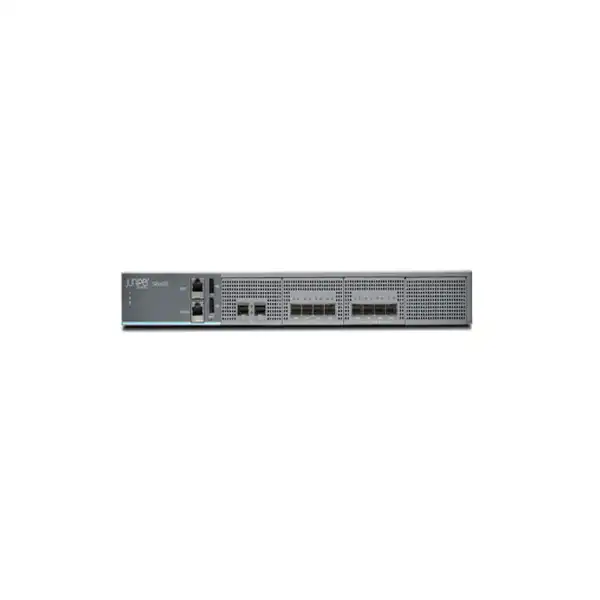
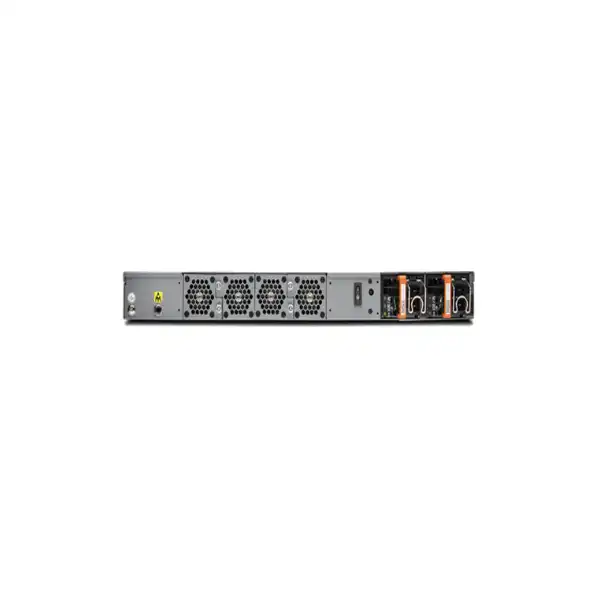
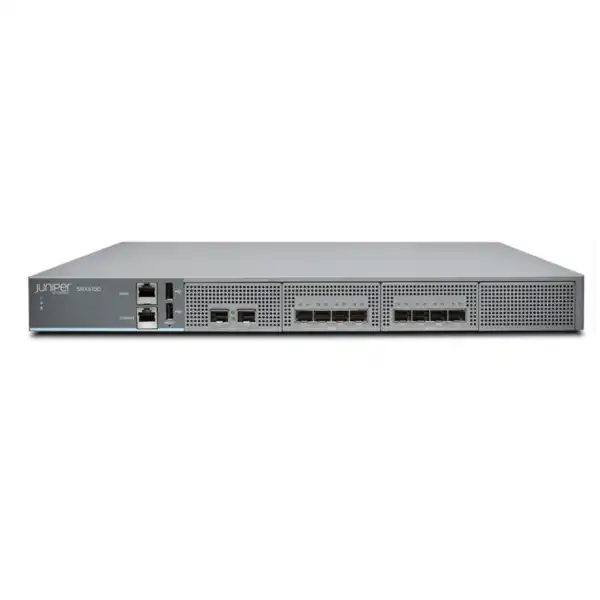
Juniper SRX4100 Firewall Dubai
A high-performance 1U Juniper firewall for enterprise campuses, data center edges and regional headquarters where buyers need substantial session scale, resilient IPsec VPN, advanced security services and the operational consistency of Junos OS.
Direct answer: what the SRX4100 is and when it makes sense
The Juniper SRX4100 Firewall is a fixed-form-factor, 1U next-generation firewall and services gateway running Junos OS. Its role is to combine stateful firewalling, application-aware policy, IPsec VPN, routing, high availability and optional advanced security services in a platform sized for substantial enterprise traffic rather than branch-office workloads. Juniper positions it for enterprise campus and data center edge deployments, as well as regional headquarters that need more throughput and session scale than entry and lower-midrange appliances.
It should be considered by organizations that have multi-gigabit internet or inter-site links, large concurrent connection counts, demanding VPN requirements, security inspection at aggregation points, or a preference for Junos-based routing and security operations. The most important point to confirm is not the headline 40 Gbps firewall figure by itself. Buyers need to map the actual enabled security stack to the appropriate performance figure, because application security, next-generation firewall inspection, advanced threat services, encrypted traffic handling and VPN processing have different throughput profiles.
FourTeck can help translate a Dubai deployment into the variables that affect the correct quote: traffic profile, packet mix, expected growth, number of protected users and devices, site-to-site VPN demand, security subscriptions, optics or DAC requirements, AC or DC power, single-unit or cluster architecture, migration complexity and support term.
Why the Juniper SRX4100 has a distinct place in an enterprise firewall shortlist
A useful way to evaluate the SRX4100 is to look at the combination of scale, interfaces and operating model rather than treating it as a generic security appliance. The chassis supplies eight onboard SFP+ ports that operate at 1GbE or 10GbE for production traffic, plus two dedicated SFP/SFP+ high-availability ports, an out-of-band Gigabit Ethernet management port, an RJ-45 console interface and two USB 2.0 ports. That physical layout suits environments where the firewall sits between fiber-connected core, distribution, data center or WAN infrastructure and where high availability is expected to be part of the design rather than an afterthought.
The SRX4100 also sits in a performance band where headline numbers can be large enough for campus or data center aggregation yet security services still need careful sizing. Juniper publishes up to 40 Gbps firewall throughput with 1,518-byte packets and 25 Gbps with an IMIX profile. The same platform has lower published figures for workloads that apply additional security functions. That distinction matters because an enterprise buying a firewall for threat inspection should not size it from a best-case stateful-forwarding figure and assume the same result after IPS, application security, URL controls and other services are enabled.
Operationally, the SRX4100 is particularly relevant to organizations already using Junos OS skills, Juniper routing, Security Director Cloud, or a wider Juniper networking architecture. A security team that values a common syntax and policy approach across routing and security may find that operational familiarity just as important as raw appliance performance. Conversely, a buyer without Juniper operational experience should include deployment engineering, policy migration and administrator enablement in the project scope rather than evaluating only hardware price.
The model is therefore best understood as an enterprise security and routing platform with a specific balance: fixed 1U hardware, strong session scale, eight 1/10GbE data interfaces, hardware-accelerated security functions, flexible routing and VPN features, and clustering options. The practical buying decision is whether that balance aligns with the actual topology and inspection load in the target network.
Verified SRX4100 hardware and performance snapshot
| Specification | Juniper SRX4100 | Buyer relevance |
|---|---|---|
| Form factor | 1U fixed chassis | Fits standard rack deployments without modular line-card planning. |
| Firewall throughput | Up to 40 Gbps at 1,518-byte packets; 25 Gbps IMIX | Use the packet mix and enabled-services figures relevant to production, not only the maximum. |
| IPsec VPN throughput | 17.5 Gbps at 1,400-byte packets; 13 Gbps IMIX | Useful for high-capacity site-to-site or hub designs, subject to tunnel and traffic assumptions. |
| Maximum concurrent sessions | 5 million | Important for large user/device populations, NAT-heavy internet access and data center east-west flows. |
| Connections per second | 275,000 for 64-byte connection tests | Helps assess bursty transaction environments where new-flow rate matters as much as bandwidth. |
| IPsec VPN tunnels | 4,075 | Relevant for large hub-and-spoke designs and organizations consolidating many remote sites. |
| Traffic ports | 8 × 1GbE/10GbE SFP+ | Optics, fiber type, switch compatibility and port distribution across CPU groups must be planned. |
| Dedicated HA ports | 2 × 1GbE/10GbE SFP/SFP+ | Supports purpose-built control and fabric connectivity for clustered firewalls. |
| Memory | 64 GB RAM | Supports the platform’s routing, session and security processing scale. |
| Storage | 240 GB SSD with 1+1 RAID | Provides mirrored local storage resilience; external logging should still be considered for enterprise retention. |
| Power | 2 × 650 W redundant AC-DC or DC-DC PSU; average consumption listed at 200 W | Confirm AC or DC SKU, rack power feeds and redundancy design before ordering. |
| Operating range | 0°C to 40°C; 5% to 90% noncondensing humidity; front-to-back airflow | Data center cooling and rack airflow must keep the device within environmental specifications. |
Published performance values are test-condition figures and should be treated as sizing references rather than a guarantee of identical production throughput. Packet size, enabled security features, encryption, policy complexity, logging, software release and traffic behavior all influence real results.
Understanding the performance numbers before you size the firewall
Firewall procurement often goes wrong when a buyer compares only the largest number on two data sheets. On the SRX4100, 40 Gbps represents maximum firewall throughput with large 1,518-byte packets. Juniper also publishes 25 Gbps for IMIX firewall traffic, which is a more mixed-packet profile. For IPsec, the published figures are 17.5 Gbps with 1,400-byte packets and 13 Gbps with IMIX. Juniper further provides application-security, next-generation firewall, secure web access and advanced-threat figures under particular enabled-service test conditions. Those figures are intentionally different because deeper inspection consumes more processing than stateful packet forwarding.
A sound design starts by deciding which security controls will actually be active. If the SRX4100 will primarily enforce zones, NAT, routing and site-to-site VPN, the sizing model is different from a deployment where most internet traffic is subjected to application identification, IPS, URL filtering, malware protection and encrypted traffic controls. The question is not whether the appliance can technically enable a feature; it is whether the required set of features can run with comfortable headroom during peak periods and future growth.
Packet size also matters. Large packet benchmarks tend to produce higher throughput than environments with many small packets because the device processes fewer packets per second for a given bit rate. Transaction-heavy applications, voice signaling, DNS, short web sessions, IoT traffic and certain data center workloads can create a high new-session rate even when aggregate bandwidth seems moderate. That is why the SRX4100’s published connection and session scale should be reviewed alongside gigabits per second.
For Dubai buyers, it is useful to capture actual interface graphs, peak and 95th-percentile throughput, current session counts, new-session peaks, VPN utilization and expected circuit upgrades. A new 10 Gbps internet link does not automatically imply a firewall must sustain exactly 10 Gbps of every security service at all times, but it does mean the security design should account for realistic peak inspection loads without creating a bottleneck. Conversely, buying exclusively from headline throughput can result in over-sizing if the deployment is modest and a smaller current SRX model would satisfy requirements.
Capacity planning should therefore produce a workload statement: expected peak traffic, traffic direction, inspection profile, encrypted fraction, number of sites, concurrent users or devices, desired growth horizon and high-availability mode. Once those variables are defined, the SRX4100 can be assessed on a defensible basis rather than on marketing numbers alone.
Interfaces, transceivers and physical connectivity planning
Eight 1/10GbE SFP+ traffic ports
The SRX4100 exposes eight onboard SFP+ network interfaces for production traffic. These can support 1GbE or 10GbE operation with compatible transceivers. Buyers should map WAN, LAN, DMZ, core, server, transit and interconnect requirements to actual physical interfaces before quotation rather than assuming copper RJ-45 connectivity is built into the traffic ports.
Dedicated HA connectivity
Two dedicated 1/10GbE SFP/SFP+ interfaces are provided for chassis-cluster control and fabric functions. This separation is valuable because cluster synchronization does not have to consume the normal data interfaces. Optics or supported direct-attach cabling for these links still need to be selected for the physical placement of both firewalls.
Out-of-band management
A dedicated 1GbE management interface supports separation of administrative access from production paths. In a well-designed enterprise deployment, this interface can connect to a management network with controlled administrator access, monitoring and configuration services, reducing dependence on the production forwarding path for device administration.
Console and USB access
An RJ-45 console interface provides local serial management for commissioning or recovery, while two USB 2.0 Type-A ports support compatible storage use cases. Rack access, console cabling and secure operational procedures should be included in the installation plan, especially for high-availability pairs mounted in restricted data center rows.
Juniper documents a broad set of supported SFP and SFP+ optics for the SRX4100, including 1GbE and 10GbE variants for copper and fiber scenarios as well as supported direct-attach copper cables for short-distance 10GbE connections. Compatibility should be checked against the current Juniper Hardware Compatibility Tool at the time of ordering because optics support can depend on exact transceiver part number and software support. The 1GbE copper transceivers documented for this platform operate at 1000 Mbps; 10 Mbps and 100 Mbps speeds are not supported on those specific 1GbE copper modules.
Port placement also has a performance implication. Juniper identifies traffic ports 0/0 through 0/3 as one CPU-connected group and ports 0/4 through 0/7 as another. Juniper recommends distributing traffic across the groups so the processing load is balanced. If only two production links are used, for example, choosing one from each group can be more appropriate than concentrating all traffic on a single group. This is a deployment detail that can easily be missed when a firewall is cabled purely by port numbering convenience.
High availability: why a second appliance changes more than the bill of materials
The SRX4100 supports Juniper chassis clustering with stateful high availability, including active/backup and active/active deployment options. Juniper’s published feature set includes configuration synchronization, firewall session synchronization, device and link monitoring, route and interface failover mechanisms and dedicated control and fabric links. For a business that treats the firewall as a critical gateway, a two-unit architecture can reduce the risk that a single hardware or maintenance event interrupts connectivity.
However, high availability is not created by simply purchasing two units and placing them side by side. The design needs redundant upstream and downstream network paths, resilient switching, appropriately separated power feeds, correct HA cabling, synchronized configuration and a failover plan that has been tested under realistic traffic. If both firewalls share the same power distribution unit, switch, fiber path or upstream carrier handoff, the cluster may still have a common point of failure outside the appliances.
The SRX4100 ships in AC and DC variants and uses redundant power supplies. That internal redundancy is useful, but the installation should connect redundant feeds in a way that reflects the facility’s power architecture. In a Dubai data center, the correct power-cord type, rack PDU availability, A/B feed strategy and cooling direction should be confirmed before equipment arrives. The platform uses front-to-back airflow, so rack placement should be consistent with the site’s hot-aisle/cold-aisle arrangement.
Cluster sizing also needs headroom. A resilient design should consider the traffic that one surviving node must carry after failover. If both appliances are normally run close to their service-specific processing limit, losing one node may create a degraded state even though the HA mechanism itself works correctly. Capacity planning should therefore examine both normal and failure scenarios, especially where active/active distribution is used.
FourTeck quotation planning for an HA pair can include two correctly powered SRX4100 units, required HA and data transceivers, rack and cabling assumptions, support coverage, license alignment, configuration work, migration testing and a documented failover acceptance test. That provides a more useful project scope than quoting two appliance chassis without the dependencies that make the pair genuinely resilient.
Security services and the licensing decision
The SRX4100 can operate as a stateful, zone-based firewall with routing, NAT and VPN capabilities, while additional application and threat-defense functions may depend on the selected Juniper software and security subscription package. This distinction is essential when comparing quotations. A hardware-only price is not equivalent to a fully licensed next-generation firewall deployment, and a low initial quote can be misleading if the security services expected by the project are not included.
Juniper documents application visibility and control, application QoS, user-aware firewall functions, application-based routing features, intrusion prevention, antivirus, antispam, URL filtering, SSL inspection, botnet protection, GeoIP-based enforcement, cloud-based advanced threat prevention, encrypted traffic insights and SecIntel threat intelligence among the capabilities available in the SRX family. The current subscription bundles, entitlement names and term options should be verified at quotation time because software packaging evolves independently of the physical appliance.
Start from required controls
Define whether the project needs only firewall, routing, NAT and VPN or also IPS, application control, URL filtering, malware defenses, encrypted traffic capabilities and centralized cloud management. Licensing should follow the security policy rather than the other way around.
Match the subscription term
One-year, multi-year or other available term structures affect total project cost and renewal planning. The quote should state the term clearly and distinguish perpetual hardware ownership from time-bound security or cloud entitlements.
Plan support separately
Vendor support and security subscriptions solve different problems. Buyers should specify the desired hardware/software support service level, response requirements and coverage term in addition to any threat-service subscription.
For a renewal or replacement project, entitlement continuity should be reviewed before cutover. A new chassis with incomplete or incorrectly dated subscriptions can create a gap between the intended security policy and the functions actually available. Accurate procurement therefore needs the existing contract context, requested new term, required feature set and target activation date.
Junos OS, centralized management and operational fit
The SRX4100 runs Junos OS, which is one of the platform’s defining operational characteristics. The device can be configured through the Junos command-line interface, and Juniper also supports browser-based management and centralized management platforms including Security Director Cloud. Juniper documents integrations and automation mechanisms that include SSH, SNMP, Python, event scripts, commit scripts and reporting capabilities. For organizations already using Juniper infrastructure, this can reduce the gap between security and network operations because routing, interface, policy and automation concepts are handled within a familiar operating environment.
Management architecture should be chosen before the implementation starts. A single SRX4100 in a smaller environment may be managed locally, while an organization with multiple firewalls, distributed sites or shared security policy normally benefits from centralized administration, visibility and configuration governance. Security Director Cloud can provide a unified policy and management experience, and Juniper also positions Mist WAN Assurance for lifecycle operations and WAN-oriented use cases. The precise management subscription and feature requirements should be validated against the customer’s current Juniper environment.
The operational question is not merely whether a tool can manage the device. Teams should decide who owns firewall policy, who owns routing, how changes are approved, where configuration backups are retained, how logs are forwarded, what monitoring platform receives health telemetry, and how software upgrades are tested. A high-performance appliance can still become an operational risk if policy ownership and change control are unclear.
Junos configuration practices also affect migration complexity. Existing SRX users may be able to adapt security zones, address objects, route policies and VPN conventions from another Juniper platform, although hardware interfaces and feature support still need validation. Organizations migrating from a different firewall vendor should expect policy translation rather than literal conversion. Application objects, NAT logic, VPN settings, user mappings and security profiles do not always have one-to-one equivalents across vendors.
A sensible project therefore includes both technology and process outcomes: the SRX4100 should be reachable on a controlled management plane, integrated with monitoring and logging, configured with role-appropriate administrator access, backed up, documented and operated through a predictable change procedure. Those requirements should be part of the deployment scope if the buyer needs a production-ready result rather than a delivered box.
Routing, VPN and secure connectivity capabilities
The SRX4100 is more than an inline security filter. Juniper documents IPv4 and IPv6 routing functions including static routes, OSPF, BGP, IS-IS, multicast capabilities, virtual routers, policy-based routing, source-based routing and equal-cost multipath. It also supports advanced routing technologies such as MPLS functions and EVPN-VXLAN-related security use cases. The value of that feature depth is that an SRX4100 can participate directly in enterprise routing designs instead of forcing all routing decisions onto adjacent devices.
That flexibility should be used deliberately. A firewall can become more difficult to troubleshoot if it accumulates complex routing, NAT, security, VPN and application logic without clear ownership. For data center edge deployments, architects should define whether the SRX4100 is expected to exchange dynamic routes with core switches, route between virtual routers, inspect EVPN-VXLAN-related traffic, or operate in a simpler routed or secure-wire role. The implementation approach should match the existing network architecture and the skills of the operations team.
For VPN, Juniper publishes support for site-to-site, hub-and-spoke, dynamic endpoint, AutoVPN and other IPsec designs, as well as remote-access options through Juniper Secure Connect. The appliance’s 4,075 published IPsec tunnel scale makes it relevant to hub designs with a large number of remote locations, but tunnel count alone is not sufficient for sizing. Total encrypted throughput, encryption algorithms, tunnel traffic distribution, routing model, redundancy, key management and failure recovery are equally important.
A Dubai headquarters acting as a regional VPN hub might terminate branches across the UAE, GCC or wider international network. In that case, the security team should identify how much aggregate traffic will be encrypted at peak time, whether internet breakout is centralized, whether remote sites use static or dynamic addressing, and how tunnel resilience works during carrier or firewall failover. If all remote traffic is backhauled through the hub for security inspection, the inspection workload and VPN workload must be considered together.
For remote-access VPN, user count, identity integration, client compatibility, split-tunnel policy, MFA requirements and licensing should be confirmed separately from site-to-site capacity. Treating all VPN use cases as a single number can obscure significant differences in design and operational responsibility.
Where the SRX4100 is likely to fit well
Enterprise campus perimeter
A campus with multi-gigabit internet connectivity, large employee and device populations, segmented internal networks and substantial SaaS or cloud traffic may use the SRX4100 as a perimeter gateway. The 5 million session scale and 1/10GbE interfaces can suit aggregation duties, while deeper security services need to be sized from the relevant inspection figures rather than the stateful maximum.
Regional headquarters
A regional HQ often combines internet breakout, inter-site VPN, partner connectivity, public services and central policy enforcement. The SRX4100 can be considered where the organization wants strong routing, VPN and security integration in a single appliance family, particularly if Junos operations are already established.
Data center edge
The fixed 1U form factor, high session scale, dynamic routing support and 10GbE connectivity make the platform relevant at a data center edge where traffic is entering or leaving protected zones. Architects should map east-west and north-south flows separately, because internal application traffic can create very different session and inspection patterns from internet traffic.
Large VPN aggregation
Organizations consolidating many branches can use the SRX4100 as a VPN hub when aggregate encrypted traffic, tunnel count, routing and resiliency remain within design limits. For critical hub functions, dual-node clustering and upstream path redundancy should be treated as part of the architecture.
Junos-standardized environments
Where network teams already operate Juniper switching, routing or other SRX systems, the platform can reduce operational fragmentation. Existing skills do not remove the need for model-specific design, but they may make policy, routing, troubleshooting and automation workflows more consistent.
When the SRX4100 may be the wrong size
A balanced product page should identify cases where another model deserves consideration. The SRX4100 may be oversized for a smaller office with sub-gigabit internet access, modest session counts and limited security-service demands. In that situation, a lower-capacity SRX platform may deliver the necessary features with lower acquisition cost, lower power use and simpler connectivity. The right question is whether the buyer needs the SRX4100’s combination of scale and 10GbE connectivity, not whether a larger firewall is automatically safer.
At the other end of the spectrum, the SRX4100 may be insufficient where traffic levels are approaching its service-specific inspection capacity, where a project needs substantial headroom for growth, or where the interface architecture requires higher-speed connectivity than 10GbE. Juniper’s nearby SRX4200 is published at roughly double the SRX4100’s firewall, VPN and next-generation firewall performance in the same general family positioning, with 10 million concurrent sessions. Larger SRX platforms extend performance and connectivity further. A buyer expecting rapid growth should compare the cost of moving up a model today against the operational cost of replacing an under-sized firewall earlier than planned.
The SRX4100 also has no PoE capability and no modular expansion slot for adding different onboard interface modules. That is normally acceptable for a data center or campus firewall connected to switches, but it means physical connectivity requirements should be satisfied by the existing SFP+ interfaces and adjacent network infrastructure. If a design depends heavily on native copper port density or higher-speed interfaces, another platform architecture may be more suitable.
Model selection should therefore be based on measured and forecast traffic, security feature profile, session scale, interface requirements, resilience and operational standardization. A correct shortlist may include a smaller SRX, the SRX4100, the SRX4200 or a larger platform; choosing between them is a sizing exercise rather than a brand preference exercise.
SRX4100 versus SRX4200: a practical comparison
| Decision point | SRX4100 | SRX4200 |
|---|---|---|
| Maximum firewall throughput | 40 Gbps | 80 Gbps |
| IMIX firewall throughput | 25 Gbps | 50 Gbps |
| IPsec IMIX throughput | 13 Gbps | 26 Gbps |
| Concurrent sessions | 5 million | 10 million |
| Typical selection logic | When SRX4100 inspection, session and VPN capacity provides comfortable growth headroom. | When the same general platform class is desired but traffic, inspection or session demand is materially higher. |
The comparison is intentionally about capacity rather than declaring one model better. Both share the same 1U physical form factor and similar onboard interface structure in Juniper’s current data sheet. The SRX4200’s higher published processing scale can be valuable for fast-growing networks, but paying for unused capacity is not automatically advantageous. If the SRX4100 provides adequate inspection performance with realistic failure-state and growth headroom, it may be the more efficient choice.
A sizing framework for Dubai enterprise buyers
Collect real interface throughput, concurrent session counts, new-session rates, VPN traffic and security-service utilization. Averages conceal the periods that actually determine capacity.
List the controls expected on major traffic classes: stateful firewall, application control, IPS, web filtering, malware defense, TLS inspection, VPN and logging. Use the corresponding performance profile where published.
Include planned circuit upgrades, cloud migration, SaaS adoption, new branches, data center changes, device growth and a realistic refresh horizon. Capacity should not be consumed on day one.
For HA deployments, determine what one surviving firewall must carry during maintenance or an outage. Normal distributed traffic can become concentrated after failover.
Map every physical link, VLAN handoff, optic type, fiber distance, LAG or redundant path. Throughput capacity is irrelevant if the required connectivity cannot be built cleanly.
If the calculated requirement is too close to a limit or far below it, compare the SRX4100 with smaller or larger SRX choices before finalizing the bill of materials.
This framework helps prevent two opposite mistakes: selecting a firewall that is too small once inspection is enabled, or purchasing excessive capacity without a clear business need. For an accurate FourTeck consultation, raw monitoring exports or screenshots are often more useful than a simple statement such as “we have a 10 Gbps line,” because they reveal traffic shape, peaks and session behavior.
Migration planning from an existing firewall
Replacing a firewall is a policy and routing migration project, not just a hardware swap. The first task is discovery: capture physical connections, VLANs, routing tables, dynamic routing neighbors, NAT rules, security policies, address objects, service objects, VPN definitions, public IP allocations, certificates, authentication dependencies, logging destinations and monitoring systems. The value of discovery is that it exposes hidden dependencies before the maintenance window.
Policy migration requires interpretation. A mature firewall may contain years of accumulated rules, some of which no longer receive traffic, some of which duplicate other rules and some of which have owners who have left the organization. Moving every rule exactly as it exists can carry technical debt to the new SRX4100. A better migration identifies active business requirements, cleans obvious obsolete objects where approval permits, and maps the required behavior to Junos security zones and policies.
NAT deserves separate attention because source, destination and static translation behavior must be preserved accurately. Published services, remote-access gateways, partner tunnels and applications with IP allowlists may depend on existing public addresses. If an ISP circuit or IP range is changing at the same time as the firewall, the migration plan should include DNS, partner communication and application-owner coordination rather than treating the network change as invisible to the rest of the business.
VPN migration requires the peer side to be documented: public addresses, IKE versions, encryption and authentication parameters, pre-shared keys or certificates, interesting traffic, route behavior, dead-peer detection and failover. Third-party partners may need advance notice for a coordinated change. A firewall cutover can be technically successful while one critical tunnel remains down because the peer organization has not updated its configuration.
Testing should be application-led. A generic ping confirms reachability but does not prove that DNS, web applications, ERP, VoIP, remote access, partner services and inbound published systems work as intended. A pre-approved acceptance test list with application owners can reduce the uncertainty of the cutover and make rollback decisions more objective.
Where high availability is introduced during the migration, test cluster failover after basic services are stable. The team should confirm session behavior, route convergence, link monitoring and management access during failover, then document the result. That turns HA from an assumed capability into a validated operational control.
Installation, rack, power and environmental requirements
The SRX4100 is a 1U appliance approximately 17.48 inches wide and 25 inches deep. Juniper documents installation in standard 19-inch racks and cabinets with sufficient depth and maintenance clearance. Physical planning should verify rack unit availability, rail or mounting hardware, front and rear service access and cable routing before the device reaches the site. A firewall mounted into an already congested cabinet can create avoidable airflow and maintenance problems.
Cooling is front to back, and Juniper specifies an operating temperature range of 0°C to 40°C with 5% to 90% noncondensing humidity. Dubai’s outdoor climate does not change the equipment’s published operating range; what matters is the controlled environment inside the server room or data center. Facilities teams should ensure that cooling, containment and rack airflow keep inlet temperature inside specification even during degraded cooling conditions.
The appliance is available with AC or DC power supplies and uses a redundant 1+1 PSU design. Juniper lists two 650 W redundant power supplies and an average system power consumption of approximately 200 W in its current data sheet. Actual facility design should account for the correct input type, circuit rating, power cords, PDU connectors and redundancy policy. If the installation has A and B feeds, each PSU can be connected according to the site’s resilience standards rather than both supplies depending on a single source.
Grounding and electrostatic-discharge procedures are part of the hardware installation requirements. The firewall should be connected to earth ground during normal operation, and service work should follow the ESD and safety procedures in Juniper’s hardware guide. These details matter in enterprise environments because improper grounding or handling can compromise reliability even when the logical configuration is correct.
Before installation day, the project checklist should include rack position, power type, dual-feed availability, optic and cable inventory, upstream and downstream switch ports, management network address, console access, hostname, software target, licensing status, support registration and configuration plan. Completing those items in advance shortens the time between unpacking the hardware and beginning controlled network testing.
Security policy design and segmentation
The SRX4100 uses Junos security zones and policies to control traffic between trust boundaries. Good design begins with the business segmentation model rather than a large flat ruleset. Typical zones might represent internet, users, servers, DMZ, partner networks, management, guest services or other risk domains. The exact names are less important than ensuring that interfaces, routes, NAT and policy are aligned with a clear security purpose.
Policy objects should be structured so administrators can understand intent months after deployment. Address groups and service definitions are useful when they represent stable business concepts, while excessive nesting can make troubleshooting harder. Rule descriptions, ticket references and ownership information can make future review more efficient. The firewall’s maximum policy scale is large, but the ability to create many rules does not mean a business should accept unnecessary policy sprawl.
Application-aware security can add more precise control than ports alone, especially when multiple applications share HTTPS. It can also increase processing demand and may require subscriptions. Buyers should decide where application identification produces material security value and where simple network policy is sufficient. Applying the deepest possible inspection to every flow without a risk-based reason can consume capacity and operational attention unnecessarily.
TLS inspection is another design choice that needs governance. Decryption can improve visibility into encrypted traffic, but it introduces certificate management, privacy considerations, application compatibility testing and performance impact. Some applications use certificate pinning or other behaviors that complicate interception. A project that expects broad TLS inspection should include a bypass policy, certificate distribution plan, user communication where required and specific sizing analysis.
Policy review should continue after go-live. Logging and traffic analysis can reveal unused rules, unexpected application paths and overly broad access. The objective is a security policy that is understandable, enforceable and maintainable rather than simply a successful initial migration.
Logging, monitoring and day-two operations
Enterprise firewall operations depend on visibility after deployment. The SRX4100 can generate security, system and traffic information that should be integrated with the organization’s monitoring and log-retention strategy. Local storage is not a substitute for centralized retention when the business needs long-term investigation, compliance evidence or correlation with servers, identity systems and cloud services.
A monitoring plan should include device health, interface state, CPU and memory behavior, session counts, HA status, power supplies, fans, routing neighbors, VPN status and security-service availability. Thresholds should reflect normal behavior rather than generic defaults. For example, a short CPU spike during a policy commit may not be meaningful, while sustained resource pressure during peak user hours can indicate a sizing or traffic issue.
Log volume also needs planning. Detailed session and threat logs can generate significant data, especially on a multi-gigabit gateway. The SIEM or log platform should have enough ingestion capacity and a retention policy aligned with business and regulatory needs. Sending every possible event without filtering may increase cost and obscure useful signals, while logging too little can make incident investigation difficult.
Software lifecycle management should be treated as an operational process. Junos releases can include new features, fixes, security updates and behavior changes. Before upgrading a production cluster, administrators should review release notes, compatibility requirements and known issues, then test or stage the change where feasible. High availability can reduce service interruption but does not remove the need for change planning.
A practical handover package for the SRX4100 should include the approved configuration, network diagram, interface map, HA design, license and support information, monitoring destinations, backup procedure, admin access model, software version, rollback method and escalation contacts. Documentation is part of reliability because it reduces recovery time when a future engineer must troubleshoot the system under pressure.
Procurement details that affect an accurate Dubai quotation
The phrase “Juniper SRX4100” identifies the platform but not the complete bill of materials. An accurate quote should begin with the power variant and quantity. A single appliance and a two-node HA deployment are materially different projects, and AC versus DC power must match the installation environment. The requested vendor support term and service level should also be stated rather than assumed.
Optics are another common source of incomplete quotations. Eight 1/10GbE SFP+ production ports do not mean the required transceivers are automatically included for every connection. The buyer should provide the switch models, port speeds, fiber type, connector type and approximate distance for each link. Short inter-rack connections may use supported DAC options in some designs, while longer links can require compatible SR or LR optics. Copper needs should be checked carefully against supported 1GbE transceiver behavior.
Security licensing should list the expected capabilities and term. If the organization needs IPS, application control, URL filtering, malware defenses, cloud threat services or centralized management, those requirements should be visible in the commercial request. Comparing a base appliance quote from one supplier to a licensed multi-year bundle from another does not produce a meaningful price comparison.
Implementation scope can include rack installation, base Junos configuration, VLAN and routing setup, NAT, security policy, site-to-site VPN, high-availability configuration, migration from the old firewall, change-window attendance, testing and documentation. Buyers who already have an experienced Juniper team may need supply only; organizations without that skill set may benefit from a defined professional-services scope. Separating hardware, licenses, support and services makes the quote easier to evaluate.
Lead time and regional availability can change, so stock claims should be confirmed when the quotation is requested. If a project has a fixed cutover date, communicate that date early along with acceptable alternatives such as the SRX4200 if capacity or availability creates a constraint. Procurement teams should also allow time for internal security review, license activation, configuration staging and partner coordination rather than using delivery date as the only milestone.
For UAE projects, FourTeck can prepare a quote around the exact deployment rather than a generic chassis price. The most useful inputs are quantity, AC/DC preference, HA requirement, traffic profile, required security services, optics, support term and whether migration or installation is included.
Buyer questions about the Juniper SRX4100
Is the SRX4100 a 40 Gbps firewall?
Juniper publishes up to 40 Gbps firewall throughput with 1,518-byte packets and 25 Gbps with IMIX. Security-service throughput is lower under deeper inspection profiles, so 40 Gbps should not be used as the universal capacity figure for every deployment.
How many production ports are built in?
The appliance provides eight onboard 1/10GbE SFP+ traffic ports. It also has two dedicated 1/10GbE SFP/SFP+ HA ports, one 1GbE out-of-band management interface, one RJ-45 console port and two USB 2.0 ports.
Does it support high availability?
Yes. Juniper supports chassis clustering with stateful synchronization and active/backup or active/active architectures. A production HA design still needs redundant network paths, power, compatible HA links and tested failover behavior.
Are advanced security features included automatically?
Not all advanced security capabilities should be assumed from the hardware purchase alone. Features such as IPS, advanced threat defense, URL filtering and application-security services may depend on the selected subscription package and term. The quote should state entitlements explicitly.
Can it be used as a VPN hub?
Yes. Juniper publishes 4,075 IPsec VPN tunnels and significant encrypted throughput for the SRX4100. The real design must still account for aggregate VPN traffic, routing, cryptographic settings, remote-site count and failover requirements.
Does it have copper Ethernet ports for user traffic?
The eight production interfaces are SFP+ cages rather than a bank of fixed RJ-45 copper ports. Compatible 1GbE copper transceivers are documented, but specific modules and speed behavior should be checked. Direct connection to an access layer is normally handled through switches.
What operating system does it run?
The SRX4100 runs Junos OS. It can be managed locally and through Juniper centralized management platforms, depending on the organization’s design and entitlements.
Should we buy one unit or two?
For noncritical labs or lower-impact environments, one device may be sufficient. For a production internet edge, data center gateway or regional VPN hub where outage cost is material, a two-node HA design is usually the architecture to evaluate.
A realistic implementation journey
Document topology, interfaces, routing, policies, NAT, VPN, applications, logging, circuits, current load and business-critical flows.
Map traffic and inspection requirements to SRX4100 service-specific performance with growth and HA failure-state headroom.
Confirm appliance quantity, AC/DC power, transceivers or DACs, licenses, support, management subscriptions and implementation scope.
Register support, validate software, configure management, routing, zones, policies, NAT, VPN and HA before the production change where possible.
Follow a documented change sequence with application tests, partner VPN validation, monitoring checks and an agreed rollback threshold.
Deliver documentation, backups, monitoring integration, operational ownership, upgrade procedure, support details and verified HA behavior.
Decision recap: what should be confirmed before choosing SRX4100
What FourTeck needs for an accurate SRX4100 quotation
A short requirement note is enough to begin, but the following inputs help avoid missing licenses, optics or services and make model sizing more meaningful.
Plan a Juniper SRX4100 deployment that is sized for the real workload
FourTeck can prepare a Dubai quotation covering the SRX4100 hardware, compatible optics, relevant Juniper subscriptions, support and optional implementation. Share your traffic profile, required security services, interface plan and HA requirement so the proposed bill of materials reflects the network you actually need to protect.


Reviews
There are no reviews yet.