

Portable business networking
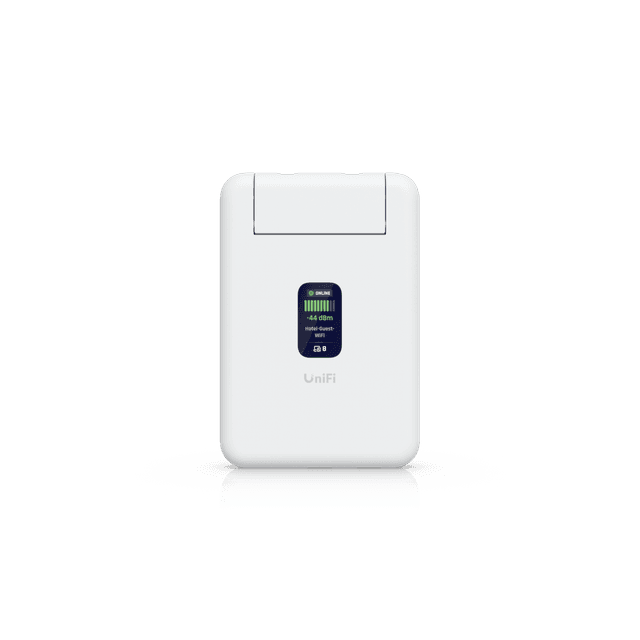
Ubiquiti UniFi Travel Router UTR in Dubai, UAE
Carry a controlled private network between hotels, client offices, project sites and temporary workspaces. The UniFi Travel Router UTR accepts WiFi, Gigabit Ethernet or supported mobile USB tethering as its internet source, then provides portable connectivity for business devices with stand-alone operation and VPN client support.
Quote preparation
Share the required quantity, destination, intended uplink, VPN preference and any setup support needed. FourTeck can then coordinate a model-specific quotation.
UTR
Dual-band WiFi 5, 2×2 MIMO
WiFi, Ethernet, USB tethering
USB-C, 5V/2A source required
WireGuard and OpenVPN
Direct answer for buyers
The Ubiquiti UniFi Travel Router UTR is a pocket-sized router for creating a private, repeatable network while away from the main office. It can receive internet through a hotel or venue WiFi network, a wired Gigabit Ethernet connection, or USB tethering from a supported iOS or Android device. It is mainly intended for travellers, mobile professionals and temporary teams that want more control than connecting every device directly to an unfamiliar network. Before proceeding, confirm that WiFi 5 capacity is adequate, identify the expected uplink method, verify VPN requirements, plan a suitable USB-C power source and check current regional availability.
What it does
The UTR separates your devices from the public or temporary internet connection being used at the location. Instead of joining a laptop, phone and tablet individually to a hotel network, the traveller can connect the UTR to that network and then connect business devices to the router’s own local WiFi or Ethernet environment. This can simplify daily reconnection, keep a consistent local network name and support a defined VPN client configuration.
It is not an integrated cellular modem and it does not replace a full office gateway. Mobile internet depends on USB tethering from a compatible phone or another external source. Its role is portable routing and controlled access rather than high-density office coverage.
Who it suits
The UTR may be useful for executives travelling between offices, consultants working from customer premises, field engineers commissioning systems, production teams using short-term venues and small project groups that require a familiar network for several devices.
It is especially relevant where compact size, low power demand and flexible uplink choices matter more than the latest wireless generation or extensive port capacity. Buyers needing WiFi 6 or WiFi 7, integrated 4G or 5G, multiple LAN ports, advanced threat inspection or large-site coverage should evaluate a different platform.
Business challenges the UTR can help address
Repeated device onboarding
Hotels and temporary workplaces often require each device to be joined separately. A travel router can centralise the upstream connection so the traveller manages one uplink while continuing to use a familiar local network for authorised devices. Captive portal behaviour can vary, so the process should be tested for the intended environment.
Changing internet sources
A project may begin with venue WiFi, move to a wired connection and later depend on phone tethering. The UTR supports these three practical uplink methods, giving travellers a consistent router even when the source changes. Availability and performance still depend on the upstream service.
Portable VPN access
WireGuard and OpenVPN client support can help route selected travel traffic through an appropriate VPN service or business endpoint. The VPN design, credentials, remote endpoint and company security policy remain customer responsibilities unless configuration assistance is included in the quotation.
Limited luggage space
At approximately 95.95 x 65 x 12.5 mm and 89 g, the device is designed for portability. Its low 5 W maximum power consumption also makes it practical for compact travel kits, though a compliant USB-C power source must be arranged because an adapter is not included.
Core capability band
Choose WiFi, one of the Gigabit Ethernet interfaces or supported USB phone tethering according to the location.
Connect business devices to one travel network rather than reconfiguring each endpoint at every venue.
The manufacturer states that no UniFi account is required when the UTR is used in stand-alone device mode.
Use supported WireGuard or OpenVPN configurations where they fit the organisation’s access design and policy.
Product-fit decision matrix
| Requirement | Suitable when | Confirm before ordering |
|---|---|---|
| Portable business routing | One traveller or a small mobile team needs a reusable local network. | Number of client devices and expected workload. |
| Venue WiFi as WAN | The location provides usable WiFi and permits downstream routing. | Captive portal behaviour, signal quality and venue terms. |
| Wired uplink | A hotel, customer or temporary office provides Ethernet. | Port authentication, VLAN requirements and cable needs. |
| Mobile tethering | A compatible iOS or Android phone provides internet over USB. | Phone, cable, mobile plan and tethering policy. |
| VPN client use | WireGuard or OpenVPN matches the remote endpoint. | Server details, credentials, routes, DNS and company policy. |
| High-speed modern WLAN | WiFi 5 and 2×2 MIMO are adequate for the task. | Do not select it where WiFi 6/7 features are mandatory. |
Verified technical information
The following values are based on the official model-specific technical information for UTR. Regional packaging, firmware capabilities and service availability should still be checked at quotation stage.
| Brand | Ubiquiti UniFi |
|---|---|
| Product name | UniFi Travel Router |
| Model | UTR |
| Product type | Portable travel router |
| Dimensions | 95.95 x 65 x 12.5 mm |
| Weight | 89 g |
| Enclosure | Polycarbonate |
| Uplink methods | WiFi, two Gigabit Ethernet RJ45 ports, USB tethering for supported iOS/Android devices |
| WiFi standard | WiFi 5 / IEEE 802.11ac, with 802.11n/g/b support |
| Maximum stated 802.11ac data rate | Up to 866.7 Mbps under supported radio conditions; real throughput varies |
| WiFi MIMO | 2 x 2 |
| Antennas | Two embedded WiFi antennas |
| Maximum transmit power | 2.4 GHz: 13 dBm; 5 GHz: 15 dBm |
| VPN client support | WireGuard and OpenVPN |
| Management connection | Bluetooth |
| Status display | 1.14-inch display |
| Maximum power consumption | 5 W |
| Power method | USB-C, 5V/2A; power adapter not included |
| Operating temperature | -10 to 40 degrees C |
| Operating humidity | 5 to 95% non-condensing |
| Certifications | CE, FCC and IC; regional suitability should be confirmed |
| UAE availability | Contact FourTeck for current options, quantity and lead-time guidance |
Dependencies and limitations to review
The UTR provides routing but it cannot improve an unreliable upstream service. Hotel bandwidth, mobile signal, venue restrictions, captive portals, VPN endpoint capacity and local radio congestion all affect the experience. USB tethering depends on the mobile device, data plan, operating-system behaviour and cable. VPN performance depends on encryption overhead, routing and the remote server. Firmware features may change with updates. A buyer should therefore validate the intended workflow rather than assessing the device only by its maximum radio data rate.
The product is a WiFi 5 unit. Its compact design and embedded antennas are suitable for short-range travel use, not broad office or warehouse coverage. A USB-C 5V/2A power source is needed, and the official specification states that the adapter is not included. Confirm the exact supplied contents with the quotation.
A practical purchase and deployment journey
Define the travel scenario
List the countries, venues, devices, user count and applications. State whether the router will support general browsing, voice, remote desktop, video meetings, file transfer or equipment commissioning.
Choose uplink priorities
Decide whether wired Ethernet, venue WiFi or phone tethering is the normal source and which method is the fallback. Include cables and adapters in the bill of materials.
Confirm security design
Identify the local SSID, password policy, VPN protocol, remote endpoint and allowed routes. Verify that the design follows company policy before it is used for business data.
Prepare and test
Update firmware, configure the router, test each uplink, confirm captive portal handling and verify access to required corporate services before the traveller leaves.
Flexible internet handoff
The ability to change between WiFi, Ethernet and supported phone tethering is the UTR’s defining operational strength. A consultant may use a wired socket at a customer office, authenticate once to hotel WiFi in the evening and switch to a phone connection while travelling. The local device network can remain familiar even though the upstream path changes.
This flexibility should not be confused with automatic universal compatibility. Some hotels restrict routers, isolate clients, require browser-based authentication or periodically expire sessions. Corporate wired networks may use authentication or VLAN controls. Mobile carriers may limit tethering. Testing and an agreed fallback remain important.
Consistent traveller workflow
A repeated local network can reduce the time spent joining every device at each stop. Printers, test equipment or presentation devices that depend on a known network may also be easier to use within a small temporary workspace. The UTR’s status display provides at-a-glance device information without turning the unit into a bulky appliance.
Organisations should still control who receives the travel network credentials and how those credentials are changed. A lost router must be handled according to the company’s device and credential policy. Configuration backup, asset tracking and firmware maintenance are practical lifecycle tasks.
VPN-ready portable routing
WireGuard and OpenVPN client support allows the travel router to participate in a wider remote-access design. This can be useful where several connected devices should use the same VPN path or where a traveller wants a defined exit point. The exact result depends on the VPN server, route policy, name resolution and internet quality.
A router VPN is not a substitute for endpoint security, multifactor authentication, device management or application-level controls. FourTeck can discuss configuration support, but the customer should provide the approved VPN profile, destinations and security requirements.
Ideal business environments and use cases
Consulting and audit travel
A consultant can maintain a familiar private network for a laptop, phone and tablet while moving between hotels and temporary customer areas. The client site’s access rules must be respected.
Field engineering
Engineers may use the router for controlled access among a laptop and a small number of commissioning devices. Compatibility with the equipment and required addressing plan should be validated.
Temporary project rooms
Small teams can establish a short-range local network where the venue provides a usable upstream service. Larger groups or wider spaces will normally need a more capable deployment.
Executive travel kits
The small dimensions and 89 g weight make the UTR suitable for a prepared travel kit that includes the correct USB-C supply, cables, written connection steps and support contacts.
Event and demonstration teams
A sales or technical demonstration team can use one known local network for presentation devices, provided venue policies and upstream capacity support the planned demonstration.
Remote-work continuity
The router can provide an additional connection method when a traveller has more than one available upstream option. It does not guarantee service continuity because all paths may share local infrastructure.
Integration and operational considerations
Corporate network policy
Some organisations prohibit unmanaged routers, personal VPN endpoints or local sharing of a corporate connection. Confirm approval before deploying the UTR on company or customer networks. The router should be incorporated into travel-security guidance, not used as an informal bypass.
Addressing and route conflicts
A VPN or customer environment may use the same private subnet as the router’s local network. Such overlap can prevent access to remote services. Plan addressing carefully and test with the actual VPN profile and business applications.
Power and cabling
The device requires USB-C power at 5V/2A and has a maximum stated consumption of 5 W. Include a suitable regional power adapter, quality cable and any Ethernet cable needed. Confirm airline, hotel and site rules for power banks or shared charging equipment.
Firmware and support lifecycle
Plan firmware review before travel, document the working configuration and avoid untested changes immediately before an important project. Current firmware may add, modify or improve features, so operational documentation should identify the tested version rather than assuming every device behaves identically.
Buyer questions to resolve before ordering
Define simultaneous laptops, phones, tablets and special devices rather than only the number of travellers.
Specify WiFi, Ethernet or phone tethering and identify the expected backup method.
Review device compatibility, local congestion and application demand before accepting the radio generation.
Confirm WireGuard or OpenVPN, authentication, routes, DNS and the responsible administrator.
Include a compatible power source, USB-C cable, Ethernet cable, tethering cable and written recovery steps.
State whether FourTeck should quote setup, testing, documentation or only hardware supply.
Procurement checklist
☐ Confirm the exact UTR model and regional variant.
☐ State the required quantity and destination.
☐ Document the normal number of connected devices.
☐ Identify primary and fallback internet sources.
☐ Confirm WiFi 5 suitability for the workload.
☐ Verify WireGuard or OpenVPN requirements.
☐ Include a 5V/2A USB-C power source.
☐ Include required Ethernet and tethering cables.
☐ Review corporate and customer network policy.
☐ Define configuration and testing responsibility.
☐ Confirm current firmware and app compatibility.
☐ Request warranty and lead-time guidance in writing.
☐ Specify delivery coordination requirements.
☐ Record the required support or handover scope.
How FourTeck can assist
FourTeck can help translate the travel requirement into a clear quotation. This may include checking whether the UTR’s WiFi generation and port arrangement fit the intended use, identifying missing power or cable items, reviewing the proposed uplink methods and documenting optional configuration support. For buyers purchasing several units, a consistent naming, configuration and handover approach can also be discussed.
An accurate request should include quantity, destination, expected usage date, application profile, preferred VPN protocol and any setup or testing tasks. FourTeck can then coordinate commercial availability and scope without presenting optional services as part of the base hardware. Visit the FourTeck technology product catalogue, review available networking and configuration services, or submit the travel-router requirement for quotation coordination.
UAE availability and support guidance
Contact FourTeck to confirm current UAE availability for the Ubiquiti UniFi Travel Router UTR. Supply may depend on regional variant, quantity, vendor lead time and the date of the request. A quotation can identify the exact model, commercial terms, expected delivery coordination and any separately scoped accessories or configuration services. Installation is usually minimal for a travel router, but preparation, VPN configuration, testing and user handover may still be valuable where several employees will carry the device.
FourTeck can coordinate requirements for organisations operating in Dubai, Abu Dhabi, Sharjah and Ajman through one combined discussion. Buyers should provide the delivery destination, quantity, preferred timeline and whether the units must be prepared before handover. No stock position, delivery date, warranty period or configuration outcome should be assumed until it appears in the relevant quotation or order documentation.
GCC Availability
FourTeck can assist organisations planning UTR purchases for projects and travelling teams across GCC markets, including the United Arab Emirates, Saudi Arabia, Kuwait, Qatar, Bahrain and Oman. The useful first step is a requirement review covering the destination country, exact model, quantity, intended uplink, power accessories, VPN approach and any preparation service. Product availability, regional packaging, delivery schedules, service visits and vendor lead times can vary by country and order size. Licensing is not normally the central purchase issue for this stand-alone travel router, but VPN endpoints and related services may have their own terms. Buyers should also confirm local power arrangements, mobile tethering policies and venue-network rules. FourTeck can coordinate quotation and project planning after the destination, expected usage date and support scope are documented. For Kuwait-related technology requirements, buyers may also review FourTeck Kuwait information.
Africa Availability
Organisations preparing travel kits, field-service deployments or temporary project connectivity in Africa can ask FourTeck to review the UTR requirement alongside accessories, configuration and regional fulfilment considerations. Availability may depend on the destination, quantity, model region, vendor lead time, shipping arrangement, power requirements and local project conditions. Mobile tethering performance and permitted frequencies or certifications should be checked for the intended market rather than assumed from another region. Buyers should share the destination country, exact quantity, preferred deployment schedule, required cables, VPN design and any support expectation. FourTeck can help structure an appropriate quotation without promising local inventory, customs outcomes or fixed delivery dates. Regional information is available through FourTeck Africa, with additional project context for Kenya and Uganda.
Related products, services and alternatives to consider
USB-C travel power kit
A compliant 5V/2A power source and suitable cable should be included because the official product specification states that an adapter is not included. Confirm regional plug needs separately.
Ethernet and tethering cables
Short, labelled cables can make wired and mobile fallback connections practical. Compatibility with the phone and power arrangement must be checked.
Configuration service
For multiple travellers, consider a documented baseline covering SSID, administrative access, VPN profile, addressing and recovery steps.
Higher-capacity gateway
A full UniFi gateway and access point may be more suitable for a fixed office, higher client count, advanced security inspection or broader wireless coverage.
Why businesses contact FourTeck
Technology procurement is often delayed by small uncertainties: whether a power supply is included, which uplink will work at the intended location, how a VPN should be configured, whether the radio generation meets the application need, and which services belong in the quotation. FourTeck focuses the discussion on those practical questions. The aim is to create a clear bill of materials and scope rather than treating every travel requirement as identical.
Assistance may include requirement clarification, model confirmation, accessory guidance, quotation coordination, configuration scoping, pre-deployment testing plans and delivery coordination. The exact activities depend on the agreed quotation. Background information about the company is available on the FourTeck company page.
Frequently asked questions
Is the UTR a 4G or 5G mobile router?
No integrated cellular modem is listed. Mobile internet is provided through supported iOS or Android USB tethering, so the phone, mobile plan, signal and cable remain separate dependencies.
Can it connect to hotel WiFi?
WiFi is a supported uplink method. Actual hotel compatibility depends on signal quality, captive portal behaviour, session limits and venue policy. Test important workflows before relying on them.
Does the UniFi Travel Router require a UniFi account?
The manufacturer states that no UniFi account is required for stand-alone device mode. Management preferences and any wider UniFi integration should still be confirmed for the planned setup.
Which VPN protocols are supported?
The model-specific technical information lists WireGuard and OpenVPN VPN client support. The customer must provide a compatible endpoint, profile, credentials and route policy.
Is a power adapter supplied?
The official specification lists USB-C 5V/2A power and states that the adapter is not included. Confirm the exact box contents and order a suitable power source where required.
Is this a WiFi 6 or WiFi 7 device?
No. The UTR is specified as WiFi 5 with 2×2 MIMO. Buyers who require newer WLAN features should consider another platform.
Can FourTeck configure the router before delivery?
Configuration and testing can be discussed as a separate scope. Provide the approved SSID, administrative policy, VPN profile, addressing and acceptance requirements so the work can be quoted accurately.
How do I obtain a Dubai price?
Send FourTeck the required quantity, destination, target date, accessories and service scope. The response can then confirm the current commercial price and regional availability.
What warranty applies?
Warranty terms may depend on the supplied region and commercial channel. Ask for the applicable warranty guidance to be included with the quotation or order documentation.
Prepare a travel-router quotation around the real use case
Share the quantity, destination, expected uplink, VPN preference, required accessories and configuration scope. FourTeck can confirm current UAE options and prepare a focused quotation for the Ubiquiti UniFi Travel Router UTR.

Reviews
There are no reviews yet.