

Compact professional UniFi switching
Ubiquiti Pro Max 16 USW-Pro-Max-16 in Dubai, UAE
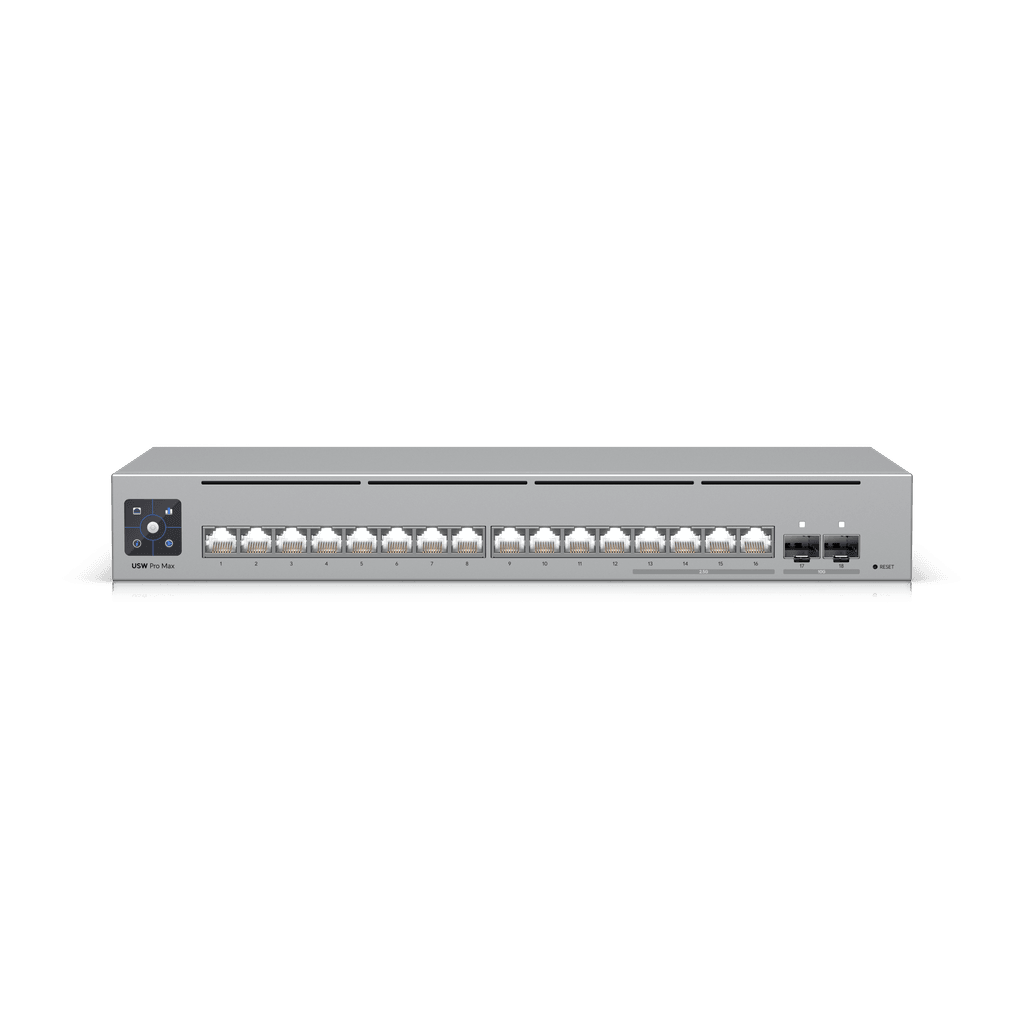
A compact Layer 3 switch for businesses that want a balanced combination of twelve Gigabit access ports, four 2.5 GbE ports and two 10G SFP+ uplinks without paying for an integrated PoE budget they may not need.
Local routing and network control
For selected high-speed endpoints
Fast uplink and aggregation options
Separate device power required
Direct answer for buyers
The Ubiquiti Pro Max 16, model USW-Pro-Max-16, is a compact managed switch in the UniFi professional switching range. It is mainly used to connect office devices, servers, workstations, storage, access-layer switches and other network equipment while providing a selective path to 2.5 GbE and 10G uplinks. It suits organisations already using, or planning to use, UniFi Network management and those that do not need PoE power from the switch itself. Before proceeding, confirm that sixteen copper access ports are sufficient, that four 2.5 GbE ports meet the high-speed requirement, that the selected SFP+ optics or DAC cables match the connected equipment, and that separate power is available for any PoE-dependent endpoints.
What it does
USW-Pro-Max-16 acts as a compact aggregation and access switch for a UniFi-managed network. Twelve standard Gigabit ports accommodate common business endpoints, while four 2.5 GbE interfaces provide additional bandwidth for devices such as newer workstations, multi-gigabit servers, network storage, high-performance wireless access infrastructure connected through an external power solution, and selected downstream switches. Two 10G SFP+ ports support high-speed uplinks to a gateway, core switch, server, storage platform or another switch. Layer 2 and Layer 3 functions help administrators segment traffic, apply access controls, create link aggregation groups, manage multicast behaviour and route between local networks where appropriate.
Who it suits
This model is a practical fit for small and mid-sized offices, design and media teams, retail or hospitality back offices, education labs, branch locations and professional environments that need more capability than a basic unmanaged switch. It is particularly relevant when most connected devices remain at 1 GbE but a smaller group needs 2.5 GbE, while the backbone or uplink should operate at 10G. It is less suitable when many powered access points, cameras or phones must receive power directly from the switch, when more than sixteen copper ports are required immediately, or when the network is managed through a platform outside the UniFi ecosystem and centralised UniFi administration is not planned.
Business challenges this switch can help address
Gigabit bottlenecks on selected devices
A network may not need every port to operate above 1 GbE, yet a handful of systems can benefit from higher throughput. The four 2.5 GbE ports give buyers a measured upgrade path without moving every endpoint to a much more expensive all-multi-gigabit platform.
Limited uplink headroom
Two 10G SFP+ ports can reduce congestion between the access layer and a gateway, core, server or storage device. The exact result depends on traffic patterns, transceiver choice, cabling and the capabilities of connected equipment.
Fragmented switch administration
For organisations standardising on UniFi Network, centralised visibility can simplify VLAN configuration, port profiles, firmware administration and troubleshooting. The management benefit depends on a correctly deployed UniFi console or supported hosting environment.
Space constraints
The compact chassis supports rack, desktop and wall deployment, which can suit branches, labs and small communications rooms. Mounting choice should still consider airflow, cable bend radius, power-adapter placement and service access.
Core capability band
Designed to handle simultaneous traffic across the available interfaces within the published platform limits.
Provides useful headroom for a mixed Gigabit, 2.5G and 10G access design.
Supports packet forwarding for business networks with varied traffic profiles.
Requires UniFi Network version 8.1.127 or later according to the manufacturer specification.
Product-fit decision matrix
| Requirement | Suitable when | Confirm before ordering |
|---|---|---|
| Mixed access speeds | Most devices use 1 GbE and up to four devices need 2.5 GbE. | Which exact endpoints require multi-gigabit links and whether four ports are enough. |
| 10G backbone | One or two SFP+ links can serve the uplink, server or aggregation requirement. | Optics, DAC type, fibre mode, distance and compatibility at both ends. |
| Non-PoE design | Connected devices are self-powered or use separate injectors or PoE switches. | Whether any access point, camera or phone expects power from this switch. |
| Compact deployment | A short-depth rack, wall or desktop position is preferred. | Mounting accessory, rack depth, ventilation and cable clearance. |
| UniFi administration | The organisation wants centralised management in UniFi Network. | Console location, software version, administrator access and adoption plan. |
Verified technical information
| Brand | Ubiquiti |
|---|---|
| Product name | UniFi Pro Max 16 |
| Model | USW-Pro-Max-16 |
| Product type | Managed Layer 3 Ethernet switch, non-PoE |
| 1 GbE RJ45 | 12 ports supporting 1G/100M/10M |
| 2.5 GbE RJ45 | 4 ports supporting 2.5G/1G/100M/10M |
| 10G SFP+ | 2 ports supporting 10G/1G |
| Switching capacity | 84 Gbps |
| Non-blocking throughput | 42 Gbps |
| Forwarding rate | 62 Mpps |
| Supported VLANs | Up to 1,000 |
| MAC address table | 16,000 entries |
| IPv4 static routes | 256 |
| Form factor | 1U rack mount, desktop or wall mounting |
| Dimensions | 325.1 × 160 × 43.7 mm |
| Weight | 1.95 kg |
| Maximum power consumption | 25W |
| Power method | Included AC/DC adapter; USB Type-C 5V DC, 5A input |
| Operating temperature | -5 to 40°C |
| Management requirement | UniFi Network version 8.1.127 or later |
| Availability | Contact FourTeck to confirm current UAE options, quantity and lead time. |
Important dependency: this is the non-PoE model
USW-Pro-Max-16 should not be confused with USW-Pro-Max-16-PoE. The model on this page does not provide Power over Ethernet to connected devices. That distinction matters in access-point, surveillance and voice deployments because many wireless access points, IP cameras and desk phones normally receive both data and electrical power through the Ethernet cable. Buyers using this non-PoE model must provide separate power, use suitable PoE injectors, or connect powered endpoints through another PoE-capable switch. A quotation should identify every endpoint and its power requirement before the model is finalised. Choosing the non-PoE version can be sensible where the switch primarily connects desktops, servers, storage and self-powered equipment, but it may create unnecessary complexity when a large proportion of endpoints require PoE.
A practical purchase and deployment journey
Map every connection
List current and planned devices, required speeds, VLAN membership and power needs. Separate ordinary 1 GbE endpoints from systems that genuinely benefit from 2.5 GbE or a direct 10G connection.
Confirm topology and uplinks
Decide whether both SFP+ ports will be used for independent links, redundancy, link aggregation, a server connection or future expansion. Check the far-end interface and cable distance before selecting optics or DACs.
Validate management
Confirm where UniFi Network will run, whether the required software version is available, who will administer the system and how configuration backups, updates and credentials will be controlled.
Define installation scope
Include rack or wall mounting, patching, labelling, VLAN creation, port profiles, testing and documentation in the quotation where professional implementation is required.
Test and hand over
Verify negotiated link speeds, VLAN reachability, uplink performance, management access and endpoint power arrangements. Record the final port map so future support does not depend on memory.
Selective multi-gigabit capacity
The design is useful when a business wants to move beyond a fully Gigabit access layer without purchasing a larger switch in which every port supports a higher speed. Four 2.5 GbE interfaces can be allocated to the systems that benefit most, such as editing workstations, compact servers, NAS devices or downstream equipment with matching interfaces. This selective approach can improve procurement clarity because the buyer pays for a measured amount of multi-gigabit capacity. It also requires discipline. If the number of high-speed endpoints is likely to exceed four soon, the apparent saving can disappear when a second switch or earlier replacement becomes necessary. FourTeck can help review expected port growth, device replacement cycles and traffic patterns before recommending this model.
10G uplinks and media planning
The two SFP+ ports create options for 10G uplinks, but SFP+ is a physical interface family rather than a guarantee that every module or cable combination will work in every design. Buyers should identify whether the connection uses a direct-attach copper cable, multimode fibre, single-mode fibre or an SFP+ to RJ45 adapter. Distance, transceiver type, fibre grade, connector type, heat, power draw and far-end compatibility all matter. For short rack connections, a supported DAC may be simple and cost-effective. For longer runs or building links, optical modules may be more appropriate. A complete bill of materials should include both ends of the link and the required patching rather than listing only the switch.
Operational control in UniFi Network
Centralised management is one of the main reasons to select a UniFi switch. Administrators can apply port profiles, monitor link state, assign VLAN behaviour, review connected clients and manage firmware from a common interface. The switch supports functions including LACP, STP and RSTP, QoS using DSCP, IGMP controls, 802.1X, DHCP snooping, access lists, port isolation, port mirroring, voice VLAN and loop protection. These features are valuable only when they are configured in line with the broader network design. A poorly planned VLAN or access-control policy can disrupt services just as easily as it can improve segmentation. Configuration should therefore be documented, tested and aligned with the gateway and endpoint environment.
Ideal business environments and use cases
Professional offices
A branch or office can connect ordinary desktops and printers at 1 GbE while reserving 2.5 GbE for storage, power users or a local server. The 10G uplink can connect to a core switch, gateway or central rack where suitable.
Creative and media teams
Designers, editors and production users often move large files. The switch may serve a small group of higher-speed workstations, although real workflow performance also depends on storage throughput, server interfaces, client hardware and cabling.
Education and training labs
Labs that use UniFi management may value segmentation, central visibility and a compact chassis. Port count and physical protection should be assessed where equipment is frequently reconnected by users.
Hospitality back-office networks
The unit can support management systems, servers and office endpoints, but guest Wi-Fi access points and cameras may require a separate PoE design. The complete site topology should be evaluated rather than selecting the switch in isolation.
Compact server or storage edge
A small server room may use SFP+ for an uplink or server attachment and 2.5 GbE for selected devices. Buyers should check whether two SFP+ ports provide enough resilience and expansion for the intended lifecycle.
AV and multicast environments
Published support for advanced IGMP configuration and Pro AV profiles can be relevant to managed audiovisual networks. Protocol, bandwidth, latency and vendor-specific design requirements should still be validated for the exact application.
Integration and operational considerations
A switch upgrade should be treated as part of a system, not as an isolated hardware purchase. The gateway must support the required VLANs, routing, access-control policies and uplink speed. Existing copper cabling must support the intended 2.5 GbE links over the installed distance and environmental conditions. SFP+ interfaces require suitable modules or cables at both ends. The UniFi console must run a compatible software version and have a reliable management path to the switch. Administrators should also consider maintenance windows, firmware policy, configuration backups and how remote support will be provided if the site loses connectivity.
Power is another operational point. The switch uses an external AC/DC power adapter and accepts USB Type-C 5V DC input according to the published specification. Rack layouts should allow safe adapter placement and strain relief rather than leaving the power supply unsupported. Where business continuity matters, discuss protected power, UPS runtime and whether the absence of a redundant power input is acceptable. The physical environment must remain within the specified temperature and humidity range, with adequate ventilation and without cable pressure on the front interfaces.
Buyer questions to resolve before ordering
A sixteen-port switch may fit the current requirement but leave little room for new users, servers or downstream devices. Reserve capacity should be deliberate.
Confirm that the endpoints and their cabling actually support 2.5 GbE. A faster switch port does not increase the speed of a 1 GbE device.
List every powered device and its standard. If PoE is central to the design, compare the PoE variant or a mixed-switch approach.
Specify device, interface, distance and cable medium. This determines the correct transceiver, DAC or adapter choice.
Identify the console, software version, administrator and backup process before installation.
Clarify whether one switch, one power adapter and one uplink path are acceptable for the service being supported.
Procurement checklist
☐ Confirm the exact model as USW-Pro-Max-16, not the PoE version.
☐ Record the required quantity and intended deployment locations.
☐ Count current and planned 1 GbE and 2.5 GbE endpoints.
☐ Identify every device that needs PoE or separate power.
☐ Define the purpose of both SFP+ interfaces.
☐ Select compatible DAC cables, optical modules or adapters.
☐ Confirm rack, wall or desktop mounting requirements.
☐ Check rack depth, airflow, cable clearance and adapter placement.
☐ Confirm UniFi Network hosting and compatible software version.
☐ Document VLANs, routing, access controls and port profiles.
☐ Decide whether configuration, testing and handover are required.
☐ Confirm UAE availability, lead time and warranty terms in the quotation.
How FourTeck can assist
FourTeck can support the buying process by translating a device list and network diagram into a clearer bill of materials. That may include confirming whether the non-PoE model is appropriate, comparing it with the PoE variant, checking port growth, reviewing uplink media and identifying whether rack accessories, SFP+ modules, DAC cables or installation services should be included. The objective is not to add unnecessary components; it is to reduce the risk of receiving a switch that cannot power the intended endpoints, lacks enough high-speed ports or arrives without the parts required to connect it.
For organisations planning a wider network refresh, FourTeck can also discuss gateway, switching, wireless and structured-cabling dependencies. Visit the business technology product catalogue, review available installation and configuration services, or use the FourTeck contact page to submit the exact requirement. A useful enquiry includes the site location, number of users, connected devices, port-speed needs, PoE requirements, preferred uplink method and expected deployment schedule.
UAE availability and support guidance
Contact FourTeck to confirm current UAE availability for the Ubiquiti USW-Pro-Max-16. Availability may depend on quantity, regional supply, vendor lead time and the accessories included in the request. Delivery and project coordination can be discussed after the exact requirement is confirmed. Where installation or configuration is needed, include that scope in the quotation so mounting, adoption, VLAN configuration, uplink setup, testing and documentation can be planned together rather than handled as separate assumptions.
FourTeck can coordinate enquiries for organisations in Dubai, Abu Dhabi, Sharjah and Ajman through one combined requirement review. This approach is useful for businesses with multiple branches because each site may need a different port count, uplink medium, rack arrangement or service scope. The final quotation should state the exact model, quantity, accessories, destination, warranty guidance and any professional services. For broader company information, see about FourTeck or contact the regional team.
GCC availability
FourTeck can assist GCC organisations that are evaluating the Ubiquiti Pro Max 16 for branch, office, hospitality, education or professional network projects. Support can include requirement review, confirmation of the exact non-PoE model, comparison with the PoE version, uplink planning, quotation coordination, delivery planning and definition of installation or configuration scope. Projects in the United Arab Emirates, Saudi Arabia, Kuwait, Qatar, Bahrain and Oman may have different product availability, import arrangements, lead times, service conditions and regional requirements. Buyers should therefore provide the destination country, required quantity, preferred deployment date, SFP+ media, mounting method and management environment before expecting a final recommendation. Licensing is not normally the same issue as it is with subscription-based security products, but UniFi management compatibility and software version still need to be confirmed. For Kuwait-related enquiries, the FourTeck Kuwait resource can provide a relevant starting point. No fixed delivery or installation date should be assumed until the complete scope and vendor lead time are reviewed.
Africa availability
Organisations planning UniFi switching projects in Africa can ask FourTeck for guidance on model selection, accessories, deployment requirements, configuration scope and regional procurement planning. The USW-Pro-Max-16 may be appropriate where a compact non-PoE switch with a small number of 2.5 GbE ports and 10G uplinks matches the site design, but power standards, rack conditions, fibre choices, local support expectations and shipping arrangements should be assessed before ordering. Availability and fulfilment can vary by destination, quantity, vendor lead time, regulatory requirements and local project conditions. Buyers should share the destination country, device count, required port speeds, uplink distance, PoE needs and preferred schedule so the proposed bill of materials can be reviewed properly. FourTeck maintains regional resources for Africa technology enquiries, including dedicated information for Kenya and Uganda. Local inventory, customs outcomes, onsite coverage and exact delivery times must be confirmed for each project rather than assumed.
Related options and complementary services
USW-Pro-Max-16-PoE
Consider the PoE variant when the switch must power compatible access points, cameras or phones. Confirm PoE budget, per-port standard and endpoint demand.
Higher-port-count UniFi switches
A 24-port or 48-port model may provide a more suitable growth path where the present design already uses most of the sixteen copper interfaces.
SFP+ optics and DAC cables
The correct 10G medium depends on distance, fibre type, connector, far-end interface and supported module options. Include both ends in the bill of materials.
Network installation service
Rack mounting, patching, labelling, adoption, VLAN setup, testing and documentation can be quoted where the customer requires implementation support.
Why businesses contact FourTeck
Businesses usually need more than a model number. They need to know whether the port mix fits the intended network, whether the non-PoE design is appropriate, what SFP+ components are required, how the switch will be managed and what should be included in the implementation scope. FourTeck can help clarify these points before a quotation is prepared. This can reduce avoidable changes such as replacing the switch because powered endpoints were overlooked, ordering incompatible optical modules, discovering that the rack arrangement does not accommodate the planned mounting method, or deploying without a documented VLAN and uplink plan.
The assistance can be scaled to the requirement, from product-only quotation coordination to a broader review covering network layout, configuration and delivery planning. Recommendations remain dependent on the information supplied by the customer and the current vendor options. The most useful starting point is a simple port schedule, device list and diagram showing how the switch is expected to connect to the gateway, servers, storage and downstream equipment.
Frequently asked questions
Does the USW-Pro-Max-16 provide PoE?
No. This exact model is the non-PoE version. Devices that require Power over Ethernet need a separate injector, another PoE switch or the USW-Pro-Max-16-PoE model, subject to a review of the required PoE budget.
How many 2.5 GbE ports are included?
The switch provides four 2.5 GbE RJ45 ports. The remaining twelve RJ45 ports are Gigabit Ethernet, and two additional SFP+ ports support 10G or 1G connections.
Can it be installed in a rack?
Yes. The manufacturer lists 1U rack, desktop and wall mounting options. Confirm the required mounting hardware, supported rack depth, ventilation and cable clearance before installation.
Does it support Layer 3 functions?
Yes. Published functions include DHCP server and relay, inter-VLAN routing and static routing for local networks. The design should still be coordinated with the gateway and broader network policy.
What software is required for management?
The published application requirement is UniFi Network version 8.1.127 or later. Confirm the console location, current version and administrator access before deployment.
Are SFP+ modules included?
Do not assume that the required optics, DAC cables or SFP+ to RJ45 adapters are included. The quotation should list the exact media needed for each uplink.
Is this switch suitable for Wi-Fi access points?
It can carry network traffic for access points, but it cannot power them. A separate PoE source is required, and the selected port speed should match the access point and cabling.
Can FourTeck configure the switch?
Configuration support can be discussed as part of the quotation. Scope may include adoption, VLANs, port profiles, uplinks, testing and documentation, depending on the customer requirement.
How can I confirm Dubai availability?
Submit the exact model, quantity, required accessories and preferred timeline to FourTeck. Current UAE availability and vendor lead time will be confirmed for the quotation.
What information is needed for an accurate quote?
Provide quantity, site location, port requirements, PoE needs, SFP+ media, mounting method, UniFi management environment and any installation or configuration services required.
Confirm the right switch before you order
Share your port schedule, endpoint power needs, 10G uplink plan and deployment location. FourTeck can help confirm whether USW-Pro-Max-16 is the correct fit and prepare a UAE quotation with the required accessories and service scope.

Reviews
There are no reviews yet.