
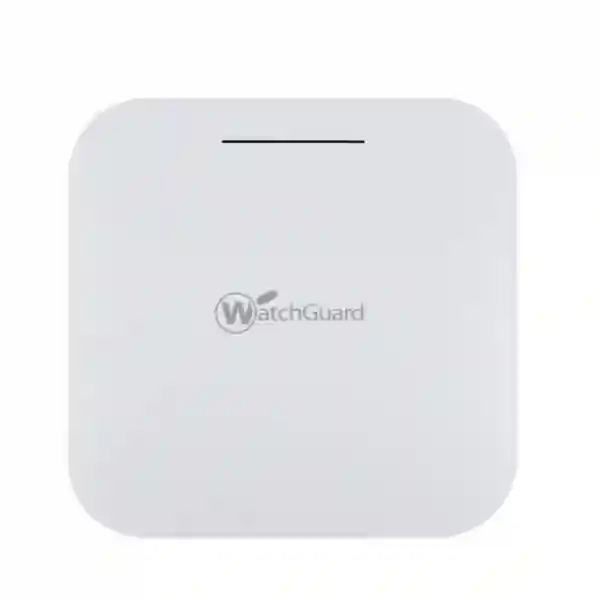
Secure Wi‑Fi 6 for lower-density indoor networks
WatchGuard AP130 Dubai
WatchGuard AP130 is a compact 2×2 Wi‑Fi 6 indoor access point for organizations that want current-generation wireless, WPA3-capable security and centralized WatchGuard Cloud management without choosing an access point intended for high-density venues. It is positioned by WatchGuard for low-density environments such as small offices, meeting rooms and remote-work locations. For Dubai and UAE buyers, that makes the AP130 particularly relevant where the requirement is dependable business Wi‑Fi for a manageable number of active users rather than stadium, campus or high-density conference coverage.
Before ordering, confirm the number of users, floor layout, wall construction, PoE availability, VLAN plan, internet connection, security policy and expected roaming behavior. FourTeck can help translate those requirements into an access-point quantity and network design discussion instead of treating wireless coverage as a single-device purchase.
Verified AP130 highlights
- Wi‑Fi 6 / IEEE 802.11ax
- 2×2 radios on 2.4 GHz and 5 GHz
- Up to 574 Mbps on 2.4 GHz and 1200 Mbps on 5 GHz
- 1 × 1 GbE Ethernet interface
- 802.3at PoE+ or 12V DC power input
- WPA3 and WPA2 security options
- WatchGuard Cloud management
- Indoor operating range: 0°C to 40°C
Best fit
Low-density indoor spaces where business users need modern dual-band Wi‑Fi and centralized administration.
Power planning
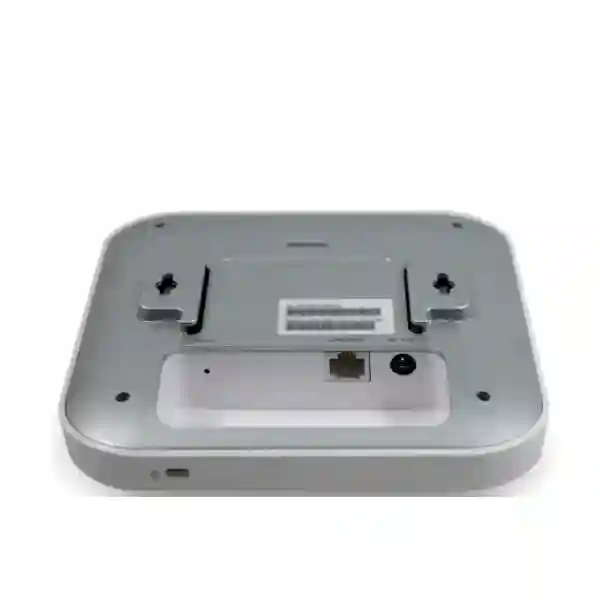
The access point supports 802.3at PoE+ and has a published maximum power consumption of 13.88 W, so switch budget and port capability should be checked.
Management model
AP130 belongs to WatchGuard’s newer Wi‑Fi 6 generation managed through Wi‑Fi in WatchGuard Cloud, not the older Gateway Wireless Controller workflow.
What is the WatchGuard AP130?
The WatchGuard AP130 is a dual-radio indoor access point built around Wi‑Fi 6 technology. WatchGuard specifies 2×2 operation on both frequency bands: 2.4 GHz supports 802.11b/g/n/ax and 5 GHz supports 802.11a/n/ac/ax. Published maximum data rates are 574 Mbps on the 2.4 GHz band and 1200 Mbps on the 5 GHz band. These are radio data-rate figures rather than a promise of real-world application throughput; actual performance depends on client capabilities, channel width, interference, distance, building materials, airtime competition, upstream switching and internet capacity.
For security, WatchGuard lists WPA3 PSK, WPA2 PSK, mixed WPA3/WPA2 PSK, WPA3 Enterprise, WPA2 Enterprise and OWA support. The AP130 uses internal antennas and a compact 160 × 160 × 33.2 mm enclosure weighing approximately 0.39 kg. It can be installed in indoor environments and supports ceiling T-bar or flat-surface mounting options according to WatchGuard’s current product guidance. The Ethernet side is intentionally straightforward: one 1 GbE port, with power available through IEEE 802.3at PoE+ or the 12V / 2A DC input.
The most important selection point is density. WatchGuard categorizes AP130 for low-density indoor use. A buyer should therefore avoid selecting it only because Wi‑Fi 6 appears on the specification sheet. If the intended location has a high number of simultaneously active clients, substantial voice or video use, dense classrooms, busy hospitality areas or a requirement for multi-gigabit uplinks and dedicated scanning radios, a different WatchGuard access-point model may deserve evaluation. FourTeck can review the client count, traffic pattern and room layout before quotation so the model aligns with the actual deployment.
WatchGuard AP130 specifications buyers should verify
| Area | Verified specification | Buying implication |
|---|---|---|
| Wireless standard | Wi‑Fi 6 / 802.11ax, dual-band 2.4 GHz and 5 GHz | Suitable when clients include modern Wi‑Fi 6 devices while maintaining compatibility with supported earlier standards. |
| Spatial streams | 2×2 on both radios | Match expectations to low-density use rather than high-density auditorium or large-campus deployment. |
| Published radio rates | 574 Mbps at 2.4 GHz; 1200 Mbps at 5 GHz | Real throughput will be lower and shaped by the full RF and network environment. |
| Ethernet | 1 × 1 GbE | Check switching design and avoid assuming a multi-gigabit wired uplink is included. |
| Power | 802.3at PoE+ or 12V / 2A DC; 13.88 W published maximum consumption | Confirm PoE+ capability and total switch power budget when deploying several units. |
| Wireless security | WPA3/WPA2 PSK and Enterprise options, plus OWA | Security design still depends on identity, VLAN, firewall and endpoint policies; encryption alone does not create segmentation. |
| Dimensions / weight | 160 × 160 × 33.2 mm; 0.39 kg | Compact enough for unobtrusive indoor mounting where a suitable mounting surface and cable route exist. |
| Operating environment | 0°C to 40°C; indoor deployment | Do not treat AP130 as an outdoor or rugged access point. Consider conditioned indoor placement in hot climates. |
Deployment design: what to decide before buying
A reliable WatchGuard AP130 deployment starts with questions that are more practical than the headline wireless rate. First, estimate concurrent active devices rather than only total registered users. A ten-person office can easily have thirty or more Wi‑Fi clients when laptops, phones, tablets, printers and meeting-room systems are counted. Second, map where users actually work. Corridors and ceiling positions that look central on a drawing do not always create the best RF coverage through reinforced concrete, glass partitions, shelving or equipment rooms.
Third, decide whether staff, guests, voice devices, printers, cameras and IoT equipment should share the same network. In most business environments they should not. SSID design should connect to a VLAN and firewall policy plan so a guest device cannot reach internal systems merely because both use the same access point. This is where wireless and firewall planning meet. Buyers exploring broader security architecture can review FourTeck Firewall Dubai network-security guidance for segmentation, VPN and policy considerations that sit upstream of the AP.
Fourth, verify switching. AP130 has one 1 GbE interface and supports 802.3at PoE+. A PoE switch must have compatible ports and enough aggregate power budget for every powered device connected to it. If the switch is already powering phones, cameras and other access points, calculate the full budget rather than assuming that an unused Ethernet port has sufficient power. If a PoE injector or DC adapter is preferred, confirm the correct accessory and regional power arrangement as part of the quote.
Finally, decide how configuration ownership will work. WatchGuard’s current Wi‑Fi 6 access points, including AP130, are managed through Wi‑Fi in WatchGuard Cloud. That management architecture should be understood before purchase, especially when an organization is replacing an older WatchGuard access point that used a different controller model. Cloud management can simplify distributed administration, but the project still needs clear responsibility for SSIDs, security policy, firmware planning, alerts, documentation and change control.
WatchGuard AP130 Dubai
Customers searching for WatchGuard AP130 Dubai usually need more than a model number. They are often deciding whether the AP130 is the right indoor Wi‑Fi 6 access point for a small office, branch, meeting area, professional-services workspace, clinic, retail back office, warehouse administration area or remote-work location. In Dubai, the first design issue is typically building layout. Concrete walls, glass partitions, metal shelving, server-room placement and open-plan seating can all change RF behavior, so AP quantity should be based on coverage and client activity rather than floor area alone. A compact office may be well served by one correctly placed unit, while a partitioned workplace can require multiple access points even when the total number of users is modest.
Power and cabling are equally important. The AP130 uses a 1 GbE port and supports 802.3at PoE+. Businesses renovating or moving offices should confirm where structured cabling terminates, whether the access switch provides PoE+, and whether the switch has enough remaining power budget. Ceiling placement can improve coverage, but only if the cable path, mounting position and future maintenance access are practical. For environments with staff and visitor networks, plan VLAN separation and firewall policy at the same time as the wireless installation. The AP can carry the wireless service, but routing and access control elsewhere in the network determine what each user group can reach.
Dubai buyers also commonly search for WatchGuard AP130 price UAE, WatchGuard AP130 supplier Dubai, AP130 installation Dubai and WatchGuard Wi‑Fi 6 access point quotation. Current pricing and availability should be confirmed at the time of enquiry because they can change with sourcing, quantity, licensing and accessory requirements. FourTeck’s wider UAE IT infrastructure portfolio can be relevant where the wireless project also includes switches, structured cabling, firewalls, servers or other business-network components.
For quotation, provide the office location, approximate floor plan, number of users, typical concurrent devices, number of guest users, current router or firewall, switch model, PoE availability and whether configuration or installation support is required. This lets the discussion focus on a workable deployment rather than only the unit price. AP130 is positioned for lower-density indoor use; if the Dubai site has dense meeting rooms, large training spaces or high simultaneous traffic, ask whether a higher-capacity WatchGuard model should be assessed before purchase.
WatchGuard AP130 UAE
A WatchGuard AP130 UAE project may involve a single office or several branches across different emirates. The technical product does not change simply because the location changes, but deployment planning can. Buyers should confirm the national regulatory domain and allowed wireless channels for the country of operation, because WatchGuard notes that available transmit power is tied to regulatory limits. This makes it important to source the correct regional product and configure the access point for the intended country rather than assuming that a unit obtained for another market will behave identically.
For UAE organizations with distributed locations, WatchGuard Cloud management can be useful because AP130 units can be administered centrally rather than treated as isolated stand-alone access points. The operational benefit is strongest when configuration is standardized: SSID naming, authentication, VLAN mapping, firmware approach and documentation should be consistent across branches. However, centralized management does not remove the need for local RF planning. A branch in a compact office tower, a warehouse office, a villa-based workplace and a retail back office can each require different placement and AP counts even when the same policy is used.
Procurement teams comparing WatchGuard AP130 UAE price should separate the access point hardware from the rest of the deployment. Confirm whether the quotation includes the required management entitlement, mounting hardware, PoE source, cabling work, switch changes, configuration and post-installation support. Ask for exact inclusions rather than relying on a single headline number. If the existing environment already uses a WatchGuard Firebox or other security gateway, review how wireless VLANs, guest access and administrative traffic will integrate with current firewall rules.
Where broader IT operations are part of the requirement, FourTeck IT services can provide context for infrastructure support beyond the access point itself. A sensible UAE design should document the AP location, switch port, VLAN assignments, SSID purpose, authentication method and responsible administrator. Those records make later troubleshooting and expansion easier. For multi-site businesses, they also reduce the risk that every location evolves into a different wireless configuration that is difficult to support.
WatchGuard AP130 Uganda
WatchGuard AP130 Uganda searches commonly map to practical branch-network questions: can the access point serve a small office, can it be managed remotely, what power and switch requirements apply, and how should guest or staff traffic be separated? AP130 is appropriate to consider for lower-density indoor areas where a 2×2 Wi‑Fi 6 design matches the client load. It should not be treated as a universal access point for every school hall, hotel area, campus or crowded event space. Before selecting the model, estimate simultaneous active clients and the applications they run, especially video meetings, cloud applications, voice traffic and large file transfers.
Ugandan deployments can benefit from centralized cloud administration when IT responsibility is shared across multiple offices. WatchGuard Cloud enables management of the newer Wi‑Fi 6 access-point family, including AP130. That can reduce the need to visit a branch for routine configuration changes, but internet reachability, administrator access and a clear support process still matter. Organizations should document who receives alerts, who approves SSID or password changes, how firmware updates are handled and what happens if upstream connectivity fails.
Power design is especially worth discussing at quotation stage. AP130 supports 802.3at PoE+, which can simplify installation because power and data can travel over one Ethernet cable from a compatible switch. Confirm the switch model, cable quality, available PoE budget and any power-backup strategy for the network cabinet. If the AP is powered but the router, firewall, switch or internet equipment is not protected during an outage, wireless availability will still be lost. For organizations comparing a wider range of infrastructure options, the FourTeck Uganda technology site can provide regional context without implying that a specific AP130 unit is currently in stock.
For a useful WatchGuard AP130 Uganda quotation, share city, building type, floor size, wall construction, user count, device count, internet service, existing switch and whether the network needs staff, guest or device-specific SSIDs. Ask the supplier to distinguish hardware cost from any cloud management, accessories, cabling, configuration and support scope. This keeps procurement transparent and helps prevent the common mistake of buying an access point before confirming the surrounding network can support it.
WatchGuard AP130 Kampala
For Kampala offices, professional firms, clinics, NGOs, education administration spaces and small retail or hospitality back-office areas, the WatchGuard AP130 can be evaluated as a business Wi‑Fi 6 access point where user density remains modest. Kampala buyers often need to solve a mix of coverage, internet reliability and centralized administration. A wireless upgrade will improve the radio side only when the wired network and internet service are also sized correctly. If an office has a slow uplink, congested switch or poorly positioned router, installing a Wi‑Fi 6 access point alone will not remove every performance bottleneck.
Site layout matters in multi-room commercial buildings. Reinforced walls, elevators, stair cores, neighboring Wi‑Fi networks and long corridors can create coverage gaps or interference. Rather than positioning an AP only where an electrical outlet exists, use the Ethernet cabling plan to place the AP where users need coverage. AP130’s PoE+ capability supports this approach because a compatible switch can deliver both data and power over the network cable. For one-floor offices, ceiling placement can be effective, while partition-heavy environments may need more than one access point to maintain stable 5 GHz coverage.
Security policy should also be designed before deployment. A common Kampala business requirement is separate access for staff and visitors. Create distinct SSIDs and map them to VLANs when the switching and firewall infrastructure supports it. Guest internet should be isolated from accounting systems, file shares, administrative interfaces and other internal services. Where organizations use cloud services heavily, prioritize reliable 5 GHz coverage for work areas while keeping 2.4 GHz available for compatible devices that need its propagation characteristics.
When requesting a WatchGuard AP130 Kampala quote, specify whether the need is hardware supply only or a complete scope covering network review, PoE switching, configuration and support. Include approximate user numbers during the busiest hour, not just employee headcount. If conference rooms, training rooms or customer waiting areas create short periods of dense usage, mention them because they may change the recommended AP quantity or model. Central WatchGuard Cloud management can simplify ongoing administration, but a successful deployment still depends on local cabling, power, RF placement and clear ownership of the wireless configuration.
WatchGuard AP130 Arua
WatchGuard AP130 Arua requirements are often best approached from the perspective of branch reliability. A smaller branch may not need a high-density wireless platform, but it still needs predictable coverage, secure access and a support method that does not depend on frequent on-site configuration. AP130 is designed for lower-density indoor environments and can fit this type of requirement when the number of simultaneously active wireless clients is modest. The first check should be whether the office layout can be covered from one central position or whether walls and room separation justify multiple access points.
Remote administration is particularly relevant when technical staff are based elsewhere. WatchGuard Cloud provides the management platform for AP130, allowing authorized administrators to work with supported Wi‑Fi configuration and monitoring from a central interface. That does not eliminate the value of local documentation. Label the switch port, record the access point serial and placement information according to your internal process, document VLANs and SSIDs, and keep contact details for whoever can physically check cabling or power if a branch loses connectivity.
Power continuity should be discussed as part of the network rather than only the access point. AP130 can draw power from an 802.3at PoE+ switch, so the switch, firewall/router and upstream connectivity equipment form one service chain. If business operations require wireless access during short power interruptions, the backup-power plan has to cover the relevant network devices. Buyers should also check heat and placement conditions: AP130 is an indoor model with a published operating temperature of 0°C to 40°C, so it should be installed in a suitable indoor environment with airflow rather than in an exposed or excessively hot location.
For an Arua quotation, provide the building type, number of rooms, user and device count, expected guest use, existing internet equipment and whether a PoE switch is already available. If the access point will serve cloud applications, video calls or shared business systems, mention those workloads. Procurement should confirm what is included in the quote and avoid assuming that every management, support, mounting or power accessory is bundled. A clear scope makes it easier to compare offers on the basis of an implementable solution, not only a hardware line item.
WatchGuard AP130 Mbarara
Organizations looking for WatchGuard AP130 Mbarara may include clinics, education offices, professional services, retail administration, branch businesses and other workplaces that need secure indoor wireless without high-density venue requirements. AP130’s 2×2 Wi‑Fi 6 design suits lower-density client areas, but the phrase “small office” should be interpreted through actual client activity. A ten-person team running several devices per employee can create a very different radio load from a twenty-person office where only a few laptops are active at once.
Healthcare and education environments should pay special attention to segmentation. Staff systems, guest devices, administrative services, printers, cameras and specialized equipment should not automatically share one broadcast domain or the same access privileges. Wireless SSIDs can be part of the separation strategy, but the switch and firewall must enforce the underlying VLAN and policy design. AP130 provides the wireless connection; it does not replace a correctly configured security gateway. For sensitive organizations, define who can administer the AP, whether enterprise authentication is required and how configuration changes are logged or approved.
Mbarara buyers should also consider growth. If the site is likely to add more employees, a training room, customer Wi‑Fi or additional cloud applications, explain that future state when requesting a quote. It may be better to deploy multiple access points with a clear channel and roaming plan than to expect one device to serve an expanding floor indefinitely. Because AP130 has a 1 GbE uplink, the switching environment should be checked for port capacity and PoE+ availability. The published maximum AP power consumption is 13.88 W, but switch sizing must account for all PoE devices, not only one access point.
A useful request for quotation should therefore contain the floor plan or approximate dimensions, wall types, user numbers, existing network equipment, current wireless problems and desired SSIDs. State whether the purchase requires only supply or also configuration, mounting, testing and ongoing support. This information allows AP130 to be evaluated against the real Mbarara requirement and makes it easier to identify when another WatchGuard access point class would be more suitable for heavier client density.
WatchGuard AP130 Gulu
The WatchGuard AP130 Gulu use case can be particularly relevant to offices and organizations that want a manageable indoor Wi‑Fi 6 platform for a modest number of active users. Rather than comparing access points only by theoretical radio rate, Gulu buyers should evaluate reliability across the full chain: ISP connection, firewall or router, switching, PoE, cabling, AP placement and client devices. A problem in any one of those layers can appear to the user as “bad Wi‑Fi,” so the design and troubleshooting plan should identify each component clearly.
For distributed organizations, centralized cloud management can reduce configuration inconsistency. AP130 uses WatchGuard Cloud for management, which can help an IT administrator apply a structured approach across sites. However, remote management works best when the physical installation is documented. Record the AP mounting point, cable label, switch port, VLAN mapping and power source. If a device stops responding, local staff can then verify the physical basics while the network administrator reviews configuration and status from the management platform.
Wireless security should reflect user roles. Staff may need access to business systems while guests need internet only. Devices such as printers or scanners may require limited access to specific services. AP130 supports modern WPA3 and WPA2 options, including enterprise modes, but authentication and encryption are only part of the design. Use VLANs, firewall rules and least-privilege access so the wireless architecture matches the organization’s security requirements. If an existing firewall already handles multiple network segments, confirm that the switch ports and SSIDs are mapped consistently to those segments.
When comparing WatchGuard AP130 Gulu supplier options, ask for a written scope covering the hardware, any required management or service entitlement, PoE method, accessories and support. Do not assume local stock or a fixed delivery schedule without confirmation. Give the seller realistic information about the busiest usage period, not only the average number of staff. If an event room, training class or visitor area creates high temporary density, that may justify a different access point or a multi-AP design. The goal is a predictable wireless service that can be supported after installation, not simply the purchase of a Wi‑Fi 6 label.
WatchGuard AP130 Kenya
For WatchGuard AP130 Kenya deployments, the key decision is whether the site fits the product’s intended lower-density indoor role. Small offices, branch workspaces, meeting areas and remote-worker environments are the clearest match. A busy training centre, large open-plan enterprise floor or high-capacity hospitality environment may require a different class of access point, even though AP130 supports Wi‑Fi 6. Buyers should therefore start with concurrent active users, application mix and coverage requirements instead of choosing by brand and wireless generation alone.
Kenyan organizations with multiple branches can benefit from a common management approach. AP130 is part of WatchGuard’s current cloud-managed Wi‑Fi family, allowing supported administration through WatchGuard Cloud. Standardize SSIDs, authentication rules and VLAN mapping where branch needs are similar, but allow RF settings and AP counts to reflect each building. Dense neighboring Wi‑Fi in commercial districts can create channel competition, while branch sites with thicker walls may require additional placement care. A site survey or at least a structured floor-plan review is more reliable than assuming a fixed coverage radius.
Switching should be reviewed early. The AP130 uses one 1 GbE Ethernet port and can be powered with 802.3at PoE+. When several access points, phones or cameras share a PoE switch, calculate total power budget and confirm uplink capacity. Wireless traffic also needs a policy path through the firewall. Separate staff, guest and device networks where business risk justifies it, and define which internal services each network can reach. For wider regional infrastructure projects, the FourTeck Africa technology portfolio provides a broader route for discussing networking and security requirements beyond one access point model.
A WatchGuard AP130 Kenya quotation should state quantity, destination, existing switch model, whether PoE is available, expected user load and support requirements. Ask whether the proposed scope includes cloud management, mounting, configuration, cabling or only the access point hardware. If an organization is replacing older WatchGuard Wi‑Fi hardware, identify the existing management method because AP130 uses the newer WatchGuard Cloud architecture rather than older controller workflows. That migration detail can affect planning and should be understood before procurement.
WatchGuard AP130 Kuwait
WatchGuard AP130 Kuwait buyers should evaluate the product as an indoor access point, not as a general outdoor or rugged wireless device. WatchGuard publishes an operating temperature range of 0°C to 40°C for AP130 and recommends indoor installation with adequate airflow. In a hot climate, this makes the equipment-room and mounting environment important. The access point should be placed in an appropriate conditioned indoor location rather than where direct heat, dust exposure or outdoor conditions exceed its intended use.
For offices and branch environments, AP130 offers dual-band 2×2 Wi‑Fi 6 with current WPA3-capable security and WatchGuard Cloud management. The 5 GHz radio provides higher published data rates, while 2.4 GHz can support compatible clients and may propagate differently through building materials. A good design encourages capable work devices toward 5 GHz where practical but maintains appropriate support for devices that still depend on 2.4 GHz. Channel planning should consider neighboring networks, especially in office towers and dense commercial areas where many businesses operate Wi‑Fi in close proximity.
Kuwait procurement teams should ask for exact quotation inclusions. The AP130 can use 802.3at PoE+ or DC power, but the access point, injector, switch and other accessories may be quoted separately depending on the project. Confirm whether the existing switch supports PoE+ and whether its total power budget remains adequate after all powered devices are counted. If guest Wi‑Fi is needed, coordinate VLAN and firewall policy so visitors are kept away from business systems. If enterprise authentication is required, confirm how identity services will integrate with the wider network.
When searching for WatchGuard AP130 price Kuwait or WatchGuard AP130 supplier Kuwait, treat current pricing and availability as time-sensitive information that should be confirmed directly. Share the number of access points, site type, user count, floor plan and deployment scope when requesting a quote. If the expected environment has many simultaneous users or demanding applications, ask whether AP130 remains the correct class of device. A model aligned with actual density is more important than selecting the lowest-cost Wi‑Fi 6 option.
WatchGuard AP130 Ghana
Businesses considering WatchGuard AP130 Ghana should begin with the intended indoor coverage area and number of concurrently active devices. The AP130 is designed for lower-density spaces, so it can be a strong candidate for a small office, branch, meeting area or other modest client environment where Wi‑Fi 6 and cloud management are desired. The correct number of access points depends on room geometry and building materials as much as employee count. One AP placed behind several concrete walls can perform worse than two access points positioned to provide cleaner 5 GHz coverage.
For organizations that rely on cloud productivity applications, video meetings and web-based systems, the wireless design should be paired with sufficient internet and wired-network capacity. AP130 has a 1 GbE uplink, so upstream switching and firewall throughput should not be ignored. PoE+ can simplify installation, but the switch must support IEEE 802.3at and have enough power capacity. If a switch replacement is part of the project, plan port count for future access points, phones and cameras instead of purchasing only enough capacity for today.
Security planning should distinguish encryption from access control. AP130 supports WPA3 and WPA2 security modes, including enterprise options, but organizations still need decisions about authentication, guest access, VLANs and firewall permissions. A visitor network should typically be isolated from finance, HR, file storage and device-management interfaces. IoT or building devices may deserve their own restricted network. These controls are particularly important when the same access point serves several user groups.
For a WatchGuard AP130 Ghana quote, specify whether the requirement is in Accra or another location, because delivery coordination and implementation scope may differ. Ask for confirmed availability rather than assuming stock. Provide the expected quantity, busiest client load, existing network equipment and whether you need supply only, remote configuration or on-site deployment support. If the site includes a large event room, lecture area or public-facing space with high temporary density, state that explicitly so AP130 can be compared with higher-capacity alternatives before purchase.
WatchGuard AP130 Nigeria
WatchGuard AP130 Nigeria enquiries can cover very different environments, from a small Lagos office to a branch location in another state. The AP130 should be evaluated against the specific site rather than a national one-size-fits-all assumption. WatchGuard positions this model for lower-density indoor use. It can therefore make sense for compact workplaces and branch rooms, while busy open-plan floors, customer halls, training facilities or dense hospitality spaces may need a different WatchGuard model or a larger multi-AP design.
One practical advantage for multi-site organizations is centralized WatchGuard Cloud management. Standardized wireless policies can simplify administration across branches, but each location still needs local RF planning. Nearby Wi‑Fi networks, concrete construction, floor layout and client movement affect channel use and coverage. If users move between rooms while on voice or video calls, access-point placement and roaming behavior become more important than a simple “full bars” coverage target. The design should aim for usable signal quality and capacity where people actually work.
Power and network resilience are also key. AP130 supports 802.3at PoE+, allowing a compatible switch to provide power and data. If the business uses UPS backup, include the PoE switch, firewall/router and necessary internet equipment in the continuity calculation. A powered AP is not useful if the upstream network has shut down. For secure design, map wireless SSIDs to appropriate VLANs and firewall policies. Keep guest traffic, administrative systems and device-management interfaces separated according to business need.
When requesting WatchGuard AP130 Nigeria pricing, provide quantity, city, deployment type, switch details and expected user load. Current hardware availability, commercial terms and delivery should be confirmed at quotation time rather than assumed. Ask whether the quote includes any cloud-management entitlement, PoE hardware, installation, configuration or support. If the office is expected to grow rapidly, state the projected user count so the wireless design can be sized for the future rather than only today’s headcount. A structured pre-sales review helps avoid replacing an undersized access point soon after deployment.
WatchGuard AP130 Seychelles
WatchGuard AP130 Seychelles can be relevant to smaller indoor offices, administrative spaces, meeting rooms and selected hospitality back-office areas where the wireless client density is moderate. It is important to distinguish these use cases from outdoor guest areas, poolside coverage, open-air venues or harsh environments. AP130 is an indoor access point, so projects that require outdoor or rugged coverage should consider a WatchGuard model designed for those conditions rather than attempting to place the AP130 in an unsuitable location.
In hospitality and service environments, wireless segmentation deserves careful planning. Staff operations, management systems, guest internet and IoT devices can have very different access requirements. A single physical access point can participate in a segmented design through appropriate SSIDs and VLANs, but the switch and firewall must enforce the network boundaries. Guest users should not be able to reach internal administrative systems simply because they share the same wireless hardware. AP130’s WPA3-capable security supports modern wireless protection, while network policy determines where authenticated traffic is allowed to go.
PoE+ can make installation cleaner because only the Ethernet run is required at the AP location when powered from a compatible switch. This is helpful where electrical outlets are not ideally positioned for ceiling or wall-mounted networking equipment. Confirm cable routing, switch power budget and maintenance access before installation. The AP130 has a 1 GbE port, so upstream infrastructure should be sized around the expected traffic from all connected users rather than assuming the radio’s headline data rate will translate directly into application throughput.
For a WatchGuard AP130 Seychelles quotation, provide the island or site location, building layout, number of rooms, active-user estimate and whether guest wireless is required. Availability and shipping arrangements should be confirmed as part of the quote, with no assumption of local stock. If the project is part of a larger regional rollout, centralized WatchGuard Cloud management can support a more consistent administration model. Document the wireless configuration and local physical installation so remote administrators and site staff share a clear understanding of how the branch network is built.
Compatibility, security and integration guidance
The AP130 can work as part of a broader network regardless of whether the upstream security gateway is a WatchGuard firewall, but buyers should design management and policy deliberately. If a WatchGuard Firebox is already present, do not assume the AP130 is managed by the older Gateway Wireless Controller. WatchGuard’s current documentation states that its newer Wi‑Fi 6 access points, including AP130, are managed in WatchGuard Cloud. Organizations migrating from earlier WatchGuard Wi‑Fi hardware should therefore review management workflow, licensing and configuration migration rather than treating the new AP as a drop-in controller replacement.
Client compatibility is also broader than “Wi‑Fi 6 only.” The radios support earlier 2.4 GHz and 5 GHz standards listed by WatchGuard, so older supported client devices can connect according to their capabilities. However, the network should be tuned for the real client population. Legacy clients, old drivers and poorly behaved IoT devices can affect airtime efficiency. Where possible, identify critical device types before rollout and test them with the chosen security mode, especially if moving from WPA2 to WPA3 or introducing enterprise authentication.
For branch and cloud-heavy networks, the AP is only one security layer. Use firewall policy, VLANs, identity controls and endpoint security as appropriate. FourTeck can discuss the wireless element alongside broader infrastructure from Firewall Dubai and regional technology planning through FourTeck Africa where relevant to the deployment.
Common buying questions about WatchGuard AP130
Is AP130 suitable for a large high-density office?
WatchGuard positions AP130 for low-density indoor environments. For dense offices, classrooms, large conference spaces or sites with many concurrent clients, compare higher-capacity WatchGuard models before purchase.
Does AP130 support PoE?
Yes. WatchGuard specifies 802.3at PoE+ support. Confirm that the switch or injector provides compatible power and that the total PoE budget is sufficient for all connected devices.
Does AP130 support WPA3?
Yes. WatchGuard lists WPA3 PSK and WPA3 Enterprise among the supported security options, alongside WPA2 and mixed modes.
How is AP130 managed?
AP130 is part of WatchGuard’s newer Wi‑Fi 6 family managed through Wi‑Fi in WatchGuard Cloud. It is not managed through the older Gateway Wireless Controller workflow.
Can AP130 be used outdoors?
AP130 is an indoor access point. For outdoor, exposed or rugged environments, select a model designed and rated for those conditions.
What should I provide for a quote?
Share location, quantity, floor layout, active-device estimate, guest-Wi‑Fi requirement, existing switch and firewall models, PoE availability, and whether installation or configuration support is required.
How to decide whether AP130 is the right model
Choose AP130 when the site is an indoor, lower-density environment and the organization values Wi‑Fi 6, WPA3-capable security, PoE+ deployment and WatchGuard Cloud administration. Reconsider the model when the requirement includes high client density, large public spaces, outdoor exposure, multi-gigabit wired uplinks or dedicated security-scanning-radio features found on other WatchGuard access points. This is not a criticism of AP130; it is normal network sizing. The most cost-effective device is the one that matches the use case without forcing the organization to replace or overbuild the network soon afterward.
For a small office, ask whether one AP can serve the work area with acceptable 5 GHz coverage. For a branch with many rooms, think in terms of multiple cell areas and cable locations. For a meeting-heavy environment, estimate the maximum simultaneous clients during meetings rather than average daily occupancy. For retail or clinics, include scanners, tablets, phones, printers and guest devices in the client count. For distributed organizations, include cloud-management and support ownership in the design.
FourTeck can discuss AP130 as part of an end-to-end office network rather than in isolation. The FourTeck UAE website provides a wider view of network, security and IT infrastructure categories, while FourTeck IT services is relevant where organizations also need deployment or operational assistance. For East African enquiries, FourTeck Uganda and FourTeck Africa provide regional pathways for broader project discussion.
Quotation checklist
Site information
City, building type, floor dimensions, wall construction, ceiling type and any restricted mounting areas.
User load
Employee count, simultaneous active users, guest peaks, devices per user and high-bandwidth applications.
Existing network
Firewall/router model, switch model, available ports, PoE capability, VLANs and current Wi‑Fi equipment.
Scope
Hardware only, configuration, cabling, mounting, testing, cloud setup, migration, training or ongoing support.
Decision recap: WatchGuard AP130
AP130 is a current-generation WatchGuard indoor Wi‑Fi 6 access point aimed at lower-density environments. Its verified hardware profile includes dual-band 2×2 radios, published rates up to 574 Mbps on 2.4 GHz and 1200 Mbps on 5 GHz, a 1 GbE port, 802.3at PoE+, WPA3-capable security and WatchGuard Cloud management. Those specifications are useful, but the correct purchase decision still depends on user density, room layout, cabling, PoE, firewall segmentation and management requirements.
For the most useful FourTeck sales discussion, provide your location, required quantity, floor plan, user/device estimate, switch and firewall details, and whether you need deployment assistance. FourTeck can then review whether AP130 fits the intended environment and prepare a quotation around the actual network requirement rather than an unsupported assumption about coverage or stock.

Reviews
There are no reviews yet.