
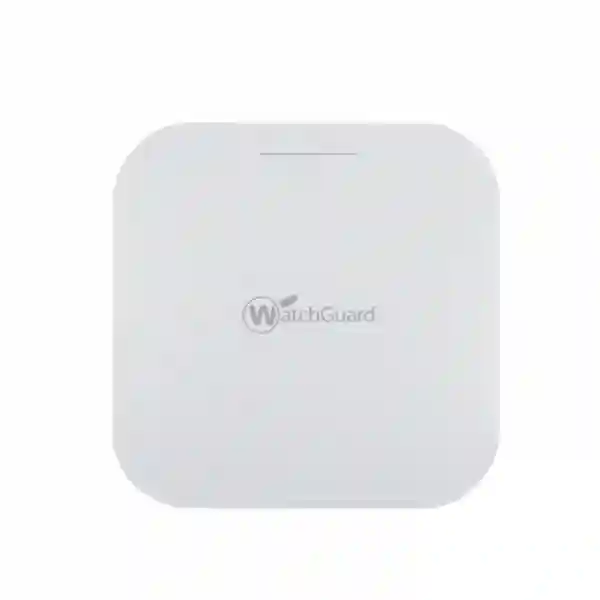
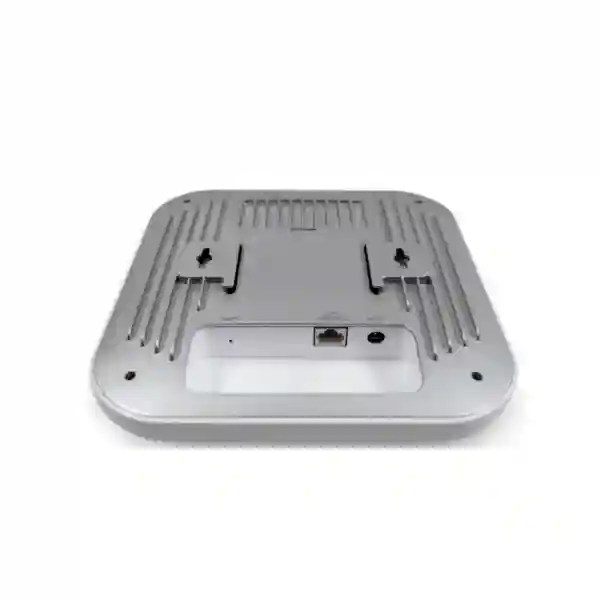
WatchGuard AP432 Wi‑Fi 6 Access Point
The WatchGuard AP432 is a cloud-managed indoor wireless access point built for environments where user density, device count and reliable throughput matter more than basic coverage alone. WatchGuard positions the AP432 for high-density indoor deployments such as expansive offices, larger education environments and campus-style spaces. Its Wi‑Fi 6 4×4 architecture, 2.5 Gigabit Ethernet uplink and PoE+ power option make it a practical candidate for organizations refreshing older wireless networks or standardizing secure business Wi‑Fi.
Direct answer for buyers
Choose the AP432 when you need a high-density indoor WatchGuard access point and your design can support a 2.5 GbE uplink, 802.3at PoE+ and WatchGuard Cloud management. Before ordering, confirm the number of APs, expected client density, switch port speed, PoE budget, cabling, ceiling or surface mounting, required WatchGuard Wi‑Fi license and the exact deployment location.
802.11ax access point for high-density indoor deployments.
Up to 2400 Mbps on 5 GHz and 1148 Mbps on 2.4 GHz under supported conditions.
One 2.5 Gigabit Ethernet interface with 802.3at PoE+ support.
Managed with WatchGuard Cloud using Standard Wi‑Fi or USP Wi‑Fi licensing.
What the WatchGuard AP432 is designed to do
The AP432 is not a basic home-style wireless router. It is a business access point intended to form part of a managed network. In practical terms, it provides the radio layer that connects laptops, phones, tablets and other Wi‑Fi clients to the wired infrastructure while allowing administrators to configure and monitor the wireless environment through WatchGuard Cloud. For organizations already using WatchGuard security products, the management approach can also support a more consistent operational model across network security and wireless services.
A high-density access point should be selected from capacity requirements, not only floor area. Two offices with the same square metres can need very different AP counts if one contains meeting rooms, call-centre seating, classrooms, guest Wi‑Fi, collaboration devices and many smartphones while the other has only a small number of fixed users. FourTeck therefore recommends treating the AP432 as one component of a wireless design that also considers client density, channel reuse, transmit power, building materials, interference, roaming, VLAN design, authentication, internet bandwidth and the switching infrastructure underneath the APs.
For UAE buyers, regional procurement and broader IT planning can also be coordinated through FourTeck UAE IT and network solutions. The goal is to make the access-point purchase match the network that will actually power, connect, secure and manage it.
Verified WatchGuard AP432 specifications and buyer notes
| Item | Verified information | What to confirm before purchase |
|---|---|---|
| Product type | Indoor high-performance Wi‑Fi 6 access point for high-density deployments. | Coverage plan, user density and placement. |
| Wireless architecture | 4×4 Wi‑Fi 6 / 802.11ax on 2.4 GHz and 5 GHz. | Client capabilities, channel plan and coexistence with legacy devices. |
| Peak data rate | Up to 1148 Mbps on 2.4 GHz and up to 2400 Mbps on 5 GHz. | Real throughput depends on clients, RF conditions, channel width, interference and network load. |
| Ethernet | One 2.5 Gigabit Ethernet interface. | Switch port speed, cabling standard, VLANs and upstream capacity. |
| Power | 802.3at PoE+ or optional compatible AC power adapter. | PoE switch budget, injector requirements and local power arrangement. |
| Management | WatchGuard Cloud. | Account readiness, Internet access, DNS/NTP connectivity and license activation. |
| Licensing | WatchGuard Standard Wi‑Fi Management or WatchGuard USP Wi‑Fi Management. | License term and whether advanced USP features are required. |
| Mounting | T-bar ceiling and flat-surface mounting options are listed by WatchGuard. | Ceiling type, mounting position, cable path and site access. |
Standard Wi‑Fi
Appropriate when the requirement is core WatchGuard Cloud wireless management such as inventory, SSIDs, radio and device settings, firmware upgrades, 24-hour reporting visibility and support coverage included with the applicable license.
USP Wi‑Fi
Designed for organizations that need the broader WatchGuard wireless feature set, including capabilities such as 30-day reporting, syslog, SNMP monitoring, AP VPN to Firebox, advanced airspace monitoring and ThreatSync integration, subject to current WatchGuard documentation and the rest of the deployed WatchGuard environment.
Deployment planning matters more than the box
The AP432 can provide strong wireless capability, but a good result still depends on the network design. A 2.5 GbE uplink is useful only when the switch port, cabling and upstream switching fabric can support the intended traffic. PoE+ must be available with enough switch power budget for the planned AP quantity. SSIDs should map cleanly to the required VLANs, and guest users should be separated from business systems where appropriate. Authentication, DHCP, DNS, captive-portal requirements, roaming behaviour and security logging should all be agreed before rollout.
FourTeck can also help align wireless projects with broader edge-security planning. Review the Firewall Dubai service and support scope when the project also needs VLAN segmentation, firewall policy, VPN or security-gateway coordination.
WatchGuard AP432 Dubai
Customers searching for WatchGuard AP432 Dubai are usually trying to answer three practical questions: is the AP432 suitable for their site, what else is required to deploy it, and how should it be quoted with licensing and services. For Dubai offices, training centres, schools, hospitality properties, professional services firms and larger commercial spaces, the AP432 is relevant when the wireless design needs a high-density indoor Wi‑Fi 6 platform rather than a small low-density access point. Its 4×4 Wi‑Fi 6 radio design and 2.5 GbE PoE+ uplink make it especially important to review the wired network before purchase. A project using several AP432 units may also need multigigabit switch ports, sufficient PoE+ budget, suitable Cat cabling, VLAN configuration and adequate internet or WAN capacity.
Dubai deployments can vary sharply between glass-partitioned offices, open-plan workplaces, retail floors, hotels, warehouses with office zones and multi-floor commercial buildings. The correct AP count should therefore not be estimated from a generic square-metre figure alone. A wireless survey or at least a documented placement plan should consider walls, ceiling height, client density, meeting rooms, neighbouring Wi‑Fi networks, expected roaming and the proportion of modern 5 GHz clients. Where guest Wi‑Fi is required, the design should also define guest isolation, captive-portal requirements and firewall access rules. Where the wireless network supports voice or collaboration traffic, channel planning and roaming consistency become more important.
FourTeck can help buyers in Dubai structure a quotation around hardware, WatchGuard Standard Wi‑Fi or USP Wi‑Fi licensing, PoE needs and the required installation or configuration scope. Current stock, price and delivery timing should be confirmed at quotation stage rather than assumed from a web listing. For related UAE infrastructure planning, buyers can review FourTeck UAE, the Firewall Dubai product collection and the FourTeck Firewall Dubai profile before submitting the final site details for a commercial proposal.
WatchGuard AP432 UAE
A WatchGuard AP432 UAE project can involve very different environments across Dubai, Abu Dhabi, Sharjah, Ajman and other Emirates, so the buying process should begin with a network requirement rather than a simple quantity request. The AP432 is intended for high-density indoor Wi‑Fi, making it a strong candidate where many users and devices share the same business wireless service. Corporate offices may prioritize roaming and secure employee SSIDs, schools may need separate staff and student access, clinics may want controlled guest connectivity, and retail environments may need wireless separation between business terminals, staff devices and visitor access. The same AP model can support these different scenarios only when the surrounding switching, VLAN and security design is correct.
For UAE procurement teams, licensing should be written into the bill of materials. WatchGuard lists Standard Wi‑Fi and USP Wi‑Fi management options for its current cloud-managed access points. Standard Wi‑Fi covers the core management functions, while USP Wi‑Fi adds broader security, monitoring and reporting capabilities. The right choice depends on operational requirements, not only purchase price. Buyers should also confirm whether the APs will connect to existing WatchGuard Firebox infrastructure, whether AP VPN or ThreatSync-related capabilities are needed, how long the license should run and who will administer the WatchGuard Cloud account after handover.
A UAE rollout should also confirm PoE+ capacity and multigigabit switching. The AP432 has a 2.5 Gigabit Ethernet interface, so connecting it to a 1 GbE switch port may create an avoidable bottleneck where wireless demand is high. In a new fit-out, it is useful to confirm cable certification, rack capacity, PoE budget, patching, UPS backup and firewall policies at the same time as the AP layout. FourTeck can coordinate these discussions through its UAE technology solutions site and the verified Firewall Dubai contact page. Availability, license term, services and commercial conditions should be confirmed in the formal quotation for the exact destination and quantity.
WatchGuard AP432 Uganda
Organizations searching for WatchGuard AP432 Uganda often need a dependable business Wi‑Fi platform for offices, schools, hospitality, NGOs, project sites, financial services, retail operations or multi-site companies. The AP432 is most relevant where the indoor environment has a high concentration of users or devices and where centralized cloud management is desirable. Because Uganda deployments can include head offices in Kampala as well as regional sites connected over different internet links, the design should separate the questions of local wireless capacity, WAN performance and central administration. The AP can provide strong local Wi‑Fi, but cloud management and user experience still depend on reliable DNS, internet reachability and appropriate upstream networking.
Procurement should include the complete deployment path. Confirm how many APs are required, whether the switches offer 802.3at PoE+, whether there are 2.5 GbE ports where needed, whether the cabling can support multigigabit Ethernet and whether the firewall can handle the planned staff, guest and application traffic. In multi-floor or campus-style environments, AP placement should account for reinforced walls, stairwells, long corridors, outdoor spill-over and neighbouring networks. A high-power design is not automatically a good design; too much cell overlap can create roaming and interference problems. Channel allocation and AP spacing should be planned rather than left entirely to default settings.
FourTeck’s Uganda IT solutions portal provides a regional route for networking and infrastructure enquiries. For an AP432 quotation, buyers should provide city, site count, building type, expected users, device quantity, current switch models, PoE budget, cabling information, internet bandwidth, required SSIDs, authentication method and whether configuration or installation support is part of the request. Hardware, WatchGuard management licensing, support entitlement and professional services should be itemized so procurement can compare complete solutions instead of comparing an appliance-only price with a fully managed bundle.
WatchGuard AP432 Kampala
WatchGuard AP432 Kampala enquiries are commonly associated with office expansions, schools, hotels, professional firms, shared workplaces and organizations replacing older Wi‑Fi infrastructure in Uganda’s main commercial centre. In Kampala, density often matters as much as coverage. A floor may contain boardrooms, open-plan seating, reception areas, VoIP or collaboration devices, CCTV or IoT equipment and visitor traffic all competing for airtime. The AP432 is designed for high-density indoor use, but the result depends on how those users are distributed and how the radio plan is built around walls, floors, furniture and neighbouring wireless networks.
A Kampala buyer should therefore provide more than the number of rooms. Useful planning inputs include a floor plan, expected concurrent users, business applications, number of SSIDs, guest requirements, device types, roaming expectations and the intended authentication model. If the site is moving from 1 GbE switching to multigigabit switching, the AP432’s 2.5 GbE interface can be incorporated into that refresh. If the existing switches provide only 1 GbE or limited PoE, the project may still be possible, but procurement should understand where the constraints are and whether a switch upgrade offers better long-term value.
Power reliability is another design consideration. PoE+ centralizes AP power at the switch, which can simplify wireless deployment when the switching rack is backed by an appropriate UPS. This can be preferable to relying on separate AC adapters at ceiling locations, but the total PoE load must be calculated correctly. WatchGuard Cloud management also means the network should allow the required outbound connectivity for activation, time synchronization and management. FourTeck can coordinate Kampala requirements through the FourTeck Uganda site. Buyers should request a quotation that clearly separates AP hardware, Standard or USP Wi‑Fi licensing, switching or injector requirements, installation materials, configuration scope and any onsite service expectations.
WatchGuard AP432 Arua
For WatchGuard AP432 Arua projects, the strongest buying process begins with site readiness. Regional offices, education facilities, NGO operations, hospitality properties and service organizations may need reliable indoor Wi‑Fi for staff systems, cloud applications, visitor access and operational devices, but the upstream network can be very different from a large Kampala headquarters. Before specifying a high-density AP, confirm the actual number of concurrent users, the internet service available at the site, switching capacity and the physical building layout. The AP432 can support demanding local wireless environments, yet user experience will still be limited by an undersized WAN circuit or congested upstream switch.
Arua deployments should also plan for remote administration. WatchGuard Cloud can centralize AP configuration and monitoring, which is useful when local IT resources are limited, provided the site has stable connectivity for management communications. The quotation should identify who owns the WatchGuard account, who receives alerts, who is authorized to change SSIDs and security settings and how configuration backups or operational records are handled. For guest networks, the design should define internet-only access and prevent unnecessary visibility into internal business devices. For staff networks, VLAN mapping and firewall rules should reflect the organization’s application needs rather than using one flat wireless network for every device.
Physical deployment details are equally important. Ceiling construction, cable pathways, switch location, UPS support and mounting access can affect installation cost more than the AP itself. If the site has no PoE+ switching, a suitable injector or switch upgrade should be considered rather than assumed. If a multi-site organization is standardizing AP432 units across Uganda, a consistent naming, SSID and VLAN template can simplify support while still allowing site-specific RF settings. Regional buyers can use FourTeck Uganda for infrastructure enquiries and should include Arua as the destination in the commercial request so logistics, service scope and timing can be confirmed instead of inferred.
WatchGuard AP432 Mbarara
WatchGuard AP432 Mbarara deployments may suit universities, schools, healthcare sites, commercial offices, hotels, financial-service branches and growing organizations that need secure indoor Wi‑Fi with centralized management. The AP432 should be considered where the wireless workload is dense enough to benefit from a 4×4 Wi‑Fi 6 access point and where the wired network can support the design. Mbarara buyers should avoid selecting access points only from a coverage promise because wireless performance is shared. A single AP placed in the middle of a large floor may show signal in many rooms but still provide poor capacity when dozens of active clients compete at once.
A better design divides the building into usable cells, places APs close to demand and controls channel overlap. The planning process should capture classrooms, waiting areas, meeting rooms, staff zones, guest spaces and any high-usage applications such as video conferencing or cloud-based ERP. Where several APs are installed, roaming behaviour should be tested with the actual client mix. Modern laptops and phones can take advantage of Wi‑Fi 6 features, while older clients may behave differently and can influence airtime efficiency. That makes real client inventory useful during design.
The wired layer deserves the same attention. The AP432 uses a 2.5 GbE uplink and PoE+, so switch capacity, port speed, PoE budget, cabling and UPS protection should be reviewed together. WatchGuard Cloud licensing must also be part of the commercial request. Standard Wi‑Fi may be sufficient for straightforward cloud management, while USP Wi‑Fi should be reviewed where richer monitoring, security and integration capabilities are required. FourTeck can route Mbarara requirements through FourTeck’s Uganda networking channel. Include the number of sites, floor plan, expected user count, switch models, internet links and desired support scope to obtain a quotation that reflects the complete deployment rather than hardware alone.
WatchGuard AP432 Gulu
A WatchGuard AP432 Gulu project is often best approached as a network-standardization exercise rather than a single-device purchase. Businesses, education organizations, NGOs, hospitality sites and distributed operations may want the same wireless platform used at larger offices so policies and administration remain consistent across locations. The AP432’s WatchGuard Cloud management can support that model, while its high-density Wi‑Fi 6 design provides headroom where local sites have many concurrent users. The first task is to confirm whether the Gulu site actually needs that capacity or whether a lower-density model would be more economical. Capacity should match the site, not the prestige of the model name.
If the AP432 is the correct fit, the site should be checked for PoE+, cabling and 2.5 GbE readiness. A branch with only older Fast Ethernet or unmanaged switching will not gain the full value of a modern cloud-managed access point until the underlying LAN is upgraded. A managed switch with VLAN support also makes it easier to separate staff, visitors, voice, CCTV or other device groups. Security policies can then be applied at the firewall rather than mixing all clients into a single broadcast domain. For organizations with central IT teams in Kampala or another city, consistent VLAN numbers, SSID naming and cloud templates can reduce troubleshooting time.
Procurement teams should request clear line items for the AP, WatchGuard Wi‑Fi license, injectors or switches if required, mounting materials, configuration and onsite work. They should also verify the license term and support entitlement instead of assuming that hardware alone provides ongoing cloud management. FourTeck’s Uganda technology site can support Gulu-related enquiries. Provide the final delivery destination and desired service scope so logistics and implementation can be confirmed. For organizations operating across several African markets, the FourTeck Africa IT solutions portal can also be useful for broader multi-country coordination.
WatchGuard AP432 Kenya
WatchGuard AP432 Kenya searches usually come from organizations comparing enterprise Wi‑Fi options for offices, schools, hospitality, retail, healthcare, professional services and distributed branches. The AP432 is intended for high-density indoor use, so it is most compelling when a site needs to serve many simultaneous clients or wants a standardized Wi‑Fi 6 platform with WatchGuard Cloud management. In Nairobi or other dense commercial areas, neighbouring wireless networks can increase interference, making an RF plan important. In larger campuses or multi-building environments, the project should distinguish between indoor AP432 coverage and any outdoor or rugged wireless requirements that may call for a different WatchGuard access-point model.
Kenya buyers should evaluate both the wireless and the wired edge. The AP432’s 2.5 GbE Ethernet interface can benefit from multigigabit access switching, particularly where many modern clients use high-throughput applications. PoE+ simplifies ceiling deployment, but the switch must have enough total power for every AP on the stack. The project should also document VLANs, DHCP, DNS, firewall policies, guest isolation, authentication and any cloud-management connectivity requirements. Organizations replacing older Wi‑Fi systems should avoid copying old channel plans or SSID structures without review; the upgrade is an opportunity to simplify naming, reduce unnecessary SSIDs and improve segmentation.
Commercially, the quotation should state the AP hardware, WatchGuard Standard Wi‑Fi or USP Wi‑Fi license term, support coverage and any required accessories or professional services. Current price and availability should be verified for the exact quantity and destination. FourTeck supports regional technology enquiries through FourTeck Kenya, which covers networking and security solutions for business environments. Where the deployment also needs firewall segmentation or VPN coordination, the PA‑410 branch firewall page illustrates the type of edge-security planning that may sit alongside the wireless project, although the appropriate firewall brand and model should be selected independently from the AP requirement.
WatchGuard AP432 Kuwait
For WatchGuard AP432 Kuwait deployments, indoor environmental design, user density and infrastructure readiness should be reviewed together. Corporate offices, schools, clinics, hotels, retail groups and multi-site organizations may need a high-density Wi‑Fi platform that is easier to administer centrally. The AP432 supports that requirement through WatchGuard Cloud while providing Wi‑Fi 6 4×4 radios and a 2.5 GbE PoE+ connection. It is an indoor model, so outdoor courtyards, exposed industrial zones or harsh environments should be addressed with an access point specifically designed for those conditions rather than extending an indoor product beyond its intended use.
Kuwait projects should include a structured RF and network review. Office partitions, reinforced walls, glass, conference rooms and high client concentration can produce uneven performance even when signal strength looks acceptable. A survey or predictive design should estimate AP placement and then be validated after installation. The switch layer must supply 802.3at PoE+ with enough aggregate budget, and 2.5 GbE ports are preferable where the design expects to use the AP’s multigigabit uplink capability. Cabling should be tested before ceiling hardware is installed, especially in renovation projects where cable quality or termination may be uncertain.
The software side matters too. WatchGuard Standard Wi‑Fi and USP Wi‑Fi offer different levels of reporting, monitoring and integration. A buyer that only needs straightforward centralized configuration may have different licensing priorities from an enterprise wanting longer reporting visibility, SNMP, syslog, advanced airspace monitoring or integration with other WatchGuard services. FourTeck’s Kuwait IT solutions portal provides a regional path for networking and Wi‑Fi enquiries. When requesting a quote, include city, site count, AP quantity, switch details, floor plan, license term and whether onsite installation or remote configuration is expected. This helps the quotation reflect the complete Kuwait project rather than a generic hardware price.
WatchGuard AP432 Ghana
WatchGuard AP432 Ghana buyers may be planning business Wi‑Fi for offices, universities, schools, hospitals, hospitality properties, financial-service branches, retail operations or larger institutions. The AP432 is positioned as a high-density indoor access point, so it is most suitable when concurrent client load and application demand justify a 4×4 Wi‑Fi 6 platform. The evaluation should begin with the number of active clients in each zone, not the total number of employees on the company payroll. A site with 200 employees spread across several floors has a different RF problem from a training hall where 150 devices become active at the same time.
For Ghana deployments, switching and power design can determine whether the AP performs as intended. The 2.5 GbE uplink should connect to a suitable switch port when high throughput is required, and 802.3at PoE+ must be available for clean ceiling or wall deployment. Organizations refreshing Wi‑Fi should review structured cabling, PoE budgets, rack power and UPS support at the same time. The wireless design should map SSIDs to appropriate VLANs and use firewall rules to separate employee, guest and device traffic. This is particularly useful when the same network also carries IP phones, cameras, access-control systems or other connected equipment.
WatchGuard Cloud management can help centralize configuration, but licensing must be included in the procurement plan. The choice between Standard Wi‑Fi and USP Wi‑Fi should be based on reporting, monitoring, security and integration requirements. FourTeck’s Ghana IT solutions portal specifically lists networking, Wi‑Fi, firewalls and related business technology. Ghana buyers should provide the final site location, quantity, expected client count, internet service, switch models and support expectations. This gives the sales and technical teams enough information to prepare a commercial request without assuming local stock, fixed delivery time or an installation scope that has not been agreed in writing.
WatchGuard AP432 Nigeria
A WatchGuard AP432 Nigeria project can range from a single high-density office floor to a nationwide branch standardization program. Lagos, Abuja, Port Harcourt and other commercial centres may have very different building types, internet services and local support arrangements, so the AP quantity should be designed per site rather than copied across every location. The AP432 is well suited to indoor environments with many concurrent users and can be centrally managed through WatchGuard Cloud, making it attractive to IT teams that want consistent configuration across multiple sites.
Power and network resilience deserve early attention. PoE+ allows the access point to be powered from the switch, which can make backup-power planning more straightforward when the rack is protected by a suitable UPS. However, a site with unstable switching or insufficient PoE budget will still experience wireless outages. The 2.5 GbE uplink also means buyers should check whether the access switch supports multigigabit ports and whether the cable path can sustain the required Ethernet speed. Where only 1 GbE switching is available, the AP may operate but the design should acknowledge the wired limitation rather than promising maximum wireless throughput.
Nigeria procurement teams should also decide how wireless policy will be administered. WatchGuard Standard Wi‑Fi covers core cloud management, while USP Wi‑Fi adds expanded reporting, monitoring and security-related capabilities. The exact option should match operational requirements and budget. For local infrastructure and cybersecurity discussions, buyers can use FourTeck Nigeria. If the wireless rollout is part of a broader branch-security refresh, related internal resources such as the Sophos XGS 88 branch firewall page and Palo Alto Networks PA‑415 page show how firewall sizing and segmentation can be considered alongside Wi‑Fi. The final firewall choice remains a separate technical decision from the AP432 selection.
WatchGuard AP432 Seychelles
WatchGuard AP432 Seychelles enquiries are likely to come from hotels, resorts, offices, professional services, schools, clinics and organizations that need secure indoor Wi‑Fi across sites where network reliability is important to daily operations. The AP432 is an indoor high-density access point, which makes it appropriate for guest areas, conference spaces, office floors and other protected interior locations when the user load justifies a 4×4 Wi‑Fi 6 design. Outdoor pool areas, exposed walkways or harsh coastal installations should be evaluated with hardware designed for rugged or outdoor deployment rather than assuming the AP432 can serve every location.
Island deployments also make planning and spares strategy important. Procurement teams should confirm the exact AP quantity, license term, mounting accessories, PoE requirements and any recommended spare units before shipment. A well-documented bill of materials reduces the risk of discovering after arrival that the site needs injectors, different mounting hardware or a switch upgrade. Because the AP432 uses 2.5 GbE and PoE+, the wired infrastructure should be validated in advance. If an existing network was designed for older 1 GbE access points, the refresh may be a good time to assess switches, uplinks, cabling and UPS capacity.
For hotels and guest environments, the wireless design should also account for room density, corridors, floor-to-floor leakage, public areas and separation between guest traffic and operational systems. WatchGuard Cloud can centralize configuration and monitoring, but the license option should match the required reporting and security features. FourTeck can coordinate Seychelles enquiries through the broader FourTeck Africa technology portal. Buyers should provide the island or final delivery point, building plans, expected concurrent devices, current switch models, internet link details and desired installation or remote-support scope. Availability, shipping, service coverage and project timing should then be confirmed in the formal quotation rather than assumed from regional proximity.
Compatibility, switching and security checklist
Switching
Confirm 2.5 GbE-capable access ports where full multigigabit uplink value is required, adequate PoE+ budget, VLAN support and sufficient uplink capacity from the access layer.
Cabling
Check cable category, distance, termination quality and test results. Existing cabling should not be assumed to support multigigabit Ethernet without validation.
Firewall & VLANs
Separate staff, guest and device networks where appropriate. Define DHCP, DNS, internet access, internal access and logging policies before the rollout.
Cloud management
Plan WatchGuard account ownership, license activation, administrator access, alerting, firmware policy and required outbound connectivity for WatchGuard Cloud services.
Related FourTeck products and services
A wireless project is normally connected to switching, firewalls, WAN connectivity and support. These verified pages on the same Firewall Dubai website can help buyers continue that planning without treating the AP as an isolated purchase.
Firewall product solutions
Review the site’s broader product collection when the AP432 deployment also requires firewall, segmentation or secure internet-gateway planning.
Palo Alto Networks PA‑410
A compact branch firewall reference for sites that need security-gateway planning alongside new wireless infrastructure.
Palo Alto Networks PA‑415
Useful for buyers comparing branch firewall designs with integrated PoE-capable connectivity requirements.
Sophos XGS 88
A compact branch firewall option to review when the wireless upgrade is part of a wider small-office or branch security refresh.
PA‑Series firewall family
Explore broader enterprise firewall sizing and segmentation considerations for larger AP432 deployments.
Firewall services and support
Use this service page when the Wi‑Fi rollout also needs firewall configuration, VPN, VLAN policy, migration or ongoing network-security support.
About FourTeck Firewall Dubai
Review the site’s network-security scope and supported technology areas before combining wireless and firewall requirements into one discussion.
Contact and quotation page
Submit the AP432 quantity, destination, licensing, site details and installation requirements for a formal commercial review.
Frequently asked questions about WatchGuard AP432
Is WatchGuard AP432 Wi‑Fi 6?
Yes. WatchGuard documents the AP432 as a 4×4 Wi‑Fi 6 / 802.11ax access point intended for high-density indoor deployments.
What Ethernet port does the AP432 use?
The AP432 has one 2.5 Gigabit Ethernet interface. The same interface can receive 802.3at PoE+ power.
Can AP432 be powered without PoE+?
WatchGuard’s hardware documentation states that power can be provided through PoE+ or an optional compatible AC power adapter. The exact power accessory should be confirmed in the quotation.
How is the AP432 managed?
It is managed through WatchGuard Cloud. Current WatchGuard documentation lists Standard Wi‑Fi Management and USP Wi‑Fi Management licenses for cloud-managed APs including the AP432.
What is the difference between Standard and USP Wi‑Fi?
Both cover core cloud management. USP Wi‑Fi adds broader functions such as extended reporting, syslog, SNMP, AP VPN to Firebox, advanced airspace monitoring, ThreatSync integration and additional security or analytics capabilities, subject to WatchGuard’s current feature matrix.
Is AP432 for outdoor use?
No. WatchGuard positions AP432 as an indoor access point. Outdoor, rugged or exposed locations should use an appropriately rated access-point model.
How many AP432 units do I need?
There is no reliable universal number based only on floor area. Quantity depends on concurrent clients, wall construction, ceiling height, interference, channel plan, roaming requirements and application demand. A survey or documented wireless design is recommended.
Does the AP432 require a WatchGuard firewall?
The AP432 is managed through WatchGuard Cloud. Some USP Wi‑Fi capabilities integrate with WatchGuard Firebox and the wider WatchGuard platform, so the exact requirement should be checked against the features you intend to use. Do not assume every AP432 deployment requires the same firewall architecture.
Can FourTeck provide an AP432 price?
FourTeck can prepare a quotation after confirming destination, quantity, license type and term, accessories, switching or injector needs and any configuration or installation scope. Current price, stock and lead time should be confirmed at that stage.
Quotation checklist
Decision recap
The WatchGuard AP432 is a strong fit when the requirement is high-density indoor Wi‑Fi 6 with WatchGuard Cloud management, a 4×4 radio design, a 2.5 GbE uplink and PoE+ power. The decision should not be based on the AP specification alone. Confirm RF design, switch capability, PoE budget, cabling, VLANs, firewall policy, management licensing and support ownership before procurement.
FourTeck can help turn those requirements into a quotation-ready bill of materials. Share the site details and intended deployment scope through the verified sales contact page so hardware, license and services can be reviewed together.

Reviews
There are no reviews yet.