
2.5G Fiber Edge Router • AX3000 Wi‑Fi 6 • Business VPN
DrayTek Vigor2136axF in Dubai, UAE
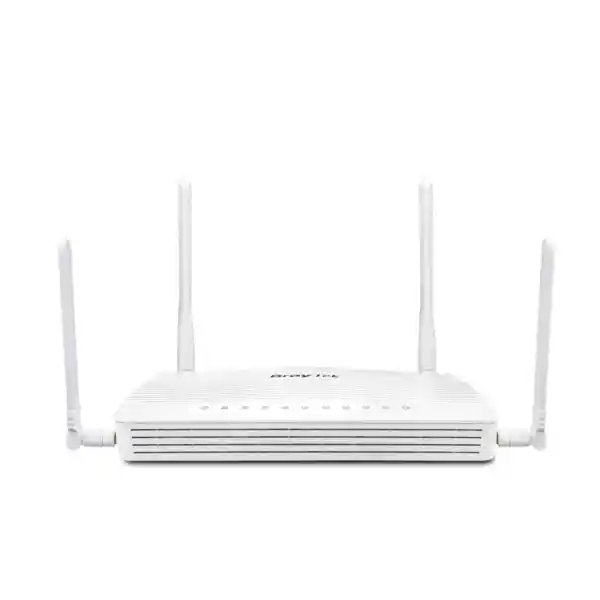
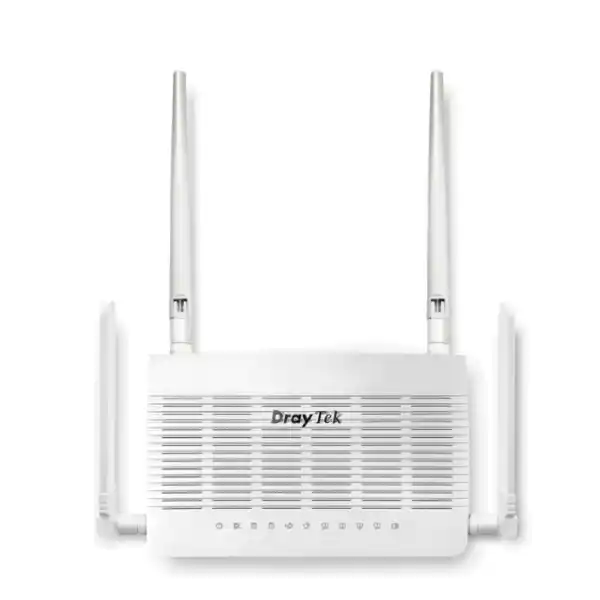
The DrayTek Vigor2136axF is positioned for organizations that want multi-gigabit-capable WAN access, integrated Wi‑Fi 6, secure VPN connectivity and granular traffic control in a compact router. DrayTek’s current manufacturer documentation identifies the fiber-WAN Wi‑Fi 6 member of this family as Vigor2136Fax; this page retains the commonly searched Vigor2136axF wording while describing the verified Vigor2136F-series fiber and 802.11ax feature set. For Dubai offices, retail sites, villas, clinics, consulting firms, branch locations and managed customer premises, the platform provides a practical middle ground between simple consumer routing and a larger enterprise firewall deployment.
Direct answer: who should choose the Vigor2136axF?
Choose the DrayTek Vigor2136axF when the site has a fiber handoff or SFP-based service, requires a secondary 2.5GbE WAN option, and benefits from an integrated Wi‑Fi 6 radio without the cost, rack space or operational overhead of a much larger security gateway. Its best-fit environments are small offices, branch networks, high-end home offices, professional services locations, boutique hospitality and retail branches where application control, policy routing, VLAN separation, traffic shaping, secure remote access and WAN resilience matter more than very large user counts or multi-gigabit encrypted threat inspection.
The platform is rated by DrayTek for approximately 50,000 NAT sessions and is recommended for networks around 30 hosts. Published NAT performance reaches up to approximately 2.3 Gbps under manufacturer test conditions, while IPsec performance is specified up to about 390 Mbps. Those figures make it important to size the router according to the services that will actually be used. A 2.5G physical interface does not mean every security, VPN or traffic-control workload will run at the full port line rate. For a Dubai branch using cloud applications, VoIP, video meetings, point-of-sale traffic and general internet browsing, however, the available routing capacity is usually well aligned to a sub-2.5 Gbps access circuit when the policy set is sensibly designed.
The model is especially attractive where the ISP or building network provides active Ethernet over fiber. The dedicated 2.5/1G SFP WAN allows the router to terminate a compatible optical transceiver directly, while the switchable 2.5GbE RJ‑45 port can be assigned as a second WAN or used on the LAN side. This gives integrators flexibility during migrations: the site can keep the fiber service as primary and attach a separate Ethernet-based ISP, 5G gateway, carrier CPE or upstream modem for failover. For procurement and deployment assistance across the UAE, FourTeck’s Firewall Dubai practice can help align the router with the circuit handoff, VPN design, VLAN plan and security policy.
Verified hardware interface map
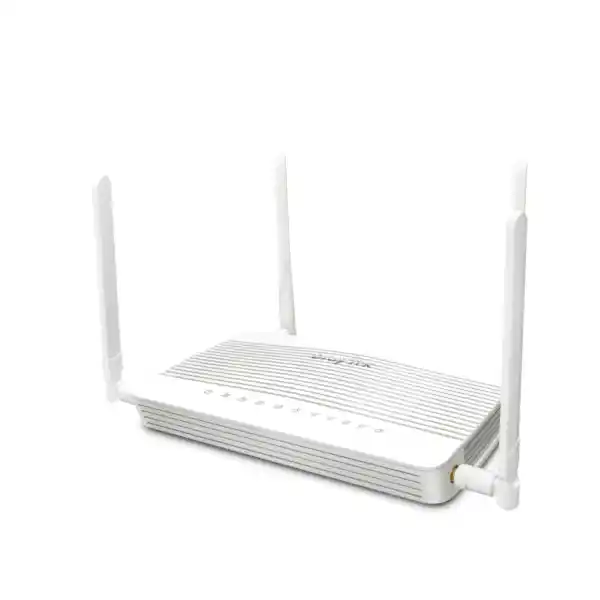
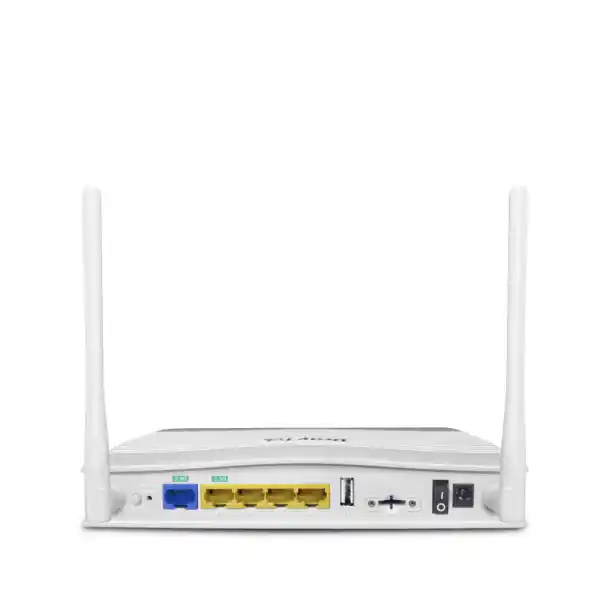
The Vigor2136F Wi‑Fi 6 variant is built around a dedicated 2.5/1G SFP WAN interface, a single 2.5GbE RJ‑45 port that can operate as LAN or WAN, three fixed Gigabit Ethernet LAN ports and two USB 2.0 ports. The wireless model adds dual-band 802.11ax radio capability and external Wi‑Fi antennas. This is a deliberately compact interface mix: it provides one multi-gigabit optical path, one multi-gigabit copper path and enough Gigabit access ports for a small local environment or for uplink into a managed switch.
The physical arrangement is useful in UAE branch deployments where the router sits near the provider handoff rather than inside a large data-room chassis. The fiber SFP can connect toward the carrier or building distribution layer, the 2.5GbE copper interface can become a secondary WAN or a high-speed LAN uplink, and the three Gigabit LAN ports can serve management, a local switch, a workstation segment or another infrastructure device. Because the switchable port is a shared design resource, the topology should be planned before installation rather than assuming there are two independent 2.5G LAN ports plus two 2.5G WAN ports.
WAN architecture and resiliency
Dual-WAN is one of the central reasons to select this model. The fixed SFP WAN and the switchable 2.5GbE Ethernet interface can be used together for load balancing and automatic failover. Administrators can build route policies that direct specific networks, applications or traffic classes toward a preferred connection, then use failover behavior to keep business traffic moving when the primary path becomes unavailable or falls outside an expected service condition.
That matters in Dubai because many small sites now depend on SaaS, cloud telephony, payment gateways, remote desktops and video collaboration. A single WAN outage can stop revenue-generating work even when the local network is functioning normally. With a second access path, the Vigor2136axF can maintain essential services while the primary carrier recovers. Proper failover design still requires attention to public IP addressing, NAT, DNS, VPN re-establishment and the characteristics of the backup circuit, but the router provides the mechanisms needed to build a resilient edge without introducing a separate WAN controller.
Performance sizing: 2.5G ports, 2.3 Gbps NAT and real-world expectations
A common design mistake is to equate a port’s negotiated speed with the sustained throughput of every routed workload. The Vigor2136F family provides 2.5-gigabit physical connectivity, and DrayTek publishes maximum NAT performance of approximately 2.3 Gbps under its controlled test conditions. That figure represents a strong result for a compact branch router, but it should be interpreted as an upper routing benchmark rather than a guaranteed application throughput in every deployment. Traffic classification, VPN encryption, logging, QoS, session distribution, packet size, WAN protocol overhead and enabled security functions can all change the effective forwarding rate.
For sizing, start with the access circuit rather than the switch port. If the site purchases a 1 Gbps fiber service, the platform has ample physical headroom for that uplink and can also provide a faster 2.5G link toward a local switch or secondary WAN. If the site purchases a 2 Gbps or 2.5 Gbps service, review whether the dominant traffic is straightforward NAT, encrypted site-to-site VPN, remote-user VPN or heavily shaped application traffic. A branch that transfers large unencrypted cloud backups may behave differently from a branch that pushes most traffic through IPsec. DrayTek specifies IPsec throughput up to approximately 390 Mbps, so a design expecting multi-gigabit encrypted tunnel throughput should move to a higher-performance gateway class rather than relying on the physical port rating alone.
The 50,000-session ceiling is similarly important. Session count describes how many concurrent state entries the router can track, not how many employees it can support at a fixed level of quality. One modern laptop can open hundreds of sessions through browsers, collaboration tools, sync clients, endpoint agents and cloud applications. Cameras, IoT platforms and mobile devices add additional state. DrayTek recommends the series for approximately 30 hosts, which is a useful baseline for deployment planning. A 25-person office with managed endpoints and predictable workloads is much closer to the intended profile than a public venue attempting to serve several hundred transient users simply because average bandwidth appears low.
For projects that include virtualization hosts, local storage or application servers, the edge-router selection should be coordinated with the wider infrastructure design. FourTeck’s Server Dubai solutions team can align server uplinks, switching capacity and backup traffic with the WAN plan so that a fast internet circuit is not undermined by an under-sized internal topology.
AX3000 Wi‑Fi 6 for business and professional environments
The wireless member of the Vigor2136F family integrates dual-band Wi‑Fi 6 with an aggregate headline link rate in the AX3000 class: up to 574 Mbps on 2.4 GHz and up to 2402 Mbps on 5 GHz under supported channel and client conditions. Those are PHY link rates rather than guaranteed application throughput, but they show the radio’s intended role: current-generation office notebooks, smartphones, tablets and IoT clients can connect directly to the router without requiring a separate access point for a small site.
Wi‑Fi 6 contributes more than peak speed. OFDMA allows the radio to schedule smaller resource units efficiently across multiple clients, reducing the waste that occurs when many devices exchange short bursts of traffic. MU‑MIMO helps the access point communicate with multiple compatible stations more effectively. BSS Coloring improves reuse in environments where neighboring Wi‑Fi networks are visible on the same channels, while Target Wake Time can help compatible battery-powered devices coordinate sleep and transmit behavior. WPA3 adds a modern security option, and the router also supports established enterprise wireless controls such as client isolation, access lists, hidden SSIDs, scheduling and authentication choices.
In a small Dubai office, the integrated radio can be appropriate when the router is centrally located and construction materials do not create difficult RF shadows. In a larger villa, clinic, retail floor or partitioned office, the router should be treated as the root or management point rather than assuming one radio can cover the entire site. DrayTek’s virtual AP management capabilities can support a self-healing mesh with compatible devices, and the router can also centrally manage a larger set of DrayTek access points. The key is to plan coverage based on measured signal and capacity requirements, not on a single advertised range number.
A 160 MHz 5 GHz channel can help compatible clients reach the highest advertised PHY rate, but wide channels also consume more spectrum and can be less practical in dense office towers or multi-tenant environments. Where neighboring networks are numerous, a narrower channel plan may deliver better stability even if the maximum link-rate number appears lower. For voice and video, predictable airtime, low retries and good roaming behavior are often more valuable than a peak speed test taken next to the router.
VLAN and subnet design
The router supports 802.1Q tag-based VLANs, multiple IP subnets, inter-VLAN routing and custom DHCP behavior. That enables a small organization to separate corporate workstations, guest Wi‑Fi, voice devices, cameras, printers and building systems rather than placing every endpoint in one broadcast and trust domain. Segmentation reduces accidental exposure, makes policy enforcement easier and creates a cleaner troubleshooting boundary.
A practical branch design might assign one VLAN to employee devices, one to voice, one to guest access and one to infrastructure. Firewall rules can then allow only the flows that are required: guest devices reach the internet but not business subnets; cameras can reach their recorder or cloud platform but not user workstations; staff devices can access approved printers and servers; management interfaces can be limited to administrators. The router’s policy routing can also send a selected VLAN through a preferred WAN if, for example, guest traffic should use the secondary circuit.
Routing for advanced branch networks
Beyond static IPv4 and IPv6 routes, the Vigor2136F platform supports policy routing, inter-VLAN routing and dynamic routing options including RIP, OSPF and BGP in the documented feature set. This is meaningful for managed branch networks because the router can participate in a more structured routing design instead of being limited to a simple default gateway role.
Dynamic routing should still be deployed only where it solves a clear problem. A single-office network with one internet connection and a few VLANs is often easier to operate with static and policy routes. OSPF can become valuable when a site has multiple routers, routed VPN links or internal Layer-3 switching. BGP may be relevant to specialized upstream or multi-site designs, but internet-scale BGP expectations should not be projected onto a compact branch appliance. The right configuration keeps the control plane proportionate to the site’s complexity.
VPN capability: site-to-site, remote access and secure branch connectivity
The Vigor2136F series supports up to 16 concurrent VPN tunnels, with documented support for IPsec, IKEv1/IKEv2, IKEv2-EAP, IPsec XAuth, OpenVPN and WireGuard alongside the broader DrayTek remote-access feature set. This makes the router useful for small organizations that need to connect a Dubai office to headquarters, link several branches together, provide encrypted access to administrators, or establish a protected path toward a cloud-hosted service.
For site-to-site design, IPsec remains a common choice because it is broadly interoperable with enterprise firewalls and cloud VPN gateways. The router supports pre-shared keys and X.509-based authentication options, with modern AES encryption available. IKEv2 is generally preferred for new deployments where both endpoints support it because it offers a cleaner negotiation framework and strong resilience features. WireGuard can be attractive for simpler modern tunnels and remote-user scenarios, while OpenVPN is useful where compatibility with existing deployments is required. The protocol should be chosen according to the remote endpoint, authentication standard, operational tooling and compliance requirements rather than by popularity alone.
DrayTek publishes IPsec throughput up to about 390 Mbps for this platform under its test methodology. That is sufficient for many branch applications, but it is notably below the raw NAT capacity. If a customer has a 2 Gbps fiber service and expects all traffic to traverse an encrypted site-to-site tunnel at near line rate, this is not the correct performance class. Conversely, a 50 to 200 Mbps branch tunnel carrying ERP, file access, voice signaling and management traffic can sit comfortably within the platform’s intended use when latency and upstream conditions are suitable.
Security policy should also bind VPN availability to the right WAN interfaces and source addresses where practical. A tunnel endpoint does not need to be exposed on every available path simply because two WANs exist. The Vigor platform provides controls that allow administrators to limit where a VPN service listens, and DrayTek also supports port-knocking techniques for selected services. These mechanisms should complement—not replace—strong authentication, updated firmware, restricted administration access and appropriate logging.
For multi-site organizations, document tunnel ownership, local and remote prefixes, phase settings, failover behavior and DNS dependencies before commissioning. A VPN that connects successfully is only the first step; route symmetry, overlapping subnets, MTU, NAT exemptions, failover re-keying and application dependencies determine whether it remains reliable in production.
Firewall, reputation controls and defensive configuration
The DrayTek Vigor2136axF should be viewed as a business routing and security platform rather than as a next-generation firewall designed for very large threat-inspection workloads. It includes stateful firewall policy, IP and content controls, traffic rules, MAC filtering, spoofing defenses and reputation-oriented security functions. These capabilities can substantially improve the security posture of a small branch when they are configured deliberately, but they still depend on good policy design and disciplined administration.
Start by applying a default-deny approach between internal security zones where operationally practical. Guest networks should not have implicit access to staff devices. IoT and CCTV segments should be limited to the exact cloud services, NVRs or management stations they need. Administrative interfaces should not be reachable from ordinary user networks unless there is a justified support requirement. WAN-side management should be disabled or strictly restricted to known addresses and encrypted protocols. Where remote administration is necessary, a VPN-first model is generally safer than publishing the management interface directly to the internet.
The platform supports access-list controls and brute-force protection for management. It also supports secure management methods such as HTTPS and SSH in addition to legacy services that may be present for compatibility. Disable protocols that are not required. SNMPv3 should be preferred where the monitoring platform supports it, because it provides authentication and privacy features that older SNMP versions do not. Log forwarding and alerting should be configured so that repeated authentication failures, WAN events and major policy changes are not visible only when somebody manually opens the router interface.
Firmware lifecycle is part of the security model. DrayTek continues to publish firmware and resource updates for the Vigor2136 family. Before a production deployment, confirm the current recommended release for the exact regional hardware, back up the configuration, review release notes, schedule a maintenance window and validate VPN and WAN behavior after any upgrade. In managed environments, maintaining a record of firmware level and configuration backup date is as important as the original installation.
Application-aware QoS
The router supports bandwidth management using IP addresses, ports and applications, along with traffic shaping, per-IP limits, application QoS and prioritization mechanisms. That is valuable on asymmetric or moderately sized broadband connections where one backup job, large download or guest device can otherwise consume enough capacity to affect calls and interactive cloud sessions.
Effective QoS starts with the true bottleneck. Configure shaping against a realistic WAN rate slightly below the carrier’s sustainable service level rather than the raw interface speed. Then prioritize latency-sensitive traffic such as voice or critical business applications while limiting non-essential bulk transfers. If the WAN is 500 Mbps but the router believes it has 2.5 Gbps available, queuing may occur upstream at the provider and the local QoS policy will have less control.
Voice and collaboration readiness
For VoIP and video meetings, the network should maintain low jitter and packet loss during congestion. The Vigor2136axF can prioritize voice traffic and use application-aware policy to prevent large transfers from dominating the uplink. VLAN separation for IP phones can further simplify policy, DHCP options and troubleshooting.
QoS cannot correct poor Wi‑Fi coverage, overloaded upstream infrastructure or an unstable ISP circuit, so end-to-end testing remains essential. Measure latency, jitter and loss during a realistic busy-hour load. Where unified communications, Microsoft Teams, Zoom, cloud PBX or SIP trunks are mission-critical, combine router QoS with a well-designed switched and wireless LAN and use the secondary WAN as part of a documented continuity plan.
Management, monitoring and VigorACS integration
Day-two operations often matter more than the first installation. The Vigor2136F platform includes local monitoring for clients, WAN state, wireless information, ARP, routes, DHCP leases, IPv6 neighbors, DNS cache and session data. These views help an administrator answer basic operational questions quickly: which device obtained an address, whether the intended route exists, whether a WAN is online, how many sessions are active and whether the wireless network is seeing the expected clients.
For managed deployments, DrayTek’s VigorACS ecosystem adds centralized provisioning and monitoring capabilities such as zero-touch deployment, configuration management, Auto VPN, interface quality and SLA information, application visibility and other multi-site functions supported by the management platform. This can be especially useful to an MSP or an organization with multiple retail or professional branches across the UAE because it reduces the need to maintain every router as an isolated appliance.
The Vigor2136 series can also operate as a controller for compatible DrayTek access points and switches. For smaller Wi‑Fi deployments, the virtual controller can help build and manage a mesh, while AP management can centralize configuration for a larger set of compatible access points. Switch management functions can simplify common provisioning tasks such as port profiles, VLAN settings, QoS and maintenance operations. The benefit is operational consistency: the edge router becomes a visibility and coordination point for the site’s access infrastructure rather than only a NAT gateway.
Organizations that want ongoing monitoring, managed configuration, structured backups and on-site support can pair the appliance with FourTeck IT Services UAE. The objective should be to define an operating model before a fault occurs: who owns firmware, who receives alerts, how configuration changes are approved, where backups are stored, and how quickly a failed edge device must be replaced.
Hardware and environmental specifications for installation planning
The environmental numbers are particularly relevant in the Gulf. A router installed in a cooled office behaves very differently from one left inside an unventilated outdoor cabinet, ceiling void or glass-front enclosure exposed to solar heat. The product’s published operating range tops out around 45°C, so the equipment should remain in a temperature-controlled indoor location with enough airflow around the chassis and power adapter. Do not treat Dubai’s ambient outdoor conditions as compatible simply because the device is fanless or compact.
If the WAN arrives in a telecom room that is not continuously cooled, measure actual enclosure temperature during the hottest operational period and relocate the router or add appropriate environmental control if required. Heat-related instability can resemble network faults and may shorten hardware life. A small UPS is also recommended for sites where brief power disturbances would interrupt payment terminals, cloud calls or VPN sessions.
SFP planning: the part that should be confirmed before purchase
The fiber interface is a major differentiator between the Vigor2136F family and the copper-WAN Vigor2136 variant, but the presence of an SFP cage does not mean every fiber service can be connected directly. The optical service type, wavelength, connector, fiber mode, carrier authentication and transceiver compatibility must be confirmed first. Active Ethernet presented as a standards-based 1G or 2.5G optical handoff is a different situation from GPON, XGS-PON or a managed carrier ONT that requires the provider’s own termination equipment.
For an enterprise or building fiber handoff, document whether the service is single-mode or multi-mode, the required optic type, expected link speed, connector format and transmit/receive wavelength. Confirm whether the provider requires a VLAN tag, PPPoE credentials, DHCP option, static addressing or another activation method. If the service is delivered through an ISP-owned ONT or media converter, the safest design may be to keep that device and connect its Ethernet output to the router rather than attempting to bypass carrier equipment.
The router supports 2.5/1G SFP WAN operation, not 10G SFP+. This distinction matters when customers see a physically similar optical module and assume interchangeability. A 10G-only optic or carrier handoff is not the intended match for a 2.5/1G SFP port. Likewise, passive optical network modules can involve registration and provider-specific requirements that go beyond a generic SFP transceiver. Procurement should therefore include the exact circuit description and handoff specification, not only the router model.
For migrations, the switchable 2.5GbE RJ‑45 interface provides a useful alternative. A site can initially connect an Ethernet handoff from the existing carrier device, complete routing and policy configuration, and later move to a supported optical termination if there is a clear operational benefit. This phased approach can reduce commissioning risk because it separates network-policy changes from physical-layer changes.
Security architecture without invented ASIC claims
For technical procurement, it is useful to distinguish published platform behavior from assumptions about internal silicon. DrayTek publishes routing, VPN, session and interface specifications for the Vigor2136F family, but the public product material does not require a buyer to design around a named proprietary firewall ASIC or a disclosed packet-processing chip model. As a result, this page does not invent a processor or accelerator designation. Capacity planning should rely on the published performance figures and on a workload test that resembles the customer’s configuration.
The practical implication is straightforward: use 2.3 Gbps as the approximate upper NAT reference under favorable conditions, approximately 390 Mbps as the published IPsec reference, 50,000 as the NAT-session scale, and 16 as the concurrent VPN-tunnel ceiling. Then apply margin for enabled features, packet mix, logging and future growth. If a design depends on deep inspection at multi-gigabit rates, hundreds of users, hundreds of VPN tunnels or large-scale SSL decryption, it belongs in a different appliance category.
This conservative method is more reliable than inferring capability from a CPU core count or marketing label. Router performance is a product of forwarding architecture, software path, acceleration conditions, packet size and feature interaction. Published platform measurements plus an acceptance test provide a more useful engineering basis than an unverified silicon assumption.
IPv6, multicast and protocol support for modern networks
The Vigor2136F platform includes IPv6 WAN and LAN functionality alongside traditional IPv4. Supported WAN-side methods include common DHCPv6 and static IPv6 options, with transition and tunnel mechanisms documented in the platform feature set. IPv6 static routing, neighbor visibility and policy controls allow the router to support dual-stack environments without treating IPv6 as an afterthought.
This is important because security policies must be symmetrical across IP versions. A network that carefully filters IPv4 but leaves IPv6 broadly open can create an unintended path between segments or toward the internet. When IPv6 is enabled, define firewall rules, DNS behavior, address assignment and management access with the same care used for IPv4. If the business is not yet using IPv6, decide explicitly whether it should be disabled on selected networks rather than leaving behavior to endpoint defaults.
The router also supports IGMP functions such as IGMP proxy, snooping and fast-leave behavior. Multicast handling is relevant for IPTV, some discovery protocols and specialized local applications, but it should be configured according to actual requirements. Uncontrolled multicast can consume wireless airtime or create unnecessary load across VLANs, while overly restrictive policies can break services that depend on discovery. A segmented branch should therefore document which networks need multicast and whether traffic must cross VLAN boundaries.
Protocol helpers and application-layer gateway functions can be useful with legacy applications such as SIP, FTP or H.323, but they should not be enabled indiscriminately. Modern SIP deployments often prefer explicit NAT traversal techniques and provider-specific guidance. When troubleshooting a voice issue, verify whether an ALG is helping or modifying signaling in an undesirable way before assuming it must always remain active.
Small office topology
In a compact office, place the Vigor2136axF at the ISP demarcation point and use the SFP interface for primary fiber. Assign the switchable 2.5GbE port to the LAN and connect it to a managed 2.5G switch if internal aggregate traffic warrants the faster uplink. Use tagged VLANs between router and switch so staff, voice, guest and infrastructure networks remain logically separated.
The integrated Wi‑Fi 6 radio can serve nearby clients, while additional access points can cover meeting rooms or remote areas. This design preserves the router’s multi-gigabit copper port for LAN aggregation and uses one of the Gigabit LAN interfaces for management or a local device. If backup WAN is more important than a 2.5G LAN uplink, reassign the multi-gigabit copper port to secondary WAN and use a Gigabit LAN interface toward the switch.
Dual-WAN branch topology
For a business that prioritizes uptime, use the SFP connection for the primary fixed service and dedicate the 2.5GbE RJ‑45 interface to a second provider, carrier CPE or external 5G router. Configure health checks and failover so traffic moves automatically when the primary path is no longer usable. Important VPNs should be tested against both WAN paths because a change of public IP can trigger tunnel renegotiation.
When the backup path has lower capacity, apply route and QoS policy so essential workloads receive priority. Guest traffic, large cloud backups and software updates can be limited during failover. This prevents a 100 or 300 Mbps backup connection from becoming saturated by traffic that was harmless on a multi-gigabit primary service.
Dubai and UAE deployment considerations
A technically correct router still needs to fit the local site conditions. In the UAE, many commercial buildings provide the ISP circuit through a dedicated telecom room, building riser or managed handoff. Before installation, confirm where the carrier demarcation physically terminates, whether the customer is permitted to install third-party optics, whether static public IP addresses are included, and whether the provider requires its own gateway or ONT. These details affect whether the SFP port can be used directly or whether the router should sit behind carrier equipment.
Power protection is also important. A dual-WAN design has limited value if the router, ONT and access switch all lose power during a brief disturbance. Place the router and the devices required for internet continuity on the same appropriately sized UPS. If the backup WAN uses an external 5G gateway, include that device in the protected power budget. For sites with IP phones, PoE switches and local servers, calculate the UPS runtime based on the whole critical communication chain rather than only the router’s adapter.
Wireless deployment needs attention to local construction. Reinforced concrete, foil-backed insulation, glass treatments and dense partitioning can reduce signal or create reflections. In villas, vertical separation between floors is often more difficult than open-room horizontal coverage. In offices, neighboring WLANs may already occupy much of the 5 GHz spectrum. The integrated AX3000 radio is useful, but additional managed access points may still be necessary for consistent roaming and capacity.
Procurement should also distinguish hardware from implementation. A router can be delivered as a boxed product, but business value comes from the configured WAN, VLAN, security, Wi‑Fi, VPN, monitoring and failover policy. FourTeck UAE can provide product supply and project integration through its main UAE technology practice, allowing the router to be coordinated with switching, wireless, telephony, servers and managed support rather than installed as an isolated device.
For organizations with branches outside the UAE, the same configuration principles can be standardized while allowing each site to use its local carrier handoff, addressing and regulatory requirements. Maintain a master configuration template, then document per-site exceptions such as WAN credentials, static IPs, VPN peers, VLAN IDs and wireless channels. Standardization simplifies support and reduces the chance of inconsistent security behavior across locations.
Comparison: Vigor2136axF versus a basic consumer router
A consumer Wi‑Fi router may advertise a similar AX3000 wireless class or even faster headline Wi‑Fi numbers, but that does not make it equivalent to the Vigor2136F platform. The business value here is the combination of an SFP fiber WAN, a switchable 2.5GbE WAN/LAN port, dual-WAN policy, business VPN protocols, VLAN routing, advanced QoS, routing options, centralized management and a 50,000-session design point. These features are intended to give administrators deterministic control over how the branch communicates.
A consumer router is generally appropriate when the main goal is simple internet access for a household and there is little need for segmented trust zones, site-to-site VPN, dynamic routing, centralized multi-site management or service-aware WAN policy. The Vigor2136axF is better when the network itself is part of business operations: phones must continue working during congestion, guest devices cannot reach corporate resources, a remote office must maintain a tunnel to headquarters, or a second ISP should take over when the first fails.
The comparison should not be reduced to Wi‑Fi speed. A router can produce a high local wireless speed test while still lacking the policy, telemetry and operational controls needed for a managed business environment. Conversely, buying a business router does not guarantee excellent Wi‑Fi coverage in a large property. Wireless design and edge-routing design are related but separate disciplines. Use the integrated radio where it fits; add purpose-built access points where the coverage model demands them.
The Vigor platform also offers a clearer migration path for a growing small network. The router can begin as an all-in-one edge and wireless device, then later become the gateway and controller point while managed switches and additional access points take over access-layer functions. This allows investment to follow the site’s growth without replacing the router merely because more LAN ports or wireless cells are needed.
Comparison: when to select a larger firewall instead
The Vigor2136axF is not intended to replace every firewall category. A larger next-generation firewall is more appropriate when the business requires high-throughput SSL inspection, advanced sandboxing, integrated endpoint telemetry, very large rule sets, hundreds of users, extensive identity-based policy, high tunnel counts or multi-gigabit encrypted inspection. Similarly, if the WAN is 5 or 10 Gbps, a platform with 10G interfaces and a performance profile designed for that service level should be selected.
The same principle applies to VPN aggregation. Sixteen concurrent tunnels are ample for a small organization or branch but not for a headquarters terminating dozens or hundreds of sites. A branch with one headquarters tunnel, a disaster-recovery tunnel and a handful of remote users is within the intended envelope. A regional hub serving a large franchise estate is not. Design to the peak architecture, not only the first month of use.
User count and session behavior should guide the decision. DrayTek’s recommendation around 30 hosts is a practical clue. Thirty light office users can be easier to serve than ten development workstations running container registries, constant sync, test environments and multiple remote desktops. Likewise, a retail branch with eight staff devices may also have dozens of cameras, displays, scanners and IoT devices. Build an endpoint inventory and estimate session behavior rather than counting payroll headcount alone.
For customers uncertain about the boundary between a business router and a next-generation firewall, the best approach is workload-led selection. Define circuit speed, expected users, encrypted traffic percentage, required threat controls, VLAN count, VPN count, retention requirements and growth horizon. Then choose the smallest platform that meets those requirements with reasonable headroom. This avoids both under-sizing and unnecessary complexity.
Licensing and service planning
One attraction of DrayTek routing platforms is that many core routing, VPN, VLAN and management features are integrated into the appliance software rather than turning the router into an unusable gateway when a broad feature subscription expires. However, buyers should still separate the base router capability from optional security services, cloud management offerings, support contracts and any third-party filtering service that may have its own commercial terms. Product availability and service packaging can vary by region and distributor.
For budgeting, ask three separate questions. First, what does the hardware provide on day one? Second, which features require registration, a license or a cloud platform for centralized operation? Third, what level of support is required after deployment? A single-site owner with internal IT may only need the router and standard firmware support. A multi-site business may prefer VigorACS management, configuration backup, proactive monitoring and an SLA from its integrator.
Do not confuse product warranty with managed service. A hardware warranty addresses covered device failure under the manufacturer’s or seller’s terms. It does not replace configuration management, incident response, ISP escalation, VPN troubleshooting or after-hours support. If the site is revenue-critical, define the response process and spare strategy before commissioning.
For global procurement coordination or organizations that need a consistent technology partner across regions, FourTeck’s global technology site provides an additional route for project alignment beyond the UAE-specific practice.
Deployment workflow for a production installation
1. Validate the carrier handoff. Confirm whether the primary service is SFP-based active Ethernet, copper Ethernet from an ONT, PPPoE, static IP or DHCP. Record VLAN tagging and authentication requirements. For fiber, confirm the exact supported optic and whether the carrier permits customer-owned termination.
2. Define the physical port roles. Decide whether the 2.5GbE RJ‑45 interface will serve as secondary WAN or as the high-speed LAN uplink. Because it is switchable, that choice affects the rest of the topology. Document which Gigabit ports connect to the managed switch, management station or other local infrastructure.
3. Build the LAN segmentation plan. Create VLANs and subnets for staff, voice, guest, cameras, servers and management according to actual site needs. Define DHCP scopes and reservations. Use bind-IP-to-MAC or equivalent controls only where they serve a clear administrative purpose; they are not a substitute for network access control.
4. Apply firewall policy. Begin with minimum necessary communication between VLANs. Allow guest internet access without internal reachability. Restrict infrastructure management to admin networks. Limit IoT flows. Avoid broad any-to-any rules created only to solve a temporary commissioning issue.
5. Configure QoS against realistic circuit rates. Measure the primary and backup WANs, then shape slightly below their stable throughput so the router controls the queue. Prioritize voice and critical interactive applications. Set different behavior for failover if the backup circuit is substantially slower.
6. Build and test VPNs. Configure site-to-site or remote-access tunnels using modern protocols supported at both ends. Test routing, DNS, MTU and failover. Verify that a tunnel does not accidentally allow more network access than intended.
7. Tune Wi‑Fi. Set secure authentication, channel plan, SSIDs and client separation. Where the router’s radio cannot provide full coverage, add compatible access points rather than increasing transmit power blindly. Test at real user locations, not only beside the router.
8. Enable monitoring and backups. Configure NTP, logs, alerts and secure management. Back up the completed configuration. Record firmware version, administrator ownership and recovery procedure. If VigorACS or another management platform is used, confirm the router appears healthy and that configuration history is retained.
9. Run an acceptance test. Verify primary WAN, backup WAN, failover, VPN, VLAN isolation, guest access, voice quality, Wi‑Fi coverage, DNS, internet speed and administrative access. Record results so future troubleshooting has a known-good baseline.
Troubleshooting framework for common field issues
Fiber link does not come up: verify the optic type, speed support, fiber mode, polarity, connector condition and carrier handoff. Check whether the service is actually active Ethernet rather than PON. Confirm whether the provider requires its own ONT. An SFP cage alone does not guarantee protocol compatibility with every optical service.
2.5G service tests below expectation: determine whether the measured workload is plain NAT or encrypted VPN, confirm that the client and switch uplinks are not limited to 1 Gbps, verify negotiated port speed, test with a capable wired endpoint, and ensure QoS or bandwidth limits are not intentionally constraining the flow. Remember that a 2.5G interface does not guarantee 2.5 Gbps application throughput under all features.
Video calls degrade when backups run: measure WAN upload usage. If the circuit is asymmetric, upstream saturation may occur long before download capacity is exhausted. Configure traffic shaping and application-aware QoS using a realistic egress rate. Consider scheduling bulk cloud backups outside the busiest meeting period.
VPN connects but resources are unreachable: compare local and remote subnets for overlap, inspect firewall rules, verify route installation, test DNS separately from IP reachability, and check whether NAT is being applied to traffic that should remain routed. If the tunnel works on one WAN but not the other, review peer addressing and failover behavior.
Wi‑Fi speed is inconsistent: test signal strength, channel occupancy, width, client capability and wired backhaul. A client on 2.4 GHz will not achieve the same rate as a 5 GHz device on a clean 160 MHz channel. In dense buildings, narrower channels may produce more stable overall capacity. If coverage is weak behind structural barriers, add access points instead of treating maximum transmit power as the first remedy.
Random instability during hot periods: inspect the installation environment. The platform is intended for indoor operating temperatures up to about 45°C. An enclosed cabinet, direct sunlight or poorly ventilated telecom space can exceed that even when the office itself is comfortable. Environmental correction should precede repeated configuration changes.
Why model naming matters: Vigor2136axF and Vigor2136Fax
The search term “Vigor2136axF” is sometimes used to describe the fiber-capable Wi‑Fi 6 version of the Vigor2136 family. DrayTek’s current official product material and model declarations identify the fiber + 802.11ax unit as Vigor2136Fax, while the copper-WAN Wi‑Fi 6 sibling is identified as Vigor2136ax. The “F” therefore belongs to the fiber-series designation, and the “ax” suffix identifies the Wi‑Fi 6 radio variant.
This distinction is more than cosmetic because the WAN hardware differs. The Vigor2136ax uses a fixed 2.5GbE copper WAN, whereas the Vigor2136Fax uses a fixed 2.5/1G SFP WAN. Both can include the switchable 2.5GbE RJ‑45 LAN/WAN interface, three Gigabit LAN ports and AX3000 Wi‑Fi 6, but the primary physical WAN medium is not the same.
When requesting a quotation, state whether the required primary WAN is SFP fiber or 2.5GbE RJ‑45 copper. If SFP fiber is required, request the Vigor2136F Wi‑Fi 6 variant by its current manufacturer model designation, Vigor2136Fax, and include the optic or carrier handoff details. This avoids a common procurement error where a similar model name arrives with the wrong primary WAN interface.
FourTeck can validate the bill of materials against the site handoff before order placement. That validation is especially useful when a project specification was written using shorthand naming, distributor naming or an earlier model reference.
Technical capability summary
Routing & WAN
2.5/1G SFP primary WAN, switchable 2.5GbE copper WAN/LAN, dual-WAN load balancing and failover, policy routing, static routing, OSPF, BGP and IPv6 support. The design is well suited to active fiber branches that may need an Ethernet backup path.
Security & VPN
Stateful firewall controls, filtering, spoofing defenses, management protection, reputation-oriented functions and up to 16 VPN tunnels using common business protocols including IPsec, OpenVPN and WireGuard. Published IPsec performance reaches up to approximately 390 Mbps.
Wireless & LAN
AX3000 dual-band Wi‑Fi 6 with OFDMA, MU‑MIMO, BSS Coloring, TWT and WPA3 support, plus VLANs, multiple subnets, guest isolation options and three fixed Gigabit LAN interfaces. Additional managed APs can be introduced when a single radio is not enough.
Operations
Client, route, WAN and session visibility, secure administration, centralized DrayTek access-point and switch management functions, and integration with VigorACS for larger managed estates. Configuration backup and firmware lifecycle management should be part of the operating procedure.
Decision recap: is this the right router for your project?
The Vigor2136axF / Vigor2136Fax is a strong candidate when your primary requirement is a compact, business-oriented edge router with an SFP fiber WAN, a flexible 2.5GbE secondary interface, integrated Wi‑Fi 6, approximately 2.3 Gbps maximum NAT performance, up to 50,000 sessions and up to 16 VPN tunnels. It is especially appropriate for small professional sites that want more control than a consumer gateway but do not need a large next-generation firewall chassis.
Choose it when
You have an SFP/active-fiber handoff; the site is around the small-office or branch scale; WAN resilience matters; you need VLANs, QoS and policy routing; VPN requirements fit within 16 concurrent tunnels; and AX3000 Wi‑Fi 6 is useful for local coverage or as part of a managed DrayTek wireless design.
Choose a larger platform when
You need 5/10G WAN, hundreds of users, hundreds of VPN tunnels, multi-gigabit encrypted traffic, extensive SSL inspection, high-end threat prevention, large-scale identity policy or a much higher security-service throughput target than this compact branch platform is designed to provide.
The final choice should be based on the actual circuit and workload rather than the product name alone. If the fiber service cannot be presented through a compatible 1G/2.5G SFP, the copper-WAN sibling or a different gateway may be a better fit. If most traffic will be encrypted through VPN, size from the VPN figure rather than from NAT throughput. If integrated Wi‑Fi coverage will not reach the full premises, plan additional access points from the beginning.
Quotation input checklist for UAE procurement
To receive an accurate bill of materials and avoid ordering the wrong WAN variant, prepare the following information. The checklist is designed to capture the facts that materially affect router selection, optics, configuration effort and support scope.
Connectivity inputs
• Primary ISP and circuit speed
• Handoff type: SFP fiber or RJ‑45
• Fiber mode, optic type and connector if known
• PPPoE, DHCP or static public IP
• ISP VLAN tag requirements
• Secondary WAN type and speed
LAN and security inputs
• Number of users and total endpoints
• VLANs required: staff, guest, voice, CCTV, server
• Site-to-site and remote VPN count
• Required VPN throughput
• Wi‑Fi coverage area and floor count
• Managed support and monitoring requirement
Site readiness inputs
• Router installation location
• Available UPS capacity
• Existing switch model and uplink speed
• Existing access points
• Rack, wall or desktop preference
• Planned go-live date and change window
Operational inputs
• Who will own firewall policy
• Whether centralized VigorACS is required
• Configuration backup expectations
• Alerting and escalation contacts
• Remote support requirements
• Spare-unit or replacement SLA requirement
Structured consultation panel: from product choice to working network
A successful Vigor2136axF deployment should end with a tested operating service, not simply a router powered on at the edge. FourTeck can structure the engagement around four stages so that procurement, implementation and support are aligned from the start.
1. Validate
Confirm the exact DrayTek variant, ISP handoff, SFP compatibility, circuit speed, user count, VPN requirements and Wi‑Fi coverage need. This prevents a fiber/copper model mismatch and establishes realistic performance expectations.
2. Design
Create WAN roles, VLANs, subnets, firewall policy, QoS, VPN topology, wireless SSIDs, management access and failover behavior. The design should identify what happens not only during normal operation but also during ISP or device failure.
3. Deploy & test
Install the router, apply current firmware, configure the approved design, integrate switching and access points, then test wired throughput, VPN, VLAN isolation, Wi‑Fi, QoS and WAN failover under realistic load.
4. Operate
Maintain configuration backups, firmware discipline, monitoring, alerting and a documented escalation path. For business-critical sites, pair the router with a defined support SLA and protected power so that resilience exists beyond the configuration file.
For a quotation, send the circuit handoff details, expected user and endpoint count, required VPNs and whether the 2.5GbE copper interface should be used as secondary WAN or LAN. FourTeck can then confirm the exact model designation, optics, switching and service scope before order placement.
DrayTek Vigor2136axF / Vigor2136Fax supply and configuration in Dubai
For UAE projects, FourTeck can assist with model validation, SFP selection, router configuration, VLAN and VPN design, Wi‑Fi integration, dual-WAN failover testing and ongoing support. Share the ISP handoff and intended topology so the proposed configuration matches the real site rather than a generic template.
Product specifications and firmware capabilities can change by hardware revision, region and software release. Final procurement should be checked against the current manufacturer datasheet and the exact supplied model.


Reviews
There are no reviews yet.