
DrayTek VigorSwitch PQ1070x UAE
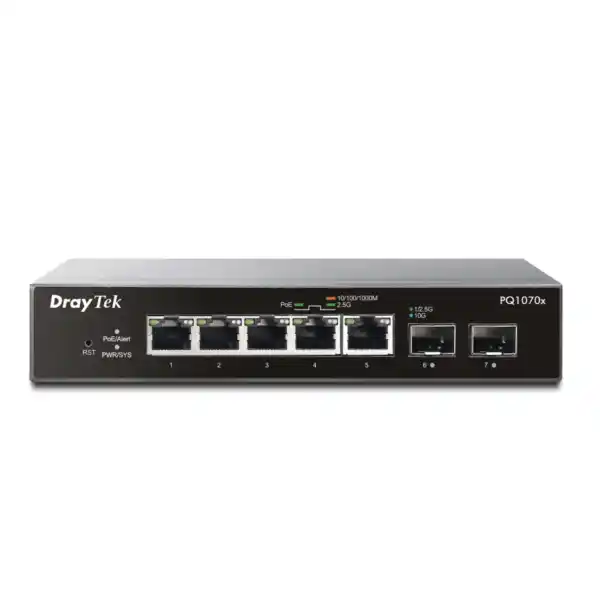
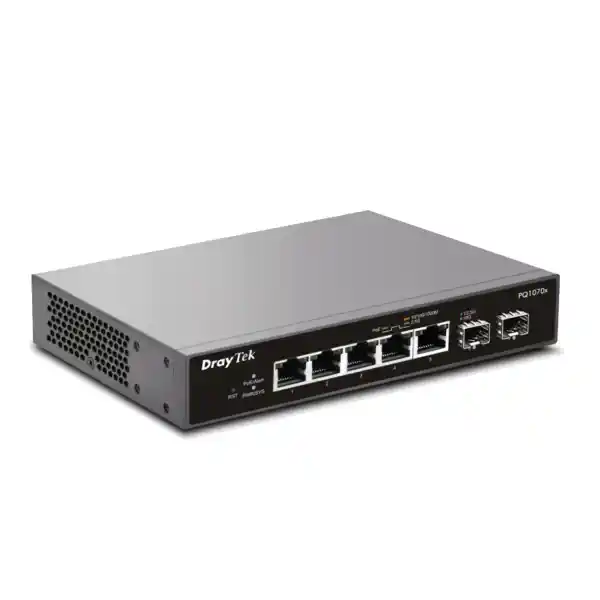
The DrayTek VigorSwitch PQ1070x is a compact multi-gigabit PoE+ access switch designed for networks that have outgrown ordinary Gigabit Ethernet but do not require a large, full-featured Layer-3 chassis. Five 2.5GbE copper ports serve access points, workstations, cameras, edge servers and other high-throughput endpoints, while two 10G-capable SFP+ interfaces provide fast aggregation paths toward a firewall, distribution switch, NAS or fibre backbone. For UAE offices, retail branches, clinics, classrooms, villas converted to commercial spaces and compact equipment rooms, this port mix solves a common design problem: how to introduce Wi-Fi 6-class wired backhaul and 10G uplink capacity without consuming unnecessary rack space.
The product combines a published 65Gbps switching capacity with a 75W shared PoE budget, Smart Lite management, VLAN controls, traffic prioritisation and loop-protection functions. The result is a focused access-layer device for engineers who value predictable port economics, multi-gigabit throughput and practical segmentation more than an oversized feature list.
Direct answer: what is the VigorSwitch PQ1070x best used for?
The VigorSwitch PQ1070x is best used as a compact managed access or aggregation-edge switch where up to five powered devices need more than 1Gbps of copper bandwidth and the local network needs one or two high-speed fibre or DAC uplinks. Typical examples include a small office deploying several Wi-Fi 6 access points, an engineering or media team transferring large files to network storage, a retail outlet combining wireless access, CCTV and POS infrastructure, or a branch that needs separate employee, guest, voice, camera and management VLANs without deploying a large rack switch.
It is not intended to replace a full Layer-3 core or distribution platform. DrayTek positions the model in its Smart Lite range rather than as an L2+ routing switch, and the published specification set does not provide a Layer-3 routing table, static routing or inter-VLAN routing functions. In a well-designed network, routing and security policy therefore remain on a suitable firewall, router or Layer-3 switch, while the PQ1070x handles high-speed local switching, VLAN separation, PoE delivery and traffic control at the access edge. That distinction is important because it allows buyers to size the product for what it does especially well rather than buying it for features that belong elsewhere in the architecture.
Technical specification summary
| Category | Published specification | Engineering relevance |
|---|---|---|
| Copper access | 5 × 10M/100M/1G/2.5G RJ-45 | Multi-gigabit connectivity for Wi-Fi 6 APs, workstations, cameras and appliances. |
| PoE | 5 × IEEE 802.3af/at PoE/PoE+, up to 30W per port subject to shared budget | Single-cable power and data for supported powered devices. |
| PoE budget | 75W total | Requires load planning when several devices approach 20–30W draw. |
| Fibre / uplink | 2 × SFP+ supporting 1G/2.5G/10G | Suitable for high-speed fibre or compatible direct-attach aggregation links. |
| Switching capacity | 65Gbps | Provides headroom for simultaneous multi-gigabit access and 10G uplink traffic. |
| Forwarding rate | 48.36Mpps at 64-byte frames | Indicates packet-processing capability under small-frame conditions. |
| Packet buffer | 8Mbit | Absorbs short bursts where ingress and egress rates differ. |
| MAC table | 16K entries | Comfortable scale for compact office and branch Layer-2 domains. |
| Jumbo frame | Up to 10KB | Useful where the complete path supports larger Ethernet frames, such as selected storage workloads. |
| VLAN | Up to 32; 802.1Q tag-based and port-based VLAN support | Provides practical segmentation for staff, guest, voice, CCTV, IoT and management zones. |
| QoS | 7 queues; SPQ and WRR; CoS, DSCP and CoS-DSCP; rate limiting | Allows latency-sensitive traffic to be prioritised when links are congested. |
| Loop / resilience | STP, RSTP, loop protection and storm control | Helps contain accidental loops and broadcast storms in small switched domains. |
| Management | HTTP/HTTPS, configuration backup/restore, dual image, SNTP, LLDP, VigorRouter SWM support | Supports browser-based administration, operational recovery and topology visibility. |
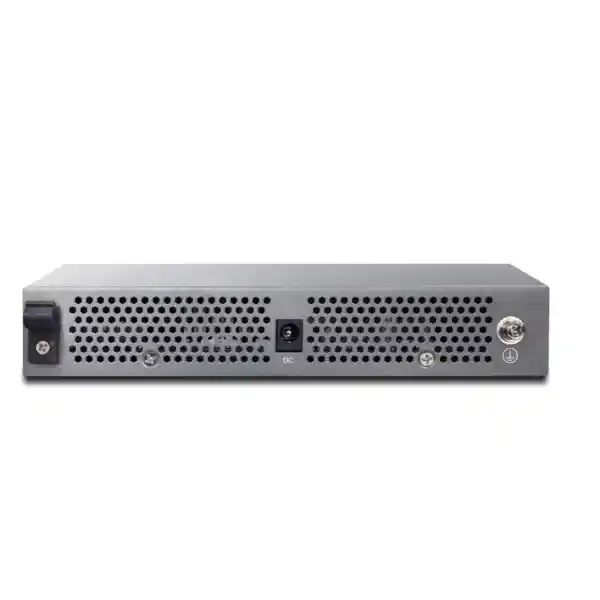
| Power input | DC 56V @ 1.6A | External DC power architecture; allow suitable UPS-backed outlet planning. |
| Max. power consumption | 89.6W published maximum | Relevant to UPS runtime and thermal planning. |
| Dimensions / environment | 175 × 114 × 32mm; 0–45°C operation; 10–90% RH non-condensing | Compact footprint, but climate-controlled installation remains important in UAE conditions. |
Why 2.5GbE matters
A modern Wi-Fi 6 access point can deliver aggregate wireless throughput that exceeds the practical ceiling of a 1GbE uplink, especially when several radios, clients and LAN transfers are active together. A 2.5GbE port gives the AP more wired headroom without requiring the cost and cabling constraints of 10GBASE-T. It is also useful for compact NAS systems, workstations with multi-gigabit adapters and edge compute devices. Because 2.5GBASE-T was designed to work over suitable existing twisted-pair cabling at common office distances, it can be an efficient upgrade path where the installed copper plant is in good condition.
Why two 10G SFP+ ports matter
Two SFP+ interfaces let engineers avoid forcing several 2.5GbE access flows through a single Gigabit bottleneck. One port can uplink to a core, firewall or aggregation switch while the second connects to a high-speed storage host, another switch or a redundant physical path where the wider design supports it. SFP+ also lets the deployment choose the correct medium—multimode fibre, single-mode fibre or a compatible direct-attach cable—based on distance, pathway, electrical isolation and rack layout rather than being locked to copper Ethernet.
Why Smart Lite can be enough
Not every branch requires dynamic routing, large ACL frameworks or enterprise stacking. Many access networks need reliable VLAN separation, traffic prioritisation, loop protection, rate limiting, multicast awareness and web management, while routing and policy enforcement already live on a firewall. In that design, a focused Smart Lite switch can simplify operations and reduce the number of features that administrators must maintain. The PQ1070x fits that pattern particularly well when the endpoint count is small but the bandwidth requirement per endpoint is high.
Why PoE planning still matters
Each copper port can serve standards-based PoE/PoE+ devices, but the 75W total budget is shared. A five-port switch therefore should not be treated as five independent 30W power supplies. Engineers must add the expected maximum draw of all powered devices, reserve margin for startup behaviour and future replacements, and confirm that the aggregate remains within budget. This is especially important when mixing high-performance access points, PTZ cameras, illuminators, phones and other devices whose actual demand differs significantly.
Switching architecture and real-world bandwidth planning
The most useful way to read a switch specification is to separate port speed from system design. Five 2.5GbE access interfaces provide a theoretical aggregate of 12.5Gbps in one direction if all ports are simultaneously sending at line rate. The two 10G SFP+ interfaces provide considerably more uplink capacity than a single 1GbE trunk and create options for separating northbound traffic from local storage traffic. The published 65Gbps switching capacity is consistent with a device designed to move traffic among its ports without the severe oversubscription that would be expected from a low-cost Gigabit uplink architecture. Actual application throughput will still depend on frame size, endpoint capability, TCP behaviour, transceiver choice, cabling, server performance, security inspection elsewhere in the path and the pattern of simultaneous flows.
For UAE branch deployments, this matters because the WAN circuit is often not the only heavy data path. A site may have a 500Mbps or 1Gbps internet connection but still require multi-gigabit LAN throughput for local backup, cloud cache appliances, video editing, IP camera recording or access-point aggregation. In that case, designing every switch port around the WAN speed would under-size the LAN. The PQ1070x lets the engineer maintain faster east-west traffic while the firewall independently controls the lower-speed north-south internet path.
The 8Mbit packet buffer helps absorb short-lived bursts, but it should not be interpreted as a substitute for sound uplink sizing. When several 2.5GbE sources continuously feed an egress port operating at a lower speed, queues eventually fill and packets are dropped. QoS can decide which classes receive preferential treatment, but it cannot manufacture bandwidth. The correct design combines adequate uplink capacity, sensible VLAN architecture, application-aware prioritisation and realistic expectations about traffic concurrency.
2.5GbE access ports: practical deployment guidance
The five RJ-45 access ports negotiate across 10Mbps, 100Mbps, 1Gbps and 2.5Gbps rates, which allows the switch to support a mixed estate during migration. A legacy printer or phone can remain at Fast Ethernet or Gigabit speed while a new Wi-Fi 6 access point uses 2.5GbE. This mixed-speed capability is operationally useful because office refresh cycles are rarely uniform. It avoids forcing every connected endpoint to be replaced just because the uplink infrastructure has been upgraded.
For access points, verify that the AP itself has a 2.5GbE Ethernet interface and that its power demand stays within the switch’s PoE capabilities. A Wi-Fi 6 model with a 1GbE port will still function but will negotiate at its own maximum. Likewise, an endpoint advertised with a 5GbE or 10GbE copper NIC may fall back to 2.5GbE only if both sides support that negotiated mode. Review the endpoint NIC specification rather than assuming all multi-gigabit interfaces share every intermediate speed.
Cabling condition is equally important. Multi-gigabit Ethernet was created partly to extend higher throughput over existing structured cabling, but link quality still depends on cable category, installed length, terminations, patch panels, electromagnetic environment and workmanship. A technically correct deployment therefore includes certification or at least link testing on critical runs, especially in older offices where the cabling history is unknown. If a port repeatedly negotiates down to 1Gbps, investigate the physical channel before treating it as a switch software issue.
The value of 2.5GbE is greatest when the complete path is faster than 1Gbps. A 2.5GbE workstation connected to the PQ1070x will not achieve multi-gigabit transfer rates to a NAS that is itself connected at 1Gbps elsewhere. For high-performance use cases, map the entire flow from client to destination and identify every inter-switch link, firewall interface, server NIC and storage subsystem. The switch is one component in that end-to-end chain.
10G SFP+ uplinks: fibre, DAC and topology choices
Multimode fibre
A compatible 10G multimode optic is a common choice for building and data-room links where the fibre plant supports the required wavelength and distance. It provides electrical isolation and works well between cabinets where copper grounding differences or pathway noise are concerns. Confirm fibre type, connector format, optic compatibility and optical budget before procurement.
Single-mode fibre
Single-mode optics suit longer building-to-building or campus runs where the existing plant is OS2 or another compatible single-mode standard. The fibre link must still comply with local pathway and building requirements, and the optic pair must be matched. Avoid purchasing transceivers solely by connector shape; wavelength and supported distance are equally important.
Direct-attach copper
A compatible SFP+ DAC can be economical for very short rack or cabinet links between the switch and another SFP+ device. It eliminates separate optical modules and fibre patch leads, but interoperability and cable length must be checked. DAC is a point-to-point rack solution, not a substitute for structured building cabling.
Dual-uplink usage
Two SFP+ ports create design flexibility, but they do not automatically imply chassis stacking or advanced link aggregation. Use them as independent high-speed links unless the selected firmware and the complete topology explicitly support the desired aggregation behaviour. The published Smart Lite feature set should be checked before assuming enterprise LACP or stacking functions.
An important procurement detail is that an SFP+ cage is not itself a fibre interface until the correct transceiver or DAC is installed. When requesting a quotation, specify the remote device, required speed, fibre type, connector, estimated path length and whether the link is within a rack, within a building or between buildings. That information lets the bill of materials include the right optics and patching rather than leaving the uplink as an incomplete line item.
PoE+ engineering: how to size the 75W power budget correctly
The PQ1070x provides PoE/PoE+ on all five 2.5GbE copper ports, with standards support for IEEE 802.3af and 802.3at powered devices. An individual PoE+ port can support devices requiring up to the applicable PoE+ power level, but the switch’s total published PoE budget is 75W. The correct sizing exercise therefore starts with aggregate demand, not simply the number of available ports. Five low-power devices can fit comfortably, while three or four high-power devices may approach the limit.
A practical design uses the powered device’s maximum or declared PoE draw rather than its average daytime consumption. Suppose two access points are specified at 18W each and three cameras at 9W each. The combined design figure is 63W, leaving 12W of nominal budget. That may be acceptable if the device specifications are reliable and there is no planned upgrade to higher-power models, but a project with tight power headroom should be reviewed carefully. If two of those APs may later be replaced by models drawing 25W each, the same switch could become power-constrained even though there are still free data ports.
PoE also affects UPS design. A switch that powers access points, CCTV cameras and other critical devices becomes an electrical concentration point. Connecting only the switch’s DC adapter to a UPS can keep several edge devices online during a short outage, but UPS runtime must be calculated using realistic switch-plus-PoE load rather than the idle consumption of the switch alone. The published maximum system consumption provides a useful upper-bound reference for power planning, while actual runtime depends on attached devices and battery condition.
DrayTek promotes PoE operational functions such as device status checking and, in some product materials, scheduled power behaviour. Firmware feature matrices can change between regional releases, so functions that affect automated power cycling should be confirmed against the exact firmware intended for deployment. For critical cameras, access-control devices or production wireless systems, automation should be tested during commissioning rather than enabled from an assumption based solely on a marketing summary.
Wi-Fi 6 and multi-gigabit access-point backhaul
One of the strongest use cases for the VigorSwitch PQ1070x is powering and connecting modern wireless access points. Wi-Fi 6 increases aggregate radio capacity, improves scheduling efficiency in dense client environments and can create enough local traffic that a 1GbE wired uplink becomes the limiting factor. A 2.5GbE Ethernet connection gives a compatible AP a larger path to the wired network while PoE+ delivers power over the same cable. In a small office, this can enable a clean deployment with only one data cable to each ceiling location and a single compact switch serving multiple APs.
The switch does not replace wireless design. AP count and placement should still be based on coverage, client density, channel planning, construction materials, interference and roaming requirements. A site with poor RF design will not become reliable merely because the AP uplinks run at 2.5Gbps. Conversely, a well-designed wireless network can be artificially capped by undersized wired backhaul. The PQ1070x addresses the wired side of that equation by removing the traditional Gigabit bottleneck for up to five compatible endpoints.
VLANs are especially valuable in wireless deployments. Staff SSIDs, guest access, voice handsets, IoT devices and building systems can be mapped into separate VLANs and passed through a tagged uplink to a firewall or router. The gateway then applies inter-VLAN policy, internet access rules, content controls and logging. Because the PQ1070x is not intended as a Layer-3 routing platform, this separation of duties is clean: the switch forwards the VLANs, while the security gateway decides what traffic is permitted between them.
For organisations standardising on managed wireless, document the VLAN ID, SSID mapping, native or untagged VLAN behaviour, AP management subnet, DHCP source and firewall policy before installation. This prevents a common commissioning problem in which an AP powers on successfully but cannot reach its controller or management interface because the switch port and gateway expect different tagging behaviour.
CCTV, IoT and branch edge deployments
Although 2.5GbE is often associated with wireless, it can also simplify specialised edge networks. IP surveillance systems increasingly combine multiple camera streams, analytics and high-resolution recording. Individual cameras rarely need 2.5Gbps, but multi-rate ports maintain compatibility while the 10G SFP+ uplinks can prevent the edge switch from becoming the bottleneck between several cameras and a central NVR. The 75W PoE budget, rather than data bandwidth, is often the primary constraint in a camera-heavy design, particularly with PTZ units, heaters or infrared illuminators.
For IoT and building systems, VLAN segmentation is usually more valuable than raw port speed. Lighting gateways, sensors, displays and controllers can be placed in dedicated network segments with policy enforcement on the firewall. Storm control and loop protection provide additional safeguards against common Layer-2 problems. The switch should not be treated as a cybersecurity appliance, however. Segmentation becomes meaningful only when the upstream gateway enforces least-privilege communication between the VLANs and monitors traffic as required.
Retail branches can combine an access point, POS terminal, IP camera, digital signage controller and small edge appliance on a single compact switch. In this scenario, the 10G uplink may be more capacity than the WAN needs, but it can still be useful when the branch has a local server, NVR or high-speed inter-floor connection. The switch’s small footprint also makes it practical for shallow cabinets and back-office locations where a full 19-inch access switch would be physically excessive.
Healthcare and education environments can use a similar pattern, but procurement should include any sector-specific compliance, availability and environmental requirements. The PQ1070x provides switching and PoE functions; it does not by itself satisfy regulated security, medical-device isolation or life-safety requirements. Those obligations belong to the wider network design and organisational control framework.
VLAN design for a five-port multi-gigabit edge
The published VLAN capacity of up to 32 VLANs is more than sufficient for many compact branch designs. Capacity alone is not the goal; the important task is to create a segmentation model that operators can understand and maintain. A five-port switch might serve only a handful of physical devices, yet a single access point can carry several SSIDs and therefore several tagged VLANs. The SFP+ uplink can transport those VLANs to the upstream firewall or distribution switch, allowing a small physical footprint to participate in a much richer logical design.
Corporate laptops, authenticated desktops and managed devices. Apply business access policies upstream and avoid mixing unmanaged guest clients into this segment.
Internet-oriented traffic with isolation from internal servers. Commonly delivered through a wireless SSID and tagged through the switch to a gateway.
IP phones or voice infrastructure where separate addressing and QoS policy are desirable. Confirm endpoint tagging behaviour before rollout.
Cameras and embedded devices that should communicate only with approved recorders, controllers and update services.
Administration interfaces for network devices. Use only where supported by the deployed firmware and protect access from user networks.
Local NAS or services that benefit from high-speed connectivity but need controlled reachability from user and IoT zones.
The switch supports 802.1Q tag-based VLANs and port-based VLAN functionality. For a trunk to an upstream firewall, ensure that both devices agree on allowed VLAN IDs and on the treatment of any untagged or native traffic. Avoid reusing the same VLAN number for different purposes across sites unless central standards explicitly define that numbering. Consistent documentation reduces troubleshooting time when a branch is later expanded or managed remotely.
QoS, seven queues and traffic prioritisation
The PQ1070x provides seven QoS queues and supports strict priority and weighted round-robin scheduling, together with CoS and DSCP-based classification options and rate limiting. These tools are useful when several traffic classes compete for the same constrained egress path. Voice, interactive meetings and control traffic can be prioritised ahead of large backups or software downloads, helping reduce latency and jitter during congestion.
Strict priority is powerful but should be used carefully. If a high-priority class is allowed to consume the egress interface continuously, lower-priority queues can be starved. Weighted round-robin distributes service more predictably among queues and is often easier to operate when multiple applications require guaranteed opportunity to transmit. The correct policy depends on the traffic profile rather than on a generic rule that voice should always receive absolute priority.
QoS markings also need end-to-end consistency. A switch can honour DSCP or CoS values, but if endpoints do not mark traffic correctly, or if an upstream firewall rewrites the values, the expected prioritisation may not occur. In enterprise networks, define a small, controlled class model and map applications into it deliberately. Avoid trusting arbitrary markings from guest or unmanaged devices, because a client could otherwise label bulk traffic as high priority.
Rate limiting is valuable for containing noncritical devices or preventing a single port from monopolising an uplink, but it should not be used to conceal under-sized infrastructure. If a legitimate workload regularly hits a configured cap, revisit the design. The benefit of multi-gigabit switching is the ability to move more useful traffic; policy should protect shared resources without unnecessarily throttling the applications that justified the upgrade.
STP, RSTP, storm control and loop protection
Layer-2 loops can disable a small network surprisingly quickly. A patch cable connecting two access ports, an unmanaged switch wired back to itself, or an incorrectly bridged endpoint can cause broadcasts and unknown unicast traffic to circulate repeatedly. The PQ1070x includes STP and RSTP together with loop-protection and storm-control functions that help reduce the operational impact of such mistakes.
RSTP is generally preferred over classic STP where rapid convergence is required and the broader topology supports it. Even in a small branch, spanning-tree settings should be intentional. Identify which upstream switch or device should be the root bridge and avoid leaving the outcome entirely to default bridge identifiers in a multi-switch environment. The PQ1070x is not listed as supporting MSTP in the current global specification, so designs that depend on multiple spanning-tree instances should use a switch family intended for that architecture.
Storm control complements spanning tree by limiting the impact of excessive broadcast or similar traffic, but threshold configuration requires care. Set too low, storm control can interfere with legitimate bursts such as device discovery or address resolution. Set too high, it may provide little practical protection. Commissioning should include observation of normal peak traffic before aggressive thresholds are applied.
Loop protection is especially helpful in branch locations where non-technical staff may move cables. It should still be combined with physical labelling, port documentation and cabinet discipline. Network resilience is strongest when preventive operational practices reduce the chance of a loop and protocol controls limit the damage if one occurs.
Multicast and IPv6 considerations
The switch supports IGMP snooping for IPv4 multicast, which can improve efficiency by forwarding multicast streams only toward ports that have interested receivers rather than flooding them across the entire VLAN. This is useful for IPTV, selected video-distribution systems and multicast-based service discovery patterns, although the exact application architecture determines whether an IGMP querier is also required elsewhere in the network. The published feature matrix does not position the PQ1070x as an IGMP querier, so the upstream router or another appropriate device may need to perform that role.
DrayTek also references IPv6 readiness and MLD-snooping capability in product materials, with some functions shown as firmware-dependent or planned in feature matrices. IPv6 should therefore be designed end to end rather than enabled casually. Confirm gateway support, RA behaviour, DHCPv6 policy, firewall rules, DNS and endpoint security before extending IPv6 into user or IoT VLANs. A network that filters IPv4 carefully but leaves IPv6 uncontrolled can unintentionally create a second, less governed path.
For multicast-heavy deployments, test the actual receivers and transmitters during commissioning. Consumer media systems, building controllers and discovery protocols sometimes behave differently from enterprise multicast assumptions. The switch can provide Layer-2 tools, but application-specific validation is still necessary to avoid unnecessary flooding or service-discovery failures across segmented VLANs.
Management, configuration backup and operational recovery
The PQ1070x supports browser-based HTTP and HTTPS management, configuration backup and restore, dual-image capability, SNTP and LLDP. In a production deployment, HTTPS should be used where supported by the installed firmware and management access should be limited to trusted administration networks. A management interface should not be exposed directly to the public internet. Remote administration, where required, is better provided through a secure VPN or an approved management platform behind the site firewall.
Configuration backup is operationally important because even a small seven-port switch can carry critical VLAN and PoE settings. Save a known-good configuration after commissioning and again after authorised changes. Store the file with a site identifier, device model, firmware version and date so that support staff can restore the correct state rather than guessing which backup belongs to the device. A simple change log is particularly valuable when several small branches use the same model but different VLAN IDs or port assignments.
Dual-image support provides an additional recovery mechanism during firmware maintenance, but it does not remove the need for controlled upgrades. Review release notes, preserve the current configuration, confirm maintenance-window access and avoid performing an upgrade when no on-site recovery path exists for a critical remote branch. Firmware behaviour can evolve, including the availability of features marked for future support, so production documentation should record exactly which release has been validated.
LLDP can simplify troubleshooting by exposing neighbouring network devices and interface information. In structured environments, it helps operators identify which AP or upstream switch is attached to a port without tracing every cable physically. SNTP keeps the device’s time aligned with a trusted time source, which improves the usefulness of logs and event correlation.
DrayTek lists VigorRouter switch-management integration for this model. If centralised management is a project requirement, confirm the exact router model, firmware versions and management functions expected before standardising. A platform that can discover and monitor the switch may not necessarily expose every local configuration option through the central interface.
Performance details: buffer, MAC table and jumbo frames
The published 16K MAC address table is generous relative to the physical port count. It allows the switch to learn a large number of Layer-2 addresses when connected to an upstream trunk or downstream virtualised environment, although a typical five-port branch will use only a fraction of that capacity. The MAC table should not be interpreted as a recommendation to build a 16,000-endpoint broadcast domain; it is simply the hardware learning scale available to the switch.
The 10KB maximum jumbo-frame size can reduce protocol overhead in selected high-throughput workloads, especially storage or backup flows where endpoints and every intermediate device support the same MTU. Jumbo frames are an end-to-end setting. Enabling a large MTU on the PQ1070x alone does not increase performance if a server, firewall or another switch in the path remains at the standard frame size. Inconsistent MTU values can produce confusing failures in which small packets succeed but larger transfers stall or fragment.
The 8Mbit buffer helps absorb bursts, but buffer size is only one aspect of switch performance. In a compact access design, the more relevant questions are whether uplink capacity matches expected concurrency, whether QoS has been configured rationally and whether the receiving endpoint can process traffic fast enough. A 10Gbps uplink to an under-powered NAS does not produce 10Gbps file transfers.
The listed 48.36Mpps forwarding rate at 64-byte frames provides a standardised indication of packet-processing performance under small-packet conditions. Real office traffic uses a mixture of frame sizes, and application throughput will typically be measured in useful data rate rather than raw packet rate. Use the published figure as part of hardware comparison, not as a promise that every application will achieve a specific user-visible transfer speed.
UAE installation environment: heat, cabinets and power quality
The published operating temperature range is 0–45°C with 10–90% non-condensing operating humidity. Those figures make installation environment a serious design consideration in the UAE. A compact switch placed above a ceiling, inside an unventilated outdoor box or in a cabinet exposed to direct solar heating can exceed its rated environment even when the surrounding building is air-conditioned. Network equipment should be installed in a ventilated, climate-controlled location with clear airflow around the device and its power adapter.
The switch’s small 175 × 114 × 32mm chassis makes placement flexible, but small size can tempt installers to put it in unsuitable spaces. Avoid resting the device on top of other heat-generating equipment or packing cables tightly around ventilation openings. In dusty service areas, protect the equipment while preserving ventilation and include periodic inspection in the maintenance plan.
Power quality is also important. The DC adapter should be fed from a correctly rated outlet, and business-critical installations should use a suitable UPS and surge-protection strategy consistent with the building’s electrical design. Because the switch can power several endpoints, one electrical interruption may simultaneously disconnect wireless, cameras and other systems. A UPS can centralise resilience, but runtime calculations must include the PoE load.
For remote branches, label the switch, adapter, uplinks and powered-device cables clearly. Good physical documentation reduces support time when non-network staff must follow instructions by phone. Photographing the final cabinet and recording port assignments can be as valuable as saving the logical configuration.
Three deployment topologies
1. Wi-Fi 6 branch edge
Connect three to five PoE+ access points to the 2.5GbE copper ports. Carry staff, guest, voice and IoT VLANs over an SFP+ trunk to the firewall or distribution switch. This layout gives each AP more than Gigabit wired headroom while keeping routing and security policy centralised.
Best when the branch has high local wireless density, a capable upstream gateway and a structured cabling plant that supports reliable 2.5GBASE-T operation. Verify aggregate AP PoE demand against the 75W budget.
2. Creative or engineering pod
Connect several 2.5GbE workstations on copper and use one 10G SFP+ port for a NAS or upstream aggregation link. The second SFP+ port can connect to the building core or another high-speed resource depending on the topology.
This design improves local transfer capacity without installing a large 10GBASE-T switch at every workgroup. End-to-end storage performance still depends on server NICs, disks, protocol tuning and uplink architecture.
3. CCTV and IoT micro-zone
Use the PoE ports for selected cameras, access controllers or IoT gateways, segment device classes with VLANs and aggregate recording traffic through a 10G uplink. Storm control and loop protection add practical safeguards at the edge.
This topology is limited primarily by PoE power and the number of physical ports rather than switching bandwidth. High-power cameras must be calculated carefully, and security controls remain the responsibility of the upstream firewall and system design.
Sizing methodology before you buy
A correct PQ1070x deployment starts with four independent counts: data ports, PoE load, uplink bandwidth and logical segments. Data-port count is simple: list every endpoint that must connect directly to the switch and reserve capacity for expected additions. If all five copper ports are already allocated on day one, decide whether that is acceptable or whether a larger model would provide a better growth path. Connecting an unmanaged switch later may add ports, but it can complicate VLAN control, troubleshooting and uplink contention.
Second, calculate PoE demand using maximum device requirements. Record each powered device’s standard, expected draw and peak draw. Sum the values and compare them with the 75W budget. Keep reasonable headroom for startup conditions and replacement models. If the budget is marginal, use a higher-capacity PoE switch or independent power for selected devices rather than planning to operate continuously at the edge of available power.
Third, map traffic flows. Five 2.5GbE endpoints do not automatically require 12.5Gbps of uplink, because most office devices are not transmitting at line rate simultaneously. However, a creative team copying large files or several APs serving many clients can generate real concurrency. Estimate the dominant flows and decide whether one 10G uplink is enough or whether the second port should be used for a separate high-bandwidth destination.
Fourth, define the VLAN model. The switch supports up to 32 VLANs, which is ample for compact sites, but the upstream gateway must also support the same segmentation and have enough interfaces or subinterfaces. Identify which VLANs appear on each access port, which are tagged on the trunk and where DHCP and default gateways reside.
Finally, include environmental and operational factors: cabinet dimensions, AC power, UPS load, fibre type, optic compatibility, cable certification, remote support needs and firmware policy. A small switch can still fail a project if one of these non-port-count items is omitted from the bill of materials.
SFP+ and cabling procurement checklist
When the PQ1070x is specified with 10G uplinks, the switch itself is only one part of the link. The quotation should identify the medium and both endpoints. For fibre, record whether the installed plant is multimode or single mode, the connector type at each end, the approximate distance and whether intermediate patch panels are present. Select transceivers that match the fibre and the remote equipment, then include suitable patch leads and cleaning materials where required.
For short in-cabinet links, a compatible DAC may simplify the design. Confirm that both devices accept the chosen cable type and length. Interoperability matters because not every SFP+ host treats every third-party module or DAC identically. Where supportability is critical, select optics from an approved compatibility list or obtain confirmation before ordering.
On the copper side, existing structured cabling should be assessed for 2.5GbE operation. Cable category is part of the answer, but workmanship often determines real performance: split pairs, damaged patch leads, poor terminations and excessive untwist can all reduce margin. A link that works at 1Gbps is not automatically guaranteed to be healthy at higher signalling rates. Test critical runs and replace low-quality patch cords during the upgrade rather than troubleshooting intermittent negotiation later.
Keep copper data cabling physically separated from sources of electrical noise according to applicable cabling standards and local installation practice. Where long links cross between electrical zones or buildings, fibre is often preferable because it provides galvanic isolation and avoids copper distance limits. The switch’s combination of 2.5GbE copper access and SFP+ fibre uplinks makes that hybrid design straightforward.
Security boundaries: what the switch does and does not do
The PQ1070x provides useful Layer-2 controls, but it should not be described as a firewall. VLANs separate broadcast domains and can create logical security zones, yet devices in different VLANs are protected only when the routing device enforces policy between them. If the upstream gateway permits unrestricted inter-VLAN traffic, the existence of separate VLAN IDs does not by itself create meaningful least-privilege security.
The published Smart Lite feature set includes storm control, loop protection and management access controls, while enterprise functions such as full 802.1X/MAC authentication, DHCP snooping, dynamic ARP inspection and IP source guard are not listed as supported in the current global specification matrix. Organisations that require those controls at the access layer should select a switch family that explicitly provides them rather than assuming they can be added through configuration.
Management-plane protection is therefore especially important. Use HTTPS where available, restrict administration to trusted subnets, change default credentials, apply strong unique passwords, keep firmware supported and back up the configuration. Where a dedicated management VLAN is used, ensure the upstream firewall prevents ordinary user and guest networks from reaching device administration pages.
Security architecture should also account for physical access. A compact branch switch may be installed outside a locked data room. If someone can unplug uplinks, reset the device or move cables between ports, logical controls may be bypassed or disrupted. Use an appropriate enclosure and document the reset/recovery process so that physical security and network policy reinforce one another.
Migration from a Gigabit PoE switch
A migration to the PQ1070x can often be completed without changing every endpoint. Because the copper ports negotiate lower Ethernet rates, legacy Gigabit devices can remain connected while selected APs or workstations move to 2.5GbE. The key is to preserve the logical configuration during the physical transition. Before removing the old switch, document each port’s VLAN, tagging mode, PoE requirement, endpoint MAC address where useful, and upstream connection.
Build the new VLANs and management settings before the cutover where practical, then connect one device class at a time. Test management reachability, DHCP, default gateway access and application connectivity for each VLAN. If the upstream changes from a 1GbE RJ-45 link to a 10G SFP+ link, verify transceiver status and trunk VLANs before moving user devices. This staged method prevents multiple variables from changing at once.
PoE migration deserves its own check. An old switch may have a larger total power budget even if its data ports are slower. Do not assume the new switch can power the same endpoint set merely because both products have five or more PoE ports. Recalculate the attached load against the 75W budget and inspect endpoint power classifications after connection.
After the migration, run representative performance tests rather than relying only on negotiated link speed. Confirm that a 2.5GbE endpoint can transfer data above 1Gbps to an appropriate destination, that wireless clients see expected aggregate improvement, and that the 10G uplink is not constrained by another interface. Save the final configuration and update the network diagram while the installation details are still fresh.
How the PQ1070x fits into a broader FourTeck network design
The switch is most effective when it is specified as part of a complete architecture rather than as an isolated component. For UAE project planning, FourTeck can align the access switch with firewall capacity, wireless coverage, structured cabling, fibre uplinks, UPS design and network segmentation. General networking and infrastructure information is available through FourTeck UAE, while organisations planning firewall-led segmentation can review the specialist resources at Firewall Dubai.
Projects that include migration, configuration, rack work, network testing or operational support can also be coordinated with FourTeck IT Services UAE. For customers managing standardised infrastructure across several countries, the broader portfolio can be referenced through FourTeck Global.
These links are useful because the PQ1070x often sits at the point where wireless, security, fibre, PoE and end-user connectivity meet. Treating the switch as part of that integrated design reduces the risk of buying the right switch with the wrong optics, under-sized UPS capacity, incompatible AP power requirements or a firewall that lacks the interfaces needed for the intended VLAN structure.
When the PQ1070x is a strong fit—and when to choose a larger switch
Strong fit
Choose the PQ1070x when you need a small number of high-speed PoE+ access ports, 10G fibre uplink capacity, VLAN segmentation and practical Layer-2 management. It suits compact branches, wireless pods, edge cabinets and specialist workgroups where five copper ports are sufficient.
It is particularly attractive when physical space is constrained and the alternative would be deploying a 24-port multi-gigabit switch that is mostly unused. The seven-port layout concentrates budget on the interfaces that matter.
Choose a larger or different model when
You expect more than five direct copper endpoints, need substantially more than 75W PoE, require PoE++ for high-power devices, need switch stacking, MSTP, enterprise authentication, DHCP snooping, dynamic ARP inspection, Layer-3 routing or a larger set of 10G ports.
In those cases, a larger managed switch can be cheaper operationally than adding multiple small switches later. Growth, security requirements and power demand should be considered before purchase rather than after ports are exhausted.
Commissioning workflow for enterprise-quality results
Record model, serial information, site, cabinet, power source and every connected endpoint. Label both ends of copper and fibre links.
Review firmware release notes, choose a validated release and preserve recovery access. Do not upgrade blindly during a remote cutover.
Change credentials, use HTTPS where available, restrict management reachability and configure trusted time settings.
Create only the required VLANs, define access versus tagged behaviour and document the corresponding gateway interfaces.
Connect powered devices in a controlled sequence and confirm total draw, link rate and application behaviour.
Verify SFP+ transceiver status, VLAN carriage and end-to-end throughput using a capable test endpoint.
Where appropriate, test expected behaviour for cable removal, device restart and loop protection in a controlled window.
Save the final configuration, diagram the port map and provide support staff with the approved management procedure.
Frequently asked technical questions
Is the VigorSwitch PQ1070x a 10GbE copper switch?
No. The five RJ-45 access ports support up to 2.5GbE. The 10GbE capability is provided through the two SFP+ interfaces. This distinction affects cabling, transceiver selection and how 10G endpoints are connected.
Can every PoE port deliver 30W at the same time?
The ports support PoE+ devices, but the shared switch budget is 75W. Five devices each demanding 30W would greatly exceed that total. Size the attached load based on the maximum requirements of all powered devices.
Does it route between VLANs?
The current published specification does not list Layer-3 routing, static routes or VLAN routing for this model. Use an upstream firewall, router or Layer-3 switch for inter-VLAN gateway functions and policy enforcement.
How many VLANs does it support?
DrayTek lists support for up to 32 VLANs, with 802.1Q tag-based and port-based VLAN functions. That is usually more than enough for a small branch or dedicated edge pod.
Can I connect a 1GbE SFP module?
The SFP+ ports are published as supporting 1G, 2.5G and 10G operation, but module compatibility must still be checked. The physical cage alone does not guarantee support for every third-party transceiver.
Will existing Gigabit devices work?
Yes, the RJ-45 ports negotiate 10M, 100M, 1G and 2.5G speeds, so mixed-speed endpoints can coexist. Each link runs at the highest mutually supported rate that the physical cabling can sustain.
Does it support jumbo frames?
The published maximum is 10KB. Jumbo frames should be enabled only when the complete path—including endpoints and intermediate devices—uses a compatible MTU.
Is the switch suitable for Wi-Fi 6 APs?
Yes, Wi-Fi 6 AP backhaul is a primary use case for 2.5GbE PoE+ access. Confirm that the AP has a multi-gigabit Ethernet interface and that its maximum PoE draw fits within the total 75W budget.
Does the PQ1070x support spanning tree?
Yes. DrayTek lists STP and RSTP. MSTP is not listed for the model in the current global matrix, so networks that depend on multiple spanning-tree instances should select a different switch platform.
Can it be installed in a hot ceiling space?
The published operating range is 0–45°C. In UAE buildings, enclosed ceiling or outdoor spaces can exceed that temperature. Install the switch in a ventilated, climate-controlled location within the manufacturer’s environmental limits.
Is 65Gbps the same as internet speed?
No. Switching capacity describes the internal switching fabric, not WAN bandwidth. Internet speed is determined by the ISP circuit, firewall capability and service configuration. The switch can still provide faster local LAN transfers than the internet connection.
What should be included in a quotation?
Include the switch, correct power accessories, required SFP/SFP+ optics or DACs, fibre and copper patching, mounting requirements, UPS capacity, configuration services and testing. List endpoint PoE demand and intended VLANs so the design can be validated before supply.
UAE procurement factors beyond the switch price
A technically complete quotation should be evaluated on more than the unit price of the switch. The correct transceivers, patch leads and power components can materially affect whether the installation is usable on day one. If a project requires 10G fibre uplinks, identify whether optics are included or quoted separately. If the switch will power access points, verify that the AP models and their peak power draw are part of the sizing exercise rather than added later.
Lead time and lifecycle also matter. For multi-site rollouts, confirm that the selected hardware and compatible accessories can be supplied consistently across planned phases. Standardising on a model that fits only the first site but becomes unavailable or under-sized for later branches can increase support complexity. When several sites have similar requirements, create a baseline bill of materials with approved substitutions rather than rebuilding the design from scratch each time.
Support scope should be explicit. Decide whether the requirement is supply only, pre-configuration, on-site installation, migration, testing, documentation, remote support or a combination. A seven-port switch is simple to unpack, but a production deployment involving VLAN trunks, 10G optics, firewall changes and wireless migration may need coordinated engineering work.
Finally, distinguish warranty coverage from operational support. Hardware warranty addresses product defects under the applicable terms; it does not automatically include site troubleshooting, configuration changes or recovery from cabling and upstream network problems. For business-critical locations, define who owns first-line diagnosis and what remote access method is permitted.
Decision recap: is the DrayTek VigorSwitch PQ1070x right for your network?
The PQ1070x is a strong architectural fit when the project needs a small, high-bandwidth access switch rather than a conventional high-port-count device. Its five 2.5GbE PoE+ copper ports target modern edge devices that need more than Gigabit throughput, while the pair of 10G SFP+ interfaces provides a clean path into faster fibre infrastructure. The 75W PoE budget is appropriate for several moderate-power APs or edge devices, provided the total is calculated rather than assumed. Smart Lite features such as VLANs, QoS, rate limiting, STP/RSTP, storm control and loop protection cover the most common Layer-2 requirements of compact offices and branches.
Wi-Fi 6 backhaul, small high-speed workgroups, compact edge cabinets, PoE+ endpoints, fibre aggregation and VLAN-segmented branches where five copper ports are sufficient.
Total PoE demand, optic compatibility, cabling quality, environmental temperature, firmware-dependent functions and whether five access ports provide enough growth margin.
You need Layer-3 routing, PoE++, many more ports, much higher PoE budget, enterprise access-control features, MSTP, stacking or a broad 10G access layer.
Keep switching, routing and security roles clear. Let the PQ1070x handle fast local Layer-2 access, while an appropriate firewall or Layer-3 device enforces inter-VLAN policy and WAN security.
Quotation input checklist
For a precise UAE quotation and a deployable bill of materials, provide the information below. These inputs help avoid the most common ordering gaps: insufficient PoE headroom, wrong optics, missing fibre patch leads, incompatible uplink media or a switch that has no spare access ports after commissioning.
Number and model of APs, cameras, phones, workstations, NAS devices and other equipment connecting directly to the switch.
Maximum wattage and PoE standard for every powered device, including expected future replacements or additions.
Make and model of the firewall, core switch, NAS or other device at the far end of each SFP+ link.
Multimode or single-mode fibre, connector type, approximate length and whether existing patch panels are used.
VLAN IDs, names, tagged/untagged behaviour and which upstream device will provide the gateway and DHCP service.
Cabinet dimensions, ambient temperature, ventilation, available power outlets and UPS requirements.
Expected traffic between clients, storage, wireless, NVR systems, internet and other high-bandwidth resources.
Supply only, pre-configuration, on-site installation, migration, fibre testing, performance validation, documentation and ongoing support.
Structured consultation for the DrayTek VigorSwitch PQ1070x
A reliable deployment begins with the workload rather than the model number. FourTeck can review the endpoint count, PoE demand, VLAN design, 2.5GbE cabling, fibre uplinks, firewall interfaces and UPS requirements before the purchase is finalised. This is particularly useful where the switch will sit under Wi-Fi 6 access points or serve as a compact high-speed edge between user devices and a 10G backbone.
For multi-site UAE projects, the same review can be turned into a repeatable branch standard that defines port assignments, VLAN IDs, approved optics, firmware baseline, management addressing, backup procedure and commissioning tests. Standardisation makes future support faster and reduces configuration drift between sites.
Recommended information to send
Site location in the UAE, quantity required, connected device list, PoE wattage, fibre type and distance, upstream switch/firewall model, required VLANs, target installation date and whether configuration or on-site support is needed.
With those details, the switch can be evaluated as a complete working design rather than as a standalone line item.

Reviews
There are no reviews yet.