
Direct buyer answer: what is the CX 8100?
Where the HPE Aruba Networking CX 8100 fits
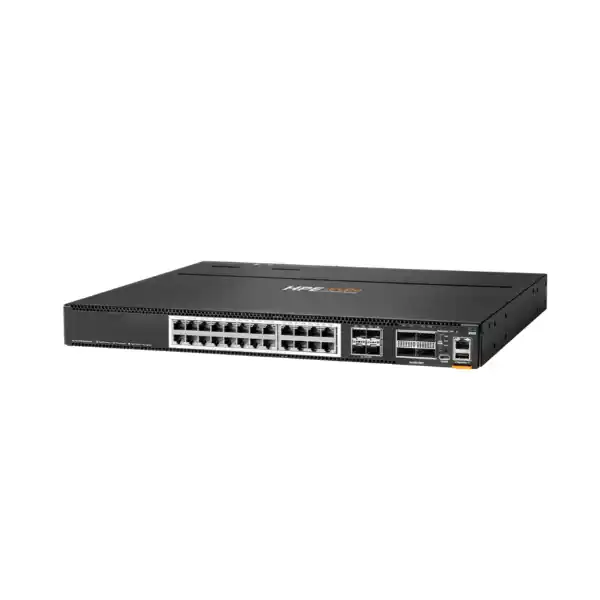
The CX 8100 sits in a useful part of the enterprise switching market: it combines fixed-port economics with enough high-speed connectivity for serious aggregation and data center work. HPE positions the series for next-generation campus core and aggregation as well as virtual and highly dynamic data center environments. That positioning matters because the series is not a conventional access switch built primarily around large quantities of 1GbE user ports and Power over Ethernet. Instead, its design centers on high-speed server, uplink and aggregation connectivity, with 10GbE appearing across the family and 40/100GbE QSFP ports providing a path toward higher-capacity links.
For a Dubai enterprise, that usually means the CX 8100 enters the shortlist when a network refresh is moving beyond basic edge switching. Examples include consolidating traffic from multiple access stacks into a campus aggregation pair, connecting virtualization hosts or storage systems at 10GbE, building a compact rack-scale leaf or top-of-rack layer, or replacing older aggregation switches whose uplinks have become a bottleneck. Because all CX 8100 models share the same broad architectural family but differ significantly in copper and fiber density, the right question is not only how many ports are needed today. Buyers should map the physical media, expected link speeds, rack airflow, redundancy, growth and optics strategy before selecting a bundle.
The family also provides a modern operational model through AOS-CX. HPE describes the operating system as database-driven and designed to simplify complex network tasks. For operations teams, this is more than a software-label difference: configuration state, analytics, APIs and automation become part of the platform decision. Enterprises using infrastructure-as-code practices can take advantage of REST APIs and Python scripting, while teams focused on troubleshooting can use the embedded Network Analytics Engine and telemetry capabilities. Those features are especially relevant in environments where a small network team must operate many switches consistently.
Four base models: choose by media and density
The four CX 8100 base models solve different cabling problems. Fiber-heavy environments should not be forced onto a copper model merely because the total port count looks similar, and the reverse is equally true.
HPE sells each base model in bundles supporting front-to-back or back-to-front airflow. That is a procurement choice, not a cosmetic detail. In a data center, airflow direction should follow the cold-aisle/hot-aisle orientation and the airflow behavior of adjacent equipment. A technically correct switch with the wrong fan direction can undermine rack cooling design and create avoidable thermal risk.
Performance and forwarding: interpret the numbers correctly
The CX 8100 series reaches up to 1.76 Tbps of bidirectional switching capacity and up to 1,309 Mpps of forwarding. Those are series maximums, not a promise that every base model has identical forwarding capacity. HPE QuickSpecs list model-dependent switching figures, with the lower-port models below the maximum and the higher-density configurations reaching the headline value. This distinction matters during design because a buyer should match the exact selected model to the intended traffic pattern instead of treating a family-level maximum as a universal specification.
For most business designs, raw switching capacity is only one sizing input. The uplink architecture, number of active 10GbE endpoints, east-west traffic between servers, oversubscription ratio, storage traffic and resilience design can be more influential. A campus aggregation pair carrying many downstream access switches may see bursty north-south and inter-VLAN traffic, whereas a data center top-of-rack pair can encounter sustained east-west flows. The same CX 8100 model can therefore be comfortable in one environment and poorly matched in another even when the physical port count appears sufficient.
The platform uses a 1.8 GHz quad-core 64-bit CPU, 16 GB RAM, 32 GB flash/storage and a 32 MB packet buffer according to current HPE technical information. The published scale values include a MAC address table size of 147,456 entries, IPv4 and IPv6 host tables of 65,536 entries each, up to 24,576 IPv4 unicast routes and 12,288 IPv6 unicast routes, together with up to 1,024 VLANs. These figures are valuable when a design is doing more than simple Layer 2 aggregation. Large route tables, segmentation plans, ACL policies and multicast requirements should be checked against the complete HPE scale tables before the final bill of materials is approved.
AOS-CX operations, analytics and automation
Database-driven architecture
AOS-CX uses a modern system architecture in which software processes operate as microservices and exchange state through the switch database. HPE highlights this architecture as a way to limit the impact of an individual software-process failure and to support resilient operations. For buyers, the practical value is a platform designed around continuous operation rather than a monolithic management model.
Network Analytics Engine
The HPE Aruba Networking Network Analytics Engine is embedded in the switch and can use time-series information for monitoring and troubleshooting. This can help operations teams identify anomalies, examine historical behavior and create more structured workflows around capacity and fault analysis instead of relying solely on ad-hoc CLI checks.
REST APIs and Python
Built-in REST APIs and Python scripting give network engineers options for repeatable configuration, integration and event-driven automation. The value is strongest when the organization has clear standards for version control, testing and change management; automation should make a good operating model more consistent, not simply make configuration changes faster.
Telemetry and orchestration
HPE documents continuous telemetry options including IPFIX and WebSocket subscriptions, and the CX 8100 is supported by HPE Aruba Networking Fabric Composer for data center orchestration. Whether those capabilities belong in the project depends on the operational model, existing tools and any required subscriptions or support entitlements.
High availability with VSX: design the pair, not just the switch
HPE Aruba Networking Virtual Switching Extension, or VSX, is a major reason the CX 8100 is attractive for aggregation and data center roles. VSX is built around two switches connected with an inter-switch link while each chassis maintains an independent control plane. The architecture synchronizes relevant state between the pair and supports multichassis designs without turning the two physical switches into a single-control-plane device. That independence can reduce the blast radius of certain failures and gives the network team more flexibility during maintenance.
A resilient design still requires more than buying two units. The inter-switch link capacity must be chosen with expected cross-chassis traffic in mind. Downstream devices should be dual-homed appropriately, upstream routing or link aggregation should be designed for failure scenarios, and the team should understand how keepalive and synchronization paths are built. If every critical flow depends on one optic, one patch panel or one upstream device, the presence of two CX 8100 switches does not automatically make the application highly available.
For migration projects, VSX also affects the cutover plan. Existing spanning-tree topology, LACP groups, VLAN gateways, routing adjacencies and maintenance windows should be mapped before cabling is moved. When a legacy aggregation stack is being replaced, the safest path often stages the new pair, validates software and management access, establishes uplinks, then migrates downstream links in controlled groups. A detailed rollback plan is especially important for 24/7 UAE operations where application owners expect minimal interruption.
Layer 2, Layer 3 and data center capabilities
The CX 8100 is not limited to high-speed Ethernet forwarding. HPE lists advanced Layer 2 and Layer 3 functions including BGP, OSPF, VRF, IPv6, VXLAN and EVPN. This combination allows the platform to participate in routed campus aggregation designs and in modern data center fabrics where overlay and underlay concepts are used. The exact architecture should be selected according to the organization’s routing standards and operational skills rather than enabled simply because the features are available.
Routing and segmentation
BGP and OSPF support routed designs, while VRF enables logical separation of routing domains. IPv6 support helps organizations build dual-stack or IPv6-forward strategies instead of locking the aggregation layer to IPv4-only assumptions.
VXLAN and EVPN
VXLAN and EVPN provide building blocks for scalable data center fabrics. They are most valuable when paired with a documented control-plane design, IP addressing plan, operational tooling and a team comfortable troubleshooting both underlay and overlay behavior.
Lossless Ethernet features
HPE documents Data Center Bridging features including Priority Flow Control and Enhanced Transmission Selection. Storage-related support includes iSCSI, lossless iSCSI, RoCE and NVMe over Fabrics use cases, subject to complete end-to-end design and compatible server/storage adapters.
Traffic control
QoS, storm protection, loopback detection, jumbo frames and flow-control capabilities help adapt the platform to demanding traffic profiles. These features should be deployed from a policy rather than copied generically across every port.
Optics, breakout and cabling decisions
A large share of switch procurement errors occur outside the switch chassis itself. The CX 8100 fiber models rely on SFP/SFP+ interfaces for 1/10GbE connectivity and QSFP+/QSFP28 interfaces for 40/100GbE. HPE also documents 1Gbps transceiver support, including 1GBASE-T on SFP+ ports. The correct optic depends on speed, fiber type, distance, connector, patch-panel design and the device at the other end of the link. A 10GbE requirement therefore needs more detail than “add SFP+ modules.”
The 40/100GbE ports can also be used for breakout on supported configurations, with HPE documenting 4 × 10Gbps and 4 × 25Gbps breakout capabilities from 40/100G ports. Breakout is useful when a high-speed physical port must fan out to multiple lower-speed interfaces, but buyers should confirm the exact CX 8100 model, software support, cable type and remote-device compatibility. A breakout cable that is electrically correct is not enough if the far-end platform or transceiver combination is unsupported.
HPE provides an Unsupported Transceiver Mode that can enable certain third-party 1G, 10G, 25G and 100G transceivers and cables. The procurement implication is important: HPE explicitly states that unsupported transceivers or cables do not receive HPE warranty or support for those components. Enterprises that value end-to-end vendor accountability should therefore decide whether savings from third-party optics outweigh troubleshooting and support boundaries. For critical core, aggregation and storage links, validated optics are often the cleaner operational choice.
Power, cooling and rack planning in UAE facilities
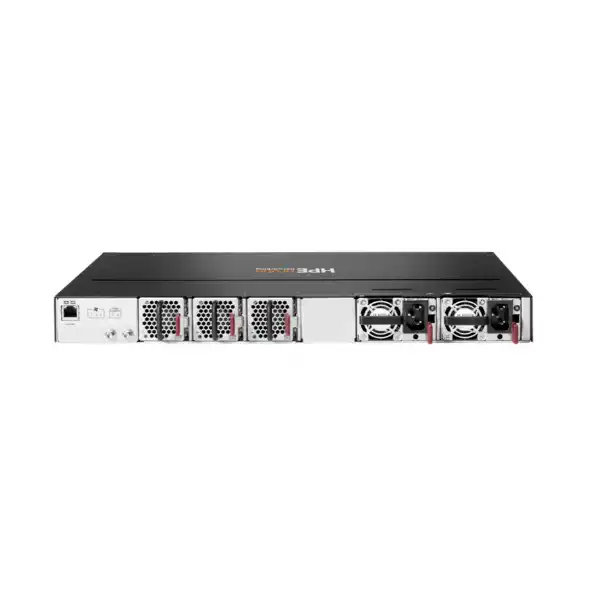
Current HPE product data lists a maximum power consumption of up to 500 W depending on the model, with an idle figure of 120 W. The series uses two field-replaceable, hot-swappable power supplies and three field-replaceable, hot-swappable fans in the documented bundles. Redundant components support serviceability, but the facility design should still provide independent power paths where resilience is required. Connecting both power supplies to the same PDU or upstream circuit may preserve PSU redundancy while leaving a single electrical failure domain.
Airflow is especially important in Dubai data centers and equipment rooms because ambient conditions outside the controlled rack environment can be demanding. HPE offers front-to-back and back-to-front airflow bundles; select the direction to match the aisle layout and surrounding equipment. Current HPE documentation also shows model- and airflow-dependent environmental limits, so the exact SKU’s operating temperature specification should be checked rather than relying on a generic family statement. In a properly designed facility, switch cooling should align with rack blanking, cable management, supply-air delivery and hot-air return.
The chassis is a compact 1U unit with published dimensions around 44.0 mm high by 442.5 mm wide by 406.4 mm deep, while fully configured weight varies by model. Depth is usually manageable in standard enterprise racks, but rear clearance is still needed for power connections and fan exhaust. Copper-heavy configurations can also create substantial patch-cord density, so horizontal and vertical cable management should be planned before installation rather than added after the rack is populated.
Management, licensing and support: what belongs in the quote
A CX 8100 hardware quote should not be interpreted as a complete operational solution unless the scope explicitly says so. The switch includes local management interfaces such as an RJ-45 serial console, USB-C console, dedicated RJ-45 Ethernet management port and USB Type-A. AOS-CX provides the switch operating environment, but organizations may also want centralized management, orchestration, analytics integrations, professional services or enhanced support. Those items can have separate commercial terms, subscription periods or entitlement requirements depending on the selected operating model.
For that reason, buyers should ask for licensing and subscriptions to be written as distinct BOM lines rather than hidden behind a generic “complete solution” description. If HPE Central, Fabric Composer, support services or another management component is required, the quote should state the exact part or subscription, term and quantity. If the design is intended to run primarily through local AOS-CX management and existing automation tools, the quotation should state that assumption as well. This avoids discovering after delivery that the operational workflow depends on a service that was never budgeted.
Support deserves similar precision. HPE’s current CX 8100 data sheet lists a limited lifetime warranty, while separate HPE support services can provide broader lifecycle assistance and service levels. Warranty and support are not the same purchasing decision. A business running revenue-critical systems may require defined response times, access to vendor assistance, replacement logistics and software support that go beyond the base warranty. In the UAE, the required support level should reflect application criticality, internal engineering coverage and acceptable outage duration.
Deployment scenarios that make sense
Campus aggregation pair
Two CX 8100 switches can aggregate multiple access switches using 10GbE or higher-speed links while providing routed services and resilient uplinks. Fiber-heavy 24XF4C or 48XF4C models are natural candidates when most downstream links are SFP/SFP+, but actual port density and uplink oversubscription should be calculated from the campus topology.
Data center top-of-rack
The 1U form factor and mix of 10GbE with 40/100GbE make the family relevant to server racks. Copper models can suit 10GBASE-T server connections, while SFP+ models fit fiber or DAC-oriented designs. Server NIC types, storage protocol, rack density and east-west traffic should decide the model.
End-of-row aggregation
Where several racks converge on a shared aggregation position, the 48XF4C or 40XT8XF4C can provide higher downlink density. The cabling-distance implications are different from top-of-rack, so fiber type, transceiver budget and cable pathways become more important.
Legacy 10GbE refresh
Organizations replacing older 10GbE aggregation can preserve familiar link speeds while gaining 100GbE uplink options and AOS-CX operational capabilities. Migration planning should include old and new transceiver compatibility, VLAN/routing translation, maintenance windows and configuration conversion rather than treating the project as a chassis swap.
When the CX 8100 may not be the right choice
The CX 8100 is a strong fit for many aggregation and 10GbE-oriented data center requirements, but it should not be selected automatically. If the project is primarily an office access-layer deployment requiring extensive PoE for access points, phones or cameras, an access-switch family designed around PoE may be more appropriate. Similarly, if the data center roadmap requires much greater native 25GbE server density, higher-speed fabric interfaces or a different buffer and scale profile, a higher-tier data center switch should be evaluated rather than forcing the requirement into a 10GbE-focused platform.
Large campus cores can also demand chassis modularity, very high interface counts or a different redundancy model. In those cases, modular HPE Aruba Networking core platforms may offer a better architectural fit. Conversely, a small branch or modest aggregation requirement might not need the CX 8100’s capabilities at all. The commercial goal should be to buy enough architecture for the required lifecycle without paying for capacity and operational complexity that the site will never use.
Within the HPE portfolio, nearby families such as the CX 8325, CX 8360 or modular campus platforms may deserve comparison depending on port speeds, scale, buffer requirements and fabric design. The comparison should be requirement-led. A procurement table that lists only list price and port count can miss differences in interface types, supported topologies, management approach, environmental requirements and future expansion.
UAE procurement checklist before placing the order
Confirm 24 or 48 SFP/SFP+ ports, or the required Smart Rate copper density.
Specify front-to-back or back-to-front according to the rack’s cold/hot aisle plan.
Confirm voltage, power-cord type, redundant feeds and PDU outlets for both supplies.
Count copper, fiber, DAC and AOC links separately; do not quote “10GbE ports” as one category.
Define number, speed, distance, optic/cable type and far-end compatibility.
Document any QSFP-to-4×10G or 4×25G breakout and validate both endpoints.
If using VSX, include the second switch, inter-switch links, keepalive path and redundant upstream/downstream design.
State whether the environment will use local AOS-CX, APIs, HPE management services or orchestration tools.
Match warranty and service coverage to the business impact of an outage.
Define rack mounting, patching, labeling, configuration, testing, migration and handover responsibilities.
Migration and implementation approach
A good CX 8100 implementation begins with discovery rather than configuration. The existing network should be documented at physical and logical levels: switch models, uplinks, VLANs, routed interfaces, gateway placement, routing neighbors, spanning-tree roles, LACP groups, management addressing, AAA, logging, NTP, monitoring and any application-specific requirements. This information determines whether the new switch can be introduced in parallel or whether part of the topology must be changed during the same maintenance window.
Next, build and stage the CX 8100 configuration away from production where practical. Load the approved AOS-CX release, apply management security, define user authentication, configure NTP and logging, then validate interfaces and optics. For a VSX pair, establish the inter-switch and keepalive design and test expected behavior before production traffic is attached. If automation is used, scripts or templates should be tested against a representative lab or staging configuration so that assumptions about interface naming, VLAN creation and routing syntax do not first appear during cutover.
During migration, move dependencies in a controlled sequence. Upstream connectivity should be established and tested, then downstream links can be migrated by functional group. Validate LACP state, MAC learning, ARP/ND, routing neighbors and application reachability after each stage. Storage traffic deserves special attention if DCB, PFC or jumbo frames are part of the design because inconsistent settings across server NICs, switches and storage arrays can create hard-to-diagnose performance problems.
Finally, the project should close with operational handover rather than stopping when traffic passes. Save the as-built configuration, diagram physical and logical links, record optic types and serial information, document failover tests, and provide the network team with a recovery procedure. This reduces long-term dependence on the original installer and makes future change windows safer.
Buyer questions worth answering before the quotation
This single answer narrows the family quickly. A server rack using RJ-45 10GbE NICs has different cabling, heat and reach considerations from a fiber or DAC-based environment.
Count production, redundancy and growth links separately. A design that consumes every QSFP port on day one may have no clean path for a second upstream pair or additional fabric connectivity.
If yes, define inter-switch link capacity, keepalive transport and dual-homing expectations. Two switches in a rack are not automatically a VSX design.
Campus user traffic, virtualization, backup, storage and east-west application traffic have different burst and latency behavior. This influences uplink ratios and whether a different platform should be considered.
Existing modules may appear reusable but should be validated for speed, media, distance and HPE support status. Reuse should be intentional, not assumed.
A non-critical lab can accept a different service model from a production aggregation layer. Define acceptable restoration time and local spare strategy before selecting support.
Frequently asked questions
Is the HPE Aruba Networking CX 8100 a Layer 3 switch?
Yes. HPE documents an advanced Layer 2/Layer 3 feature set including routing technologies such as BGP and OSPF, VRF segmentation and IPv6. The exact design and scale requirements should still be validated against the current AOS-CX release and selected model.
Does every CX 8100 model provide the same port mix?
No. The family includes 24-port and 48-port fiber-centric SFP/SFP+ variants as well as 24-port and 40-port Smart Rate 10GBASE-T variants with additional SFP+ ports. All include four high-speed 40/100GbE QSFP-class ports, but the downlink media and density differ.
Can CX 8100 QSFP ports be broken out?
HPE documents 4 × 10Gbps and 4 × 25Gbps breakout from 40/100G ports on supported configurations. The exact model, cable, software and remote endpoint should be checked before ordering breakout assemblies.
What is the maximum switching capacity?
The CX 8100 series reaches up to 1.76 Tbps with forwarding up to 1,309 Mpps. Model-specific performance varies, so use the exact QuickSpecs row for the selected configuration when validating capacity.
Does the CX 8100 support redundant power?
Current HPE documentation lists two field-replaceable, hot-swappable power supplies and three field-replaceable, hot-swappable fans in the bundles. For real electrical resilience, each PSU should also be connected to an appropriately independent power path where the facility supports it.
Is a CX 8100 suitable for a Dubai data center?
It can be, provided the selected model matches the required media, throughput and topology and the rack environment meets HPE temperature, power and airflow requirements. Front-to-back versus back-to-front airflow should be deliberately aligned with the data center aisle design.
Are transceivers included automatically?
Do not assume so. A quotation should explicitly list every required SFP/SFP+, QSFP+/QSFP28, DAC, AOC or breakout component. The correct choice depends on speed, media, distance and far-end compatibility.
What should be compared before buying?
Compare the four CX 8100 variants first. Then, if the requirement involves more native 25GbE density, different scale, a larger modular campus core or other specialized needs, evaluate adjacent HPE Aruba Networking switch families before finalizing the BOM.
Decision recap
What FourTeck needs for an accurate CX 8100 quotation
A short requirement summary is enough to begin, but the more specific the inputs, the more accurate the BOM will be. For a campus or data center project, provide the points below where known.
Build the right HPE Aruba Networking CX 8100 solution for your UAE network
Send FourTeck your port count, uplink speeds, media types, resilience requirement and deployment location. We can help map those inputs to the appropriate CX 8100 model, airflow bundle, optics, cabling, support and implementation scope—without over-specifying hardware your environment does not need.

Reviews
There are no reviews yet.