
Enterprise Campus Switching • UAE
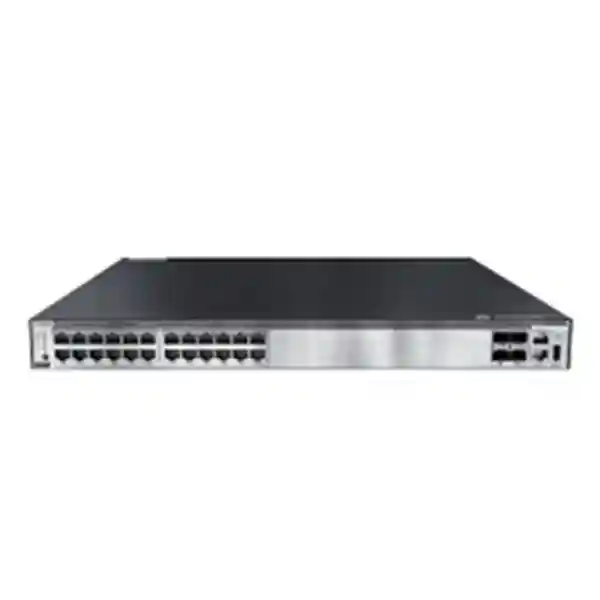
Huawei CloudEngine S5731-S24P4X
A 24-port Gigabit PoE+ access and aggregation switch with four 10GE SFP+ uplinks, 1+1 power backup capability, high-performance forwarding, advanced Layer 3 services, iStack virtualization, mature IPv6 operation, intelligent operations tooling and a feature set built for converged enterprise campus networks.
Direct answer: what is the Huawei CloudEngine S5731-S24P4X?
The Huawei CloudEngine S5731-S24P4X is a managed enterprise campus switch intended primarily for access-layer and selected aggregation-layer roles. It provides twenty-four copper Gigabit Ethernet ports that support PoE+ and four fixed 10 Gigabit Ethernet SFP+ uplinks. Huawei specifies forwarding performance of 96 Mpps and device switching capacity of 128 Gbit/s, with a larger system switching capability value of 672 Gbit/s in Huawei documentation. The platform runs Huawei VRP, supports a broad set of Layer 2 and Layer 3 functions, and can participate in an iStack system in which multiple physical switches operate as one logical switching entity.
For a UAE enterprise, the practical value is straightforward: a single rack unit can connect IP phones, Wi-Fi access points, security cameras, badge readers, thin clients, printers, building-control endpoints and conventional user devices while using the 10GE SFP+ interfaces to connect toward a distribution or core layer. This keeps the access layer compact while avoiding the throughput bottleneck that can occur when a modern access switch is limited to 1GE uplinks.
The S5731-S24P4X also has two removable power-module positions, enabling resilient power designs and high PoE budgets when appropriately specified power modules are installed. Huawei documentation lists 1+1 power backup and hot-swappable power options for the platform. That makes the switch particularly relevant where powered endpoints are operationally important and where maintenance windows must be tightly controlled.
Core hardware profile
The fixed interface design is suited to a typical 24-port wiring-closet block. All twenty-four downlink interfaces are 10/100/1000Base-T, simplifying migration from older Fast Ethernet endpoints while allowing current Gigabit-capable clients to operate at line rate. PoE+ support removes the need for local power adapters for compliant powered devices and is especially useful for voice, wireless, surveillance and IoT deployments.
Four 10GE SFP+ ports create flexible uplink choices. Depending on the optics, cabling, distance and topology, these interfaces can be used for fiber uplinks to a distribution switch, redundant uplinks to two upstream devices, high-bandwidth server or appliance connectivity, or service-interface stacking where supported by the selected software and design.
Published physical and platform details
Huawei lists the chassis dimensions at approximately 43.6 mm high by 442 mm wide by 420 mm deep, corresponding to a 1U rack form factor. The published chassis weight including packaging is approximately 8.6 kg. The platform includes an Ethernet management interface, an RJ45 console interface and USB 2.0 connectivity, supporting common operational workflows for staging, console recovery and maintenance.
Huawei documentation also identifies a 1.4 GHz CPU with four cores and 2 GB of memory for the listed model family. These control-plane resources are separate from packet-forwarding silicon, allowing the switch to maintain management, routing protocol and operations functions while forwarding data in hardware.
Technical specification summary
| Model | Huawei CloudEngine S5731-S24P4X |
| Access interfaces | 24 x 10/100/1000Base-T Ethernet ports with PoE+ |
| Uplink interfaces | 4 x 10GE SFP+ |
| Forwarding performance | 96 Mpps |
| Switching capacity | 128 Gbit/s device switching capability / 672 Gbit/s system switching capability as published by Huawei |
| Rack size | 1U |
| Dimensions | 43.6 x 442 x 420 mm |
| Power architecture | Two removable power-module slots; 1+1 backup design supported |
| Management | Dedicated management Ethernet, RJ45 console, USB 2.0; SNMP, HTTPS, NETCONF/YANG and related platform tools |
| Operating system | Huawei Versatile Routing Platform (VRP) |
PoE+ architecture and power-budget planning
PoE design is one of the main reasons to choose the S5731-S24P4X instead of the non-PoE S5731-S24T4X. The switch can power IEEE 802.3af and IEEE 802.3at endpoints over the same balanced copper cabling used for Ethernet traffic. This is useful for centralized power design because access-point, phone and camera power can be backed by the UPS system serving the network rack rather than by separate local adapters distributed around an office, hotel, warehouse, clinic, school or branch environment.
Huawei documentation shows that the available PoE budget depends on the selected power module, input voltage and number of installed modules. With a suitable 1000 W PoE AC module operating on approximately 220 V AC, Huawei lists an available PoE budget of 760 W for the S5731-S24P4X. With a 1000 W module on 110 V AC, the listed available PoE power is lower, at 665 W. With two high-capacity PoE modules, the platform can provide a much larger aggregate available power figure, although the practical draw of connected devices is constrained by the number of ports, each port’s negotiated PoE class and supported per-port standard.
In a UAE deployment, where nominal utility power is typically in the 220–240 V class, the higher-voltage operating range is particularly relevant to design calculations. A well-engineered bill of materials should still specify the exact power module part number rather than assuming that every S5731-S24P4X ships with the same supply. Huawei describes the base model as available without a power module in its ordering information, so procurement must align the switch chassis, required PoE budget, redundancy objective and facility power standard.
PoE budgeting should be performed endpoint by endpoint. Twenty-four VoIP phones at modest power draw can require far less than a set of twenty-four high-performance wireless access points. PTZ surveillance cameras, infrared illuminators, environmental sensors and door-control units can introduce additional demand. Engineers should calculate maximum negotiated power, not merely average draw, then retain an operational margin for upgrades and seasonal or feature-driven changes. Where critical endpoints are involved, dual power modules can also reduce the risk that a single PSU fault disables a large number of PoE devices.
Perpetual PoE
Huawei describes Perpetual PoE functionality for the series so that, under supported conditions, powered devices can continue receiving power while the switch reboots following a software upgrade. For environments with access-control devices, cameras or wireless access points, this can reduce service disturbance associated with maintenance.
Fast PoE
Fast PoE is designed to deliver power to attached powered devices shortly after the switch itself receives power, without waiting for the full network operating system boot process to complete. Huawei states that power delivery can begin within seconds, materially reducing endpoint outage duration after a facility power interruption.
Redundant power design
Two removable power-module slots allow resilient configurations. Redundancy should be matched with suitable upstream electrical feeds and UPS architecture; installing two power supplies on the same unprotected electrical circuit does not provide the same failure-domain separation as a properly designed dual-feed installation.
10GE uplinks: why four SFP+ ports matter
A twenty-four-port access switch can theoretically receive substantial aggregate traffic from attached users and devices. If uplink capacity is restricted to a single 1GE link, congestion can appear long before the access ports themselves are busy. The four 10GE SFP+ interfaces on the S5731-S24P4X give network architects significantly more headroom and topology flexibility. A common design uses two 10GE uplinks as a resilient link aggregation group toward the distribution layer, while the remaining SFP+ ports are reserved for future expansion, secondary distribution connectivity, high-bandwidth service attachment or stacking requirements.
SFP+ optics also allow physical-media flexibility. Short-reach multimode fiber is appropriate inside buildings and campuses where fiber type and distance support it; single-mode optics can extend farther when inter-building or campus backbone distances require it. Direct-attach or active optical cabling may be suitable inside a rack or adjacent-rack environment when compatibility and distance requirements are satisfied. Transceiver selection must always be validated against the specific VRP release, Huawei compatibility matrix and actual fiber plant.
For UAE projects, this is relevant in mixed real-estate environments. A corporate office may have a distribution switch in the main equipment room and access switches in floor telecom rooms. A hotel may have intermediate distribution facilities on multiple levels. A school or industrial site may need fiber between buildings. Four SFP+ uplinks provide a practical basis for resilient and bandwidth-rich aggregation without consuming copper access ports.
Layer 2 switching depth for enterprise access
The S5731-S series is more than a basic Layer 2 edge switch. Huawei documents support for large MAC address tables, multiple VLAN assignment methods, loop-prevention technologies, aggregation mechanisms and enterprise segmentation features. The published MAC address capacity is 64K entries, which is substantial for a 24-port access device and provides headroom for aggregation scenarios, virtualized endpoint environments and networks that carry many downstream MAC addresses.
VLAN features include interface-based VLAN assignment and policy options based on protocol, IP subnet and MAC address criteria. The platform also supports voice VLAN, guest VLAN, MUX VLAN, VLAN mapping, selective QinQ and GVRP-related functions. This breadth matters when the switch is used in a converged building network where phones, cameras, access points, printers, staff endpoints, guest services and building systems share common physical infrastructure but must remain logically segmented.
Link aggregation is supported through LACP and Eth-Trunk functions. Aggregating multiple physical links can increase bandwidth and maintain service when one member path fails, provided the upstream device and topology are correctly designed. In environments that require separate upstream switches, multi-chassis or stack-based designs should be planned carefully so that link aggregation remains loop-free and operationally predictable.
For loop protection, Huawei lists traditional STP, RSTP and MSTP alongside additional mechanisms including VBST and ring-oriented resiliency technologies. Engineers should select the smallest set of control protocols necessary for the topology rather than enabling overlapping loop-prevention methods indiscriminately. A deterministic campus design with clear root-bridge placement, edge-port protections and documented trunk policy remains easier to troubleshoot than an organically grown Layer 2 domain.
Layer 3 routing and gateway capabilities
Huawei positions the CloudEngine S5731-S family with enhanced Layer 3 functions suitable for campus access and aggregation. Published capabilities include static routing, VRF-related functions, routing policies and dynamic routing protocols such as OSPF, IS-IS and BGP. Huawei also lists VRRP, enabling first-hop redundancy designs when multiple Layer 3 switches provide default-gateway services to downstream VLANs.
The platform supports IPv4 routing entries at a scale appropriate for enterprise campus requirements, and Huawei documentation lists 32K IPv4 routes for the series. Actual usable scale in a specific configuration can depend on software release, enabled features, resource profiles and license state, so detailed sizing should be validated against the exact deployment release rather than treated as a universal guarantee across every software combination.
Dynamic routing matters when the access or aggregation layer must participate directly in routed campus designs. OSPF is widely used for enterprise interior routing, while BGP can appear in larger segmentation designs, data-center interconnects, service-provider-facing edges or EVPN-based architectures. IS-IS may be relevant for specific large-scale or service-provider-style networks. The existence of these protocols does not mean every campus should use all of them. Good architecture selects the protocol set that matches operational skill, failure-domain goals and network size.
VRF-style separation is useful for keeping multiple logical routing domains on the same physical platform. This can be valuable for shared buildings, managed service environments, laboratory networks, security segmentation or enterprises separating operational technology from corporate IT. When combined with VLAN controls, ACLs and authentication, routing separation can form part of a broader zero-trust or least-privilege access strategy.
IPv6 readiness
Huawei documents mature IPv6 capabilities for the S5731-S platform, including IPv4/IPv6 dual stack and IPv6 routing support. Dual-stack operation allows organizations to introduce IPv6 while retaining IPv4 services, which is generally more practical than attempting a one-time migration across an established campus.
The series documentation also references IPv6 transition technologies and protocol support relevant to mixed environments. Before enabling transition mechanisms, architects should confirm whether native dual stack is sufficient; simpler designs are usually easier to secure and troubleshoot.
Multicast services
The platform supports multicast functions including IGMP-related features and Layer 3 multicast protocols in the wider S5731-S feature set. This is useful in networks carrying digital signage, IPTV, one-to-many video, building systems or media distribution.
Multicast should be engineered deliberately. IGMP snooping, querier placement, PIM design and boundary controls help ensure multicast traffic reaches intended receivers without flooding unnecessary access links.
iStack: one logical system from multiple physical switches
Huawei iStack technology is a major operational feature of the CloudEngine S5731-S series. Huawei states that up to nine physical switches can be virtualized into one logical switch, subject to the supported stack design and software release. From a management perspective, this reduces the number of independently administered nodes and creates a common control framework for ports, VLANs, uplinks and redundancy.
The business value of stacking appears most clearly in wiring closets that need more than twenty-four access ports. Instead of treating several standalone switches as separate islands, an iStack can present them as a single logical device. This simplifies configuration consistency and can enable link aggregation across member switches, increasing resilience when downstream or upstream devices are dual-connected to separate stack members.
However, stacking is not merely a checkbox. Engineers must plan stack topology, stack bandwidth, member roles, software compatibility, stack IDs, power redundancy and physical cable paths. A poorly cabled stack can create a common failure point even though the logical system is redundant. Ring-style stack connectivity is generally preferred where supported because it provides an alternate path after a stack-link failure.
Operational procedures must also cover member replacement. Spare-switch configuration, image compatibility, configuration synchronization and stack priority should be documented before a failure occurs. For sites with strict uptime requirements, pre-staging a compatible spare and keeping the correct stack cables and power modules in local stock can reduce mean time to repair.
Campus security: authentication, policy and attack protection
Access switches sit at the point where users and devices enter the wired network, so security functionality is essential. Huawei documents 802.1X authentication, MAC address authentication and Portal authentication capabilities for the S5731-S family. These mechanisms can work with AAA infrastructure to identify users or endpoints and apply network policy dynamically.
802.1X is generally suitable for managed endpoints with supplicant support. MAC authentication can help with devices that cannot run an 802.1X supplicant, such as some cameras, printers, sensors and building systems. Portal authentication can be used in selected guest or user-access scenarios. A mature design normally avoids relying on MAC identity alone for high-trust access because MAC addresses can be imitated; policy should combine identity, segmentation and traffic controls according to risk.
Huawei also documents DHCP snooping and protections against bogus DHCP servers, IP/MAC spoofing and several denial-of-service attack patterns. DHCP snooping is particularly valuable at the access layer because it creates a trust boundary between authorized infrastructure and untrusted user-facing ports. Binding information can then support anti-spoofing enforcement and improve confidence that source addressing reflects legitimate assignments.
ACL and QoS policies can be delivered dynamically in supported authentication workflows. This allows the network to apply different access permissions or service classes to authenticated employees, contractors, phones, cameras and other endpoint categories. A network-access-control deployment should be staged gradually, beginning with visibility and monitor mode before enforcement, to avoid unintentionally disconnecting business-critical devices.
Administrative access to the switch should be secured separately from endpoint access. Use encrypted management protocols, role-based administrator practices where available, centralized AAA, SNMPv3 rather than older community-based versions when practical, management-plane ACLs, logging, NTP and dedicated out-of-band or management-network paths. The presence of rich security functions does not replace sound operational hardening.
VXLAN, EVPN and fabric-oriented operation
Huawei documentation for the S5731-S series describes hardware-assisted VXLAN capabilities, including Layer 2 and Layer 3 gateway roles and BGP EVPN for establishing VXLAN tunnels. VXLAN enables logical network overlays across a routed underlay, allowing multiple tenant or service networks to share physical infrastructure while remaining logically separated.
For a traditional small office, VXLAN may be unnecessary. For larger campuses, multi-building environments and policy-driven fabrics, it can provide a path away from large Layer 2 domains and toward scalable segmentation. EVPN supplies a control plane for distributing reachability information instead of relying entirely on flood-and-learn behavior. This can improve convergence, segmentation and operational clarity when deployed correctly.
Licensing must be checked carefully. Huawei’s current series documentation identifies VXLAN Layer 2 and Layer 3 gateway functions as requiring additional licensing in the listed feature matrix. Project teams should therefore separate hardware capability from license entitlement. A switch may be physically capable of a function while the purchased software package does not grant operational use.
Fabric deployment also increases the importance of controller, telemetry and automation integration. NETCONF/YANG support provides standards-based configuration interfaces for automation. Where a Huawei campus-management platform is used, software-version alignment, controller entitlement and feature compatibility should be included in the design and commercial scope from the beginning rather than treated as post-installation additions.
SNMP and monitoring
The platform supports SNMP versions commonly used in enterprise monitoring. SNMPv3 is preferable where security policy requires authenticated and encrypted management. Interface counters, environmental state and system information can be integrated with network-monitoring systems.
NETCONF/YANG
NETCONF with YANG models enables structured configuration and automation workflows. This is useful for standardized provisioning, configuration validation and integration with orchestration systems, reducing error rates in environments with many access switches.
Telemetry and O&M
Huawei describes telemetry and intelligent O&M functions for the series, including data collection and integration with campus analytics tools. This can help operators move from periodic polling toward more granular service visibility when the surrounding management platform is deployed.
QoS for voice, video, Wi-Fi and business applications
A converged access switch must handle traffic with different sensitivity to delay and loss. Voice calls can tolerate little jitter; interactive video needs sustained throughput; transactional applications may be latency-sensitive; backups can consume substantial bandwidth without requiring priority. The S5731-S family supports enterprise QoS mechanisms that allow classification, marking, policing, queueing and scheduling policies to be applied according to the network design.
The most effective QoS policy begins at a trusted classification point. For an IP phone, the access switch may trust or remark traffic based on device identity and VLAN. For wireless traffic, the access point and controller architecture influences how user packets are marked by the time they reach the wired switch. Camera networks may need guaranteed bandwidth but not necessarily the same strict priority treatment as voice.
QoS cannot create bandwidth that does not exist. It manages contention when links are congested. This is why the S5731-S24P4X’s 10GE uplinks are important: good uplink sizing reduces the frequency and severity of congestion, while QoS handles exceptional contention and protects latency-sensitive services. Link utilization should be monitored over time so that traffic policy and capacity planning evolve together.
For organizations migrating from older switches, existing QoS configurations should not simply be copied line by line. Queue structures, hardware behavior and command syntax may differ. A migration plan should map the intent of each old policy to the S5731-S behavior, then validate performance using representative traffic.
Typical UAE deployment scenarios
The S5731-S24P4X is well suited to enterprise floors where twenty-four ports provide the right density and PoE endpoints form a significant part of the connected estate. In a modern office, one switch may serve desk phones, access points, meeting-room devices and user outlets. Two or more switches can be stacked when port density grows, while 10GE uplinks connect the closet to distribution.
Hospitality deployments often need dense PoE for corridor access points, IP phones, door systems, cameras and back-office endpoints. A switch with redundant power options and centralized PoE can reduce the number of local power adapters distributed around guest and service areas. Network segmentation should separate guest, staff, surveillance, voice and building-management traffic even if those services share the same physical switch.
Retail and branch networks can use the S5731-S24P4X to aggregate point-of-sale terminals, phones, Wi-Fi, digital signage, cameras and back-office systems. When branch availability is important, dual uplinks and resilient power can maintain connectivity during selected failures. Central automation and standardized templates can simplify configuration across many locations.
Schools and training centers often combine classroom access points, IP telephony, cameras and administrative networks. The switch’s PoE+ density and VLAN capability support this converged requirement. Multicast and QoS can also become relevant for classroom video distribution, announcements and real-time learning applications.
Industrial and warehouse deployments should be evaluated more carefully. The S5731-S24P4X is an enterprise campus switch, so rack environment, temperature, dust control, vibration and power quality must be suitable for the device. Where harsh-environment specifications are required, an industrial switching family may be more appropriate. In controlled network cabinets within warehouses or logistics facilities, however, the S5731-S24P4X can provide a robust enterprise access layer for cameras, handheld-terminal WLAN, office endpoints and automation-adjacent systems.
Wireless access-point aggregation
Wi-Fi access points are a natural match for PoE+ switching. The S5731-S24P4X can centrally power access points and carry their Ethernet traffic to the wired network. For access points with a single Gigabit Ethernet interface, the access-port rate aligns directly. If the WLAN design uses multi-gigabit Ethernet access points, engineers should note that this model’s twenty-four copper access ports are standard 10/100/1000Base-T rather than 2.5GE or 5GE interfaces. In that case, a multi-gigabit access-switch model may be a better fit.
Wireless capacity planning should consider aggregate traffic, not just the number of access points. Twenty-four busy APs can generate far more uplink demand than twenty-four office phones. The four 10GE uplinks provide useful aggregation headroom, but uplink count and topology should be based on expected WLAN throughput, redundancy objectives and oversubscription targets.
Power classification is equally important. Verify the maximum PoE requirement of the chosen AP model, particularly if USB modules, additional radios or IoT features increase power draw. A design that operates comfortably under normal load but crosses the PoE budget during radio activation or feature upgrades can cause avoidable instability.
IP surveillance and security-system switching
The combination of PoE+, Gigabit access and 10GE uplinks makes the S5731-S24P4X a strong candidate for IP camera aggregation in controlled enterprise facilities. Most fixed cameras consume far less than the maximum PoE+ allowance, while PTZ models, heaters and illuminators can draw more. The correct design uses the camera manufacturer’s maximum stated power, adds budget margin and validates whether all cameras can operate simultaneously under worst-case conditions.
Surveillance traffic is often continuous rather than bursty. Twenty-four high-resolution cameras can produce a steady aggregate load, especially with high frame rates, high-quality codecs or multiple streams. Uplink sizing should therefore be based on measured or calculated bit rate per camera and not on port speed alone. Even when the calculated total is below 1 Gbit/s, 10GE uplinks provide valuable margin and allow additional services to share the switch without compressing the surveillance design.
Security networks should be segmented from user data. VLANs, ACLs and routed boundaries can restrict camera access to authorized video management systems. Administrative interfaces on cameras should not be broadly reachable from user networks. DHCP snooping, port security and access-control functions can further reduce the risk of unauthorized devices being connected to camera-facing ports.
Voice and unified communications access
IP phones benefit from PoE because power can be centralized at the network rack and supported by UPS. Voice VLAN features allow phones to be separated logically from attached PCs or general data devices, while QoS can protect real-time audio from congestion. In many desktop deployments, the phone contains an internal Ethernet switch that passes PC traffic through a separate logical VLAN, reducing the number of physical wall ports required.
For voice resiliency, network power and upstream routing matter as much as the access switch. A dual-PSU switch still loses service if the rack UPS fails or the upstream call-control network is unreachable. High-availability designs should therefore treat switch power, uplinks, default gateways, WAN connectivity, DHCP, DNS, NTP and call-control platforms as one service chain.
Organizations integrating switching with IP telephony can also use FourTeck’s broader UAE infrastructure resources. For structured deployment planning, network integration and operational support, visit FourTeck IT Services UAE for related professional-service capabilities.
Data-center and server-edge considerations
Although Huawei positions the S5731-S family for campus access and aggregation and notes data-center access applicability in selected contexts, the S5731-S24P4X should not automatically be treated as a top-of-rack data-center switch. Its primary downlink ports are 1GE copper and optimized for PoE-capable edge devices. Modern server environments often require 10GE, 25GE, 40GE or faster server interfaces, redundant fabrics and deeper data-center-specific buffering or automation features.
The switch can still serve management networks, low-bandwidth servers, appliances or branch server rooms where 1GE is sufficient. Four 10GE SFP+ uplinks can provide high-speed connectivity into a server-room aggregation layer. The correct decision depends on traffic profile, east-west traffic, storage protocols, virtualization density and future growth.
For projects that combine campus switching with server infrastructure, FourTeck’s Server Dubai resource can support complementary planning around rack servers, compute platforms and data-center infrastructure.
Software release, licensing and feature validation
Enterprise switch procurement should never be based only on the front-panel port count. The desired functions must be mapped to a specific VRP software release and license package. Huawei’s feature matrices can change between releases, and some advanced capabilities require additional licensing. VXLAN gateway functions are a clear example in current S5731-S documentation, where additional licenses are identified.
Before ordering, list all mandatory protocols and operational functions: dynamic routing, VRFs, EVPN, VXLAN gateways, telemetry, controller integration, advanced authentication, MPLS-related features if relevant, network automation and any required management platform. Then validate each item against the exact software release planned for deployment. This avoids discovering after installation that a function is unsupported in the chosen release or locked behind a license not included in the purchase.
Lifecycle planning matters as well. Select a software train with a support horizon that matches the expected service life of the network. Standardize releases across stack members and, where practical, across a site. Maintain configuration backups and approved upgrade paths. Test upgrades in a lab or non-critical environment when the network carries business-critical services.
The Huawei support portal currently identifies V200R025C00 information for the S5731-S24P4X hardware-center entry, while earlier feature milestones are referenced throughout the family documentation. An implementation should confirm the image and patch level supplied with the actual unit and validate interoperability with the existing network before production cutover.
Sizing methodology for a 24-port PoE switch
Start with physical port demand. Count all currently connected endpoints and every reserved outlet likely to be activated during the expected lifetime of the switch. Avoid designing to exactly twenty-four used ports on day one. A practical reserve reduces emergency switch additions when a new phone, access point, camera or workstation is introduced.
Next calculate PoE demand. For every powered device, record its supported standard and maximum expected wattage. Add the values, then include headroom. Where endpoint classes vary, group them by type so that the power model can be maintained as the device inventory changes. Compare the result with the available PoE budget of the exact power-module configuration rather than with the PSU label alone.
Then size uplinks. Estimate average and peak aggregate traffic from users, Wi-Fi, cameras and other services. Apply a reasonable oversubscription model. Two 10GE links in a LAG may provide both resilience and capacity, but the upstream architecture must support the corresponding aggregation design. If access switches are stacked, calculate aggregate uplink demand across the entire stack rather than per member in isolation.
Finally, size control-plane and feature scale. Count VLANs, routed interfaces, routes, MAC addresses, ACL entries, authentication sessions and multicast groups. Most ordinary 24-port access deployments sit comfortably below platform limits, but large aggregation roles or highly segmented networks can approach scale limits faster. Feature combinations can share hardware tables, so validated design limits are more important than a single maximum number copied from a specification sheet.
This method creates a bill of materials based on actual service requirements rather than on model familiarity. If the calculation shows that 24 x 1GE PoE+ ports and four 10GE uplinks are a good fit, the S5731-S24P4X is a strong candidate. If multi-gigabit downlinks, higher port density, different environmental requirements or greater uplink speeds are necessary, the design should move to a more suitable model rather than forcing the S5731-S24P4X beyond its intended role.
High-availability design
Availability begins with failure-domain analysis. A single S5731-S24P4X can use dual power modules, but the design should also consider two independent electrical feeds, UPS redundancy, uplink diversity, upstream switch redundancy and physical cable routing. If all redundant components share one breaker, one fiber pathway or one distribution switch, the architecture still contains a large single failure domain.
Stacking can improve device and uplink redundancy by allowing links to terminate on different members. However, a stack is still one logical system, and some failures or configuration errors can affect the whole stack. For the most critical environments, architects should compare stacked access designs with independent-switch designs and evaluate operational simplicity, fault isolation and convergence behavior.
Routing protocols and VRRP can provide Layer 3 path redundancy. LACP can provide link-level resilience. Spanning-tree or other loop-protection mechanisms can provide Layer 2 protection. Each mechanism solves a different problem; combining them without a clear topology can create complexity. A good high-availability design has a documented failure response for PSU loss, link loss, uplink optic failure, access-switch failure, stack-member failure and upstream-device failure.
Maintenance procedures should be treated as part of availability engineering. Configuration backups, known-good images, spare optics, spare power modules and console access can reduce outage duration. Fast PoE and Perpetual PoE features can help maintain endpoint power through selected events, but the overall application remains dependent on upstream services.
UAE rack, cooling and power considerations
The UAE’s climate makes facility cooling a serious infrastructure consideration, even though enterprise network rooms are normally air-conditioned. Huawei lists a long-term operating range beginning at -5°C and extending to 45°C at lower elevations for the model family, with derating rules at higher altitudes. The practical goal should not be to operate continuously near the maximum rating. Cooler and stable rack conditions generally improve reliability and give greater margin during HVAC events.
Cabinet depth must accommodate the approximately 420 mm chassis plus power modules, power cords, fiber bend radius and rear clearance. A nominally shallow wall cabinet may not provide enough usable depth. Confirm rack depth before delivery, particularly in older telecom closets. Airflow must not be obstructed by bundled patch cords or equipment installed too close to fan intakes and exhaust paths.
Power planning should account for switch consumption and PoE load. Huawei lists maximum power consumption for the S5731-S24P4X at 121 W without powered devices and a higher figure when PD load is included, with documentation illustrating a maximum figure near 977 W under a 720 W PD load condition. UPS sizing should therefore use the intended PoE scenario rather than the switch-only consumption. A cabinet containing several PoE switches can place a substantial load on UPS capacity and cooling.
For larger infrastructure projects, FourTeck’s UAE site at FourTeck UAE provides a broader reference point for enterprise networking, infrastructure and technology sourcing across Dubai and the wider Emirates.
Optics and cabling strategy
The S5731-S24P4X uses copper RJ45 interfaces for access and SFP+ cages for 10GE uplinks. Copper horizontal cabling should be certified to the Ethernet and PoE requirements of the project. Poor terminations can pass basic connectivity tests while creating intermittent errors or excessive resistance under PoE load. Certification records are especially valuable in large campus deployments because they separate physical-layer problems from switch configuration issues during commissioning.
Fiber uplinks require compatible transceivers and properly installed fiber. Multimode and single-mode optics must match the installed cable type and distance. Connector cleanliness is critical at 10GE; contaminated LC connectors can create elevated loss and intermittent errors even when link LEDs appear normal. Cleaning, inspection and optical power testing should be part of professional commissioning.
Redundant uplinks should ideally follow diverse physical paths. Two fibers placed in the same tray can both be cut by one incident. Where service continuity justifies the cost, route redundant links through separate risers, trays or building paths. Document the fiber core allocation, patch-panel ports, optic types and switch-interface mapping so fault isolation does not depend on tribal knowledge.
Transceivers can also influence supportability. Validate optic support against Huawei’s compatibility information for the intended software release. Unsupported third-party optics may work electrically but can create monitoring, warranty or support complications. Procurement should align optics with the organization’s support policy, not just immediate price.
Migration from an older access switch
A successful migration begins by documenting the current state: port descriptions, VLAN membership, trunks, voice VLANs, DHCP snooping trust, spanning-tree settings, authentication policy, QoS, ACLs, routing interfaces, static routes, SNMP, syslog, NTP and administrator access. Exporting a configuration file is useful, but a service map is more valuable because syntax cannot always be translated directly between vendors or platforms.
Build the S5731-S24P4X configuration from service intent. Create management access first, then VLANs and uplinks, then endpoint-facing access policies. If dynamic routing is used, bring up adjacencies in a controlled state before moving user traffic. For PoE environments, verify powered-device behavior on representative phones, access points and cameras before mass migration.
Cutover planning should include rollback. Keep the old switch available and preserve patching documentation so critical ports can be returned quickly if an unexpected interoperability problem appears. Migrate logical groups of endpoints, not random ports, so validation is structured. Confirm DHCP, DNS, gateway reachability, voice registration, Wi-Fi controller adoption, camera recording and application access after each group.
Once migration is complete, archive the as-built configuration, device serial information, software release, license status, optics list, rack location and cable map. This operational record is part of the product deployment, not administrative overhead; it materially reduces future troubleshooting time.
When the S5731-S24P4X is the right fit
Choose this model when the project needs up to twenty-four Gigabit copper access ports, PoE+ power delivery, 10GE fiber-capable uplinks, enterprise Layer 2 controls, dynamic Layer 3 services, stacking and resilient power options. It is particularly attractive when a wiring closet needs a compact 1U switch that can support phones, cameras, Wi-Fi and general business endpoints without an external PoE injector layer.
The model is also a strong fit when the organization values a broad VRP feature set and may later adopt automation, telemetry or fabric functionality. The hardware-assisted VXLAN capabilities and NETCONF/YANG support create options beyond traditional access switching, although advanced functions should be licensed and engineered deliberately.
The final selection should still be based on requirements rather than brand or model familiarity. The product is not a multi-gigabit copper access switch, not a high-speed 25GE server leaf, and not an industrial hardened device. Projects with those needs should select a different platform. Correct product fit produces a simpler, more reliable network than attempting to compensate for missing physical capabilities through configuration.
When to consider a different switch
Consider another model if more than twenty-four copper access ports are required in one rack position and a 48-port platform would reduce complexity. A 48-port PoE switch can be more space-efficient than two 24-port devices, although two smaller switches can provide greater fault-domain separation. The correct choice depends on cabling density, redundancy and expansion strategy.
Choose a multi-gigabit access switch if new Wi-Fi access points require 2.5GE or faster wired uplinks. Connecting a 2.5GE-capable AP to a 1GE port may work but can constrain aggregate radio throughput. Likewise, select a higher-uplink platform if the access block is expected to require 25GE or 40GE uplinks during its service life.
Use an industrial-rated switch for uncontrolled cabinets exposed to dust, vibration, temperature extremes or other environmental conditions outside enterprise campus specifications. Use a data-center switching family for high-speed server fabrics. Use a simpler unmanaged or web-managed product only when enterprise authentication, routing, resiliency and operational tooling are genuinely unnecessary.
Making these distinctions during design prevents overbuying in simple branches and underbuying in high-density or high-performance sites. FourTeck can help position the S5731-S24P4X within a wider campus architecture rather than treating it as an isolated hardware purchase.
Procurement checklist for UAE buyers
Confirm the exact model string: CloudEngine S5731-S24P4X. Check whether the quoted chassis includes power modules or is supplied without them. Specify AC or DC requirements, number of PSUs, redundancy mode and required PoE budget. If the network requires 220–240 V AC operation, ensure power modules and cords are correct for the facility standard.
Confirm transceiver requirements separately. List each uplink’s media type, distance, connector type and target upstream switch. Include spare optics if service restoration objectives require local inventory. If stack links use specific interfaces or cables, include all stacking accessories in the bill of materials.
Validate licenses and software. The commercial quote should identify any required feature licenses, support entitlement and software components. Do not assume that every advanced feature described for the S5731-S family is included in the base hardware price. Where a campus controller or analytics platform is required, include those licenses and subscriptions in the same design review.
Check rack readiness. Confirm available 1U space, rack depth, PDU outlets, UPS capacity, cooling, grounding and patch-panel layout. Verify that the cabinet can handle rear PSU clearance and cable bend radius. For PoE-heavy deployments, reassess UPS runtime under full endpoint load rather than under switch-only load.
Finally, confirm implementation scope. Decide whether the purchase includes only hardware or also configuration, migration, VLAN design, authentication integration, routing, stacking, testing, documentation and handover. For switching and firewall-adjacent architecture in Dubai, the Firewall Dubai resource can support related security and network-edge planning.
Commissioning sequence
A disciplined commissioning process starts with physical inspection. Verify model, serial number, power modules, fans, optics and accessories. Mount the switch securely, establish grounding, connect power and confirm fan operation. Before production cabling is moved, connect through the console or management interface and verify the software version, license status, system time and hardware health.
Apply the base management configuration next. This includes hostname, management IP addressing, secure administrator authentication, NTP, DNS if used, syslog, SNMPv3 or alternative monitoring, and management-plane access controls. Disable or restrict unused services according to the organization’s hardening standard. Back up the baseline configuration before adding production services.
Configure VLANs, trunks and uplinks before endpoint ports. Where LACP is used, validate bundle state and hashing behavior. Where STP is used, confirm the intended root bridge and port roles. For routed designs, verify adjacencies, route tables and failover. For stacked designs, validate member IDs, stack links, master election and behavior during a planned member reboot.
Then configure edge ports by endpoint class. User ports, phones, cameras, access points and infrastructure devices should receive distinct templates. Apply authentication, DHCP snooping, port-security controls, voice VLANs and QoS policies as appropriate. Test one device of each type before scaling configuration across all ports.
Complete commissioning with failure testing. Remove one uplink, test the alternate path, simulate a power-module failure where safe, validate stack resilience and confirm that monitoring generates the expected alarms. A switch is not fully commissioned merely because all links are green; resilient behavior must be demonstrated against the design intent.
Operations and lifecycle management
After deployment, monitor interface utilization, errors, discards, PoE draw, temperature, fan state, PSU state, CPU, memory and routing adjacencies. Baseline measurements from a healthy network are useful because they show what normal looks like for the specific site. Alert thresholds can then be tuned to identify degradation without creating excessive noise.
Maintain software intentionally. Subscribe to relevant vendor advisories, review security fixes and operational bug notes, and schedule upgrades based on risk. Avoid upgrading solely because a newer image exists, but also avoid allowing production switches to remain indefinitely on unsupported releases. Test upgrade and rollback procedures before large-scale rollout.
Back up configurations whenever material changes occur. Automated version-controlled backups are preferable to occasional manual copies. Keep a record of license files and entitlement information. For stacked systems, document each member serial number and position so field replacement can be coordinated without confusion.
Capacity reviews should be scheduled periodically. Wi-Fi upgrades, camera refreshes and office expansions can change PoE and bandwidth requirements substantially. A switch that was lightly loaded at deployment may become a bottleneck several years later. Monitoring trends allows upgrades to be planned before users experience congestion or before a new endpoint estate exceeds the PoE budget.
Design decision recap
Choose it for
Twenty-four Gigabit PoE+ access ports, 10GE uplinks, enterprise Layer 2/Layer 3 services, iStack expansion, redundant power options and a converged campus access role.
Validate before ordering
Power modules, PoE budget, software release, advanced-feature licenses, optic compatibility, stack accessories, rack depth, UPS capacity and support entitlement.
Look elsewhere when
Multi-gigabit copper, more than 24 access ports in one chassis, industrial environmental hardening, 25GE/40GE server-facing ports or specialized data-center leaf features are mandatory.
Quotation input checklist
To receive an accurate commercial and technical proposal for the Huawei CloudEngine S5731-S24P4X in the UAE, prepare the following project information. Supplying these details reduces the risk of quoting the correct chassis with the wrong power, optics or licensing configuration.
Current and future copper-port count, endpoint types and expected access speed.
Number of APs, phones, cameras and other powered devices with maximum wattage.
Required 10GE links, fiber type, distance, optics and upstream switch models.
Single or dual PSU, AC or DC input, UPS design and redundancy objective.
Routing protocols, authentication, VXLAN/EVPN, automation and management requirements.
Supply only, configuration, migration, testing, documentation, support and handover.
UAE consultation and solution planning
FourTeck can position the Huawei CloudEngine S5731-S24P4X as part of a complete campus architecture covering access switching, uplinks, segmentation, wireless, IP telephony, surveillance connectivity, firewall integration, server-room infrastructure and network operations. The objective is not merely to supply a switch but to make sure the chosen model, power system, optics, licensing and configuration match the intended workload.
For Dubai and wider UAE projects, provide your floor plan or rack count, number of users, AP and camera quantities, existing core/distribution platform, fiber type, required redundancy, routing design and preferred support model. This allows engineering effort to focus on the real bottlenecks: port density, PoE, uplink capacity, high availability and lifecycle operations.
If the project includes security appliances, inter-VLAN controls or internet-edge design, network switching can be coordinated with firewall architecture instead of being implemented as separate silos. This produces clearer VLAN boundaries, simpler routing and more predictable troubleshooting across the LAN and security layers.

Reviews
There are no reviews yet.