
Huawei Enterprise Campus Switching • UAE
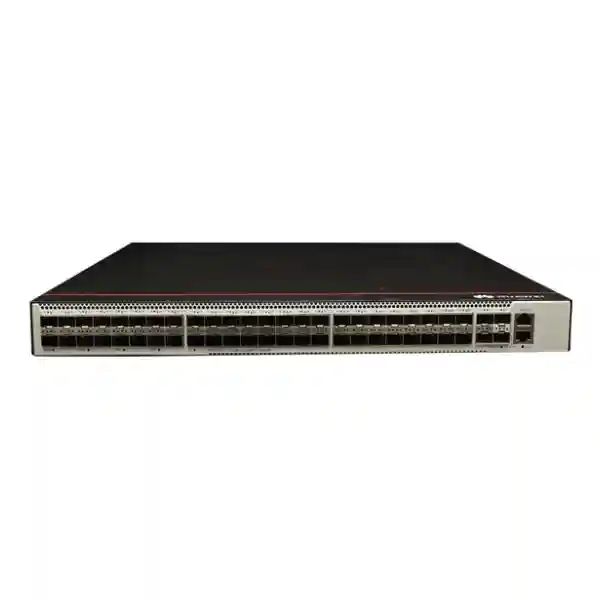
Huawei CloudEngine S5731-S48S4X-A
A compact, all-optical campus access and aggregation switch for organizations that need dense fiber connectivity, 10GE uplinks, advanced Layer 2 and Layer 3 services, telemetry-driven operations and a deployment profile suitable for UAE enterprise racks and telecom rooms.
Direct answer
The S5731-S48S4X-A provides 44 x 1/2.5GE SFP ports, 4 x GE SFP ports and 4 x 10GE SFP+ uplinks. Huawei publishes 125 Mpps forwarding performance and 308/672 Gbit/s switching capacity. The -A model uses a built-in AC power supply and a shallow approximately 220 mm chassis depth.
44 x 1/2.5GE SFP plus 4 x GE SFP.
High-speed optical uplinks for aggregation and redundant paths.
Published forwarding performance for the platform.
Approximately 442 mm wide and 220 mm basic chassis depth.
What the Huawei CloudEngine S5731-S48S4X-A is designed to do
The Huawei CloudEngine S5731-S48S4X-A sits in a useful position between traditional copper-heavy access switches and higher-cost aggregation platforms. Its defining characteristic is optical density: the front panel is built around SFP interfaces rather than dozens of 10/100/1000Base-T copper ports. That makes the platform especially relevant when endpoints, remote cabinets, buildings, surveillance zones, industrial areas, hospitality floors or campus blocks are connected with fiber rather than horizontal copper. In practical UAE deployments, this topology can be attractive where distances exceed conventional copper limits, electromagnetic interference is a concern, pathways already contain single-mode fiber, or the network team wants electrical isolation between distribution zones.
The switch combines forty-eight access-facing optical ports with four 10GE SFP+ uplinks. The first four access ports remain GE SFP interfaces, while the remaining forty-four support 1GE and, on supported software releases, 2.5GE operation. Huawei documents that in V200R023C00 and later releases, ports 5 through 48 can be placed into 2.5GE mode with the appropriate port-rate command. This detail matters during design because it enables a migration path beyond 1GE on selected optical access links without replacing the entire chassis, while still retaining 10GE uplinks for northbound connectivity.
The S5731-S family also brings enterprise Layer 2 and Layer 3 functions into the same 1U footprint. Organizations can use VLAN segmentation, spanning-tree controls, link aggregation, IPv4 and IPv6 routing, dynamic routing protocols, multicast controls, gateway redundancy, QoS, access control and programmable management capabilities. VXLAN and BGP-EVPN support give the platform a role in modern campus virtualization designs, while telemetry and NETCONF-oriented operations allow the switch to participate in controller-led and analytics-led campus management models. The result is not simply a high-port-count media converter; it is a managed enterprise switching platform intended to participate in a broader campus architecture.
Technical specification summary
| Specification | Huawei CloudEngine S5731-S48S4X-A | Design significance |
|---|---|---|
| Access ports | 44 x 1/2.5GE SFP + 4 x GE SFP | Dense optical access for fiber-first campus designs. |
| Uplink ports | 4 x 10GE SFP+ | Supports high-speed aggregation, redundant uplinks and link aggregation. |
| Forwarding performance | 125 Mpps | Sized for enterprise packet forwarding across access and uplink interfaces. |
| Switching capacity | 308 Gbit/s device capability / 672 Gbit/s system capability | Huawei presents both device and platform-system capacity values. |
| Power model | Built-in AC power | Simplifies compact rack deployment; the -A variant is not the redundant pluggable-PSU model. |
| PoE | Not supported | Appropriate for optical data transport rather than powering Ethernet endpoints. |
| Chassis | 1U, approximately 442 mm wide, 220 mm basic depth | Suitable for space-constrained communications racks. |
| Maximum power consumption | About 121 W | Useful for UPS sizing and heat-load calculations. |
| Operating temperature | -5°C to +45°C at 0–1800 m for long-term operation | Rack cooling remains essential in UAE equipment rooms. |
| Relative humidity | 5% to 95%, non-condensing | Requires controlled indoor environmental conditions. |
Understanding the 44 x 1/2.5GE SFP and 4 x GE SFP port map
The port map is one of the most important details to understand before purchasing the S5731-S48S4X-A. It should not be interpreted as forty-eight identical 2.5GE interfaces. Huawei identifies forty-four SFP interfaces as 1/2.5GE capable and four as GE SFP. In current documentation, ports 5 through 48 are GE by default and can be configured for 2.5GE operation in supported software releases beginning with V200R023C00. Ports 1 through 4 remain GE. This division influences how engineers assign higher-throughput optical clients. If a site has a small number of 2.5GE optical devices, they should be cabled to the eligible port range and validated against the intended software release and optical-module compatibility list.
In a standard enterprise campus, many fiber access links still operate at 1GE. Typical examples include uplinks from compact access switches in remote IDFs, building-management gateways, security-system zones, digital-signage clusters, industrial controllers, remote access points connected through media infrastructure, and legacy building-to-building links. For these functions, the switch provides substantial optical density in one rack unit. Where extra capacity is needed, selected 2.5GE links can help bridge the gap between 1GE access and 10GE aggregation without immediately moving every edge link to 10GE optics.
Optics selection must be engineered as a system rather than treated as an accessory decision. Fiber type, wavelength, connector type, reach, optical budget, supported transceiver coding and remote-end compatibility all matter. A 1GE single-mode link to another building has a different module requirement from a short multimode link inside a data room. Likewise, a 2.5GE deployment requires explicit validation that the chosen Huawei-supported optical module, software release and far-end device all support the same rate and signaling. FourTeck can incorporate this port-level planning into a bill of materials so the switch, optics, patching and remote devices are specified together rather than as disconnected line items.
10GE uplink design: how to use the four SFP+ interfaces
Four 10GE SFP+ uplinks give the S5731-S48S4X-A enough flexibility to support several practical northbound designs. A simple branch or building deployment might use one 10GE uplink to a distribution switch and reserve a second interface for future expansion. A resilient campus design can use two independent 10GE links toward a redundant aggregation layer. Where topology and platform compatibility permit link aggregation, multiple physical 10GE links can be combined into a logical bundle to increase aggregate bandwidth and provide protection against a single member-link failure. The remaining ports can be used for east-west interconnection, a secondary aggregation path or additional high-speed services.
Oversubscription should be calculated rather than guessed. Forty-eight access links do not normally transmit at line rate simultaneously, but application mix matters. CCTV backhaul, video distribution, backup traffic, virtualization, scientific imaging or storage replication can produce sustained flows that differ significantly from ordinary office traffic. A design using two active 10GE uplinks offers 20 Gbit/s of nominal aggregate physical bandwidth before protocol overhead, while four active links can increase that further where the topology supports it. Engineers should compare expected busy-hour traffic, growth rate, failover state and convergence requirements instead of assuming that a single uplink is adequate because average utilization appears low.
The optical nature of the uplinks also allows physical diversity. In a campus, two uplinks can follow separate fiber routes toward different distribution points to reduce common-cause failure. In a data-center-adjacent deployment, short-range multimode optics may be economical; across a campus, single-mode optics are often the better fit. The far-end device must support compatible 10GE interfaces and the same optics class. Where an organization already uses Huawei aggregation platforms, the S5731-S48S4X-A can fit naturally into a Huawei campus architecture; in mixed-vendor environments, standards-based Ethernet, VLAN, LACP and routing capabilities should be mapped carefully to the existing operational design.
Switching capacity and forwarding performance explained
Huawei lists forwarding performance of 125 Mpps for the S5731-S48S4X-A. Packets per second is useful because packet processing load depends not only on bandwidth but also on packet size. Networks carrying large numbers of small packets can stress forwarding resources differently from networks carrying fewer, larger frames. The published figure provides a platform-level indication of packet-handling capability and should be viewed together with the interface mix, feature set and intended deployment role.
The datasheet lists switching capacity as 308 Gbit/s / 672 Gbit/s. Huawei notes that the value before the slash refers to the device switching capability, while the value after the slash represents the system switching capability. Buyers should preserve that notation instead of collapsing the two numbers into a single marketing figure. For practical sizing, the interface composition provides another useful perspective: forty-eight access ports plus four 10GE uplinks create a high-density edge/aggregation profile rather than a core-switch profile. The device is intended to forward enterprise access traffic efficiently while offering enough uplink capacity and control-plane features to participate in a structured campus design.
Performance planning should also consider enabled services. Access control lists, QoS policies, multicast features, dynamic routing, telemetry and overlay functions all consume finite platform resources such as table entries, counters, buffers and control-plane processing. The correct engineering approach is to document expected MAC scale, VLAN count, routes, neighbors, multicast groups, ACL complexity and traffic profile before deployment. Public product literature confirms up to 64,000 MAC entries and support for 4,094 VLANs in the S5731-S family, but project-specific scale values for every protocol table should be checked against the intended software release when the deployment approaches platform limits.
Layer 2 services for campus segmentation
VLAN architecture
The S5731-S family supports up to 4,094 VLANs and multiple VLAN assignment methods. This lets network teams separate departments, cameras, building systems, guest services, voice traffic, management interfaces and specialized operational networks while maintaining consistent campus policy.
Loop prevention
Spanning-tree and related loop-control mechanisms remain essential in Layer 2 campus designs. They help prevent broadcast storms and provide controlled path redundancy when multiple physical links exist between access, distribution and aggregation devices.
Link aggregation
Aggregating Ethernet links can increase available bandwidth and improve resilience. The design must coordinate member interfaces, hashing behavior, remote-end configuration, VLAN carriage and failure scenarios so the logical link behaves predictably during normal and degraded operation.
Interoperability
Huawei documents VBST for compatibility with PVST/PVST+/RPVST-oriented environments, LNP behavior comparable to DTP and VCMP behavior comparable to VTP. These functions can ease integration, but change-control and interoperability testing remain recommended before production rollout.
A good Layer 2 design does more than create VLAN IDs. It defines where broadcast domains begin and end, which trunks carry each VLAN, how native or untagged traffic is treated, where default gateways reside, how loops are controlled, how management traffic is isolated and how unused ports are secured. For a fiber access switch, this discipline is especially important because a single interface may represent an entire remote cabinet or building. A misconfigured trunk can therefore expose a much larger failure domain than an ordinary desktop access port. FourTeck can help map the S5731-S48S4X-A into an existing VLAN and uplink model through FourTeck IT Services UAE, including documentation of port roles, VLAN assignments and migration sequencing.
Layer 3 routing for access and aggregation roles
The S5731-S series is more than a Layer 2 access family. Huawei lists enterprise routing features including OSPF, IS-IS, BGP and VRRP. These capabilities allow the S5731-S48S4X-A to terminate routed VLAN interfaces, exchange routes with upstream infrastructure and participate in resilient gateway designs. This is valuable when an organization wants to reduce large Layer 2 failure domains by moving routing closer to the access or building-distribution layer.
OSPF is commonly used inside enterprise networks because it provides dynamic path discovery and convergence without requiring every route to be configured statically. IS-IS is another link-state protocol used in larger enterprise and service-provider-style designs. BGP can be relevant when the campus uses policy-rich routing, EVPN control planes or controlled exchange between routing domains. VRRP enables gateway redundancy by presenting a virtual default-gateway address across participating routers or Layer 3 switches. The availability of these protocols does not mean every deployment should enable them all; protocol choice should follow the overall network architecture, operations skill set and fault-isolation strategy.
For a UAE campus with multiple buildings, a routed-access design can use the S5731-S48S4X-A to create Layer 3 boundaries near the edge. Each building or service zone can have its own routed interfaces, while dynamic routing advertises reachable prefixes to the distribution layer. This can improve convergence and reduce spanning-tree dependence, but it also requires disciplined IP addressing, routing policy, authentication, logging and monitoring. Organizations moving from a flat VLAN model should perform a dependency assessment first because servers, security appliances, IP telephony, surveillance systems and legacy applications may assume that certain devices remain in the same Layer 2 segment.
VXLAN and BGP-EVPN capability
Huawei lists VXLAN Layer 2 and Layer 3 gateway capabilities, centralized and distributed gateway models, BGP-EVPN and NETCONF-based configuration for the S5731-S family. These functions are important in modern campus fabrics because they separate the logical tenant or service topology from the physical underlay. Instead of stretching conventional VLAN designs across an entire campus by manual trunk configuration, an organization can use an overlay model in which VXLAN Network Identifiers represent logical segments while the underlay transports IP traffic between participating devices.
BGP-EVPN provides a control plane for advertising endpoint and network reachability. In a properly designed fabric, this can improve scalability and reduce reliance on flooding compared with simpler overlay methods. It also creates a framework for consistent segmentation across buildings, departments or operational domains. The S5731-S48S4X-A can therefore be considered for campus fabric access or aggregation roles when the broader Huawei solution architecture, software release and licensing model support the required design.
Fabric features should be planned as an end-to-end system. The underlay addressing, routing protocol, loopback design, VTEP placement, BGP-EVPN route policies, anycast gateway strategy, controller integration and security segmentation all need to align. A switch that supports VXLAN is only one component. For procurement, FourTeck recommends defining whether the project is a conventional VLAN campus, a routed access network, a controller-managed Huawei CloudCampus design or a full VXLAN fabric. That answer determines the correct software feature set, upstream switch selection and implementation scope.
Multicast, video and surveillance traffic
Fiber-dense switches are frequently used in camera aggregation and media-distribution networks, so multicast behavior matters. Huawei documents Layer 2 and Layer 3 multicast functions across the S5731-S family, including IGMP snooping and PIM variants. IGMP snooping allows the switch to observe multicast membership and constrain traffic to ports that actually require a stream, rather than flooding multicast frames across the entire VLAN. This can materially reduce unnecessary traffic in IPTV, video distribution and certain surveillance architectures.
At Layer 3, PIM Sparse Mode, PIM Dense Mode and PIM Source-Specific Multicast support can be relevant when multicast streams must cross routed boundaries. The exact protocol selection depends on the source distribution model, receiver behavior and upstream network. Source-Specific Multicast can simplify some one-to-many delivery patterns because receivers request traffic from a specific source. Traditional PIM-SM relies on rendezvous-point behavior for shared-tree establishment before traffic moves to optimized paths.
In a practical UAE surveillance deployment, the S5731-S48S4X-A can aggregate fiber-linked camera access switches or remote security cabinets. However, the S5731-S48S4X-A itself does not supply PoE, so it does not directly power cameras or access points. Power must be provided at the remote edge by PoE access switches, injectors or local power systems. Engineers should calculate sustained camera bitrates, codec behavior, recording architecture, multicast or unicast mode, uplink oversubscription and failover paths. A 10GE uplink can carry substantial video traffic, but the design should be based on actual channel counts and recording profiles rather than assumptions.
Security controls at the switching layer
Campus security depends on more than a perimeter firewall. The access and aggregation switches enforce segmentation, limit unwanted traffic, protect the control plane and create the visibility needed to investigate incidents. The S5731-S family supports access control mechanisms that can be used to regulate traffic between endpoints, services and management networks. In a well-structured design, VLANs define broad segmentation, Layer 3 ACLs restrict permitted communication, management interfaces are isolated from user networks and unused services are disabled.
MAC-address controls, blackhole MAC entries and source-based packet filtering can help deal with specific Layer 2 threats or operational requirements. Port-security and authentication capabilities should be selected according to the access model. When the S5731-S48S4X-A aggregates other switches, security policy may need to be enforced both at the remote edge and again at the routed boundary. This layered approach reduces the risk that a compromised downstream device can move laterally without controls.
The switch should also be integrated with the organization’s broader security architecture. Administrative access should use secure management protocols, trusted source ranges and centralized authentication where supported. Configuration backups, role-based access, change logging, NTP synchronization and syslog collection are basic operational controls. For firewalling and north-south segmentation around campus networks, FourTeck also maintains the Firewall Dubai solution site. Switching and firewall policies should be designed together so VLAN and routing changes do not unintentionally bypass security inspection paths.
Quality of Service for converged enterprise traffic
Enterprise campus networks frequently carry voice, interactive applications, video, transactional traffic, management flows and bulk transfers over the same physical uplinks. Quality of Service helps classify, mark, queue and schedule traffic so congestion does not affect every application equally. On the S5731-S48S4X-A, QoS design should begin with business requirements rather than with queue configuration. Engineers should identify which applications are latency-sensitive, which are loss-sensitive and which can tolerate delay during congestion.
The next step is to define trust boundaries. A downstream access switch may already mark DSCP values; alternatively, the S5731-S48S4X-A may need to reclassify traffic at the aggregation point. Blindly trusting all endpoint markings is risky because misconfigured or malicious devices can assign high-priority markings to ordinary traffic. A better design establishes where markings become trusted, maps them to internal forwarding classes and applies queue behavior consistently across the path.
QoS cannot create bandwidth that does not exist. If all four 10GE uplinks are saturated for sustained periods, prioritization can protect selected traffic but bulk applications will still experience reduced throughput. Capacity planning and QoS therefore work together. For example, a campus carrying surveillance video plus office traffic may reserve predictable treatment for routing, voice and critical application flows while allowing backup traffic to use remaining capacity. The policy should be validated under failure conditions, because losing one uplink increases utilization on the surviving paths and can expose congestion that never appears during normal operation.
Telemetry, NETCONF and modern operations
Huawei positions telemetry as a key operational capability in the CloudEngine campus portfolio. Traditional SNMP polling remains useful for many monitoring tasks, but streaming telemetry can provide richer and more frequent device state information to analytics platforms. Faster visibility can help operations teams identify interface errors, congestion, route changes and abnormal behavior before users report a service issue. This is particularly valuable in fiber aggregation environments where one port may represent an entire downstream zone.
NETCONF provides a structured method for configuration and state management. Combined with data models and a controller or automation platform, it can reduce the need for repetitive command-line changes on individual switches. In larger UAE campuses, automation can improve consistency across dozens of access devices. Standardized templates can define VLANs, uplinks, routing parameters, security policies and monitoring settings, while orchestration systems track deployment state.
Automation should be introduced with governance. A controller can deploy a mistake faster than an engineer can type one manually, so configuration validation, staged rollout, rollback procedures and out-of-band access remain important. Organizations should also decide which system is the source of truth for network intent. If engineers change the CLI directly while a controller manages the same configuration, drift and unintended overrides can occur. The S5731-S48S4X-A is most effective in an automated environment when operational ownership, templates, change windows and monitoring responsibilities are clearly defined.
ASIC and forwarding architecture: what can be stated responsibly
Enterprise switch buyers sometimes ask for the exact forwarding ASIC model. Public Huawei product briefs for the S5731-S48S4X-A focus on functional performance and do not prominently identify a merchant-silicon part number. It is therefore more accurate to describe the architecture through published capabilities: 125 Mpps forwarding, 308/672 Gbit/s switching capacity, 64,000 MAC entries, 4,094 VLAN support, hardware-based Ethernet switching and routing functions, multicast support, QoS, ACL processing, VXLAN and BGP-EVPN capabilities. These are the characteristics that determine how the platform behaves in a campus design.
A forwarding architecture should be evaluated by workload and resource scale, not by silicon branding alone. An engineer needs to know whether the switch can sustain the intended access density, maintain forwarding during control-plane events, support the required table sizes and process policy functions without creating bottlenecks. The uplink mix should match traffic concentration, and the feature set should align with the software release. In very large routing or overlay deployments, route-table, ARP/ND, ACL, multicast and EVPN scale values can become more important than nominal switching capacity.
For procurement documents, FourTeck recommends specifying measurable requirements rather than undocumented chipset assumptions. Examples include minimum port counts and speeds, required optical standards, forwarding performance, supported dynamic routing protocols, VLAN scale, VXLAN/EVPN capability, management protocol support, environmental limits, power input, warranty requirements and software release. This produces a technically defensible bill of materials and reduces the risk of purchasing based on a single headline specification.
Compact 1U chassis for UAE telecom rooms
The S5731-S48S4X-A is attractive in space-constrained environments because the chassis is 1U high and approximately 442 mm wide with a basic depth of about 220 mm. Huawei hardware documentation lists a maximum depth of roughly 227 mm when protruding components are included. This shallow profile can be useful in wall-mounted or compact communications racks where deeper enterprise switches create clearance problems. Rack selection should still account for front fiber bend radius, rear power-cable clearance, airflow and service access.
Dense optical cabling can consume more front-of-rack space than the switch itself. Forty-eight SFP interfaces plus four SFP+ uplinks can create a large number of patch cords, so horizontal cable managers, fiber trays and clear labeling are essential. LC connectors should not be allowed to carry cable weight. Engineers should preserve bend radius, route patch cords away from fan intakes and document both local port numbers and far-end destinations. In a building-distribution rack, color-coded patching or structured labels can materially reduce troubleshooting time during an outage.
Environmental control matters in the UAE. Huawei specifies long-term operation from -5°C to +45°C at 0 to 1800 m altitude, with derating at higher altitude, and 5% to 95% non-condensing relative humidity. Those values are device limits, not recommended room setpoints. Equipment rooms should operate with controlled temperature, filtered airflow and appropriate UPS-backed power. Dust accumulation, blocked ventilation and unconditioned cabinets can raise internal temperatures even when the room appears acceptable. For critical sites, temperature sensors and rack-level monitoring should be included in the operations plan.
Power, UPS and heat-load planning
The -A designation identifies the compact built-in AC power variant. Public Huawei information lists an AC input range of 90 V to 264 V AC at 47 to 63 Hz for the platform, with a maximum device power figure around 121 W. The exact measured consumption depends on configuration, optics, traffic and operating conditions. For UPS sizing, engineers should use a conservative design value rather than assuming the switch will always remain near an idle measurement.
UPS calculations should include every device in the rack, not only the switch. Add the upstream router or firewall, downstream media devices, fiber equipment, management appliances, any PoE access switches and environmental monitoring systems. Then calculate required runtime, UPS efficiency and future expansion margin. If the switch supports a building-security network, even a short power interruption may affect many downstream devices, so the network power design should align with the facility’s resilience objectives.
Heat must also be considered. Huawei publishes maximum heat dissipation around 413 BTU/hour for the S5731-S48S4X-A. A single switch is a modest heat source, but multiple switches, UPS systems and optical equipment in a small closet can create significant thermal load. Cooling design should account for worst-case equipment density and loss of one cooling component where required. The switch uses active air cooling with intelligent speed adjustment, so adequate intake and exhaust clearance must be maintained. Rack doors, brush panels and cable bundles should not block airflow paths.
The -A model versus the S5731-S48S4X with pluggable power
Huawei offers both the S5731-S48S4X and S5731-S48S4X-A. The interface profile and published forwarding performance are similar, but the power architecture is different. The S5731-S48S4X supports a 1+1 pluggable power backup design, while the S5731-S48S4X-A is the built-in AC version intended for a compact approximately 220 mm depth. This difference is critical when the switch is being purchased for a site with strict availability requirements.
The -A model is appealing when shallow rack depth, simpler installation and lower physical complexity are priorities. It fits well in branch offices, building telecom rooms, retail back rooms, hospitality closets and similar spaces where redundant internal power supplies may not be required. Availability can instead be improved at the site level through a high-quality UPS, redundant upstream paths, spare-unit strategy and documented replacement procedures.
The non-A S5731-S48S4X is more appropriate when internal 1+1 power redundancy is part of the design requirement. That does not automatically make it the correct choice for every project: redundant PSU capability generally comes with a different chassis/power design and should be justified by the service-level objective. During quotation, buyers should state whether built-in AC power is acceptable or whether dual power modules are mandatory. This prevents accidental substitution between visually similar models with materially different resilience characteristics.
Optical transceiver and fiber planning
The S5731-S48S4X-A is only as useful as the optical design attached to it. Each link needs a compatible pair of transceivers and a fiber path that meets the required optical budget. The first design question is fiber type. Multimode fiber is common within buildings and data rooms, while single-mode fiber is generally preferred for longer campus links and new backbone installations because it supports greater reach and a broader upgrade path. Existing fiber plant should be tested and documented before optics are ordered.
The second question is speed and wavelength. A 1GE SFP link and a 10GE SFP+ link use different module classes even when both terminate on LC connectors. A 2.5GE-capable access interface needs a supported module and a far end that can operate at 2.5GE. BiDi optics, CWDM, long-reach optics and standard dual-fiber modules each have different planning considerations. Using third-party optics without validating compatibility can create diagnostic alarms, intermittent links or unsupported conditions during fault escalation.
The third question is optical power. Every connector, splice and fiber segment introduces loss. Designers should compare transmitter output, receiver sensitivity and path loss with an engineering margin. A link can be physically connected and still operate too close to the receiver threshold, causing errors as temperature or connector condition changes. Conversely, very short links with high-power long-reach optics can overdrive receivers unless attenuation or appropriate modules are used.
For UAE projects, FourTeck can quote the switch together with matching optics, patch cords and related infrastructure through FourTeck UAE. Providing the fiber type, approximate distance, connector format, far-end device and required speed for each link produces a much more accurate bill of materials than ordering transceivers only by generic labels such as “single-mode SFP.”
Recommended deployment scenarios
Campus building aggregation
Use fiber access ports to connect remote IDFs or building zones, then uplink over redundant 10GE links to the campus distribution layer. This model is effective where copper distance is impractical or where existing backbone fiber already reaches each zone.
Surveillance network aggregation
Aggregate remote PoE camera switches over fiber while keeping camera power at the edge. IGMP, routing and QoS functions can support structured transport toward recording systems when the surveillance design requires them.
Hospitality and large properties
Hotels, resorts and mixed-use properties can use fiber to reach distant floors, villas, service buildings and equipment rooms while centralizing high-density optical aggregation in a controlled rack.
Education and multi-building sites
Schools, universities and training campuses can connect faculties, labs and administration blocks with fiber while applying VLAN, routing and multicast policies at a common aggregation point.
Industrial and utility zones
Fiber provides electrical isolation and resilience against electromagnetic interference. The switch can aggregate remote Ethernet zones while keeping control and management segmentation under enterprise policy.
Branch fiber consolidation
A shallow 1U chassis can consolidate many optical links in a branch or regional hub where rack depth is limited and a full modular aggregation switch would be excessive.
Design example: multi-building UAE campus
Consider a business campus with a main administration building, warehouse, security gate, operations block and two remote service buildings. Each remote location has a compact access switch serving local users, cameras, access-control devices or operational systems. Single-mode fiber already connects each location to a central communications room. The S5731-S48S4X-A can act as the central optical aggregation switch, terminating those remote links on its SFP interfaces and forwarding traffic through 10GE SFP+ uplinks toward a redundant core or firewall layer.
The VLAN plan might separate corporate users, voice, cameras, guest services, building management, access control and network management. If the campus uses a conventional Layer 2 design, selected VLANs can be trunked from remote switches through the S5731-S48S4X-A to distribution gateways. If the organization prefers routed access, the S5731-S48S4X-A can terminate Layer 3 interfaces and exchange routes dynamically with upstream switches. The second approach reduces Layer 2 scope but requires IP addressing and routing design at the aggregation layer.
For resilience, two 10GE uplinks can run to separate upstream switches through diverse fibers. Additional 10GE interfaces can provide a second bundle, connect a local server/security zone or remain available for expansion. Link utilization should be monitored during busy hours and during simulated failure of one uplink. If the remaining path cannot carry peak traffic with acceptable QoS, the design should increase bandwidth or redistribute traffic before production launch.
Operationally, each access port should be labeled with building, rack, far-end port, fiber pair and VLAN/routing role. Optical receive levels should be recorded during commissioning to create a baseline. Monitoring should alert on link flaps, error counters, optical threshold events where available, high utilization, power/environment alarms and routing adjacency changes. This level of documentation turns a fiber switch from a black box into a maintainable infrastructure asset.
Design example: CCTV and security aggregation
A large warehouse or logistics site may have camera clusters spread across gates, loading areas, perimeter zones and remote buildings. Instead of pulling dozens of long copper runs to a central location, each zone can use a local PoE access switch. Those local switches connect back over single-mode fiber to the S5731-S48S4X-A. This architecture keeps PoE power close to cameras while using fiber for distance, electrical isolation and central aggregation.
The key sizing input is total video throughput. Camera count alone is insufficient because bitrate depends on resolution, frame rate, codec, scene complexity and recording configuration. Engineers should calculate typical and peak bitrates per camera, aggregate them by remote switch and then model the combined load on each 10GE uplink. Recording servers may also generate reverse or east-west traffic during playback, export or analytics operations. If multicast live view is used, IGMP snooping and multicast routing should be configured deliberately rather than left to default flooding behavior.
Security segmentation is equally important. Cameras should normally reside in dedicated VLANs or routed segments with controlled access to recorders, management stations, NTP, DNS and approved update services. The network-management interface of the switch should not be reachable from camera networks unless there is a specific operational requirement. ACLs and upstream firewalls can enforce these boundaries. Logging should be centralized so unauthorized changes or repeated link events are visible to operations.
Because the S5731-S48S4X-A itself does not provide PoE, buyers must include remote PoE switches and their power/UPS requirements in the bill of materials. This distinction prevents a common procurement mistake in which a high-density optical switch is assumed to power field devices directly. Its role is data aggregation, policy and transport; endpoint power is provided elsewhere.
Design example: hospitality, residential and mixed-use properties
Large hospitality and mixed-use properties often combine guest internet, staff networks, IP telephony, IPTV, access control, CCTV, building management and back-office systems. These services may extend across towers, villas, podium areas, parking zones and remote facilities. Fiber is frequently the practical medium between distribution points, making a dense SFP switch such as the S5731-S48S4X-A useful for centralized aggregation.
The design should separate operational domains. Guest traffic should not share unrestricted Layer 2 access with staff or building systems. Voice may require QoS and dedicated VLANs. IPTV can rely on multicast controls. Cameras need predictable bandwidth to recording systems. Building-management traffic may have low bandwidth but high availability requirements. The S5731-S48S4X-A provides the switching and routing functions needed to keep these services logically separate while sharing physical fiber infrastructure.
A common mistake is to treat every remote area as a simple extension of a single central VLAN. That approach can create a very large broadcast domain and make faults hard to isolate. A better architecture defines which services need Layer 2 continuity and which can be routed at the aggregation boundary. Dynamic routing and gateway redundancy can then be used where appropriate. For controller-managed campuses, VXLAN and EVPN can provide logical segmentation that is less dependent on manual trunk configuration.
Hospitality operations also care about change windows because network outages can affect guests and property systems around the clock. Migration should therefore be staged by zone, with preconfigured ports, documented rollback paths and spare optics available. The compact 1U form factor helps in property telecom rooms where rack depth is limited, but environmental conditions and fiber management must still be engineered carefully.
Software release and licensing considerations
Feature availability can depend on software release and, for some functions, license entitlement. Huawei’s public material specifically notes that 2.5GE mode for ports 5 through 48 is available in V200R023C00 and later. Current support tools also identify newer software trains for the model. A buyer should therefore record the required feature set before choosing a target software version rather than assuming that any factory image provides identical behavior.
MPLS capability is another example where licensing should be verified. Huawei product summaries describe MPLS capability via license for the S5731-S series. If the switch is being purchased for an enterprise that uses MPLS functions, EVPN, advanced routing or specialized services, the quotation should list the required software license separately and confirm compatibility with the chosen release. Feature activation should be part of commissioning acceptance, not discovered after installation.
Software governance also affects security and stability. Organizations should maintain a supported release strategy, review Huawei advisories, validate upgrades in a lab or pilot device, back up configuration before change and schedule upgrades with rollback options. A network with dozens of switches benefits from a standardized release policy because mixed versions can complicate troubleshooting and automation.
During procurement, ask for the exact hardware model, software expectations, license items and support entitlement to be listed clearly. This prevents ambiguity between the S5731-S48S4X-A and similarly named Huawei switches. It also gives the implementation team a clean baseline for acceptance testing.
Migration from legacy 1GE fiber switching
Many organizations considering the S5731-S48S4X-A are replacing older 24-port or 48-port GE fiber switches. A successful migration begins with an inventory. Export the current switch configuration, identify every active port, record optics and receive levels, list VLANs, trunks, link aggregates, routing interfaces, ACLs, multicast settings, management addresses and monitoring dependencies. Physical labels should be verified against actual far-end devices rather than trusted blindly.
Next, map old interfaces to new interfaces. Reserve ports 5 through 48 for any links that may need 2.5GE in the future, while ordinary 1GE links can use any compatible access SFP port. Assign the four 10GE uplinks according to the new distribution design. If the old switch used 1GE uplinks, upgrading northbound connectivity to 10GE can remove an existing bottleneck, but the upstream device and optics must support the change.
Configuration should be built and reviewed before the outage window. Management access, AAA, NTP, syslog, SNMP or telemetry, VLANs, trunks, routing, ACLs and QoS can be staged in advance. During the cutover, move links in logical groups and validate reachability after each group. This makes it easier to isolate errors than moving forty-eight fibers at once. Keep the legacy switch powered and documented until the new platform passes acceptance testing.
Post-migration validation should include endpoint reachability, gateway failover, dynamic-routing adjacency, multicast delivery, uplink utilization, error counters, optical levels, management visibility and configuration backup. A clean acceptance report gives operations a known-good baseline and reduces uncertainty when future incidents occur.
Management, monitoring and troubleshooting checklist
Baseline configuration
Back up the running configuration, software version, license state, interface descriptions, VLAN list, routing neighbors and management settings after commissioning.
Interface health
Monitor link state, error counters, discards, utilization, flaps and optical alarms where supported. Persistent errors should trigger fiber cleaning, inspection and power-budget checks.
Environmental health
Track temperature, fan status and power events. UAE telecom rooms should have reliable cooling and dust control rather than relying on the switch’s maximum operating limit.
Routing and control plane
Alert on OSPF, IS-IS or BGP adjacency changes, VRRP state transitions, repeated MAC movement and unexpected topology changes.
Capacity
Trend uplink utilization and interface peaks. Capacity growth is easier to manage when expansion is planned before sustained congestion appears.
Change control
Use named change records, pre-change backups, peer review and rollback steps. Automation templates should be version controlled and validated before deployment.
When troubleshooting a fiber link, work from the physical layer upward. Confirm the correct transceiver type at both ends, clean connectors, check receive and transmit optical power, verify speed and duplex behavior, inspect error counters and confirm the far-end interface. Only after the physical link is stable should VLAN, LACP, spanning-tree, routing or ACL configuration be investigated. This sequence prevents teams from spending hours on protocol analysis when the actual issue is a dirty connector or mismatched optic.
UAE procurement considerations
Enterprise switch procurement in the UAE should specify more than a model number. The quotation should state the exact S5731-S48S4X-A hardware variant, quantity, power cord type, optical modules, patch cords, rack accessories, software or feature licenses, support coverage and any installation services. If the project spans multiple sites, the bill of materials should identify which optics and accessories belong to each location so staging teams do not have to reverse-engineer the design during installation.
Lead time and lifecycle status should be checked at the time of order because enterprise networking portfolios evolve. Where a project depends on a specific Huawei software train or transceiver part number, availability should be confirmed before the installation date is committed. Critical sites may also require one or more on-site spare switches or spare optical modules. A spare strategy can be more practical for the built-in-AC -A model than trying to create internal PSU redundancy that the chassis does not provide.
Documentation should be included in handover. At minimum, the customer should receive the final bill of materials, device serial numbers, rack locations, management addresses, software versions, license records, support information, interface schedule, fiber map, configuration backup and acceptance-test results. This information becomes critical during audits, troubleshooting and future expansion.
FourTeck supports UAE enterprise networking through FourTeck UAE and can also coordinate related compute, firewall, structured networking and support requirements. For organizations with projects spanning multiple African markets, the FourTeck Africa site provides a regional starting point for multi-country infrastructure discussions.
Sizing methodology before requesting a quote
A technically correct quote starts with port demand. Count every active fiber link, identify its current speed, target speed, fiber type and far-end device. Add growth capacity rather than buying exactly enough ports for day one. Reserve interfaces for maintenance, expansion and temporary migration. Where 2.5GE is required, explicitly identify those links because only the appropriate access-port range should be assigned and software compatibility must be confirmed.
Then size the uplinks. Estimate average and peak throughput from each remote zone, but also model failure scenarios. If two 10GE uplinks normally share traffic and one fails, the remaining path may need to carry the entire load. If that exceeds the application’s acceptable congestion threshold, use additional uplink capacity or redesign the distribution. Consider multicast, backups, video analytics and software-distribution traffic, not just ordinary user web traffic.
Next, define Layer 3 and feature scale. Count VLANs, IP subnets, routing adjacencies, expected routes, multicast groups and critical ACL policies. If VXLAN or BGP-EVPN is required, document the overlay architecture and controller model. If MPLS is required, call it out explicitly so licensing is included. If the switch is only being used as a Layer 2 fiber aggregator, the configuration can remain simpler, which often improves operational clarity.
Finally, account for physical and environmental factors: rack depth, available U-space, UPS power, cooling, fiber management, patch-panel location and maintenance access. A switch that is electrically correct but physically impossible to cable neatly is not a successful design. These inputs allow FourTeck to produce a quote that includes the complete deployment set rather than only the base chassis.
When the S5731-S48S4X-A is a strong fit
This model is particularly well matched to networks with many optical access links and limited rack depth. If a site has twenty, thirty or forty fiber-connected remote cabinets, a copper-heavy switch wastes interfaces and often forces the use of separate media converters. The S5731-S48S4X-A consolidates those links directly into managed SFP ports while retaining enterprise switching and routing functions.
It is also a good candidate where a network is moving gradually from 1GE optical access toward 2.5GE on selected links. The forty-four eligible 1/2.5GE SFP ports provide a targeted upgrade path, while the four 10GE uplinks keep northbound capacity higher than the access links. Organizations should still validate exact optics and software because “2.5GE capable” is a system property involving both ends of the fiber link.
Finally, the model is useful where the network requires more than basic Layer 2 forwarding. Dynamic routing, multicast, VLAN flexibility, VXLAN, BGP-EVPN, telemetry and programmable management allow it to participate in modern campus architectures. Buyers should choose the platform because these capabilities match the intended design, not merely because the port count is attractive.
When another switch may be more appropriate
The S5731-S48S4X-A is not a universal access switch. If most endpoints are copper-connected desktops, printers and phones, a 48-port Base-T model may be more economical and operationally simpler. If endpoints require PoE or PoE+, this model cannot supply power, so a PoE-capable switch should be selected at the edge. If the site needs 25GE, 40GE or 100GE uplinks, a higher-performance aggregation platform is a better fit.
Similarly, if internal redundant power supplies are mandatory, the non-A S5731-S48S4X with pluggable 1+1 power capability should be evaluated instead of the built-in-AC -A model. If the project requires very large route tables, data-center-scale buffers or very high-density 10GE/25GE access, a campus access switch may not provide the right resource profile. Requirements should drive platform selection.
FourTeck can compare Huawei switch families and adjacent infrastructure rather than forcing every project into one model. That consultation can also include upstream firewalls, servers and structured IT services so the selected switch fits the rest of the environment. The goal is a coherent architecture with matched interfaces, supportability and growth capacity.
Commissioning sequence for production deployment
A controlled commissioning process reduces risk. Start with hardware inspection: verify model, serial number, accessories, rack kit and physical condition. Install the switch with appropriate front and rear clearance. Connect it to UPS-backed AC power, verify fan operation and confirm that the environment is within normal operating limits. Before connecting production fibers, configure secure management access and set the planned software version.
Next, apply baseline configuration. Define device identity, management IP, NTP, DNS if required, AAA, syslog, monitoring, telemetry, VLANs, trunks, routing interfaces and uplink policies. Configure interface descriptions before cables are connected. If link aggregation is used, build both ends consistently. If dynamic routing is used, apply authentication and routing policy according to the network standard.
Connect uplinks first and validate management reachability, routing adjacency and spanning-tree state. Then connect access fibers in batches. After each batch, confirm interface state, optical health, expected MAC learning, VLAN reachability and application connectivity. For 2.5GE links, verify the port mode, software support and far-end rate explicitly. Avoid changing many variables simultaneously.
Finally, test resilience. Disconnect one uplink and confirm traffic reconverges as designed. Test gateway failover where VRRP is used. Verify monitoring alerts, configuration backup and remote administration. Record interface utilization and optical levels as commissioning baselines. Only after these checks should the migration be considered complete.
Operational lifecycle and maintenance
After deployment, the S5731-S48S4X-A should be treated as a managed infrastructure asset. Configuration backups should run after approved changes. Software and license records should be kept with asset documentation. Monitoring thresholds should distinguish normal transient events from conditions that require action. A single brief link flap may be harmless, while repeated flaps on the same fiber can indicate contamination, damaged cable, marginal optics or a failing far-end device.
Optical maintenance deserves special attention. Fiber connectors should be inspected and cleaned before reconnection; “inspect before you connect” is good operational discipline. Dust caps should remain on unused ports and patch cords. Spare optics should be stored in anti-static packaging and labeled by type. When troubleshooting, avoid swapping multiple components at once because that makes root-cause identification difficult.
Capacity reviews should be scheduled periodically. Track 10GE uplink peaks, error rates, route or MAC growth and the number of free access ports. If a site regularly exceeds planned thresholds, expansion should be designed before performance becomes user-visible. Changes such as adding a large camera system or moving backups across the campus may alter traffic behavior even when the number of users stays constant.
Lifecycle planning also means knowing when to upgrade software, renew support and replace aging hardware. Keeping a tested spare unit can shorten recovery for critical sites using the built-in-AC model. FourTeck can combine product supply with ongoing network services through IT Services UAE so procurement, deployment and operational support are handled within a consistent technical framework.
Frequently asked technical questions
Does the S5731-S48S4X-A provide PoE?
No. This model is an optical data switch and Huawei lists PoE+ as unsupported. Use PoE-capable access switches or local power at the endpoint side.
Are all 48 SFP ports 2.5GE capable?
No. Huawei identifies 44 x 1/2.5GE SFP ports and 4 x GE SFP ports. Ports 5–48 can support 2.5GE mode on supported software releases.
How many 10GE uplinks are available?
Four 10GE SFP+ interfaces are provided. They can be planned for redundant uplinks, aggregation or other high-speed optical connections.
Does the -A model have redundant power supplies?
No. The -A variant uses a built-in AC power supply. The non-A S5731-S48S4X is the model associated with 1+1 pluggable power backup.
Can it route between VLANs?
Yes. The S5731-S family supports Layer 3 functions including OSPF, IS-IS, BGP and VRRP, enabling routed campus designs.
Does it support VXLAN?
Huawei documents VXLAN Layer 2 and Layer 3 gateway functions plus BGP-EVPN for the family. Exact deployment requirements should be matched to software and licensing.
Is it suitable for shallow racks?
Yes. The -A chassis is approximately 220 mm deep in basic dimensions, making it useful in compact telecom cabinets with proper clearance.
Can FourTeck include optics?
Yes. For an accurate optical BOM, provide fiber type, link distance, desired speed, connector type and far-end device for every link.
Why buy Huawei CloudEngine S5731-S48S4X-A through FourTeck UAE
A high-density optical switch should be quoted as part of a complete network system. FourTeck can help define the switch quantity, optics, uplink modules, fiber patching, rack requirements, licenses and implementation scope needed for a working deployment. This reduces the risk of receiving a chassis without the transceivers or accessories needed to connect it.
FourTeck’s UAE network practice can also map the switch into existing firewall, server and campus infrastructure. That is useful when a project includes VLAN changes, routing migration, surveillance aggregation or building-to-building fiber. The network can be documented before installation so the field team knows exactly which interface serves each remote zone and which uplink leads to each distribution device.
For broader infrastructure requirements, visit FourTeck UAE. For implementation, troubleshooting and managed support, see IT Services UAE. Security projects can be coordinated through Firewall Dubai, while multi-country African requirements can begin through FourTeck Africa.
Decision recap
Choose it for
Dense fiber access, compact rack depth, 10GE uplinks, advanced campus Layer 2/Layer 3 functions and organizations that do not need PoE on the switch itself.
Validate before order
Optics compatibility, software release, any licenses, 2.5GE requirements, uplink design, power resilience requirement and support coverage.
Consider another model if
You require PoE, mostly copper access, internal 1+1 power supplies, or uplink speeds higher than the four available 10GE SFP+ interfaces.
Deployment outcome
A well-planned S5731-S48S4X-A deployment can consolidate many fiber zones into a manageable 1U platform with scalable routing, segmentation and monitoring.
Quotation input checklist
Send the following information for an accurate Huawei CloudEngine S5731-S48S4X-A UAE quotation and deployment bill of materials.
Consult FourTeck for a deployment-ready Huawei switching BOM
For the best result, request the S5731-S48S4X-A together with compatible optics, uplink design, software and license requirements, rack/UPS planning and implementation services. This ensures that the quoted solution can be installed and commissioned without discovering missing transceivers, incompatible fiber assumptions or unplanned feature requirements at the project stage.
FourTeck can support standalone switch supply, multi-site rollout, campus migration, CCTV aggregation, hospitality networks and enterprise fiber refresh projects across the UAE. The technical team can also coordinate the switch with firewall policy, routing, monitoring and downstream access infrastructure so the complete network behaves as one engineered system.
Key model identifiers
Product: Huawei CloudEngine S5731-S48S4X-A
SKU: HUAWEI-S5731-S48S4X-A-UAE
Region: United Arab Emirates
Primary role: Fiber access / campus aggregation
Power variant: Built-in AC

Reviews
There are no reviews yet.