
Huawei CloudEngine S5735-S24T8J4XEZ-V2
A resilient 1U campus switch for organisations that need 24 copper Gigabit access ports, flexible optical access or uplink options, dedicated stacking, dual power resilience and a mature enterprise feature set without paying for PoE capability that the deployment does not require.
Best suited for: enterprise campus access, aggregation, branch cores, server-access edge and multi-floor distribution.
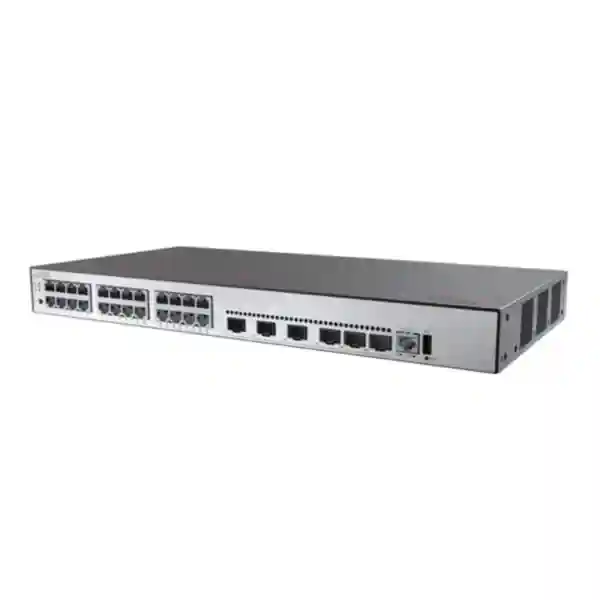
Key differentiator: 24 x GE copper plus 8 x 2.5GE SFP ports that can be switched to 2 x 10GE SFP+, alongside 4 additional 10GE SFP+ uplinks.
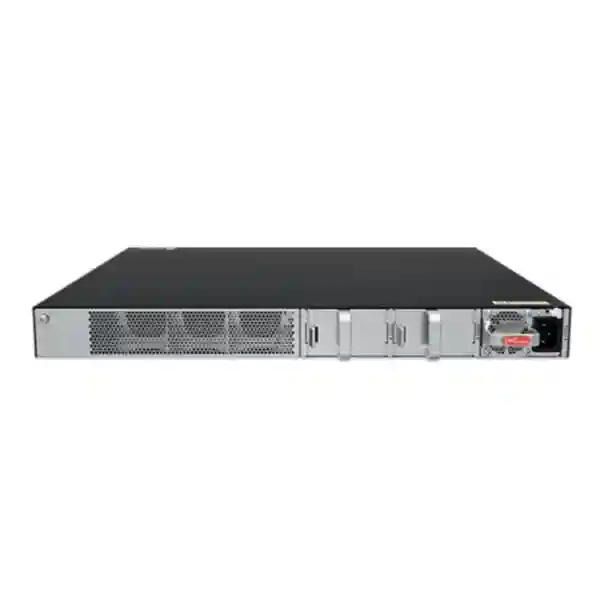
Resilience: dedicated stack interfaces, 1+1 pluggable power backup and standard enterprise redundancy protocols.
What the S5735-S24T8J4XEZ-V2 is designed to solve
The Huawei CloudEngine S5735-S24T8J4XEZ-V2 sits in a practical part of the enterprise switching market: organisations need more capability than a basic Layer 2 access switch, but they do not necessarily need a large modular chassis or a PoE-heavy access platform. This model provides a strong mixture of copper access, optical flexibility, dedicated stacking and Layer 3 control in a single rack unit. In a UAE campus, it can sit in a floor distribution cabinet serving desktops, printers, building systems, fixed appliances and downstream switches. In a branch, it can operate as the primary LAN switching layer while maintaining redundant uplinks toward a firewall or WAN edge. In a data-room environment, it can provide server or appliance access where one-gigabit copper remains appropriate and multiple 10-gigabit uplinks are required for northbound capacity.
The important design point is that this exact model is non-PoE. That is an advantage when endpoints are independently powered and the network team wants to avoid paying for oversized PoE power supplies, thermal headroom and power budgets that will never be used. Organisations that require power delivery for access points, cameras or IP phones should select a PoE-capable sibling rather than assume PoE can be enabled by software. For the S5735-S24T8J4XEZ-V2, the hardware value lies in port diversity, routing depth, availability and operations.
FourTeck positions this switch as part of a complete network design rather than an isolated box. The correct bill of materials should include optics, patching, compatible power modules, rack accessories, redundancy design, software release alignment and operational tooling. Customers planning a wider UAE infrastructure refresh can also coordinate related design work through FourTeck UAE, including switching, routing, security and structured deployment planning.
Verified hardware specification overview
Published power-consumption values can differ by datasheet revision, power-module combination, traffic profile and measurement method. For procurement, use the exact hardware revision, selected power modules and current Huawei documentation in the final BOM rather than treating a single catalogue wattage as an electrical-design limit.
Port architecture: why this model is more flexible than a conventional 24-port access switch
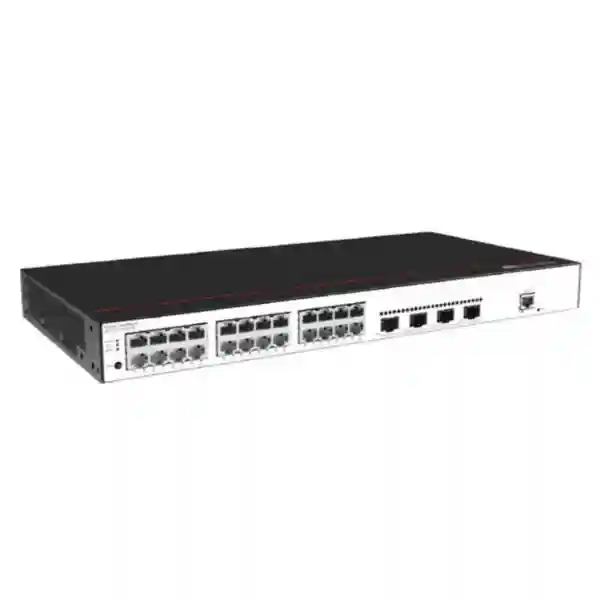
The front-panel architecture is the central reason to choose the S5735-S24T8J4XEZ-V2. Twenty-four 10/100/1000Base-T interfaces handle ordinary copper Ethernet. Those ports can support the bulk of office endpoints where one gigabit remains sufficient and where installed Category 5e, Category 6 or better cabling is already available. Because the switch is non-PoE, these ports should be planned for endpoints that have their own power source or receive power by another method. Typical examples include workstations, printers, building controllers, rack appliances, servers with one-gigabit management interfaces, downstream non-PoE devices and security or IoT gateways that use local power.
The unusual element is the additional bank of eight 2.5GE SFP ports. This creates options for optical access in buildings where fibre is preferred between rooms, cabinets or industrial areas, and it also provides a path for devices that benefit from more than one gigabit without consuming the four main 10GE uplinks. Huawei documents that these eight ports can alternatively be switched to operate as two 10GE SFP+ ports. That conversion is not simply a mathematical aggregation of eight ports; it is an operating mode that should be reflected in the intended port map before installation. A network engineer should decide whether the project benefits more from eight individual 2.5GE optical interfaces or from two additional 10GE interfaces, then validate compatible optics and software configuration for that mode.
Four dedicated 10GE SFP+ interfaces remain available for conventional high-speed uplink duties. In a campus, two can be used toward a pair of aggregation or core switches while the remaining ports serve a firewall cluster, a local server or another distribution block. In a compact branch, the switch can use redundant 10GE links to a firewall or collapsed core while retaining spare high-speed interfaces for future growth. The practical benefit is choice: the customer is not forced to consume a single shared uplink bank for every function.
The two dedicated 12GE stack ports further protect the useful data-port budget. Stacking traffic does not need to consume the main 10GE uplinks, so northbound links stay available for production forwarding. This matters when several switches are combined into a logical system. A clean stack design normally uses both stack interfaces in a resilient topology where supported, plans cable routing to avoid a single physical failure path, standardises software versions and records which unit provides which access ports. The stack should be treated as part of the network availability design, not merely as a convenient way to reduce the number of management IP addresses.
When the 8 x 2.5GE SFP mode makes sense
Use the eight-port mode when the building needs multiple optical edge links, when intermediate bandwidth is more valuable than a smaller number of 10GE connections, or when the switch is aggregating remote closets and specialised endpoints. Fibre can help with distance, electrical isolation and electromagnetic conditions, but the exact optical module must match the fibre type, distance, connector plan and Huawei support matrix.
When the 2 x 10GE alternate mode makes sense
Use the alternate 10GE mode when additional high-speed uplinks or server connections are more valuable than eight separate 2.5GE optical links. This can be useful in a compact aggregation design, but the port-mode decision should be made before patching and labelling so the physical design, transceiver count and logical configuration remain consistent.
Layer 2 services for segmented enterprise networks
At the switching layer, the CloudEngine S5735-S-V2 platform provides the functions expected in a managed enterprise campus. Huawei documents support for up to 4094 VLANs, voice VLAN, MUX VLAN and VLAN assignment based on several criteria including MAC address, protocol, IP subnet, policy and port. For a network architect, this means segmentation does not need to depend on a single static access-port model. The design can separate corporate users, guest services, building-management systems, surveillance backhaul, voice, printers, laboratory devices, operational technology and management traffic according to business and security requirements.
MAC-layer controls include automatic learning and aging, static and dynamic entries, blackhole MAC entries and filtering based on source MAC addresses. These features are useful when the switching layer needs to enforce deterministic behaviour for specialised systems or contain unwanted traffic. They should be combined with proper endpoint authentication and IP-layer controls rather than treated as complete security on their own. In large deployments, uncontrolled MAC learning can consume table resources or enable unintended endpoint mobility, so per-interface learning limits and policy should be applied according to the endpoint profile.
Loop prevention and path resiliency remain critical in any campus with redundant links. The S5735-S-V2 family supports traditional spanning-tree mechanisms and Huawei documents Ethernet Ring Protection Switching for fast ring recovery, along with Smart Link for uplink backup. The choice between STP-family protocols, ERPS, link aggregation and routed designs depends on topology. A simple branch with two uplinks may benefit from a straightforward aggregated or routed design; a metro-style building ring may justify ERPS; a mixed-vendor campus may prioritise standards-based interoperability. The switch should be configured according to a topology standard rather than enabling several redundancy mechanisms without a clear control-plane design.
For environments migrating from another vendor, Huawei also lists interoperability functions such as VBST compatibility with PVST/PVST+/RPVST-style environments, LNP with functions similar to DTP, and VCMP with functions similar to VTP. These are useful migration tools, but they do not remove the need to test trunk behaviour, native VLAN expectations, spanning-tree root placement, allowed VLAN lists and failure convergence. A controlled migration window should include link-by-link verification and a rollback plan.
Layer 3 routing: access switch, aggregation switch or compact branch core
The S5735-S24T8J4XEZ-V2 is not limited to basic Layer 2 forwarding. Huawei publishes a routing feature set that includes static routes, RIP and RIPng, OSPF and OSPFv3, IS-IS and IS-ISv6, BGP and BGP4+, VRRP and VRRP6, ECMP, routing policies and policy-based routing. The presence of these protocols changes how the switch can be deployed. In a traditional access design, it may simply run VLANs and default routes toward a distribution pair. In a routed-access architecture, it can establish Layer 3 adjacencies upstream, reduce Layer 2 failure domains and provide clearer convergence behaviour. In a compact branch, it can perform inter-VLAN routing locally while maintaining redundant next hops toward firewalls or WAN routers.
OSPF or IS-IS can be appropriate where the campus uses an interior gateway protocol and the network team wants deterministic route advertisement. BGP can be relevant in more advanced enterprise segmentation or where the branch, data centre or service edge participates in a broader routed policy design. ECMP allows multiple equal-cost next hops to be used when the topology and software feature set are configured accordingly. VRRP provides first-hop gateway redundancy for VLAN interfaces when multiple Layer 3 switches serve the same subnet. Policy-based routing can steer selected traffic differently from the normal routing table, although it should be used carefully because it can complicate troubleshooting if the operational team does not maintain clear documentation.
The key sizing question is not simply whether a protocol name appears in the feature list. Engineers must consider route scale, adjacency count, convergence targets, control-plane policy, software release, licensing where applicable and how much traffic is expected between VLANs. A 24-port switch can have an extensive protocol set while still being part of a wider architectural hierarchy. FourTeck therefore sizes the S5735-S24T8J4XEZ-V2 by role: access, routed access, aggregation, branch core or appliance access. That role determines how routing, redundancy, monitoring and uplink capacity should be configured.
For customers integrating a new switch with security gateways, segmentation policies and secure internet breakout, FourTeck can align LAN design with broader UAE security deployments through FourTeck IT Services UAE. The objective is to keep the routing boundary, firewall boundary and user segmentation model consistent rather than configuring each device in isolation.
High availability: power, stack, links and gateway continuity
Availability on an enterprise switch must be considered at several layers. The S5735-S24T8J4XEZ-V2 supports 1+1 pluggable power redundancy. Huawei lists compatible AC and DC power-module options for this model, allowing the hardware design to match the site power architecture. Redundant supplies are most valuable when they are fed from independent upstream power paths where possible. Installing two modules but connecting both to the same single PDU, breaker or UPS improves resilience against an internal power-module failure but does not eliminate the upstream electrical single point of failure. In critical UAE sites, the rack power map should be documented down to PDU and UPS source.
The switch also provides two dedicated stack ports. Stacking can simplify operation by presenting multiple physical units as a coordinated system, but resiliency depends on topology and implementation. Both stack links should be used according to Huawei design guidance, cables should be physically routed to reduce common damage risk and software versions should remain aligned. Capacity planning must account for traffic that may traverse the stack when an endpoint and its active uplink reside on different members. A stack is not a substitute for a complete redundancy design; upstream aggregation, firewall connectivity, gateway placement and power all need independent failure analysis.
At the Ethernet layer, link aggregation can combine physical connections for bandwidth and resilience when the upstream device and design support it. Spanning-tree protocols provide loop control for Layer 2 topologies, while ERPS can be relevant in ring deployments that need rapid recovery. Smart Link can provide uplink backup in applicable designs. At Layer 3, VRRP/VRRP6 and dynamic routing can maintain gateway and path availability. The correct mechanism should be chosen based on topology instead of enabling redundant features that may interact in unexpected ways.
A strong acceptance test should include deliberate failure events. Remove one power source, disconnect one uplink, break a stack connection where the design allows safe testing, reboot a member during a maintenance window and verify traffic convergence. Monitor packet loss, route reconvergence, gateway reachability and management visibility. Document the observed result rather than assuming protocol configuration equals business continuity. This is particularly important for hospitality, healthcare, logistics, finance and industrial environments where short outages can affect many operational systems.
Security controls at the access layer
Identity and authentication
Huawei documents IEEE 802.1X, MAC authentication, portal authentication, AAA, RADIUS and HWTACACS options across the platform. These can be used to control who or what is allowed onto the network and to centralise administrative access policy.
Layer 2 protection
Port isolation, port security, sticky MAC, blackhole MAC entries and limits on learned MAC addresses help constrain local switching behaviour and reduce the impact of unintended or malicious endpoint activity.
DHCP and address integrity
DHCP snooping can build trusted binding information and help prevent unauthorised DHCP behaviour. Binding IP, MAC, interface and VLAN information provides a basis for stronger source validation when designed correctly.
Management-plane protection
SSH v2, HTTPS, AAA and role-based operational procedures should be preferred for management. Legacy or unnecessary management services should be disabled, and administration should be restricted to dedicated management networks.
Access-layer security is effective only when policies reflect endpoint reality. A printer, an employee workstation, a hypervisor host, a building controller and a temporary contractor device should not necessarily receive the same authentication method, VLAN assignment or east-west reachability. Start with an endpoint inventory and define authorised communication flows. Then select the switch controls that enforce those flows without creating an operational burden the support team cannot sustain.
DHCP snooping is particularly valuable in user-access networks because a rogue DHCP server can redirect clients or break connectivity. Trusted ports should be limited to the legitimate DHCP path, while access ports remain untrusted. Where static-address devices are common, the design must account for them explicitly. Similarly, 802.1X can provide strong identity-based access but requires a functioning authentication service, certificate or credential lifecycle, supplicant support and a fallback strategy for devices that cannot perform 802.1X. MAC authentication can help with non-supplicant devices but should not be treated as equivalent to cryptographic identity.
Administrative security deserves the same attention. Use central AAA where practical, unique administrator identities, command accounting when supported, SSH instead of insecure remote shells, HTTPS for web access and SNMPv3 when SNMP is required. Restrict the source addresses allowed to reach management interfaces and keep management VLANs away from general user access. Back up configurations after approved changes, preserve logs centrally and maintain a documented recovery path for situations where the switch cannot reach the authentication servers.
Operations, telemetry and lifecycle management
Huawei positions the CloudEngine S5735-S-V2 family around simplified operations as well as packet forwarding. The platform supports cloud-oriented management using NETCONF/YANG, traditional SNMP, RMON, web-based management, system logging and telemetry-related capabilities. For a modern network team, the value is not merely having multiple management protocols. The goal is to collect enough structured information to detect faults, understand user experience and automate repeatable tasks without making the switching layer fragile.
NETCONF/YANG can support model-driven configuration and state retrieval. This is useful when an organisation wants configuration templates, compliance checking or integration with an orchestration platform. Automation should be introduced with version-controlled templates, device-role variables and pre-change validation. A script that can change hundreds of switches quickly can also distribute a mistake quickly, so automation governance matters as much as API capability. Start with read-only inventory and validation tasks, then move toward controlled configuration deployment after the operational team trusts the workflow.
Telemetry can provide higher-frequency or more structured operational visibility than periodic polling in use cases where supported collectors and analysis tools are deployed. Combined with tools such as Huawei iMaster NCE-CampusInsight in appropriate environments, telemetry can help identify performance problems and correlate network behaviour with user experience. Even without a full analytics platform, standard monitoring should cover interface errors, utilisation, discards, CPU and memory health, power status, fan status, stack status, routing adjacencies, spanning-tree changes and environmental alarms.
Virtual Cable Test can assist with copper troubleshooting by helping identify certain cabling faults from the switch side. It is not a replacement for certification testing during structured-cabling installation, but it can reduce troubleshooting time after deployment. The best operational model combines clean physical labelling with logical monitoring. Every switch, uplink, patch panel, rack position and power feed should be represented consistently in diagrams and inventory records. Engineers should be able to move from an alert to the correct physical port without relying on memory.
Lifecycle planning should also cover software. Before an upgrade, review release notes, hardware compatibility, feature changes, resolved defects and any prerequisites. Maintain configuration backups and a documented rollback approach. In a stack, follow the vendor-supported upgrade process rather than treating members as unrelated standalone switches. After the change, verify stack health, uplinks, routing, authentication, monitoring and critical application reachability. These practices create a stable operating environment long after the initial installation is complete.
UAE deployment engineering: heat, racks, power and cabling
Although Huawei specifies a long-term operating range up to 50°C for this model, that figure should not be used as a reason to tolerate poor rack cooling. UAE facilities can experience high ambient temperatures, and equipment rooms located near roofs, loading areas, warehouses or poorly conditioned service spaces can become much hotter than an office. The switch uses active air cooling with fan modules and front/side intake toward rear exhaust. Cabinets need clear airflow paths, adequate perforation, sensible blanking and enough rear clearance for exhaust and cable bend radius. Hot exhaust from neighbouring equipment should not be directed into the switch intake.
The chassis depth is about 420 mm, so rack selection must consider more than nominal 19-inch width. Allow space for rear power connections, optional expansion hardware, cable management and service access. Shallow wall cabinets may physically accept a 1U front mounting pattern but still lack safe depth for the chassis and rear cables. Before purchase, measure usable internal depth rather than external cabinet depth. In crowded telecom rooms, also verify that front doors close without compressing copper patch leads or fibre loops.
Power design should match the required redundancy objective. Two pluggable power modules can provide 1+1 backup, but resilience is strongest when each module is fed from a different PDU or UPS-backed source. For facilities using DC distribution, validate the supported module, input range, grounding and site electrical standards. For AC sites, confirm plug type, PDU socket availability and UPS capacity. Document both power feeds on the rack elevation and label them at the device.
Copper links should be tested and labelled. Gigabit Ethernet is generally forgiving on properly installed structured cabling, but poor termination, excessive untwist, damaged patch leads or electromagnetic interference can still create errors that appear as intermittent application issues. Optical links require additional discipline: correct fibre type, connector cleanliness, transmit/receive orientation, optical budget and transceiver compatibility. Never select an optic only by connector shape. Wavelength, reach, fibre mode and supported part number all matter.
Customers that are refreshing switch rooms together with compute, storage or rack infrastructure can coordinate related infrastructure through FourTeck Server Dubai. Aligning rack depth, UPS capacity, switching uplinks and server interfaces at design time prevents the common problem of individually correct components that do not fit or interoperate cleanly as a system.
Design patterns for common S5735-S24T8J4XEZ-V2 deployments
1. Enterprise floor access
Use the 24 GE ports for wired endpoints and reserve two 10GE uplinks toward redundant distribution switches. Where local fibre endpoints or remote cabinets are present, use the 2.5GE SFP bank. Apply user, printer, IoT and management VLANs, endpoint authentication where practical, DHCP snooping on access segments and central monitoring.
2. Routed branch core
Use VLAN interfaces for local subnets, dynamic routing or static routing toward security gateways, and VRRP when a redundant switching pair provides default gateways. The four 10GE ports can connect to firewall pairs, WAN routers or local servers. Keep the design simple enough for remote support staff to troubleshoot.
3. Small aggregation layer
Aggregate multiple lower-speed access links, including optical connections where the 2.5GE SFP bank is appropriate, and forward northbound over redundant 10GE. Use Layer 3 boundaries to contain failure domains when the wider architecture supports routed aggregation.
4. Server and appliance access
Connect management interfaces, appliances and one-gigabit server ports on copper while using 10GE for higher-bandwidth appliances or upstream fabric links. Ensure the traffic profile matches the switch role; high-density east-west server fabrics may require a different data-centre-class platform.
5. Multi-building optical edge
Use suitable optical ports and transceivers to connect remote areas where copper distance or electrical conditions are unsuitable. Carefully engineer fibre reach, redundancy and building-to-building grounding considerations; optical isolation can be valuable but does not replace surge and power engineering for all connected systems.
6. Stack-based access block
Combine multiple compatible units using dedicated stack ports where supported by the selected software and design. Spread uplinks and power feeds across members, validate failure behaviour and document member priorities, cabling and physical rack positions.
How to size uplinks without guessing
A common mistake is to choose uplinks by port count alone. Twenty-four one-gigabit access ports do not mean the switch continuously generates 24 Gbps of northbound traffic, and a single 10GE uplink is not automatically sufficient either. Uplink sizing should begin with endpoint behaviour. Office users may create bursty traffic with relatively low average utilisation, while backup appliances, imaging systems, video workflows, virtualisation hosts or storage traffic can create sustained flows. Collect existing utilisation data if a network is being replaced. If the site is new, classify endpoint types and estimate concurrency instead of multiplying every access port by line rate.
Two or more 10GE uplinks can be used for capacity and resilience depending on the upstream topology. Link aggregation may provide a larger logical bundle, but individual flows are normally hashed across member links rather than striped at the packet level, so one flow may still be limited by a single member’s capacity. Dynamic routing with multiple Layer 3 links can provide an alternative architecture. The decision should reflect how the upstream switches, firewalls and routing design operate.
The flexible optical bank introduces another sizing choice. If eight 2.5GE links are used to aggregate remote access devices, their combined offered load could be significant. If the bank is converted to two 10GE interfaces, those ports may become additional uplinks or high-speed local connections. The engineer should map every intended port before ordering transceivers. A simple spreadsheet showing port number, speed, medium, endpoint, VLAN/trunk role and redundancy peer will often reveal oversubscription or missing optics before installation.
Also consider failure-state traffic. A design with two normally balanced 10GE uplinks should still perform acceptably if one link fails and all traffic shifts to the survivor. If the remaining path becomes congested, redundancy exists electrically but not operationally. Capacity planning should therefore test normal state and degraded state. Monitoring thresholds can then be set to alert before sustained utilisation creates user impact.
Optics, fibre and compatibility planning
SFP and SFP+ connectivity is powerful because it allows the physical medium to be selected for distance and environment, but it also creates procurement complexity. Start with link distance and installed fibre type. Multimode fibre is common for shorter in-building runs, while single-mode fibre is used for longer distances and many campus backbones. Select compatible transceivers with the correct wavelength, reach and interface speed. Both ends of a link must be engineered as a pair; a valid module in one switch does not guarantee the remote device is using a matching optical standard.
Connector cleanliness is operationally important. Dust or contamination can introduce optical loss that causes intermittent errors or link failure. Use proper inspection and cleaning procedures rather than repeatedly reseating modules. Maintain fibre bend radius in the cabinet and route patch cords so that door movement does not stress connectors. Where many fibres converge, labelled trays and colour conventions reduce the chance of accidental disconnection during maintenance.
For the eight 2.5GE SFP ports, confirm supported transceiver types for the exact software and hardware revision. Do not assume every generic 2.5G optic is accepted simply because the electrical form factor fits. Likewise, when switching the bank to two 10GE SFP+ interfaces, validate the supported port mode and module list. The safest procurement process uses Huawei compatibility information and the final configured operating mode.
Spare strategy also matters. Sites with many identical links should keep a small number of tested spare optics and patch leads. Store optics in protective packaging and record the exact part numbers used. A spare that is physically similar but uses a different wavelength or reach may not restore service. Standardising a small set of optic types across a campus can simplify both troubleshooting and inventory.
Power consumption, thermal behaviour and facility planning
Because the S5735-S24T8J4XEZ-V2 does not provide PoE, its electrical profile is substantially simpler than that of a high-power PoE access switch. Huawei documentation for the model lists power-module combinations and maximum device consumption values in the tens of watts rather than hundreds of watts dedicated to endpoint power. Different document revisions can publish different typical figures because measurement conditions, power modules and platform revisions vary. Facility planning should therefore use the current product documentation and the selected power modules, with margin for real operating conditions.
Thermal planning follows power planning. The switch uses active air cooling with intelligent fan-speed adjustment and two fan modules. Air enters from the front and sides and exits at the rear. The rack should preserve that path. Avoid placing solid blank objects immediately against side intakes, and do not pack loose cabling behind the switch in a way that blocks exhaust. In a shared rack with firewalls, servers and UPS equipment, evaluate the combined heat load rather than considering each device independently.
The stated long-term operating range of -5°C to +50°C and non-condensing humidity range are hardware limits, not target room conditions. Stable, conditioned environments generally improve component life and reduce fan stress. Monitor room temperature independently from device sensors because a sensor reports conditions at a specific point inside the chassis. In a tall rack, inlet temperature can vary significantly between bottom and top.
For critical sites, include environmental alarms in the monitoring system and define an escalation threshold below the maximum hardware limit. The objective is to detect cooling degradation early, before equipment reaches a protective or failure condition. This is especially relevant during UAE summer periods, after-hours HVAC schedules or maintenance events that affect cooling redundancy.
Migration from an existing Cisco, HPE Aruba or mixed-vendor access layer
Replacing an access switch is rarely a port-for-port exercise. The existing configuration often contains years of operational assumptions: native VLANs, voice VLANs, spanning-tree priorities, storm control, port-security exceptions, static MAC entries, DHCP-snooping trust states, authentication policies, quality-of-service markings, management ACLs and monitoring dependencies. Before migration, export the current configuration and translate intent rather than syntax. The goal is not to reproduce every historical command; it is to preserve required services and remove obsolete settings deliberately.
Begin with an interface inventory. For each old port, record connected device, negotiated speed, VLAN or trunk role, PoE requirement, authentication behaviour, MAC count and observed traffic. Any endpoint requiring PoE is a red flag for this particular non-PoE model and must be powered separately or moved to a PoE-capable switch. Identify uplinks, port channels, spanning-tree topology and gateway placement. Confirm whether the legacy environment depends on vendor-specific protocols that need a standards-based replacement or one of Huawei’s interoperability mechanisms.
Build the new configuration offline where possible. Define VLANs, trunks, Layer 3 interfaces, routing, management, AAA and monitoring. Apply naming conventions consistently. If 802.1X or NAC is in use, test representative endpoint types before the change window. If dynamic routing is used, verify route filters and metrics in a lab or staging environment. If the switch participates in a stack, assemble and validate the stack before moving production cables.
During cutover, migrate links in an order that preserves management visibility. Bring up and verify uplinks first, then move access ports in controlled groups. Check MAC learning, VLAN reachability, DHCP, DNS, application access and any local routing. Compare monitoring counters and logs against the pre-change baseline. If an issue appears, isolate whether it is physical, Layer 2, Layer 3, authentication or application-specific rather than making multiple simultaneous changes.
After migration, keep the old configuration and port map as audit evidence, but update the authoritative documentation to reflect the new Huawei design. Remove temporary migration VLANs or permissive policies once validation is complete. A successful cutover should leave the network simpler and better documented than before, not merely moved to different hardware.
How FourTeck approaches configuration and commissioning
A production deployment begins with requirements rather than commands. FourTeck first establishes the switch role, number and type of endpoints, fibre and copper paths, uplink topology, routing boundary, management method, security requirements and availability target. That produces a port map and logical design. The hardware BOM can then be checked against actual needs: switch quantity, power-module count, stack accessories, supported optics, fibre patch cords, rack depth and any expansion requirements.
Base configuration typically includes device identity, management addressing, secure administrative access, time synchronisation, logging, AAA integration where required, VLANs, trunks, access-port templates, spanning-tree or routed-access settings, uplink configuration and monitoring. Layer 3 deployments additionally require routed interfaces, dynamic-routing or static-routing policy, gateway redundancy if needed and route filtering. Security controls such as DHCP snooping, 802.1X, MAC authentication or port security are applied based on the endpoint class and operational model.
Commissioning verifies the design under real conditions. Physical inspection confirms rack fit, airflow, redundant power and labelling. Interface checks confirm expected speed, duplex, optical levels where available and error counters. Functional tests validate VLAN reachability, DHCP, DNS, routing and authentication. Resiliency tests verify the expected response to link or power failure. Monitoring is confirmed so that the operations team receives meaningful alarms after handover.
For organisations with regional footprints extending beyond the UAE, FourTeck can also coordinate broader infrastructure sourcing and standardisation through FourTeck Africa. A standardised switch template across countries can reduce training and spare complexity, but local power, cabling, support logistics and regulatory requirements should still be incorporated into each site design.
Procurement checklist for the UAE
Ordering only the chassis model is not enough for a deployment-ready result. Confirm the exact switch part number and region, the number and type of power modules, the desired redundancy arrangement, all required transceivers, stack components, fibre patch leads, copper patch leads and rack accessories. Verify that the selected software release supports the intended feature set and optics. Where advanced management or controller integration is planned, confirm licensing and platform requirements separately rather than assuming every management function is included by default.
For optics, provide link distance and fibre type. For copper, provide approximate port count and whether any endpoints require PoE. For routing, provide the required protocols and approximate route scale. For stacking, provide the number of members and rack placement. For power, specify AC or DC, number of independent feeds and PDU outlet type. These details allow the quotation to reflect a usable design rather than a chassis-only price.
Support planning is equally important. Record serial numbers, software version, configuration backup location, warranty or support entitlement and the escalation path. Maintain at least one known-good configuration backup after acceptance. If the switch is business-critical, keep appropriate spare optics, power components and patch leads on site, and consider a spare switch strategy based on the number of identical units and acceptable replacement time.
Finally, define acceptance criteria before delivery. Examples include successful redundant power test, redundant uplink test, stack health, routing adjacency, VLAN reachability, authentication test, monitoring visibility, configuration backup and documentation handover. A purchase is complete when the switch performs the required network role, not merely when hardware is installed in the rack.
Frequently asked technical questions
Does the S5735-S24T8J4XEZ-V2 provide PoE?
No. This exact model is a non-PoE variant. If phones, wireless access points, cameras or other powered devices need power from the switch, choose an appropriate PoE-capable model or provide an external powering method.
How many 10GE ports are available?
The switch has four fixed 10GE SFP+ ports. In addition, the bank of eight 2.5GE SFP ports can be switched to an alternate mode providing two 10GE SFP+ ports, subject to the supported configuration. Plan the port mode before ordering optics.
Can it be used as a Layer 3 switch?
Yes. Huawei lists static routing, RIP/RIPng, OSPF/OSPFv3, IS-IS/IS-ISv6, BGP/BGP4+, VRRP/VRRP6, ECMP, routing policies and policy-based routing for this platform. Confirm software release and any feature-specific entitlement requirements in the final design.
Does it support redundant power?
Yes. The model supports 1+1 power-supply backup with pluggable power modules. For end-to-end resilience, connect the modules to independent power paths where site infrastructure permits.
What is the switching capacity?
Huawei publishes 216 Gbps as the device switching capability and 520 Gbps as the system switching capability for this model, with forwarding performance of 162 Mpps.
Can it be stacked?
The switch includes two dedicated 12GE stack ports and the S5735-S-V2 platform supports iStack functionality. Stack design, member count, cable topology and software compatibility should be confirmed against the selected release and Huawei guidance.
Is it appropriate for a data centre?
It can serve access-layer or appliance-access roles where its port types and performance match the requirement. High-density leaf-spine fabrics, very high 25/40/100GE server counts or large east-west workloads may be better served by data-centre-specific CloudEngine platforms.
What should be provided for an accurate quotation?
Provide quantity, site location, copper and fibre port requirements, link distances, fibre type, preferred AC or DC power, redundancy expectation, stack quantity, required optics, desired software or management integration and whether installation or configuration services are required.
Decision recap: when this is the right Huawei switch
Strong fit
- You need 24 conventional Gigabit copper access ports.
- You need multiple optical access choices plus 10GE uplinks.
- You want dedicated stacking instead of consuming main uplink ports.
- You need 1+1 pluggable power resilience.
- You require enterprise Layer 3 routing and IPv6 features.
- You want telemetry, NETCONF/YANG and traditional management options.
- You do not require PoE from the 24 copper access ports.
Consider another model when
- Your endpoints require PoE or PoE++ from the switch.
- You need 48 copper access ports in one unit.
- You require dense 25GE, 40GE or 100GE server-facing interfaces.
- You need a fanless or ultra-shallow switch for a specialised enclosure.
- Your architecture requires a large modular chassis with high slot density.
- You need a data-centre leaf platform optimised for very high east-west bandwidth.
Quotation input checklist
For a deployment-ready quotation, send the information below. Providing these inputs helps FourTeck select the correct power modules, optics and accessories and reduces revision cycles during procurement.
UAE location, number of switches, rack locations and whether the project is new build, expansion or replacement.
Count of copper endpoints, fibre endpoints, uplinks, trunks, server links and any ports that must operate above 1GE.
Fibre type, link distance, connector type, remote device model and required redundancy for each optical path.
AC or DC preference, independent feeds, PDU type, UPS arrangement and required power-module redundancy.
VLANs, routing protocols, VRRP, stack requirement, authentication, DHCP snooping and management platform integration.
Supply only, staging, configuration, installation, migration, testing, documentation, training and post-deployment support.
Consult FourTeck for the complete UAE switching BOM
The Huawei CloudEngine S5735-S24T8J4XEZ-V2 is a capable choice when a project needs resilient enterprise switching, 24 copper Gigabit access ports, flexible 2.5GE optical connectivity, multiple 10GE uplinks, dedicated stacking and advanced Layer 3 functions without PoE. The best result comes from selecting the chassis together with the correct optics, power modules, rack arrangement, software plan and configuration standard.
FourTeck can review your topology, endpoint count, fibre routes, redundancy target and migration constraints, then prepare a deployment-oriented BOM and commissioning scope for Dubai, Abu Dhabi, Sharjah and other UAE locations. The objective is a network that is supportable after handover: documented ports, validated failover, secure management, known spare strategy and clear operational ownership.

Reviews
There are no reviews yet.