
Juniper ACX7020 Cloud Metro Router Dubai
A compact 1U, temperature-hardened multiservice router for organizations that need a practical 1GbE-to-25GbE access platform with 100 Gbps system throughput, Junos OS Evolved, precision timing, and a clear path from traditional metro Ethernet toward segment routing, EVPN, SRv6 and automated Cloud Metro operations.
Direct answer: what the Juniper ACX7020 is and where it fits
What exactly is it?
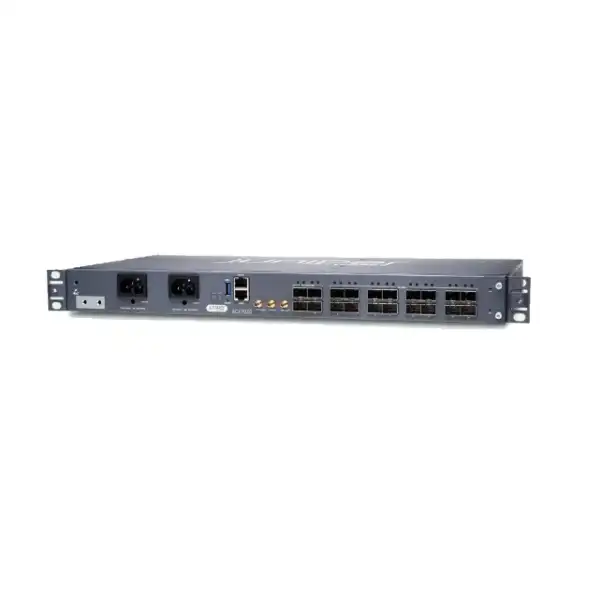
The Juniper ACX7020 is a fixed-form-factor member of the ACX7000 Cloud Metro family. It combines 100 Gbps of throughput with sixteen 1/10GbE SFP+ interfaces and four 1/10/25GbE SFP28 interfaces in a compact 1U chassis designed for challenging access and edge environments.
What is it mainly used for?
Typical roles include metro access, cell-site routing, mobile backhaul, business Ethernet, IP/IP-VPN service delivery, residential or wholesale access aggregation, customer edge, and smaller WAN edge locations that need flexible 1GbE, 10GbE and 25GbE connectivity.
Who should consider it?
Service providers, telecom operators, wholesale carriers, large enterprises, managed service providers, utilities, transport networks and other organizations that value a hardened, shallow-depth router with precision timing and multiservice routing should place the ACX7020 on the shortlist.
What is the most important factor to confirm?
Confirm the required port-speed mix and total forwarding requirement first. The platform offers only four 25GbE-capable interfaces and 100 Gbps system throughput, so a design expecting multiple high-speed uplinks, rapid growth beyond 100 Gbps, or 100GbE interfaces should be evaluated against a larger ACX7000 model.
What can FourTeck help determine?
FourTeck can help translate the design into an orderable bill of materials: AC or DC chassis, conformal-coated or standard variant, supported optics, fibre type, timing requirement, rack and power constraints, software and support needs, migration steps, and the correct quantity for the Dubai or wider UAE deployment.
Why the ACX7020 deserves a separate evaluation
The ACX7020 is not simply a small router with a large number of optical ports. Its value comes from the combination of physical depth, industrial environmental design, flexible access speeds, timing hardware, and the same Junos OS Evolved operating model used across the broader ACX7000 Cloud Metro portfolio. That combination makes it particularly relevant when the installation point is closer to users, radio sites, street or building access locations, utility environments, transport facilities, or distributed enterprise sites rather than a spacious core data-centre rack.
At the physical layer, the platform gives operators twenty front-panel service interfaces. Sixteen are SFP+ ports that can operate at 1GbE or 10GbE. Four are SFP28 ports that can operate at 1GbE, 10GbE or 25GbE. This matters because metro access upgrades rarely happen all at once. A network may have a large installed base of 1GbE services, a growing number of 10GbE customer or aggregation links, and only a few locations that currently justify 25GbE. The ACX7020 allows those speeds to coexist without requiring a chassis replacement every time a single service is upgraded, provided the total capacity and physical port limits remain suitable.
The form factor is equally important. The chassis is approximately 44.9 cm wide, 4.37 cm high and 23.5 cm deep, with a fully configured weight around 4.45 kg. The shallow depth can be useful where conventional deep data-centre platforms are awkward to install. However, shallow does not mean installation planning can be ignored. The unit uses side-to-side airflow, contains fixed system fans, and relies on clear intake and exhaust paths. A cabinet designed around front-to-back airflow only should therefore be reviewed carefully before deployment.
For software architecture, the ACX7020 runs Junos OS Evolved rather than being positioned as a simple Layer 2 appliance. Juniper documents support for capabilities such as MPLS, EVPN, segment routing, SRv6, telemetry, automation and network slicing, subject to the exact software release, feature support and entitlements selected. This creates a useful migration path for organizations consolidating older access technologies into an IP service fabric while keeping operational consistency with other Juniper platforms.
The practical buying question is therefore not “Is the ACX7020 powerful?” but “Does its particular balance of 100 Gbps capacity, four 25GbE-capable ports, sixteen 1/10GbE ports, environmental tolerance and timing functions match this site?” That is the decision FourTeck should validate during quotation because over-specifying a small site wastes budget, while under-specifying an aggregation point can create an early redesign.
ACX7020 technical specification snapshot
The following buyer-oriented summary is based on Juniper’s published ACX7020 product and hardware documentation. Exact supported optics, software features, environmental limits and regulatory approvals should still be checked against the hardware revision and Junos OS Evolved release intended for the project.
| Specification | ACX7020 detail | Buyer relevance |
|---|---|---|
| System throughput | 100 Gbps | Use expected aggregate traffic, redundancy model and growth horizon to determine whether the platform is appropriately sized. |
| Access interfaces | 16 × SFP+ at 1/10GbE | Well suited to mixed 1GbE and 10GbE service access where optical module compatibility is planned correctly. |
| Higher-speed interfaces | 4 × SFP28 at 1/10/25GbE | These ports are commonly important for uplink or high-value service planning; only four can operate at 25GbE. |
| Maximum port count by native speed | Up to 20 × 1GbE, 20 × 10GbE, or 4 × 25GbE depending on port configuration | The platform is flexible, but speed capability differs between the sixteen SFP+ and four SFP28 groups. |
| Form factor | Fixed 1U, around 23.5 cm deep | Useful for constrained access locations, but rack compatibility and side clearance remain essential. |
| Dimensions | Approx. 44.9 × 4.37 × 23.5 cm | Confirm cabinet rail spacing, cable bend radius, power access and maintenance clearance. |
| Weight | Approx. 4.45 kg fully configured | Normally straightforward for two-post rack deployment when the rack is correctly secured and rated. |
| Memory | 16 GB DDR4 RAM | A platform attribute rather than a user-upgrade sizing lever; feature scale should be checked through Juniper feature documentation. |
| Typical power draw | About 65 W at 25°C without optics under Juniper’s stated test conditions | Actual site power should include installed optics, ambient conditions, feed design and operational load. |
| Maximum power draw | 220 W without optics | Use the documented maximum plus optical-module requirements when planning circuits, UPS capacity and cabinet thermal load. |
| Power choices | AC and DC models; AC input 110–240 VAC, DC input documented from -24 to -60 VDC | Choose the variant around the site’s feed architecture, grounding standard, backup strategy and telecom power plant. |
| Cooling | Side-to-side airflow with three integrated fans and removable air filter | Cabinet airflow must not block the right-side intake or recirculate hot exhaust. |
| Management | RJ-45 console and 10/100/1000BASE-T out-of-band management port | Plan console access for initial setup, then integrate the dedicated management interface into the operations network. |
| Timing interfaces | 10 MHz input, 10 MHz output and 1PPS output, plus network timing capabilities | Important for mobile and synchronization-sensitive designs; timing configuration should be reviewed because it can affect usable service ports. |
Port planning: where ACX7020 designs succeed or fail
Port planning is the first technical exercise to perform because the ACX7020 deliberately mixes two interface groups. Ports 0 through 3 are SFP28 interfaces capable of 1GbE, 10GbE or 25GbE operation. Ports 4 through 19 are SFP+ interfaces capable of 1GbE or 10GbE operation. A spreadsheet that simply counts “twenty ports” can therefore be misleading. The four 25GbE-capable positions should be reserved deliberately for uplinks, aggregation, high-bandwidth customers, or future migration rather than consumed casually by low-speed services unless there is a sound operational reason.
A common fit is a site with multiple 1GbE and 10GbE access circuits and one or two higher-speed uplinks. For example, a provider may have several enterprise Ethernet customers at 1GbE, a few business or mobile services at 10GbE, and dual 25GbE paths toward upstream aggregation. The hardware can accommodate this general pattern, but the full traffic model still needs to respect the 100 Gbps system throughput. Port line rates do not mean that every interface can necessarily sustain its maximum rate simultaneously in every traffic direction and service combination without regard to platform capacity.
Optics are another procurement dependency. The chassis port type tells you the mechanical and electrical interface family, but not the correct optical module for a particular circuit. Fibre mode, distance, connector type, wavelength, optical budget, temperature rating, interoperability policy and whether the link is direct, patched through an ODF, or connected to third-party equipment all affect transceiver choice. Some projects may also use copper SFPs or direct-attach options where supported. FourTeck should therefore quote optics from a port schedule rather than adding a generic set of modules to every ACX7020 order.
The platform’s efficient thermal design is intended to support high-power SFP+ and SFP28 transceivers on supporting ports, which is useful for extended reach and specialized optical requirements. Even so, “high power supported” is not a substitute for validating the exact optic against Juniper’s compatibility information and the selected hardware and software release. Optical interoperability becomes particularly important when the far-end device is not Juniper, because the project team must decide whether to use vendor-qualified optics on both sides, standards-based third-party optics, or a managed demarcation approach.
One model-specific timing detail deserves special attention: Juniper’s hardware documentation notes that when Precision Time Protocol is configured, no interface is created for port 19 and that port is disabled. This means a design using PTP should not assume that all sixteen SFP+ service ports remain available. A mobile-backhaul bill of materials that allocates every port and only later enables PTP can create an avoidable capacity problem. The service-port map and timing architecture should therefore be designed together.
For procurement, the useful deliverable is a port matrix listing port number, intended speed, media type, optic, far-end equipment, circuit role, redundancy partner and expected traffic. That single document reduces multiple risks at once: wrong optics, wasted 25GbE ports, missing PTP capacity, incompatible connectors, insufficient uplink bandwidth and unclear spare-port strategy.
Metro services, MPLS, EVPN, segment routing and SRv6
The ACX7020 is intended to participate in modern multiservice metro architectures rather than operate as a narrowly defined Ethernet switch. Juniper positions the platform for Layer 2 services, IP and IP-VPN use cases, MPLS, EVPN, segment routing and SRv6, together with telemetry and automation. This breadth is valuable when a provider wants one access platform to support several service types while gradually modernizing the underlay and service-control model.
Traditional metro Ethernet
Organizations with established VLAN-based business services can use the ACX7020 as part of a controlled evolution rather than requiring every customer circuit to move to a new architecture on day one. The migration plan should map current VLAN, QoS, OAM, redundancy and customer handoff behaviors to the intended Junos configuration.
MPLS and IP-VPN
For operators already using MPLS, the platform can fit into service-delivery designs that maintain label-switched transport and routed VPN services. Actual scale, protocol combination and feature behavior must be validated against the Junos OS Evolved release selected for production.
EVPN service evolution
EVPN can provide a more structured control plane for Ethernet and VPN services across modern metro designs. Buyers should define whether EVPN is needed immediately or is a roadmap requirement, because that affects software qualification, interoperability testing and the broader network architecture.
Segment routing and SRv6
The platform’s support for segment-routing technologies gives operators options for simplifying traffic engineering and building a programmable service fabric. The correct choice between MPLS-based segment routing, SRv6 or a phased approach depends on the rest of the network, not on the ACX7020 alone.
From a buyer’s perspective, protocol support should never be treated as a checklist where more checked boxes automatically mean a better design. The useful question is which capabilities will actually be used during the life of the platform. If the immediate requirement is straightforward business Ethernet but the three-year roadmap includes EVPN and automated assurance, the ACX7020 may provide useful investment protection. If the organization requires only a few routed 1GbE links and has no timing, multiservice or environmental constraints, a simpler enterprise router might be more economical and operationally lighter.
Conversely, if the target site is an aggregation point that needs 100GbE uplinks or substantially more than 100 Gbps of throughput, the ACX7020 should not be selected merely because its software architecture is attractive. A larger ACX7000 platform can preserve the same general operating model while providing more physical and forwarding scale. Keeping hardware scale and protocol architecture as separate decisions is one of the best ways to avoid premature replacement.
Precision timing and mobile backhaul considerations
Timing is one of the areas that differentiates the ACX7020 from many compact enterprise routers. Juniper positions the platform for 4G and 5G mobile deployments and documents support for precision timing technologies including Synchronous Ethernet and Precision Time Protocol, together with advanced Class C timing capabilities. The front panel also provides dedicated 10 MHz input, 10 MHz output and 1PPS output connections. These facilities matter where frequency and phase synchronization must be distributed accurately between the transport network and radio infrastructure.
A mobile-backhaul design should identify the timing source, synchronization hierarchy, boundary or transparent clock requirements, holdover expectations, failover behavior and monitoring method before the router is ordered. It is not enough to say that a site “needs PTP.” The implementation team should know where the grandmaster sits, how the timing packets traverse the network, which nodes recover or regenerate time, how SyncE is used alongside PTP if required, and what alarms or performance thresholds the operations team will monitor.
The ACX7020’s timing interfaces also have a direct port-planning consequence. Juniper documents that enabling PTP disables port 19. This hardware behavior should be captured in the low-level design and in the commercial port count. A site that requires fifteen SFP+ service interfaces plus PTP may still fit comfortably; a site that expects to use all sixteen SFP+ interfaces and then add PTP later may not. Reserving that capacity from the beginning avoids an unnecessary field redesign.
For non-mobile customers, timing features should not be viewed as wasted capability automatically. Utilities, transport, financial networks, broadcast environments and other distributed systems may have their own synchronization requirements. However, if precision timing has no relevance to the project, it should not become the reason to pay for a more specialized platform. The ACX7020 still needs to win the selection on capacity, environmental design, interfaces, software architecture and lifecycle fit.
FourTeck’s quotation discussion for timing-sensitive deployments should therefore include the intended clock source, PTP profile if known, SyncE requirement, use of 10 MHz or 1PPS connections, number of service ports needed after timing is enabled, and any acceptance-testing requirement. These inputs are more useful than a generic request for “a 5G router” because they connect the hardware purchase to the network’s synchronization design.
Junos OS Evolved, operations and automation
The ACX7020 runs Junos OS Evolved, giving network teams a routing-focused operational environment with command-line management, programmability and integration into Juniper’s automation portfolio. Juniper documentation also refers to Juniper Routing Director, formerly associated with the Paragon Automation naming, for onboarding, management and monitoring. For a buyer already operating Juniper routing, this can reduce the operational discontinuity that often appears when access sites are built from a completely different product family.
Initial configuration still requires practical planning. The hardware provides an RJ-45 console port for local or console-server access and a dedicated 10/100/1000BASE-T management port for out-of-band management. Juniper’s installation guidance states that the management port must be configured before it can be used for normal remote access. Factory-default operation also includes zero-touch provisioning behavior, so implementation procedures should define whether the site will use ZTP, local staging, a prebuilt configuration, or a centralized onboarding workflow.
A mature deployment should separate day-one provisioning from day-two operations. Day one covers image qualification, base configuration, management addressing, authentication, routing adjacencies, service templates, timing configuration where applicable and acceptance tests. Day two covers configuration backups, software lifecycle, telemetry collection, alarm handling, service assurance, capacity thresholds, security audit, change control and rollback. Buying a router without defining those processes transfers work from procurement to operations rather than eliminating it.
Embedded active-assurance capabilities in the ACX7000 family can be valuable where operators want the network to measure service experience rather than rely solely on interface status. Whether a specific assurance function is used depends on the operator’s architecture, software environment and entitlements, so the business case should be tied to an operational requirement such as automated service testing, continuous validation or faster fault isolation. Buyers should confirm the exact feature set and commercial terms rather than assuming every function is included in a base hardware purchase.
Automation is most effective when configuration standards already exist. A team that uses unique hand-built syntax for every site will gain less from automation than one that has standardized variables, interface roles, routing policies, QoS profiles, telemetry destinations and naming conventions. The ACX7020 can participate in an automated metro design, but the organizational work of defining reusable intent remains essential.
For Dubai and UAE projects involving multiple branches, towers, substations, campuses or edge locations, FourTeck can help turn these operational requirements into a repeatable deployment package. The commercial conversation should identify whether devices arrive for centralized staging, direct-to-site installation, preconfiguration, rack-and-stack only, or a larger migration service. That distinction affects both project cost and deployment risk.
Industrial environmental design, cooling and UAE site conditions
The ACX7020 is designed as a temperature-hardened, industrial-rated platform, which is one reason it is attractive for access environments that are more demanding than a conventional office data room. Juniper’s product datasheet describes an industrial operating range around -40°C to +65°C, while the current hardware site guide publishes detailed environmental tolerances that can reach +70°C under specific altitude conditions. These figures should not be simplified into a claim that the router can be installed anywhere outdoors without protection. Environmental qualification always depends on cabinet design, contamination, airflow, humidity, altitude and the exact installation class.
Juniper’s hardware guidance calls for a dry, clean and well-ventilated environment and warns that dust can restrict intake vents and filters. For outside-plant or indoor non-office environments, the documentation recommends protection against dust, fog, salt fog, pests, moisture and airborne contaminants, with sealed cabinet approaches for relevant outdoor deployments. This is especially significant in the UAE, where heat and airborne dust can combine to stress poorly designed edge cabinets even when the electronics themselves have a strong temperature rating.
The airflow pattern is side-to-side. Air enters through the right side where the removable filter is installed and is exhausted through the chassis by three fixed fans. Cabinet designers therefore need to preserve lateral airflow. Installing the router tightly against a solid cabinet wall, packing cable bundles against the intake, or allowing adjacent equipment to exhaust hot air directly into the ACX7020 can defeat the benefit of the platform’s hardened design. Site surveys should record side clearance, cabinet ventilation method, neighboring equipment airflow and expected internal cabinet temperature rather than only the room temperature.
The air filter is a maintenance item. Juniper advises regular inspection and documents replacement on a six-month interval because accumulated dust restricts airflow. In a dusty environment, the operational team may choose to inspect more frequently based on actual site conditions. The three system fans are fixed and are not field-replaceable units, so a fan hardware failure has different maintenance implications from a chassis with hot-swappable fan trays. That should influence spares strategy and support-response planning for critical sites.
A conformal-coated variant is available for both AC and DC models. Conformal coating can be valuable where additional environmental protection is justified, but it should be selected according to the target environment and organizational standard rather than added indiscriminately. The model naming is important at quotation stage: ACX7020-AC and ACX7020-DC identify the standard power variants, while the corresponding “-C” versions add conformal coating. Buyers should ensure the purchase order reflects the exact required variant because AC/DC conversion and environmental treatment are not decisions to postpone until installation day.
The correct UAE deployment approach is therefore to treat the ACX7020 as a hardened network device that still needs engineered site conditions. Hardened electronics reduce risk; they do not replace cabinet thermal design, clean power, grounding, airflow management, filter maintenance or physical protection.
Power architecture: AC versus DC is a design decision
The ACX7020 is offered in AC-powered and DC-powered variants. The AC model uses two fixed AC power supply modules, while the DC model uses a fixed DC power system supporting dual input feeds. Juniper documents AC operation across 110–240 VAC and DC input from approximately -24 VDC through -60 VDC. The choice should follow the site’s electrical architecture rather than a preference for one connector type.
Enterprise server rooms in Dubai may naturally favor AC feeds from UPS-backed distribution. Telecom sites, mobile facilities and utility environments may have established -48 VDC plants where the DC model integrates more cleanly. A resilient design should document feed source, upstream breaker or fuse arrangement, grounding, A/B path separation where applicable, UPS or battery autonomy, maintenance isolation and how a single electrical failure affects the router.
Juniper publishes a typical power figure around 65 W at 25°C under stated conditions without optics and a maximum figure of 220 W without optics. These numbers are useful for planning but should not be copied directly into a UPS sizing sheet without context. Optical modules add consumption. Higher ambient temperature affects cooling demand. Multiple routers in the same cabinet raise the total thermal load. The site’s power budget should therefore use the appropriate worst-case engineering value and include the selected transceivers rather than relying only on typical consumption.
For quotation accuracy, the buyer should state AC or DC, number of independent feeds, site voltage, plug or termination expectations, grounding standard and whether FourTeck is responsible for power installation. These details prevent the common situation where the router itself is correct but the site is not ready to energize it.
Security, management isolation and operational access
Juniper describes hardware security capabilities for the ACX7020 including secure boot, a tamper-resistant design approach and a trust anchor with device identity. These platform features help establish confidence in the system itself, but a secure deployment still depends heavily on management architecture and operational policy. The most common avoidable weakness is not the absence of a hardware security function; it is exposing management services too broadly, using weak credentials, failing to control software versions or leaving legacy access methods enabled unnecessarily.
The dedicated RJ-45 management interface supports out-of-band management at 10/100/1000BASE-T speeds. Where possible, it should connect to a protected management network with access controls separate from customer or production forwarding. Console access should also be designed intentionally. A remote site may use a secure console server, while a small branch may rely on local physical access. Either way, the runbook should define who can reach the device during a routing outage and how credentials are protected.
Initial hardening should include strong administrative authentication, approved remote-management protocols, source restrictions, logging, time synchronization, role separation where required, configuration backup, and integration with the organization’s monitoring platform. Telnet should not be enabled simply because it is available; encrypted management such as SSH is the normal choice unless a specific legacy requirement is justified and controlled. SNMP settings, telemetry destinations and automation credentials should follow the organization’s security baseline.
Software lifecycle is equally important. The project should select a Junos OS Evolved release that supports the required protocols and optics and that fits the customer’s operational support policy. Newest is not automatically best for every production network, and older is not automatically safer. The relevant criteria include feature qualification, bug exposure, interoperability results, support status and consistency with neighboring devices. A lab or staging validation is advisable when the deployment introduces new protocol combinations, SRv6, EVPN, advanced timing or third-party optical interoperability.
A quotation can include the correct hardware and still leave security work undefined, so FourTeck’s scoping should distinguish supply-only from configured deployment. If configuration is included, the buyer should provide the security baseline, management addressing, AAA requirements, logging destinations, NTP or PTP sources, permitted management subnets and change-control constraints before implementation begins.
Sizing the ACX7020: use traffic and service design, not only port count
The central sizing limit is the platform’s 100 Gbps throughput. That number must be interpreted against the proposed service mix. A site with twenty low-utilization access ports may be an excellent candidate even though the nominal sum of port line rates exceeds 100 Gbps. A different site with only four interfaces may be unsuitable if those links are expected to drive sustained high utilization close to the forwarding limit or if growth will quickly require 100GbE uplinks.
A practical sizing worksheet should record current peak traffic, 95th-percentile utilization where available, expected growth, oversubscription policy, backup-path behavior, traffic asymmetry, service-level commitments and whether a failure causes traffic to converge onto the same router. If the design uses two ACX7020 units in a resilient pair, do not automatically divide capacity by two. Consider the failure state. Each router may need to carry most or all of the site’s traffic when its peer or an upstream link is unavailable.
The route, MAC, label, policy and service scale required by the design should also be validated through the applicable Juniper feature documentation. Hardware throughput alone does not establish that every control-plane scale value or protocol combination fits every deployment. This is particularly important for service providers carrying many VPNs, large EVPN fabrics, extensive policy, or complex route distributions. The correct design input is the expected scale of the actual network, not a generic assumption that a 100 Gbps router can support any 100 Gbps use case.
Buffering and QoS matter where access speeds differ. Traffic may arrive from multiple 10GbE service links and leave through a smaller or congested uplink. Deep buffering and service assurance features can help manage bursts, but they do not remove the need for a defined QoS policy. Buyers should identify traffic classes, priority services, shaping or policing requirements, oversubscription points and congestion behavior. For mobile or wholesale networks, these details often have contractual implications.
Growth should be judged over the expected equipment lifecycle. If a site requires 70–80 Gbps today and has a credible path above 100 Gbps soon, selecting the ACX7020 because it fits this year’s traffic may not be economical. A larger ACX family platform with 100GbE interfaces could reduce a future truck roll and migration. If the site carries 10–20 Gbps today with moderate growth and values the shallow hardened chassis, the ACX7020 may be a strong fit.
The sizing outcome should therefore be one of three decisions: ACX7020 fits with comfortable headroom; ACX7020 fits but requires explicit growth monitoring and a replacement trigger; or a larger platform should be considered now. A good quotation documents which of those conclusions applies rather than presenting every router as universally suitable.
Deployment roles where the ACX7020 is particularly relevant
Mobile cell-site routing
Precision timing, industrial environmental design and flexible Ethernet speeds make the ACX7020 a natural candidate for 4G/5G transport sites. The project should confirm PTP/SyncE design, the port-19 timing limitation, DC power requirements, cabinet thermal conditions and uplink resiliency.
Business Ethernet access
A provider serving multiple enterprise customers can combine 1GbE and 10GbE handoffs while preserving 25GbE-capable ports for upstream connectivity. Service definitions, QoS, OAM, redundancy and optic standards should be templated for repeatable rollout.
Wholesale or multiservice access
MPLS, EVPN and routing capabilities allow the platform to participate in a converged service fabric rather than act as a single-purpose handoff device. The main question is whether the 100 Gbps forwarding ceiling and four 25GbE interfaces provide enough headroom for the wholesale growth model.
Enterprise WAN edge
Large enterprises with many optical WAN circuits, demanding environments or existing Juniper routing operations may use the ACX7020 as a compact WAN edge. For ordinary office branches with simple Internet connectivity, a different enterprise router may be more appropriate and easier to justify.
Utilities and distributed infrastructure
The shallow chassis, temperature tolerance and timing options can suit substations, transport facilities and other distributed infrastructure. Environmental hardening does not eliminate the need for clean cabinet conditions, protected power, grounding and a maintenance plan for filters and fixed fans.
Installation planning from delivery to live service
A successful ACX7020 deployment is easier when procurement, physical installation and network activation are treated as one coordinated process. Start with the exact model variant and bill of materials. Confirm whether the site needs ACX7020-AC, ACX7020-AC-C, ACX7020-DC or ACX7020-DC-C. Add the correct optical modules, fibre jumpers, console access method, rack hardware, grounding materials and any external timing connections. Where multiple identical sites are planned, freeze a standard site kit so technicians are not improvising accessories in the field.
Next, validate the rack and cabinet. The ACX7020 is a 1U fixed chassis designed for two-post mounting, but the installation environment must still provide the correct hole pattern, structural support, service clearance and side airflow. Juniper’s site guide calls for substantial front and rear service space and unrestricted airflow around the chassis. Cable routing should keep optical patch cords and power leads away from the side intake and exhaust path.
Power and grounding should be completed before the router is energized. Verify feed voltage, A/B feed design where used, breaker or fuse ratings, grounding point, UPS or DC plant capacity and labeling. In larger rollouts, record the power-feed identifiers in the deployment worksheet so operations teams can isolate the correct circuit during maintenance. A router with dual feed capability provides little resilience if both feeds ultimately depend on the same upstream breaker or UPS module.
For staging, define the Junos OS Evolved software version and base configuration. Prepare hostname, management address, default gateway, authentication, NTP or timing parameters, logging, telemetry, routing protocols, interface templates, service configuration and any automation enrollment. The console interface is the dependable starting point for first configuration; once the management port has its address and reachability, normal out-of-band administration can move to the management network.
Optical turn-up should include more than a green link light. Verify part number, transmit and receive levels where applicable, fibre polarity, negotiated or configured speed, interface errors, far-end compatibility, MTU and service path. For 25GbE uplinks, confirm that the far-end port and optic support the same physical standard. For metro services, run end-to-end tests appropriate to the service contract rather than assuming local interface status proves the circuit.
Routing and service activation should follow a staged sequence: establish management, validate physical interfaces, bring up underlay adjacencies, confirm route exchange, activate MPLS or segment-routing functions if used, build EVPN or service instances, apply QoS, enable timing where required, and then run acceptance tests. This sequence makes troubleshooting more deterministic because each layer is proven before the next one depends on it.
Finally, handover should include a current configuration backup, software version, serial and asset details, optic inventory, port map, power-feed map, timing design, monitoring status, support contract information and rollback notes. These items turn an installed router into an operationally supportable network asset.
Migration from an existing access router
Replacing an existing metro or enterprise edge router with the ACX7020 requires more than copying interface IP addresses. The first migration task is to inventory what the current device actually does. Record physical circuits, VLANs, encapsulations, routing protocols, VRFs, MPLS services, QoS, policing, multicast behavior, OAM, timing, management access, filters, security policy, static routes, redundancy protocols and monitoring integrations. Old configurations often contain historical statements that no longer serve a purpose, so migration is also an opportunity to remove obsolete complexity rather than translating every line mechanically.
Build a service mapping from old interface to new ACX7020 port. This is where the mixed SFP+/SFP28 design becomes important. Determine which circuits can remain at 1GbE, which move to 10GbE, which require 25GbE, and which optics can be reused only if they are supported and operationally approved. Do not assume an optic that physically fits will be accepted or supported. If the existing network uses copper handoffs, confirm the transceiver and cabling approach explicitly.
Protocol migration can be in-place or architectural. An in-place migration preserves the existing MPLS, IGP, BGP and service model so only the hardware changes. An architectural migration may introduce EVPN, segment routing, SRv6, new telemetry or automation at the same time. Combining both can reduce the number of future changes, but it also increases the number of variables during cutover. For critical networks, separating hardware replacement from major control-plane redesign may produce a cleaner rollback path.
Timing-sensitive sites require a dedicated synchronization migration plan. Validate the source and priority of clocks, PTP profile, SyncE behavior, external 10 MHz or 1PPS connections and alarms. Remember that enabling PTP affects port 19 availability. A timing cutover should include verification of lock state and quality, not only packet forwarding.
The rollback plan should be physically realistic. Identify which fibres or copper circuits return to the old router, whether old optics remain installed and labeled, how long both devices can remain powered, and what event triggers rollback. Configuration rollback alone is insufficient if the migration also changed patching, wavelengths, power feeds or upstream routing policy.
FourTeck can scope migration assistance when the buyer provides the current platform, service count, port schedule, protocol summary, maintenance window and target architecture. The quality of those inputs directly affects the accuracy of professional-services effort and the amount of contingency needed during cutover.
Licensing, software entitlement and support: what to confirm before ordering
Enterprise routing purchases often fail commercially when the hardware is treated as the entire solution. The ACX7020’s feature set spans advanced routing, automation, telemetry, service assurance and modern metro architectures, but exact software entitlement and subscription requirements can change by feature, software release and commercial program. The safe procurement method is to list the functions the project intends to use and have each one validated against the current Juniper ordering and licensing information.
Start with the network services: basic IP routing, BGP, IS-IS or OSPF, MPLS, Layer 2 or Layer 3 VPNs, EVPN, segment routing, SRv6, advanced QoS, telemetry, timing and automation. Then add operational integrations such as Routing Director, active assurance or centralized management if they are part of the design. The quotation should distinguish hardware, perpetual or subscription software where applicable, support coverage, cloud or controller components, and professional services. This makes lifecycle cost much easier to understand than a single opaque bundle.
Support level should reflect site criticality. A router carrying a major mobile aggregation path or wholesale service has a different business impact from a lab unit or low-priority branch. Buyers should decide required response time, hardware replacement expectations, software support, access to updates, escalation path and whether they maintain local spares. Because the ACX7020’s system fans are fixed rather than field-replaceable, the support and spare strategy is particularly relevant for remote critical sites.
Lifecycle planning should include the Junos software strategy as well. Define who approves upgrades, how releases are tested, whether the organization standardizes on a limited set of versions, how configuration backups are handled and how emergency fixes are deployed. For a fleet deployment, consistency usually reduces operational risk. A mix of unrelated releases across sites makes automation, troubleshooting and feature behavior harder to predict.
FourTeck’s role in quotation should be to convert the required outcomes into the current orderable combination rather than assume a generic license pack. Buyers can improve accuracy by providing the intended protocols, automation platform, service-assurance requirement, desired support term, number of devices and whether the quote is for new deployment, expansion or replacement.
When to choose the ACX7020 — and when to compare another platform
ACX7020 is a strong candidate when
- The site needs a shallow, compact 1U router with industrial environmental characteristics.
- The interface mix is primarily 1GbE and 10GbE with up to four 25GbE connections.
- 100 Gbps of throughput provides reasonable growth headroom.
- Precision timing, SyncE, PTP or dedicated timing interfaces are part of the design.
- The organization values Junos OS Evolved consistency and modern metro protocols.
- The location uses AC or telecom-style DC power and can support side-to-side airflow.
- Metro access, mobile backhaul, enterprise edge or wholesale service delivery requires a multiservice platform rather than a basic branch router.
Compare a different option when
- The site already needs 100GbE interfaces or is expected to exceed 100 Gbps soon.
- More than four 25GbE ports are required without external aggregation.
- A commercial data-centre environment favors much higher density over industrial hardening.
- The workload needs modular expansion or field-replaceable fan architecture.
- A simple enterprise branch has no need for metro timing, multiservice routing or advanced transport features.
- The existing network standard is centered on another routing platform and operational consistency outweighs ACX-specific advantages.
- Growth projections make a larger ACX7000 model economically preferable despite a higher initial hardware cost.
Within Juniper’s own family, platforms such as the ACX7024 or ACX7024X should be considered when higher throughput and different high-speed port requirements are needed. The right comparison is not based on model number alone. It should compare forwarding capacity, 25GbE and 100GbE density, environmental rating, physical depth, power architecture, optics, software requirements and the projected three-to-five-year traffic profile.
Dubai and UAE procurement guidance
For a UAE procurement, availability and lead time should be confirmed at the time of quotation rather than assumed from a generic product listing. The exact AC/DC and conformal-coated variant, quantity, optics, software, support level and project schedule all influence the commercial package. Large multi-site orders may also benefit from staged delivery, standardized site kits and centralized preconfiguration.
The best request for quotation includes more than the product name. State the intended model if known, quantity, power type, number of 1GbE/10GbE/25GbE links, fibre distances, connector standard, timing requirement, software features, support term, rack environment, installation location and whether configuration or migration services are required. If the project is still at design stage, provide expected traffic and service type instead; FourTeck can help determine whether the ACX7020 or another platform better fits the requirement.
For outdoor, roadside, utility or telecom sites, include cabinet type, cooling method, anticipated internal temperature, dust exposure, power plant and maintenance access. The ACX7020’s industrial characteristics are valuable in the region, but a poorly ventilated or contaminated enclosure can still shorten equipment life. Conformal coating may be appropriate for some environments, while a clean indoor room may not need it.
For enterprise buyers, also clarify whether the ACX7020 is being used as a carrier-facing WAN edge, an internal aggregation device or part of a private metro network. These roles can require very different routing, security, redundancy and support designs even when the same chassis is selected.
Frequently asked buyer questions about the Juniper ACX7020
Is the ACX7020 a 100 Gbps router?
Yes. Juniper specifies 100 Gbps system throughput for the ACX7020. That figure describes the platform’s forwarding capacity, not a single 100GbE physical interface. The fastest native service ports are the four SFP28 interfaces at 25GbE. If the design requires 100GbE ports, another ACX model should be evaluated.
How many 25GbE ports does it provide?
Four. Ports 0–3 are SFP28 interfaces and can operate at 1GbE, 10GbE or 25GbE. The remaining sixteen SFP+ interfaces operate at 1GbE or 10GbE. A design needing more than four 25GbE connections should compare a higher-density platform rather than assuming every port can be upgraded to 25GbE.
Can all twenty ports run at 10GbE?
The published port architecture supports up to twenty 10GbE interfaces because both the sixteen SFP+ ports and four SFP28 ports can operate at 10GbE. Total network design must still respect system throughput and any feature-specific scale or traffic behavior.
Does the ACX7020 support PTP?
Yes, precision timing is a core use case and Juniper documents PTP, SyncE and dedicated timing interfaces. A crucial hardware note is that configuring PTP disables port 19, so the service-port plan must reserve capacity accordingly.
Is it suitable for 5G backhaul?
It is designed for mobile and Cloud Metro access use cases and includes the timing and environmental characteristics that can make it suitable for 4G/5G transport. Suitability still depends on bandwidth, synchronization architecture, redundancy, optics, topology and the mobile operator’s technical standards.
Does it run regular Junos?
The ACX7020 runs Junos OS Evolved. Network teams familiar with Juniper routing will recognize the operating model, but deployment procedures and feature support should be based on Junos OS Evolved documentation for the intended release rather than assumptions drawn from a different Juniper platform.
Does it support MPLS and EVPN?
Juniper positions the ACX7020 for next-generation metro services including MPLS, EVPN, segment routing and SRv6. The exact feature combination and scale should be checked against the target Junos OS Evolved release and the current licensing or entitlement model.
Can it be used as an enterprise WAN router?
Yes, particularly for enterprises that need many optical WAN links, hardened environmental characteristics, advanced routing or a Juniper-based metro architecture. For a conventional office branch with a few Internet circuits, a simpler enterprise routing platform may offer a better cost and operational fit.
What is the airflow direction?
Cooling is side-to-side. The router draws air through the right side of the chassis where the removable air filter is located and exhausts it through the integrated fan system. Cabinet side clearance and cable routing are therefore important installation considerations.
Are the fans field replaceable?
The three system fans are fixed and are not described as customer-replaceable field units. The air filter and optical transceivers have different maintenance characteristics. Critical remote sites should therefore consider support response and spare-router strategy.
How often should the air filter be replaced?
Juniper’s hardware maintenance guidance calls for regular inspection and documents replacement every six months. Sites with high dust exposure may warrant more frequent inspection based on actual contamination and airflow conditions.
Is the ACX7020 suitable for outdoor installation?
It is temperature-hardened, but outdoor deployment still requires an appropriate protected enclosure. Juniper’s site guidance discusses sealed cabinet approaches for outside-plant environments and protection from dust, moisture, salt fog, pests and other contaminants. The router should not be treated as an exposed outdoor device.
What power versions are available?
Juniper offers AC and DC variants, with conformal-coated versions of each. The AC model uses fixed AC power modules, while the DC model is designed for DC plant environments with dual-feed support. Choose the variant before ordering based on the actual site power design.
What management ports are provided?
The front panel includes a dedicated 10/100/1000BASE-T RJ-45 management port, an RJ-45 console port and a USB Type-A port. Initial configuration is normally performed through console access before out-of-band management is fully configured.
Are optics included automatically?
They should not be assumed. Optics are selected according to speed, fibre type, distance, wavelength, connector, temperature and interoperability requirements. A quotation should list each required optic explicitly against a port plan.
What is conformal coating and do I need it?
Conformal coating adds environmental protection to electronic assemblies and is available in designated ACX7020 variants. Whether it is justified depends on contamination risk, deployment enclosure and customer engineering standards. Indoor controlled environments may not require it.
How should I decide between ACX7020 and ACX7024?
Start with capacity and interface needs. The ACX7020 is a 100 Gbps platform with up to four 25GbE ports. The ACX7024 family offers substantially higher throughput and additional high-speed interface options. Compare the projected traffic, 100GbE requirement, environmental rating, physical constraints and lifecycle growth rather than choosing by model hierarchy alone.
Can FourTeck provide supply only?
The commercial scope can be defined around the project requirement. Buyers should state whether they need hardware supply, optics, support, configuration, staging, installation, migration or a combination. A clear scope avoids mixing product cost with implementation effort.
What information is needed for an accurate UAE quote?
Provide quantity, AC or DC preference, conformal-coating requirement, port-speed mix, optic distances, timing requirement, intended routing features, support term, site environment and service scope. If those details are not yet known, provide the traffic and topology requirement so they can be derived during consultation.
Decision recap before selecting the ACX7020
What FourTeck needs from the buyer for an accurate quotation
New deployment, expansion, spare, replacement or multi-site rollout.
AC or DC, number of feeds, site voltage and power-resilience expectation.
Standard or conformal-coated, plus indoor, outdoor-cabinet or industrial-site conditions.
Number of 1GbE, 10GbE and 25GbE circuits now and expected during the equipment lifecycle.
Fibre type, distance, connector, wavelength, far-end device and any approved optic standard.
PTP, SyncE, 10 MHz or 1PPS needs, including mobile timing profile where known.
IP routing, MPLS, EVPN, SR, SRv6, VPNs, QoS, telemetry and automation requirements.
Support term, staging, configuration, installation, migration, acceptance testing and handover expectations.
Build the right Juniper ACX7020 configuration for your UAE network
The best ACX7020 purchase starts with a validated port map, capacity model, power variant, optic list, timing design and software requirement. Share your site count, current traffic, target service speeds and deployment environment with FourTeck so the quotation reflects the actual network rather than a generic chassis-only bundle.

Reviews
There are no reviews yet.