
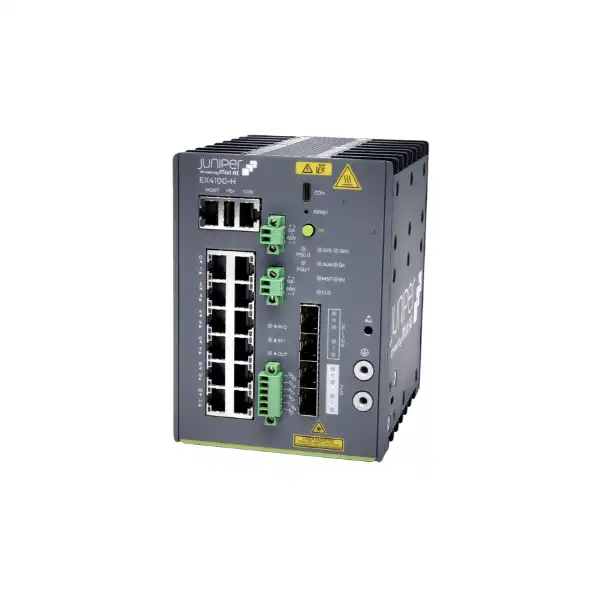
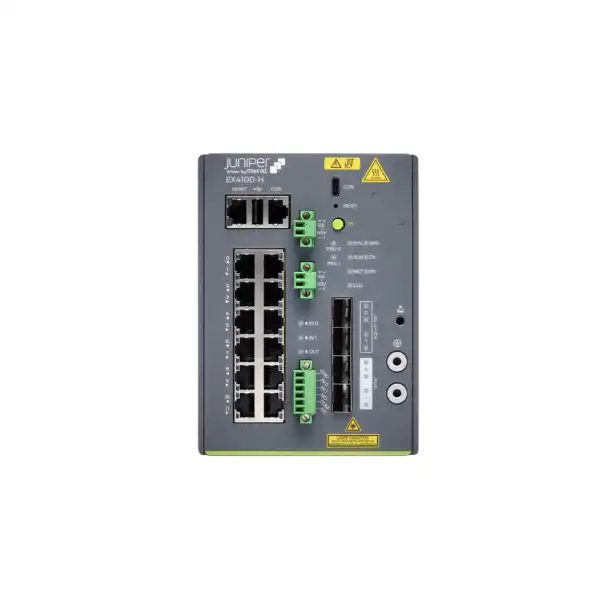
Juniper EX4100-H Ethernet Switch
A temperature-hardened, fanless Juniper switching platform for industrial, transport, surveillance, smart-city and distributed enterprise environments where conventional office access switches may not match the physical deployment conditions.
Buyer signals at a glance
- Fanless convection-cooled industrial access switching
- Copper multigigabit PoE++ and fiber access variants
- Junos OS with optional Mist Wired Assurance cloud operations
- Virtual Chassis support for up to 10 switches
- AC and DC power options with model-specific redundancy choices
- Designed for cabinet or enclosure deployment in harsh environments
Direct answer: what is the Juniper EX4100-H?
The Juniper EX4100-H is a family of ruggedized industrial Ethernet access switches built for locations where temperature range, vibration exposure, enclosure design, power architecture, remote operation and physical resilience matter more than they normally do in an office wiring closet. It runs Junos OS, supports cloud-ready management through Juniper Mist Wired Assurance, and combines enterprise switching capabilities with industrial deployment characteristics.
Industrial access, remote surveillance, smart infrastructure, transportation, factory-floor, outdoor-enclosure and distributed edge switching.
Organizations needing Juniper switching in tougher physical environments or compact edge locations where fanless operation and extended temperature support are valuable.
Exact model, port type, PoE load, PSU arrangement, optics, cabinet airflow and operating environment must be confirmed before ordering.
The model, accessories, licensing, power, optics, support and deployment scope that best match the UAE project requirement.
Why EX4100-H is different from a conventional campus access switch
Many Ethernet switch purchases begin with a port count and end with a power supply choice. EX4100-H projects need a wider conversation. The family is intended for harsh indoor and outdoor-enclosure use cases, so the enclosure, thermal design, power feed, cable plant, optics and installation location are part of the switching decision rather than separate facilities details. That distinction is important in Dubai and across the UAE, where equipment may sit close to roads, outdoor surveillance poles, industrial machinery, remote cabinets, transport infrastructure or energy systems. High ambient temperature outside a cabinet does not automatically mean the switch can be placed anywhere without environmental planning; the temperature inside the enclosure and airflow condition remain key engineering inputs.
Juniper describes EX4100-H as a ruggedized, temperature-hardened platform with fanless convection cooling. The documented operating envelope depends on the cabinet configuration: sealed, ventilated or blower-equipped. This is useful because the switch can be matched to locations that would be unsuitable for standard office-class equipment, but the qualification belongs to the complete installation, not just the chassis. Dust, moisture, salt fog, restricted airflow, direct solar heating and optic-module temperature limits can all influence the real design.
The family also preserves familiar enterprise-network capabilities. It can participate in Virtual Chassis designs, supports Layer 2 and Layer 3 functions, and can be managed locally with Junos or through the Juniper Mist cloud when the appropriate Wired Assurance licensing is in place. That combination makes EX4100-H relevant when a business wants consistent operational methods across office, branch and industrial networks instead of introducing an unrelated industrial-switch operating model at every harsh-environment site.
EX4100-H model family: choose the access medium first
EX4100-H-12MP
A compact twelve-port copper PoE++ model. It provides eight 10/100/1000BASE-T access ports and four 100M/1/2.5Gbps multigigabit PoE++ ports, plus two 1/10Gbps SFP/SFP+ MACsec-enabled uplinks and two 1/10Gbps SFP/SFP+ Virtual Chassis ports. This model is particularly interesting for compact roadside, surveillance, remote-edge and industrial cabinets where only a modest number of endpoints are required but some devices need multigigabit connectivity or high-power PoE.
EX4100-H-24MP
A twenty-four-port copper PoE++ model for denser access requirements. It includes sixteen 1Gbps RJ-45 PoE++ ports and eight 1/2.5Gbps RJ-45 PoE++ ports, with four 1/10Gbps SFP/SFP+ uplinks and four 1/10Gbps SFP/SFP+ Virtual Chassis or uplink ports. It suits larger industrial cabinets, surveillance aggregation, transport facilities, warehouses and other sites where endpoint count and PoE demand exceed the compact 12-port design.
EX4100-H-24F
A fiber-focused industrial access model with twenty-four 1Gbps SFP access ports, four 1/10Gbps SFP/SFP+ MACsec-enabled uplinks and four 1/10Gbps SFP/SFP+ Virtual Chassis or uplink ports. It has no PoE access ports. This model should be evaluated when fiber is the access medium, electrical isolation is desirable, long cable distances are involved, or field devices connect through optical infrastructure rather than copper Ethernet.
Core specification comparison
| Decision area | EX4100-H-12MP | EX4100-H-24MP | EX4100-H-24F |
|---|---|---|---|
| Access ports | 8 × 10/100/1000 RJ-45 + 4 × 100M/1/2.5G RJ-45 | 16 × 1G RJ-45 + 8 × 1/2.5G RJ-45 | 24 × 1G SFP |
| PoE | PoE++ on 12 downlinks, up to 90 W per port subject to system power budget | PoE++ on 24 downlinks, up to 90 W per port subject to system power budget | No PoE access ports |
| Uplinks | 2 × 1/10G SFP/SFP+ | 4 × 1/10G SFP/SFP+ | 4 × 1/10G SFP/SFP+ |
| Virtual Chassis / extra network ports | 2 × 1/10G SFP/SFP+ | 4 × 1/10G SFP/SFP+ | 4 × 1/10G SFP/SFP+ |
| Cooling | Fanless convection | Fanless convection | Fanless convection |
| Typical reason to shortlist | Compact rugged PoE edge | Higher-density rugged PoE access | Rugged fiber access or aggregation |
The table is a selection aid rather than a complete bill of materials. Power supplies, optics, mounting hardware, licenses, support contracts and enclosure components can be separate quotation lines. Port count alone should therefore never be treated as the final purchasing specification.
Environmental engineering for Dubai and UAE installations
The strongest reason to evaluate EX4100-H is not merely its Ethernet feature set; it is the combination of enterprise switching and environmental tolerance. Juniper specifies operation up to 15,000 feet with no temperature derating and relative humidity from 5% to 95% noncondensing. For the documented EX4100-H ruggedized models, the stated operating range depends on enclosure airflow: from -40°C to +60°C in a sealed cabinet with no forced airflow, up to +70°C in a ventilated cabinet with approximately 40 linear feet per minute airflow, and up to +75°C in a blower-equipped cabinet with approximately 200 LFM airflow. Storage range is documented from -40°C to +85°C.
Those numbers should be used as engineering limits, not marketing shorthand. In the UAE, the external air temperature can be substantially lower than the temperature trapped inside a sun-exposed metal enclosure. Solar load, enclosure color, cabinet size, heat produced by power supplies and PoE devices, cable entries, filters and neighboring equipment all affect the internal temperature. A switch rated for a high environmental limit does not remove the need to calculate or measure cabinet conditions.
Juniper also requires the switch to be installed in a cabinet or enclosure and highlights protection from moisture, contaminants and salt fog in outdoor deployments. That is especially relevant near coastal areas, road infrastructure, industrial sites or locations exposed to fine airborne dust. The enclosure must preserve ventilation or forced-air assumptions without allowing contamination to compromise connectors, optics or power components.
Environmental checklist
- Internal enclosure temperature, not only outdoor ambient
- Sealed, vented or blower-equipped airflow design
- Dust, moisture and salt-fog exposure
- Optic module temperature rating
- PSU heat and PoE load
- Grounding, surge and electrical design
- Safe maintenance clearance
- Cable gland and fiber bend requirements
PoE++ planning: per-port capability is not the same as total available power
The EX4100-H-12MP and EX4100-H-24MP support PoE++ on their copper access ports, with support up to 90 W per port. That figure is useful for powering modern wireless access points, PTZ cameras, compact edge devices and other IEEE 802.3bt equipment, but a network design must distinguish the maximum power a single port can negotiate from the total PoE budget available across the switch. The final usable budget depends on the model, installed power supplies and power architecture. For the 12MP, Juniper publishes an overall PoE figure of up to 360 W with two power supplies. A project with several high-draw devices can therefore reach the system budget long before every port is loaded to its individual maximum.
For procurement, build a powered-device table. Record the endpoint model, IEEE power class, expected steady-state draw, worst-case draw, cable length and whether redundant powering is required. Cameras with heaters or infrared illuminators, outdoor wireless access points and certain edge-compute devices can have higher peak consumption than their normal operating draw. If a design is based only on average wattage, a cold start or simultaneous device boot can expose a power shortfall.
Cabling also matters. Juniper notes that IEEE 802.3bt class 4 powered devices require Category 5 or better cabling, while many UAE deployments will appropriately use higher-category structured cabling for multigigabit links and margin. Connector quality, cable temperature, bundling and distance should be considered in industrial cabinets because electrical resistance and heat can rise in challenging physical conditions.
If a site does not need PoE, do not buy a PoE model simply because it is the default option in a reseller list. A fiber model or non-PoE copper model may provide a cleaner fit, reduce unnecessary power-system complexity and better match field media. Conversely, if the site may add cameras, wireless APs or sensors later, reserving PoE capacity and spare ports can reduce future enclosure work.
Power design: AC, DC and redundancy need to be specified explicitly
EX4100-H-12MP power
The 12MP uses external 340 W AC and/or 340 W DC power supplies. Its compact chassis and external PSU arrangement can be useful in cabinets with constrained device space, but the total installation must include room and thermal consideration for the external supplies and wiring.
EX4100-H-24MP power
The 24MP uses field-replaceable 340 W AC and/or 340 W DC power supplies. The quotation should identify whether one or two PSUs are required and whether the feeds are AC, DC or mixed, because the redundancy objective and PoE budget depend on this selection.
EX4100-H-24F power
The fiber model uses 90 W AC and/or 90 W DC field-replaceable power supplies. Because it does not power copper endpoints, the power requirement differs substantially from the PoE models, but redundant feed design may still be important in critical infrastructure.
Redundancy should be designed around failure domains. Two power supplies connected to the same upstream breaker are not equivalent to two independent feeds. For high-availability sites, document the source of each feed, UPS or DC plant, breaker arrangement, grounding, surge protection and expected runtime. The EX4100-H can support redundant power arrangements, but the surrounding electrical system determines whether that redundancy delivers the business result expected during a utility, PSU or circuit failure.
Optics and uplinks: select transceivers for both distance and environment
SFP and SFP+ interfaces are central to every EX4100-H variant. The copper PoE models use SFP/SFP+ for uplinks and Virtual Chassis connectivity; the 24F also uses SFP ports for its twenty-four access interfaces. Optic selection should therefore be treated as part of the switch design, not an accessory choice made after the chassis arrives.
Start with fiber type, required distance, connector standard and link speed. Then evaluate the optic’s environmental rating. Juniper publishes separate environmental guidance for industrial-grade and commercial-grade optics because the pluggable transceiver can become the thermal limit even when the switch chassis itself supports a wider range. A high-temperature cabinet populated with the wrong optic can therefore produce an installation whose practical operating limit is set by the transceiver rather than the EX4100-H chassis.
For existing UAE fiber plants, record whether each link is single-mode or multimode, approximate distance, connector and patch-panel type, and whether the remote endpoint is 1G or 10G. The link must be compatible at both ends. Do not assume a 10G-capable SFP+ slot automatically negotiates correctly with every legacy optic or remote device; the specific transceiver combination and supported software release should be checked against current Juniper hardware compatibility information.
Spare optics can also be sensible for remote sites where service access is difficult. However, stocking should be aligned to the deployed transceiver family rather than buying generic spares. A consistent optic standard across similar field cabinets simplifies troubleshooting, reduces accidental mismatches and makes replacement logistics easier.
Virtual Chassis: useful consolidation, but mode details matter
EX4100-H supports Juniper Virtual Chassis technology, allowing up to ten compatible switches to operate as a single logical system. This can reduce the number of management points, simplify configuration consistency and provide design options for resilient access or distribution. EX4100-H can also participate with EX4100 and EX4100-F platforms when the Virtual Chassis mode is correctly aligned.
A critical detail is the mode. HGoE is the default on EX4100-H. For mixed Virtual Chassis designs with EX4100 or EX4100-F, the modes must be compatible: either the EX4100-H is converted as required or the companion switches are configured to the corresponding HGoE mode. Juniper also documents differences between HiGig and HGoE behavior. In HiGig mode the dedicated VCP interfaces must operate consistently as Virtual Chassis ports or network ports, while HGoE can permit more flexible mixed use. Uplink behavior can also differ by mode.
For a new deployment, decide early whether the VCP-capable interfaces are reserved for stacking or needed as ordinary network uplinks. If the project later discovers that every high-speed port was committed to a Virtual Chassis design, an uplink shortage may force a different topology or chassis choice. The topology should also consider physical distance between members, approved optics or cables, failure domains and how maintenance will be performed in separate cabinets.
Virtual Chassis is not automatically the best solution for every industrial site. Widely separated remote cabinets may be easier to operate as independent switches under Mist or centralized management rather than extending one logical chassis across fragile inter-site links. The decision should compare operational simplicity with fault containment and physical topology.
Mist Wired Assurance or local Junos management?
EX4100-H is cloud-ready and can be onboarded to Juniper Mist for Wired Assurance. That approach is attractive when the organization wants centralized visibility, configuration workflows, telemetry, service-level insights and consistent operations across many distributed locations. Remote industrial and surveillance sites can particularly benefit because network staff may not be physically present when an incident occurs.
Cloud management is not simply included by virtue of buying the chassis. Juniper states that a Mist Wired Assurance license is required to use the relevant Mist cloud workflows. Without that license, the switch can still be configured and operated through Junos OS CLI, and other on-premises management methods may be available depending on the wider architecture. Procurement should therefore separate hardware, subscription and support decisions instead of treating them as one indistinguishable line item.
For a multi-year project, compare subscription duration with the expected support and lifecycle plan. A one-year license may suit a proof of concept but create an avoidable renewal event soon after production deployment. Three- or five-year terms can align better with procurement cycles, but the correct term depends on budget policy, planned hardware lifecycle and the features required. Confirm the current subscription class for the exact port count and feature tier; license SKUs can change as vendors revise packaging.
If the organization already uses Juniper Mist for wireless, extending Wired Assurance to EX4100-H can create a more unified operational view. If the site is isolated, highly regulated or intentionally kept off cloud services, Junos-based local management may be more appropriate. The selection should follow the operational model, not fashion.
Security, segmentation and protected uplinks
Industrial Ethernet deployments increasingly carry more than simple control traffic. Cameras, access-control devices, wireless APs, sensors, operator workstations, payment systems, IoT gateways and general enterprise clients may share physical infrastructure. EX4100-H supports enterprise features including EVPN-VXLAN, group-based policy capabilities and MACsec on selected interfaces, giving architects multiple options for separating traffic and protecting sensitive links.
MACsec is particularly relevant when Ethernet links traverse areas where physical access is not fully trusted. Juniper documents AES-256 MACsec support on specified EX4100-H interfaces. The important buyer detail is that MACsec is interface- and feature-dependent; it should not be assumed on every access port without checking the exact model. If link encryption is a requirement, the bill of materials and topology must identify which physical interfaces need it, what the peer device supports and which software features or licenses are required.
EVPN-VXLAN can extend modern campus-fabric approaches toward the access layer. This may be useful for organizations standardizing segmentation across many sites, but it also introduces architectural dependencies. Underlay routing, overlay control-plane design, addressing, policy and operational ownership must be planned. Buying EX4100-H because it supports EVPN-VXLAN does not by itself create a fabric; the network architecture has to define how the switch participates.
For simpler sites, traditional VLANs and routed uplinks may be entirely sufficient. A good design uses the least complexity needed to meet isolation, resilience and scale requirements. Ruggedized hardware should solve a physical deployment problem without forcing unnecessary logical complexity.
Dry-contact alarms: a small interface with practical field value
EX4100-H includes dry-contact alarm connections that can integrate simple external alarm signals with switch monitoring. Juniper documents two alarm inputs and one relay output arrangement. Inputs can be connected to devices such as door or cabinet sensors, while the relay output can drive or signal external alarm equipment subject to the documented electrical limits and configuration.
This matters because industrial and roadside cabinets often need basic physical-state awareness alongside packet monitoring. A network operations team may want to know that a door has opened, a cabinet sensor has changed state or a chassis condition should trigger a local indicator. Dry contacts provide a straightforward bridge between those physical events and network management without requiring every field sensor to become an IP endpoint.
The alarm ports are not plug-and-play in the sense of automatically producing the desired behavior. They require initial configuration, and the input threshold, grounding and relay logic must be understood. The installer should document whether each input is normally open or normally closed, what event constitutes a major or minor alarm, and what the output relay is expected to activate. Electrical work should follow Juniper’s installation guidance and local site requirements.
For buyers, the main procurement point is to include terminal accessories, field wiring and integration effort in the scope if dry contacts are part of the design. Otherwise the feature may exist on the switch but remain unused because the cabinet wiring was never planned.
Use-case fit in the UAE
Surveillance and smart-city edge
PoE++ versions can power cameras and wireless links while fiber uplinks carry traffic back to aggregation points. The ruggedized temperature range and cabinet deployment model suit roadside and remote locations, but PoE budget, surge protection, cabinet heat and camera peak power must be sized together.
Transportation infrastructure
Traffic systems, stations, depots and roadside networks can require extended temperature support, vibration tolerance and remote operations. Dry-contact alarms can add cabinet-state integration, while fiber interfaces support longer-distance links between field locations.
Industrial and manufacturing
Fanless operation avoids reliance on chassis fan modules in dusty or vibration-prone locations, though the enclosure itself must still provide the required environment. VLAN, routing and fabric capabilities allow integration with wider enterprise architecture where appropriate.
EV charging and energy edge
Distributed charging or utility-adjacent sites may need compact, remotely managed switching with AC or DC options. The actual selection should account for cabinet power, upstream WAN architecture, cybersecurity and the number of local Ethernet devices.
Airports and large campuses
Remote buildings, apron-adjacent systems, outdoor cameras and transport-related zones may need rugged access switching while remaining operationally consistent with the campus Juniper estate. Model and enclosure design should be matched to the precise location.
Where EX4100-H may not be the right choice
A balanced shortlist includes reasons not to buy. If the switch will live in a normal air-conditioned office communications room, a standard EX4100 or another campus access platform may offer a more conventional rack form factor and port-density choice without paying for ruggedized characteristics that provide little value. If the project requires substantially more than 24 access ports per cabinet, a higher-density platform may reduce chassis count, although environmental requirements still need to be met.
If the field network is primarily fiber, a copper PoE model may create unnecessary cost and unused power capability. The EX4100-H-24F should be compared instead. If every endpoint is copper but none needs power, a non-PoE option may be preferable if current regional availability and software support match the project. Likewise, if endpoints need speeds above the available multigigabit access interfaces, the architecture may require a different switch family.
EX4100-H also does not eliminate enclosure engineering. Buyers seeking a bare switch that can simply be mounted in direct outdoor weather exposure should not interpret ruggedized as waterproof. Juniper’s installation guidance calls for cabinet or enclosure use and appropriate protection from environmental contaminants. The enclosure, gland sealing, airflow and maintenance design remain part of the solution.
Finally, a complex EVPN-VXLAN or Mist-managed architecture should be justified by operational needs. A small standalone industrial site may be better served by a simpler routed or VLAN-based design. The hardware supports sophisticated capabilities, but good engineering starts with the required outcome rather than using every available feature.
Sizing the switch: a practical buyer workflow
Count endpoints
List devices by type and location. Add sensible spare ports for growth, maintenance and temporary diagnostics.
Classify media and speed
Separate 1G copper, multigigabit copper, 1G fiber and 10G uplink requirements before choosing a chassis.
Build the PoE budget
Use maximum expected draw for each powered device and confirm the PSU arrangement supports the total requirement.
Validate the environment
Check internal cabinet temperature, airflow, contamination, vibration, humidity, solar load, altitude and maintenance access.
Choose uplink and VC use
Reserve the required SFP/SFP+ ports for uplinks, stacking or network use before finalizing the topology.
Complete lifecycle scope
Add licenses, support, spare optics, installation, configuration, migration and documentation to the commercial comparison.
Installation planning: hardware fit is more than chassis dimensions
The compact EX4100-H-12MP has a distinctive cube-like form factor, while the 24MP and 24F use a wider 1U-style chassis. That means the mounting method and available cabinet geometry can differ materially between models. The site survey should record usable width, depth, rail or shelf arrangement, cable-entry direction, bend radius for fiber, position of power terminals and clearance needed for future replacement. A cabinet with enough theoretical volume can still be unsuitable if the door interferes with patch leads or if the PSU cannot be serviced without disconnecting unrelated equipment.
Fanless does not mean zero airflow requirement. Convection-cooled equipment needs free space around relevant surfaces, and Juniper’s temperature limits explicitly vary by enclosure airflow. In a sealed cabinet, heat generated by the switch, PSU and PoE load must be dissipated through the enclosure. In a vented or blower-equipped design, filters, airflow path and fan maintenance become part of availability planning.
Grounding and surge protection deserve particular attention at outdoor and transportation sites. Copper Ethernet connected to field devices can create exposure to transients, and local electrical practices, bonding and protective devices must be reviewed by qualified personnel. Fiber uplinks can help provide electrical isolation between cabinets, but they do not remove the need for correct chassis grounding and power protection.
Installation documentation should identify each switch, cabinet, port assignment, optic, power feed, alarm input, uplink and management address. Remote sites are expensive to revisit, so labeling and as-built records produce real operational value. A few minutes of disciplined documentation during commissioning can save hours when a technician returns months later.
Migration from an existing industrial or campus switch
Replacing an existing field switch with EX4100-H should start with a port-by-port audit. Capture VLAN membership, tagged and untagged behavior, spanning-tree settings, routed interfaces, DHCP relay, access-control policies, QoS, multicast requirements, PoE settings, LLDP, link aggregation and uplink speed. Industrial and surveillance networks often contain undocumented dependencies that only become visible when a replacement is attempted.
If the old platform is from another vendor, configuration syntax cannot simply be copied. Translate the intended behavior into Junos constructs, then test the resulting configuration. Pay attention to default behavior differences, especially VLAN tagging, spanning tree, link aggregation and PoE negotiation. If the network uses proprietary industrial protocols or specialized multicast patterns, verify feature support and lab-test critical traffic before the maintenance window.
Physical migration can be just as important. Existing fiber transceivers may not be supported in the new switch. Copper patch leads may be too short because the port orientation changed. A new PSU may require a different feed or terminal arrangement. The cabinet may need a shelf, bracket or revised cable management. These are predictable issues when the survey includes photographs, measurements and part numbers.
For high-availability sites, plan rollback. Keep the old switch configuration, cable map and hardware available until acceptance tests are complete. Define success criteria such as endpoint reachability, PoE delivery, camera streams, upstream routing, alarm behavior and management visibility. A controlled migration is less about speed than about knowing exactly what to verify before declaring the site operational.
Operations, telemetry and troubleshooting
A ruggedized switch is often installed precisely where hands-on troubleshooting is inconvenient. Operational visibility therefore matters. EX4100-H supports familiar Junos operational commands and cloud-ready telemetry, while Mist Wired Assurance can provide a centralized management experience when licensed. The most useful operational design combines device health, interface state, environmental alarms, power status and client connectivity into a monitoring workflow that the support team actually uses.
Before handover, define alert thresholds. A cabinet that normally runs at a moderate internal temperature should generate attention before reaching the switch’s maximum environmental boundary. Likewise, repeated link flaps, optic errors, PoE denial events or PSU alarms may indicate a developing site problem. Monitoring should help operations intervene before users report failure.
For optical links, retain receive/transmit power baselines where available. A gradual change can signal contamination, fiber damage or connector deterioration. For copper links, cable diagnostics can help isolate certain physical faults. For PoE devices, record negotiated power and port state. These details make remote triage more effective because the engineer can distinguish a network configuration issue from a field-cabling or endpoint-power problem.
Configuration backup and change control are also essential. Whether management is cloud-based or local, every production switch should have an identifiable desired configuration, software version and ownership record. Industrial sites frequently remain in service for years; operational discipline is what keeps a rugged hardware platform maintainable over that period.
Software release and lifecycle considerations
EX4100-H models entered Junos support in different releases. Juniper documentation identifies 24.3R1 as the first Junos OS release for the EX4100-H-12MP and 24.4R1 for the 24MP and 24F. That matters when an organization has a strict software-standardization policy. A network running an older Junos train may need a software upgrade before EX4100-H can be introduced into the same operational environment.
For Virtual Chassis or feature-rich deployments, confirm the exact target software release across all participating switches. Mixed hardware support, specific optics, security functions and bug fixes can depend on software. The preferred release should be selected from Juniper’s current support guidance rather than assuming the earliest supported version is appropriate for production.
Lifecycle planning should include vendor support coverage and spare strategy. Industrial switches often serve locations with higher truck-roll cost than office closets, so a support plan with clear replacement expectations can be commercially justified. Critical sites may also keep a cold spare chassis or standardized spare PSU and optics locally. The right choice depends on site count, business impact and replacement lead time.
Because vendor lifecycle status can change, an order should verify current availability, support term eligibility and recommended software close to purchase date. The model family name alone is not enough to establish lifecycle suitability for a multi-year project.
Procurement: build a complete bill of materials, not a chassis-only quote
An EX4100-H purchase can appear simple until the accessories and operational requirements are separated. A complete quotation should identify the exact base model, quantity, power supplies, power cords or DC wiring requirements, mounting hardware, SFP/SFP+ optics, fiber patch cords, Mist subscription if required, Juniper support, spare components, installation and configuration services. If the switch is part of an outdoor cabinet project, the cabinet itself, climate design, surge protection, terminal wiring and field labor may need to be quoted by the relevant project contractor.
The bill of materials should also distinguish mandatory components from recommended spares. This makes budget decisions clearer. For example, the project may require two PSUs for resilience but choose whether to purchase a spare optic for every site or maintain a central spare pool. The same approach can be used for support tiers and license duration.
Avoid accepting a quote that uses only the description “Juniper EX4100-H switch” without an orderable model and accessory list. The family contains materially different copper, PoE and fiber configurations. Commercial comparison is meaningful only when each vendor is quoting the same technical scope.
Buyer questions to resolve before placing an order
Do we need copper, fiber or both?
This decision immediately narrows the model. Copper PoE deployments typically point toward 12MP or 24MP, while fiber-heavy access can favor 24F.
What is the real PoE load?
Use endpoint maximums and startup behavior, not only port count. Check whether the chosen PSU combination preserves enough budget during a PSU failure.
How hot will the enclosure become?
The relevant figure is the switch environment inside the enclosure under worst expected conditions. Airflow category determines the documented upper operating limit.
Will we use Mist?
If yes, include the appropriate Wired Assurance subscription and term. If not, define the Junos or on-premises operational workflow.
Do we need Virtual Chassis?
Reserve the correct interfaces, choose the VC mode and verify compatibility with any EX4100 or EX4100-F members before deployment.
Which optics are approved?
Match distance, fiber type, speed and environmental rating, then validate the transceiver against current Juniper compatibility information.
Frequently asked questions
Is Juniper EX4100-H an outdoor switch?
It is a ruggedized industrial switch intended for harsh indoor and outdoor-enclosure use cases, but Juniper requires cabinet or enclosure installation with the appropriate environmental protection and airflow. It should not be interpreted as a weatherproof bare chassis for direct exposure to rain, dust or salt spray.
Does EX4100-H support PoE++?
The EX4100-H-12MP and EX4100-H-24MP support PoE++ on their copper downlink ports, up to 90 W per port, subject to the total system power budget. The EX4100-H-24F is a fiber model and does not provide PoE access ports.
Can EX4100-H be managed from Juniper Mist?
Yes. EX4100-H is cloud-ready and can be managed through Mist Wired Assurance when the appropriate license is purchased. Junos CLI remains available for local management when Mist Wired Assurance is not used.
How many switches can form a Virtual Chassis?
Juniper documents support for up to ten switches in a Virtual Chassis. EX4100-H can be combined with compatible EX4100 and EX4100-F members when the Virtual Chassis mode and software requirements are correctly aligned.
What temperature range does EX4100-H support?
The documented operating range depends on enclosure airflow. Juniper specifies -40°C to +60°C in a sealed cabinet, -40°C to +70°C in a ventilated cabinet and -40°C to +75°C in a blower-equipped cabinet for the ruggedized models, subject to the applicable optic and installation conditions.
Does the switch support AC and DC power?
Yes, the EX4100-H family supports model-specific AC and DC PSU arrangements. The 12MP uses external 340 W supplies, the 24MP uses 340 W field-replaceable supplies, and the 24F uses 90 W field-replaceable supplies. Confirm the exact feed and redundancy design in the quote.
Is the EX4100-H-24F a PoE switch?
No. Its twenty-four access ports are 1Gbps SFP fiber interfaces. It is intended for fiber-based access requirements rather than powering endpoints over copper Ethernet.
Are optics included with the switch?
Optics should be treated as separate bill-of-material items unless a specific bundle explicitly states otherwise. The required transceivers depend on fiber type, distance, speed and environmental rating.
Decision recap
12MP for compact PoE, 24MP for denser PoE, 24F for fiber; evaluate 12T when non-PoE copper is specifically required.
Calculate system PoE demand and define AC/DC redundancy rather than selecting power supplies after the chassis.
Validate internal enclosure temperature, airflow, contamination protection, optic limits and site grounding.
Choose Mist Wired Assurance licensing or a Junos-based workflow and align the software release with the wider estate.
What FourTeck needs for an accurate EX4100-H quotation
Specify the Juniper EX4100-H around the real site, not only the port count
For Dubai and UAE projects, FourTeck can help build a quotation that aligns the exact EX4100-H chassis with PoE load, AC/DC power, industrial optics, enclosure conditions, Mist licensing, Juniper support and implementation scope. Providing the site and endpoint details at the beginning produces a cleaner bill of materials and reduces the risk of discovering missing accessories or environmental constraints during installation.

Reviews
There are no reviews yet.