
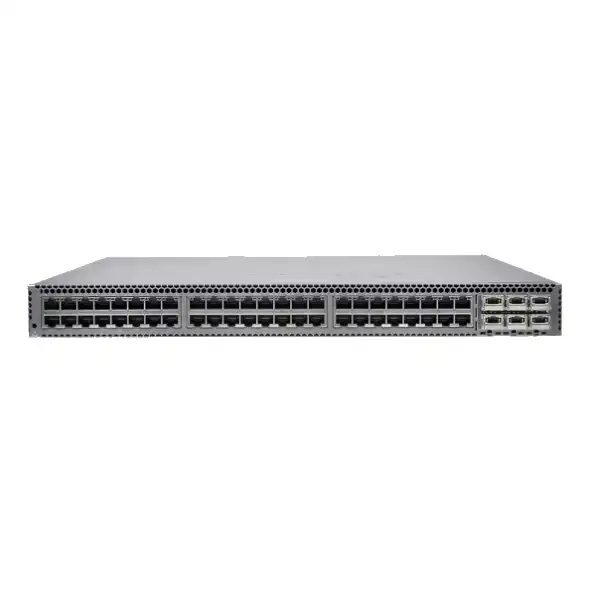
Juniper QFX5100 Data Center Switch
A technically capable 1/10/40GbE switching family built for server access, aggregation, leaf roles and data center fabrics. The critical buying decision today is not simply whether QFX5100 performance fits the network, but whether the exact QFX5100 SKU, licensing, optics and remaining support horizon make sense compared with a current-generation alternative.
Direct answer: what is the Juniper QFX5100?
The Juniper QFX5100 is a family of fixed-configuration Ethernet switches designed primarily for data center access, top-of-rack, aggregation and leaf deployments. It runs Junos OS and combines high-density 10GbE or 40GbE interfaces with Layer 2, Layer 3, virtualization, automation and data-center-oriented features. Depending on the model, the family provides SFP/SFP+ server-facing ports, 100M/1/10GbE RJ-45 interfaces, or dense QSFP+ 40GbE connectivity. It is mainly used where predictable low-latency switching, high port density, mature routing behavior and compatibility with established Juniper data center designs are important.
Organizations should consider the QFX5100 when they are maintaining an installed QFX5100 estate, extending an existing 10/40GbE fabric, replacing a failed unit with an operationally compatible model, or supporting an architecture whose optics, cabling, software and automation were built around this family. A greenfield deployment requires more caution because the platform is now identified by Juniper as end-of-life. That does not automatically make every existing QFX5100 unusable, but it changes the procurement question from “is this switch fast enough?” to “is this exact SKU supportable for the intended service life?”
The most important factor to confirm is the exact hardware and software identity. QFX5100-48S, QFX5100-48T, QFX5100-24Q, QFX5100-24Q-AA and QFX5100-96S are not interchangeable descriptions. They differ in physical media, port density, chassis height, expansion options, power consumption and deployment role. Airflow orientation, AC or DC power, optics, breakout requirements and feature licenses can also change the usable design. Two boxes with “QFX5100” on the label can therefore create very different outcomes in a rack.
FourTeck can help map the required port count, media type, uplink design, optics, software features, airflow, support expectations and migration horizon to an exact bill of materials. For UAE buyers, this is especially useful when the requirement comes from a legacy network diagram or an abbreviated tender line that names only the product family without the full SKU.
Where the QFX5100 family fits in a data center
The QFX5100 was designed for the era in which 10GbE server connectivity and 40GbE uplinks became standard building blocks for virtualized data centers. That design still explains why many installed environments continue to use the platform. A QFX5100-48S can sit at the top of a server rack with forty-eight SFP/SFP+ interfaces facing hosts and six QSFP+ interfaces available for uplinks or breakout. A QFX5100-48T serves a similar role where copper 10GBASE-T is required. The QFX5100-24Q shifts the emphasis toward dense 40GbE, while the 2U QFX5100-96S addresses high-density fiber aggregation or server access.
In practical design work, the family can be viewed as a 10/40GbE data center building block rather than a modern universal-speed switch. That distinction matters. Current networks may require 25GbE at the server, 100GbE uplinks, MACsec, newer silicon capabilities or longer forward software life. A QFX5100 may therefore remain perfectly aligned to an established 10GbE rack while being the wrong platform for a new compute cluster that is expected to migrate to 25/100GbE. Matching the port count alone is not enough; the expected speed roadmap should be part of the decision.
The platform also has value in brownfield Juniper environments because Junos OS operational behavior is familiar to teams that already administer Juniper switches, routers and security platforms. Commit and rollback, protected process architecture, routing-policy concepts, CLI workflows and automation interfaces can reduce operational friction compared with introducing a completely different network operating model. That benefit is most compelling when the switch is being added to an existing design whose templates, monitoring, logging and change procedures already account for QFX5100 behavior.
For a new UAE data center build, the safer starting point is to compare the QFX5100 requirement with Juniper’s current recommended migration path, including the QFX5120 family. The goal is not to reject legacy hardware automatically; it is to establish whether compatibility with the installed base outweighs the advantages of newer port speeds, lifecycle runway and platform capabilities.
QFX5100 models: the family name hides major differences
QFX5100-48S
A 1U fiber-oriented access or leaf model with 48 SFP/SFP+ interfaces and six QSFP+ ports. It is the most natural match for racks using 1GbE/10GbE optical modules or supported direct-attach cabling, with 40GbE available for uplinks. Breakout from the QSFP+ ports can increase the available 10GbE interface count. This model is often the reference point when buyers say “QFX5100 top-of-rack switch,” but its optical requirements must be specified separately.
QFX5100-48T
A 1U copper access or leaf model with 48 RJ-45 ports supporting 100 Mbps, 1GbE and 10GbE, plus six QSFP+ ports. This is the model to examine when server, appliance or structured cabling requirements specifically call for twisted-pair copper. Its power consumption is materially higher than the 48S figure, so rack power and thermal planning should not simply be copied from a fiber model.
QFX5100-24Q / 24Q-AA
These 1U models center on high-density QSFP+ 40GbE connectivity. The standard 24Q starts with 24 QSFP+ ports and can expand to 32 using supported expansion modules. The 24Q-AA is a specialized application-acceleration variant with enhanced CPU, memory and storage characteristics and optional packet-flow acceleration hardware. A request for “24Q” should therefore not be assumed to include “24Q-AA” capabilities.
QFX5100-96S
A 2U high-density model with 96 SFP/SFP+ ports and eight QSFP+ ports. Its density makes it useful where many 10GbE fiber connections must be consolidated, but its physical size, power, airflow and lifecycle milestone differ from the 1U models. A 96S replacement should be checked against rack-unit availability and the exact cabling pattern rather than selected solely because it offers the largest port count.
Verified hardware specification overview
| Model | Primary interfaces | Switching capacity | Form factor | Published power consumption |
|---|---|---|---|---|
| QFX5100-48S | 48 x SFP/SFP+ plus 6 x QSFP+ | 1.44 Tbps / 1.08 Bpps | 1U | 150 W |
| QFX5100-48T | 48 x 100M/1/10GbE RJ-45 plus 6 x QSFP+ | 1.44 Tbps / 1.08 Bpps | 1U | 335 W |
| QFX5100-24Q | 24 x QSFP+, expandable to 32 with supported modules | 2.56 Tbps / 1.44 Bpps | 1U | 161 W |
| QFX5100-24Q-AA | 24 x QSFP+ with specialized expansion options | 2.56 Tbps / 1.44 Bpps | 1U | 175 W |
| QFX5100-96S | 96 x SFP/SFP+ plus 8 x QSFP+ | 2.56 Tbps / 1.44 Bpps | 2U | 263 W |
These figures describe the family at a hardware level, but they do not replace an exact SKU check. Airflow, power-supply type, transceiver support, software release and entitlement can change the practical bill of materials. Published power numbers are also platform figures rather than a complete rack energy model; optics, fan operation, environmental conditions and redundant power architecture need to be included in facility planning.
Port planning: fiber, copper, QSFP+ and breakout choices
Port planning is where many QFX5100 quotations go wrong. The family includes physically different media types, and the correct switch depends on what is connected at the far end. The QFX5100-48S and QFX5100-96S use SFP/SFP+ cages for their primary 1/10GbE connectivity. Those cages do not create a complete link by themselves. The design still needs compatible optical transceivers, supported direct-attach cables, suitable fiber type and connector presentation, or approved copper SFP choices where applicable. A rack elevation that merely says “48 x 10G” is therefore incomplete unless it also identifies media and reach.
The QFX5100-48T addresses a different cabling problem by providing forty-eight RJ-45 interfaces capable of 100 Mbps, 1GbE and 10GbE. That can be useful in environments that already have structured copper cabling or devices with 10GBASE-T network adapters. The tradeoff is not only media. Copper 10GbE can affect power, thermal behavior and cabling distance assumptions, and the switch itself has a higher published power-consumption figure than the 48S. If the rack is already thermally constrained, this difference belongs in the design review.
All QFX5100 product SKUs use QSFP+ connectivity for 40GbE roles. A QSFP+ port can operate as a 40GbE interface or, where the platform and configuration support it, be broken out into four 10GbE interfaces using appropriate splitter cabling and optics. This capability can be valuable for extending 10GbE density. On the QFX5100-48S, for example, breakout can raise the usable 10GbE port count beyond the forty-eight native SFP/SFP+ cages. On the 24Q, breakout is fundamental to designs that use the switch as a high-density 10GbE aggregation platform rather than only as a 40GbE device.
Breakout is not a reason to ignore physical-layer detail. The cable assembly must match the switch, the remote device and the required distance. DAC is attractive for short in-rack or adjacent-rack connections because it can reduce optic count and power, while fiber is more appropriate for longer reach or structured optical distribution. Mixing vendor optics, older transceivers, passive and active copper, or different fiber grades should be checked against the exact Juniper hardware and software support matrix rather than assumed to work because the connector fits.
For a Dubai quotation, useful inputs include the number of server links, NIC speed, connector type, rack-to-rack distance, single-mode or multimode fiber, existing patch-panel presentation, required uplink count and whether any 40GbE ports need to be preserved for inter-switch links. These details determine whether a 48S, 48T, 24Q or 96S is the sensible starting point and how many optics, DACs or breakout assemblies belong in the order.
Performance means more than the headline Tbps number
The QFX5100 family is published with 1.44 Tbps switching capacity on the 48S and 48T, and 2.56 Tbps on the 24Q, 24Q-AA and 96S. Packet-forwarding figures are 1.08 Bpps for the 48-port models and 1.44 Bpps for the denser models. Juniper also documents very low latency, including a figure as low as 550 nanoseconds for a 40GbE-to-40GbE path on the QFX5100-24Q. Those numbers help establish that the platform was engineered for high-performance data center use, but they should not be treated as a guarantee for every traffic pattern or every feature combination.
Real design performance depends on interface speed mix, packet size, traffic distribution, queue behavior, congestion, oversubscription, enabled services and the topology around the switch. A top-of-rack switch can have ample internal capacity yet still experience congestion because four heavily utilized servers contend for one uplink, or because east-west traffic converges on a smaller number of aggregation paths. The practical question is therefore how much offered load is expected on each group of ports and what oversubscription ratio is acceptable for the applications.
The QFX5100 provides a 12 MB buffer capacity across the documented QFX5100 models and offers data-center-oriented quality-of-service functions, including classification, policing, shaping, multiple hardware queues and congestion management. These capabilities can help control bursty traffic, but they do not turn a shallow-buffer architecture into an unlimited burst absorber. Storage workloads, distributed compute, backup traffic and microbursts should be evaluated against observed traffic behavior rather than sized from average utilization alone.
For buyers replacing an existing QFX5100, the safest performance comparison uses interface counters, queue drops, traffic peaks and uplink utilization from the current environment. For a new deployment, estimate server-to-server and server-to-uplink demand, account for failure scenarios that shift traffic onto surviving links, and test whether 10/40GbE remains aligned with the workload’s expected growth period.
Layer 2, Layer 3, VXLAN and MPLS capabilities
The QFX5100 is not just a high-density Ethernet port platform. Juniper documents a broad set of Layer 2 and Layer 3 functions that allow the switch to participate in routed leaf designs, traditional VLAN environments, virtualized overlays and selected MPLS roles. For IPv4 routing, documented protocols include static routing, RIP, OSPF, IS-IS and BGP, alongside routing policy, VRRP, DHCP relay and related functions. The operational value is that a QFX5100 can terminate routing at the top of rack instead of forcing every server VLAN to extend deeper into the network.
VXLAN support is particularly relevant to virtualized data centers. Juniper documents Layer 2 gateway services that connect VXLAN and VLAN domains, with EVPN and OVSDB options for MAC learning and integration with VMware NSX in supported designs. This gives the platform a role in overlay-based architectures, but the phrase “supports VXLAN” should not be interpreted without software and licensing context. The intended control plane, exact Junos release, feature entitlement, scale requirements and interoperability with the rest of the fabric must all be validated.
MPLS capabilities include functions such as label switching, LDP, RSVP traffic engineering, Layer 3 VPN and IPv6 6PE. That can be useful in smaller provider-style or segmented enterprise environments where the QFX5100 is expected to do more than ordinary data center switching. Again, the availability of advanced protocols is tied to the product and license model. A second-hand or replacement chassis should not be assumed to carry the same entitlement as the unit it replaces.
The switch also supports data center bridging functions that matter in converged environments. Juniper documents priority-based flow control, Enhanced Transmission Selection and DCBX, plus FCoE transit capabilities and FIP snooping. These features can preserve a converged Ethernet design where FCoE remains in service, but a legacy FCoE requirement deserves a full end-to-end review. Host adapters, upstream storage networking, lossless behavior, redundancy and operational ownership between LAN and SAN teams all affect the outcome.
A procurement document should therefore list the protocols that are actually needed rather than simply requesting “Layer 3” or “advanced features.” BGP underlay, EVPN, VXLAN gateway, MPLS VPN, FCoE transit and ordinary static routing represent very different software and design expectations. Naming them explicitly makes it possible to validate licensing and software support before equipment is supplied.
Licensing: a small line item with a large design impact
Licensing should be treated as part of the architecture, not as an administrative detail added after hardware selection. Juniper’s published QFX5100 ordering information identifies advanced feature licenses for capabilities including IS-IS, BGP, VXLAN and MPLS. The license reference differs by model group: QFX-JSL-EDGE-ADV1 is associated with QFX5100-48T and QFX5100-48S advanced features, while QFX5100-HDNSE-LIC is associated with QFX5100-24Q and QFX5100-96S. This distinction is exactly why a generic “QFX5100 license” line in a bill of materials is unsafe.
In a brownfield environment, first document what the existing switch is doing. A unit that appears to be providing only server access may also be running BGP to a leaf-spine fabric, acting as a VXLAN gateway or carrying MPLS labels. Replacing the hardware without reproducing the necessary entitlement can produce a device that powers on and accepts basic configuration but cannot legally or operationally provide the intended advanced function. The configuration should be reviewed against the proposed replacement’s licensed feature set before the maintenance window.
Software lifecycle is equally important. QFX5100 documentation is now marked EOL, and supported Junos release choices are constrained by platform lifecycle. A migration plan should identify the current release, the target release, known feature dependencies, interoperability with neighboring switches and whether an in-service upgrade method is valid for the actual topology. Juniper notes that Topology-Independent In-Service Software Upgrade support is for standalone mode, so it should not be generalized to every Virtual Chassis or fabric arrangement.
FourTeck can use the desired routing, overlay and management functions to identify which software and entitlement checks belong in the quotation. For buyers sourcing a spare or replacement unit, providing the current chassis SKU, Junos release and feature configuration is more useful than providing only the family name.
Junos OS operations, automation and observability
Configuration safety
Junos OS commit and rollback behavior is useful in change-controlled data centers because proposed changes can be reviewed and a previous configuration can be restored. That does not remove the need for maintenance planning, but it gives teams a consistent operational framework for controlled changes.
Automation
Juniper documents zero-touch provisioning plus support for Python, Puppet, Chef and Junos scripting. In established environments these interfaces can reduce repetitive configuration work, but existing scripts must be tested against the exact Junos release rather than assumed to be portable forever.
Monitoring
SNMP, sFlow, high-frequency statistics, traffic mirroring and platform insight functions can feed operational visibility. A replacement project should confirm that interface numbering, telemetry collection, syslog, authentication and network-management integrations are preserved after the change.
Fabric management
Juniper positions Apstra for intent-based data center fabric design, deployment, lifecycle management and assurance. Existing QFX5100 deployments may be managed within an Apstra-controlled environment, so controller compatibility and supported device/software combinations should be part of the upgrade review.
Operational consistency is often one of the strongest reasons to retain a QFX5100 in an existing network. The benefit comes from the surrounding system: configuration templates, authentication, monitoring, backup, logging, change control, incident procedures and staff familiarity. When these elements are already mature, replacing one failed switch with a compatible model can be lower risk than introducing a different platform during an urgent maintenance event. In contrast, a planned refresh is an opportunity to decide whether preserving every legacy workflow is worth giving up newer hardware capabilities. The right answer depends on the life expectancy of the data center and the amount of automation that would need to be revalidated on a successor platform.
Virtual Chassis and high availability planning
Juniper documents Virtual Chassis support for the QFX5100, allowing multiple interconnected switches to operate as a single logical system. The documentation describes configurations of up to ten interconnected switches and includes functions such as Routing Engine election, pre-provisioning, automatic link aggregation of Virtual Chassis ports, graceful Routing Engine switchover, nonstop routing and nonstop bridging. In the right environment, this can simplify management and provide a familiar resiliency model.
A Virtual Chassis design should not be reduced to a member count. The physical topology, Virtual Chassis port selection, cabling, member roles, software version, mixed-member compatibility and failure domains all matter. Adding a replacement switch may require it to run an appropriate software release and have the correct configuration and cabling before it is introduced. A mismatch can turn a straightforward hardware replacement into a control-plane event, so the existing topology should be documented before any unit is swapped.
High availability also exists outside Virtual Chassis. Redundant power supplies, redundant fans, dual uplinks, routing-protocol convergence, LAG design and BFD can all contribute to service continuity. These mechanisms protect against different failures. Dual power supplies do not protect against a switch ASIC failure; a Virtual Chassis does not automatically protect against both members being connected to the same power feed; redundant uplinks do not help if both terminate on the same upstream failure domain. Resilience should be mapped against the failures the business actually needs to survive.
The QFX5100 offers both front-to-back and back-to-front airflow variants, commonly reflected in AFI and AFO SKU naming. This is a high-availability issue as much as a cooling issue. Installing the wrong airflow orientation can undermine hot-aisle/cold-aisle discipline, raise inlet temperature and create avoidable thermal risk. Fan and power-supply airflow must match the intended chassis orientation and rack design.
For a critical UAE deployment, the quotation should therefore identify the exact airflow direction, number and type of power supplies, upstream redundancy, Virtual Chassis role if applicable, and the intended maintenance process. “Redundant” should be expressed as a design, not used as a product adjective.
Power, rack space and cooling considerations
QFX5100 models are compact, but their facility requirements are not identical. The QFX5100-48S, 48T and 24Q family members are 1U platforms, while the QFX5100-96S is 2U. Published power consumption ranges from 150 W for the 48S to 335 W for the copper 48T, with the 24Q, 24Q-AA and 96S falling between those values. That spread is large enough to affect rack power density and thermal planning, especially where multiple switches are installed in the same cabinet.
Dimensions also matter during replacement. The 48T is deeper than the 48S and 24Q, while the 96S is deeper and twice the rack height. Rail compatibility, rear clearance, cable-management space and PDU placement should therefore be checked before assuming a model will fit simply because the rack is standard 19-inch width. Dense QSFP+ breakout cabling can create substantial cable volume at the front of the chassis, and short DAC assemblies need enough bend radius to avoid stressing connectors.
Airflow direction must follow the data center’s hot-aisle/cold-aisle arrangement. Juniper offers front-to-back and back-to-front variants. A replacement should match the airflow of the surrounding equipment wherever possible. Mixing airflow directions in the same row can recirculate hot exhaust into neighboring equipment. In a warm climate, facility cooling is usually engineered carefully; undermining that design with the wrong switch fan orientation is an unnecessary risk.
Power-supply type must also match the site. QFX5100 ordering history includes AC and DC variants. Redundant supplies should be connected to genuinely independent power paths if the resilience objective requires protection from feed or PDU failure. Simply installing two supplies into the same PDU does not provide the same failure isolation as an A/B power design.
Before shipment, confirm rack unit availability, usable depth, rail requirements, airflow direction, AC or DC input, plug and PDU compatibility, redundant feed design and expected optic count. These checks are inexpensive compared with discovering during an outage that the replacement chassis is the correct model but the wrong airflow or power variant.
Lifecycle warning: QFX5100 is an EOL platform
Juniper’s current QFX5100 documentation identifies the product family as EOL and presents QFX5120 as the recommended upgrade. The lifecycle table for QFX Series hardware also shows that many QFX5100 SKUs reached last-order milestones in 2022, with end-of-support dates that vary by exact SKU. For example, a large group of QFX5100-24Q, QFX5100-48S and QFX5100-48T SKUs is listed with end of support on 1 July 2027, while listed QFX5100-96S variants show end of support on 31 December 2027. The exact serialised hardware, SKU and support contract must be checked because family-level statements can hide important differences.
This lifecycle position changes the business case. A QFX5100 can still make sense as a like-for-like replacement, a spare for a controlled legacy estate, or a temporary capacity extension where the surrounding network is already scheduled for refresh. It is less attractive for a new data center expected to operate for many years without another switching migration. Buying an older platform at a low acquisition cost can become expensive if support, spares, software compatibility or security maintenance later force an accelerated replacement.
Support status should also be separated from physical functionality. A switch may continue forwarding traffic after its formal support horizon, but the business must decide whether that operational posture meets internal risk requirements. Regulated environments, customer-facing services and systems with strict vendor-support policies may require a different answer from an isolated lab or a noncritical legacy rack.
When FourTeck prepares a QFX5100 proposal, lifecycle is therefore part of the technical recommendation. If the requirement is exact compatibility, the quote can focus on matching the installed model and accessories. If the requirement is future growth, it is appropriate to compare QFX5120 or another current platform rather than reproduce a 10/40GbE design by default.
When QFX5100 is a sensible choice
The strongest use case is a controlled brownfield replacement. If an organization operates a validated QFX5100 fabric, has trained staff, known Junos templates, compatible optics and a defined refresh date, maintaining a like-for-like spare can reduce recovery time. In that case, introducing a newer platform during an unplanned failure may create more variables than the business wants to handle. Exact model matching, software compatibility and configuration restoration become the priorities.
A second use case is incremental expansion of a legacy 10GbE environment where the remaining service life is short and where the surrounding infrastructure does not benefit from 25/100GbE. Adding a compatible 48S or 48T may be economically rational if the data center will be consolidated or migrated before the platform’s support constraints become unacceptable. The key is to make that time horizon explicit rather than assuming today’s expansion will remain in place indefinitely.
A third use case is interoperability with an application or appliance environment that has been qualified against the QFX5100 family. Some organizations value stability more than introducing new features. When certification, change validation or operational risk dominates the decision, keeping a known platform can be justified. Even then, the lifecycle of the surrounding system should be aligned with the lifecycle of the switch so that one legacy dependency does not force another emergency procurement later.
The common thread is a defined reason for choosing QFX5100 specifically. “It is cheaper,” “it has 48 ports,” or “we used Juniper before” are not sufficient by themselves. A strong selection rationale references installed compatibility, migration timing, operational tooling, optics reuse, support expectations and workload speed requirements.
When a newer alternative should be evaluated
A current-generation alternative deserves serious evaluation when the project is greenfield, when the intended service life extends well beyond QFX5100 support milestones, or when server connectivity is moving from 10GbE to 25GbE. Juniper’s own QFX5100 documentation points to QFX5120 as the recommended upgrade. The QFX5120 family adds models with 25GbE server-facing connectivity and 100GbE uplink options, giving modern leaf-spine designs more growth headroom than a 10/40GbE architecture.
Higher uplink speed is not the only reason to migrate. Newer platforms may offer updated software support, different security features, newer management integration and a longer procurement runway. If a business expects to keep the network for five or more years, those lifecycle characteristics may outweigh the short-term convenience of reusing every legacy optic or cable.
The comparison should be economic as well as technical. Reusing SFP+ optics and 10GbE NICs can lower immediate cost, but delaying a planned 25GbE transition may create another hardware change later. Conversely, forcing 25GbE into an application environment that cannot use the bandwidth produces cost without benefit. The right design sets a realistic traffic-growth assumption, identifies when servers will refresh, and chooses a switch generation that aligns with that schedule.
FourTeck can compare the requested QFX5100 with a QFX5120-class design based on exact port count, media, uplink requirements, rack constraints and software functions. The result should be a decision between two architectures, not a simplistic “new is always better” recommendation.
Migration planning from an existing QFX5100
A migration begins with discovery. Record the exact chassis SKU, serial number, Junos version, licenses, interface configuration, transceiver inventory, Virtual Chassis membership, routing neighbors, VLANs, link aggregation groups, spanning-tree role, VXLAN or MPLS configuration, management addressing, authentication, logging, SNMP settings and automation dependencies. This information establishes what the switch really does. It is common for an older data center switch to accumulate responsibilities that are not visible in the original network diagram.
Next, separate functions that must be preserved from functions that can be redesigned. A newer leaf may support the same BGP relationships and VLANs but use different interface names, uplink speeds or EVPN behavior. Existing 40GbE uplinks may need new 100GbE optics or breakout strategies. Server links may remain 10GbE temporarily even if the new switch is 25GbE capable. A staged design can preserve service while creating a path for later server upgrades.
Optics are often a hidden migration cost. Do not assume that every SFP+ or QSFP+ module in the QFX5100 can simply move to the successor. Check supported optics, wavelength, reach, fiber plant and the port modes of the new platform. Where an interconnect spans a data center or building, verify optical budget rather than relying only on nominal module distance. DAC and AOC compatibility also deserves explicit confirmation.
The maintenance method should match the service criticality. A simple standalone access switch can often be migrated by prebuilding the replacement configuration, moving uplinks, then moving server links in groups. A Virtual Chassis or routed leaf requires more careful sequencing because control-plane adjacencies and multi-homed endpoints may change. Rollback criteria should be defined before the first cable is moved.
Finally, update monitoring and documentation. New interface indexes, hostnames, serial numbers, management addresses, telemetry endpoints or alert thresholds can create blind spots after a technically successful cutover. Migration is complete only when the replacement is visible in backup, logging, monitoring, inventory and support systems as well as forwarding production traffic.
Procurement risks with EOL data center switches
EOL procurement requires more discipline than ordering a current catalogue product. First, establish the source and condition. New-old-stock, vendor-authorized inventory, refurbished hardware and used equipment can all appear under the same model description, but they do not carry the same warranty, support eligibility or component history. The quotation should clearly state condition and support assumptions so that price comparisons are meaningful.
Second, match the complete SKU rather than the family label. Airflow, AC versus DC power, TAA variants and chassis-only part numbers can all matter. A QFX5100-48S-AFI and a QFX5100-48S-AFO share port architecture but move air in opposite directions. A chassis spare may not include the same power supplies, fan trays or accessories as a fully configured system. An abbreviated marketplace listing can therefore look correct while being operationally incomplete.
Third, confirm software and entitlement. Hardware that boots is not necessarily ready to replace a production switch. The intended Junos release must be obtainable and supported for the required feature set, and advanced capabilities may require the correct license. Organizations should preserve their own entitlement records and avoid assuming that a used chassis transfers every right associated with the previous owner’s deployment.
Fourth, inspect accessory scope. Rack-mount hardware, power cords, rails, console access, management transceivers, optics, DACs and breakout cables may be omitted from a chassis quote. In a planned project these can be sourced separately; during a failure they can become the difference between a same-day recovery and another procurement cycle.
Finally, decide how much remaining lifecycle is acceptable. A spare intended to bridge six months until a scheduled refresh has a different value proposition from hardware intended to anchor a new five-year deployment. Writing the intended service period into the procurement rationale makes the lifecycle risk visible to both technical and financial stakeholders.
Deployment workflow for a replacement or expansion
Capture the existing state
Back up configuration and record hardware, software, licenses, optics, cabling, neighbors, VLANs, routing, Virtual Chassis status and monitoring dependencies. Photograph front and rear cabling if the change is physical.
Validate the replacement
Check exact SKU, airflow, power, fan direction, software release, entitlement and transceiver compatibility. Confirm that the rack has the correct depth, rail hardware, PDU connections and cooling path.
Pre-stage configuration
Load the required Junos release and a reviewed configuration before the maintenance window where possible. Establish management access and verify rollback or recovery methods before production links are moved.
Move links deliberately
Follow a port map rather than moving cables from memory. Validate uplinks and routing first, then server or downstream links in controlled groups. Track link state, errors and traffic as each group comes online.
Validate service
Check protocol adjacencies, LAGs, VLAN reachability, application paths, errors, queue drops, CPU and environmental sensors. Confirm that redundancy still behaves as designed after the change.
Close the operational loop
Update network diagrams, asset inventory, support records, configuration backup, monitoring, syslog and change documentation. Keep the removed hardware labelled if it will be retained as a known spare.
UAE availability and quotation guidance
For Dubai and UAE buyers, the QFX5100 should be quoted against an exact requirement rather than presented as a single commodity switch. Because the family has reached EOL milestones, availability can vary by specific SKU and condition. A useful quotation should state whether the proposed unit is new-old-stock, refurbished, replacement inventory or another clearly defined condition, and it should identify any warranty or support basis separately from the hardware price.
The full bill of materials may include the chassis, power supplies, fan assemblies, rack hardware, power cords, SFP/SFP+ or QSFP+ optics, DAC or AOC cables, QSFP+ breakout assemblies and software entitlement. If the unit is joining an existing Virtual Chassis or routed fabric, the quote may also need services for software alignment, configuration preparation, installation and migration validation. These line items should be visible rather than bundled into an ambiguous “complete switch” description.
Lead time should be treated as a sourcing variable, not a guaranteed characteristic of the product. EOL inventory can change quickly, especially for a specific airflow or power variant. For urgent replacement, provide the failed switch’s exact SKU and photographs of the front and rear labels if available. That reduces the chance of sourcing a mechanically similar but operationally different unit.
For planned modernization, providing the existing switch configuration and the desired future port-speed roadmap lets FourTeck compare a replacement QFX5100 with a newer QFX platform on an equivalent functional basis. This helps separate short-term compatibility value from long-term lifecycle value.
Frequently asked buyer questions
Is QFX5100 still a current Juniper platform?
No. Juniper’s product documentation marks QFX5100 as EOL and recommends QFX5120 as an upgrade path. Exact support dates differ by SKU, so an existing deployment should be checked against Juniper’s lifecycle table rather than using one date for the whole family.
Can QFX5100 provide 10GbE and 40GbE?
Yes, but the physical implementation depends on the model. The 48S and 96S offer SFP/SFP+ ports plus QSFP+ ports, the 48T offers copper 100M/1/10GbE plus QSFP+, and the 24Q family focuses on QSFP+ 40GbE with breakout options.
Does every QFX5100 include BGP, VXLAN and MPLS entitlement?
Do not assume so. Juniper publishes advanced-feature licenses associated with QFX5100 model groups. The required protocols and exact model should be mapped to the appropriate license and Junos release before purchase.
Can a QSFP+ port be used for 10GbE?
Supported QSFP+ ports can be configured for 40GbE or broken into four 10GbE interfaces using suitable breakout cabling and optics. The exact port, cable type and remote device compatibility must be checked for the intended topology.
Which model is best for fiber server access?
The QFX5100-48S is the usual 1U fiber-oriented starting point because it provides 48 SFP/SFP+ ports and six QSFP+ ports. Higher-density requirements may point to the 96S, while a 40GbE-focused design may point to the 24Q.
Which model is best for 10GBASE-T copper?
The QFX5100-48T provides forty-eight RJ-45 interfaces supporting 100 Mbps, 1GbE and 10GbE. Confirm power, cooling and structured cabling characteristics because its physical and thermal profile differs from the 48S.
Can QFX5100 be used in a Virtual Chassis?
Yes. Juniper documents Virtual Chassis support, including multiple-member operation, Routing Engine election and resiliency functions. Existing topology, software version, member compatibility and Virtual Chassis cabling should be verified before adding or replacing a member.
Should a new data center buy QFX5100?
A new build should normally compare it with a current platform because QFX5100 is EOL. QFX5100 may still be justified for exact compatibility or a short-lived legacy requirement, but lifecycle and future port-speed needs should be explicit in the decision.
Decision recap before ordering
1. Exact model fit
Choose 48S, 48T, 24Q/24Q-AA or 96S based on media, density, form factor and role. Do not accept a family-only substitution without review.
2. Physical layer
Specify every optic, DAC, AOC and breakout requirement, including distance, fiber type and remote interface. Connector compatibility is not enough.
3. Software and license
List required routing, VXLAN, MPLS and automation functions. Match them to the exact entitlement and a suitable Junos release.
4. Rack and airflow
Confirm rack units, depth, rails, power type, A/B feeds and airflow orientation so the replacement fits the physical data center design.
5. Lifecycle
Check exact end-of-support status and define how long the equipment must remain in production. EOL risk is part of the architecture.
6. Alternative path
Compare QFX5120 or another current platform if the project needs 25/100GbE growth, longer support runway or a broader modernization program.
What FourTeck needs for an accurate QFX5100 quotation
The fastest way to produce a useful quotation is to provide enough information to identify the exact operating requirement. A legacy part number is helpful, but the surrounding network details protect against repeating an old design mistake or supplying a visually similar chassis with the wrong physical characteristics.
Existing part number, preferred model or photograph of the chassis label.
Number of switches and whether they are spares, access, leaf, aggregation or Virtual Chassis members.
Count of 1G, 10G and 40G links, copper versus fiber, and expected growth.
Fiber type, reach, connector presentation, DAC/AOC use and breakout requirements.
BGP, IS-IS, OSPF, VXLAN, EVPN, MPLS, FCoE, Virtual Chassis and automation requirements.
Current software release, known entitlement and whether the device is joining an existing fabric.
AC or DC, redundant feed needs, rack PDU type and AFI/AFO cooling direction.
Required production life, support expectation and planned date for full platform refresh.
Supply only, rack-and-stack, configuration preparation, migration support or post-change validation.
Choose the QFX5100 for compatibility — or move forward with a planned upgrade
The Juniper QFX5100 remains a capable 10/40GbE data center switching family, but its EOL status makes accurate model selection and lifecycle planning essential. If you need a like-for-like spare, FourTeck can work from the exact installed SKU, software and optics. If you are refreshing the fabric, we can compare the requested QFX5100 design with a newer QFX platform so that port speed, licensing, cabling, support horizon and migration effort are evaluated together.
For the most accurate response, send the model or chassis label, quantity, server-facing media, uplink speeds, airflow direction, Junos version and the business timeline for the network. That information is enough to turn a generic QFX5100 request into a defensible technical bill of materials.

Reviews
There are no reviews yet.