
WatchGuard AP230W in Dubai and Regional Markets
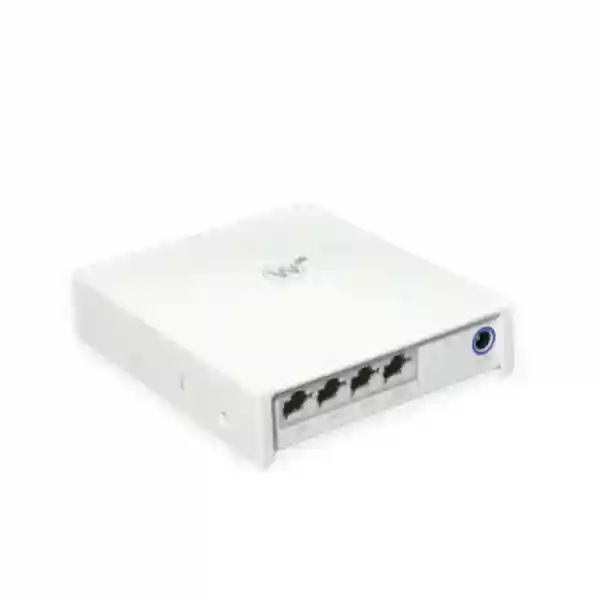
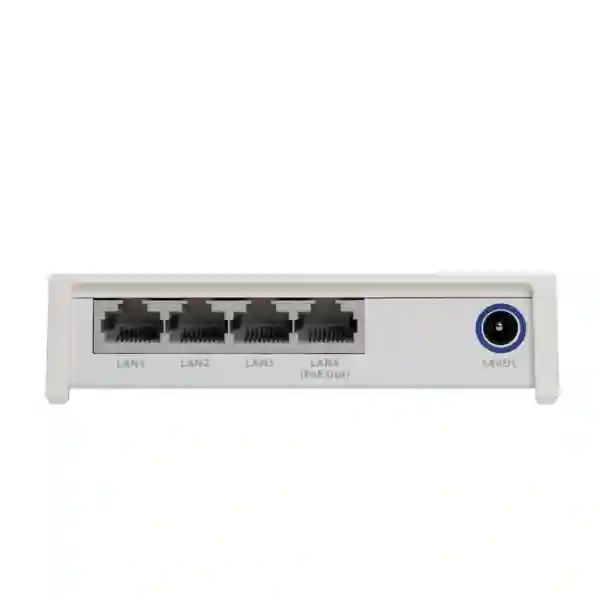
The WatchGuard AP230W is a compact indoor wall-mount Wi‑Fi 6 access point built for business spaces that need wireless service and useful wired connectivity from the same room-level device. It is especially relevant to hospitality rooms, conference spaces, classrooms, co-working areas, multi-unit properties and distributed offices where an access point must fit discreetly near users while providing both secure Wi‑Fi and local Ethernet connectivity. WatchGuard specifies 2×2 802.11ax client radios, maximum data rates of 574 Mbps on 2.4 GHz and 1.2 Gbps on 5 GHz, plus a dedicated radio for security scanning. Four additional Gigabit LAN ports extend wired connectivity, with one LAN port able to provide 802.3af PoE output when the AP itself receives the required PoE+ or supported adapter power.
For buyers searching for WatchGuard AP230W Dubai, WatchGuard Wi‑Fi 6 UAE, AP230W price, AP230W supplier, secure wireless access point, WatchGuard Cloud Wi‑Fi or a wall-plate access point for branch rooms, the purchasing decision should include more than hardware. The project should confirm licensing, switch power budget, cabling, mounting position, local radio regulations, SSID design, guest access, wired-device needs and the number of users expected in each coverage area. FourTeck can coordinate this requirement review and prepare a quotation based on the actual deployment.
Best considered for low- to medium-density indoor spaces where wall placement, Wi‑Fi 6, cloud management and room-level wired ports are useful.
WatchGuard AP230W overview: what buyers need to know
WatchGuard positions the AP230W as an indoor Wi‑Fi 6 access point for low- to medium-density environments. Its wall-oriented form factor is useful where a ceiling access point is not the preferred deployment method, particularly in individual rooms or defined zones. The device uses internal antennas and is designed for indoor operation. WatchGuard documents 2.4 GHz 2×2 802.11b/g/n/ax wireless with a maximum data rate of 574 Mbps and 5 GHz 2×2 802.11a/n/ac/ax wireless with a maximum data rate of 1.2 Gbps. These are radio data-rate figures rather than guaranteed application throughput, so real user performance still depends on client capabilities, channel width, interference, distance, wall construction, airtime use, upstream switching, internet capacity and configuration.
A separate dual-band radio is dedicated to security scanning. This matters for organisations that want wireless monitoring without relying only on the radios serving client traffic. WatchGuard Cloud provides the management environment for this Wi‑Fi 6 generation. Buyers replacing older WatchGuard access points should note that the AP230W belongs to the newer WatchGuard Cloud-managed family and is not managed through the older Gateway Wireless Controller or legacy Wi‑Fi Cloud workflow used by certain previous-generation access points. A migration or mixed-estate project should therefore review management compatibility before equipment is ordered.
The AP230W also differentiates itself with wired expansion. In addition to its Gigabit uplink, it provides four Gigabit LAN connections for room devices. One of those downstream ports can supply 802.3af PoE output, subject to the AP receiving the required power. This can be useful for a compatible IP phone or another supported low-power Ethernet device, but the complete power chain should be checked before deployment. FourTeck can help map the AP, switch, PoE budget, cabling and connected endpoints so the quotation reflects the actual room design rather than treating the access point as an isolated purchase.
Wi‑Fi 6 room coverage
Dual-band 2×2 802.11ax is aimed at modern indoor client access, with performance influenced by RF design and client capability.
Dedicated scanning
A separate dual-band security-scanning radio supports visibility into the wireless environment without being described as another client-serving radio.
Four wired extensions
Four additional Gigabit LAN ports help connect room equipment, with one downstream port supporting 802.3af PoE output when power conditions are met.
Cloud management
WatchGuard Cloud centralises access-point configuration and monitoring, subject to the correct supported Wi‑Fi license and activation workflow.
Verified WatchGuard AP230W technical highlights
| Wireless | 2.4 GHz 2×2 802.11b/g/n/ax and 5 GHz 2×2 802.11a/n/ac/ax |
| Maximum radio data rates | 574 Mbps at 2.4 GHz and 1.2 Gbps at 5 GHz |
| Security radio | Dedicated dual-band security-scanning radio |
| Ethernet | 1 x Gigabit uplink with PoE+ input plus 4 x Gigabit LAN extension ports |
| PoE output | One LAN port supports 802.3af PSE output up to the documented power limit when the AP is powered appropriately |
| Power options | PoE+ input or supported optional AC power adapter; downstream PoE requires adequate input power |
| Dimensions | 130 mm x 110 mm x 34.2 mm |
| Weight | 384 g |
| Operating environment | Indoor use; 0°C to 40°C operating temperature; 5% to 95% non-condensing humidity |
| Management | WatchGuard Cloud with the appropriate supported access-point licensing and activation |
Specification values are manufacturer-published figures. Wireless performance, allowable channels and transmit power can vary by country regulations, client devices, RF conditions and configuration. Final licensing, part numbers and regional suitability should be confirmed on the quotation.
Licensing, management and deployment planning
An AP230W purchase should include the management and licensing discussion from the start. WatchGuard documents Standard Wi‑Fi Management and USP Wi‑Fi Management options for WatchGuard Cloud-managed access points. Activation requires the supported access-point serial number and an appropriate license key. The exact license term, package and included service features should be confirmed at quotation time rather than assumed from hardware alone. This is particularly important for procurement teams comparing an appliance-only price with a complete deployable Wi‑Fi solution.
Power design is equally important. The access point accepts PoE through its uplink and can also use a supported optional power adapter. If the design expects the AP230W to power a downstream device from its PoE-capable LAN port, the upstream power method must meet WatchGuard requirements. A room deployment should therefore document the switch model, PoE class and available budget, cable path, patching, intended downstream devices and whether those devices themselves need power. These details prevent a common mistake where an access point functions correctly but a planned phone or endpoint cannot receive power as expected.
RF design should not be based only on the model name. Before choosing quantity, identify room construction, expected users, client types, neighbouring access points, desired roaming behaviour, business and guest SSIDs, authentication method, VLAN plan, internet circuit and any voice-over-Wi‑Fi requirement. The AP230W is designed for indoor use and should be located with clearance for airflow. In hot regions, air-conditioned indoor deployment and cabinet placement deserve attention because the documented operating range reaches 40°C, not an unrestricted outdoor or high-temperature rating.
WatchGuard AP230W Dubai
Customers searching for WatchGuard AP230W Dubai usually have a room-level wireless requirement rather than a generic request for “more Wi‑Fi.” Dubai offices, serviced apartments, hotels, training spaces and mixed-use properties often combine high mobile-device usage with cloud applications, video meetings, IP phones and guest connectivity. The AP230W is relevant when the intended design favours an indoor wall-mounted access point that can serve wireless clients and also provide local Gigabit Ethernet connections. Instead of installing a separate small switch in every room, the four downstream LAN ports can help connect selected wired equipment, subject to port-count and power requirements. One of those ports can deliver 802.3af PoE output when the AP is powered correctly, which can simplify certain room layouts where a compatible endpoint requires power.
For a Dubai quotation, the useful questions are practical. How many rooms or zones require coverage? Are walls concrete, glass, partition board or a mixture? How many users and devices will be active at peak time? Does the property need a guest SSID separate from staff systems? Will an IP phone, small switch, printer, IPTV endpoint or another Ethernet device use the AP’s wired extension ports? Is the upstream switch able to supply the required PoE+ power across all planned access points? Which WatchGuard Cloud license package and term should be included? These answers determine whether AP230W is a good fit and how many units belong in the bill of materials.
Dubai buyers also need to distinguish between radio capability and actual user throughput. WatchGuard publishes maximum radio data rates, but real Wi‑Fi performance depends on client radios, channel selection, interference, distance, channel width, airtime competition and the wired uplink. A design with many rooms should therefore be planned around coverage and capacity rather than simply placing the maximum possible number of access points. FourTeck can help review the site requirement and coordinate the AP230W with switching, VLANs, firewall policy and guest access. Buyers can explore the FourTeck firewall and security product catalogue when the wireless project also requires a business security gateway.
For organisations comparing adjacent security platforms, the same Dubai site includes live product pages for the Palo Alto Networks PA-410, Palo Alto Networks PA-415 and Sophos XGS 88. These are not direct substitutes for an AP230W; they are related edge-security products to consider when wireless users need a properly segmented and protected internet gateway. Request current availability, licensing and project scope before purchase.
WatchGuard AP230W UAE
A WatchGuard AP230W UAE deployment may span very different environments: a small professional office in Abu Dhabi, a hospitality property in Dubai, a training centre in Sharjah, a branch in Ajman or a distributed business with several sites. The AP230W is most useful where the project calls for indoor, low- to medium-density Wi‑Fi 6 with wall placement and extra Ethernet ports near users. Because the UAE market includes many new offices and renovated commercial spaces, cabling and switch power should be evaluated while the network plan is still flexible. The access point requires an uplink and power source, and downstream PoE use adds another power consideration. A structured bill of materials should therefore identify the access point quantity, supported Wi‑Fi license, switch PoE budget, patching, power accessories if required and any services needed for configuration.
Procurement teams often search for AP230W price UAE or WatchGuard access point supplier UAE, but price comparisons can be misleading when one offer includes only hardware and another includes licenses, support or deployment. Ask every supplier to identify the exact hardware, license type, term, power accessories, warranty/support entitlement, taxes, delivery assumptions and configuration scope. For a multi-site rollout, also request consistent naming and documentation so each access point can be mapped to a building, floor, room or branch in WatchGuard Cloud. This improves operational clarity when equipment is later moved or replaced.
UAE wireless designs should also account for local regulatory settings. WatchGuard notes that maximum transmit power and available channels depend on the regulatory limits of the country of operation. The device should therefore be activated and configured for the correct region rather than copied from an unrelated deployment. For properties with many neighbouring networks, RF planning matters because simply increasing transmit power does not guarantee better service and can make roaming or channel contention worse. The AP230W’s dedicated scanning capability can support wireless-security visibility, but it does not remove the need for sound channel, SSID, VLAN and authentication design.
FourTeck UAE provides a broader infrastructure context through FourTeck UAE IT and security solutions. Buyers planning AP230W alongside a firewall can also review perimeter firewall planning in Dubai to understand how guest Wi‑Fi, staff networks, VPN access and internet security should be separated at the gateway. Final availability, lead time and commercial terms should be confirmed for the exact UAE requirement.
WatchGuard AP230W Uganda
WatchGuard AP230W Uganda enquiries are likely to come from organisations that need manageable indoor Wi‑Fi in offices, hospitality sites, schools, clinics, NGOs, professional firms and branch locations. The product’s wall-mount format is particularly relevant when the network design is organised around rooms or defined work areas and where local wired ports can reduce the need for extra small switches. Uganda deployments should start with a coverage and power discussion: confirm the number of rooms, construction materials, cable routes, existing PoE switches, internet service, expected client count and whether wired endpoints will connect through the AP230W. If a downstream device is expected to receive PoE from the access point, verify the complete upstream PoE+ budget and supported endpoint load before finalising equipment.
In Kampala and regional cities, organisations may operate across multiple branches with different internet links and building conditions. WatchGuard Cloud management can help centralise configuration and monitoring of supported access points, but licensing and activation still need to be planned. The quotation should identify the correct Wi‑Fi management license and term rather than assuming cloud management is an unlicensed hardware feature. Branch naming, SSID consistency, VLAN structure and administrator roles should be agreed before rollout. This is especially helpful for NGOs, retail groups, training organisations and service companies that may add locations over time.
Uganda buyers also commonly evaluate wireless products in the context of power stability and supportability. The AP230W can be powered by supported PoE or an optional compatible adapter, so the design can be matched to available infrastructure. Where business continuity is important, the PoE switch, router/firewall and internet termination can be included in UPS planning. The access point itself should remain indoors and within its documented operating conditions. Coverage should be verified through practical site planning rather than assuming a single unit will cover every adjacent room through thick walls.
For regional procurement and related infrastructure, visit FourTeck Uganda. That regional site includes networking and firewall material for cities such as Kampala, Mbarara, Gulu and Arua, which is useful when AP230W forms one part of a larger branch-security design. FourTeck can help structure a quote around access points, licensing, switches, firewall segmentation and deployment requirements without claiming stock or delivery until the exact request is checked.
WatchGuard AP230W Kampala
For WatchGuard AP230W Kampala buyers, the most relevant planning question is usually how to deliver consistent wireless access across offices, meeting rooms, guest areas or multi-room facilities without making the network difficult to support. The AP230W is not a long-range outdoor access point; it is an indoor wall-mounted Wi‑Fi 6 unit intended for low- to medium-density areas. That makes it a practical candidate for room-by-room design where users need modern wireless and where several wired endpoints may also be located nearby. Four Gigabit extension ports can support local Ethernet devices, and one can provide PoE output under the manufacturer’s specified power conditions.
A Kampala office should document its existing network before ordering. Check whether the current switch is PoE+ capable, how much total PoE budget remains, whether uplink ports are Gigabit, how VLANs are arranged and whether the current firewall can keep guest traffic separate from finance, management, servers, phones or other internal systems. If the office is replacing consumer Wi‑Fi routers, avoid copying their flat-network design. A business access-point project is an opportunity to separate user groups and create clearer administration. WatchGuard Cloud can manage supported AP230W devices centrally, but the project should include the correct licensing and an administrator handover process.
Kampala locations can vary from compact professional offices to larger education, NGO, hospitality and multi-tenant environments. Each type has a different traffic pattern. Meeting rooms may see short periods of high client activity. Hospitality rooms may need predictable per-room coverage and guest isolation. Training areas can have many devices arriving at once. A professional office may care more about stable video calls, cloud applications and secure staff access. These differences affect access-point quantity, channel reuse, SSID count, roaming expectations and firewall policies. A simple floor plan and user estimate make the quotation much more useful.
When comparing AP230W Kampala offers, request hardware model, license type and term, power arrangement, warranty/support details, configuration scope and delivery conditions in writing. The surrounding network may also require switch or gateway updates. FourTeck’s firewall services and deployment guidance explains the network-segmentation and gateway side of a wireless project. Commercial availability should be confirmed against the exact Kampala destination and quantity rather than assumed from an online listing.
WatchGuard AP230W Arua
A WatchGuard AP230W Arua project may involve a branch office, health organisation, NGO, school, service company or hospitality property that needs business Wi‑Fi with clearer management than standalone routers provide. In these environments, a wall-mounted access point can be useful when cable routes are designed around rooms and when computers, phones or other wired devices need nearby Ethernet connectivity. The AP230W’s four downstream Gigabit ports can help consolidate room connections, but network designers should still check whether a dedicated switch is more appropriate when several high-traffic or powered devices are present.
Power and connectivity planning deserve special attention in a regional-site deployment. The AP230W can receive power over its Ethernet uplink from suitable PoE infrastructure, helping reduce separate power adapters at each mounting point. However, the upstream switch and UPS design must be sized for the full number of access points, and any planned PoE output to a downstream device adds to the power requirement. A resilient installation may place the PoE switch and internet gateway on backup power so wireless service remains available during shorter supply interruptions, subject to the organisation’s continuity plan. This is a network-design consideration, not a promise about local utility conditions.
Arua buyers should also think about remote support. When an IT team manages several branches from Kampala or another location, standardisation becomes valuable. Consistent AP names, site labels, SSIDs, VLANs, firmware policy and administrator access can reduce troubleshooting time. WatchGuard Cloud supports central management of this access-point generation, so a distributed organisation can consider AP230W as part of a common wireless standard where building size and density fit the model. The correct management license must be included and kept current according to the selected package.
Before requesting a quote, provide the Arua site type, number of rooms, expected users, internet connection, current firewall, switch model, cable availability, required guest access and any wired endpoints planned at each AP. This helps determine whether AP230W should be used alone, combined with other WatchGuard access-point models or paired with updated switching. Regional buying support can be coordinated through FourTeck Uganda, with availability and logistics confirmed for the final order rather than stated in advance.
WatchGuard AP230W Mbarara
Businesses searching for WatchGuard AP230W Mbarara may be planning wireless coverage for offices, clinics, schools, accommodation, retail administration areas or regional branches. The AP230W suits indoor spaces where a wall-mounted access point can be placed close to users and where additional Ethernet ports are valuable. It should not be selected purely because Wi‑Fi 6 is newer than an existing access point. The project should verify room size, wall materials, client density, interference, application types and the condition of the wired network. If uplink cabling is old, damaged or poorly terminated, replacing only the wireless endpoint will not solve the underlying performance problem.
Mbarara branch environments can benefit from a clear separation between wireless roles. Staff devices, guest users, payment or operational systems and management interfaces should not automatically share unrestricted access. The AP230W can broadcast configured wireless networks through WatchGuard Cloud, while the wider VLAN and firewall design controls where traffic is allowed to go. A small branch may use one or two APs, while a larger property may need several units with careful channel planning. Quantity should be based on coverage and capacity rather than an arbitrary square-metre rule because walls, furniture, client radios and neighbouring signals affect performance.
The AP230W’s wired ports can be useful in reception desks, consultation rooms or office areas where devices such as an IP phone, printer or workstation also need network access. If the design intends to power a compatible endpoint from the AP’s PoE-enabled extension port, confirm that the access point itself receives the required input power and that the downstream device falls within the supported output. The quotation should show whether power injectors, adapters or PoE switches are needed; these should not be assumed to be included unless listed.
For an accurate Mbarara quote, share quantity, building type, required SSIDs, current switch and firewall models, cable layout, expected user count and preferred license term. This gives FourTeck enough context to evaluate the access point as part of a working solution. Regional enquiries can use FourTeck Uganda’s business IT platform for broader networking and security guidance. Final stock status, lead time, warranty handling and deployment scope should be confirmed for the exact order.
WatchGuard AP230W Gulu
WatchGuard AP230W Gulu searches can reflect a need for secure indoor Wi‑Fi at branch offices, education sites, healthcare facilities, NGOs, hospitality locations and professional organisations. The AP230W is designed as a compact wall access point rather than a rugged outdoor radio. It supports Wi‑Fi 6 on both 2.4 GHz and 5 GHz client bands and adds a dedicated security-scanning radio. This combination is useful where the organisation wants business wireless that can be centrally managed while maintaining visibility into the surrounding wireless environment. The value depends on correct placement, licensing and network design, not on the hardware alone.
For a Gulu site, start with the wired foundation. Confirm that each proposed mounting position has a tested Ethernet run and that the PoE switch or injector can provide the required power. If several access points are planned, calculate the total switch PoE budget rather than checking a single port. If the AP230W’s downstream PoE feature will be used, include that load in the design. Also confirm whether local devices need one Gigabit port or several; the four extension ports are useful, but they should not replace a properly planned access switch when the room has many endpoints or higher aggregate traffic needs.
Central management is valuable for organisations with a head office elsewhere in Uganda. WatchGuard Cloud can group and manage supported access points across multiple locations, allowing consistent configuration and reporting. A deployment can use a naming convention such as country-city-building-floor-room so remote administrators can immediately identify the affected device. Guest and corporate networks should use separate policies, and administrative access should be limited to authorised staff. Where the organisation has a firewall, wireless VLANs can be mapped to different security rules so guests cannot browse internal systems and staff networks can receive the access they actually need.
Gulu procurement should compare complete packages: hardware, Wi‑Fi license, support entitlement, power accessories, switching requirements, transport, configuration and any onsite work. Avoid comparing a bare AP listing with a fully scoped deployment as though they are identical offers. FourTeck can coordinate the requirement through FourTeck Uganda and help connect the wireless request with firewall, switching and branch-network planning. Availability and delivery dates should be confirmed only after the exact quantity and destination are known.
WatchGuard AP230W Kenya
WatchGuard AP230W Kenya is a relevant search for organisations considering secure Wi‑Fi 6 in offices, hospitality properties, training centres, schools, multi-unit environments and branch facilities. Kenyan buyers should first decide whether they need a wall-room access point or a conventional ceiling access point. The AP230W is purpose-built for wall deployment and low- to medium-density use, making it attractive where each room or zone benefits from its own access point and local wired Ethernet. Four downstream Gigabit ports can connect room devices, while the dedicated security-scanning radio supports wireless threat visibility within the WatchGuard ecosystem.
In Nairobi and other commercial centres, dense neighbouring Wi‑Fi can affect performance. Good design therefore relies on channel planning, appropriate transmit power, sensible access-point spacing and an understanding of client capabilities. The AP230W’s published 574 Mbps and 1.2 Gbps data rates should be treated as maximum radio rates rather than a promise to every user. Real throughput can be lower because wireless is a shared medium and traffic passes through the Gigabit wired uplink. For meeting rooms or training spaces with bursts of simultaneous devices, capacity planning is often more important than raw signal strength.
Kenya projects should also include firewall and VLAN planning. Corporate Wi‑Fi, guest access, voice devices, POS systems and building devices may have different trust requirements. The access point supplies connectivity, but the broader network decides how those groups can communicate. Buyers can review the FourTeck Kenya firewall guidance when the AP230W is part of a branch-security design. For wider product and network enquiries, FourTeck Kenya provides a regional path for IT, networking and security requirements.
Before ordering AP230W for Kenya, share the number of sites, room count, expected clients, switch model, available PoE budget, internet bandwidth, required SSIDs, authentication preference, wired endpoints and whether installation or remote configuration is needed. The quote should identify the WatchGuard Wi‑Fi license and term, because cloud management requires the appropriate entitlement and activation. It should also make clear what is and is not included in power accessories, warranty/support and deployment. Final availability, pricing and delivery depend on the exact Kenyan requirement and should be confirmed in writing.
WatchGuard AP230W Kuwait
WatchGuard AP230W Kuwait buyers may be planning wireless for offices, hospitality rooms, conference spaces, training facilities or distributed business branches. The first design issue in Kuwait is not simply access-point speed; it is whether the indoor environment matches the AP230W’s operating and mounting profile. WatchGuard specifies indoor use and an operating range up to 40°C. The access point should therefore be installed in a suitable conditioned indoor space with adequate airflow rather than treated as an outdoor or high-temperature enclosure. Equipment cabinets and wall locations exposed to excess heat should be reviewed before installation.
Kuwait offices often use cloud business applications, IP telephony, conferencing and guest internet simultaneously. The AP230W can fit a room-level design because it offers both Wi‑Fi 6 and multiple Gigabit wired connections. An office can connect selected Ethernet devices near the access point without adding an unmanaged desktop switch in every room. Where one downstream device needs PoE, the AP can provide it from the designated port under the manufacturer’s power conditions. The upstream switch must still be sized for the access point fleet, and any PoE pass-through requirement should be included in the budget calculation.
For multi-floor or multi-branch deployments, WatchGuard Cloud can centralise management of supported access points. Buyers should include the correct management license and decide how sites, devices, SSIDs and administrators will be organised. A standard naming convention and documented VLAN scheme help support teams troubleshoot later. Guest access should be isolated from business systems, and wireless traffic should pass through suitable firewall policies. A Wi‑Fi project that ignores the gateway can create an attractive wireless experience without adequate network separation.
FourTeck’s regional site at FourTeck Kuwait covers networking, Wi‑Fi, firewall and wider business technology requirements. To request an AP230W Kuwait quotation, provide quantity, destination, site type, floor or room count, existing PoE switching, internet link, current firewall, desired license term and whether deployment support is required. Pricing should be compared on a like-for-like basis that includes licensing and accessories. Current stock, delivery scheduling and warranty/support handling should be confirmed on the formal quote.
WatchGuard AP230W Ghana
A WatchGuard AP230W Ghana deployment can suit organisations moving from ad-hoc routers to centrally managed business Wi‑Fi. Offices, schools, clinics, hospitality sites, professional services and branch facilities may value the AP230W’s combination of Wi‑Fi 6, wall mounting and integrated wired extension ports. Ghana buyers should assess where users actually work and where Ethernet is required. In a room with an IP phone, workstation, printer or another local device, the access point’s downstream ports can reduce extra hardware. In a larger open office with many endpoints, a managed access switch may still be the correct architecture.
Coverage planning should account for walls, floors, furniture, neighbouring Wi‑Fi and client radios. The AP230W is intended for low- to medium-density indoor areas, so a property with a large hall or very high client density may require another WatchGuard access-point model or a mixed design. Do not choose quantity from one theoretical range figure. A site plan, device estimate and intended applications provide a better basis for placement. Voice calls, video meetings and cloud systems can be sensitive to poor roaming or congestion, so access-point spacing and backhaul quality matter.
Management and security are part of the purchase. WatchGuard Cloud supports central configuration of AP230W, with the correct supported Wi‑Fi license. A business should define administrator roles, SSID naming, guest policy, corporate authentication and VLAN mapping before a large rollout. The firewall should enforce separation between guests, staff, servers and operational systems. Where power continuity matters, include the PoE switch and firewall in UPS planning so the wireless network is not protected by backup power at the AP while its upstream infrastructure is unavailable.
For broader Ghana IT projects, FourTeck Ghana covers wireless access points, switches, firewalls, structured networking and business infrastructure. An AP230W quote should list the exact access-point quantity, WatchGuard management license and term, required power accessories, switching changes, delivery destination and any configuration or installation services. Buyers should also request written warranty/support information. FourTeck can coordinate the technical requirement, while actual product availability and logistics should be confirmed against the current order rather than assumed from general regional capability.
WatchGuard AP230W Nigeria
WatchGuard AP230W Nigeria buyers may be evaluating secure wireless for corporate offices, branches, education, hospitality, healthcare, professional services or multi-tenant facilities. The AP230W’s strongest architectural advantage is the combination of indoor wall-mounted Wi‑Fi 6 and four local Gigabit LAN ports. This can be useful in rooms where wireless clients and wired devices must be served from the same network point. It should still be compared with ceiling-mount alternatives when open-area coverage or higher density is the main requirement. The correct model depends on building layout and expected client behaviour.
For Nigerian branches, power architecture can be as important as wireless architecture. The AP230W can use PoE from a compatible network source, allowing the access point to be powered centrally with the switch. If the organisation uses protected power for the network rack, this can simplify continuity planning because separate adapters are not required at each access-point location. Any downstream PoE device connected to the AP must still fit the manufacturer’s supported output and upstream power conditions. UPS capacity, PoE switch budget and the firewall/router should be planned as one system rather than independently.
Large organisations with locations in Lagos, Abuja or other cities may value central management. WatchGuard Cloud supports the AP230W family and can simplify common wireless settings across sites. A multi-branch project should create standard SSIDs, VLANs, authentication, device naming and support procedures while still adapting RF placement to each building. Central configuration does not mean every site should use the same channel layout or AP quantity. Local interference, room construction and user density require individual assessment.
FourTeck provides a regional route through FourTeck Nigeria for business IT and infrastructure enquiries. AP230W procurement should specify hardware quantity, management licensing, switch and PoE requirements, destination, support expectations and deployment scope. Buyers comparing AP230W price Nigeria should make sure quoted packages include the same components and terms. No stock position, delivery date or warranty condition should be assumed until it is confirmed for the exact order, especially where quantity, import routing or project timing can affect availability.
WatchGuard AP230W Seychelles
WatchGuard AP230W Seychelles can be relevant for hospitality, professional offices, education, government-related facilities, retail administration and other indoor business environments where secure Wi‑Fi must be manageable across rooms or defined zones. The wall-mount design is particularly useful in accommodation and meeting-room scenarios because it can combine wireless service with local Gigabit Ethernet. Four downstream LAN ports give the designer flexibility for room devices, while the Wi‑Fi 6 radios serve mobile clients. The device is intended for indoor use, so outdoor terraces, exposed corridors or harsh environments should be handled with equipment designed for those conditions instead of assuming the AP230W enclosure is weather resistant.
Island deployments often make pre-order planning especially important because missing accessories or an incorrect license can create avoidable project delays. A Seychelles bill of materials should therefore identify each AP, supported WatchGuard Wi‑Fi license, PoE source, any required injectors or adapters, switching, mounting requirements and spare strategy. If a downstream Ethernet device is intended to use the AP’s PoE output, verify both compatibility and power budget before shipment. Documentation should include serial numbers, room names and cloud-management assignments so local staff and remote support teams can identify equipment quickly.
Hospitality networks require particular attention to guest isolation and user experience. Guest users should not have access to hotel administration, staff systems, payment environments or building-management devices. Corporate staff and operational devices can also be separated by VLAN and firewall policy. WatchGuard Cloud can support SSID configuration and central administration, while a properly designed gateway controls inter-network access. Captive-portal options may be available depending on the management package and configuration, but the final guest-access workflow should be tested with the property’s actual devices and business requirements.
For Seychelles enquiries, FourTeck can coordinate through its broader FourTeck Africa technology platform, which covers business networking, Wi‑Fi, switches, firewalls and related infrastructure. Provide the island or delivery point, property type, number of rooms, expected clients, current switching, internet links, firewall design and desired management term. Quotation and logistics can then be aligned to the real project. Availability, freight, warranty route and installation scope should be stated in writing rather than inferred from general regional service information.
Which environments fit the AP230W?
Hospitality and multi-unit rooms
Useful where each room or small group of rooms needs Wi‑Fi plus local Ethernet, subject to RF survey, cabling and guest-isolation design.
Conference and meeting rooms
Suitable when the room requires modern wireless capacity and wired connections for phones, room systems or selected endpoints.
Classrooms and training spaces
Can support low- to medium-density indoor learning areas, with capacity planning based on simultaneous clients and application demand.
Branch and co-working offices
Wall deployment can suit compact branch rooms and shared offices where central cloud management and local wired ports simplify support.
Compatibility and integration checklist
The AP230W should be checked against the complete access network. It needs a Gigabit Ethernet uplink and appropriate power. The connected switch should provide the required PoE where that is the chosen power method, and total PoE budget should cover all access points plus any other powered devices. If an AP230W downstream PoE port will power another endpoint, validate the input-power requirement and endpoint demand. Cabling should be tested, correctly terminated and routed to the mounting location before deployment day.
Management compatibility is equally important. The AP230W belongs to WatchGuard’s newer cloud-managed Wi‑Fi family and is managed in WatchGuard Cloud. Organisations using older WatchGuard access points managed through Gateway Wireless Controller or legacy Wi‑Fi Cloud should plan the management transition rather than expecting one control method to operate every generation identically. Standard Wi‑Fi and USP Wi‑Fi licensing options should be reviewed for the required features and term.
At the network layer, map SSIDs to appropriate VLANs and firewall policies. Decide whether staff authentication uses a shared key, enterprise identity or another supported method. Define guest access separately. Document DNS, DHCP, internet breakout, captive portal requirements, logging and any endpoint-security integration planned in the WatchGuard environment. FourTeck can help turn these items into a quotation checklist so switches, firewall policy and licensing are not discovered as missing dependencies after the AP hardware arrives.
Related FourTeck security and network resources
A secure Wi‑Fi deployment sits inside a wider network. If the current gateway is only an ISP router, review how guest users, staff, servers, phones and operational devices are separated before adding new wireless capacity. The FourTeck perimeter firewall guide explains gateway segmentation, VPN, policy and deployment considerations. The Firewall Dubai services page covers configuration, migration and support planning. For product comparisons, the security product collection provides a starting point for related gateway options.
Regional buyers can also use FourTeck UAE, FourTeck Kenya, FourTeck Uganda, FourTeck Kuwait, FourTeck Ghana, FourTeck Nigeria and FourTeck Africa when a wireless project requires local procurement context, related switching, firewall planning or broader business IT infrastructure.
WatchGuard AP230W FAQ
Is the WatchGuard AP230W a Wi‑Fi 6 access point?
Yes. WatchGuard documents the AP230W as a 2×2 Wi‑Fi 6 802.11ax indoor wall-mount access point. It supports 2.4 GHz and 5 GHz client radios, with manufacturer-published maximum data rates of 574 Mbps and 1.2 Gbps respectively.
Does AP230W have Ethernet ports for room devices?
Yes. In addition to the uplink, WatchGuard specifies four additional Gigabit LAN ports. One of those ports supports 802.3af PoE output under the documented power conditions, making it useful for selected compatible endpoints.
Can I power the AP230W with PoE?
Yes. WatchGuard supports PoE input on the uplink and also documents an optional AC adapter path. If downstream PoE output is required, the AP must receive adequate supported input power. Confirm the upstream switch or injector and total PoE budget.
How is WatchGuard AP230W managed?
The AP230W is managed through WatchGuard Cloud. It belongs to the newer Wi‑Fi 6 access-point family and is not managed by the older Gateway Wireless Controller or legacy Wi‑Fi Cloud workflow used for certain previous access-point generations.
Does AP230W require a license?
WatchGuard documents Standard Wi‑Fi Management and USP Wi‑Fi Management licenses for Cloud-managed access points. Activation requires a supported device serial number and license key. Ask for the exact license package, term and included features on the quotation.
Is AP230W suitable for outdoor use?
No. WatchGuard describes AP230W as an indoor access point and provides indoor environmental guidance. Outdoor or rugged environments should use a model designed and rated for those conditions.
Is AP230W suitable for a hotel room?
It can be a good technical fit for hospitality and multi-unit room designs because WatchGuard positions it for low- to medium-density indoor environments and provides local Ethernet ports. Final suitability depends on room layout, cabling, user density, guest-network design and power infrastructure.
What should I provide for an AP230W quotation?
Share quantity, country and city, building type, room or floor count, expected users, current switch and firewall models, PoE availability, internet speed, required SSIDs, guest access, wired endpoints, preferred license term and whether configuration or installation services are needed.
Quotation checklist for WatchGuard AP230W
Site and users
Country, city, building type, room count, floor plan, expected concurrent clients and critical applications.
Wired network
Current switch model, PoE+ capability, total PoE budget, cable category, uplink design and downstream Ethernet devices.
Wireless design
Staff and guest SSIDs, VLANs, authentication, roaming expectations, high-use rooms and any voice-over-Wi‑Fi requirements.
Commercial scope
AP quantity, WatchGuard Wi‑Fi license and term, power accessories, support entitlement, delivery location and deployment services.
Decision recap
Choose WatchGuard AP230W when the site needs an indoor wall-mounted Wi‑Fi 6 access point for a low- to medium-density area and the four local Gigabit Ethernet extension ports add real value. It is especially attractive for room-oriented deployments where wireless and wired connectivity must meet at one point. The dedicated security-scanning radio and WatchGuard Cloud management strengthen the operational case for organisations already using or standardising on the WatchGuard ecosystem.
Before approving the purchase, confirm management licensing, upstream PoE, downstream PoE use, RF placement, country regulatory settings, VLAN and guest isolation, firewall policy and the exact support/warranty package. If the site is a large open area, high-density venue or outdoor environment, compare another access-point model rather than forcing the AP230W into a role it was not designed to fill.
Related-product and consultation area
A complete Wi‑Fi project may also need switching, firewall segmentation and internet-edge security. On the same FourTeck specialist site, the PA-410, PA-415 and Sophos XGS 88 are examples of related gateway products that can be reviewed when a new wireless network also needs a controlled perimeter. They are separate product categories and should be sized independently from the AP230W.
For implementation planning, use the FourTeck firewall services page for security and migration context, or send the final wireless requirement through the FourTeck contact page. Include the requested model, quantity, destination, license term, room plan, switching and PoE details so the commercial response can be built around the actual project.

Reviews
There are no reviews yet.