
WatchGuard Network Security • Micro-office Firewall • Wi-Fi 7
WatchGuard Firebox T115-W
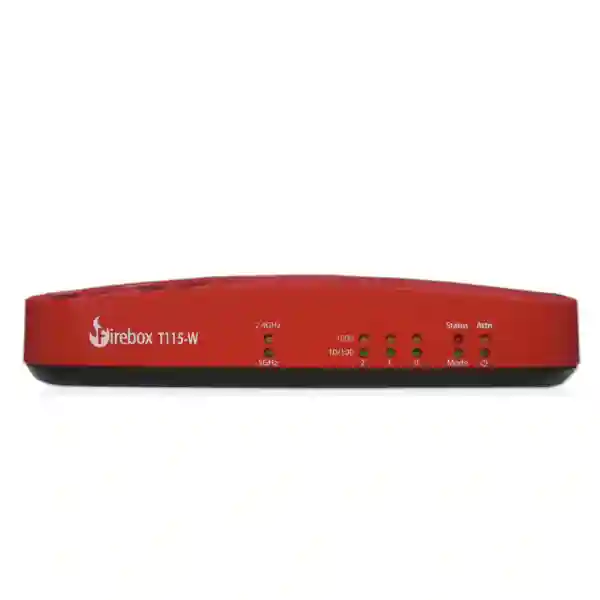
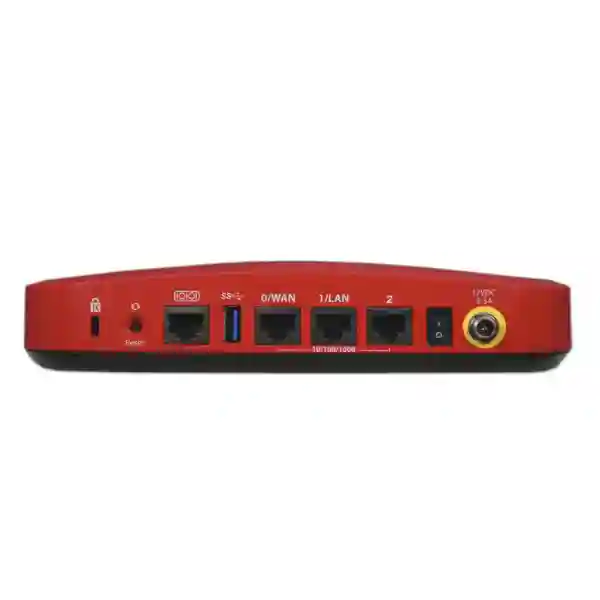
The WatchGuard Firebox T115-W is a compact wireless tabletop firewall built for solo professionals, micro-offices and low-traffic locations that need business-grade network protection without a large appliance footprint. WatchGuard specifies three 1GbE RJ45 interfaces, integrated Wi-Fi 7, a silent fanless chassis, 4 GB DDR4 memory, and flexible management through WatchGuard Cloud or local Fireware tools. For buyers, the important question is not simply whether the T115-W is a current model; it is whether its inspected throughput, VPN limits, port count, wireless design, subscription choice and management method match the actual site.
WatchGuard’s tabletop comparison positions the T115-W for very small environments. Treat that as a sizing starting point, not a guarantee for every traffic profile.
Vendor-listed UTM performance is more useful than raw firewall speed when security inspection is expected to remain enabled.
Encrypted inspection can be the practical sizing constraint for internet-heavy sites, so compare requirements against inspected traffic rather than line speed alone.
For branch or remote access projects, confirm tunnel count, authentication design and real encrypted traffic before ordering.
Direct answer: who is the WatchGuard Firebox T115-W for?
The Firebox T115-W is best evaluated for micro-offices, home-office professionals, very small branches, kiosks, compact service locations and other low-traffic environments where an integrated wireless firewall is more practical than a larger appliance. It is not a general replacement for every small-business firewall simply because it has a 1.02 Gbps headline UDP firewall figure. WatchGuard lists 320 Mbps firewall IMIX, 280 Mbps UTM full scan, 140 Mbps HTTPS full scan and 210 Mbps VPN IMIX, so a buyer should size around the security services and encrypted traffic that will actually run. The model provides three Gigabit Ethernet ports and built-in Wi-Fi 7; organizations that need more wired interfaces, substantially higher inspected throughput, larger VPN counts or greater user headroom should compare the next models in the Firebox tabletop range before deciding.
Verified WatchGuard Firebox T115-W highlights
Compact network interfaces
The appliance has three 10/100/1000 RJ45 network interfaces. This is enough for a simple WAN/LAN plus an additional zone or network, but organizations planning many physically separate networks may prefer managed switching and VLANs or a model with more physical ports.
Integrated Wi-Fi 7
WatchGuard documents dual-band 2.4 GHz and 5 GHz Wi-Fi 7 radios. Wireless design still depends on room layout, wall materials, client capabilities, interference and coverage expectations. A firewall with Wi-Fi is not automatically a substitute for a properly planned multi-access-point WLAN.
Cloud or local management
A T115-W can be managed in WatchGuard Cloud or locally with Fireware Web UI and WatchGuard System Manager. That gives small businesses and service providers flexibility to choose centralized cloud administration or local control according to operational policy.
Quiet, low-space deployment
The fanless design is suitable for reception areas, small offices and other places where noise matters. WatchGuard lists dimensions of approximately 205 × 174 × 42 mm and maximum power consumption of 25 W, making physical planning straightforward for compact sites.
Performance and capacity: read the numbers in context
Firewall throughput numbers describe different test conditions. For the T115-W, WatchGuard lists 1.02 Gbps firewall throughput using large UDP packets, but 320 Mbps firewall IMIX, which better reflects a mixture of packet sizes. The listed UTM full-scan figure is 280 Mbps, IPS full scan 375 Mbps, antivirus 450 Mbps, VPN IMIX 210 Mbps and HTTPS full scan 140 Mbps. These figures should not be added together and should not be treated as guaranteed application speeds. Real performance depends on traffic mix, security services, encrypted inspection, policy complexity, firmware, network conditions and the number of active users and sessions.
This distinction matters when a buyer searches for “WatchGuard T115-W price” or “T115-W firewall for 500 Mbps internet.” A low-traffic office may have a high-speed ISP package but use only a fraction of that bandwidth most of the day. Conversely, a site with many cloud applications, video calls, backups and TLS inspection can place more demand on a small firewall than its user count suggests. FourTeck can help turn the requirement into a practical sizing conversation before a quotation is finalized.
Licensing, security services and management choices
The appliance itself is only one part of a WatchGuard purchase. Security capabilities and support entitlements depend on the selected package, subscription term and current WatchGuard offer. Buyers should confirm exactly what is included in the quotation rather than assuming that every advanced security service is permanently enabled with the hardware. A useful bill of materials should identify the appliance, support or security subscription, subscription duration, any required migration or configuration service, and any accessories or switching needed for the intended network design.
Management method should also be chosen deliberately. WatchGuard Cloud can simplify centralized monitoring and policy administration across multiple Fireboxes, while locally managed deployments can use Fireware Web UI or WatchGuard System Manager. For a one-site business, either approach may be reasonable depending on who administers the network. For an MSP or organization with several small locations, common policy templates and centralized visibility may be more important. Before deployment, decide who owns the admin accounts, how multi-factor authentication will be handled where applicable, how configuration backups will be stored, who approves policy changes and how firmware maintenance will be scheduled.
FourTeck resources for evaluation, deployment and alternatives
Start with the Firewall Dubai product catalogue when you want to compare compact security appliances with other firewall classes. If the requirement includes installation, VPN, policy design or ongoing changes, review FourTeck firewall services and the dedicated firewall deployment guidance. For edge-security architecture and internet-facing policy planning, the perimeter firewall page explains the wider design questions that sit around the appliance.
If T115-W capacity appears too limited, compare the requirement rather than forcing the model into an unsuitable workload. FourTeck’s existing pages for the Palo Alto Networks PA-410, Palo Alto Networks PA-415 and Sophos XGS 88 provide useful reference points for alternative branch and small-business designs. Buyers can also review FourTeck’s firewall support scope or use the firewall quotation contact page to submit a requirement.
WatchGuard Firebox T115-W Dubai
Customers searching for WatchGuard Firebox T115-W Dubai are usually trying to answer several questions at once: is the model suitable for a small office, does it include wireless, what license should be selected, can it handle the office internet connection, and who can help with configuration or migration. The T115-W is most relevant in Dubai where the requirement is a compact branch, professional office, kiosk, small consultancy, retail back office or similar low-traffic environment. Its integrated Wi-Fi 7 and fanless tabletop format can reduce equipment clutter in a very small site, while three Gigabit Ethernet ports provide a simple foundation for WAN, LAN and an additional network. Where the site already has managed switching, VLANs can be used to create logical separation without needing one physical firewall port for every segment.
Dubai buyers should size the unit against inspected traffic rather than the speed printed on the ISP contract. WatchGuard lists 280 Mbps UTM full scan and 140 Mbps HTTPS full scan, so an office with heavy cloud traffic, constant encrypted inspection, large backups or many simultaneous video sessions may need more headroom even when the number of employees is small. A practical pre-sales review should capture internet speed, typical peak usage, VPN requirements, guest Wi-Fi, CCTV or IoT networks, any locally hosted services, and whether remote workers need access to internal systems. This prevents a purchase that looks adequate by raw firewall throughput but becomes constrained after real security services are activated.
Deployment planning in Dubai should also consider how the wireless radio will be used. An integrated wireless firewall can suit a compact office, but larger premises, meeting rooms separated by heavy walls, multi-floor layouts or high client density often need dedicated access points. The Firebox can still remain the security gateway while separate Wi-Fi infrastructure provides coverage. If the T115-W is replacing an older firewall or ISP router, document current public IPs, NAT rules, VPN tunnels, DHCP scopes, VLANs, DNS settings and any application exceptions before cutover. FourTeck can help structure the quotation and configuration scope around those details rather than treating the appliance as a plug-and-play box.
For a Dubai quotation, request the exact WatchGuard subscription or support package, term length, deployment services, required accessories and expected lead time in writing. Availability and price should be confirmed at the time of purchase because they can change. The most useful enquiry includes the number of users and devices, ISP bandwidth, office layout, required wireless coverage, remote-access users, branch VPN needs and any compliance or logging expectations. That information lets the T115-W be evaluated against the real business environment and makes it easier to identify when a larger Firebox model would be a safer long-term choice.
WatchGuard Firebox T115-W UAE
The WatchGuard Firebox T115-W UAE requirement often comes from organizations standardizing security across a head office and several very small branches. In that scenario, the T115-W can be evaluated as an edge appliance for low-traffic sites while larger Firebox models protect locations with more users, faster inspected traffic or greater VPN demand. WatchGuard Cloud management can be useful in a distributed design because administrators can monitor and configure multiple devices from a central platform. Local management remains available where operational policy requires it, so procurement teams should decide how devices will be administered before choosing the deployment model.
For UAE offices, the practical fit depends less on emirate and more on workload. A small professional services office in Abu Dhabi, a compact retail branch in Sharjah or a service counter in Ajman may all have similar requirements: secure web access, controlled application use, branch VPN, guest network separation and limited remote access. The T115-W can support such designs when traffic stays within its performance envelope. However, businesses should not assume that three physical ports mean only three usable network segments. Managed switches and VLANs can create several logical networks, but this requires careful design and supportable switch configuration. Organizations that need numerous physical interfaces, PoE directly from the firewall, higher inspected throughput or larger VPN limits should compare other models.
Power and environment planning also matter. WatchGuard specifies a 100–240 V power supply and indoor operation. In offices where power quality is inconsistent, use an appropriate conditioned supply or UPS according to site policy. The fanless chassis is helpful in quiet spaces, but it still needs secure placement and adequate airflow. The appliance should not be left where visitors can reach cables, reset controls or network ports. For wireless use, evaluate radio coverage separately from firewall capacity. The integrated Wi-Fi 7 capability is modern, but the number and placement of access points required by a business is fundamentally a coverage and client-density question.
FourTeck’s UAE firewall resources can support a broader comparison when the T115-W is being assessed alongside Fortinet, Sophos, Palo Alto Networks, Cisco, SonicWall or other platforms. The procurement checklist should include current subscription options, support entitlement, device registration, firmware planning, configuration ownership, backup procedure and post-deployment support. Avoid buying the hardware first and deciding those items afterward. A well-scoped UAE enquiry produces a clearer bill of materials and makes it easier to determine whether the WatchGuard Firebox T115-W is an economical fit for a micro-site or whether growth expectations justify a larger platform from the outset.
WatchGuard Firebox T115-W Uganda
Businesses researching WatchGuard Firebox T115-W Uganda may be planning a small Kampala office, a regional branch, a professional practice, a compact NGO location, a retail outlet or a remote administrative site that needs a controlled internet gateway. The model’s small footprint, built-in wireless and centralized management options make it attractive for distributed deployments where there is little room for equipment. The correct buying question is whether the site genuinely matches the low-traffic profile. A few users can still create heavy demand if they rely on cloud backup, video collaboration, large software updates or encrypted web applications throughout the day.
Connectivity conditions should be documented before selecting the firewall. Identify the primary ISP handoff, whether the service uses dynamic or static addressing, whether a secondary connection will be required, and which applications must remain available during changes. Three Gigabit Ethernet ports provide flexibility for a basic WAN/LAN design plus an additional interface, but a dual-WAN design can reduce the ports available for separate local zones. Managed switching and VLANs can help, but the switching layer must support the intended segmentation. Where branch connectivity is required, confirm the number of site-to-site tunnels and realistic VPN throughput. WatchGuard lists five Branch Office VPN tunnels and five Mobile VPN users for the T115-W, which is sufficient for some micro-sites but not for every distributed organization.
For Uganda deployments, maintenance planning is as important as initial setup. Store configuration backups, document administrator access, keep subscription and support dates visible, and plan firmware upgrades rather than leaving the appliance unchanged for years. The official WatchGuard guidance recommends running current supported Fireware. If a remote site is difficult to visit, cloud management and clear remote-recovery procedures can reduce operational friction. Power protection and physical security should also be included in the site checklist, especially where a small appliance may otherwise sit openly on a desk or shared shelf.
FourTeck buyers can use the FourTeck Uganda technology portal as a regional enquiry path while the product evaluation remains grounded in the official WatchGuard specifications. When requesting a quote, provide the delivery location, user and device count, bandwidth, desired subscription term, wireless expectations, VPN needs and whether supply-only or configuration assistance is required. That produces a more useful response than asking only for the “T115-W price in Uganda,” because the license and deployment scope can materially affect the complete project cost.
WatchGuard Firebox T115-W Kampala
A WatchGuard Firebox T115-W Kampala search is often more specific than a country-level enquiry. Kampala organizations may be dealing with a compact office in a shared commercial building, a small customer-facing branch, a professional practice, a training space or a project office where security equipment must fit into a limited communications area. The T115-W can be practical in such environments because it is fanless and compact and combines firewall and Wi-Fi capability in one appliance. That convenience should still be balanced against building layout, user density and the need for separate access points where coverage extends beyond a small suite.
Before deploying in Kampala, map the network that already exists. Many small offices grow organically: an ISP router provides DHCP, an unmanaged switch feeds desks and cameras, a Wi-Fi router serves staff and visitors, and a remote-access tool has been added later. Replacing the edge with a business firewall is an opportunity to clean up that structure. Define a staff network, isolate guest traffic, separate cameras or IoT devices where practical, decide which systems require inbound access, and remove unnecessary port forwarding. The T115-W supports VLAN-based designs, but the access switch and wireless infrastructure must also be configured consistently.
Bandwidth planning should use real usage rather than the package name sold by the ISP. If the site has a 300 Mbps or faster connection, ask how much of that bandwidth needs UTM or TLS inspection at busy times. WatchGuard’s listed 280 Mbps UTM full-scan and 140 Mbps HTTPS full-scan figures can become more important than the 1.02 Gbps large-packet firewall figure. Video meetings, SaaS applications and web traffic are commonly encrypted, which makes TLS inspection a relevant sizing factor. If the office is likely to grow or add more users, leaving margin can be more cost-effective than replacing the firewall early.
Kampala procurement should also confirm how the device will be supported after installation. Clarify who owns the WatchGuard account, who receives renewal notices, who can make policy changes, how backups are retained and whether configuration support is included in the quotation. If remote administration will be used, secure management access and strong authentication should be part of the design. A detailed enquiry with floor layout, expected Wi-Fi usage, ISP details, number of users, branch links and critical business applications helps determine whether the T115-W is a good fit for the Kampala site or whether separate wireless and a larger firewall would be more resilient.
WatchGuard Firebox T115-W Arua
For buyers searching WatchGuard Firebox T115-W Arua, the strongest use case is a small location that needs dependable policy control without enterprise-scale hardware. That could include a project office, clinic administration point, professional services office, retail branch, local NGO site or a small business that relies on cloud systems and needs better separation between staff, guest and device traffic. The T115-W’s fanless form factor is useful where dedicated server-room space is unavailable, but the device should still be installed in a secure indoor location with stable power and controlled access to its cables and reset controls.
Arua projects should put connectivity resilience into the design discussion early. If the business depends on one internet link, document what happens when that link is unavailable. If a secondary service is planned, understand that using two physical firewall interfaces for WAN connectivity leaves fewer ports for directly connected LAN zones. VLAN-capable switching can preserve segmentation while using fewer physical firewall interfaces, but the switch becomes an important part of the security architecture and should be managed accordingly. The network diagram should identify which devices belong to staff, management, guest, CCTV or other operational networks and which communications are actually required between them.
Remote support is another practical concern. A small site may not have a dedicated security administrator on premises. WatchGuard Cloud management can help centralize monitoring and policy configuration, while local Fireware tools remain available for organizations that prefer on-device administration. Whichever method is chosen, administrators should avoid exposing management interfaces broadly to the internet. Account ownership, secure authentication, backup procedures and firmware updates should be defined before handover. A deployment that is technically secure on day one can become difficult to support if credentials, subscriptions and configuration files are not documented.
When asking for a T115-W quote for Arua, include more than the quantity. State the number of users, expected connected devices, ISP bandwidth, whether Wi-Fi must cover the entire premises, whether there are branch VPNs, and whether the site hosts cameras, servers or line-of-business systems. If the location expects expansion, note the likely number of users and bandwidth over the next two to three years. These details allow a seller or integrator to judge the model against real requirements and avoid treating a micro-office firewall as a one-size-fits-all solution.
WatchGuard Firebox T115-W Mbarara
The WatchGuard Firebox T115-W Mbarara use case often fits a branch or small independent office that wants stronger security than a standard ISP router without introducing a large rack appliance. Small hospitality offices, clinics, education administration, retail locations, service companies and professional practices may need secure internet access, a guest network, remote management and a VPN to another location. The T115-W can cover these requirements when traffic and tunnel counts remain modest, and its integrated Wi-Fi 7 can be useful where the site is physically compact.
Wireless planning deserves separate attention. Wi-Fi 7 capability describes the radio standard, not guaranteed building coverage. Concrete walls, metal shelving, multiple rooms, nearby networks and the mix of client devices all affect performance. A Mbarara business with customers, staff and operational devices spread across a larger property may be better served by dedicated access points connected through a managed switch, while the Firebox handles security, routing and VPN. In that design, use separate SSIDs and VLANs for staff and guests, and avoid placing management interfaces on networks that visitors can access.
Application requirements can also change the sizing decision. A very small team using browser-based accounting, cloud file storage and email may fit comfortably, while a similar-sized office running continuous cloud backup, IP cameras through the internet, large software downloads and heavy video conferencing can create much higher load. HTTPS inspection is especially important to consider because WatchGuard lists 140 Mbps for full-scan HTTPS on this model. If encrypted inspection is part of the security policy, compare expected peak traffic with that figure and retain margin for bursts and growth.
Procurement in Mbarara should request a complete commercial description: hardware model, license or security package, subscription duration, support terms, delivery conditions and any professional service scope. If migration is required, list current VPNs, public IP mappings, DHCP ranges, DNS dependencies and business-critical applications before changes are made. A successful T115-W deployment should leave the customer with a backup, a simple network diagram, known administrative ownership and a renewal plan. Those operational details matter more over the life of the firewall than a low initial hardware price alone.
WatchGuard Firebox T115-W Gulu
For WatchGuard Firebox T115-W Gulu enquiries, a common design goal is to secure a small business or project site while keeping administration simple enough for centralized support. The T115-W is positioned by WatchGuard for low-traffic micro-offices, making it relevant to small branch operations, consultancies, administrative offices, education support locations and organizations that need a secure gateway but do not have large local IT teams. The combination of integrated Wi-Fi 7, three Gigabit interfaces and cloud-management capability can reduce the number of separate devices in a compact site, provided the wireless coverage and firewall capacity match the environment.
Gulu buyers should think through branch connectivity before purchase. If the site needs a permanent VPN to Kampala or another office, document the applications that will cross the tunnel, their bandwidth requirements and what should happen if the link drops. WatchGuard lists five Branch Office VPN tunnels and five Mobile VPN users for the T115-W. That may be more than enough for a tiny branch, but organizations with many partner connections, remote employees or future branch expansion should avoid choosing a model that starts close to its limits. VPN performance should be evaluated using realistic traffic, not only a theoretical maximum.
The security policy should also be designed for the devices present at the site. Staff laptops, guest phones, CCTV cameras, biometric systems, printers and VoIP phones do not all need unrestricted communication with one another. Where managed switching is available, VLAN segmentation can create useful boundaries even though the T115-W has only three physical Ethernet ports. Rules should allow only the flows required by the business, with logging enabled where it assists troubleshooting and security review. This is often a bigger improvement than simply replacing an old router without changing the network structure.
For Gulu procurement, ask for current availability and commercial terms rather than assuming stock or delivery times. Share the exact site location, number of units, internet service details, required subscription term and whether configuration should be completed before delivery or on site. If the business expects to add users, cloud systems or a second ISP, include that roadmap. FourTeck’s Uganda enquiry channel can coordinate regional requirements, but final product selection should remain tied to verified WatchGuard specifications and the operational needs of the Gulu location.
WatchGuard Firebox T115-W Kenya
WatchGuard Firebox T115-W Kenya searches commonly come from buyers comparing compact firewalls for a small Nairobi office, a remote branch, a retail or service location, or a professional business that wants integrated Wi-Fi and centralized security management. The model’s official positioning is for micro-offices and low-traffic environments, so the strongest fit is where user count, inspected traffic and VPN demand are modest. A business with a very fast fibre connection should not reject the model automatically, but it should examine how much of that connection will be actively used under security inspection. Conversely, a growing branch should not select the T115-W purely because the current staff count is small.
Kenya deployments benefit from a clear separation between internet connectivity, firewall performance and wireless coverage. The T115-W has three Gigabit Ethernet ports and built-in Wi-Fi 7, but a larger office may still need managed switching and multiple access points. Where a dedicated Wi-Fi system is used, the Firebox can focus on gateway security and routing while VLANs separate staff, guests, voice, cameras or IoT devices. This can create a cleaner design than relying on a single all-in-one device to reach every part of the building. If the office uses cloud applications heavily, consider HTTPS inspection requirements because the vendor-listed full-scan HTTPS figure is 140 Mbps.
For multi-site Kenyan organizations, cloud management and VPN planning can be important. Decide whether the T115-W will connect back to a headquarters firewall, another WatchGuard appliance or a different VPN peer. Confirm supported tunnel design, authentication and route planning before purchase. Also define how firmware will be maintained, where backups are stored and which administrators have access to the WatchGuard account. Remote branches often remain secure longer when these operational tasks are assigned explicitly rather than left to ad-hoc support.
The FourTeck Kenya portal provides a regional route for firewall and networking enquiries. A strong quotation request should include the delivery city, unit quantity, user count, internet bandwidth, expected security services, VPN needs, Wi-Fi coverage area and required subscription term. Ask for the appliance and licensing to be itemized so the full project can be compared accurately. If the expected workload exceeds the T115-W’s low-traffic positioning, the same requirement data can be used to evaluate a larger WatchGuard model without restarting the discovery process.
WatchGuard Firebox T115-W Kuwait
A WatchGuard Firebox T115-W Kuwait enquiry is most relevant for a compact office, small branch or service point that wants a professional security gateway with integrated Wi-Fi and a quiet tabletop format. Kuwait businesses often rely heavily on cloud applications, voice services, online collaboration and centrally managed infrastructure, so even a small site can generate significant encrypted traffic. The T115-W should therefore be evaluated using WatchGuard’s inspected-performance figures and the site’s peak usage, not only the number of employees. A handful of power users can place more demand on the firewall than a larger group performing light browsing.
The built-in Wi-Fi 7 radio can be convenient in a small suite or branch, but wireless design should account for office partitions, neighboring wireless networks, client density and the devices actually in use. If the requirement covers a larger floor, warehouse, clinic or customer-facing venue, dedicated access points may provide better coverage and roaming. The T115-W can remain the gateway and enforce segmentation through VLANs while a managed switch and access points handle distribution. This separation can also make future wireless upgrades easier without replacing the firewall.
Kuwait procurement teams should request clarity on security subscriptions and support. The hardware does not remove the need to choose the appropriate WatchGuard entitlement for the intended security services. Ask the supplier to state the term, included services, support level, registration requirements and renewal date. If the organization has an internal IT department, decide whether the appliance will be cloud managed or locally managed and who will retain administrative ownership. For branch deployments, standardized naming, backups and documented VPN parameters can reduce troubleshooting time across multiple sites.
FourTeck’s Kuwait business IT portal includes firewall and network-security enquiry paths for local projects. A T115-W quotation request should state the site type, location, number of users, primary and backup internet links, VPN requirements, wireless coverage expectations and whether the project includes configuration or migration. Buyers should also note future growth. If the office is expected to double in size, introduce heavier TLS inspection or add multiple branch tunnels, selecting a larger model at the start may be more economical than replacing a correctly functioning but undersized appliance later.
WatchGuard Firebox T115-W Ghana
The WatchGuard Firebox T115-W Ghana market fit is strongest for micro-offices and small branches that need structured firewall policy, VPN and wireless capability without deploying a larger rack appliance. A small Accra professional office, service location, branch counter, project office or administrative site may need far more than the security available from a basic ISP router, especially when staff use SaaS platforms, cloud storage, online banking, remote support and business email. The T115-W provides a business firewall platform, but the security outcome depends on configuration, active services and ongoing maintenance.
Ghana buyers should begin with a simple traffic and device inventory. List user computers, mobile devices, printers, cameras, phones, servers and any guest clients. Identify which devices must communicate internally and which should remain isolated. With managed switching, the T115-W can enforce policies between VLANs so that guest Wi-Fi, CCTV and staff systems do not sit in one unrestricted broadcast domain. Because the appliance has three physical Gigabit ports, logical segmentation is often more scalable than trying to dedicate a physical port to every network type.
Internet and power resilience should also be considered in the project scope. If a second WAN link is required, plan the interface usage and failover policy before installation. Place the firewall on suitable power protection and keep it in a secure indoor location. For remote sites, document the recovery process in case the primary connection fails or a configuration change causes loss of access. Cloud management can reduce travel for routine administration, but access control and account security must still be handled carefully.
The FourTeck Ghana portal can be used for local technology enquiries and quotation coordination. When requesting the WatchGuard Firebox T115-W, specify whether the need is hardware only or a complete security project. Include desired subscription duration, users, bandwidth, VPN connections, Wi-Fi coverage, delivery location and configuration requirements. Avoid relying on a web price from another country because licensing, taxes, logistics, currency and services can differ. A current written quote with a complete bill of materials is the safest basis for procurement.
WatchGuard Firebox T115-W Nigeria
For WatchGuard Firebox T115-W Nigeria enquiries, the model should be viewed as a micro-office security appliance rather than a universal SMB firewall. It can suit a small Lagos office, satellite branch, retail or service point, home-based professional environment or a compact operational site where traffic is modest and integrated wireless is useful. The T115-W combines firewall, VPN, Wi-Fi 7 and centralized management options in a small form factor. Businesses with larger teams, faster sustained traffic, numerous VPN users or many physical network segments should compare larger Firebox models before committing.
Nigeria sites often have strong reasons to plan WAN resilience. If two internet connections will be used, decide how failover should operate and which firewall interfaces will be assigned to each service. Because the unit has three Ethernet ports, dual-WAN use can constrain direct LAN connectivity unless a managed switch carries multiple VLANs. That is not inherently a problem, but it should be documented. A structured design may use one or more VLAN trunks between the firewall and switch, then separate staff, voice, guest and device networks through tagged interfaces and security policies.
Security-service performance should also guide the decision. WatchGuard lists 280 Mbps UTM full scan, 375 Mbps IPS full scan and 140 Mbps HTTPS full scan. A small office with a 500 Mbps or 1 Gbps ISP circuit may still choose the T115-W if actual inspected demand is low, but it should understand that the firewall may not pass the full line rate while deep security inspection is active. Businesses handling sensitive applications or heavily encrypted web traffic may prefer extra performance margin. The sizing conversation should include peak usage, not just monthly data volume.
FourTeck’s Nigeria IT service portal provides a regional contact path. A useful request for quotation states the city, number of units, delivery requirement, expected users and devices, internet links, subscription term, branch VPNs, remote users and support expectations. Ask for current availability rather than assuming inventory. Also clarify whether configuration, migration and handover documentation are included. For a distributed Nigerian organization, establishing a standard branch template can make small-firewall deployments more consistent and easier to support over time.
WatchGuard Firebox T115-W Seychelles
The WatchGuard Firebox T115-W Seychelles requirement can fit small professional offices, hospitality administration points, service businesses, remote project locations and compact branches that need secure internet access without a large equipment footprint. The fanless tabletop design is practical where the firewall sits near staff rather than in a dedicated server room, and integrated Wi-Fi 7 can reduce the number of devices needed in a small space. However, hospitality or guest-facing environments should not assume that one integrated radio can cover an entire property. Coverage, roaming and user density may call for dedicated access points even when the T115-W remains the security gateway.
For island deployments, procurement should include operational continuity and support planning. Document how replacement hardware would be sourced if needed, how configuration backups are stored, who controls the WatchGuard account and how remote troubleshooting will be performed. The goal is not to predict a failure but to avoid turning a routine support issue into a prolonged outage because the network design, credentials or subscription status are unclear. A UPS or conditioned power supply may also be appropriate according to the site’s power environment and business-continuity policy.
Bandwidth costs and availability can make traffic management important. The T115-W can apply policy and security controls, but capacity should be reviewed against the site’s actual use of cloud applications, video, backups and guest traffic. Where guest internet is offered, separate it from business systems and consider bandwidth policy so customer usage does not affect critical applications. If VPN is used to connect to an overseas headquarters or cloud-hosted resources, measure the real dependency on that tunnel and compare it with the model’s VPN capacity and tunnel limits.
A Seychelles quotation request should include the island or delivery location, site type, number of users, internet service details, Wi-Fi coverage area, guest-network requirements, VPN connections and the desired subscription term. Buyers should ask for lead time, freight and warranty handling to be stated rather than assumed. Because the T115-W is deliberately positioned for low-traffic sites, future growth matters: if a small office is expected to become a larger hospitality, retail or operations environment, additional firewall capacity and separate wireless infrastructure may provide a smoother expansion path.
Selection checklist before you buy
Traffic and inspection
Record current ISP speed, normal and peak utilization, expected encrypted inspection, cloud backup, video and large file transfers. Compare the workload with UTM and HTTPS inspection figures rather than raw UDP throughput.
Users and devices
Count people, but also laptops, phones, printers, cameras, access-control devices and other endpoints. A five-person office may have dozens of connected devices and very different traffic from another five-person office.
VPN demand
Confirm branch tunnels, remote users, partner connections and the applications carried over VPN. WatchGuard lists five Branch Office VPN tunnels and five Mobile VPN users for the T115-W.
Wireless coverage
Determine whether the integrated Wi-Fi 7 radio is enough for the physical space. Large, multi-room or high-density environments may still need dedicated access points.
Ports and segmentation
Plan WAN, LAN, secondary WAN and local zones. If three physical interfaces are not enough, verify managed switch support and design VLANs deliberately rather than adding unmanaged switches without policy separation.
Subscriptions and support
Ask the quotation to identify the WatchGuard package, subscription term, support entitlement, registration responsibility, renewal dates and any professional services separately.
Frequently asked questions
Does the WatchGuard Firebox T115-W include Wi-Fi?
Yes. WatchGuard specifies built-in dual-band Wi-Fi 7 on the T115-W. Coverage and performance still depend on site conditions and client devices, so larger premises may require separate access points.
How many Ethernet ports does the T115-W have?
It has three 1GbE RJ45 network interfaces. Managed switches and VLANs can extend logical segmentation where more than three network zones are required.
Is the Firebox T115-W suitable for a 1 Gbps internet connection?
The answer depends on the expected traffic and enabled security services. WatchGuard lists 1.02 Gbps for a large-packet firewall test, but lower figures for mixed traffic, UTM and HTTPS inspection. If a business expects to use most of a 1 Gbps circuit while security inspection is active, a larger model may be appropriate.
Can it be managed from the cloud?
Yes. WatchGuard documents WatchGuard Cloud management, and local management is also available through Fireware Web UI and WatchGuard System Manager.
What is the T115-W firewall throughput?
WatchGuard lists 1.02 Gbps firewall throughput using UDP 1518-byte packets and 320 Mbps firewall IMIX. For practical sizing, also review UTM, HTTPS inspection, IPS and VPN figures because those can be more representative of a secured business workload.
Does FourTeck publish a fixed T115-W price?
A current project price should be quoted based on hardware sourcing, selected WatchGuard package, subscription term, logistics and any configuration or deployment services. Request an itemized quotation instead of assuming a price found in another market applies locally.
Can FourTeck help with migration from another firewall?
Migration can be scoped to include interface mapping, NAT, routing, VPN, security policies, user access, testing and handover. Existing rules should be reviewed rather than copied blindly, especially when the old configuration contains obsolete or overly broad access.
Decision recap
Good reasons to shortlist the T115-W
Very small user population, low-traffic branch, compact deployment area, desire for built-in Wi-Fi 7, need for quiet fanless hardware, modest VPN demand and preference for WatchGuard management.
Reasons to compare a larger model
Heavy TLS inspection, sustained high bandwidth, many remote users, numerous branch VPNs, more physical interfaces, rapid growth, larger wireless area, or a requirement for substantially more inspection headroom.
Quotation checklist
To receive a useful WatchGuard Firebox T115-W quotation, send the following information: target country and city, quantity, approximate user and device count, current and planned internet bandwidth, number of WAN connections, required branch VPNs, remote-access users, wireless coverage needs, expected security services, desired subscription term, any migration requirement, and whether installation or remote configuration should be included.
Also state whether the business already uses WatchGuard Cloud, has an existing WatchGuard account, needs a new security policy built from scratch, or is replacing another vendor. These details help separate a simple hardware request from a complete deployment project and reduce the risk of missing licensing, accessories or professional services in the bill of materials.
Related firewall and regional resources
Regional buyers can continue through FourTeck’s dedicated portals for Uganda technology enquiries, Kenya firewall and IT requirements, Kuwait network-security projects, Ghana IT product sourcing and Nigeria IT service enquiries. These pages provide local contact routes while the technical suitability of the T115-W remains based on WatchGuard’s official specifications and the site workload.
For Dubai and UAE firewall projects, use the Firewall Dubai product, services and deployment pages linked above to compare the T115-W against alternative security platforms and to define the implementation scope. A product page can explain capability, but the final choice should be made from a written requirement that covers traffic, users, security services, connectivity, growth and support.
Consult FourTeck about WatchGuard Firebox T115-W
The WatchGuard Firebox T115-W is a focused model: compact, wireless, fanless and intended for micro-office and low-traffic use. That makes it valuable when the requirement fits, but it also makes accurate sizing important. FourTeck can help review the site, compare inspected throughput with real traffic, clarify subscription options, plan VLANs and VPNs, and define migration or configuration work before a purchase order is raised.
Send the site details and expected workload for a current quotation. Price, stock, lead time, subscription availability, warranty handling and service scope should be confirmed in the written offer for the target country.

Reviews
There are no reviews yet.